GitOps has emerged as the dominant paradigm for managing Kubernetes deployments at scale. By treating Git as the single source of truth for declarative infrastructure and applications, teams achieve auditability, rollback capabilities, and consistent deployments across environments.
In this article, we’ll build a production-grade GitOps pipeline using ArgoCD on Amazon EKS, covering cluster setup, ArgoCD installation, application deployment patterns, secrets management, and multi-environment promotion strategies.
Why GitOps?
Traditional CI/CD pipelines push changes to clusters. GitOps inverts this model: the cluster pulls its desired state from Git. This approach provides:
- Auditability: Every change is a Git commit with author, timestamp, and approval history
- Declarative Configuration: The entire system state is version-controlled
- Drift Detection: ArgoCD continuously reconciles actual vs. desired state
- Simplified Rollbacks: Revert a deployment by reverting a commit
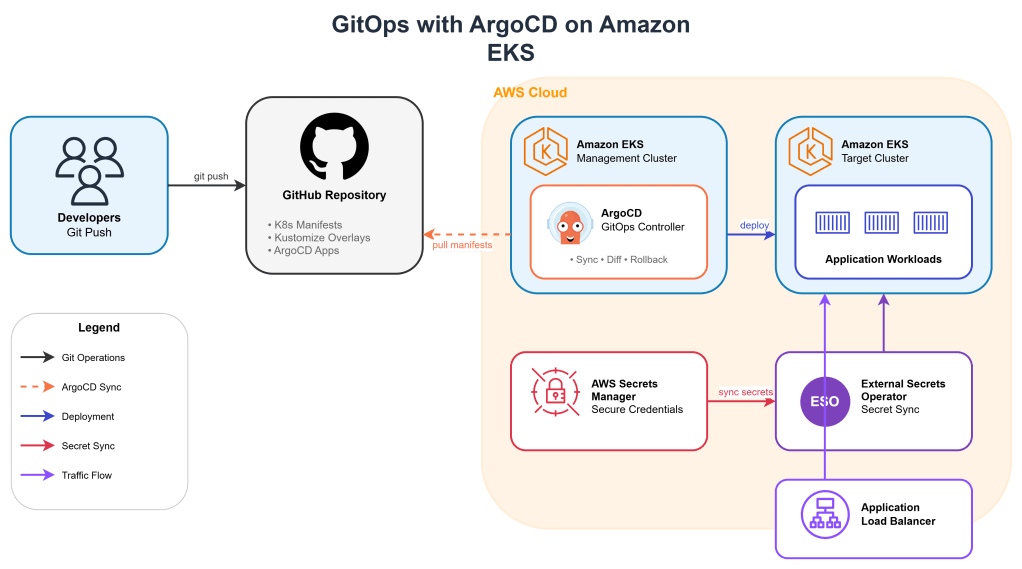
Architecture Overview
The architecture consists of:
- Amazon EKS cluster running ArgoCD
- GitHub repository containing Kubernetes manifests
- AWS Secrets Manager for sensitive configuration
- External Secrets Operator for secret synchronization
- ApplicationSets for multi-environment deployments
Step 1: EKS Cluster Setup
First, create an EKS cluster with the necessary add-ons:
eksctl create cluster \
  --name gitops-cluster \
  --version 1.29 \
  --region us-east-1 \
  --nodegroup-name workers \
  --node-type t3.large \
  --nodes 3 \
  --nodes-min 2 \
  --nodes-max 5 \
  --managed
Enable OIDC provider for IAM Roles for Service Accounts (IRSA):
eksctl utils associate-iam-oidc-provider \
  --cluster gitops-cluster \
  --region us-east-1 \
  --approve
Step 2: Install ArgoCD
Create the ArgoCD namespace and install using the HA manifest:
kubectl create namespace argocd

kubectl apply -n argocd -f \
  https://raw.githubusercontent.com/argoproj/argo-cd/stable/manifests/ha/install.yaml
For production, configure ArgoCD with an AWS Application Load Balancer:
# argocd-server-ingress.yaml
apiVersion: networking.k8s.io/v1
kind: Ingress
metadata:
  name: argocd-server
  namespace: argocd
  annotations:
    kubernetes.io/ingress.class: alb
    alb.ingress.kubernetes.io/scheme: internet-facing
    alb.ingress.kubernetes.io/target-type: ip
    alb.ingress.kubernetes.io/certificate-arn: arn:aws:acm:us-east-1:ACCOUNT:certificate/CERT-ID
    alb.ingress.kubernetes.io/listen-ports: '[{"HTTPS":443}]'
    alb.ingress.kubernetes.io/backend-protocol: HTTPS
spec:
  rules:
  - host: argocd.example.com
    http:
      paths:
      - path: /
        pathType: Prefix
        backend:
          service:
            name: argocd-server
            port:
              number: 443
Retrieve the initial admin password:
kubectl -n argocd get secret argocd-initial-admin-secret \
  -o jsonpath="{.data.password}" | base64 -d
Base Deployment
# apps/base/deployment.yaml
apiVersion: apps/v1
kind: Deployment
metadata:
  name: api-service
spec:
  selector:
    matchLabels:
      app: api-service
  template:
    metadata:
      labels:
        app: api-service
    spec:
      serviceAccountName: api-service
      containers:
      - name: api
        image: api-service:latest
        ports:
        - containerPort: 8080
        resources:
          requests:
            cpu: 100m
            memory: 128Mi
          limits:
            cpu: 500m
            memory: 512Mi
        livenessProbe:
          httpGet:
            path: /health
            port: 8080
          initialDelaySeconds: 10
          periodSeconds: 5
        readinessProbe:
          httpGet:
            path: /ready
            port: 8080
          initialDelaySeconds: 5
          periodSeconds: 3
        env:
        - name: DB_HOST
          valueFrom:
            secretKeyRef:
              name: api-secrets
              key: db-host
Environment Overlay (Production)
apiVersion: kustomize.config.k8s.io/v1beta1
kind: Kustomization

namespace: production

resources:
- ../../base

images:
- name: api-service
  newName: 123456789.dkr.ecr.us-east-1.amazonaws.com/api-service
  newTag: v1.2.3

patches:
- path: patches/replicas.yaml

commonLabels:
  environment: production
apiVersion: apps/v1
kind: Deployment
metadata:
name: api-service
spec:
replicas: 5Step 4: Secrets Management with External Secrets Operator
Never store secrets in Git. Use External Secrets Operator to synchronize from AWS Secrets Manager:
helm repo add external-secrets https://charts.external-secrets.io
helm install external-secrets external-secrets/external-secrets \
  -n external-secrets --create-namespace
Create an IAM role for the operator:
eksctl create iamserviceaccount \
  --cluster=gitops-cluster \
  --namespace=external-secrets \
  --name=external-secrets \
  --attach-policy-arn=arn:aws:iam::aws:policy/SecretsManagerReadWrite \
  --approve
Configure the SecretStore:
apiVersion: external-secrets.io/v1beta1
kind: ClusterSecretStore
metadata:
  name: aws-secrets-manager
spec:
  provider:
    aws:
      service: SecretsManager
      region: us-east-1
      auth:
        jwt:
          serviceAccountRef:
            name: external-secrets
            namespace: external-secrets
Define an ExternalSecret for your application:
apiVersion: external-secrets.io/v1beta1
kind: ExternalSecret
metadata:
  name: api-secrets
spec:
  refreshInterval: 1h
  secretStoreRef:
    kind: ClusterSecretStore
    name: aws-secrets-manager
  target:
    name: api-secrets
    creationPolicy: Owner
  data:
  - secretKey: db-host
    remoteRef:
      key: prod/api-service/database
      property: host
  - secretKey: db-password
    remoteRef:
      key: prod/api-service/database
      property: password
Step 5: ArgoCD ApplicationSet for Multi-Environment
ApplicationSets enable templated, multi-environment deployments from a single definition:
apiVersion: argoproj.io/v1alpha1
kind: ApplicationSet
metadata:
  name: api-service
  namespace: argocd
spec:
  generators:
  - list:
      elements:
      - env: dev
        cluster: https://kubernetes.default.svc
        namespace: development
      - env: staging
        cluster: https://kubernetes.default.svc
        namespace: staging
      - env: prod
        cluster: https://prod-cluster.example.com
        namespace: production
  template:
    metadata:
      name: 'api-service-{{env}}'
    spec:
      project: default
      source:
        repoURL: https://github.com/org/gitops-repo.git
        targetRevision: HEAD
        path: 'apps/overlays/{{env}}'
      destination:
        server: '{{cluster}}'
        namespace: '{{namespace}}'
      syncPolicy:
        automated:
          prune: true
          selfHeal: true
        syncOptions:
        - CreateNamespace=true
        retry:
          limit: 5
          backoff:
            duration: 5s
            factor: 2
            maxDuration: 3m
Step 6: Sync Waves and Hooks
Control deployment ordering using sync waves:
# Deploy secrets first (wave -1)
apiVersion: external-secrets.io/v1beta1
kind: ExternalSecret
metadata:
  name: api-secrets
  annotations:
    argocd.argoproj.io/sync-wave: "-1"
# ...

# Deploy ConfigMaps second (wave 0)
apiVersion: v1
kind: ConfigMap
metadata:
  name: api-config
  annotations:
    argocd.argoproj.io/sync-wave: "0"
# ...

# Deploy application third (wave 1)
apiVersion: apps/v1
kind: Deployment
metadata:
  name: api-service
  annotations:
    argocd.argoproj.io/sync-wave: "1"
# ...
Add a pre-sync hook for database migrations:
apiVersion: batch/v1
kind: Job
metadata:
  name: db-migrate
  annotations:
    argocd.argoproj.io/hook: PreSync
    argocd.argoproj.io/hook-delete-policy: HookSucceeded
spec:
  template:
    spec:
      containers:
      - name: migrate
        image: api-service:v1.2.3
        command: ["./migrate", "--apply"]
      restartPolicy: Never
  backoffLimit: 3
Step 7: Notifications and Monitoring
Configure ArgoCD notifications to Slack:
apiVersion: v1
kind: ConfigMap
metadata:
  name: argocd-notifications-cm
  namespace: argocd
data:
  service.slack: |
    token: $slack-token
  template.app-sync-status: |
    message: |
      Application {{.app.metadata.name}} sync status: {{.app.status.sync.status}}
      Health: {{.app.status.health.status}}
  trigger.on-sync-failed: |
    - when: app.status.sync.status == 'OutOfSync'
      send: [app-sync-status]
  subscriptions: |
    - recipients:
      - slack:deployments
      triggers:
      - on-sync-failed
Production Best Practices
Repository Access
Use deploy keys with read-only access:
apiVersion: v1
kind: Secret
metadata:
  name: gitops-repo
  namespace: argocd
  labels:
    argocd.argoproj.io/secret-type: repository
stringData:
  type: git
  url: git@github.com:org/gitops-repo.git
  sshPrivateKey: |
    -----BEGIN OPENSSH PRIVATE KEY-----
    ...
    -----END OPENSSH PRIVATE KEY-----
Resource Limits for ArgoCD
apiVersion: apps/v1
kind: Deployment
metadata:
  name: argocd-repo-server
  namespace: argocd
spec:
  template:
    spec:
      containers:
      - name: argocd-repo-server
        resources:
          requests:
            cpu: 500m
            memory: 512Mi
          limits:
            cpu: 2
            memory: 2Gi
RBAC Configuration
apiVersion: v1
kind: ConfigMap
metadata:
  name: argocd-rbac-cm
  namespace: argocd
data:
  policy.csv: |
    p, role:developer, applications, get, */*, allow
    p, role:developer, applications, sync, dev/*, allow
    p, role:ops, applications, *, */*, allow
    g, dev-team, role:developer
    g, ops-team, role:ops
  policy.default: role:readonly
Enjoy
Osama

 Technology Geek