
I will be speak Build Up – DevOps Edition, it’s more disussion like about DevOps and why it’s important now , Don’t forget to register and learn something new.
The Link here
Regards
Osama
For the people who think differently Welcome aboard
I will be speak Build Up – DevOps Edition, it’s more disussion like about DevOps and why it’s important now , Don’t forget to register and learn something new.
The Link here
Regards
Osama
we’ll look at considerations for migrating existing applications to serverless and common ways for extending the serverless
At a high level, there are three migration patterns that you might follow to migrate your legacy your applications to a serverless model.
Leapfrog
As the name suggests, you bypass interim steps and go straight from an on-premises legacy architecture to a serverless cloud architecture
Organic
You move on-premises applications to the cloud in more of a “lift and shift” model. In this model, existing applications are kept intact, either running on Amazon Elastic Compute Cloud (Amazon EC2) instances or with some limited rewrites to container services like Amazon Elastic Kubernetes Service (Amazon EKS)/Amazon Elastic Container Service (Amazon ECS) or AWS Fargate.
Developers experiment with Lambda in low-risk internal scenarios like log processing or cron jobs. As you gain more experience, you might use serverless components for tasks like data transformations and parallelization of processes.
At some point in the adoption curve, you take a more strategic look at how serverless and microservices might address business goals like market agility, developer innovation, and total cost of ownership.
You get buy-in for a more long-term commitment to invest in modernizing your applications and select a production workload as a pilot. With initial success and lessons learned, adoption accelerates, and more applications are migrated to microservices and serverless.
Strangler
With the strangler pattern, an organization incrementally and systematically decomposes monolithic applications by creating APIs and building event-driven components that gradually replace components of the legacy application.
Distinct API endpoints can point to old vs. new components, and safe deployment options (like canary deployments) let you point back to the legacy version with very little risk.
New feature branches can be “serverless first,” and legacy components can be decommissioned as they are replaced. This pattern represents a more systematic approach to adopting serverless, allowing you to move to critical improvements where you see benefit quickly but with less risk and upheaval than the leapfrog pattern.
Migration questions to answer:
Application Load Balancer vs. API Gateway for directing traffic to serverless targets
| Application Load Balancer | Amazon API Gateway |
|---|---|
| Easier to transition existing compute stack where you are already using an Application Load Balancer | Good for building REST APIs and integrating with other services and Lambda functions |
| Supports authorization via OIDC-capable providers, including Amazon Cognito user pools | Supports authorization via AWS Identity and Access Management (IAM), Amazon Cognito, and Lambda authorizers |
| Charged by the hour, based on Load Balancer Capacity Units | Charged based on requests served |
| May be more cost-effective for a steady stream of traffic | May be more cost-effective for spiky patterns |
| Additional features for API management: Export SDK for clients Use throttling and usage plans to control access Maintain multiple versions of an APICanary deployments |
Consider three factors when comparing costs of ownership:
Reference
Cheers
Osama
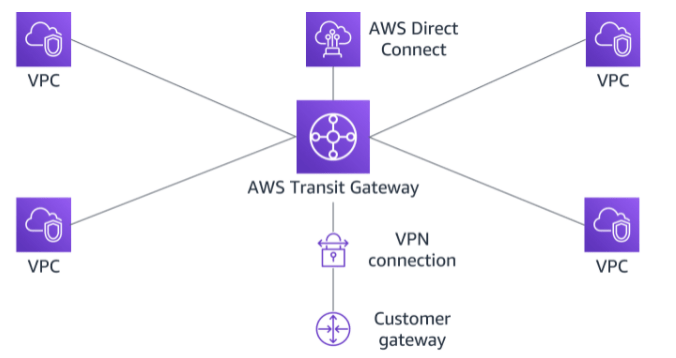
AWS Transit Gateway is a highly available and scalable service that provides interconnectivity between VPCs and your on-premises network. Within a Region, AWS Transit Gateway provides a method for consolidating and centrally managing routing between VPCs with a hub-and-spoke network architecture.
Between Regions, AWS Transit Gateway supports inter-regional peering with other transit gateways. It does this to facilitate routing network traffic between VPCs of different Regions over the AWS global backbone. This removes the need to route traffic over the internet. AWS Transit Gateway also integrates with hybrid network configurations when a Direct Connect or AWS Site-to-Site VPN connection is connected to the transit gateway.
Attachments
AWS Transit Gateway supports the following connections:
AWS Transit Gateway MTU
AWS Transit Gateway supports an MTU of 8,500 bytes for:
AWS Transit Gateway supports an MTU of 1,500 bytes for VPN connections.
AWS Transit Gateway route table
A transit gateway has a default route table and can optionally have additional route tables. A route table includes dynamic and static routes that decide the next hop based on the destination IP address of the packet. The target of these routes can be any transit gateway attachment.
Associations
Each attachment is associated with exactly one route table. Each route table can be associated with zero to many attachments.
Route propagation
A VPC, VPN connection, or Direct Connect gateway can dynamically propagate routes to a transit gateway route table. With a Direct Connect attachment, the routes are propagated to a transit gateway route table by default.
With a VPC, you must create static routes to send traffic to the transit gateway.
With a VPN connection or a Direct Connect gateway, routes are propagated from the transit gateway to your on-premises router using BGP.
With a peering attachment, you must create a static route in the transit gateway route table to point to the peering attachment.
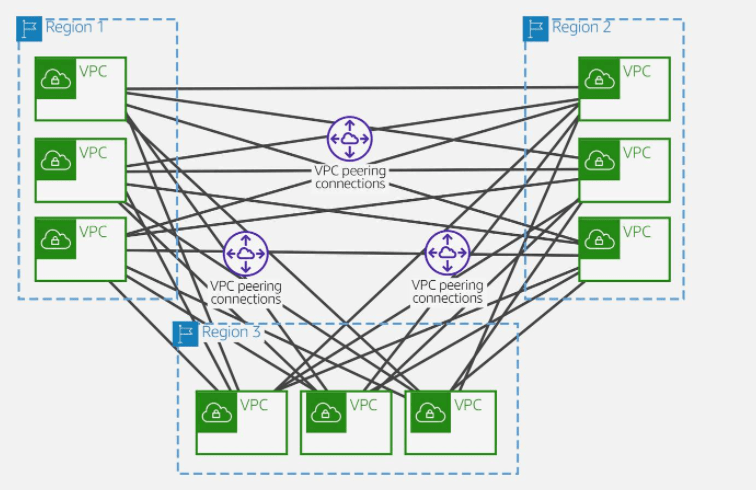
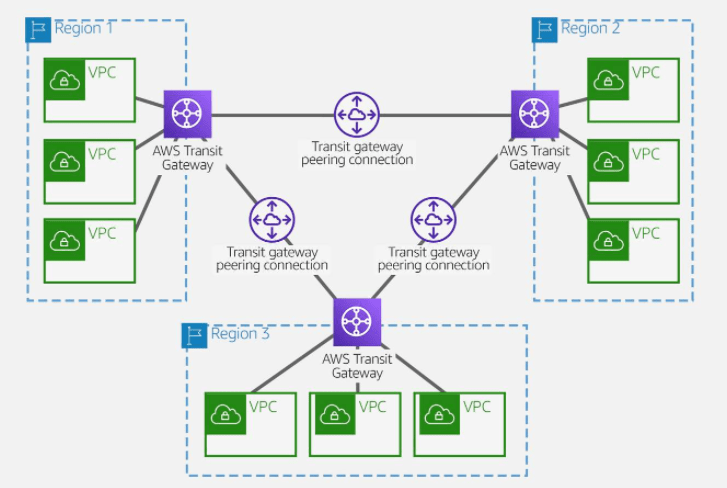
AWS offers two types of peering connections for routing traffic between VPCs in different Regions: VPC peering and transit gateway peering. Both peering types are one-to-one, but transit gateway peering connections have a simpler network design and more consolidated management.
Suppose a customer has multiple VPCs in three different Regions. As the following diagram illustrates, to permit network traffic to route between each VPC requires creating 72 VPC peering connections. Each VPC needs 8 different routing configurations and security policies.
With AWS Transit Gateway, the same environment only needs three peering connections. The transit gateway in each Region facilitates routing network traffic to all the VPCs in its Region. Because all routing can be managed by the transit gateway, the customer only needs to maintain three routing configurations, simplifying management.
Cheers
Osama
Amazon Simple Storage Service (Amazon S3)
Amazon DynamoDB
Amazon ElastiCache for Redis
Amazon Quantum Ledger Database (Amazon QLDB)
Amazon Aurora
Amazon Relational Database Service (Amazon RDS)
Cheers
Osama
AWS VPN is comprised of two services:
ased on IPsec technology, AWS Site-to-Site VPN uses a VPN tunnel to pass data from the customer network to or from AWS.
One AWS Site-to-Site VPN connection consists of two tunnels. Each tunnel terminates in a different Availability Zone on the AWS side, but it must terminate on the same customer gateway on the customer side.
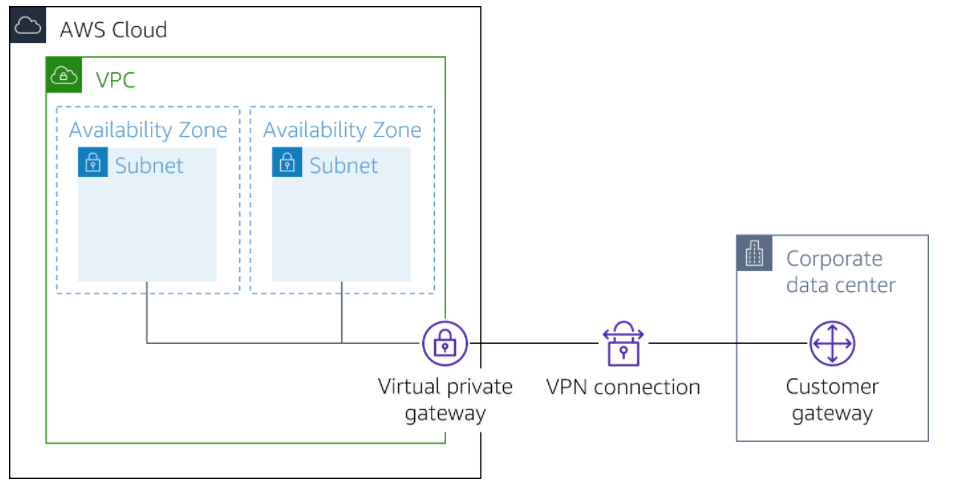
Customer gateway
A resource you create and configure in AWS that represents your on-premise gateway device. The resource contains information about the type of routing used by the Site-to-Site VPN, BGP, ASN and other optional configuration information.
Customer gateway device
A customer gateway device is a physical device or software application on your side of the AWS Site-to-Site VPN connection.
Virtual private gateway
A virtual private gateway is the VPN concentrator on the Amazon side of the AWS Site-to-Site VPN connection. You use a virtual private gateway or a transit gateway as the gateway for the Amazon side of the AWS Site-to-Site VPN connection.
Transit gateway
A transit gateway is a transit hub that can be used to interconnect your VPCs and on-premises networks. You use a transit gateway or virtual private gateway as the gateway for the Amazon side of the AWS Site-to-Site VPN connection.
In addition, when you connect your VPCs to a common on-premises network, it’s recommend that you use nonoverlapping CIDR blocks for your networks.
Based on OpenVPN technology, Client VPN is a managed client-based VPN service that lets you securely access your AWS resources and resources in your on-premises network. With Client VPN, you can access your resources from any location using an OpenVPN-based VPN client.
Client VPN endpoint
Your Client VPN administrator creates and configures a Client VPN endpoint in AWS. Your administrator controls which networks and resources you can access when you establish a VPN connection.
VPN client application
This is the software application that you use to connect to the Client VPN endpoint and establish a secure VPN connection.
Client VPN endpoint configuration file
This is a configuration file that is provided to you by your Client VPN administrator. The file includes information about the Client VPN endpoint and the certificates required to establish a VPN connection. You load this file into your chosen VPN client application.
Cheers
Osama
Direct Connect provides a private, reliable connection to AWS from your physical facility, such as a data center or office. It is a fully integrated and redundant AWS service that provides complete control over the data exchanged between your AWS environment and the physical location of your choice.
Direct Connect offers consistent performance with reduced bandwidth cost, backed by a service-level agreement that guarantees 99.99 percent availability.
When choosing to implement a Direct Connect connection, you should first consider bandwidth, connection type, protocol configurations, and other network configuration specifications.
Direct Connect offers physical connections of 1, 10, and 100 Gbps to support your private connectivity needs to the cloud. Direct Connect supports the Link Aggregation Control Protocol (LACP), facilitating multiple dedicated physical connections to be grouped into link aggregation groups (LAGs). When you group connections into LAGs, you can stream the multiple connections as a single, managed connection.
Available only in select locations, the 100-Gbps connection is particularly beneficial for applications that transfer large-scale datasets. Such applications include broadcast media distribution, advanced driver assistance systems for autonomous vehicles, and financial services trading and market information systems.
Consider the following Direct Connect specifications:
To use Direct Connect in a Direct Connect location, your network must meet one of the following conditions:
The two most common solutions are co-locating at a Direct Connect location or contracting with a Direct Connect Partner.
co-locating
You deploy a router and supporting network equipment to a location with a physical uplink to AWS. Your router at the Direct Connect location is connected to the AWS router using a cross connect. This establishes the physical link used by the Direct Connect service to connect your physical location with AWS.
contracting with a Direct Connect Partner.
The Direct Connect Partner provides you with the physical equipment necessary to connect to an AWS router at the Partner’s physical location. You use this physical link to configure the Direct Connect service to link your physical location with AWS.
Additionally, your network must meet the following conditions:
When all the physical components are in place to create the Direct Connect connection, AWS will provide you with an LOA-CFA. The LOA-CFA lets you show the operator of the facility hosting the AWS router that AWS approves your request to connect to the AWS router. This connection will complete the last physical step in setting up the Direct Connect connection.
When this is done, you can complete the setup using the AWS Management Console. Here you can choose the virtual interface type your connection will use and configure the Direct Connect gateway.
Direct Connect supports three different virtual interfaces:
Cheers, Enjoy the Cloud
Osama
Link HERE
Will be speaking about DevOps on Thursday, October 7
looking forward to meeting you all.
Cheers
osama
A VPC peering connection is a networking connection between two VPCs that lets you route traffic between them privately.
A VPC peering connection is highly available. This is because it is neither a gateway nor a VPN connection and does not rely on a separate piece of physical hardware. There is no bandwidth bottleneck or single point of failure for communication. A VPC peering connection helps to facilitate the transfer of data.
You can establish peering relationships between VPCs across different AWS Regions. This is called inter-Region VPC peering. It permits VPC resources that run in different AWS Regions to communicate securely with each other. Examples of these resources include EC2 instances, Amazon Relational Database Service (Amazon RDS) databases, and AWS Lambda functions. This communication is accomplished using private IP addresses, without requiring gateways, VPN connections, or separate network appliances. All inter-Region traffic is encrypted with no single point of failure or bandwidth bottleneck. Traffic always stays on the global AWS backbone and never traverses the public internet, which reduces threats such as common exploits and distributed denial of service (DDoS) attacks. Inter-Region VPC peering provides an uncomplicated and cost-effective way to share resources between Regions or replicate data for geographic redundancy.
You can also create a VPC connection between VPCs in different AWS accounts.
Full sharing of resources between all VPCs
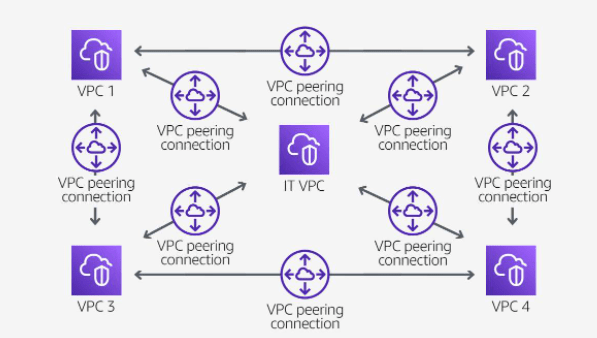
Your organization has company services distributed across four VPCs and a single VPC dedicated to centralized IT services and logging. To facilitate data sharing, the IT department constructed a fully mesh network design using VPC peering to connect each VPC to every other VPC in the organization.
Each VPC must have a one-to-one connection with each VPC it is approved to communicate with. This is because each VPC peering connection is nontransitive in nature and does not allow network traffic to pass from one peering connection to another.
For example, VPC 1 is peered with VPC 2, and VPC 2 is peered with VPC 4. You cannot route packets from VPC 1 to VPC 4 through VPC 2. To route packets directly between VPC 1 and VPC 4, you can create a separate VPC peering connection between them.
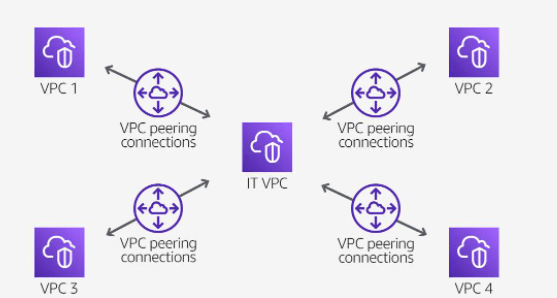
Partial sharing of centralized resources
Your organization’s IT department maintains a central VPC for file sharing. Multiple VPCs require access to this resource but do not need to send traffic to each other. A peering connection is established to connect the VPCs solely to this resource.
Overlapping CIDR blocks
You cannot create a VPC peering connection between VPCs with matching or overlapping IPv4 Classless Inter-Domain Routing (CIDR) blocks. This limitation also applies to VPCs that have nonoverlapping IPv6 CIDR blocks. You cannot create a VPC peering connection if the VPCs have matching or overlapping IPv4 CIDR blocks. This applies even if you intend to use the VPC peering connection for IPv6 communication only.
Transitive peering
You have a VPC peering connection between VPC A and VPC B, and between VPC A and VPC C. There is no VPC peering connection between VPC B and VPC C. You cannot route packets directly from VPC B to VPC C through VPC A.
Edge-to-edge routing through a gateway or private connection
If either VPC in a peering relationship has one of the following connections, you cannot extend the peering relationship to that connection:
Cheers 🥂
Osama
A VPC endpoint lets you privately connect your VPC to supported AWS services and VPC endpoint services. With VPC endpoints, resources inside a VPC do not require public IP addresses to communicate with resources outside the VPC. Traffic between Amazon Virtual Private Cloud (Amazon VPC) and a service does not leave the Amazon network.
VPC endpoints are a security product first and a connectivity product second. VPC endpoints do not allow traffic between your VPC and the other services to leave the Amazon network.
You might have stringent compliance requirements that prevent connectivity between a VPC and a public-facing service endpoint. In this case, VPC endpoints offer a way to use AWS services from your VPCs that would otherwise not be available.
A VPC endpoint does not require an internet gateway, virtual private gateway, network address translation (NAT) device, virtual private network (VPN) connection, or Direct Connect connection. Instances in your VPC do not require a public IP address to connect to services presented through a VPC endpoint.
The following are the different types of VPC endpoints. You create the type of VPC endpoint that is required by the supported service.
A gateway VPC endpoint targets specific IP routes in a VPC route table in the form of a prefix list. This is used for traffic destined to Amazon DynamoDB or Amazon Simple Storage Service (Amazon S3).
Instances in a VPC do not require public IP addresses to communicate with VPC endpoints. This is because interface endpoints use local IP addresses within the consumer VPC. Gateway endpoints are destinations that are reachable from within a VPC through prefix-lists within the VPC’s route table.
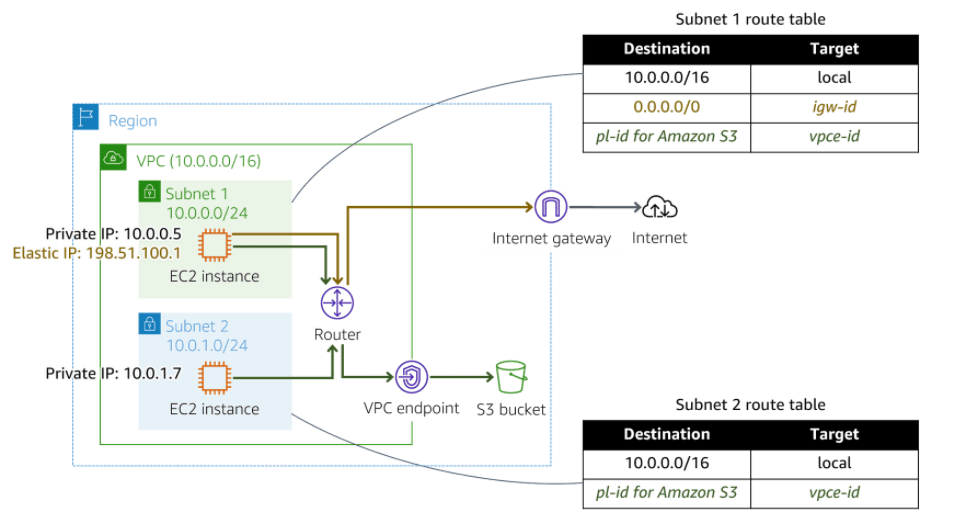
In the following diagram, instances in subnet 1 can send and receive traffic to and from the internet and the S3 bucket. Instances in subnet 2 only have access to the S3 bucket.
Powered by AWS PrivateLink, an interface endpoint is an elastic network interface with a private IP address from the IP address range of your subnet. It serves as an entry point for traffic destined to a supported AWS service or a VPC endpoint service.
A Gateway Load Balancer endpoint is an elastic network interface with a private IP address from the IP address range of your subnet. This type of endpoint serves as an entry point to intercept traffic and route it to a service that you’ve configured using Gateway Load Balancers, for example, for security inspection. You specify a Gateway Load Balancer endpoint as a target for a route in a route table. Gateway Load Balancer endpoints are supported for endpoint services that are configured for Gateway Load Balancers only.
Like interface endpoints, Gateway Load Balancer endpoints are also powered by AWS PrivateLink.
AWS PrivateLink provides a private connection between your VPCs and supported AWS services. This AWS service provides secure usage within the AWS network and avoids exposing traffic to the public internet.
Before AWS PrivateLink, services within a single VPC were connected to multiple VPCs in two ways:
With AWS PrivateLink, services establish a Transmission Control Protocol (TCP) connection between the service provider’s VPC and the service consumer’s VPC. This provides a secure and scalable solution.
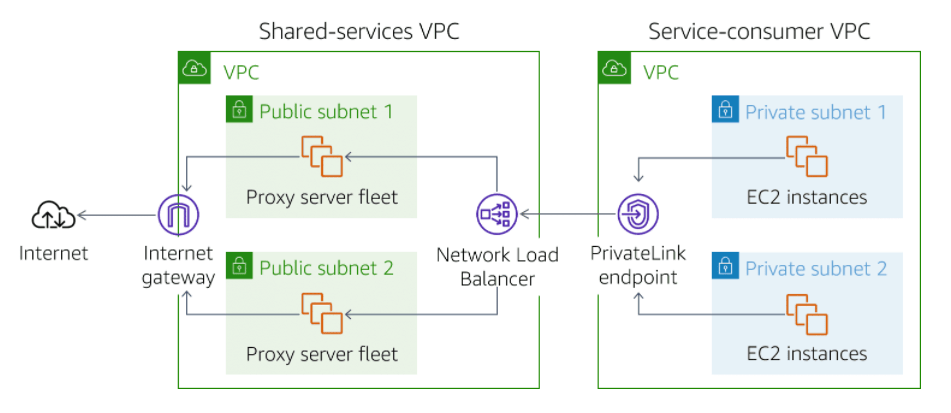
In the following diagram, traffic from Amazon Elastic Compute Cloud (Amazon EC2) instances in private subnets is routed to a Network Load Balancer. The Network Load Balancer is connected to instances in public subnets that communicate with the internet. This architecture permits backend EC2 instances to communicate with the front-end instances through the AWS PrivateLink endpoint. And it avoids the security and cost implications of data traveling through the public internet.
Cheers
Osama
When building and testing a function, you must specify three primary configuration settings: memory, timeout, and concurrency. These settings are important in defining how each function performs. Deciding how to configure memory, timeout, and concurrency comes down to testing your function in real-world scenarios and against peak volume. As you monitor your functions, you must adjust the settings to optimize costs and ensure the desired customer experience with your application.
Memory
You can allocate up to 10 GB of memory to a Lambda function. Lambda allocates CPU and other resources linearly in proportion to the amount of memory configured. Any increase in memory size triggers an equivalent increase in CPU available to your function. To find the right memory configuration for your functions, use the AWS Lambda Power Tuning tool.
Timeout
The AWS Lambda timeout value dictates how long a function can run before Lambda terminates the Lambda function. At the time of this publication, the maximum timeout for a Lambda function is 900 seconds. This limit means that a single invocation of a Lambda function cannot run longer than 900 seconds (which is 15 minutes).
It is important to analyze how long your function runs. When you analyze the duration, you can better determine any problems that might increase the invocation of the function beyond your expected length. Load testing your Lambda function is the best way to determine the optimum timeout value.
With AWS Lambda, you pay only for what you use. You are charged based on the number of requests for your functions and the duration, the time it takes for your code to run. Lambda counts a request each time it starts running in response to an event notification or an invoke call, including test invokes from the console.
Duration is calculated from the time your code begins running until it returns or otherwise terminates, rounded up to the nearest 1 ms. Price depends on the amount of memory you allocate to your function, not the amount of memory your function uses. If you allocate 10 GB to a function and the function only uses 2 GB, you are charged for the 10 GB. This is another reason to test your functions using different memory allocations to determine which is the most beneficial for the function and your budget.
In the AWS Lambda resource model, you can choose the amount of memory you want for your function and are allocated proportional CPU power and other resources. An increase in memory triggers an equivalent increase in CPU available to your function. The AWS Lambda Free Tier includes 1 million free requests per month and 400,000 GB-seconds of compute time per month.
Depending on the function, you might find that the higher memory level might actually cost less because the function can complete much more quickly than at a lower memory configuration.
You can use an open-source tool called Lambda Power Tuning to find the best configuration for a function. The tool helps you to visualize and fine-tune the memory and power configurations of Lambda functions. The tool runs in your own AWS account—powered by AWS Step Functions—and supports three optimization strategies: cost, speed, and balanced. It’s language-agnostic so that you can optimize any Lambda functions in any of your languages.
Concurrency and scaling
Concurrency is the third major configuration that affects your function’s performance and its ability to scale on demand. Concurrency is the number of invocations your function runs at any given moment. When your function is invoked, Lambda launches an instance of the function to process the event. When the function code finishes running, it can handle another request. If the function is invoked again while the first request is still being processed, another instance is allocated. Having more than one invocation running at the same time is the function’s concurrency.
As an analogy, you can think of concurrency as the total capacity of a restaurant for serving a certain number of diners at one time. If you have seats in the restaurant for 100 diners, only 100 people can sit at the same time. Anyone who comes while the restaurant is full must wait for a current diner to leave before a seat is available. If you use a reservation system, and a dinner party has called to reserve 20 seats, only 80 of those 100 seats are available for people without a reservation. Lambda functions also have a concurrency limit and a reservation system that can be used to set aside runtime for specific instances.
Unreserved concurrency
The amount of concurrency that is not allocated to any specific set of functions. The minimum is 100 unreserved concurrency. This allows functions that do not have any provisioned concurrency to still be able to run. If you provision all your concurrency to one or two functions, no concurrency is left for any other function. Having at least 100 available allows all your functions to run when they are invoked.
Reserved concurrency
Guarantees the maximum number of concurrent instances for the function. When a function has reserved concurrency, no other function can use that concurrency. No charge is incurred for configuring reserved concurrency for a function.
Provisioned concurrency
Initializes a requested number of runtime environments so that they are prepared to respond immediately to your function’s invocations. This option is used when you need high performance and low latency.
You pay for the amount of provisioned concurrency that you configure and for the period of time that you have it configured.
For example, you might want to increase provisioned concurrency when you are expecting a significant increase in traffic. To avoid paying for unnecessary warm environments, you scale back down when the event is over.
Limit a function’s concurrency to achieve the following:
Reserve function concurrency to achieve the following:
When your function finishes processing an event, Lambda sends metrics about the invocation to Amazon CloudWatch. You can build graphs and dashboards with these metrics in the CloudWatch console. You can also set alarms to respond to changes in use, performance, or error rates.
CloudWatch includes two built-in metrics that help determine concurrency: ConcurrentExecutions and UnreservedConcurrentExecutions.
ConcurrentExecutions
Shows the sum of concurrent invocations for a given function at a given point in time. Provides historical data on how functions are performing.
You can view all functions in the account or only the functions that have a custom concurrency limit specified.
UnreservedConcurrentExecutions
Shows the sum of the concurrency for the functions that do not have a custom concurrency limit specified.
Enjoy the Cloud
Osama
Cheers
 Technology Geek