Implementing GitOps with ArgoCD on Amazon EKS

GitOps has emerged as the dominant paradigm for managing Kubernetes deployments at scale. By treating Git as the single source of truth for declarative infrastructure and applications, teams achieve auditability, rollback capabilities, and consistent deployments across environments.

In this article, we’ll build a production-grade GitOps pipeline using ArgoCD on Amazon EKS, covering cluster setup, ArgoCD installation, application deployment patterns, secrets management, and multi-environment promotion strategies.

Why GitOps?

Traditional CI/CD pipelines push changes to clusters. GitOps inverts this model: the cluster pulls its desired state from Git. This approach provides:

  • Auditability: Every change is a Git commit with author, timestamp, and approval history
  • Declarative Configuration: The entire system state is version-controlled
  • Drift Detection: ArgoCD continuously reconciles actual vs. desired state
  • Simplified Rollbacks: Revert a deployment by reverting a commit

Architecture Overview

The architecture consists of:

  • Amazon EKS cluster running ArgoCD
  • GitHub repository containing Kubernetes manifests
  • AWS Secrets Manager for sensitive configuration
  • External Secrets Operator for secret synchronization
  • ApplicationSets for multi-environment deployments

Step 1: EKS Cluster Setup

First, create an EKS cluster with the necessary add-ons:

eksctl create cluster \
  --name gitops-cluster \
  --version 1.29 \
  --region us-east-1 \
  --nodegroup-name workers \
  --node-type t3.large \
  --nodes 3 \
  --nodes-min 2 \
  --nodes-max 5 \
  --managed

Enable OIDC provider for IAM Roles for Service Accounts (IRSA):

eksctl utils associate-iam-oidc-provider \
  --cluster gitops-cluster \
  --region us-east-1 \
  --approve

Step 2: Install ArgoCD

Create the ArgoCD namespace and install using the HA manifest:

kubectl create namespace argocd

kubectl apply -n argocd -f \
  https://raw.githubusercontent.com/argoproj/argo-cd/stable/manifests/ha/install.yaml

For production, configure ArgoCD with an AWS Application Load Balancer:

# argocd-server-ingress.yaml
apiVersion: networking.k8s.io/v1
kind: Ingress
metadata:
  name: argocd-server
  namespace: argocd
  annotations:
    kubernetes.io/ingress.class: alb
    alb.ingress.kubernetes.io/scheme: internet-facing
    alb.ingress.kubernetes.io/target-type: ip
    alb.ingress.kubernetes.io/certificate-arn: arn:aws:acm:us-east-1:ACCOUNT:certificate/CERT-ID
    alb.ingress.kubernetes.io/listen-ports: '[{"HTTPS":443}]'
    alb.ingress.kubernetes.io/backend-protocol: HTTPS
spec:
  rules:
  - host: argocd.example.com
    http:
      paths:
      - path: /
        pathType: Prefix
        backend:
          service:
            name: argocd-server
            port:
              number: 443

Retrieve the initial admin password:

kubectl -n argocd get secret argocd-initial-admin-secret \
  -o jsonpath="{.data.password}" | base64 -d

Base Deployment

# apps/base/deployment.yaml
apiVersion: apps/v1
kind: Deployment
metadata:
  name: api-service
spec:
  selector:
    matchLabels:
      app: api-service
  template:
    metadata:
      labels:
        app: api-service
    spec:
      serviceAccountName: api-service
      containers:
      - name: api
        image: api-service:latest
        ports:
        - containerPort: 8080
        resources:
          requests:
            cpu: 100m
            memory: 128Mi
          limits:
            cpu: 500m
            memory: 512Mi
        livenessProbe:
          httpGet:
            path: /health
            port: 8080
          initialDelaySeconds: 10
          periodSeconds: 5
        readinessProbe:
          httpGet:
            path: /ready
            port: 8080
          initialDelaySeconds: 5
          periodSeconds: 3
        env:
        - name: DB_HOST
          valueFrom:
            secretKeyRef:
              name: api-secrets
              key: db-host

Environment Overlay (Production)

apiVersion: kustomize.config.k8s.io/v1beta1
kind: Kustomization

namespace: production

resources:
- ../../base

images:
- name: api-service
  newName: 123456789.dkr.ecr.us-east-1.amazonaws.com/api-service
  newTag: v1.2.3

patches:
- path: patches/replicas.yaml

commonLabels:
  environment: production
apiVersion: apps/v1
kind: Deployment
metadata:
  name: api-service
spec:
  replicas: 5

Step 4: Secrets Management with External Secrets Operator

Never store secrets in Git. Use External Secrets Operator to synchronize from AWS Secrets Manager:

helm repo add external-secrets https://charts.external-secrets.io
helm install external-secrets external-secrets/external-secrets \
  -n external-secrets --create-namespace

Create an IAM role for the operator:

eksctl create iamserviceaccount \
  --cluster=gitops-cluster \
  --namespace=external-secrets \
  --name=external-secrets \
  --attach-policy-arn=arn:aws:iam::aws:policy/SecretsManagerReadWrite \
  --approve

Configure the SecretStore:

apiVersion: external-secrets.io/v1beta1
kind: ClusterSecretStore
metadata:
  name: aws-secrets-manager
spec:
  provider:
    aws:
      service: SecretsManager
      region: us-east-1
      auth:
        jwt:
          serviceAccountRef:
            name: external-secrets
            namespace: external-secrets

Define an ExternalSecret for your application:

apiVersion: external-secrets.io/v1beta1
kind: ExternalSecret
metadata:
  name: api-secrets
spec:
  refreshInterval: 1h
  secretStoreRef:
    kind: ClusterSecretStore
    name: aws-secrets-manager
  target:
    name: api-secrets
    creationPolicy: Owner
  data:
  - secretKey: db-host
    remoteRef:
      key: prod/api-service/database
      property: host
  - secretKey: db-password
    remoteRef:
      key: prod/api-service/database
      property: password

Step 5: ArgoCD ApplicationSet for Multi-Environment

ApplicationSets enable templated, multi-environment deployments from a single definition:

apiVersion: argoproj.io/v1alpha1
kind: ApplicationSet
metadata:
  name: api-service
  namespace: argocd
spec:
  generators:
  - list:
      elements:
      - env: dev
        cluster: https://kubernetes.default.svc
        namespace: development
      - env: staging
        cluster: https://kubernetes.default.svc
        namespace: staging
      - env: prod
        cluster: https://prod-cluster.example.com
        namespace: production
  template:
    metadata:
      name: 'api-service-{{env}}'
    spec:
      project: default
      source:
        repoURL: https://github.com/org/gitops-repo.git
        targetRevision: HEAD
        path: 'apps/overlays/{{env}}'
      destination:
        server: '{{cluster}}'
        namespace: '{{namespace}}'
      syncPolicy:
        automated:
          prune: true
          selfHeal: true
        syncOptions:
        - CreateNamespace=true
        retry:
          limit: 5
          backoff:
            duration: 5s
            factor: 2
            maxDuration: 3m

Step 6: Sync Waves and Hooks

Control deployment ordering using sync waves:

# Deploy secrets first (wave -1)
apiVersion: external-secrets.io/v1beta1
kind: ExternalSecret
metadata:
  name: api-secrets
  annotations:
    argocd.argoproj.io/sync-wave: "-1"
# ...

# Deploy ConfigMaps second (wave 0)
apiVersion: v1
kind: ConfigMap
metadata:
  name: api-config
  annotations:
    argocd.argoproj.io/sync-wave: "0"
# ...

# Deploy application third (wave 1)
apiVersion: apps/v1
kind: Deployment
metadata:
  name: api-service
  annotations:
    argocd.argoproj.io/sync-wave: "1"
# ...

Add a pre-sync hook for database migrations:

apiVersion: batch/v1
kind: Job
metadata:
  name: db-migrate
  annotations:
    argocd.argoproj.io/hook: PreSync
    argocd.argoproj.io/hook-delete-policy: HookSucceeded
spec:
  template:
    spec:
      containers:
      - name: migrate
        image: api-service:v1.2.3
        command: ["./migrate", "--apply"]
      restartPolicy: Never
  backoffLimit: 3

Step 7: Notifications and Monitoring

Configure ArgoCD notifications to Slack:

apiVersion: v1
kind: ConfigMap
metadata:
  name: argocd-notifications-cm
  namespace: argocd
data:
  service.slack: |
    token: $slack-token
  template.app-sync-status: |
    message: |
      Application {{.app.metadata.name}} sync status: {{.app.status.sync.status}}
      Health: {{.app.status.health.status}}
  trigger.on-sync-failed: |
    - when: app.status.sync.status == 'OutOfSync'
      send: [app-sync-status]
  subscriptions: |
    - recipients:
      - slack:deployments
      triggers:
      - on-sync-failed

Production Best Practices

Repository Access

Use deploy keys with read-only access:

apiVersion: v1
kind: Secret
metadata:
  name: gitops-repo
  namespace: argocd
  labels:
    argocd.argoproj.io/secret-type: repository
stringData:
  type: git
  url: git@github.com:org/gitops-repo.git
  sshPrivateKey: |
    -----BEGIN OPENSSH PRIVATE KEY-----
    ...
    -----END OPENSSH PRIVATE KEY-----

Resource Limits for ArgoCD

apiVersion: apps/v1
kind: Deployment
metadata:
  name: argocd-repo-server
  namespace: argocd
spec:
  template:
    spec:
      containers:
      - name: argocd-repo-server
        resources:
          requests:
            cpu: 500m
            memory: 512Mi
          limits:
            cpu: 2
            memory: 2Gi

RBAC Configuration

apiVersion: v1
kind: ConfigMap
metadata:
  name: argocd-rbac-cm
  namespace: argocd
data:
  policy.csv: |
    p, role:developer, applications, get, */*, allow
    p, role:developer, applications, sync, dev/*, allow
    p, role:ops, applications, *, */*, allow
    g, dev-team, role:developer
    g, ops-team, role:ops
  policy.default: role:readonly

Enjoy
Osama

Building a Real-Time Data Enrichment & Inference Pipeline on AWS Using Kinesis, Lambda, DynamoDB, and SageMaker

Modern cloud applications increasingly depend on real-time processing, especially when dealing with fraud detection, personalization, IoT telemetry, or operational monitoring.
In this post, we’ll build a fully functional AWS pipeline that:

  • Streams events using Amazon Kinesis
  • Enriches and transforms them via AWS Lambda
  • Stores real-time feature data in Amazon DynamoDB
  • Performs machine-learning inference using a SageMaker Endpoint

1. Architecture Overview

2. Step-By-Step Pipeline Build


2.1. Create a Kinesis Data Stream

aws kinesis create-stream \
  --stream-name RealtimeEvents \
  --shard-count 2 \
  --region us-east-1

This stream will accept incoming events from your apps, IoT devices, or microservices.


2.2. DynamoDB Table for Real-Time Features

aws dynamodb create-table \
  --table-name UserFeatureStore \
  --attribute-definitions AttributeName=userId,AttributeType=S \
  --key-schema AttributeName=userId,KeyType=HASH \
  --billing-mode PAY_PER_REQUEST \
  --region us-east-1

This table holds live user features, updated every time an event arrives.


2.3. Lambda Function (Real-Time Data Enrichment)

This Lambda:

  • Reads events from Kinesis
  • Computes simple features (e.g., last event time, rolling count)
  • Saves enriched data to DynamoDB
import json
import boto3
from datetime import datetime, timedelta

ddb = boto3.resource("dynamodb")
table = ddb.Table("UserFeatureStore")

def lambda_handler(event, context):

    for record in event["Records"]:
        payload = json.loads(record["kinesis"]["data"])

        user = payload["userId"]
        metric = payload["metric"]
        ts = datetime.fromisoformat(payload["timestamp"])

        # Fetch old features
        old = table.get_item(Key={"userId": user}).get("Item", {})

        last_ts = old.get("lastTimestamp")
        count = old.get("count", 0)

        # Update rolling 5-minute count
        if last_ts:
            prev_ts = datetime.fromisoformat(last_ts)
            if ts - prev_ts < timedelta(minutes=5):
                count += 1
            else:
                count = 1
        else:
            count = 1

        # Save new enriched features
        table.put_item(Item={
            "userId": user,
            "lastTimestamp": ts.isoformat(),
            "count": count,
            "lastMetric": metric
        })

    return {"status": "ok"}

Attach the Lambda to the Kinesis stream.


2.4. Creating a SageMaker Endpoint for Inference

Train your model offline, then deploy it:

aws sagemaker create-endpoint-config \
  --endpoint-config-name RealtimeInferenceConfig \
  --production-variants VariantName=AllInOne,ModelName=MyInferenceModel,InitialInstanceCount=1,InstanceType=ml.m5.large

aws sagemaker create-endpoint \
  --endpoint-name RealtimeInference \
  --endpoint-config-name RealtimeInferenceConfig


2.5. API Layer Performing Live Inference

Your application now requests predictions like this:

import boto3
import json

runtime = boto3.client("sagemaker-runtime")
ddb = boto3.resource("dynamodb").Table("UserFeatureStore")

def predict(user_id, extra_input):

    user_features = ddb.get_item(Key={"userId": user_id}).get("Item")

    payload = {
        "userId": user_id,
        "features": user_features,
        "input": extra_input
    }

    response = runtime.invoke_endpoint(
        EndpointName="RealtimeInference",
        ContentType="application/json",
        Body=json.dumps(payload)
    )

    return json.loads(response["Body"].read())

This combines live enriched features + model inference for maximum accuracy.


3. Production Considerations

Performance

  • Enable Lambda concurrency
  • Use DynamoDB DAX caching
  • Use Kinesis Enhanced Fan-Out for high throughput

Security

  • Use IAM roles with least privilege
  • Encrypt Kinesis, Lambda, DynamoDB, and SageMaker with KMS

Monitoring

  • CloudWatch Metrics
  • CloudWatch Logs Insights queries
  • DynamoDB capacity alarms
  • SageMaker Model error monitoring

Cost Optimization

  • Use PAY_PER_REQUEST DynamoDB
  • Use Lambda Power Tuning
  • Scale SageMaker endpoints with autoscaling

Deploying Real-Time Feature Store on Amazon SageMaker Feature Store with Amazon Kinesis Data Streams & Amazon DynamoDB for Low-Latency ML Inference

Modern ML inference often depends on up-to-date features (customer behaviour, session counts, recent events) that need to be available in low-latency operations. In this article you’ll learn how to build a real-time feature store on AWS using:

  • Amazon Kinesis Data Streams for streaming events
  • AWS Lambda for processing and feature computation
  • Amazon DynamoDB (or SageMaker Feature Store) for storage of feature vectors
  • Amazon SageMaker Endpoint for low-latency inference
    You’ll see end-to-end code snippets and architecture guidance so you can implement this in your environment.

1. Architecture Overview

The pipeline works like this:

  1. Front-end/app produces events (e.g., user click, transaction) → published to Kinesis.
  2. A Lambda function consumes from Kinesis, computes derived features (for example: rolling window counts, recency, session features).
  3. The Lambda writes/updates these features into a DynamoDB table (or directly into SageMaker Feature Store).
  4. When a request arrives for inference, the application fetches the current feature set from DynamoDB (or Feature Store) and calls a SageMaker endpoint.
  5. Optionally, after inference you can stream feedback events for model refinement.

This architecture provides real-time feature freshness and low-latencyinference.

2. Setup & Implementation

2.1 Create the Kinesis data stream

aws kinesis create-stream \
  --stream-name UserEventsStream \
  --shard-count 2 \
  --region us-east-1

2.2 Create DynamoDB table for features

aws dynamodb create-table \
  --table-name RealTimeFeatures \
  --attribute-definitions AttributeName=userId,AttributeType=S \
  --key-schema AttributeName=userId,KeyType=HASH \
  --billing-mode PAY_PER_REQUEST \
  --region us-east-1

2.3 Lambda function to compute features

Here is a Python snippet (using boto3) which will be triggered by Kinesis:

import json
import boto3
from datetime import datetime, timedelta

dynamo = boto3.resource('dynamodb', region_name='us-east-1')
table = dynamo.Table('RealTimeFeatures')

def lambda_handler(event, context):
    for record in event['Records']:
        payload = json.loads(record['kinesis']['data'])
        user_id = payload['userId']
        event_type = payload['eventType']
        ts = datetime.fromisoformat(payload['timestamp'])

        # Fetch current features
        resp = table.get_item(Key={'userId': user_id})
        item = resp.get('Item', {})
        
        # Derive features: e.g., event_count_last_5min, last_event_type
        last_update = item.get('lastUpdate', ts.isoformat())
        count_5min = item.get('count5min', 0)
        then = datetime.fromisoformat(last_update)
        if ts - then < timedelta(minutes=5):
            count_5min += 1
        else:
            count_5min = 1
        
        # Update feature item
        new_item = {
            'userId': user_id,
            'lastEventType': event_type,
            'count5min': count_5min,
            'lastUpdate': ts.isoformat()
        }
        table.put_item(Item=new_item)
    return {'statusCode': 200}

2.4 Deploy and connect Lambda to Kinesis

  • Create Lambda function in AWS console or via CLI.
  • Add Kinesis stream UserEventsStream as event source with batch size and start position = TRIM_HORIZON.
  • Assign IAM role allowing kinesis:DescribeStream, kinesis:GetRecords, dynamodb:PutItem, etc.

2.5 Prepare SageMaker endpoint for inference

  • Train model offline (outside scope here) with features stored in training dataset matching real-time features.
  • Deploy model as endpoint, e.g., arn:aws:sagemaker:us-east-1:123456789012:endpoint/RealtimeModel.
  • In your application code call endpoint by fetching features from DynamoDB then invoking endpoint:
import boto3
sagemaker = boto3.client('sagemaker-runtime', region_name='us-east-1')
dynamo = boto3.resource('dynamodb', region_name='us-east-1')
table = dynamo.Table('RealTimeFeatures')

def get_prediction(user_id, input_payload):
    resp = table.get_item(Key={'userId': user_id})
    features = resp.get('Item')
    payload = {
        'features': features,
        'input': input_payload
    }
    response = sagemaker.invoke_endpoint(
        EndpointName='RealtimeModel',
        ContentType='application/json',
        Body=json.dumps(payload)
    )
    result = json.loads(response['Body'].read().decode())
    return result

Conclusion

In this blog post you learned how to build a real-time feature store on AWS: streaming event ingestion with Kinesis, real-time feature computation with Lambda, storage in DynamoDB, and serving via SageMaker. You got specific code examples and operational considerations for production readiness. With this setup, you’re well-positioned to deliver low-latency, ML-powered applications.

Enjoy the cloud
Osama

AWS Data Analytics: Building Serverless Data Lakes with Amazon Athena and AWS Glue

Modern organizations generate massive amounts of data from various sources including applications, IoT devices, web analytics, and business systems. Managing and extracting insights from this data requires robust, scalable, and cost-effective analytics solutions. AWS provides a comprehensive serverless data analytics stack centered around Amazon S3 as a data lake, AWS Glue for ETL processing, and Amazon Athena for interactive queries, enabling organizations to build sophisticated analytics platforms without managing infrastructure.

Understanding Serverless Data Analytics Architecture

The serverless data analytics pattern on AWS eliminates the need to provision and manage servers for data processing and analytics workloads. This architecture leverages Amazon S3 as the foundational storage layer, providing virtually unlimited scalability and durability for structured and unstructured data. AWS Glue serves as the serverless ETL service, automatically discovering, cataloging, and transforming data, while Amazon Athena enables interactive SQL queries directly against data stored in S3.

This architecture pattern excels in scenarios requiring flexible data processing, ad-hoc analytics, cost optimization, and rapid time-to-insight. The pay-per-use model ensures you only pay for the resources consumed during actual data processing and query execution, making it ideal for variable workloads and exploratory analytics.

Core Components and Data Flow

AWS Glue operates as a fully managed ETL service that automatically discovers data schemas, suggests transformations, and generates ETL code. The Glue Data Catalog serves as a central metadata repository, maintaining schema information and table definitions that can be accessed by multiple analytics services. Glue Crawlers automatically scan data sources to infer schemas and populate the Data Catalog.

Amazon Athena provides serverless interactive query capabilities using standard SQL, enabling analysts and data scientists to query data without learning new tools or languages. Athena integrates seamlessly with the Glue Data Catalog, automatically understanding table structures and data locations. The service supports various data formats including Parquet, ORC, JSON, CSV, and Avro.

Amazon S3 forms the foundation of the data lake, organizing data using logical partitioning strategies that optimize query performance and cost. Proper partitioning enables Athena to scan only relevant data portions, significantly reducing query execution time and costs.

Comprehensive Implementation: E-commerce Analytics Platform

Let’s build a comprehensive e-commerce analytics platform that processes customer behavior data, sales transactions, and product information to generate actionable business insights and support data-driven decision-making.

Data Lake Infrastructure Setup

Here’s a comprehensive CloudFormation template that establishes the complete serverless analytics infrastructure:

AWSTemplateFormatVersion: '2010-09-09'
Description: 'Serverless Data Analytics Platform with Athena and Glue'

Parameters:
  CompanyName:
    Type: String
    Default: ecommerce
    Description: Company name for resource naming
  
  Environment:
    Type: String
    Default: prod
    AllowedValues: [dev, staging, prod]
    Description: Environment name

Resources:
  # S3 Buckets for Data Lake
  RawDataBucket:
    Type: AWS::S3::Bucket
    Properties:
      BucketName: !Sub '${CompanyName}-${Environment}-raw-data-${AWS::AccountId}'
      VersioningConfiguration:
        Status: Enabled
      BucketEncryption:
        ServerSideEncryptionConfiguration:
          - ServerSideEncryptionByDefault:
              SSEAlgorithm: AES256
      LifecycleConfiguration:
        Rules:
          - Id: TransitionToIA
            Status: Enabled
            Transitions:
              - StorageClass: STANDARD_IA
                TransitionInDays: 30
              - StorageClass: GLACIER
                TransitionInDays: 90
              - StorageClass: DEEP_ARCHIVE
                TransitionInDays: 365
      NotificationConfiguration:
        LambdaConfigurations:
          - Event: s3:ObjectCreated:*
            Function: !GetAtt DataIngestionTrigger.Arn
            Filter:
              S3Key:
                Rules:
                  - Name: prefix
                    Value: raw/
      PublicAccessBlockConfiguration:
        BlockPublicAcls: true
        BlockPublicPolicy: true
        IgnorePublicAcls: true
        RestrictPublicBuckets: true

  ProcessedDataBucket:
    Type: AWS::S3::Bucket
    Properties:
      BucketName: !Sub '${CompanyName}-${Environment}-processed-data-${AWS::AccountId}'
      VersioningConfiguration:
        Status: Enabled
      BucketEncryption:
        ServerSideEncryptionConfiguration:
          - ServerSideEncryptionByDefault:
              SSEAlgorithm: AES256
      PublicAccessBlockConfiguration:
        BlockPublicAcls: true
        BlockPublicPolicy: true
        IgnorePublicAcls: true
        RestrictPublicBuckets: true

  AthenaResultsBucket:
    Type: AWS::S3::Bucket
    Properties:
      BucketName: !Sub '${CompanyName}-${Environment}-athena-results-${AWS::AccountId}'
      LifecycleConfiguration:
        Rules:
          - Id: DeleteOldQueryResults
            Status: Enabled
            ExpirationInDays: 30
      PublicAccessBlockConfiguration:
        BlockPublicAcls: true
        BlockPublicPolicy: true
        IgnorePublicAcls: true
        RestrictPublicBuckets: true

  # AWS Glue Database
  GlueDatabase:
    Type: AWS::Glue::Database
    Properties:
      CatalogId: !Ref AWS::AccountId
      DatabaseInput:
        Name: !Sub '${CompanyName}_${Environment}_analytics'
        Description: 'Data catalog for e-commerce analytics platform'

  # Glue Service Role
  GlueServiceRole:
    Type: AWS::IAM::Role
    Properties:
      AssumeRolePolicyDocument:
        Version: '2012-10-17'
        Statement:
          - Effect: Allow
            Principal:
              Service: glue.amazonaws.com
            Action: sts:AssumeRole
      ManagedPolicyArns:
        - arn:aws:iam::aws:policy/service-role/AWSGlueServiceRole
      Policies:
        - PolicyName: S3Access
          PolicyDocument:
            Version: '2012-10-17'
            Statement:
              - Effect: Allow
                Action:
                  - s3:GetObject
                  - s3:PutObject
                  - s3:DeleteObject
                  - s3:ListBucket
                Resource:
                  - !Sub '${RawDataBucket}/*'
                  - !Sub '${ProcessedDataBucket}/*'
                  - !Ref RawDataBucket
                  - !Ref ProcessedDataBucket
              - Effect: Allow
                Action:
                  - logs:CreateLogGroup
                  - logs:CreateLogStream
                  - logs:PutLogEvents
                Resource: '*'

  # Glue Crawlers
  CustomerDataCrawler:
    Type: AWS::Glue::Crawler
    Properties:
      Name: !Sub '${CompanyName}-customer-data-crawler'
      Role: !GetAtt GlueServiceRole.Arn
      DatabaseName: !Ref GlueDatabase
      Targets:
        S3Targets:
          - Path: !Sub 's3://${RawDataBucket}/customers/'
      SchemaChangePolicy:
        UpdateBehavior: UPDATE_IN_DATABASE
        DeleteBehavior: LOG
      Configuration: |
        {
          "Version": 1.0,
          "CrawlerOutput": {
            "Partitions": {
              "AddOrUpdateBehavior": "InheritFromTable"
            }
          }
        }

  TransactionDataCrawler:
    Type: AWS::Glue::Crawler
    Properties:
      Name: !Sub '${CompanyName}-transaction-data-crawler'
      Role: !GetAtt GlueServiceRole.Arn
      DatabaseName: !Ref GlueDatabase
      Targets:
        S3Targets:
          - Path: !Sub 's3://${RawDataBucket}/transactions/'
      SchemaChangePolicy:
        UpdateBehavior: UPDATE_IN_DATABASE
        DeleteBehavior: LOG

  ProductDataCrawler:
    Type: AWS::Glue::Crawler
    Properties:
      Name: !Sub '${CompanyName}-product-data-crawler'
      Role: !GetAtt GlueServiceRole.Arn
      DatabaseName: !Ref GlueDatabase
      Targets:
        S3Targets:
          - Path: !Sub 's3://${RawDataBucket}/products/'
      SchemaChangePolicy:
        UpdateBehavior: UPDATE_IN_DATABASE
        DeleteBehavior: LOG

  # Glue ETL Jobs
  CustomerDataTransformJob:
    Type: AWS::Glue::Job
    Properties:
      Name: !Sub '${CompanyName}-customer-data-transform'
      Role: !GetAtt GlueServiceRole.Arn
      GlueVersion: '4.0'
      Command:
        Name: glueetl
        PythonVersion: '3'
        ScriptLocation: !Sub 's3://${ProcessedDataBucket}/glue-scripts/customer_transform.py'
      DefaultArguments:
        '--job-language': 'python'
        '--job-bookmark-option': 'job-bookmark-enable'
        '--TempDir': !Sub 's3://${ProcessedDataBucket}/temp/'
        '--enable-continuous-cloudwatch-log': 'true'
        '--enable-spark-ui': 'true'
        '--spark-event-logs-path': !Sub 's3://${ProcessedDataBucket}/spark-logs/'
        '--raw-bucket': !Ref RawDataBucket
        '--processed-bucket': !Ref ProcessedDataBucket
      MaxRetries: 2
      Timeout: 60
      NumberOfWorkers: 2
      WorkerType: G.1X

  SalesAggregationJob:
    Type: AWS::Glue::Job
    Properties:
      Name: !Sub '${CompanyName}-sales-aggregation'
      Role: !GetAtt GlueServiceRole.Arn
      GlueVersion: '4.0'
      Command:
        Name: glueetl
        PythonVersion: '3'
        ScriptLocation: !Sub 's3://${ProcessedDataBucket}/glue-scripts/sales_aggregation.py'
      DefaultArguments:
        '--job-language': 'python'
        '--job-bookmark-option': 'job-bookmark-enable'
        '--TempDir': !Sub 's3://${ProcessedDataBucket}/temp/'
        '--enable-continuous-cloudwatch-log': 'true'
        '--raw-bucket': !Ref RawDataBucket
        '--processed-bucket': !Ref ProcessedDataBucket
        '--database-name': !Ref GlueDatabase
      MaxRetries: 2
      Timeout: 120
      NumberOfWorkers: 5
      WorkerType: G.1X

  # Lambda Function for Data Ingestion Trigger
  DataIngestionTrigger:
    Type: AWS::Lambda::Function
    Properties:
      FunctionName: !Sub '${CompanyName}-data-ingestion-trigger'
      Runtime: python3.9
      Handler: index.lambda_handler
      Role: !GetAtt LambdaExecutionRole.Arn
      Environment:
        Variables:
          GLUE_DATABASE: !Ref GlueDatabase
          CUSTOMER_CRAWLER: !Ref CustomerDataCrawler
          TRANSACTION_CRAWLER: !Ref TransactionDataCrawler
          PRODUCT_CRAWLER: !Ref ProductDataCrawler
      Code:
        ZipFile: |
          import json
          import boto3
          import os
          import urllib.parse
          
          glue_client = boto3.client('glue')
          
          def lambda_handler(event, context):
              try:
                  for record in event['Records']:
                      bucket = record['s3']['bucket']['name']
                      key = urllib.parse.unquote_plus(record['s3']['object']['key'])
                      
                      print(f"Processing file: s3://{bucket}/{key}")
                      
                      # Determine which crawler to run based on file path
                      if key.startswith('raw/customers/'):
                          crawler_name = os.environ['CUSTOMER_CRAWLER']
                      elif key.startswith('raw/transactions/'):
                          crawler_name = os.environ['TRANSACTION_CRAWLER']
                      elif key.startswith('raw/products/'):
                          crawler_name = os.environ['PRODUCT_CRAWLER']
                      else:
                          print(f"No crawler configured for path: {key}")
                          continue
                      
                      # Start the appropriate crawler
                      try:
                          response = glue_client.start_crawler(Name=crawler_name)
                          print(f"Started crawler {crawler_name}: {response}")
                      except glue_client.exceptions.CrawlerRunningException:
                          print(f"Crawler {crawler_name} is already running")
                      except Exception as e:
                          print(f"Error starting crawler {crawler_name}: {str(e)}")
                  
                  return {
                      'statusCode': 200,
                      'body': json.dumps('Processing completed successfully')
                  }
                  
              except Exception as e:
                  print(f"Error processing event: {str(e)}")
                  return {
                      'statusCode': 500,
                      'body': json.dumps(f'Error: {str(e)}')
                  }

  # Lambda permission for S3 to invoke the function
  LambdaInvokePermission:
    Type: AWS::Lambda::Permission
    Properties:
      FunctionName: !Ref DataIngestionTrigger
      Action: lambda:InvokeFunction
      Principal: s3.amazonaws.com
      SourceArn: !GetAtt RawDataBucket.Arn

  # Lambda Execution Role
  LambdaExecutionRole:
    Type: AWS::IAM::Role
    Properties:
      AssumeRolePolicyDocument:
        Version: '2012-10-17'
        Statement:
          - Effect: Allow
            Principal:
              Service: lambda.amazonaws.com
            Action: sts:AssumeRole
      ManagedPolicyArns:
        - arn:aws:iam::aws:policy/service-role/AWSLambdaBasicExecutionRole
      Policies:
        - PolicyName: GlueAccess
          PolicyDocument:
            Version: '2012-10-17'
            Statement:
              - Effect: Allow
                Action:
                  - glue:StartCrawler
                  - glue:GetCrawler
                  - glue:GetCrawlerMetrics
                Resource: '*'

  # Athena Workgroup
  AthenaWorkgroup:
    Type: AWS::Athena::WorkGroup
    Properties:
      Name: !Sub '${CompanyName}-analytics-workgroup'
      Description: 'Workgroup for e-commerce analytics queries'
      State: ENABLED
      WorkGroupConfiguration:
        EnforceWorkGroupConfiguration: true
        PublishCloudWatchMetrics: true
        ResultConfiguration:
          OutputLocation: !Sub 's3://${AthenaResultsBucket}/'
          EncryptionConfiguration:
            EncryptionOption: SSE_S3
        EngineVersion:
          SelectedEngineVersion: 'Athena engine version 3'

  # IAM Role for Athena
  AthenaExecutionRole:
    Type: AWS::IAM::Role
    Properties:
      AssumeRolePolicyDocument:
        Version: '2012-10-17'
        Statement:
          - Effect: Allow
            Principal:
              Service: athena.amazonaws.com
            Action: sts:AssumeRole
      Policies:
        - PolicyName: AthenaS3Access
          PolicyDocument:
            Version: '2012-10-17'
            Statement:
              - Effect: Allow
                Action:
                  - s3:GetObject
                  - s3:ListBucket
                Resource:
                  - !Sub '${RawDataBucket}/*'
                  - !Sub '${ProcessedDataBucket}/*'
                  - !Ref RawDataBucket
                  - !Ref ProcessedDataBucket
              - Effect: Allow
                Action:
                  - s3:PutObject
                  - s3:GetObject
                  - s3:DeleteObject
                Resource:
                  - !Sub '${AthenaResultsBucket}/*'
              - Effect: Allow
                Action:
                  - glue:GetDatabase
                  - glue:GetTable
                  - glue:GetTables
                  - glue:GetPartition
                  - glue:GetPartitions
                Resource: '*'

  # CloudWatch Log Groups
  GlueJobLogGroup:
    Type: AWS::Logs::LogGroup
    Properties:
      LogGroupName: !Sub '/aws/glue/${CompanyName}-etl-jobs'
      RetentionInDays: 30

  LambdaLogGroup:
    Type: AWS::Logs::LogGroup
    Properties:
      LogGroupName: !Sub '/aws/lambda/${CompanyName}-data-ingestion-trigger'
      RetentionInDays: 14

  # Sample Data Generation Lambda (for testing)
  SampleDataGenerator:
    Type: AWS::Lambda::Function
    Properties:
      FunctionName: !Sub '${CompanyName}-sample-data-generator'
      Runtime: python3.9
      Handler: index.lambda_handler
      Role: !GetAtt SampleDataRole.Arn
      Timeout: 300
      Environment:
        Variables:
          RAW_BUCKET: !Ref RawDataBucket
      Code:
        ZipFile: |
          import json
          import boto3
          import csv
          import random
          import datetime
          from io import StringIO
          import os
          
          s3_client = boto3.client('s3')
          
          def lambda_handler(event, context):
              bucket = os.environ['RAW_BUCKET']
              
              # Generate sample customer data
              customer_data = generate_customer_data()
              upload_csv_to_s3(customer_data, bucket, 'raw/customers/customers.csv')
              
              # Generate sample transaction data
              transaction_data = generate_transaction_data()
              upload_csv_to_s3(transaction_data, bucket, 'raw/transactions/transactions.csv')
              
              # Generate sample product data
              product_data = generate_product_data()
              upload_csv_to_s3(product_data, bucket, 'raw/products/products.csv')
              
              return {
                  'statusCode': 200,
                  'body': json.dumps('Sample data generated successfully')
              }
          
          def generate_customer_data():
              customers = []
              for i in range(1000):
                  customers.append({
                      'customer_id': f'CUST_{i:05d}',
                      'first_name': random.choice(['John', 'Jane', 'Bob', 'Alice', 'Charlie', 'Diana']),
                      'last_name': random.choice(['Smith', 'Johnson', 'Brown', 'Davis', 'Wilson', 'Taylor']),
                      'email': f'customer{i}@example.com',
                      'age': random.randint(18, 80),
                      'city': random.choice(['New York', 'Los Angeles', 'Chicago', 'Houston', 'Phoenix']),
                      'state': random.choice(['NY', 'CA', 'IL', 'TX', 'AZ']),
                      'registration_date': (datetime.datetime.now() - datetime.timedelta(days=random.randint(1, 365))).strftime('%Y-%m-%d')
                  })
              return customers
          
          def generate_transaction_data():
              transactions = []
              for i in range(5000):
                  transactions.append({
                      'transaction_id': f'TXN_{i:06d}',
                      'customer_id': f'CUST_{random.randint(0, 999):05d}',
                      'product_id': f'PROD_{random.randint(0, 99):03d}',
                      'quantity': random.randint(1, 5),
                      'price': round(random.uniform(10.0, 500.0), 2),
                      'transaction_date': (datetime.datetime.now() - datetime.timedelta(days=random.randint(1, 90))).strftime('%Y-%m-%d'),
                      'payment_method': random.choice(['credit_card', 'debit_card', 'paypal', 'apple_pay'])
                  })
              return transactions
          
          def generate_product_data():
              products = []
              categories = ['Electronics', 'Clothing', 'Books', 'Home & Garden', 'Sports']
              for i in range(100):
                  products.append({
                      'product_id': f'PROD_{i:03d}',
                      'product_name': f'Product {i}',
                      'category': random.choice(categories),
                      'brand': random.choice(['BrandA', 'BrandB', 'BrandC', 'BrandD']),
                      'cost': round(random.uniform(5.0, 200.0), 2),
                      'retail_price': round(random.uniform(10.0, 500.0), 2),
                      'stock_quantity': random.randint(0, 1000)
                  })
              return products
          
          def upload_csv_to_s3(data, bucket, key):
              csv_buffer = StringIO()
              if data:
                  writer = csv.DictWriter(csv_buffer, fieldnames=data[0].keys())
                  writer.writeheader()
                  writer.writerows(data)
                  
                  s3_client.put_object(
                      Bucket=bucket,
                      Key=key,
                      Body=csv_buffer.getvalue(),
                      ContentType='text/csv'
                  )
                  print(f"Uploaded {len(data)} records to s3://{bucket}/{key}")

  SampleDataRole:
    Type: AWS::IAM::Role
    Properties:
      AssumeRolePolicyDocument:
        Version: '2012-10-17'
        Statement:
          - Effect: Allow
            Principal:
              Service: lambda.amazonaws.com
            Action: sts:AssumeRole
      ManagedPolicyArns:
        - arn:aws:iam::aws:policy/service-role/AWSLambdaBasicExecutionRole
      Policies:
        - PolicyName: S3WriteAccess
          PolicyDocument:
            Version: '2012-10-17'
            Statement:
              - Effect: Allow
                Action:
                  - s3:PutObject
                  - s3:PutObjectAcl
                Resource:
                  - !Sub '${RawDataBucket}/*'

Outputs:
  RawDataBucketName:
    Description: Name of the raw data S3 bucket
    Value: !Ref RawDataBucket
    Export:
      Name: !Sub '${CompanyName}-${Environment}-raw-bucket'
  
  ProcessedDataBucketName:
    Description: Name of the processed data S3 bucket
    Value: !Ref ProcessedDataBucket
    Export:
      Name: !Sub '${CompanyName}-${Environment}-processed-bucket'
  
  GlueDatabaseName:
    Description: Name of the Glue database
    Value: !Ref GlueDatabase
    Export:
      Name: !Sub '${CompanyName}-${Environment}-glue-database'
  
  AthenaWorkgroupName:
    Description: Name of the Athena workgroup
    Value: !Ref AthenaWorkgroup
    Export:
      Name: !Sub '${CompanyName}-${Environment}-athena-workgroup'

  SampleDataGeneratorArn:
    Description: ARN of the sample data generator function
    Value: !GetAtt SampleDataGenerator.Arn
    Export:
      Name: !Sub '${CompanyName}-${Environment}-sample-data-generator'

Advanced ETL Processing with AWS Glue

Here are the Glue ETL scripts for processing and transforming the e-commerce data:

Customer Data Transformation Script

import sys
from awsglue.transforms import *
from awsglue.utils import getResolvedOptions
from pyspark.context import SparkContext
from awsglue.context import GlueContext
from awsglue.job import Job
from pyspark.sql import functions as F
from pyspark.sql.types import *

# Initialize Glue context
args = getResolvedOptions(sys.argv, ['JOB_NAME', 'raw-bucket', 'processed-bucket'])
sc = SparkContext()
glueContext = GlueContext(sc)
spark = glueContext.spark_session
job = Job(glueContext)
job.init(args['JOB_NAME'], args)

# Read customer data from S3
raw_bucket = args['raw_bucket']
processed_bucket = args['processed_bucket']

# Create dynamic frame from S3
customer_dyf = glueContext.create_dynamic_frame.from_options(
    format_options={"multiline": False},
    connection_type="s3",
    format="csv",
    connection_options={
        "paths": [f"s3://{raw_bucket}/raw/customers/"],
        "recurse": True
    },
    transformation_ctx="customer_dyf"
)

# Convert to DataFrame for complex transformations
customer_df = customer_dyf.toDF()

# Data quality checks and transformations
customer_transformed = customer_df \
    .filter(F.col("customer_id").isNotNull()) \
    .filter(F.col("email").contains("@")) \
    .withColumn("full_name", F.concat_ws(" ", F.col("first_name"), F.col("last_name"))) \
    .withColumn("age_group", 
        F.when(F.col("age") < 25, "18-24")
         .when(F.col("age") < 35, "25-34")
         .when(F.col("age") < 45, "35-44")
         .when(F.col("age") < 55, "45-54")
         .when(F.col("age") < 65, "55-64")
         .otherwise("65+")) \
    .withColumn("registration_year", F.year(F.col("registration_date"))) \
    .withColumn("email_domain", F.split(F.col("email"), "@").getItem(1))

# Add data quality metrics
total_records = customer_df.count()
valid_records = customer_transformed.count()
print(f"Customer data quality: {valid_records}/{total_records} records passed validation")

# Convert back to DynamicFrame
customer_transformed_dyf = DynamicFrame.fromDF(customer_transformed, glueContext, "customer_transformed")

# Write to S3 in Parquet format with partitioning
glueContext.write_dynamic_frame.from_options(
    frame=customer_transformed_dyf,
    connection_type="s3",
    format="glueparquet",
    connection_options={
        "path": f"s3://{processed_bucket}/processed/customers/",
        "partitionKeys": ["state", "age_group"]
    },
    format_options={"compression": "snappy"},
    transformation_ctx="customer_write"
)

job.commit()

Sales Aggregation Script

import sys
from awsglue.transforms import *
from awsglue.utils import getResolvedOptions
from pyspark.context import SparkContext
from awsglue.context import GlueContext
from awsglue.job import Job
from pyspark.sql import functions as F
from pyspark.sql.window import Window
from datetime import datetime, timedelta

# Initialize
args = getResolvedOptions(sys.argv, ['JOB_NAME', 'raw-bucket', 'processed-bucket', 'database-name'])
sc = SparkContext()
glueContext = GlueContext(sc)
spark = glueContext.spark_session
job = Job(glueContext)
job.init(args['JOB_NAME'], args)

# Read data from Glue Data Catalog
database_name = args['database_name']

# Read transactions
transactions_dyf = glueContext.create_dynamic_frame.from_catalog(
    database=database_name,
    table_name="transactions",
    transformation_ctx="transactions_dyf"
)

# Read products
products_dyf = glueContext.create_dynamic_frame.from_catalog(
    database=database_name,
    table_name="products",
    transformation_ctx="products_dyf"
)

# Read customers
customers_dyf = glueContext.create_dynamic_frame.from_catalog(
    database=database_name,
    table_name="customers",
    transformation_ctx="customers_dyf"
)

# Convert to DataFrames
transactions_df = transactions_dyf.toDF()
products_df = products_dyf.toDF()
customers_df = customers_dyf.toDF()

# Data transformations and enrichment
# Calculate total amount for each transaction
transactions_enriched = transactions_df \
    .withColumn("total_amount", F.col("quantity") * F.col("price")) \
    .withColumn("transaction_date_parsed", F.to_date(F.col("transaction_date"))) \
    .withColumn("transaction_year", F.year(F.col("transaction_date_parsed"))) \
    .withColumn("transaction_month", F.month(F.col("transaction_date_parsed"))) \
    .withColumn("transaction_

regards
Osama

AWS Backup and Disaster Recovery

Business continuity is crucial for modern organizations, and implementing a robust backup and disaster recovery strategy on AWS can mean the difference between minor disruption and catastrophic data loss. AWS provides a comprehensive suite of services and architectural patterns that enable organizations to build resilient systems with multiple layers of protection, automated recovery processes, and cost-effective data retention policies.

Understanding AWS Backup Architecture

AWS Backup serves as a centralized service that automates and manages backups across multiple AWS services. It provides a unified backup solution that eliminates the need to create custom scripts and manual processes for each service. The service supports cross-region backup, cross-account backup, and provides comprehensive monitoring and compliance reporting.

The service integrates natively with Amazon EC2, Amazon EBS, Amazon RDS, Amazon DynamoDB, Amazon EFS, Amazon FSx, AWS Storage Gateway, and Amazon S3. This integration allows for consistent backup policies across your entire infrastructure, reducing complexity and ensuring comprehensive protection.

Disaster Recovery Fundamentals

AWS disaster recovery strategies are built around four key patterns, each offering different levels of protection and cost structures. The Backup and Restore pattern provides the most cost-effective approach for less critical workloads, storing backups in Amazon S3 and using AWS services for restoration when needed.

Pilot Light maintains a minimal version of your environment running in AWS, with critical data continuously replicated. During a disaster, you scale up the pilot light environment to handle production loads. Warm Standby runs a scaled-down version of your production environment, providing faster recovery times but at higher costs.

Multi-Site Active-Active represents the most robust approach, running your workload simultaneously in multiple locations with full capacity. This approach provides near-zero downtime but requires significant investment in infrastructure and complexity management.

Comprehensive Implementation: Multi-Tier Application Recovery

Let’s build a complete disaster recovery solution for a three-tier web application, demonstrating how to implement automated backups, cross-region replication, and orchestrated recovery processes.

Infrastructure Setup with CloudFormation

Here’s a comprehensive CloudFormation template that establishes the backup and disaster recovery infrastructure:

AWSTemplateFormatVersion: '2010-09-09'
Description: 'Comprehensive AWS Backup and Disaster Recovery Infrastructure'

Parameters:
  PrimaryRegion:
    Type: String
    Default: us-east-1
    Description: Primary region for the application
  
  SecondaryRegion:
    Type: String
    Default: us-west-2
    Description: Secondary region for disaster recovery
  
  ApplicationName:
    Type: String
    Default: webapp
    Description: Name of the application

Resources:
  # AWS Backup Vault
  BackupVault:
    Type: AWS::Backup::BackupVault
    Properties:
      BackupVaultName: !Sub '${ApplicationName}-backup-vault'
      EncryptionKeyArn: !GetAtt BackupKMSKey.Arn
      Notifications:
        BackupVaultEvents: 
          - BACKUP_JOB_STARTED
          - BACKUP_JOB_COMPLETED
          - BACKUP_JOB_FAILED
          - RESTORE_JOB_STARTED
          - RESTORE_JOB_COMPLETED
          - RESTORE_JOB_FAILED
        SNSTopicArn: !Ref BackupNotificationTopic

  # KMS Key for backup encryption
  BackupKMSKey:
    Type: AWS::KMS::Key
    Properties:
      Description: KMS Key for AWS Backup encryption
      KeyPolicy:
        Statement:
          - Sid: Enable IAM User Permissions
            Effect: Allow
            Principal:
              AWS: !Sub 'arn:aws:iam::${AWS::AccountId}:root'
            Action: 'kms:*'
            Resource: '*'
          - Sid: Allow AWS Backup
            Effect: Allow
            Principal:
              Service: backup.amazonaws.com
            Action:
              - kms:Encrypt
              - kms:Decrypt
              - kms:ReEncrypt*
              - kms:GenerateDataKey*
              - kms:DescribeKey
            Resource: '*'

  BackupKMSKeyAlias:
    Type: AWS::KMS::Alias
    Properties:
      AliasName: !Sub 'alias/${ApplicationName}-backup-key'
      TargetKeyId: !Ref BackupKMSKey

  # SNS Topic for backup notifications
  BackupNotificationTopic:
    Type: AWS::SNS::Topic
    Properties:
      TopicName: !Sub '${ApplicationName}-backup-notifications'
      DisplayName: Backup and Recovery Notifications

  # Backup Plan
  ComprehensiveBackupPlan:
    Type: AWS::Backup::BackupPlan
    Properties:
      BackupPlan:
        BackupPlanName: !Sub '${ApplicationName}-comprehensive-backup-plan'
        BackupPlanRule:
          - RuleName: DailyBackups
            TargetBackupVault: !Ref BackupVault
            ScheduleExpression: 'cron(0 2 * * ? *)'  # Daily at 2 AM
            StartWindowMinutes: 60
            CompletionWindowMinutes: 120
            Lifecycle:
              MoveToColdStorageAfterDays: 30
              DeleteAfterDays: 365
            RecoveryPointTags:
              Environment: Production
              BackupType: Daily
            CopyActions:
              - DestinationBackupVaultArn: !Sub 
                  - 'arn:aws:backup:${SecondaryRegion}:${AWS::AccountId}:backup-vault:${ApplicationName}-dr-vault'
                  - SecondaryRegion: !Ref SecondaryRegion
                Lifecycle:
                  MoveToColdStorageAfterDays: 30
                  DeleteAfterDays: 365
          
          - RuleName: WeeklyBackups
            TargetBackupVault: !Ref BackupVault
            ScheduleExpression: 'cron(0 3 ? * SUN *)'  # Weekly on Sunday at 3 AM
            StartWindowMinutes: 60
            CompletionWindowMinutes: 180
            Lifecycle:
              MoveToColdStorageAfterDays: 7
              DeleteAfterDays: 2555  # 7 years
            RecoveryPointTags:
              Environment: Production
              BackupType: Weekly
            CopyActions:
              - DestinationBackupVaultArn: !Sub 
                  - 'arn:aws:backup:${SecondaryRegion}:${AWS::AccountId}:backup-vault:${ApplicationName}-dr-vault'
                  - SecondaryRegion: !Ref SecondaryRegion
                Lifecycle:
                  MoveToColdStorageAfterDays: 7
                  DeleteAfterDays: 2555

  # IAM Role for AWS Backup
  BackupServiceRole:
    Type: AWS::IAM::Role
    Properties:
      AssumeRolePolicyDocument:
        Version: '2012-10-17'
        Statement:
          - Effect: Allow
            Principal:
              Service: backup.amazonaws.com
            Action: sts:AssumeRole
      ManagedPolicyArns:
        - arn:aws:iam::aws:policy/service-role/AWSBackupServiceRolePolicyForBackup
        - arn:aws:iam::aws:policy/service-role/AWSBackupServiceRolePolicyForRestores

  # Backup Selection
  BackupSelection:
    Type: AWS::Backup::BackupSelection
    Properties:
      BackupPlanId: !Ref ComprehensiveBackupPlan
      BackupSelection:
        SelectionName: !Sub '${ApplicationName}-resources'
        IamRoleArn: !GetAtt BackupServiceRole.Arn
        Resources:
          - !Sub 'arn:aws:ec2:*:${AWS::AccountId}:instance/*'
          - !Sub 'arn:aws:ec2:*:${AWS::AccountId}:volume/*'
          - !Sub 'arn:aws:rds:*:${AWS::AccountId}:db:*'
          - !Sub 'arn:aws:dynamodb:*:${AWS::AccountId}:table/*'
          - !Sub 'arn:aws:efs:*:${AWS::AccountId}:file-system/*'
        Conditions:
          StringEquals:
            'aws:ResourceTag/BackupEnabled': 'true'

  # RDS Primary Database
  DatabaseSubnetGroup:
    Type: AWS::RDS::DBSubnetGroup
    Properties:
      DBSubnetGroupName: !Sub '${ApplicationName}-db-subnet-group'
      DBSubnetGroupDescription: Subnet group for RDS database
      SubnetIds:
        - !Ref PrivateSubnet1
        - !Ref PrivateSubnet2
      Tags:
        - Key: Name
          Value: !Sub '${ApplicationName}-db-subnet-group'

  PrimaryDatabase:
    Type: AWS::RDS::DBInstance
    Properties:
      DBInstanceIdentifier: !Sub '${ApplicationName}-primary-db'
      DBInstanceClass: db.t3.medium
      Engine: mysql
      EngineVersion: 8.0.35
      MasterUsername: admin
      MasterUserPassword: !Ref DatabasePassword
      AllocatedStorage: 20
      StorageType: gp2
      StorageEncrypted: true
      KmsKeyId: !Ref BackupKMSKey
      DBSubnetGroupName: !Ref DatabaseSubnetGroup
      VPCSecurityGroups:
        - !Ref DatabaseSecurityGroup
      BackupRetentionPeriod: 7
      DeleteAutomatedBackups: false
      DeletionProtection: true
      EnablePerformanceInsights: true
      MonitoringInterval: 60
      MonitoringRoleArn: !GetAtt RDSMonitoringRole.Arn
      Tags:
        - Key: BackupEnabled
          Value: 'true'
        - Key: Environment
          Value: Production

  # Read Replica in Secondary Region (for disaster recovery)
  SecondaryReadReplica:
    Type: AWS::RDS::DBInstance
    Properties:
      DBInstanceIdentifier: !Sub '${ApplicationName}-secondary-replica'
      SourceDBInstanceIdentifier: !GetAtt PrimaryDatabase.DBInstanceArn
      DBInstanceClass: db.t3.medium
      PubliclyAccessible: false
      Tags:
        - Key: Role
          Value: DisasterRecovery
        - Key: Environment
          Value: Production

  # DynamoDB Table with Point-in-Time Recovery
  ApplicationTable:
    Type: AWS::DynamoDB::Table
    Properties:
      TableName: !Sub '${ApplicationName}-data'
      AttributeDefinitions:
        - AttributeName: id
          AttributeType: S
        - AttributeName: timestamp
          AttributeType: N
      KeySchema:
        - AttributeName: id
          KeyType: HASH
        - AttributeName: timestamp
          KeyType: RANGE
      BillingMode: PAY_PER_REQUEST
      PointInTimeRecoverySpecification:
        PointInTimeRecoveryEnabled: true
      SSESpecification:
        SSEEnabled: true
        KMSMasterKeyId: !Ref BackupKMSKey
      StreamSpecification:
        StreamViewType: NEW_AND_OLD_IMAGES
      Tags:
        - Key: BackupEnabled
          Value: 'true'
        - Key: Environment
          Value: Production

  # Lambda Function for Cross-Region DynamoDB Replication
  DynamoDBReplicationFunction:
    Type: AWS::Lambda::Function
    Properties:
      FunctionName: !Sub '${ApplicationName}-dynamodb-replication'
      Runtime: python3.9
      Handler: index.lambda_handler
      Role: !GetAtt DynamoDBReplicationRole.Arn
      Environment:
        Variables:
          SECONDARY_REGION: !Ref SecondaryRegion
          TABLE_NAME: !Ref ApplicationTable
      Code:
        ZipFile: |
          import json
          import boto3
          import os
          
          def lambda_handler(event, context):
              secondary_region = os.environ['SECONDARY_REGION']
              primary_table = os.environ['TABLE_NAME']
              
              # Initialize DynamoDB clients for both regions
              primary_dynamodb = boto3.resource('dynamodb')
              secondary_dynamodb = boto3.resource('dynamodb', region_name=secondary_region)
              
              for record in event['Records']:
                  if record['eventName'] in ['INSERT', 'MODIFY']:
                      # Replicate data to secondary region
                      try:
                          secondary_table = secondary_dynamodb.Table(f"{primary_table}-replica")
                          
                          if record['eventName'] == 'INSERT':
                              item = record['dynamodb']['NewImage']
                              # Convert DynamoDB format to regular format
                              formatted_item = {k: list(v.values())[0] for k, v in item.items()}
                              secondary_table.put_item(Item=formatted_item)
                          
                          elif record['eventName'] == 'MODIFY':
                              item = record['dynamodb']['NewImage']
                              formatted_item = {k: list(v.values())[0] for k, v in item.items()}
                              secondary_table.put_item(Item=formatted_item)
                              
                      except Exception as e:
                          print(f"Error replicating record: {str(e)}")
                          
              return {'statusCode': 200}

  # Event Source Mapping for DynamoDB Streams
  DynamoDBStreamEventSource:
    Type: AWS::Lambda::EventSourceMapping
    Properties:
      EventSourceArn: !GetAtt ApplicationTable.StreamArn
      FunctionName: !GetAtt DynamoDBReplicationFunction.Arn
      StartingPosition: LATEST
      BatchSize: 10
      MaximumBatchingWindowInSeconds: 5

  # S3 Bucket for application data with cross-region replication
  ApplicationBucket:
    Type: AWS::S3::Bucket
    Properties:
      BucketName: !Sub '${ApplicationName}-data-${AWS::AccountId}'
      VersioningConfiguration:
        Status: Enabled
      BucketEncryption:
        ServerSideEncryptionConfiguration:
          - ServerSideEncryptionByDefault:
              SSEAlgorithm: aws:kms
              KMSMasterKeyID: !Ref BackupKMSKey
      ReplicationConfiguration:
        Role: !GetAtt S3ReplicationRole.Arn
        Rules:
          - Id: ReplicateToSecondaryRegion
            Status: Enabled
            Prefix: ''
            Destination:
              Bucket: !Sub 
                - 'arn:aws:s3:::${ApplicationName}-replica-${AWS::AccountId}-${SecondaryRegion}'
                - SecondaryRegion: !Ref SecondaryRegion
              StorageClass: STANDARD_IA
              EncryptionConfiguration:
                ReplicaKmsKeyID: !Sub 
                  - 'arn:aws:kms:${SecondaryRegion}:${AWS::AccountId}:alias/${ApplicationName}-backup-key'
                  - SecondaryRegion: !Ref SecondaryRegion
      NotificationConfiguration:
        LambdaConfigurations:
          - Event: s3:ObjectCreated:*
            Function: !GetAtt BackupValidationFunction.Arn
      Tags:
        - Key: BackupEnabled
          Value: 'true'
        - Key: Environment
          Value: Production

  # Lambda Function for Backup Validation
  BackupValidationFunction:
    Type: AWS::Lambda::Function
    Properties:
      FunctionName: !Sub '${ApplicationName}-backup-validation'
      Runtime: python3.9
      Handler: index.lambda_handler
      Role: !GetAtt BackupValidationRole.Arn
      Code:
        ZipFile: |
          import json
          import boto3
          import time
          from datetime import datetime, timedelta
          
          def lambda_handler(event, context):
              backup_client = boto3.client('backup')
              sns_client = boto3.client('sns')
              
              # Check backup job status
              try:
                  # Get recent backup jobs
                  end_time = datetime.now()
                  start_time = end_time - timedelta(hours=24)
                  
                  response = backup_client.list_backup_jobs(
                      ByCreatedAfter=start_time,
                      ByCreatedBefore=end_time
                  )
                  
                  failed_jobs = []
                  successful_jobs = []
                  
                  for job in response['BackupJobs']:
                      if job['State'] == 'FAILED':
                          failed_jobs.append({
                              'JobId': job['BackupJobId'],
                              'ResourceArn': job['ResourceArn'],
                              'StatusMessage': job.get('StatusMessage', 'Unknown error')
                          })
                      elif job['State'] == 'COMPLETED':
                          successful_jobs.append({
                              'JobId': job['BackupJobId'],
                              'ResourceArn': job['ResourceArn'],
                              'CompletionDate': job['CompletionDate'].isoformat()
                          })
                  
                  # Send notification if there are failed jobs
                  if failed_jobs:
                      message = f"ALERT: {len(failed_jobs)} backup jobs failed in the last 24 hours:\n\n"
                      for job in failed_jobs:
                          message += f"Job ID: {job['JobId']}\n"
                          message += f"Resource: {job['ResourceArn']}\n"
                          message += f"Error: {job['StatusMessage']}\n\n"
                      
                      sns_client.publish(
                          TopicArn=os.environ['SNS_TOPIC_ARN'],
                          Subject='AWS Backup Job Failures Detected',
                          Message=message
                      )
                  
                  return {
                      'statusCode': 200,
                      'body': json.dumps({
                          'successful_jobs': len(successful_jobs),
                          'failed_jobs': len(failed_jobs)
                      })
                  }
                  
              except Exception as e:
                  print(f"Error validating backups: {str(e)}")
                  return {
                      'statusCode': 500,
                      'body': json.dumps({'error': str(e)})
                  }

  # Disaster Recovery Orchestration Function
  DisasterRecoveryFunction:
    Type: AWS::Lambda::Function
    Properties:
      FunctionName: !Sub '${ApplicationName}-disaster-recovery'
      Runtime: python3.9
      Handler: index.lambda_handler
      Role: !GetAtt DisasterRecoveryRole.Arn
      Timeout: 900
      Environment:
        Variables:
          SECONDARY_REGION: !Ref SecondaryRegion
          APPLICATION_NAME: !Ref ApplicationName
      Code:
        ZipFile: |
          import json
          import boto3
          import time
          import os
          
          def lambda_handler(event, context):
              secondary_region = os.environ['SECONDARY_REGION']
              app_name = os.environ['APPLICATION_NAME']
              
              # Initialize AWS clients
              ec2 = boto3.client('ec2', region_name=secondary_region)
              rds = boto3.client('rds', region_name=secondary_region)
              route53 = boto3.client('route53')
              
              recovery_plan = event.get('recovery_plan', 'pilot_light')
              
              try:
                  if recovery_plan == 'pilot_light':
                      return execute_pilot_light_recovery(ec2, rds, route53, app_name)
                  elif recovery_plan == 'warm_standby':
                      return execute_warm_standby_recovery(ec2, rds, route53, app_name)
                  else:
                      return {'statusCode': 400, 'error': 'Invalid recovery plan'}
                      
              except Exception as e:
                  return {'statusCode': 500, 'error': str(e)}
          
          def execute_pilot_light_recovery(ec2, rds, route53, app_name):
              # Promote read replica to standalone database
              replica_id = f"{app_name}-secondary-replica"
              
              try:
                  rds.promote_read_replica(DBInstanceIdentifier=replica_id)
                  
                  # Wait for promotion to complete
                  waiter = rds.get_waiter('db_instance_available')
                  waiter.wait(DBInstanceIdentifier=replica_id)
                  
                  # Launch EC2 instances from AMIs
                  # This would contain your specific AMI IDs and configuration
                  
                  # Update Route 53 to point to DR environment
                  # Implementation depends on your DNS configuration
                  
                  return {
                      'statusCode': 200,
                      'message': 'Pilot light recovery initiated successfully'
                  }
                  
              except Exception as e:
                  return {'statusCode': 500, 'error': f"Recovery failed: {str(e)}"}
          
          def execute_warm_standby_recovery(ec2, rds, route53, app_name):
              # Scale up existing warm standby environment
              # Implementation would include auto scaling adjustments
              # and traffic routing changes
              
              return {
                  'statusCode': 200,
                  'message': 'Warm standby recovery initiated successfully'
              }

  # Required IAM Roles
  DynamoDBReplicationRole:
    Type: AWS::IAM::Role
    Properties:
      AssumeRolePolicyDocument:
        Version: '2012-10-17'
        Statement:
          - Effect: Allow
            Principal:
              Service: lambda.amazonaws.com
            Action: sts:AssumeRole
      ManagedPolicyArns:
        - arn:aws:iam::aws:policy/service-role/AWSLambdaBasicExecutionRole
      Policies:
        - PolicyName: DynamoDBReplicationPolicy
          PolicyDocument:
            Version: '2012-10-17'
            Statement:
              - Effect: Allow
                Action:
                  - dynamodb:DescribeStream
                  - dynamodb:GetRecords
                  - dynamodb:GetShardIterator
                  - dynamodb:ListStreams
                  - dynamodb:PutItem
                  - dynamodb:UpdateItem
                Resource: '*'

  S3ReplicationRole:
    Type: AWS::IAM::Role
    Properties:
      AssumeRolePolicyDocument:
        Version: '2012-10-17'
        Statement:
          - Effect: Allow
            Principal:
              Service: s3.amazonaws.com
            Action: sts:AssumeRole
      Policies:
        - PolicyName: S3ReplicationPolicy
          PolicyDocument:
            Version: '2012-10-17'
            Statement:
              - Effect: Allow
                Action:
                  - s3:GetObjectVersionForReplication
                  - s3:GetObjectVersionAcl
                Resource: !Sub '${ApplicationBucket}/*'
              - Effect: Allow
                Action:
                  - s3:ListBucket
                Resource: !Ref ApplicationBucket
              - Effect: Allow
                Action:
                  - s3:ReplicateObject
                  - s3:ReplicateDelete
                Resource: !Sub 
                  - 'arn:aws:s3:::${ApplicationName}-replica-${AWS::AccountId}-${SecondaryRegion}/*'
                  - SecondaryRegion: !Ref SecondaryRegion

  BackupValidationRole:
    Type: AWS::IAM::Role
    Properties:
      AssumeRolePolicyDocument:
        Version: '2012-10-17'
        Statement:
          - Effect: Allow
            Principal:
              Service: lambda.amazonaws.com
            Action: sts:AssumeRole
      ManagedPolicyArns:
        - arn:aws:iam::aws:policy/service-role/AWSLambdaBasicExecutionRole
      Policies:
        - PolicyName: BackupValidationPolicy
          PolicyDocument:
            Version: '2012-10-17'
            Statement:
              - Effect: Allow
                Action:
                  - backup:ListBackupJobs
                  - backup:DescribeBackupJob
                  - sns:Publish
                Resource: '*'

  DisasterRecoveryRole:
    Type: AWS::IAM::Role
    Properties:
      AssumeRolePolicyDocument:
        Version: '2012-10-17'
        Statement:
          - Effect: Allow
            Principal:
              Service: lambda.amazonaws.com
            Action: sts:AssumeRole
      ManagedPolicyArns:
        - arn:aws:iam::aws:policy/service-role/AWSLambdaBasicExecutionRole
      Policies:
        - PolicyName: DisasterRecoveryPolicy
          PolicyDocument:
            Version: '2012-10-17'
            Statement:
              - Effect: Allow
                Action:
                  - ec2:*
                  - rds:*
                  - route53:*
                  - autoscaling:*
                Resource: '*'

  RDSMonitoringRole:
    Type: AWS::IAM::Role
    Properties:
      AssumeRolePolicyDocument:
        Version: '2012-10-17'
        Statement:
          - Effect: Allow
            Principal:
              Service: monitoring.rds.amazonaws.com
            Action: sts:AssumeRole
      ManagedPolicyArns:
        - arn:aws:iam::aws:policy/service-role/AmazonRDSEnhancedMonitoringRole

  # VPC and Networking (simplified)
  VPC:
    Type: AWS::EC2::VPC
    Properties:
      CidrBlock: 10.0.0.0/16
      EnableDnsHostnames: true
      EnableDnsSupport: true
      Tags:
        - Key: Name
          Value: !Sub '${ApplicationName}-vpc'

  PrivateSubnet1:
    Type: AWS::EC2::Subnet
    Properties:
      VpcId: !Ref VPC
      CidrBlock: 10.0.1.0/24
      AvailabilityZone: !Select [0, !GetAZs '']
      Tags:
        - Key: Name
          Value: !Sub '${ApplicationName}-private-subnet-1'

  PrivateSubnet2:
    Type: AWS::EC2::Subnet
    Properties:
      VpcId: !Ref VPC
      CidrBlock: 10.0.2.0/24
      AvailabilityZone: !Select [1, !GetAZs '']
      Tags:
        - Key: Name
          Value: !Sub '${ApplicationName}-private-subnet-2'

  DatabaseSecurityGroup:
    Type: AWS::EC2::SecurityGroup
    Properties:
      GroupDescription: Security group for RDS database
      VpcId: !Ref VPC
      SecurityGroupIngress:
        - IpProtocol: tcp
          FromPort: 3306
          ToPort: 3306
          SourceSecurityGroupId: !Ref ApplicationSecurityGroup
      Tags:
        - Key: Name
          Value: !Sub '${ApplicationName}-db-sg'

  ApplicationSecurityGroup:
    Type: AWS::EC2::SecurityGroup
    Properties:
      GroupDescription: Security group for application servers
      VpcId: !Ref VPC
      SecurityGroupIngress:
        - IpProtocol: tcp
          FromPort: 80
          ToPort: 80
          CidrIp: 0.0.0.0/0
        - IpProtocol: tcp
          FromPort: 443
          ToPort: 443
          CidrIp: 0.0.0.0/0
      Tags:
        - Key: Name
          Value: !Sub '${ApplicationName}-app-sg'

Parameters:
  DatabasePassword:
    Type: String
    NoEcho: true
    Description: Master password for RDS database
    MinLength: 8
    MaxLength: 41
    AllowedPattern: '[a-zA-Z0-9]*'

Outputs:
  BackupVaultArn:
    Description: ARN of the backup vault
    Value: !GetAtt BackupVault.BackupVaultArn
    Export:
      Name: !Sub '${ApplicationName}-backup-vault-arn'
  
  BackupPlanId:
    Description: ID of the backup plan
    Value: !Ref ComprehensiveBackupPlan
    Export:
      Name: !Sub '${ApplicationName}-backup-plan-id'
  
  DisasterRecoveryFunctionArn:
    Description: ARN of the disaster recovery Lambda function
    Value: !GetAtt DisasterRecoveryFunction.Arn
    Export:
      Name: !Sub '${ApplicationName}-dr-function-arn'

  PrimaryDatabaseEndpoint:
    Description: Primary database endpoint
    Value: !GetAtt PrimaryDatabase.Endpoint.Address
    Export:
      Name: !Sub '${ApplicationName}-primary-db-endpoint'

Automated Recovery Testing

Testing your disaster recovery procedures is crucial for ensuring they work when needed. Here’s a Python script that automates DR testing:

import boto3
import json
import time
from datetime import datetime, timedelta
import logging

# Configure logging
logging.basicConfig(level=logging.INFO)
logger = logging.getLogger(__name__)

class DisasterRecoveryTester:
    def __init__(self, primary_region='us-east-1', secondary_region='us-west-2'):
        self.primary_region = primary_region
        self.secondary_region = secondary_region
        self.backup_client = boto3.client('backup', region_name=primary_region)
        self.rds_client = boto3.client('rds', region_name=secondary_region)
        self.ec2_client = boto3.client('ec2', region_name=secondary_region)
        
    def test_backup_integrity(self, vault_name):
        """Test backup integrity by verifying recent backups"""
        try:
            # List recent recovery points
            end_time = datetime.now()
            start_time = end_time - timedelta(days=7)
            
            response = self.backup_

Regards
Osama

AWS Step Functions with EventBridge Example

Modern cloud applications require sophisticated orchestration capabilities to manage complex business processes across multiple services. AWS Step Functions provides state machine-based workflow orchestration, while Amazon EventBridge enables event-driven architectures. When combined, these services create powerful, resilient, and scalable workflow solutions that can handle everything from simple automation tasks to complex multi-step business processes.

Understanding the Architecture Pattern

AWS Step Functions acts as a visual workflow orchestrator that coordinates multiple AWS services using state machines defined in Amazon States Language (ASL). EventBridge serves as a central event bus that routes events between different services and applications. Together, they create an event-driven workflow pattern where state machines can be triggered by events and can publish events to trigger other processes.

This architecture pattern is particularly powerful for scenarios requiring loose coupling between services, error handling and retry logic, long-running processes, and complex conditional branching. The combination enables you to build workflows that are both reactive to external events and capable of driving downstream processes through event publishing.

Core Components and Concepts

Step Functions state machines consist of various state types, each serving specific purposes in workflow orchestration. Task states perform work by invoking AWS services or external systems, while Choice states implement conditional logic based on input data. Parallel states enable concurrent execution of multiple branches, and Wait states introduce delays or pause execution until specific timestamps.

EventBridge operates on the concept of events, rules, and targets. Events are JSON objects representing changes in your system, rules define patterns to match specific events, and targets are the destinations where matched events are sent. The service supports custom event buses for application-specific events and includes built-in integration with numerous AWS services.

Practical Implementation: E-commerce Order Processing Workflow

Let’s build a comprehensive e-commerce order processing system that demonstrates the power of combining Step Functions with EventBridge. This system will handle order validation, payment processing, inventory management, and fulfillment coordination.

Setting Up the EventBridge Infrastructure

First, we’ll create a custom event bus and define the event patterns for our order processing system:

# Create custom event bus for order processing
aws events create-event-bus --name "ecommerce-orders"

# Create rule for order placement events
aws events put-rule \
    --name "OrderPlacedRule" \
    --event-pattern '{
        "source": ["ecommerce.orders"],
        "detail-type": ["Order Placed"],
        "detail": {
            "status": ["pending"]
        }
    }' \
    --state "ENABLED" \
    --event-bus-name "ecommerce-orders"

# Create rule for payment completion events
aws events put-rule \
    --name "PaymentCompletedRule" \
    --event-pattern '{
        "source": ["ecommerce.payments"],
        "detail-type": ["Payment Completed"],
        "detail": {
            "status": ["success"]
        }
    }' \
    --state "ENABLED" \
    --event-bus-name "ecommerce-orders"

CloudFormation Template for Infrastructure

AWSTemplateFormatVersion: '2010-09-09'
Description: 'Step Functions with EventBridge for E-commerce Order Processing'

Resources:
  # Custom EventBridge Bus
  EcommerceEventBus:
    Type: AWS::Events::EventBus
    Properties:
      Name: ecommerce-orders

  # DynamoDB Tables
  OrdersTable:
    Type: AWS::DynamoDB::Table
    Properties:
      TableName: Orders
      AttributeDefinitions:
        - AttributeName: orderId
          AttributeType: S
        - AttributeName: customerId
          AttributeType: S
      KeySchema:
        - AttributeName: orderId
          KeyType: HASH
      GlobalSecondaryIndexes:
        - IndexName: CustomerIndex
          KeySchema:
            - AttributeName: customerId
              KeyType: HASH
          Projection:
            ProjectionType: ALL
          ProvisionedThroughput:
            ReadCapacityUnits: 5
            WriteCapacityUnits: 5
      ProvisionedThroughput:
        ReadCapacityUnits: 10
        WriteCapacityUnits: 10

  InventoryTable:
    Type: AWS::DynamoDB::Table
    Properties:
      TableName: Inventory
      AttributeDefinitions:
        - AttributeName: productId
          AttributeType: S
      KeySchema:
        - AttributeName: productId
          KeyType: HASH
      ProvisionedThroughput:
        ReadCapacityUnits: 10
        WriteCapacityUnits: 10

  # Lambda Functions
  OrderValidationFunction:
    Type: AWS::Lambda::Function
    Properties:
      FunctionName: order-validation
      Runtime: python3.9
      Handler: index.lambda_handler
      Role: !GetAtt LambdaExecutionRole.Arn
      Code:
        ZipFile: |
          import json
          import boto3
          
          dynamodb = boto3.resource('dynamodb')
          orders_table = dynamodb.Table('Orders')
          
          def lambda_handler(event, context):
              order_data = event['orderData']
              
              # Validate order data
              required_fields = ['orderId', 'customerId', 'items', 'totalAmount']
              for field in required_fields:
                  if field not in order_data:
                      return {
                          'statusCode': 400,
                          'isValid': False,
                          'error': f'Missing required field: {field}'
                      }
              
              # Store order in database
              orders_table.put_item(Item={
                  'orderId': order_data['orderId'],
                  'customerId': order_data['customerId'],
                  'items': order_data['items'],
                  'totalAmount': order_data['totalAmount'],
                  'status': 'validated',
                  'timestamp': context.aws_request_id
              })
              
              return {
                  'statusCode': 200,
                  'isValid': True,
                  'orderId': order_data['orderId'],
                  'validatedOrder': order_data
              }

  InventoryCheckFunction:
    Type: AWS::Lambda::Function
    Properties:
      FunctionName: inventory-check
      Runtime: python3.9
      Handler: index.lambda_handler
      Role: !GetAtt LambdaExecutionRole.Arn
      Code:
        ZipFile: |
          import json
          import boto3
          from decimal import Decimal
          
          dynamodb = boto3.resource('dynamodb')
          inventory_table = dynamodb.Table('Inventory')
          
          def lambda_handler(event, context):
              order_items = event['validatedOrder']['items']
              
              availability_results = []
              all_available = True
              
              for item in order_items:
                  product_id = item['productId']
                  requested_quantity = item['quantity']
                  
                  # Check inventory
                  response = inventory_table.get_item(Key={'productId': product_id})
                  
                  if 'Item' not in response:
                      all_available = False
                      availability_results.append({
                          'productId': product_id,
                          'available': False,
                          'reason': 'Product not found'
                      })
                  else:
                      available_quantity = int(response['Item']['quantity'])
                      if available_quantity >= requested_quantity:
                          availability_results.append({
                              'productId': product_id,
                              'available': True,
                              'availableQuantity': available_quantity
                          })
                      else:
                          all_available = False
                          availability_results.append({
                              'productId': product_id,
                              'available': False,
                              'reason': f'Insufficient stock. Available: {available_quantity}'
                          })
              
              return {
                  'statusCode': 200,
                  'inventoryAvailable': all_available,
                  'availabilityResults': availability_results,
                  'orderId': event['orderId']
              }

  PaymentProcessingFunction:
    Type: AWS::Lambda::Function
    Properties:
      FunctionName: payment-processing
      Runtime: python3.9
      Handler: index.lambda_handler
      Role: !GetAtt LambdaExecutionRole.Arn
      Code:
        ZipFile: |
          import json
          import boto3
          import random
          import time
          
          eventbridge = boto3.client('events')
          
          def lambda_handler(event, context):
              order_id = event['orderId']
              total_amount = event['validatedOrder']['totalAmount']
              
              # Simulate payment processing delay
              time.sleep(2)
              
              # Simulate payment success/failure (90% success rate)
              payment_success = random.random() < 0.9
              
              if payment_success:
                  # Publish payment success event
                  eventbridge.put_events(
                      Entries=[
                          {
                              'Source': 'ecommerce.payments',
                              'DetailType': 'Payment Completed',
                              'Detail': json.dumps({
                                  'orderId': order_id,
                                  'status': 'success',
                                  'amount': total_amount,
                                  'timestamp': int(time.time())
                              }),
                              'EventBusName': 'ecommerce-orders'
                          }
                      ]
                  )
                  
                  return {
                      'statusCode': 200,
                      'paymentStatus': 'success',
                      'orderId': order_id,
                      'transactionId': f'txn_{random.randint(10000, 99999)}'
                  }
              else:
                  return {
                      'statusCode': 400,
                      'paymentStatus': 'failed',
                      'orderId': order_id,
                      'error': 'Payment processing failed'
                  }

  FulfillmentFunction:
    Type: AWS::Lambda::Function
    Properties:
      FunctionName: fulfillment-processing
      Runtime: python3.9
      Handler: index.lambda_handler
      Role: !GetAtt LambdaExecutionRole.Arn
      Code:
        ZipFile: |
          import json
          import boto3
          
          dynamodb = boto3.resource('dynamodb')
          orders_table = dynamodb.Table('Orders')
          inventory_table = dynamodb.Table('Inventory')
          eventbridge = boto3.client('events')
          
          def lambda_handler(event, context):
              order_id = event['orderId']
              order_items = event['validatedOrder']['items']
              
              # Update inventory
              for item in order_items:
                  inventory_table.update_item(
                      Key={'productId': item['productId']},
                      UpdateExpression='ADD quantity :qty',
                      ExpressionAttributeValues={':qty': -item['quantity']}
                  )
              
              # Update order status
              orders_table.update_item(
                  Key={'orderId': order_id},
                  UpdateExpression='SET #status = :status',
                  ExpressionAttributeNames={'#status': 'status'},
                  ExpressionAttributeValues={':status': 'fulfilled'}
              )
              
              # Publish fulfillment event
              eventbridge.put_events(
                  Entries=[
                      {
                          'Source': 'ecommerce.fulfillment',
                          'DetailType': 'Order Fulfilled',
                          'Detail': json.dumps({
                              'orderId': order_id,
                              'status': 'fulfilled',
                              'timestamp': context.aws_request_id
                          }),
                          'EventBusName': 'ecommerce-orders'
                      }
                  ]
              )
              
              return {
                  'statusCode': 200,
                  'fulfillmentStatus': 'completed',
                  'orderId': order_id
              }

  # IAM Role for Lambda functions
  LambdaExecutionRole:
    Type: AWS::IAM::Role
    Properties:
      AssumeRolePolicyDocument:
        Version: '2012-10-17'
        Statement:
          - Effect: Allow
            Principal:
              Service: lambda.amazonaws.com
            Action: sts:AssumeRole
      ManagedPolicyArns:
        - arn:aws:iam::aws:policy/service-role/AWSLambdaBasicExecutionRole
      Policies:
        - PolicyName: DynamoDBAccess
          PolicyDocument:
            Version: '2012-10-17'
            Statement:
              - Effect: Allow
                Action:
                  - dynamodb:GetItem
                  - dynamodb:PutItem
                  - dynamodb:UpdateItem
                  - dynamodb:Query
                  - dynamodb:Scan
                Resource: 
                  - !GetAtt OrdersTable.Arn
                  - !GetAtt InventoryTable.Arn
                  - !Sub "${OrdersTable.Arn}/index/*"
        - PolicyName: EventBridgeAccess
          PolicyDocument:
            Version: '2012-10-17'
            Statement:
              - Effect: Allow
                Action:
                  - events:PutEvents
                Resource: !GetAtt EcommerceEventBus.Arn

  # Step Functions State Machine
  OrderProcessingStateMachine:
    Type: AWS::StepFunctions::StateMachine
    Properties:
      StateMachineName: OrderProcessingWorkflow
      RoleArn: !GetAtt StepFunctionsExecutionRole.Arn
      DefinitionString: !Sub |
        {
          "Comment": "E-commerce Order Processing Workflow",
          "StartAt": "ValidateOrder",
          "States": {
            "ValidateOrder": {
              "Type": "Task",
              "Resource": "${OrderValidationFunction.Arn}",
              "Next": "CheckInventory",
              "Catch": [
                {
                  "ErrorEquals": ["States.ALL"],
                  "Next": "OrderValidationFailed"
                }
              ]
            },
            "CheckInventory": {
              "Type": "Task",
              "Resource": "${InventoryCheckFunction.Arn}",
              "Next": "InventoryAvailable?",
              "Catch": [
                {
                  "ErrorEquals": ["States.ALL"],
                  "Next": "InventoryCheckFailed"
                }
              ]
            },
            "InventoryAvailable?": {
              "Type": "Choice",
              "Choices": [
                {
                  "Variable": "$.inventoryAvailable",
                  "BooleanEquals": true,
                  "Next": "ProcessPayment"
                }
              ],
              "Default": "InsufficientInventory"
            },
            "ProcessPayment": {
              "Type": "Task",
              "Resource": "${PaymentProcessingFunction.Arn}",
              "Next": "PaymentSuccessful?",
              "Retry": [
                {
                  "ErrorEquals": ["States.TaskFailed"],
                  "IntervalSeconds": 5,
                  "MaxAttempts": 3,
                  "BackoffRate": 2
                }
              ],
              "Catch": [
                {
                  "ErrorEquals": ["States.ALL"],
                  "Next": "PaymentProcessingFailed"
                }
              ]
            },
            "PaymentSuccessful?": {
              "Type": "Choice",
              "Choices": [
                {
                  "Variable": "$.paymentStatus",
                  "StringEquals": "success",
                  "Next": "ProcessFulfillment"
                }
              ],
              "Default": "PaymentFailed"
            },
            "ProcessFulfillment": {
              "Type": "Task",
              "Resource": "${FulfillmentFunction.Arn}",
              "Next": "OrderCompleted",
              "Catch": [
                {
                  "ErrorEquals": ["States.ALL"],
                  "Next": "FulfillmentFailed"
                }
              ]
            },
            "OrderCompleted": {
              "Type": "Succeed"
            },
            "OrderValidationFailed": {
              "Type": "Fail",
              "Cause": "Order validation failed"
            },
            "InventoryCheckFailed": {
              "Type": "Fail",
              "Cause": "Inventory check failed"
            },
            "InsufficientInventory": {
              "Type": "Fail",
              "Cause": "Insufficient inventory"
            },
            "PaymentProcessingFailed": {
              "Type": "Fail",
              "Cause": "Payment processing failed"
            },
            "PaymentFailed": {
              "Type": "Fail",
              "Cause": "Payment failed"
            },
            "FulfillmentFailed": {
              "Type": "Fail",
              "Cause": "Fulfillment failed"
            }
          }
        }

  # IAM Role for Step Functions
  StepFunctionsExecutionRole:
    Type: AWS::IAM::Role
    Properties:
      AssumeRolePolicyDocument:
        Version: '2012-10-17'
        Statement:
          - Effect: Allow
            Principal:
              Service: states.amazonaws.com
            Action: sts:AssumeRole
      Policies:
        - PolicyName: LambdaInvokePolicy
          PolicyDocument:
            Version: '2012-10-17'
            Statement:
              - Effect: Allow
                Action:
                  - lambda:InvokeFunction
                Resource:
                  - !GetAtt OrderValidationFunction.Arn
                  - !GetAtt InventoryCheckFunction.Arn
                  - !GetAtt PaymentProcessingFunction.Arn
                  - !GetAtt FulfillmentFunction.Arn

  # EventBridge Rules
  OrderPlacedRule:
    Type: AWS::Events::Rule
    Properties:
      EventBusName: !Ref EcommerceEventBus
      EventPattern:
        source: ["ecommerce.orders"]
        detail-type: ["Order Placed"]
        detail:
          status: ["pending"]
      State: ENABLED
      Targets:
        - Arn: !GetAtt OrderProcessingStateMachine.Arn
          Id: "OrderProcessingTarget"
          RoleArn: !GetAtt EventBridgeExecutionRole.Arn

  # IAM Role for EventBridge to invoke Step Functions
  EventBridgeExecutionRole:
    Type: AWS::IAM::Role
    Properties:
      AssumeRolePolicyDocument:
        Version: '2012-10-17'
        Statement:
          - Effect: Allow
            Principal:
              Service: events.amazonaws.com
            Action: sts:AssumeRole
      Policies:
        - PolicyName: StepFunctionsExecutionPolicy
          PolicyDocument:
            Version: '2012-10-17'
            Statement:
              - Effect: Allow
                Action:
                  - states:StartExecution
                Resource: !GetAtt OrderProcessingStateMachine.Arn

Outputs:
  EventBusName:
    Description: Name of the custom EventBridge bus
    Value: !Ref EcommerceEventBus
  
  StateMachineArn:
    Description: ARN of the order processing state machine
    Value: !GetAtt OrderProcessingStateMachine.Arn

Testing the Workflow

Now let’s test our event-driven workflow by publishing events and monitoring the execution:

import boto3
import json
import time
import uuid

# Initialize AWS clients
eventbridge = boto3.client('events')
stepfunctions = boto3.client('stepfunctions')
dynamodb = boto3.resource('dynamodb')

# Set up test data
inventory_table = dynamodb.Table('Inventory')

# Populate inventory for testing
test_products = [
    {'productId': 'LAPTOP001', 'quantity': 50, 'price': 999.99},
    {'productId': 'MOUSE001', 'quantity': 100, 'price': 29.99},
    {'productId': 'KEYBOARD001', 'quantity': 75, 'price': 79.99}
]

for product in test_products:
    inventory_table.put_item(Item=product)

def publish_order_event(order_data):
    """Publish an order placed event to EventBridge"""
    try:
        response = eventbridge.put_events(
            Entries=[
                {
                    'Source': 'ecommerce.orders',
                    'DetailType': 'Order Placed',
                    'Detail': json.dumps({
                        'status': 'pending',
                        'orderData': order_data
                    }),
                    'EventBusName': 'ecommerce-orders'
                }
            ]
        )
        print(f"Event published successfully: {response}")
        return response
    except Exception as e:
        print(f"Error publishing event: {e}")
        return None

def monitor_execution(execution_arn, max_wait=300):
    """Monitor Step Functions execution"""
    start_time = time.time()
    
    while time.time() - start_time < max_wait:
        try:
            response = stepfunctions.describe_execution(executionArn=execution_arn)
            status = response['status']
            
            print(f"Execution status: {status}")
            
            if status == 'SUCCEEDED':
                print("Workflow completed successfully!")
                print(f"Output: {response.get('output', 'No output')}")
                break
            elif status == 'FAILED':
                print("Workflow failed!")
                print(f"Error: {response.get('error', 'Unknown error')}")
                break
            elif status == 'TIMED_OUT':
                print("Workflow timed out!")
                break
            
            time.sleep(5)
            
        except Exception as e:
            print(f"Error monitoring execution: {e}")
            break

# Test case 1: Successful order
test_order = {
    'orderId': str(uuid.uuid4()),
    'customerId': 'CUST001',
    'items': [
        {'productId': 'LAPTOP001', 'quantity': 1, 'price': 999.99},
        {'productId': 'MOUSE001', 'quantity': 1, 'price': 29.99}
    ],
    'totalAmount': 1029.98
}

print("Publishing successful order event...")
publish_order_event(test_order)

# Test case 2: Order with insufficient inventory
insufficient_order = {
    'orderId': str(uuid.uuid4()),
    'customerId': 'CUST002',
    'items': [
        {'productId': 'LAPTOP001', 'quantity': 100, 'price': 999.99}  # More than available
    ],
    'totalAmount': 99999.00
}

print("\nPublishing order with insufficient inventory...")
publish_order_event(insufficient_order)

Advanced Features and Patterns

Parallel Processing with Error Handling

Step Functions supports parallel execution branches, which is useful for processing multiple order components simultaneously:

{
  "Comment": "Enhanced order processing with parallel execution",
  "StartAt": "ValidateOrder",
  "States": {
    "ValidateOrder": {
      "Type": "Task",
      "Resource": "arn:aws:lambda:region:account:function:order-validation",
      "Next": "ParallelProcessing"
    },
    "ParallelProcessing": {
      "Type": "Parallel",
      "Branches": [
        {
          "StartAt": "CheckInventory",
          "States": {
            "CheckInventory": {
              "Type": "Task",
              "Resource": "arn:aws:lambda:region:account:function:inventory-check",
              "End": true
            }
          }
        },
        {
          "StartAt": "ValidateCustomer",
          "States": {
            "ValidateCustomer": {
              "Type": "Task",
              "Resource": "arn:aws:lambda:region:account:function:customer-validation",
              "End": true
            }
          }
        },
        {
          "StartAt": "CalculateShipping",
          "States": {
            "CalculateShipping": {
              "Type": "Task",
              "Resource": "arn:aws:lambda:region:account:function:shipping-calculator",
              "End": true
            }
          }
        }
      ],
      "Next": "ProcessResults"
    },
    "ProcessResults": {
      "Type": "Task",
      "Resource": "arn:aws:lambda:region:account:function:results-processor",
      "End": true
    }
  }
}

Event-Driven Callbacks

You can implement long-running processes that wait for external events using Step Functions’ callback pattern:

import boto3
import json

def lambda_handler(event, context):
    stepfunctions = boto3.client('stepfunctions')
    
    # Get task token from the event
    task_token = event['taskToken']
    order_id = event['orderId']
    
    # Simulate external process (e.g., third-party payment gateway)
    # In real implementation, you would initiate external process here
    # and store the task token for later callback
    
    # Store task token in DynamoDB for later retrieval
    dynamodb = boto3.resource('dynamodb')
    callbacks_table = dynamodb.Table('CallbackTokens')
    
    callbacks_table.put_item(Item={
        'orderId': order_id,
        'taskToken': task_token,
        'status': 'pending',
        'timestamp': context.aws_request_id
    })
    
    # Return success to continue the workflow
    return {
        'statusCode': 200,
        'message': 'External process initiated'
    }

# Separate function to handle external callback
def handle_external_callback(event, context):
    stepfunctions = boto3.client('stepfunctions')
    dynamodb = boto3.resource('dynamodb')
    callbacks_table = dynamodb.Table('CallbackTokens')
    
    order_id = event['orderId']
    external_result = event['result']
    
    # Retrieve task token
    response = callbacks_table.get_item(Key={'orderId': order_id})
    
    if 'Item' in response:
        task_token = response['Item']['taskToken']
        
        if external_result['status'] == 'success':
            stepfunctions.send_task_success(
                taskToken=task_token,
                output=json.dumps(external_result)
            )
        else:
            stepfunctions.send_task_failure(
                taskToken=task_token,
                error='ExternalProcessFailed',
                cause=external_result.get('error', 'Unknown error')
            )
    
    return {'statusCode': 200}

Monitoring and Observability

Implementing comprehensive monitoring for your Step Functions and EventBridge workflows is crucial for production environments:

import boto3
import json

def create_monitoring_dashboard():
    cloudwatch = boto3.client('cloudwatch')
    
    # Create CloudWatch dashboard
    dashboard_body = {
        "widgets": [
            {
                "type": "metric",
                "properties": {
                    "metrics": [
                        ["AWS/States", "ExecutionsSucceeded", "StateMachineArn", "arn:aws:states:region:account:stateMachine:OrderProcessingWorkflow"],
                        [".", "ExecutionsFailed", ".", "."],
                        [".", "ExecutionsTimedOut", ".", "."]
                    ],
                    "period": 300,
                    "stat": "Sum",
                    "region": "us-east-1",
                    "title": "Step Functions Executions"
                }
            },
            {
                "type": "metric",
                "properties": {
                    "metrics": [
                        ["AWS/Events", "SuccessfulInvocations", "RuleName", "OrderPlacedRule"],
                        [".", "FailedInvocations", ".", "."]
                    ],
                    "period": 300,
                    "stat": "Sum",
                    "region": "us-east-1",
                    "title": "EventBridge Rule Invocations"
                }
            }
        ]
    }
    
    cloudwatch.put_dashboard(
        DashboardName='EcommerceOrderProcessing',
        DashboardBody=json.dumps(dashboard_body)
    )

def create_alarms():
    cloudwatch = boto3.client('cloudwatch')
    
    # Alarm for failed executions
    cloudwatch.put_metric_alarm(
        AlarmName='OrderProcessing-FailedExecutions',
        ComparisonOperator='GreaterThanThreshold',
        EvaluationPeriods=1,
        MetricName='ExecutionsFailed',
        Namespace='AWS/States',
        Period=300,
        Statistic='Sum',
        Threshold=1.0,
        ActionsEnabled=True,
        AlarmActions=[
            'arn:aws:sns:region:account:order-processing-alerts'
        ],
        AlarmDescription='Alert when Step Functions executions fail',
        Dimensions=[
            {
                'Name': 'StateMachineArn',
                'Value': 'arn:aws:states:region:account:stateMachine:OrderProcessingWorkflow'
            }
        ]
    )

The combination of AWS Step Functions and EventBridge creates a powerful platform for building resilient, scalable, and maintainable event-driven workflows. This architecture pattern enables loose coupling between services while providing sophisticated orchestration capabilities for complex business processes.

By implementing the patterns and practices demonstrated in this guide, you can build workflows that are both reactive to business events and capable of driving downstream processes through intelligent event publishing. The visual nature of Step Functions combined with the flexibility of EventBridge makes it easier to understand, debug, and evolve your workflow logic as business requirements change.

Enjoy
Osama
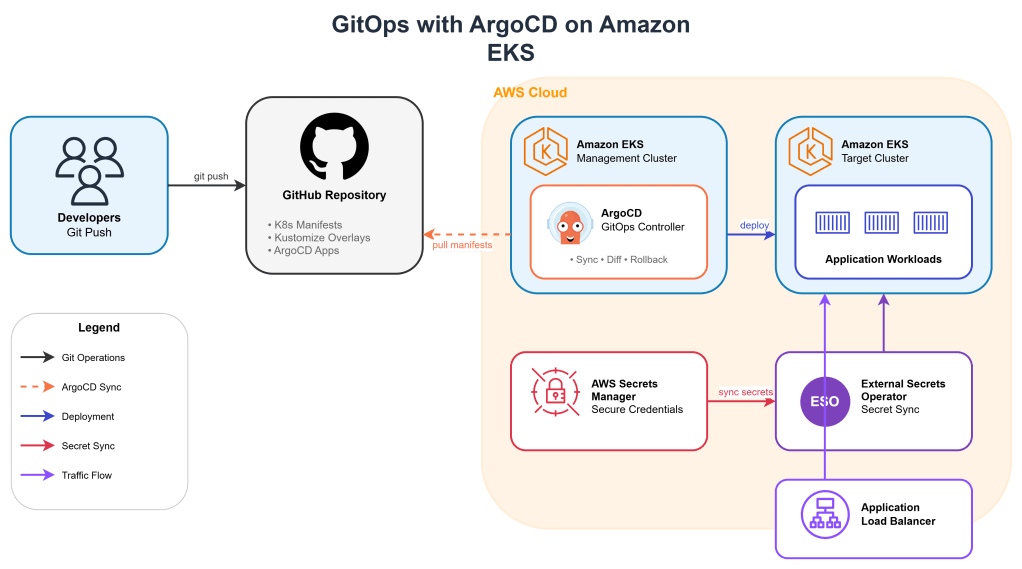
AWS Systems Manager Parameter Store: Secure Configuration Management and Automation

Configuration management is a critical aspect of modern cloud infrastructure, and AWS Systems Manager Parameter Store provides an elegant solution for storing, retrieving, and managing configuration data securely. This centralized service eliminates the need to hardcode sensitive information in your applications while enabling dynamic configuration management across your AWS environment.

Understanding AWS Systems Manager Parameter Store

AWS Systems Manager Parameter Store is a secure, hierarchical storage service for configuration data and secrets management. It integrates seamlessly with other AWS services and provides fine-grained access control through IAM policies. The service supports both standard and advanced parameters, with advanced parameters offering enhanced capabilities like larger storage size, parameter policies, and intelligent tiering.

The service organizes parameters in a hierarchical structure using forward slashes, similar to a file system. This organization allows for logical grouping of related parameters and enables bulk operations on parameter trees. For example, you might organize database connection strings under /myapp/database/ and API keys under /myapp/api/.

Key Features and Capabilities

Parameter Store offers several parameter types to meet different use cases. String parameters store plain text values, while StringList parameters contain comma-separated values. SecureString parameters encrypt sensitive data using AWS Key Management Service (KMS), ensuring that secrets remain protected both at rest and in transit.

The service provides version control for parameters, maintaining a history of changes and allowing rollback to previous versions when needed. This versioning capability is particularly valuable in production environments where configuration changes need to be tracked and potentially reversed.

Parameter policies add another layer of sophistication, enabling automatic parameter expiration, notification policies, and lifecycle management. These policies help enforce security best practices and reduce operational overhead.

Practical Implementation: Multi-Environment Application Configuration

Let’s explore a comprehensive example that demonstrates Parameter Store’s capabilities in a real-world scenario. We’ll build a microservices application that uses Parameter Store for configuration management across development, staging, and production environments.

Setting Up the Parameter Hierarchy

First, we’ll establish a logical parameter hierarchy for our application:

# Database configuration parameters
aws ssm put-parameter \
    --name "/myapp/dev/database/host" \
    --value "dev-db.internal.company.com" \
    --type "String" \
    --description "Development database host"

aws ssm put-parameter \
    --name "/myapp/dev/database/port" \
    --value "5432" \
    --type "String" \
    --description "Development database port"

aws ssm put-parameter \
    --name "/myapp/dev/database/username" \
    --value "dev_user" \
    --type "String" \
    --description "Development database username"

aws ssm put-parameter \
    --name "/myapp/dev/database/password" \
    --value "dev_secure_password_123" \
    --type "SecureString" \
    --key-id "alias/parameter-store-key" \
    --description "Development database password"

# API configuration parameters
aws ssm put-parameter \
    --name "/myapp/dev/api/rate_limit" \
    --value "1000" \
    --type "String" \
    --description "API rate limit for development"

aws ssm put-parameter \
    --name "/myapp/dev/api/timeout" \
    --value "30" \
    --type "String" \
    --description "API timeout in seconds"

aws ssm put-parameter \
    --name "/myapp/dev/external/payment_api_key" \
    --value "sk_test_123456789" \
    --type "SecureString" \
    --key-id "alias/parameter-store-key" \
    --description "Payment gateway API key"

Python Application Integration

Here’s a Python application that demonstrates how to retrieve and use these parameters:

import boto3
import json
from botocore.exceptions import ClientError
from typing import Dict, Any, Optional

class ConfigurationManager:
    def __init__(self, environment: str = "dev", region: str = "us-east-1"):
        self.ssm_client = boto3.client('ssm', region_name=region)
        self.environment = environment
        self.parameter_cache = {}
        
    def get_parameter(self, parameter_name: str, decrypt: bool = True) -> Optional[str]:
        """
        Retrieve a single parameter from Parameter Store
        """
        try:
            response = self.ssm_client.get_parameter(
                Name=parameter_name,
                WithDecryption=decrypt
            )
            return response['Parameter']['Value']
        except ClientError as e:
            print(f"Error retrieving parameter {parameter_name}: {e}")
            return None
    
    def get_parameters_by_path(self, path: str, decrypt: bool = True) -> Dict[str, Any]:
        """
        Retrieve all parameters under a specific path
        """
        try:
            paginator = self.ssm_client.get_paginator('get_parameters_by_path')
            parameters = {}
            
            for page in paginator.paginate(
                Path=path,
                Recursive=True,
                WithDecryption=decrypt
            ):
                for param in page['Parameters']:
                    # Remove the path prefix and convert to nested dict
                    key = param['Name'].replace(path, '').lstrip('/')
                    parameters[key] = param['Value']
            
            return parameters
        except ClientError as e:
            print(f"Error retrieving parameters by path {path}: {e}")
            return {}
    
    def get_application_config(self) -> Dict[str, Any]:
        """
        Load complete application configuration
        """
        base_path = f"/myapp/{self.environment}"
        
        # Get all parameters for the environment
        all_params = self.get_parameters_by_path(base_path)
        
        # Organize into logical groups
        config = {
            'database': {
                'host': all_params.get('database/host'),
                'port': int(all_params.get('database/port', 5432)),
                'username': all_params.get('database/username'),
                'password': all_params.get('database/password')
            },
            'api': {
                'rate_limit': int(all_params.get('api/rate_limit', 100)),
                'timeout': int(all_params.get('api/timeout', 30))
            },
            'external': {
                'payment_api_key': all_params.get('external/payment_api_key')
            }
        }
        
        return config
    
    def update_parameter(self, parameter_name: str, value: str, 
                        parameter_type: str = "String", overwrite: bool = True):
        """
        Update or create a parameter
        """
        try:
            self.ssm_client.put_parameter(
                Name=parameter_name,
                Value=value,
                Type=parameter_type,
                Overwrite=overwrite
            )
            print(f"Successfully updated parameter: {parameter_name}")
        except ClientError as e:
            print(f"Error updating parameter {parameter_name}: {e}")

# Example usage in a Flask application
from flask import Flask, jsonify
import os

app = Flask(__name__)

# Initialize configuration manager
config_manager = ConfigurationManager(
    environment=os.getenv('ENVIRONMENT', 'dev')
)

# Load configuration at startup
app_config = config_manager.get_application_config()

@app.route('/health')
def health_check():
    return jsonify({
        'status': 'healthy',
        'environment': config_manager.environment,
        'database_host': app_config['database']['host']
    })

@app.route('/config')
def get_config():
    # Return non-sensitive configuration
    safe_config = {
        'database': {
            'host': app_config['database']['host'],
            'port': app_config['database']['port']
        },
        'api': app_config['api']
    }
    return jsonify(safe_config)

if __name__ == '__main__':
    app.run(debug=True)

Infrastructure as Code with CloudFormation

Here’s a CloudFormation template that creates the parameter hierarchy and associated IAM roles:

AWSTemplateFormatVersion: '2010-09-09'
Description: 'Parameter Store configuration for multi-environment application'

Parameters:
  Environment:
    Type: String
    Default: dev
    AllowedValues: [dev, staging, prod]
    Description: Environment name
  
  ApplicationName:
    Type: String
    Default: myapp
    Description: Application name

Resources:
  # KMS Key for SecureString parameters
  ParameterStoreKMSKey:
    Type: AWS::KMS::Key
    Properties:
      Description: KMS Key for Parameter Store SecureString parameters
      KeyPolicy:
        Statement:
          - Sid: Enable IAM User Permissions
            Effect: Allow
            Principal:
              AWS: !Sub 'arn:aws:iam::${AWS::AccountId}:root'
            Action: 'kms:*'
            Resource: '*'
          - Sid: Allow Parameter Store
            Effect: Allow
            Principal:
              Service: ssm.amazonaws.com
            Action:
              - kms:Decrypt
              - kms:DescribeKey
            Resource: '*'

  ParameterStoreKMSKeyAlias:
    Type: AWS::KMS::Alias
    Properties:
      AliasName: !Sub 'alias/${ApplicationName}-parameter-store-key'
      TargetKeyId: !Ref ParameterStoreKMSKey

  # Database configuration parameters
  DatabaseHostParameter:
    Type: AWS::SSM::Parameter
    Properties:
      Name: !Sub '/${ApplicationName}/${Environment}/database/host'
      Type: String
      Value: !Sub '${Environment}-db.internal.company.com'
      Description: !Sub 'Database host for ${Environment} environment'

  DatabasePortParameter:
    Type: AWS::SSM::Parameter
    Properties:
      Name: !Sub '/${ApplicationName}/${Environment}/database/port'
      Type: String
      Value: '5432'
      Description: Database port

  DatabaseUsernameParameter:
    Type: AWS::SSM::Parameter
    Properties:
      Name: !Sub '/${ApplicationName}/${Environment}/database/username'
      Type: String
      Value: !Sub '${Environment}_user'
      Description: Database username

  DatabasePasswordParameter:
    Type: AWS::SSM::Parameter
    Properties:
      Name: !Sub '/${ApplicationName}/${Environment}/database/password'
      Type: SecureString
      Value: !Sub '${Environment}_secure_password_123'
      KeyId: !Ref ParameterStoreKMSKey
      Description: Database password

  # API configuration parameters
  APIRateLimitParameter:
    Type: AWS::SSM::Parameter
    Properties:
      Name: !Sub '/${ApplicationName}/${Environment}/api/rate_limit'
      Type: String
      Value: '1000'
      Description: API rate limit

  APITimeoutParameter:
    Type: AWS::SSM::Parameter
    Properties:
      Name: !Sub '/${ApplicationName}/${Environment}/api/timeout'
      Type: String
      Value: '30'
      Description: API timeout in seconds

  # IAM Role for application to access parameters
  ApplicationRole:
    Type: AWS::IAM::Role
    Properties:
      RoleName: !Sub '${ApplicationName}-${Environment}-parameter-access-role'
      AssumeRolePolicyDocument:
        Version: '2012-10-17'
        Statement:
          - Effect: Allow
            Principal:
              Service: 
                - ec2.amazonaws.com
                - ecs-tasks.amazonaws.com
                - lambda.amazonaws.com
            Action: sts:AssumeRole
      Policies:
        - PolicyName: ParameterStoreAccess
          PolicyDocument:
            Version: '2012-10-17'
            Statement:
              - Effect: Allow
                Action:
                  - ssm:GetParameter
                  - ssm:GetParameters
                  - ssm:GetParametersByPath
                Resource: 
                  - !Sub 'arn:aws:ssm:${AWS::Region}:${AWS::AccountId}:parameter/${ApplicationName}/${Environment}/*'
              - Effect: Allow
                Action:
                  - kms:Decrypt
                Resource: !GetAtt ParameterStoreKMSKey.Arn

  # Instance Profile for EC2 instances
  ApplicationInstanceProfile:
    Type: AWS::IAM::InstanceProfile
    Properties:
      Roles:
        - !Ref ApplicationRole

Outputs:
  ApplicationRoleArn:
    Description: ARN of the application role
    Value: !GetAtt ApplicationRole.Arn
    Export:
      Name: !Sub '${ApplicationName}-${Environment}-role-arn'
  
  KMSKeyId:
    Description: KMS Key ID for SecureString parameters
    Value: !Ref ParameterStoreKMSKey
    Export:
      Name: !Sub '${ApplicationName}-${Environment}-kms-key'

Advanced Automation with Parameter Policies

Parameter Store also supports parameter policies for advanced lifecycle management:

# Create a parameter with expiration policy
aws ssm put-parameter \
    --name "/myapp/dev/temp/session_token" \
    --value "temp_token_12345" \
    --type "SecureString" \
    --policies '[
        {
            "Type": "Expiration",
            "Version": "1.0",
            "Attributes": {
                "Timestamp": "2024-12-31T23:59:59.000Z"
            }
        }
    ]'

# Create a parameter with notification policy
aws ssm put-parameter \
    --name "/myapp/prod/database/password" \
    --value "prod_password_456" \
    --type "SecureString" \
    --policies '[
        {
            "Type": "ExpirationNotification",
            "Version": "1.0",
            "Attributes": {
                "Before": "30",
                "Unit": "Days"
            }
        }
    ]'

Security Best Practices and Considerations

When implementing Parameter Store in production environments, several security considerations are crucial. Always use SecureString parameters for sensitive data like passwords, API keys, and tokens. Implement least-privilege IAM policies that grant access only to the specific parameters and paths required by each service or role.

Use separate KMS keys for different environments and applications to maintain proper isolation. Regularly rotate sensitive parameters and implement parameter policies to enforce expiration dates. Monitor parameter access through CloudTrail to track who accessed which parameters and when.

Consider implementing parameter validation in your applications to ensure that retrieved values meet expected formats and constraints. This validation helps prevent configuration errors that could lead to service disruptions.

Cost Optimization and Performance

Parameter Store offers both standard and advanced parameters, with different pricing models. Standard parameters are free up to 10,000 parameters, while advanced parameters provide additional features at a cost. Choose the appropriate tier based on your requirements.

Implement intelligent caching in your applications to reduce API calls and improve performance. Cache parameters with reasonable TTL values, and implement cache invalidation strategies for critical configuration changes.

Use batch operations like get_parameters_by_path to retrieve multiple related parameters in a single API call, reducing latency and improving efficiency.

Conclusion

AWS Systems Manager Parameter Store provides a robust foundation for configuration management and secrets handling in cloud-native applications. Its integration with other AWS services, fine-grained access control, and advanced features like parameter policies make it an excellent choice for managing application configuration at scale.

By implementing the patterns and practices demonstrated in this guide, you can build more secure, maintainable, and scalable applications that properly separate configuration from code. The hierarchical organization, version control, and encryption capabilities ensure that your configuration management strategy can grow and evolve with your application needs.

Whether you’re building a simple web application or a complex microservices architecture, Parameter Store provides the tools and flexibility needed to manage configuration data securely and efficiently across multiple environments and use cases.

Building a Serverless Event-Driven Architecture with AWS EventBridge, SQS, and Lambda

In this blog, we’ll design a system where:

  1. Events (e.g., order placements, file uploads) are published to EventBridge.
  2. SQS queues act as durable buffers for downstream processing.
  3. Lambda functions consume events and take action (e.g., send notifications, update databases).

Architecture Overview

![EventBridge → SQS → Lambda Architecture]
(Visual: Producers → EventBridge → SQS → Lambda Consumers)

  1. Event Producers (e.g., API Gateway, S3, custom apps) emit events.
  2. EventBridge routes events to targets (e.g., SQS queues).
  3. SQS ensures reliable delivery and decoupling.
  4. Lambda processes events asynchronously.

Step-by-Step Implementation

1. Set Up an EventBridge Event Bus

Create a custom event bus (or use the default one):

aws events create-event-bus --name MyEventBus

2. Define an Event Rule to Route Events to SQS

Create a rule to forward events matching a pattern (e.g., order_placed) to an SQS queue:

aws events put-rule \
  --name "OrderPlacedRule" \
  --event-pattern '{"detail-type": ["order_placed"]}' \
  --event-bus-name "MyEventBus"

3. Create an SQS Queue and Link It to EventBridge

Create a queue and grant EventBridge permission to send messages:

aws sqs create-queue --queue-name OrderProcessingQueue

Attach the queue as a target to the EventBridge rule:

aws events put-targets \
  --rule "OrderPlacedRule" \
  --targets "Id"="OrderQueueTarget","Arn"="arn:aws:sqs:us-east-1:123456789012:OrderProcessingQueue" \
  --event-bus-name "MyEventBus"

4. Write a Lambda Function to Process SQS Messages

Create a Lambda function (process_order.py) to poll the queue and process orders:

import json
import boto3

def lambda_handler(event, context):
    for record in event['Records']:
        message = json.loads(record['body'])
        order_id = message['detail']['orderId']
        
        print(f"Processing order: {order_id}")
        # Add business logic (e.g., update DynamoDB, send SNS notification)
        
    return {"status": "processed"}

5. Configure SQS as a Lambda Trigger

In the AWS Console:

  • Go to Lambda → Add Trigger → SQS.
  • Select OrderProcessingQueue and set batch size (e.g., 10 messages per invocation).

6. Test the Flow

Emit a test event to EventBridge:

aws events put-events \
  --entries '[{
    "EventBusName": "MyEventBus",
    "Source": "my.app",
    "DetailType": "order_placed",
    "Detail": "{ \"orderId\": \"123\", \"amount\": 50 }"
  }]'

Verify the flow:

  1. EventBridge routes the event to SQS.
  2. Lambda picks up the message and logs:
Processing order: 123  

Use Cases

  • Order processing (e.g., e-commerce workflows).
  • File upload pipelines (e.g., resize images after S3 upload).
  • Notifications (e.g., send emails/SMS for system events).

Enjoy
Thank you
Osama

Real-Time Data Processing with AWS Kinesis, Lambda, and DynamoDB

Many applications today require real-time data processing—whether it’s for analytics, monitoring, or triggering actions. AWS provides powerful services like Amazon Kinesis for streaming data, AWS Lambda for serverless processing, and DynamoDB for scalable storage.

In this blog, we’ll build a real-time data pipeline that:

  1. Ingests streaming data (e.g., clickstream, IoT sensor data, or logs) using Kinesis Data Streams.
  2. Processes records in real-time using Lambda.
  3. Stores aggregated results in DynamoDB for querying.

Architecture Overview

![AWS Kinesis + Lambda + DynamoDB Architecture]
(Visual: Kinesis → Lambda → DynamoDB)

  1. Kinesis Data Stream – Captures high-velocity data.
  2. Lambda Function – Processes records as they arrive.
  3. DynamoDB Table – Stores aggregated results (e.g., counts, metrics).

Step-by-Step Implementation

1. Set Up a Kinesis Data Stream

Create a Kinesis stream to ingest data:

aws kinesis create-stream --stream-name ClickStream --shard-count 1

Producers (e.g., web apps, IoT devices) can send data like:

{
  "userId": "user123",
  "action": "click",
  "timestamp": "2024-05-20T12:00:00Z"
}

2. Create a Lambda Function to Process Streams

Write a Python Lambda function (process_stream.py) to:

  • Read records from Kinesis.
  • Aggregate data (e.g., count clicks per user).
  • Update DynamoDB.
import json
import boto3

dynamodb = boto3.resource('dynamodb')
table = dynamodb.Table('UserClicks')

def lambda_handler(event, context):
    for record in event['Records']:
        payload = json.loads(record['kinesis']['data'])
        user_id = payload['userId']
        
        # Update DynamoDB (increment click count)
        table.update_item(
            Key={'userId': user_id},
            UpdateExpression="ADD clicks :incr",
            ExpressionAttributeValues={':incr': 1}
        )
    return {"status": "success"}

3. Configure Lambda as a Kinesis Consumer

In the AWS Console:

  • Go to Lambda → Create Function → Python.
  • Add Kinesis as the trigger (select your stream).
  • Set batch size (e.g., 100 records per invocation).

4. Set Up DynamoDB for Aggregations

Create a table with userId as the primary key:

aws dynamodb create-table \
    --table-name UserClicks \
    --attribute-definitions AttributeName=userId,AttributeType=S \
    --key-schema AttributeName=userId,KeyType=HASH \
    --billing-mode PAY_PER_REQUEST

5. Test the Pipeline

Send test data to Kinesis:

aws kinesis put-record \
    --stream-name ClickStream \
    --data '{"userId": "user123", "action": "click"}' \
    --partition-key user123

Check DynamoDB for aggregated results:

aws dynamodb get-item --table-name UserClicks --key '{"userId": {"S": "user123"}}'

Output:

{ "userId": "user123", "clicks": 1 }

Use Cases

  • Real-time analytics (e.g., dashboard for user activity).
  • Fraud detection (trigger alerts for unusual patterns).
  • IoT monitoring (process sensor data in real-time).

Enjoy
Thank you
Osama

Building a Scalable Web Application Using AWS Lambda, API Gateway, and DynamoDB

s?

Let’s imagine we want to build a To-Do List Application where users can:

  • Add tasks to their list.
  • View all tasks.
  • Mark tasks as completed.

We’ll use the following architecture:

  1. API Gateway to handle HTTP requests.
  2. Lambda Functions to process business logic.
  3. DynamoDB to store task data.

Step 1: Setting Up DynamoDB

First, we need a database to store our tasks. DynamoDB is an excellent choice because it scales automatically and provides low-latency access.

Creating a DynamoDB Table

  1. Open the AWS Management Console and navigate to DynamoDB .
  2. Click Create Table .
    • Table Name : TodoList
    • Primary Key : id (String)
  3. Enable Auto Scaling for read/write capacity units to ensure the table scales based on demand.

Sample Table Structure

id (Primary Key)task_namestatus
1Buy groceriesPending
2Read a bookCompleted

Step 2: Creating Lambda Functions

Next, we’ll create Lambda functions to handle CRUD operations for our To-Do List application.

Lambda Function: Create Task

This function will insert a new task into the TodoList table.

import json
import boto3

dynamodb = boto3.resource('dynamodb')
table = dynamodb.Table('TodoList')

def lambda_handler(event, context):
    # Extract task details from the event
    task_name = event['task_name']
    
    # Generate a unique ID for the task
    import uuid
    task_id = str(uuid.uuid4())
    
    # Insert the task into DynamoDB
    table.put_item(
        Item={
            'id': task_id,
            'task_name': task_name,
            'status': 'Pending'
        }
    )
    
    return {
        'statusCode': 200,
        'body': json.dumps({'message': 'Task created successfully!', 'task_id': task_id})
    }

Lambda Function: Get All Tasks

This function retrieves all tasks from the TodoList table.

import json
import boto3

dynamodb = boto3.resource('dynamodb')
table = dynamodb.Table('TodoList')

def lambda_handler(event, context):
    # Scan the DynamoDB table
    response = table.scan()
    
    # Return the list of tasks
    return {
        'statusCode': 200,
        'body': json.dumps(response['Items'])
    }

Lambda Function: Update Task Status

This function updates the status of a task (e.g., mark as completed).

import json
import boto3

dynamodb = boto3.resource('dynamodb')
table = dynamodb.Table('TodoList')

def lambda_handler(event, context):
    # Extract task ID and new status from the event
    task_id = event['id']
    new_status = event['status']
    
    # Update the task in DynamoDB
    table.update_item(
        Key={'id': task_id},
        UpdateExpression='SET #status = :new_status',
        ExpressionAttributeNames={'#status': 'status'},
        ExpressionAttributeValues={':new_status': new_status}
    )
    
    return {
        'statusCode': 200,
        'body': json.dumps({'message': 'Task updated successfully!'})
    }

Step 3: Configuring API Gateway

Now that we have our Lambda functions, we’ll expose them via API Gateway.

Steps to Set Up API Gateway

  1. Open the AWS Management Console and navigate to API Gateway .
  2. Click Create API and select HTTP API .
  3. Define the following routes:
    • POST /tasks : Maps to the “Create Task” Lambda function.
    • GET /tasks : Maps to the “Get All Tasks” Lambda function.
    • PUT /tasks/{id} : Maps to the “Update Task Status” Lambda function.
  4. Deploy the API and note the endpoint URL.

Step 4: Testing the Application

Once everything is set up, you can test the application using tools like Postman or cURL .

Example Requests

  1. Create a Task
curl -X POST https://<api-id>.execute-api.<region>.amazonaws.com/tasks \
-H "Content-Type: application/json" \
-d '{"task_name": "Buy groceries"}'

Get All Tasks

curl -X GET https://<api-id>.execute-api.<region>.amazonaws.com/tasks

Update Task Status

curl -X PUT https://<api-id>.execute-api.<region>.amazonaws.com/tasks/<task-id> \
-H "Content-Type: application/json" \
-d '{"status": "Completed"}'

Benefits of This Architecture

  1. Scalability : DynamoDB and Lambda automatically scale to handle varying loads.
  2. Cost Efficiency : You only pay for the compute time and storage you use.
  3. Low Maintenance : AWS manages the underlying infrastructure, reducing operational overhead.

Enjoy the cloud 😁
Osama