Building an Embedding-Driven Similarity API Using a Vector Database on Oracle Database 23 ai

Introduction

In modern AI workflows, one common requirement is: given some piece of content (a document, image caption, query text), find “similar” items in your data store — not by exact keyword match, but by meaning. This is where vector embeddings + vector search come in. In this post we build a real API that:

  • Takes input text,
  • Generates an embedding,
  • Stores embeddings in Oracle’s vector-enabled database,
  • Builds a vector index,
  • Exposes an API endpoint that returns the top K similar items.

2. Setup & Embedding Generation

2.1 Provisioning

Ensure you have an Oracle Database that supports:

2.2 Embedding generation code (Python)

from sentence_transformers import SentenceTransformer
import oracledb

# Load embedding model
model = SentenceTransformer('all-MiniLM-L12-v2')

# Sample dataset
docs = [
    {"id":1, "title":"Cloud cost management", "category":"Finance", "text":"How to optimize cloud costs …"},
    {"id":2, "title":"Vendor contract termination", "category":"Legal", "text":"Steps and risks around vendor termination …"},
    # more documents...
]

# Connect to Oracle
conn = oracledb.connect(user="vec_user", password="pwd", dsn="your_dsn")
cursor = conn.cursor()

# Create table
cursor.execute("""
  CREATE TABLE doc_store (
    doc_id     NUMBER PRIMARY KEY,
    title      VARCHAR2(500),
    category   VARCHAR2(100),
    doc_text   CLOB,
    embed_vec  VECTOR
  )
""")
conn.commit()

# Insert embeddings
for d in docs:
    vec = model.encode(d["text"]).tolist()
    cursor.execute("""
      INSERT INTO doc_store(doc_id, title, category, doc_text, embed_vec)
      VALUES(:1, :2, :3, :4, :5)
    """, (d["id"], d["title"], d["category"], d["text"], vec))
conn.commit()

At this point you have your texts stored with their embedding vectors.

3. Vector Indexing & Querying

3.1 Create index

CREATE INDEX idx_doc_embed 
  ON doc_store(embed_vec)
  INDEXTYPE IS vector_ann 
  PARAMETERS('distance_metric=cosine, dimension=384');

(Modify dimension per your embedding size.)

3.2 API Query: embedding + vector similarity

from flask import Flask, request, jsonify
import oracledb

app = Flask(__name__)
model = SentenceTransformer('all-MiniLM-L12-v2')
conn = oracledb.connect(user="vec_user", password="pwd", dsn="your_dsn")
cursor = conn.cursor()

@app.route('/similar', methods=['POST'])
def similar():
    query = request.json["text"]
    q_vec = model.encode([query]).tolist()[0]
    cursor.execute("""
      SELECT doc_id, title, category, vector_distance(embed_vec, :qv) AS dist
      FROM doc_store
      ORDER BY vector_distance(embed_vec, :qv)
      FETCH FIRST 5 ROWS ONLY
    """, {"qv": q_vec})
    results = [{"doc_id": r[0], "title": r[1], "category": r[2], "distance": r[3]} for r in cursor]
    return jsonify(results)

if __name__ == '__main__':
    app.run(host='0.0.0.0', port=8080)

When you call this API with input text, it returns the top 5 similar documents by semantic meaning.

3.3 Hybrid filtering example

Suppose you want only results in category = “Legal”. Modify the SQL:

SELECT doc_id, title, vector_distance(embed_vec, :qv) AS dist
FROM doc_store
WHERE category = 'Legal'
ORDER BY vector_distance(embed_vec, :qv)
FETCH FIRST 5 ROWS ONLY;

This combines business metadata and semantic similarity.

Conclusion

This tutorial walked you through building a vector-based similarity API: embedding generation, vector storage, indexing, query API, hybrid filtering and production readiness. While the example uses text and embeddings, the same pattern works for images, audio, logs — any data converted into vectors. For your next step, you might add: embedding refresh jobs, user feedback logging, multi-modal embeddings (text+image), or integrate into a larger Microservices architecture.

Regards

Osama

Unlocking Semantic Search and Generative-AI with Vector Databases on OCI: A Deep Dive into Oracle’s AI Vector Search

In the age of generative AI and LLM-driven applications, one of the biggest challenges enterprises face is how to connect their business-critical data (structured and unstructured) to AI models in a performant, scalable and governed way. Enter vector databases and vector search: these allow you to represent unstructured data (documents, images, embeddings) as high-dimensional “vectors”, index them for speedy similarity or semantic search, and combine them with relational business data.

With the Oracle stack — particularly the release of Oracle Database 23 ai / AI Database 26 ai — this capability is built into the database, giving you a unified platform for relational, JSON, spatial, graph and vector data.

In this article you’ll learn:

  • What vector databases and vector search are, and why they matter for AI use-cases.
  • How Oracle’s AI Vector Search works: data types, indexes, distance functions.
  • A step-by-step example: ingest text embeddings into Oracle, query them via SQL using the VECTOR data type, combine with business metadata.
  • Architectural and operational considerations: when to use, how to scale, best practices.
  • Real-world use cases and governance implications.


Vector Databases & Why They Matter

What is a vector?

A vector is simply a list of numbers that represent features of an object: could be a sentence, document, image or audio snippet. By converting raw content into vectors (embeddings) via a model, you can perform similarity or semantic search in a high-dimensional space. Oracle+1

What is a vector database / vector search?

A vector database supports the storage, indexing and efficient querying of vectors — typically enabling nearest-neighbour or similarity search. According to Oracle:

“A vector database is any database that can natively store and manage vector embeddings and handle the unstructured data they describe.”

Importantly, in Oracle’s case, they’ve integrated vector search into their flagship database platform so you don’t need a separate vector store — you can keep relational data + vector embeddings in one system.

Why does this matter for AI and enterprise apps?

  • Search not just by keywords, but by meaning. For example: “find all documents about contracts with high risk” might match content without the word “risk” explicitly.
  • Enables Retrieval-Augmented Generation (RAG): your LLM can query your private business data (via vector search) and feed it into the prompt to generate more accurate responses.
  • Combines unstructured data (embeddings) with structured business data (metadata, JSON, graph) in one platform — leading to simpler architecture, fewer data silos

How Oracle’s AI Vector Search Works

New data type: VECTOR

With Oracle Database 23 ai / AI Database 26 ai, the VECTOR data type is introduced: you can define table columns as VECTOR, store high-dimensional embeddings, and perform vector-specific operations.

Example:

CREATE TABLE docs (
  doc_id   INT,
  doc_text CLOB,
  doc_vector VECTOR  -- storing embedding
);

Vector Indexes & Distance Metrics

To deliver performant searches, Oracle supports vector indexes and distance functions (cosine, Euclidean, etc.). You can build indexes on the VECTOR column. oracle-base.com+1

SQL Example – similarity query:

SELECT doc_id, doc_text
FROM docs
WHERE vector_distance(doc_vector, :query_vector) < 0.3
ORDER BY vector_distance(doc_vector, :query_vector)
FETCH FIRST 10 ROWS ONLY;

Embedding generation & model support

You have two broad options:

  • Generate embeddings externally (for example using an open-source transformer model) and load them into the VECTOR column.
  • Use built-in or integrated embedding models (Oracle offers embedding generation or ONNX support) so that vector creation and storage is closer to the database.

Hybrid queries: relational + vector

Because everything is in the same database, you can combine structured filters (e.g., WHERE region = 'EMEA') with vector similarity queries. This enables richer semantics. Example: “Find contract documents similar to this one and related to Europe market” in one query.

Retrieval-Augmented Generation (RAG) support

By using vector search to fetch relevant documents and feeding them into your LLM prompt, you create a pipeline where your AI model is grounded in your private enterprise data. Oracle emphasises this with the AI Vector Search feature.

3. Example Walk-through: Text Embeddings + Similarity Search on OCI

Let’s walk through a practical example of how you might use Oracle AI Vector Search on OCI.

Step 1: Set up the environment

  • Provision the Oracle AI Database 26 ai service in your OCI tenancy (or use Exadata/Autonomous with vector support).
  • Ensure compatible version (VECTOR data type support requires version 23.7+ or similar). Oracle Documentation
  • Create a user/table space for embeddings.

Step 2: Create tables for content and embeddings

CREATE TABLE knowledge_base (
  kb_id       NUMBER GENERATED BY DEFAULT AS IDENTITY,
  title       VARCHAR2(500),
  content     CLOB,
  embed_vector VECTOR
);

Step 3: Generate embeddings and load them

Example with Python using sentence-transformers to generate embeddings, and oracledb python driver to insert:

import oracledb
from sentence_transformers import SentenceTransformer

model = SentenceTransformer('all-MiniLM-L12-v2')
texts = ["Contract for vendor A", "Service Level Agreement for cloud services", ...]
embeds = model.encode(texts).tolist()

conn = oracledb.connect(user="vector_usr", password="pwd", dsn="your_dsn")
cursor = conn.cursor()

for text, embed in zip(texts, embeds):
    cursor.execute("""
        INSERT INTO knowledge_base(title, content, embed_vector)
        VALUES(:1, :2, :3)
    """, (text, text, embed))
conn.commit()

Step 4: Build a vector index (optional but recommended)

CREATE INDEX idx_kb_embed ON knowledge_base(embed_vector)
INDEXTYPE IS vector_ann INDEX_PARAMETERS('distance_metric=cosine, dimension=384');

Step 5: Run a similarity search query

Suppose you want documents similar to a query “cloud SLA compliance vendor”:

query_text = "cloud SLA compliance vendor"
query_embed = model.encode([query_text]).tolist()[0]

cursor.execute("""
  SELECT kb_id, title, vector_distance(embed_vector, :qb) AS dist
  FROM knowledge_base
  ORDER BY vector_distance(embed_vector, :qb)
  FETCH FIRST 5 ROWS ONLY
""", {"qb": query_embed})
for row in cursor:
    print(row)

Step 6: Combine with relational filters

For example: only search documents where region = 'EMEA' and then do vector search on their embeddings.

SELECT kb_id, title
FROM knowledge_base
WHERE region = 'EMEA'
ORDER BY vector_distance(embed_vector, :qb)
FETCH FIRST 5 ROWS ONLY;

Step 7: Build RAG pipeline

  • Use vector search to fetch top K relevant documents for a given input.
  • Pass those documents plus user input to an LLM in your application layer (OCI Functions, Data Science notebook, etc).
  • Return generated answer citing which documents were used.
  • Store feedback/metrics to refine embeddings over time.

4. Architecture & Operational Considerations

When to use vector databases

Use cases:

  • Semantic document search across large unstructured corpora
  • Recommendation engines (product similarity, content suggestions)
  • Anomaly/outlier detection (embeddings of transactions or sessions)
  • RAG workflows, chatbots backed by enterprise data

Architecture variations

  • Fully integrated: Use Oracle AI Database / Exadata with vector support. One system for relational + vector.
  • Hybrid: Vector store + separate LLM + service layer (if you already have a vector DB elsewhere). But the integrated approach simplifies data movement and governance.
    Oracle emphasises eliminating data silos by embedding vector search within the database.

Performance & scaling

  • Choose appropriate vector index type (ANN, HNSW, IVF) according to scale.
  • Ensure correct dimension of embeddings (e.g., 384, 768) and index parameters (e.g., nlist,nprobe).
  • Use horizontal scalability: Oracle supports sharding, parallel SQL, and Exadata acceleration for vector workloads.
  • Keep control of memory and storage: high-dimensional embeddings and large volumes need planning (embedding store size, index maintenance).

Data governance, security & maintainability

  • Embeddings often represent sensitive data: apply encryption / access controls as you would relational data.
  • Versioning of embeddings: if you regenerate embeddings (new model version), you need to update vectors & indexes.
  • Monitoring & freshness: track metrics like query latency, drift in embeddings, relevance degradation.
  • Explainability: embeddings are opaque. When building enterprise apps, you may need audit trails showing “why” a result was returned.

Best practices

  • Define embedding generation strategy: consistent model, dimension size, pipeline for updating.
  • Build hybrid search queries to mix semantic + business filters.
  • Keep embedding tables small and well-partitioned (e.g., by date or region) if you expect high volumes.
  • Automate index rebuilds/maintenance during low traffic periods.
  • Cache top results where appropriate if you have frequent similar queries.
  • Perform A/B testing: compare semantic search vs keyword search to measure lift.
  • Document and govern vector fields: vector type, model version, embedding timestamp.

5. Use-Cases and Business Value

Use-case: Contract Search & Compliance

Imagine a legal department with thousands of contracts. Traditional keyword search misses meaning (“vendor terminated for cause”) if wording varies. With vector search you embed all contracts, allow semantic queries (“supplier termination risk Europe”), retrieve relevant ones quickly, and then feed into an LLM to summarise risk across contracts.

Use-case: Product Recommendation & RAG-enabled chatbot

Retailer: store product embeddings + user behaviour embeddings in vector table. When a user asks “What new hiking boots would you recommend given my past purchases?”, the system vector-searches similar items + user profile, then uses RAG+LLM to explain recommendations (“Based on your past purchase of Trailblazer 200 and preference for Gore-Tex, here are these three options…”).

Business value

  • Faster time-to-insight from unstructured data.
  • More relevant search & recommendations → higher engagement or productivity.
  • Better AI confidence: feeding enterprise data through vector search into LLM reduces hallucinations by anchoring responses.
  • Unified cost & architecture: no separate vector store means less operational overhead and fewer data-movement risks.

Oracle Autonomous Database (ADB): A Technical Guide

Oracle Autonomous Database (ADB) on Oracle Cloud Infrastructure (OCI) is a cloud service that leverages machine learning to automate routine database tasks, offering users a self-driving, self-securing, and self-repairing database solution. This blog post will delve into setting up and interacting with an Autonomous Transaction Processing (ATP) instance, showcasing how to deploy a sample application to demonstrate its capabilities.

Overview of Oracle Autonomous Database

Self-Driving: Automates performance tuning and scaling.

Self-Securing: Applies security patches automatically.

Self-Repairing: Offers built-in high availability and backup solutions.

Step 1: Creating an Autonomous Database

Log into OCI Console: Go to console.oracle.com and log in to your account.

Create Autonomous Database:

  • Navigate to the Database section and click on Autonomous Database.
  • Click on Create Autonomous Database.
  • Fill in the required details:
    • Display Name: MyATPDB
    • Database Name: MYATPDB
    • Database Type: Autonomous Transaction Processing
    • CPU Count: 1 (can be adjusted later)
    • Storage: 1 TB (adjust as necessary)
  • Configure the Admin Password and ensure you store it securely.
  • Click Create Autonomous Database.

Step 2: Setting Up the Network

2.1: Create a Virtual Cloud Network (VCN)
  1. Navigate to the Networking Section.
  2. Click on Create VCN and fill in the necessary details:
    • VCN Name: MyVCN
    • CIDR Block: 10.0.0.0/16
    • Subnets: Create a public subnet with a CIDR block of 10.0.0.0/24.
2.2: Configure Security Lists
  1. In the VCN settings, add a security rule to allow traffic to your database:
    • Source CIDR: Your public IP address (for SQL Developer access).
    • IP Protocol: TCP
    • Source Port Range: All
    • Destination Port Range: 1522 (default for ADB)
Step 3: Connecting to the Autonomous Database
3.1: Download Wallet
  1. In the ADB console, navigate to your database and click on DB Connection.
  2. Download the Client Credentials (Wallet). This will be a zip file containing the wallet and connection files.
3.2: Set Up SQL Developer
  1. Open Oracle SQL Developer.
  2. Go to Tools > Preferences > Database > Advanced and set the Use Wallet option to true.
  3. In the Connections pane, click on the green + icon to create a new connection.
  4. Set the connection type to Cloud Wallet, then specify:
    • Connection Name: MyATPConnection
    • Username: ADMIN
    • Password: Your admin password
    • Wallet Location: Path to the unzipped wallet directory
  5. Click Test to verify the connection, then click Save.

Step 4: Creating a Sample Schema and Table

Once connected to your database, execute the following SQL commands to create a sample schema and a table:

-- Create a new user/schema
CREATE USER sample_user IDENTIFIED BY SamplePassword;
GRANT ALL PRIVILEGES TO sample_user;

-- Connect as the new user
ALTER SESSION SET CURRENT_SCHEMA = sample_user;

-- Create a sample table
CREATE TABLE employees (
employee_id NUMBER GENERATED ALWAYS AS IDENTITY PRIMARY KEY,
first_name VARCHAR2(50) NOT NULL,
last_name VARCHAR2(50) NOT NULL,
email VARCHAR2(100) NOT NULL UNIQUE,
hire_date DATE DEFAULT CURRENT_DATE
);

-- Insert sample data
INSERT INTO employees (first_name, last_name, email)
VALUES ('John', 'Doe', 'john.doe@example.com');

INSERT INTO employees (first_name, last_name, email)
VALUES ('Jane', 'Smith', 'jane.smith@example.com');

COMMIT;

Querying the Data

To verify the data insertion, run:

SELECT * FROM employees;

Step 5: Using Autonomous Database Features

5.1: Auto-Scaling

ADB allows you to scale compute and storage resources automatically. To enable auto-scaling:

  1. Navigate to your Autonomous Database instance in the OCI console.
  2. Click on Edit.
  3. Enable Auto Scaling for both CPU and storage.
  4. Specify the minimum and maximum resources.

5.2: Monitoring Performance

Utilize the Performance Hub feature to monitor real-time database performance. You can view metrics like:

  • Active Sessions
  • Wait Events
  • Resource Consumption

Regads
Osama

Oracle 23c Is out

Oracle Database 23c Free Version Now Available to Developers.

The new Oracle Database 23c Free – Developer Release is a free version of the trusted Oracle Database used by businesses of all sizes around the globe. Obtaining the only converged database that works with any data model and any task type is as easy as downloading it from the internet with no oracle.com user account or license click-through requirements.

If you’re looking for a free database to use for developing data-driven applications, look no further than Oracle Database 23c Free – Developer Release. Users can upgrade to other Oracle Database products at any moment because of its backwards compatibility with Oracle Database Enterprise Edition and Oracle Database cloud services.

Documentation here

Download:

Regards

Osama

Generate 10046 and 10053 trace

who didn’t face an issue with database or query and wants to know more about it ? what is going on behind that query or application ?

Oracle provides different method to do that, one of them is to enable and generate trace called 10046, the idea from using this kind of trace is that we can track the execution plan for the session and provide more information such as bin variable, more information about wait time parse and a lot of other information related to performance issues.

to generate the trace you have to follow these steps , you can use “SYS” user or any other user depends on the session, be notice that you should turn off the trace to complete gathering information, same as the below

spool check.out 
set timing on 
alter session set tracefile_identifier='NAME_OF_TRACE'; 
alter session set timed_statistics = true; 
alter session set statistics_level=all; 
alter session set max_dump_file_size = unlimited; 
alter session set events '10046 trace name context forever, level 12'; 
######
Run the query or the code here
#####
select 'close the cursor' from dual; 
alter session set events '10046 trace name context off'; 
spool off 
exit; 


Important hint :-

  • exit is very important to complete and close the trace.
  • you can change the name of the trace depends on what you want
  • Close the trace after you finished to complete gathering information.
  • We select from dual to ensure ensure the previous cursor is closed.

For Trace 10053 which is also provide information but it’s can be generated only for Hard parse SQL, which mean you should add Oracle Hint to the query to ensure the hard parse will be working.

spool check.out 
set timing on 
alter session set tracefile_identifier='NAME_OF_THE_TRACE'; 
alter session set timed_statistics = true; 
alter session set statistics_level=all; 
alter session set max_dump_file_size = unlimited; 
alter session set events '10053 trace name context forever'; 

run the problematic statement 

select 'close the cursor' from dual; 
alter session set events '10053 trace name context off'; 
spool off 
exit; 

Important hint :-

  • exit is very important to complete and close the trace.
  • you can change the name of the trace depends on what you want
  • Close the trace after you finished to complete gathering information.
  • We select from dual to ensure ensure the previous cursor is closed.

Now you can use the tkprof to make the trace more readable, tkprof located under $ORACLE_HOME/bin, Run the following command after generate the above trace

tkprof <trace-file> <output file> <Username/password>

cheers

Thank you

TOAD :ORA-12170 when trying to connect using TOA

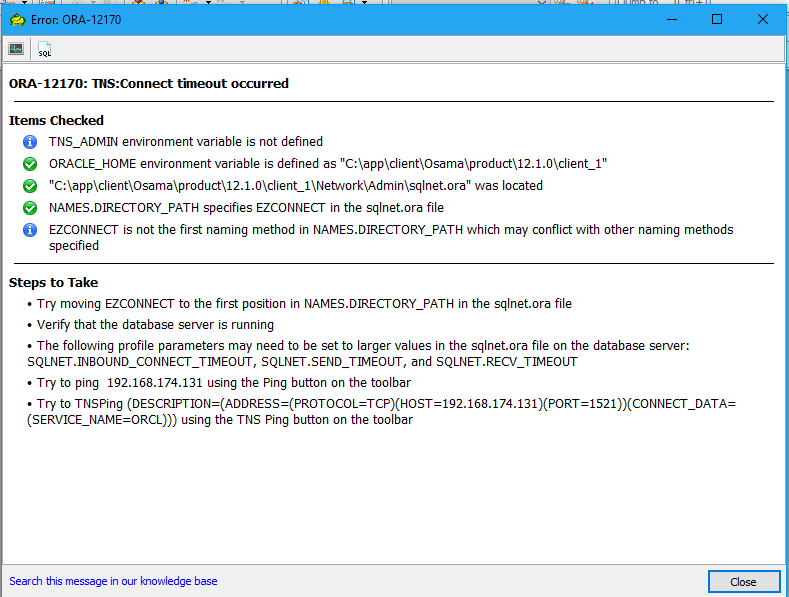
The following error appeared when you are trying to conenct to database using toad applicaion: –


1.png

Make sure of the following :-

  • Database is up and running
  • Listener is up and database is registered using.

lsnrctl status

if the above steps is done and still facing the same issue then do the following :-

  • Right Click on my computer and choose properties.
  • Advance system settings.
  • Environment Variable.

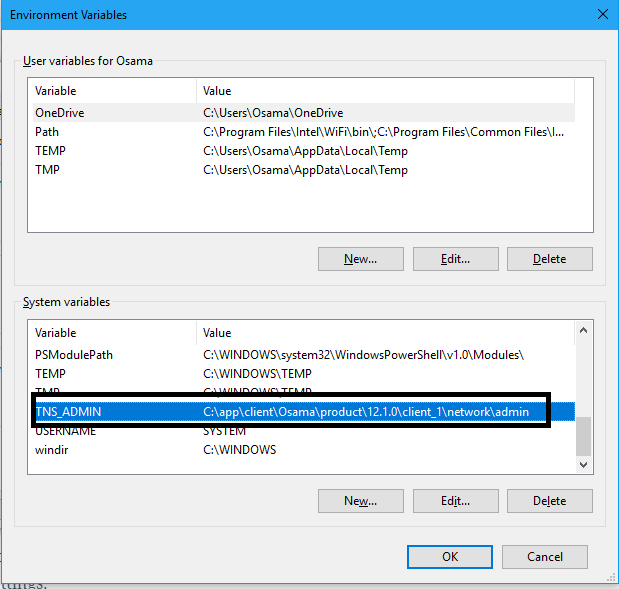
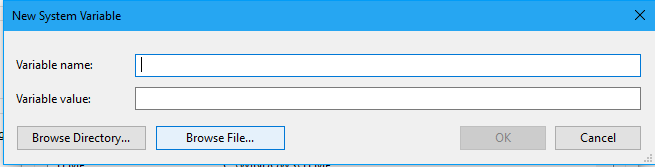
check the below entry is exsits, if not add it by press on new and follow the same steps by adding TNS_ADMIN and the location of the tnsnames.ora, sqlnet.ora into the 2nd box like the picture below.

2.png

3.png


Thanks

Osama

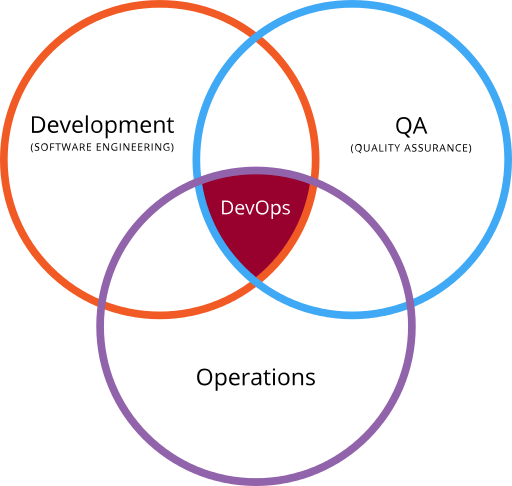
Where is the DBA in the DevOps tools ?

  • Database administrator job has been changed and it’s not like before any more, In the past The DBA responsibility was limited within database which mean troubleshooting, backup , Performance tuning, high availability .. etc after few years new layer has been added to the responsibility which is application server layer for example weblogic ,Oracle embedded the weblogic with most of their products such as enterprise manager cloud, E-business suits, as i remember after three years another layer added to DBA knowledge which is virtualization and regarding to this virtualization  made the DBA life more easier and not like before, solution providing another layer of backup and server management.

However now everything has been changed and the market working under new term which is CLOUD including different vendor AWS, Azure, and Oracle, As DBA your knowledge shouldn’t stop by only Database, within cloud there is new tools that can help the DBA with their daily Job and it’s called Devops.

DBA usually review each change request to ensure that it is well thought out,They are in charge of monitoring their databases and keeping them available and high-performing, manage access to and the overall security of the platform.

Database automation frees the DBA from the bottleneck of the past that delayed application releases since there is different environment production, Pre-Production, Development or Testing, the DevOps Automation relieved of the pressures of constantly having to juggle and merge various teams’ database changes, are now free to help their organisations take bigger steps forward in ongoing innovation.

But what is the Devops ? And How can i use to make my Job Easier

DevOps is the combination of cultural philosophies, practices, and tools that increases an organization’s ability to deliver applications and services at high velocity: evolving and improving products at a faster pace than organizations using traditional software development and infrastructure management processes. This speed enables organizations to better serve their customers and compete more effectively in the market.

Benefits of DevOps
  • Speed
  • Rapid Delivery
  • Reliability
  • Scale
  • Security

DevOps Practices

  • Continuous Integration
  • Continuous Delivery
  • Microservices
  • Infrastructure as Code
  • Monitoring and Logging
  • Communication and Collaboration
DevOps practices for DBA and Data Team focus on the Tools, practices and techniques that are useful for the Data team to use for Development activities, Testing setup and execution, Collaboration techniques and Deployment tools and techniques. The aim of this site is to further the practice and help the DBA’s and Data team to use these practices to become productive and become part of the delivery team and embrace the devops movement.
DevOps Tools
  • Docker
  • Jenkins
  • Ansible
  • Puppet
  • Nagios
  • Monit
  • Behat
  • Chef
There is more tools for sure each one of these tools having it’s own purpose for example Docker is one of the powerful container solutions, A container image is a lightweight, stand-alone, executable package of a piece of software that includes everything needed to run it: code, runtime, system tools, system libraries, settings Available for both Linux and Windows based apps, containerized software will always run the same, regardless of the environment. Containers isolate software from its surroundings, for example differences between development and staging environments and help reduce conflicts between teams running different software on the same infrastructure.
Cheers
Osama Mustafa 

Import One table to the new name in the same schema

The following case just want to share it in case anyone need it, development wants to import the existing table in the siebel schema into the new name to check the data integrity:-

Oracle Provide you with Attribute called REMAP_TABLE Read More about it here.

Just Run the following command and change the variable depend on your environment :-

  • directory : The name of existing dump
  • dumpfile : The name of dump file
  • remap_table : Allows you to rename tables during an import operation
  • tables : the name of the table you want to restore it.

impdp directory=DMP_BAK dumpfile=31-01-2017_PRDSBL.dmp  remap_table=siebel.CX_PERMITS:CX_PERMITS_NEW tables=CX_PERMITS

Thanks
Osama  

DBMS_REDEFINITION to create partition for existing table

to do this oracle provide you with package called DBMS_REDEFINITION for more information about it here

In this post i will show you how to partition existing table for SIEBEL application which is my case holding huge number of records.

  • Create the same structure for the original table but without any constraint just columns like the below with new name and sure choose the partition you want to use, in case any of the constraint has been created on the new table , error will be generated while the package running and you should recreate the table again without any constraint :-

CREATE TABLE SIEBEL.S_CASE_NEW
(
  ROW_ID                         VARCHAR2(15 CHAR)  ,
  CREATED                        DATE           DEFAULT sysdate                ,
  CREATED_BY                     VARCHAR2(15 CHAR)  ,
  LAST_UPD                       DATE           DEFAULT sysdate                ,
  LAST_UPD_BY                    VARCHAR2(15 CHAR)  ,
  MODIFICATION_NUM               NUMBER(10)     DEFAULT 0                      ,
  CONFLICT_ID                    VARCHAR2(15 CHAR) DEFAULT ‘0’  ,
  ASGN_USR_EXCLD_FLG             CHAR(1 CHAR)   DEFAULT ‘N’                    ,
  BU_ID                          VARCHAR2(15 CHAR) DEFAULT ‘0-R9NH’  ,
  CASE_DT                        DATE            ,
  CASE_NUM                       VARCHAR2(100 CHAR)  ,
  CHGOFCCM_REQ_FLG               CHAR(1 CHAR)   DEFAULT ‘N’                    ,
  CLASS_CD                       VARCHAR2(30 CHAR)  ,
  LOCAL_SEQ_NUM                  NUMBER(10)     DEFAULT 1                      ,
  NAME                           VARCHAR2(100 CHAR)  ,
  PR_REP_DNRM_FLG                CHAR(1 CHAR)   DEFAULT ‘N’                    ,
  PR_REP_MANL_FLG                CHAR(1 CHAR)   DEFAULT ‘N’                    ,
  PR_REP_SYS_FLG                 CHAR(1 CHAR)   DEFAULT ‘N’                    ,
  STATUS_CD                      VARCHAR2(30 CHAR)  ,
  ASGN_DT                        DATE,
  CLOSED_DT                      DATE,
  CURR_APPR_SEQ_NUM              NUMBER(10),
  DB_LAST_UPD                    DATE,
  REWARD_AMT                     NUMBER(22,7),
  REWARD_EXCH_DATE               DATE,
  APPLICANT_ID                   VARCHAR2(15 CHAR),
  APPR_TEMP_ID                   VARCHAR2(15 CHAR),
  AUDIT_EMP_ID                   VARCHAR2(15 CHAR),
  CATEGORY_TYPE_CD               VARCHAR2(30 CHAR),
  CITY                           VARCHAR2(50 CHAR),
  COUNTRY                        VARCHAR2(30 CHAR),
  CRIME_SUB_TYPE_CD              VARCHAR2(30 CHAR),
  CRIME_TYPE_CD                  VARCHAR2(30 CHAR),
  DB_LAST_UPD_SRC                VARCHAR2(50 CHAR),
  DESC_TEXT                      VARCHAR2(2000 CHAR),
  MSTR_CASE_ID                   VARCHAR2(15 CHAR),
  ORG_GROUP_ID                   VARCHAR2(15 CHAR),
  PAR_CASE_ID                    VARCHAR2(15 CHAR),
  PRIORITY_TYPE_CD               VARCHAR2(30 CHAR),
  PR_AGENCY_ID                   VARCHAR2(15 CHAR),
  PR_AGENT_ID                    VARCHAR2(15 CHAR),
  PR_DISEASE_ID                  VARCHAR2(15 CHAR),
  PR_POSTN_ID                    VARCHAR2(15 CHAR),
  PR_PROD_INT_ID                 VARCHAR2(15 CHAR),
  PR_PRTNR_ID                    VARCHAR2(15 CHAR),
  PR_SGROUP_ID                   VARCHAR2(15 CHAR),
  PR_SUBJECT_ID                  VARCHAR2(15 CHAR),
  PR_SUSPCT_ID                   VARCHAR2(15 CHAR),
  PS_APPL_ID                     VARCHAR2(15 CHAR),
  REWARD_CURCY_CD                VARCHAR2(20 CHAR),
  SERIAL_NUM                     VARCHAR2(100 CHAR),
  SOURCE_CD                      VARCHAR2(30 CHAR),
  STAGE_CD                       VARCHAR2(30 CHAR),
  STATE                          VARCHAR2(10 CHAR),
  SUBJECT_NAME                   VARCHAR2(100 CHAR),
  SUBJECT_PH_NUM                 VARCHAR2(40 CHAR),
  SUB_STATUS_CD                  VARCHAR2(30 CHAR),
  SUB_TYPE_CD                    VARCHAR2(30 CHAR),
  TERRITORY_TYPE_CD              VARCHAR2(30 CHAR),
  THREAT_LVL_CD                  VARCHAR2(30 CHAR),
  TYPE_CD                        VARCHAR2(30 CHAR),
  X_APP_BIRTH_DATE               DATE,
  X_APP_BIRTH_DT_HIJRI           VARCHAR2(10 CHAR),
  X_APP_FATHER_NAME_A            VARCHAR2(50 CHAR),
  X_APP_FATHER_NAME_E            VARCHAR2(50 CHAR),
  X_APP_FAX                      VARCHAR2(15 CHAR),
  X_APP_FIRST_NAME_A             VARCHAR2(50 CHAR),
  X_APP_FIRST_NAME_E             VARCHAR2(50 CHAR),
  X_APP_FULL_NAME                VARCHAR2(100 CHAR),
  X_APP_GENDER                   VARCHAR2(30 CHAR),
  X_APP_GFATHER_NAME_A           VARCHAR2(50 CHAR),
  X_APP_GFATHER_NAME_E           VARCHAR2(50 CHAR),
  X_APP_LAST_NAME_A              VARCHAR2(50 CHAR),
  X_APP_LAST_NAME_E              VARCHAR2(50 CHAR),
  X_APP_MAIL                     VARCHAR2(50 CHAR),
  X_APP_MOBILE                   VARCHAR2(15 CHAR),
  X_APP_MOTHER_F_NAME_A          VARCHAR2(50 CHAR),
  X_APP_MOTHER_F_NAME_E          VARCHAR2(50 CHAR),
  X_APP_MOTHER_L_NAME_A          VARCHAR2(50 CHAR),
  X_APP_MOTHER_L_NAME_E          VARCHAR2(50 CHAR),
  X_APP_TYPE                     VARCHAR2(30 CHAR),
  X_APPLICANT_CLASSIFICATION     VARCHAR2(30 CHAR),
  X_APPLICANT_NAT_ID_NO          VARCHAR2(15 CHAR),
  X_APPLICANT_TITLE              VARCHAR2(30 CHAR),
  X_APPLICANT_TYPE               VARCHAR2(50 CHAR),
  X_ATTACHMENT_FLG               VARCHAR2(5 CHAR),
  X_CANCEL_DESC                  VARCHAR2(300 CHAR),
  X_CANCEL_REASON                VARCHAR2(30 CHAR),
  X_CASE_COPY_FLG                VARCHAR2(30 CHAR),
  X_CASE_HIJRI_DATE              VARCHAR2(30 CHAR),
  X_CHECK_EXISTS_FKG             VARCHAR2(15 CHAR),
  X_CHECK_EXISTS_FLG             VARCHAR2(30 CHAR),
  X_COMMERCIAL_NAME              VARCHAR2(300 CHAR),
  X_COMMERCIAL_REG_NO            VARCHAR2(40 CHAR),
  X_COPY_SERIAL_NUM              VARCHAR2(100 CHAR),
  X_CREATED_DATE_HEJRI           VARCHAR2(30 CHAR),
  X_CREATED_GRG                  VARCHAR2(30 CHAR),
  X_CREATED_HIJRI                VARCHAR2(10 CHAR),
  X_CRED_EXP_DT_HIJRI            VARCHAR2(10 CHAR),
  X_CRED_EXPIRY_DATE             DATE,
  X_CRED_ISSUE_DATE              DATE,
  X_CRED_ISSUE_DT_HIJRI          VARCHAR2(10 CHAR),
  X_CRED_NO                      VARCHAR2(30 CHAR),
  X_CRED_TYPE                    VARCHAR2(30 CHAR),
  X_CRS_NO                       VARCHAR2(15 CHAR),
  X_DLV_DATE                     DATE,
  X_DLV_DATE_HIJRI               VARCHAR2(10 CHAR),
  X_DLV_USER_ID                  VARCHAR2(15 CHAR),
  X_DOCUMENT_SORUCE              VARCHAR2(30 CHAR),
  X_EST_OWNERSHIP_TYPE           VARCHAR2(30 CHAR),
  X_EST_TYPE                     VARCHAR2(30 CHAR),
  X_GIS_DATA_LOAD                VARCHAR2(15 CHAR),
  X_GIS_DATA_STATUS              VARCHAR2(10 CHAR),
  X_INV_TYPE                     VARCHAR2(30 CHAR),
  X_IS_UPLOADED                  VARCHAR2(30 CHAR),
  X_LAND_ORG_TYPE                VARCHAR2(30 CHAR),
  X_LAND_STATUS                  VARCHAR2(30 CHAR),
  X_LAND_TYPE                    VARCHAR2(30 CHAR),
  X_MUNICIPAL_NAME               VARCHAR2(30 CHAR),
  X_NATIONALITY                  VARCHAR2(30 CHAR),
  X_ORG_END_REG_DATE             DATE,
  X_ORG_END_REG_HIJRI_DATE       VARCHAR2(10 CHAR),
  X_ORG_REGISTRATION_DATE        DATE,
  X_ORG_REGISTRATION_HIJRI_DATE  VARCHAR2(10 CHAR),
  X_ORGANIZATION_NAME            VARCHAR2(200 CHAR),
  X_ORIGINAL_ORG_ID              VARCHAR2(15 CHAR),
  X_PAPER_FLG                    CHAR(1 CHAR)   DEFAULT ‘N’,
  X_PAYMENT_DT                   DATE,
  X_PAYMENT_FLAG                 VARCHAR2(30 CHAR),
  X_PAYMENT_NO                   VARCHAR2(10 CHAR),
  X_PR_EMP_ID                    VARCHAR2(15 CHAR),
  X_PR_ENG_OFFICE_ID             VARCHAR2(15 CHAR),
  X_PROC_DESC                    VARCHAR2(100 CHAR),
  X_PROC_FLG                     VARCHAR2(30 CHAR),
  X_PROC_TYPE                    VARCHAR2(30 CHAR),
  X_PROXY_ISSUE_AUTHORITY        VARCHAR2(30 CHAR),
  X_PROXY_NO                     VARCHAR2(10 CHAR),
  X_QX_CRED_EXP_DT_HIJRI         DATE,
  X_REGISTRATION_DATE            DATE,
  X_REGISTRATION_HIJRI_DATE      VARCHAR2(10 CHAR),
  X_REGISTRATION_NO              VARCHAR2(30 CHAR),
  X_REJECT_DESC                  VARCHAR2(300 CHAR),
  X_REJECT_REASON                VARCHAR2(30 CHAR),
  X_RELATION_TYPE                VARCHAR2(30 CHAR),
  X_RETURN_DATE                  DATE,
  X_RETURN_DATE_HIJRI            VARCHAR2(10 CHAR),
  X_RETURN_NOTES                 VARCHAR2(100 CHAR),
  X_RETURN_REASON                VARCHAR2(30 CHAR),
  X_SCHEMA_STATUS                VARCHAR2(30 CHAR),
  X_SECURITY_FLG                 VARCHAR2(30 CHAR),
  X_SELECT_FLG                   CHAR(1 CHAR)   DEFAULT ‘N’,
  X_STRIPPED_FIRST_NAME          VARCHAR2(50 CHAR),
  X_STRIPPED_FULL_NAME           VARCHAR2(200 CHAR),
  X_STRIPPED_LAST_NAME           VARCHAR2(50 CHAR),
  X_STRIPPED_MOTHER_FIRST        VARCHAR2(50 CHAR),
  X_STRIPPED_MOTHER_FULLNAME     VARCHAR2(50 CHAR),
  X_STRIPPED_MOTHER_LASTNAME     VARCHAR2(50 CHAR),
  X_STRIPPED_SECOND_NAME         VARCHAR2(50 CHAR),
  X_STRIPPED_THIRD_NAME          VARCHAR2(50 CHAR),
  X_TO_BU_ID                     VARCHAR2(15 CHAR),
  X_UPDATED_GRG                  VARCHAR2(30 CHAR),
  X_UPDATED_HIJRI                VARCHAR2(10 CHAR),
  COR_TYPE                       VARCHAR2(30 CHAR),
  CORR_CAS_CAT                   VARCHAR2(30 CHAR),
  PRIMARY_EMPLOYEE               VARCHAR2(30 CHAR),
  SUBMIT_TO_STATUS               VARCHAR2(15 CHAR),
  X_DOCUMENT_TYPE                VARCHAR2(30 CHAR),
  X_SURVEYOR_NAME                VARCHAR2(30 CHAR),
  X_OLD_STATUS                   VARCHAR2(30 CHAR),
  X_APPLICANT_ORG_ID             VARCHAR2(15 CHAR),
  X_APPLICANT_ROW_ID             VARCHAR2(15 CHAR),
  X_GIS_TOKEN                    VARCHAR2(100 CHAR),
  X_NEW_PERMIT_FLG               CHAR(1 CHAR)   DEFAULT ‘Y’,
  X_TRANSACTION_MOD              VARCHAR2(30 CHAR),
  X_TRANSACTION_STATUS           VARCHAR2(30 CHAR),
  X_CASE_CAT                     VARCHAR2(100 CHAR),
  X_CASE_COPY_SERIAL             NUMBER(10),
  X_GIS_PARAMETER                VARCHAR2(300 CHAR),
  X_GIS_ROWIDS                   VARCHAR2(100 CHAR),
  READING_FLAG                   CHAR(1 CHAR)   DEFAULT ‘N’,
  X_GIS_MUNICIPAL                VARCHAR2(30 CHAR),
  X_ORG_DELEGATE_NAME            VARCHAR2(200 CHAR),
  X_PR_POS_ORG_ID                VARCHAR2(15 CHAR),
  X_ORGANIZATION_STRIPPED_NAME   VARCHAR2(200 CHAR),
  X_CITIZEN_REVIEW               CHAR(1 CHAR),
  X_ALLOWED_USAGE                VARCHAR2(50 CHAR),
  X_AUTHORIZATION_DATE           DATE,
  X_AUTHORIZATION_HIJRI_DATE     VARCHAR2(10 CHAR),
  X_AUTHORIZATION_NO             VARCHAR2(20 CHAR),
  X_CIVIL_APPROVAL_DATE          DATE,
  X_CIVIL_APPROVAL_HIJRI_DATE    VARCHAR2(10 CHAR),
  X_CIVIL_APPROVAL_NO            VARCHAR2(20 CHAR),
  X_CIVIL_OFFICE                 VARCHAR2(25 CHAR),
  X_NEW_MUNICIPAL_NAME           VARCHAR2(30 CHAR),
  X_OLD_MUNICIPAL_NAME           VARCHAR2(30 CHAR),
  X_OLD_STATUS_CD                VARCHAR2(30 CHAR),
  X_RESTRICT_NUM                 VARCHAR2(30 CHAR),
  X_LAST_UPD_HIJRI               VARCHAR2(10 CHAR),
  X_APP_BIRTH_DATE_HIJRI         VARCHAR2(10 CHAR),
  X_FEES_EXCEPTION               VARCHAR2(30 CHAR),
  X_FINCL_NAME                   VARCHAR2(30 CHAR),
  X_IS_OWNER                     VARCHAR2(15 CHAR),
  X_MANAGER_ID                   VARCHAR2(15 CHAR),
  X_OWNERSHIP_TYPE               VARCHAR2(30 CHAR),
  X_PRINT_FLG                    CHAR(1 CHAR)   DEFAULT ‘N’,
  X_PRNT_FLG                     VARCHAR2(5 CHAR),
  X_SECRETARY_ID                 VARCHAR2(15 CHAR),
  X_UNDER_SECRETARY_ID           VARCHAR2(15 CHAR),
  X_VIEW_SEQUENCE                NUMBER(10)     DEFAULT 0,
  X_REGULATION_ACCPTNCE_FLG      VARCHAR2(7 CHAR),
  X_CONFIRM_FLAG                 VARCHAR2(7 CHAR),
  X_OCCUPATION_IN_RESIDENCE      VARCHAR2(30 CHAR),
  X_ROWNUM                       NUMBER(10),
  X_NUMBER_ARCHIVAL              VARCHAR2(15 CHAR),
  X_ATTACHMENT_PARAMETERS        VARCHAR2(500 CHAR),
  X_ATTACHMENT_ROW_IDS           VARCHAR2(500 CHAR),
  X_BP_ID                        VARCHAR2(15 CHAR),
  X_CONTROL_SUB_TYPE             VARCHAR2(30 CHAR),
  X_CONTROL_TYPE                 VARCHAR2(30 CHAR),
  X_DEPOSIT_ID                   VARCHAR2(15 CHAR),
  X_MALL_ID                      VARCHAR2(15 CHAR),
  X_NEW_DEPOSIT                  NUMBER(10),
  X_SOURCE_ID                    VARCHAR2(15 CHAR),
  X_STORE_ID                     VARCHAR2(15 CHAR),
  APPEALED_FLG                   CHAR(1 CHAR)   DEFAULT ‘N’                    ,
  CHANGED_FLG                    CHAR(1 CHAR)   DEFAULT ‘N’                    ,
  EVAL_ASSESS_ID                 VARCHAR2(15 CHAR),
  X_ARCHIEVING_TYPE              VARCHAR2(30 CHAR),
  X_ACTIVITY_ID                  VARCHAR2(15 CHAR),
  X_OLD_SERIAL_NUM               VARCHAR2(20 CHAR),
  X_OWNER_ORG_POSTN_ID           VARCHAR2(15 CHAR),
  X_PR_CNTR_POSTN_ID             VARCHAR2(15 CHAR),
  X_REPORT_URL                   VARCHAR2(500 CHAR),
  X_VIOLATION_ID                 VARCHAR2(15 CHAR),
  X_APPLICANT_SOURCE             VARCHAR2(50 CHAR)
)
PARTITION BY RANGE (created)(PARTITION S_CASE_2015 VALUES LESS THAN (TO_DATE(’01/01/2016′, ‘DD/MM/YYYY’)), PARTITION S_CASE_2016 VALUES LESS THAN (TO_DATE(’01/01/2017′, ‘DD/MM/YYYY’)), PARTITION S_CASE_2017 VALUES LESS THAN (MAXVALUE));
  • Now we should start the redefinition by running the following package 

 BEGIN
  DBMS_REDEFINITION.start_redef_table(
    uname      => ‘SIEBEL’,      
    orig_table => ‘S_CASE’,
    int_table  => ‘S_CASE_NEW’);
END;
/

  • Sync the both tables together 

BEGIN
  dbms_redefinition.sync_interim_table(
    uname      => ‘SIEBEL’,    
    orig_table => ‘S_CASE’,
    int_table  => ‘S_CASE_NEW’);
END;

  • After Running the both package above run the below scripts but run it from the server side, because it’s takes times & to avoid any interruption

SET SERVEROUTPUT ON
DECLARE
  l_errors  NUMBER;
BEGIN
  DBMS_REDEFINITION.copy_table_dependents(
    uname            => ‘SIEBEL’,
    orig_table       => ‘S_CASE’,
    int_table        => ‘S_CASE_NEW’,
    copy_indexes     => DBMS_REDEFINITION.cons_orig_params,
    copy_triggers    => TRUE,
    copy_constraints => TRUE,
    copy_privileges  => TRUE,
    ignore_errors    => FALSE,
    num_errors       => l_errors,
    copy_statistics  => FALSE,
    copy_mvlog       => FALSE);
 
  DBMS_OUTPUT.put_line(‘Errors=’ || l_errors);
END;
/  

  • Finish the redefinition

BEGIN
  dbms_redefinition.finish_redef_table(
    uname      => ‘SIEBEL’,    
    orig_table => ‘S_CASE’,
    int_table  => ‘S_CASE_NEW’);
END;
/

  •  After finishing everything successfully, just drop the new table because now it’s became the old table 

DROP TABLE S_CASE_NEW; 

  • Run the below query to see if the partition has been successfully created  

SELECT partitioned
FROM   dba_tables
WHERE  table_name = ‘S_CASE’;

Thanks
Osama

Kill Datapump job that running inside Database

even if you interrupt data bump job on shell therefore you have to do the following :-

as / as sysdba run the below query :

select * from dba_datapump_jobs

After checking the status of each one,

run the following :-

DECLARE
h1 NUMBER;
BEGIN
h1:=DBMS_DATAPUMP.ATTACH(‘JOB_NAME’,’OWNER_NAME’);
DBMS_DATAPUMP.STOP_JOB (h1,1,0);
END;
/

Thanks