We had built this beautiful system. Fifteen microservices, each with its own database, deployed on EKS. Textbook architecture. The problem? Every service was calling every other service directly. When the order service needed to notify inventory, shipping, notifications, and analytics, it made four synchronous HTTP calls. If any of those services were slow or down, the order service suffered.
We had built a distributed monolith. All the complexity of microservices with none of the benefits.
The solution was event-driven architecture. Instead of services calling each other, they publish events. Other services subscribe to the events they care about. The order service publishes “OrderCreated” and moves on. It doesn’t know or care who’s listening.
Amazon EventBridge is AWS’s answer to this pattern. It’s not just another message queue. It’s a serverless event bus that connects your applications, AWS services, and SaaS applications using events. And honestly, it’s changed how I think about building systems.
In this article, I’ll walk you through building a production-grade event-driven architecture on AWS. We’ll cover EventBridge fundamentals, event design, error handling, observability, and patterns I’ve learned from running this in production.
Why Event-Driven? Why Now?
Before we dive into implementation, let’s talk about why you’d want this architecture in the first place.
Loose Coupling: Services don’t need to know about each other. The order service doesn’t import the inventory service SDK. It just publishes events.
Resilience: If the notification service is down, orders still get processed. Notifications catch up when the service recovers.
Scalability: Each service scales independently. Black Friday traffic might hammer your order service, but your reporting service can process events at its own pace.
Extensibility: Need to add fraud detection? Just subscribe to OrderCreated events. No changes to the order service required.
Auditability: Events create a natural audit trail. You can replay them, analyze them, debug issues by looking at what happened.
The trade-off? Eventual consistency. If you need strong consistency across services, synchronous calls might still be necessary. But in my experience, most business processes are naturally asynchronous. Customers don’t expect their loyalty points to update in the same millisecond as their order confirmation.
Architecture Overview
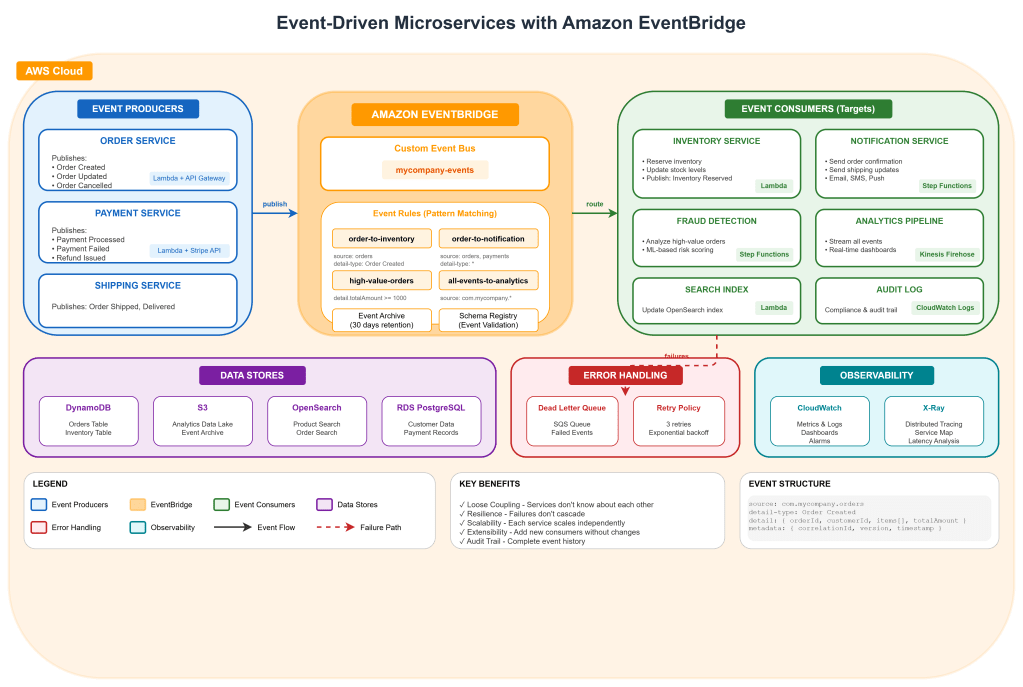
Step 1: Design Your Events First
This is where most teams go wrong. They start building services and figure out events later. But events are your contract. They’re the API between your services. Design them carefully.
Event Structure
EventBridge events follow a standard structure:
{ "version": "0", "id": "12345678-1234-1234-1234-123456789012", "detail-type": "Order Created", "source": "com.mycompany.orders", "account": "123456789012", "time": "2025-03-05T10:30:00Z", "region": "us-east-1", "resources": [], "detail": { "orderId": "ORD-12345", "customerId": "CUST-67890", "items": [ { "productId": "PROD-111", "quantity": 2, "price": 29.99 } ], "totalAmount": 59.98, "currency": "USD", "shippingAddress": { "country": "US", "state": "CA", "city": "San Francisco", "zipCode": "94102" }, "metadata": { "correlationId": "req-abc123", "version": "1.0" } }}Event Design Principles
Be Specific with detail-type: Don’t use generic types like “OrderEvent”. Use “Order Created”, “Order Shipped”, “Order Cancelled”. This makes routing rules cleaner.
Include What Consumers Need: Think about who will consume this event. The notification service needs customer email. The analytics service needs order value. Include enough data that consumers don’t need to call back to the producer.
But Don’t Include Everything: Don’t embed entire database records. Include identifiers and key attributes. If a consumer needs the full customer profile, they can fetch it.
Version Your Events: Include a version in metadata. When you need to change the schema, you can route different versions to different handlers.
Add Correlation IDs: For distributed tracing, include a correlation ID that follows the request through all services.
Create Event Schemas
EventBridge has a schema registry. Use it. It provides documentation, code generation, and validation.
# Create schema registryaws schemas create-registry \ --registry-name my-company-events \ --description "Event schemas for our microservices"Define schemas using JSON Schema or OpenAPI:
{ "openapi": "3.0.0", "info": { "title": "OrderCreated", "version": "1.0.0" }, "paths": {}, "components": { "schemas": { "OrderCreated": { "type": "object", "required": ["orderId", "customerId", "totalAmount"], "properties": { "orderId": { "type": "string", "pattern": "^ORD-[0-9]+$" }, "customerId": { "type": "string" }, "totalAmount": { "type": "number", "minimum": 0 }, "currency": { "type": "string", "enum": ["USD", "EUR", "GBP"] } } } } }}Step 2: Set Up EventBridge Infrastructure
Let’s create the EventBridge infrastructure using Terraform. I prefer Terraform over CloudFormation for this because the syntax is cleaner and it’s easier to manage across multiple AWS accounts.
Create the Event Bus
# eventbridge.tf# Create custom event bus (don't use default for production)resource "aws_cloudwatch_event_bus" "main" { name = "mycompany-events" tags = { Environment = "production" Team = "platform" }}# Event bus policy - allow other accounts to put eventsresource "aws_cloudwatch_event_bus_policy" "main" { event_bus_name = aws_cloudwatch_event_bus.main.name policy = jsonencode({ Version = "2012-10-17" Statement = [ { Sid = "AllowAccountsToPutEvents" Effect = "Allow" Principal = { AWS = [ "arn:aws:iam::111111111111:root", # Dev account "arn:aws:iam::222222222222:root" # Staging account ] } Action = "events:PutEvents" Resource = aws_cloudwatch_event_bus.main.arn } ] })}# Archive for event replay (critical for debugging)resource "aws_cloudwatch_event_archive" "main" { name = "mycompany-events-archive" event_source_arn = aws_cloudwatch_event_bus.main.arn retention_days = 30 # Archive all events event_pattern = jsonencode({ source = [{ prefix = "com.mycompany" }] })}Create Event Rules
Rules determine which events go where. This is where EventBridge really shines. The pattern matching is incredibly powerful.
# Order events to inventory serviceresource "aws_cloudwatch_event_rule" "order_to_inventory" { name = "order-created-to-inventory" event_bus_name = aws_cloudwatch_event_bus.main.name event_pattern = jsonencode({ source = ["com.mycompany.orders"] detail-type = ["Order Created"] }) tags = { Service = "inventory" }}resource "aws_cloudwatch_event_target" "inventory_lambda" { rule = aws_cloudwatch_event_rule.order_to_inventory.name event_bus_name = aws_cloudwatch_event_bus.main.name target_id = "inventory-processor" arn = aws_lambda_function.inventory_processor.arn # Retry configuration retry_policy { maximum_event_age_in_seconds = 3600 # 1 hour maximum_retry_attempts = 3 } # Dead letter queue for failed events dead_letter_config { arn = aws_sqs_queue.inventory_dlq.arn }}# High-value orders get special handlingresource "aws_cloudwatch_event_rule" "high_value_orders" { name = "high-value-orders" event_bus_name = aws_cloudwatch_event_bus.main.name # Content-based filtering - only orders over $1000 event_pattern = jsonencode({ source = ["com.mycompany.orders"] detail-type = ["Order Created"] detail = { totalAmount = [{ numeric = [">=", 1000] }] } })}resource "aws_cloudwatch_event_target" "fraud_check" { rule = aws_cloudwatch_event_rule.high_value_orders.name event_bus_name = aws_cloudwatch_event_bus.main.name target_id = "fraud-check" arn = aws_sfn_state_machine.fraud_check.arn role_arn = aws_iam_role.eventbridge_sfn.arn}Advanced Pattern Matching
EventBridge supports sophisticated pattern matching. Here are patterns I use frequently:
# Match events from multiple sourcesevent_pattern = jsonencode({ source = ["com.mycompany.orders", "com.mycompany.returns"]})# Match specific values in nested objectsevent_pattern = jsonencode({ detail = { shippingAddress = { country = ["US", "CA", "MX"] # North America only } }})# Prefix matchingevent_pattern = jsonencode({ detail = { orderId = [{ prefix = "ORD-PRIORITY-" }] }})# Exists checkevent_pattern = jsonencode({ detail = { promoCode = [{ exists = true }] # Only orders with promo codes }})# Combine multiple conditionsevent_pattern = jsonencode({ source = ["com.mycompany.orders"] detail-type = ["Order Created"] detail = { totalAmount = [{ numeric = [">=", 100] }] currency = ["USD"] items = { productId = [{ prefix = "DIGITAL-" }] } }})Step 3: Build Event Producers
Now let’s build services that publish events. I’ll show you a Python example since it’s common in AWS Lambda, but the patterns apply to any language.
Order Service (Producer)
# order_service/handler.pyimport jsonimport boto3import uuidfrom datetime import datetimefrom dataclasses import dataclass, asdictfrom typing import Listeventbridge = boto3.client('events')dataclassclass OrderItem: productId: str quantity: int price: floatdataclassclass OrderCreatedEvent: orderId: str customerId: str items: List[dict] totalAmount: float currency: str shippingAddress: dict metadata: dictdef create_order(event, context): """Handle order creation request.""" body = json.loads(event['body']) # Generate order ID order_id = f"ORD-{uuid.uuid4().hex[:8].upper()}" # Calculate total items = body['items'] total = sum(item['quantity'] * item['price'] for item in items) # Save to database (simplified) save_order_to_dynamodb(order_id, body) # Create the event order_event = OrderCreatedEvent( orderId=order_id, customerId=body['customerId'], items=items, totalAmount=total, currency=body.get('currency', 'USD'), shippingAddress=body['shippingAddress'], metadata={ 'correlationId': event['requestContext']['requestId'], 'version': '1.0', 'timestamp': datetime.utcnow().isoformat() } ) # Publish to EventBridge publish_event( source='com.mycompany.orders', detail_type='Order Created', detail=asdict(order_event) ) return { 'statusCode': 201, 'body': json.dumps({ 'orderId': order_id, 'status': 'created' }) }def publish_event(source: str, detail_type: str, detail: dict): """Publish event to EventBridge with error handling.""" try: response = eventbridge.put_events( Entries=[ { 'Source': source, 'DetailType': detail_type, 'Detail': json.dumps(detail), 'EventBusName': 'mycompany-events' } ] ) # Check for partial failures if response['FailedEntryCount'] > 0: failed = response['Entries'][0] raise Exception(f"Failed to publish event: {failed['ErrorCode']} - {failed['ErrorMessage']}") except Exception as e: # Log the error but don't fail the order # Consider sending to a fallback queue print(f"Error publishing event: {e}") send_to_fallback_queue(source, detail_type, detail)def send_to_fallback_queue(source, detail_type, detail): """Send to SQS as fallback if EventBridge fails.""" sqs = boto3.client('sqs') sqs.send_message( QueueUrl=os.environ['FALLBACK_QUEUE_URL'], MessageBody=json.dumps({ 'source': source, 'detailType': detail_type, 'detail': detail }) )Batch Publishing for High Throughput
When you need to publish many events, batch them:
def publish_events_batch(events: List[dict]): """Publish multiple events efficiently.""" # EventBridge accepts up to 10 events per call BATCH_SIZE = 10 entries = [] for event in events: entries.append({ 'Source': event['source'], 'DetailType': event['detail_type'], 'Detail': json.dumps(event['detail']), 'EventBusName': 'mycompany-events' }) # Process in batches failed_events = [] for i in range(0, len(entries), BATCH_SIZE): batch = entries[i:i + BATCH_SIZE] response = eventbridge.put_events(Entries=batch) if response['FailedEntryCount'] > 0: for idx, entry in enumerate(response['Entries']): if 'ErrorCode' in entry: failed_events.append({ 'event': batch[idx], 'error': entry['ErrorCode'] }) return failed_eventsStep 4: Build Event Consumers
Consumers are typically Lambda functions, but can also be Step Functions, SQS queues, API destinations, or other AWS services.
Inventory Service (Consumer)
# inventory_service/handler.pyimport jsonimport boto3from decimal import Decimaldynamodb = boto3.resource('dynamodb')inventory_table = dynamodb.Table('inventory')def process_order_created(event, context): """ Process OrderCreated events to update inventory. EventBridge invokes this Lambda with the full event envelope. """ # Extract the event detail detail = event['detail'] order_id = detail['orderId'] items = detail['items'] correlation_id = detail['metadata']['correlationId'] print(f"Processing order {order_id} (correlation: {correlation_id})") try: # Reserve inventory for each item for item in items: reserve_inventory( product_id=item['productId'], quantity=item['quantity'], order_id=order_id ) # Publish success event publish_event( source='com.mycompany.inventory', detail_type='Inventory Reserved', detail={ 'orderId': order_id, 'status': 'reserved', 'items': items, 'metadata': { 'correlationId': correlation_id } } ) except InsufficientInventoryError as e: # Publish failure event publish_event( source='com.mycompany.inventory', detail_type='Inventory Reservation Failed', detail={ 'orderId': order_id, 'reason': str(e), 'failedItems': e.failed_items, 'metadata': { 'correlationId': correlation_id } } ) # Don't raise - we've handled it by publishing an event return {'status': 'failed', 'reason': str(e)} return {'status': 'success'}def reserve_inventory(product_id: str, quantity: int, order_id: str): """ Atomically reserve inventory using DynamoDB conditional writes. """ try: inventory_table.update_item( Key={'productId': product_id}, UpdateExpression=''' SET availableQuantity = availableQuantity - :qty, reservedQuantity = reservedQuantity + :qty, lastUpdated = :now ADD reservations :reservation ''', ConditionExpression='availableQuantity >= :qty', ExpressionAttributeValues={ ':qty': quantity, ':now': datetime.utcnow().isoformat(), ':reservation': {order_id} } ) except dynamodb.meta.client.exceptions.ConditionalCheckFailedException: raise InsufficientInventoryError( f"Insufficient inventory for {product_id}", failed_items=[product_id] )Notification Service with Step Functions
For complex workflows, use Step Functions as the EventBridge target:
{ "Comment": "Process order notifications with multiple channels", "StartAt": "DetermineNotificationChannels", "States": { "DetermineNotificationChannels": { "Type": "Choice", "Choices": [ { "Variable": "$.detail.totalAmount", "NumericGreaterThanEquals": 500, "Next": "HighValueOrderNotifications" } ], "Default": "StandardNotifications" }, "HighValueOrderNotifications": { "Type": "Parallel", "Branches": [ { "StartAt": "SendEmail", "States": { "SendEmail": { "Type": "Task", "Resource": "arn:aws:lambda:us-east-1:123456789:function:send-email", "End": true } } }, { "StartAt": "SendSMS", "States": { "SendSMS": { "Type": "Task", "Resource": "arn:aws:lambda:us-east-1:123456789:function:send-sms", "End": true } } }, { "StartAt": "NotifyAccountManager", "States": { "NotifyAccountManager": { "Type": "Task", "Resource": "arn:aws:lambda:us-east-1:123456789:function:slack-notify", "End": true } } } ], "Next": "RecordNotificationsSent" }, "StandardNotifications": { "Type": "Task", "Resource": "arn:aws:lambda:us-east-1:123456789:function:send-email", "Next": "RecordNotificationsSent" }, "RecordNotificationsSent": { "Type": "Task", "Resource": "arn:aws:states:::dynamodb:putItem", "Parameters": { "TableName": "notification-log", "Item": { "orderId": {"S.$": "$.detail.orderId"}, "notifiedAt": {"S.$": "$$.State.EnteredTime"}, "channels": {"S": "email,sms"} } }, "End": true } }}Step 5: Handle Failures Gracefully
Things will fail. Networks are unreliable. Services go down. Your event-driven architecture needs to handle this gracefully.
Dead Letter Queues
Always configure DLQs for your event rules:
# DLQ for inventory serviceresource "aws_sqs_queue" "inventory_dlq" { name = "inventory-events-dlq" message_retention_seconds = 1209600 # 14 days tags = { Service = "inventory" Purpose = "dead-letter-queue" }}# Alarm when messages hit DLQresource "aws_cloudwatch_metric_alarm" "inventory_dlq_alarm" { alarm_name = "inventory-dlq-messages" comparison_operator = "GreaterThanThreshold" evaluation_periods = 1 metric_name = "ApproximateNumberOfMessagesVisible" namespace = "AWS/SQS" period = 300 statistic = "Sum" threshold = 0 alarm_description = "Messages in inventory DLQ" dimensions = { QueueName = aws_sqs_queue.inventory_dlq.name } alarm_actions = [aws_sns_topic.alerts.arn]}DLQ Processor
Create a Lambda to process DLQ messages:
# dlq_processor/handler.pyimport jsonimport boto3eventbridge = boto3.client('events')sqs = boto3.client('sqs')def process_dlq(event, context): """ Process messages from DLQ. Attempt to republish or escalate. """ for record in event['Records']: message = json.loads(record['body']) # Parse the original event original_event = json.loads(message.get('detail', '{}')) failure_reason = message.get('errorMessage', 'Unknown') receipt_handle = record['receiptHandle'] # Get retry count from message attributes retry_count = int( record.get('messageAttributes', {}) .get('RetryCount', {}) .get('stringValue', '0') ) if retry_count < 3: # Try to republish with delay try: reprocess_event(original_event, retry_count + 1) delete_from_dlq(record['eventSourceARN'], receipt_handle) except Exception as e: print(f"Retry failed: {e}") else: # Max retries exceeded - escalate escalate_to_operations(original_event, failure_reason) move_to_permanent_failure_queue(record)def escalate_to_operations(event, reason): """Alert operations team about permanent failure.""" sns = boto3.client('sns') sns.publish( TopicArn=os.environ['OPS_ALERT_TOPIC'], Subject='Event Processing Failure - Manual Intervention Required', Message=json.dumps({ 'event': event, 'reason': reason, 'action_required': 'Manual review and potential data reconciliation' }, indent=2) )Idempotency
Events can be delivered more than once. Your consumers must handle this:
import hashlibdef process_order_created(event, context): """Idempotent event processor.""" detail = event['detail'] # Create idempotency key from event ID event_id = event['id'] # Check if we've already processed this event if is_already_processed(event_id): print(f"Event {event_id} already processed, skipping") return {'status': 'duplicate'} try: # Process the event result = do_actual_processing(detail) # Mark as processed mark_as_processed(event_id, result) return result except Exception as e: # Don't mark as processed on failure - allow retry raisedef is_already_processed(event_id: str) -> bool: """Check DynamoDB for processed event.""" dynamodb = boto3.resource('dynamodb') table = dynamodb.Table('processed-events') response = table.get_item(Key={'eventId': event_id}) return 'Item' in responsedef mark_as_processed(event_id: str, result: dict): """Record that we processed this event.""" dynamodb = boto3.resource('dynamodb') table = dynamodb.Table('processed-events') table.put_item( Item={ 'eventId': event_id, 'processedAt': datetime.utcnow().isoformat(), 'result': result, 'ttl': int((datetime.utcnow() + timedelta(days=7)).timestamp()) } )Step 6: Observability
You can’t manage what you can’t see. Event-driven architectures need excellent observability.
CloudWatch Metrics
EventBridge publishes metrics automatically, but add custom metrics for business events:
import boto3cloudwatch = boto3.client('cloudwatch')def publish_business_metrics(event_type: str, properties: dict): """Publish custom business metrics.""" cloudwatch.put_metric_data( Namespace='MyCompany/Events', MetricData=[ { 'MetricName': 'EventsProcessed', 'Dimensions': [ {'Name': 'EventType', 'Value': event_type}, {'Name': 'Service', 'Value': 'inventory'} ], 'Value': 1, 'Unit': 'Count' }, { 'MetricName': 'OrderValue', 'Dimensions': [ {'Name': 'Currency', 'Value': properties.get('currency', 'USD')} ], 'Value': properties.get('totalAmount', 0), 'Unit': 'None' } ] )Distributed Tracing with X-Ray
Enable X-Ray tracing across your event-driven services:
from aws_xray_sdk.core import xray_recorderfrom aws_xray_sdk.core import patch_all# Patch all supported librariespatch_all()xray_recorder.capture('process_order_created')def process_order_created(event, context): # Add correlation ID as annotation correlation_id = event['detail']['metadata']['correlationId'] xray_recorder.current_subsegment().put_annotation('correlationId', correlation_id) # Your processing logic with xray_recorder.in_subsegment('reserve_inventory'): reserve_inventory(event['detail']['items']) with xray_recorder.in_subsegment('publish_event'): publish_event(...)CloudWatch Dashboard
Create a dashboard for your event-driven system:
resource "aws_cloudwatch_dashboard" "events" { dashboard_name = "event-driven-system" dashboard_body = jsonencode({ widgets = [ { type = "metric" x = 0 y = 0 width = 12 height = 6 properties = { title = "Events Published" region = "us-east-1" metrics = [ ["AWS/Events", "Invocations", "EventBusName", "mycompany-events"] ] period = 60 stat = "Sum" } }, { type = "metric" x = 12 y = 0 width = 12 height = 6 properties = { title = "Failed Invocations" region = "us-east-1" metrics = [ ["AWS/Events", "FailedInvocations", "EventBusName", "mycompany-events"] ] period = 60 stat = "Sum" } }, { type = "metric" x = 0 y = 6 width = 24 height = 6 properties = { title = "Event Processing Latency by Service" region = "us-east-1" metrics = [ ["AWS/Lambda", "Duration", "FunctionName", "inventory-processor"], ["AWS/Lambda", "Duration", "FunctionName", "notification-processor"], ["AWS/Lambda", "Duration", "FunctionName", "analytics-processor"] ] period = 60 stat = "Average" } } ] })}Step 7: Testing Event-Driven Systems
Testing event-driven architectures requires different strategies than traditional synchronous systems.
Unit Testing Event Handlers
# test_inventory_handler.pyimport pytestfrom unittest.mock import patch, MagicMockfrom inventory_service.handler import process_order_createdpytest.fixturedef order_created_event(): return { 'id': 'test-event-123', 'source': 'com.mycompany.orders', 'detail-type': 'Order Created', 'detail': { 'orderId': 'ORD-TEST', 'customerId': 'CUST-123', 'items': [ {'productId': 'PROD-1', 'quantity': 2, 'price': 29.99} ], 'totalAmount': 59.98, 'metadata': { 'correlationId': 'req-test' } } }patch('inventory_service.handler.reserve_inventory')patch('inventory_service.handler.publish_event')def test_process_order_reserves_inventory(mock_publish, mock_reserve, order_created_event): result = process_order_created(order_created_event, None) assert result['status'] == 'success' mock_reserve.assert_called_once_with( product_id='PROD-1', quantity=2, order_id='ORD-TEST' ) mock_publish.assert_called_once()patch('inventory_service.handler.reserve_inventory')patch('inventory_service.handler.publish_event')def test_insufficient_inventory_publishes_failure(mock_publish, mock_reserve, order_created_event): mock_reserve.side_effect = InsufficientInventoryError("Out of stock", ['PROD-1']) result = process_order_created(order_created_event, None) assert result['status'] == 'failed' # Verify failure event was published call_args = mock_publish.call_args assert call_args[1]['detail_type'] == 'Inventory Reservation Failed'Integration Testing with LocalStack
# test_integration.pyimport boto3import pytestimport jsonpytest.fixture(scope='session')def localstack_eventbridge(): """Set up LocalStack EventBridge for testing.""" client = boto3.client( 'events', endpoint_url='http://localhost:4566', region_name='us-east-1' ) # Create test event bus client.create_event_bus(Name='test-events') yield client # Cleanup client.delete_event_bus(Name='test-events')def test_event_routing(localstack_eventbridge): """Test that events are routed correctly.""" # Create a rule that sends to SQS for testing localstack_eventbridge.put_rule( Name='test-rule', EventBusName='test-events', EventPattern=json.dumps({ 'source': ['com.mycompany.orders'], 'detail-type': ['Order Created'] }) ) # Publish test event localstack_eventbridge.put_events( Entries=[{ 'Source': 'com.mycompany.orders', 'DetailType': 'Order Created', 'Detail': json.dumps({'orderId': 'TEST-123'}), 'EventBusName': 'test-events' }] ) # Verify event was received (check target queue) # ...Common Patterns and Anti-Patterns
Let me share some patterns I’ve learned from running event-driven systems in production.
Pattern: Event Sourcing Light
Store events alongside state changes for debugging:
def create_order(order_data): order_id = generate_order_id() # Save state save_to_database(order_id, order_data) # Also save the event save_event({ 'eventType': 'OrderCreated', 'entityId': order_id, 'data': order_data, 'timestamp': datetime.utcnow() }) # Publish to EventBridge publish_event(...)```### Pattern: Saga for Distributed TransactionsWhen you need coordination across services:```Order Created └─> Inventory Reserved (success) └─> Payment Processed (success) └─> Order Confirmed └─> Payment Failed └─> Release Inventory (compensation) └─> Order Cancelled```### Anti-Pattern: Event ChainsAvoid long chains where each service publishes an event that triggers the next:```# BAD: Long chain creates debugging nightmareA -> B -> C -> D -> E# BETTER: Use orchestration (Step Functions) for complex workflowsA -> Step Functions orchestrates B, C, D, EAnti-Pattern: Giant Events
Don’t embed entire database records in events:
// BAD{ "customer": { "id": "123", "name": "...", "address": "...", "creditHistory": [...], // 50KB of data "orderHistory": [...] // Another 100KB }}// GOOD{ "customerId": "123", "customerName": "John Doe" // Only what consumers need}Conclusion
Event-driven architecture with EventBridge has transformed how I build distributed systems. The decoupling is real. Services can be developed, deployed, and scaled independently. New capabilities can be added without touching existing services.
But it’s not magic. You need to think carefully about event design, handle failures gracefully, and invest in observability. The debugging story is different. You can’t just step through code. You need to trace events across services.
Start small. Pick one synchronous integration in your system and convert it to events. Feel the pain points. Build the tooling. Then expand.
The investment pays off. Systems become more resilient, more scalable, and paradoxically, simpler to understand once you internalize the patterns.
Regards,
Osama

 Technology Geek