Implementing GitOps with ArgoCD on Amazon EKS

GitOps has emerged as the dominant paradigm for managing Kubernetes deployments at scale. By treating Git as the single source of truth for declarative infrastructure and applications, teams achieve auditability, rollback capabilities, and consistent deployments across environments.

In this article, we’ll build a production-grade GitOps pipeline using ArgoCD on Amazon EKS, covering cluster setup, ArgoCD installation, application deployment patterns, secrets management, and multi-environment promotion strategies.

Why GitOps?

Traditional CI/CD pipelines push changes to clusters. GitOps inverts this model: the cluster pulls its desired state from Git. This approach provides:

  • Auditability: Every change is a Git commit with author, timestamp, and approval history
  • Declarative Configuration: The entire system state is version-controlled
  • Drift Detection: ArgoCD continuously reconciles actual vs. desired state
  • Simplified Rollbacks: Revert a deployment by reverting a commit

Architecture Overview

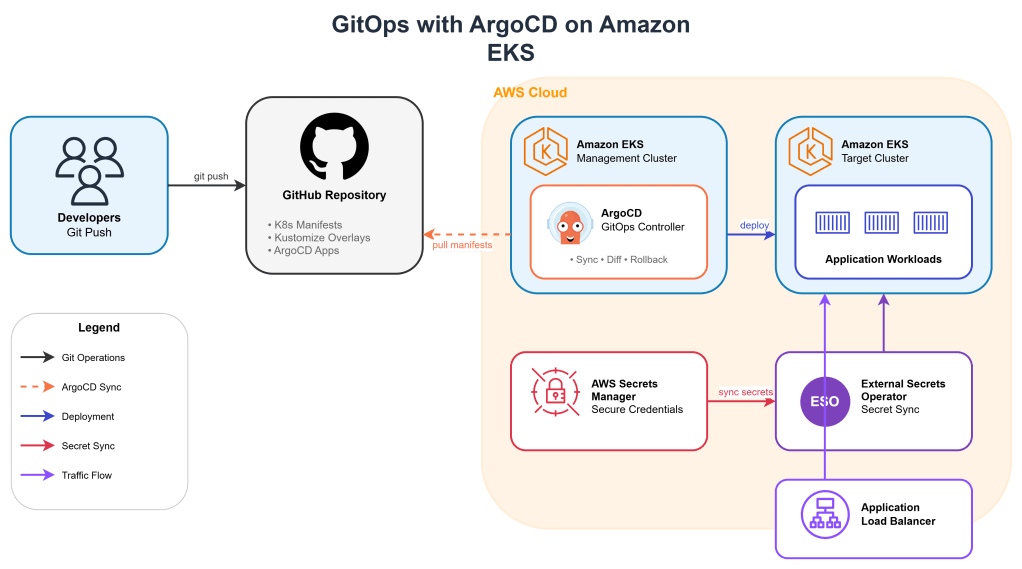
The architecture consists of:

  • Amazon EKS cluster running ArgoCD
  • GitHub repository containing Kubernetes manifests
  • AWS Secrets Manager for sensitive configuration
  • External Secrets Operator for secret synchronization
  • ApplicationSets for multi-environment deployments

Step 1: EKS Cluster Setup

First, create an EKS cluster with the necessary add-ons:

eksctl create cluster \
  --name gitops-cluster \
  --version 1.29 \
  --region us-east-1 \
  --nodegroup-name workers \
  --node-type t3.large \
  --nodes 3 \
  --nodes-min 2 \
  --nodes-max 5 \
  --managed

Enable OIDC provider for IAM Roles for Service Accounts (IRSA):

eksctl utils associate-iam-oidc-provider \
  --cluster gitops-cluster \
  --region us-east-1 \
  --approve

Step 2: Install ArgoCD

Create the ArgoCD namespace and install using the HA manifest:

kubectl create namespace argocd

kubectl apply -n argocd -f \
  https://raw.githubusercontent.com/argoproj/argo-cd/stable/manifests/ha/install.yaml

For production, configure ArgoCD with an AWS Application Load Balancer:

# argocd-server-ingress.yaml
apiVersion: networking.k8s.io/v1
kind: Ingress
metadata:
  name: argocd-server
  namespace: argocd
  annotations:
    kubernetes.io/ingress.class: alb
    alb.ingress.kubernetes.io/scheme: internet-facing
    alb.ingress.kubernetes.io/target-type: ip
    alb.ingress.kubernetes.io/certificate-arn: arn:aws:acm:us-east-1:ACCOUNT:certificate/CERT-ID
    alb.ingress.kubernetes.io/listen-ports: '[{"HTTPS":443}]'
    alb.ingress.kubernetes.io/backend-protocol: HTTPS
spec:
  rules:
  - host: argocd.example.com
    http:
      paths:
      - path: /
        pathType: Prefix
        backend:
          service:
            name: argocd-server
            port:
              number: 443

Retrieve the initial admin password:

kubectl -n argocd get secret argocd-initial-admin-secret \
  -o jsonpath="{.data.password}" | base64 -d

Base Deployment

# apps/base/deployment.yaml
apiVersion: apps/v1
kind: Deployment
metadata:
  name: api-service
spec:
  selector:
    matchLabels:
      app: api-service
  template:
    metadata:
      labels:
        app: api-service
    spec:
      serviceAccountName: api-service
      containers:
      - name: api
        image: api-service:latest
        ports:
        - containerPort: 8080
        resources:
          requests:
            cpu: 100m
            memory: 128Mi
          limits:
            cpu: 500m
            memory: 512Mi
        livenessProbe:
          httpGet:
            path: /health
            port: 8080
          initialDelaySeconds: 10
          periodSeconds: 5
        readinessProbe:
          httpGet:
            path: /ready
            port: 8080
          initialDelaySeconds: 5
          periodSeconds: 3
        env:
        - name: DB_HOST
          valueFrom:
            secretKeyRef:
              name: api-secrets
              key: db-host

Environment Overlay (Production)

apiVersion: kustomize.config.k8s.io/v1beta1
kind: Kustomization

namespace: production

resources:
- ../../base

images:
- name: api-service
  newName: 123456789.dkr.ecr.us-east-1.amazonaws.com/api-service
  newTag: v1.2.3

patches:
- path: patches/replicas.yaml

commonLabels:
  environment: production
apiVersion: apps/v1
kind: Deployment
metadata:
  name: api-service
spec:
  replicas: 5

Step 4: Secrets Management with External Secrets Operator

Never store secrets in Git. Use External Secrets Operator to synchronize from AWS Secrets Manager:

helm repo add external-secrets https://charts.external-secrets.io
helm install external-secrets external-secrets/external-secrets \
  -n external-secrets --create-namespace

Create an IAM role for the operator:

eksctl create iamserviceaccount \
  --cluster=gitops-cluster \
  --namespace=external-secrets \
  --name=external-secrets \
  --attach-policy-arn=arn:aws:iam::aws:policy/SecretsManagerReadWrite \
  --approve

Configure the SecretStore:

apiVersion: external-secrets.io/v1beta1
kind: ClusterSecretStore
metadata:
  name: aws-secrets-manager
spec:
  provider:
    aws:
      service: SecretsManager
      region: us-east-1
      auth:
        jwt:
          serviceAccountRef:
            name: external-secrets
            namespace: external-secrets

Define an ExternalSecret for your application:

apiVersion: external-secrets.io/v1beta1
kind: ExternalSecret
metadata:
  name: api-secrets
spec:
  refreshInterval: 1h
  secretStoreRef:
    kind: ClusterSecretStore
    name: aws-secrets-manager
  target:
    name: api-secrets
    creationPolicy: Owner
  data:
  - secretKey: db-host
    remoteRef:
      key: prod/api-service/database
      property: host
  - secretKey: db-password
    remoteRef:
      key: prod/api-service/database
      property: password

Step 5: ArgoCD ApplicationSet for Multi-Environment

ApplicationSets enable templated, multi-environment deployments from a single definition:

apiVersion: argoproj.io/v1alpha1
kind: ApplicationSet
metadata:
  name: api-service
  namespace: argocd
spec:
  generators:
  - list:
      elements:
      - env: dev
        cluster: https://kubernetes.default.svc
        namespace: development
      - env: staging
        cluster: https://kubernetes.default.svc
        namespace: staging
      - env: prod
        cluster: https://prod-cluster.example.com
        namespace: production
  template:
    metadata:
      name: 'api-service-{{env}}'
    spec:
      project: default
      source:
        repoURL: https://github.com/org/gitops-repo.git
        targetRevision: HEAD
        path: 'apps/overlays/{{env}}'
      destination:
        server: '{{cluster}}'
        namespace: '{{namespace}}'
      syncPolicy:
        automated:
          prune: true
          selfHeal: true
        syncOptions:
        - CreateNamespace=true
        retry:
          limit: 5
          backoff:
            duration: 5s
            factor: 2
            maxDuration: 3m

Step 6: Sync Waves and Hooks

Control deployment ordering using sync waves:

# Deploy secrets first (wave -1)
apiVersion: external-secrets.io/v1beta1
kind: ExternalSecret
metadata:
  name: api-secrets
  annotations:
    argocd.argoproj.io/sync-wave: "-1"
# ...

# Deploy ConfigMaps second (wave 0)
apiVersion: v1
kind: ConfigMap
metadata:
  name: api-config
  annotations:
    argocd.argoproj.io/sync-wave: "0"
# ...

# Deploy application third (wave 1)
apiVersion: apps/v1
kind: Deployment
metadata:
  name: api-service
  annotations:
    argocd.argoproj.io/sync-wave: "1"
# ...

Add a pre-sync hook for database migrations:

apiVersion: batch/v1
kind: Job
metadata:
  name: db-migrate
  annotations:
    argocd.argoproj.io/hook: PreSync
    argocd.argoproj.io/hook-delete-policy: HookSucceeded
spec:
  template:
    spec:
      containers:
      - name: migrate
        image: api-service:v1.2.3
        command: ["./migrate", "--apply"]
      restartPolicy: Never
  backoffLimit: 3

Step 7: Notifications and Monitoring

Configure ArgoCD notifications to Slack:

apiVersion: v1
kind: ConfigMap
metadata:
  name: argocd-notifications-cm
  namespace: argocd
data:
  service.slack: |
    token: $slack-token
  template.app-sync-status: |
    message: |
      Application {{.app.metadata.name}} sync status: {{.app.status.sync.status}}
      Health: {{.app.status.health.status}}
  trigger.on-sync-failed: |
    - when: app.status.sync.status == 'OutOfSync'
      send: [app-sync-status]
  subscriptions: |
    - recipients:
      - slack:deployments
      triggers:
      - on-sync-failed

Production Best Practices

Repository Access

Use deploy keys with read-only access:

apiVersion: v1
kind: Secret
metadata:
  name: gitops-repo
  namespace: argocd
  labels:
    argocd.argoproj.io/secret-type: repository
stringData:
  type: git
  url: git@github.com:org/gitops-repo.git
  sshPrivateKey: |
    -----BEGIN OPENSSH PRIVATE KEY-----
    ...
    -----END OPENSSH PRIVATE KEY-----

Resource Limits for ArgoCD

apiVersion: apps/v1
kind: Deployment
metadata:
  name: argocd-repo-server
  namespace: argocd
spec:
  template:
    spec:
      containers:
      - name: argocd-repo-server
        resources:
          requests:
            cpu: 500m
            memory: 512Mi
          limits:
            cpu: 2
            memory: 2Gi

RBAC Configuration

apiVersion: v1
kind: ConfigMap
metadata:
  name: argocd-rbac-cm
  namespace: argocd
data:
  policy.csv: |
    p, role:developer, applications, get, */*, allow
    p, role:developer, applications, sync, dev/*, allow
    p, role:ops, applications, *, */*, allow
    g, dev-team, role:developer
    g, ops-team, role:ops
  policy.default: role:readonly

Enjoy
Osama

Deep Dive into Oracle Kubernetes Engine Security and Networking in Production

Oracle Kubernetes Engine is often introduced as a managed Kubernetes service, but its real strength only becomes clear when you operate it in production. OKE tightly integrates with OCI networking, identity, and security services, which gives you a very different operational model compared to other managed Kubernetes platforms.

This article walks through OKE from a production perspective, focusing on security boundaries, networking design, ingress exposure, private access, and mutual TLS. The goal is not to explain Kubernetes basics, but to explain how OKE behaves when you run regulated, enterprise workloads.

Understanding the OKE Networking Model

OKE does not abstract networking away from you. Every cluster is deeply tied to OCI VCN constructs.

Core Components

An OKE cluster consists of:

  • A managed Kubernetes control plane
  • Worker nodes running in OCI subnets
  • OCI networking primitives controlling traffic flow

Key OCI resources involved:

  • Virtual Cloud Network
  • Subnets for control plane and workers
  • Network Security Groups
  • Route tables
  • OCI Load Balancers

Unlike some platforms, security in OKE is enforced at multiple layers simultaneously.

Worker Node and Pod Networking

OKE uses OCI VCN-native networking. Pods receive IPs from the subnet CIDR through the OCI CNI plugin.

What this means in practice

  • Pods are first-class citizens on the VCN
  • Pod IPs are routable within the VCN
  • Network policies and OCI NSGs both apply

Example subnet design:

VCN: 10.0.0.0/16

Worker Subnet: 10.0.10.0/24
Load Balancer Subnet: 10.0.20.0/24
Private Endpoint Subnet: 10.0.30.0/24

This design allows you to:

  • Keep workers private
  • Expose only ingress through OCI Load Balancer
  • Control east-west traffic using Kubernetes NetworkPolicies and OCI NSGs together

Security Boundaries in OKE

Security in OKE is layered by design.

Layer 1: OCI IAM and Compartments

OKE clusters live inside OCI compartments. IAM policies control:

  • Who can create or modify clusters
  • Who can access worker nodes
  • Who can manage load balancers and subnets

Example IAM policy snippet:

Allow group OKE-Admins to manage cluster-family in compartment OKE-PROD
Allow group OKE-Admins to manage virtual-network-family in compartment OKE-PROD

This separation is critical for regulated environments.

Layer 2: Network Security Groups

Network Security Groups act as virtual firewalls at the VNIC level.

Typical NSG rules:

  • Allow node-to-node communication
  • Allow ingress from load balancer subnet only
  • Block all public inbound traffic

Example inbound NSG rule:

Source: 10.0.20.0/24
Protocol: TCP
Port: 443

This ensures only the OCI Load Balancer can reach your ingress controller.

Layer 3: Kubernetes Network Policies

NetworkPolicies control pod-level traffic.

Example policy allowing traffic only from ingress namespace:

apiVersion: networking.k8s.io/v1
kind: NetworkPolicy
metadata:
  name: allow-from-ingress
  namespace: app-prod
spec:
  podSelector: {}
  ingress:
    - from:
        - namespaceSelector:
            matchLabels:
              role: ingress

This blocks all lateral movement by default.

Ingress Design in OKE

OKE integrates natively with OCI Load Balancer.

Public vs Private Ingress

You can deploy ingress in two modes:

  • Public Load Balancer
  • Internal Load Balancer

For production workloads, private ingress is strongly recommended.

Example service annotation for private ingress:

service.beta.kubernetes.io/oci-load-balancer-internal: "true"
service.beta.kubernetes.io/oci-load-balancer-subnet1: ocid1.subnet.oc1..

This ensures the load balancer has no public IP.

Private Access to the Cluster Control Plane

OKE supports private API endpoints.

When enabled:

  • The Kubernetes API is accessible only from the VCN
  • No public endpoint exists

This is critical for Zero Trust environments.

Operational impact:

  • kubectl access requires VPN, Bastion, or OCI Cloud Shell inside the VCN
  • CI/CD runners must have private connectivity

This dramatically reduces the attack surface.

Mutual TLS Inside OKE

TLS termination at ingress is not enough for sensitive workloads. Many enterprises require mTLS between services.

Typical mTLS Architecture

  • TLS termination at ingress
  • Internal mTLS between services
  • Certificate management via Vault or cert-manager

Example cert-manager issuer using OCI Vault:

apiVersion: cert-manager.io/v1
kind: ClusterIssuer
metadata:
  name: oci-vault-issuer
spec:
  vault:
    server: https://vault.oci.oraclecloud.com
    path: pki/sign/oke

Each service receives:

  • Its own certificate
  • Short-lived credentials
  • Automatic rotation

Traffic Flow Example

End-to-end request path:

  1. Client connects to OCI Load Balancer
  2. Load Balancer forwards traffic to NGINX Ingress
  3. Ingress enforces TLS and headers
  4. Service-to-service traffic uses mTLS
  5. NetworkPolicy restricts lateral movement
  6. NSGs enforce VCN-level boundaries

Every hop is authenticated and encrypted.


Observability and Security Visibility

OKE integrates with:

  • OCI Logging
  • OCI Flow Logs
  • Kubernetes audit logs

This allows:

  • Tracking ingress traffic
  • Detecting unauthorized access attempts
  • Correlating pod-level events with network flows

Regards
Osama

Basic Guide to Build a Production-Architecture on OCI

1. Why OCI for Modern Architecture?

Many architects underestimate how much OCI has matured. Today, OCI offers:

  • Low-latency networking with deterministic performance.
  • Flexible compute shapes (standard, dense I/O, high memory).
  • A Kubernetes service (OKE) with enterprise-level resilience.
  • Cloud-native storage (Block, Object, File).
  • A full security stack (Vault, Cloud Guard, WAF, IAM policies).
  • A pricing model that is often 30–50% cheaper than equivalent hyperscaler deployments.

Reference: OCI Overview
https://docs.oracle.com/en-us/iaas/Content/home.htm

2. Multi-Tier Production Architecture Overview

A typical production workload on OCI includes:

  • Network Layer: VCN, subnets, NAT, DRG, Load Balancers
  • Compute Layer: OKE, VMs, Functions
  • Data Layer: Autonomous DB, PostgreSQL, MySQL, Object Storage
  • Security Layer: OCI Vault, WAF, IAM policies
  • Observability Layer: Logging, Monitoring, Alarms, Prometheus/Grafana
  • Automation Layer: Terraform, OCI CLI, GitHub Actions/Azure DevOps

3. Networking Foundation

You start with a Virtual Cloud Network (VCN), structured in a way that isolates traffic properly:

VCN Example Layout

  • 10.10.0.0/16 — VCN Root
    • 10.10.1.0/24 — Public Subnet (Load Balancers)
    • 10.10.2.0/24 — Private Subnet (Applications / OKE Nodes)
    • 10.10.3.0/24 — DB Subnet
    • 10.10.4.0/24 — Bastion Subnet

Terraform Example

resource "oci_core_vcn" "main" {
  cidr_block = "10.10.0.0/16"
  compartment_id = var.compartment_ocid
  display_name = "prod-vcn"
}

resource "oci_core_subnet" "private_app" {
  vcn_id = oci_core_vcn.main.id
  cidr_block = "10.10.2.0/24"
  prohibit_public_ip_on_vnic = true
  display_name = "app-private-subnet"
}

Reference: OCI Networking Concepts
https://docs.oracle.com/en-us/iaas/Content/Network/Concepts/overview.htm


4. Deploying Workloads on OKE (Oracle Kubernetes Engine)

OKE is one of OCI’s strongest services due to:

  • Native integration with VCN
  • Worker nodes running inside your own subnets
  • The ability to use OCI Load Balancers or NGINX ingress
  • Strong security by default

Cluster Creation Example (CLI)

oci ce cluster create \
  --name prod-oke \
  --vcn-id ocid1.vcn.oc1... \
  --kubernetes-version "1.30.1" \
  --compartment-id <compartment_ocid>

Node Pool Example

oci ce node-pool create \
  --name prod-nodepool \
  --cluster-id <cluster_ocid> \
  --node-shape VM.Standard3.Flex \
  --node-shape-config '{"ocpus":4,"memoryInGBs":32}' \
  --subnet-ids '["<subnet_ocid>"]'

5. Adding Ingress Traffic: OCI LB + NGINX

In multi-cloud architectures (Azure, GCP, OCI), it’s common to use Cloudflare or F5 for global routing, but within OCI you typically rely on:

  • OCI Load Balancer (Layer 4/7)
  • NGINX Ingress Controller on OKE

Example: Basic Ingress for Microservices

apiVersion: networking.k8s.io/v1
kind: Ingress
metadata:
  name: payments-ingress
spec:
  ingressClassName: nginx
  rules:
  - host: payments.example.com
    http:
      paths:
      - path: /
        pathType: Prefix
        backend:
          service:
            name: payments-svc
            port:
              number: 8080

6. Secure Secrets With OCI Vault

Never store secrets in ConfigMaps or Docker images.
OCI Vault integrates tightly with:

  • Kubernetes Secrets via CSI Driver
  • Database credential rotation
  • Key management (KMS)

Example: Using OCI Vault with Kubernetes

apiVersion: v1
kind: Secret
metadata:
  name: db-secret
type: Opaque
stringData:
  username: appuser
  password: ${OCI_VAULT_SECRET_DB_PASSWORD}

7. Observability: Logging + Monitoring + Prometheus

OCI Monitoring handles metrics out of the box (CPU, memory, LB metrics, OKE metrics).
But for application-level observability, you deploy Prometheus/Grafana.

Prometheus Helm Install

helm install prometheus prometheus-community/kube-prometheus-stack \
  --namespace monitoring

Add ServiceMonitor for your applications:

apiVersion: monitoring.coreos.com/v1
kind: ServiceMonitor
metadata:
  name: payments-monitor
spec:
  selector:
    matchLabels:
      app: payments
  endpoints:
  - port: http

8. Disaster Recovery and Multi-Region Strategy

OCI provides:

  • Block Volume replication
  • Object Storage Cross-Region Replication
  • Multi-AD (Availability Domain) deployment
  • Cross-region DR using Remote Peering

Example: Autonomous DB Cross-Region DR

oci db autonomous-database create-adb-cross-region-disaster-recovery \
  --autonomous-database-id <db_ocid> \
  --disaster-recovery-region "eu-frankfurt-1"

9. CI/CD on OCI Using GitHub Actions

Example pipeline to build a Docker image and deploy to OKE:

name: Deploy to OKE

on:
  push:
    branches: [ "main" ]

jobs:
  build-deploy:
    runs-on: ubuntu-latest
    steps:
    - uses: actions/checkout@v3

    - name: Build Docker Image
      run: docker build -t myapp:${{ github.sha }} .

    - name: OCI CLI Login
      run: |
        oci session authenticate

    - name: Push Image to OCIR
      run: |
        docker tag myapp:${{ github.sha }} \
        iad.ocir.io/tenancy/myapp:${{ github.sha }}
        docker push iad.ocir.io/tenancy/myapp:${{ github.sha }}

    - name: Deploy to OKE
      run: |
        kubectl set image deployment/myapp myapp=iad.ocir.io/tenancy/myapp:${{ github.sha }}

The Final Architecture will look like this

Building a Fully Private, Zero-Trust API Platform on OCI Using API Gateway, Private Endpoints, and VCN Integration

1. Why a Private API Gateway Matters

A typical API Gateway sits at the edge and exposes public REST endpoints.
But some environments require:

  • APIs callable only from internal systems
  • Backend microservices running in private subnets
  • Zero inbound public access
  • Authentication and authorization enforced at gateway level
  • Isolation between dev, test, pprd, prod

These requirements push you toward a private deployment using Private Endpoint Mode.

This means:

  • The API Gateway receives traffic only from inside your VCN
  • Clients must be inside the private network (on-prem, FastConnect, VPN, or private OCI services)
  • The entire flow stays within the private topology

2. Architecture Overview

A private API Gateway requires several OCI components working together:

  • API Gateway (Private Endpoint Mode)
  • VCN with private subnets
  • Service Gateway for private object storage access
  • Private Load Balancer for backend microservices
  • IAM policies controlling which groups can deploy APIs
  • VCN routing configuration to direct requests correctly
  • Optional WAF (private) for east-west inspection inside the VCN

The call flow:

  1. A client inside your VCN sends a request to the Gateway’s private IP.
  2. The Gateway handles authentication, request validation, and OCI IAM signature checks.
  3. The Gateway forwards traffic to a backend private LB or private OKE services.
  4. Logs go privately to Logging service via the service gateway.

All traffic stays private. No NAT, no public egress.

3. Deploying the Gateway in Private Endpoint Mode

When creating the API Gateway:

  • Choose Private Gateway Type
  • Select the VCN and Private Subnet
  • Ensure the subnet has no internet gateway
  • Disable public routing

You will receive a private IP instead of a public endpoint.

Example shape:

Private Gateway IP: 10.0.4.15
Subnet: app-private-subnet-1
VCN CIDR: 10.0.0.0/16

Only systems inside the 10.x.x.x network (or connected networks) can call it.

4. Routing APIs to Private Microservices

Your backend might be:

  • A microservice running in OKE
  • A VM instance
  • A container on Container Instances
  • A private load balancer
  • A function in a private subnet
  • An internal Oracle DB REST endpoint

For reliable routing:

a. Attach a Private Load Balancer

It’s best practice to put microservices behind an internal load balancer.

Example LB private IP: 10.0.20.10

b. Add Route Table Entries

Ensure the subnet hosting the API Gateway can route to the backend:

Destination: 10.0.20.0/24
Target: local

If OKE is involved, ensure proper security list or NSG rules:

  • Allow port 80 or 443 from Gateway subnet to LB subnet
  • Allow health checks

5. Creating an API Deployment (Technical Example)

Here is a minimal private deployment using a backend running at internal LB:

Deployment specification

{
  "routes": [
    {
      "path": "/v1/customer",
      "methods": ["GET"],
      "backend": {
        "type": "HTTP_BACKEND",
        "url": "http://10.0.20.10:8080/api/customer"
      }
    }
  ]
}

Upload this JSON file and create a new deployment under your private API Gateway.

The Gateway privately calls 10.0.20.10 using internal routing.

6. Adding Authentication and Authorization

OCI API Gateway supports:

  • OCI IAM Authorization (for IAM-authenticated clients)
  • JWT validation (OIDC tokens)
  • Custom authorizers using Functions

Example: validate a token from an internal identity provider.

"authentication": {
  "type": "JWT_AUTHENTICATION",
  "tokenHeader": "Authorization",
  "jwksUri": "https://id.internal.example.com/.well-known/jwks.json"
}

This ensures zero-trust by requiring token validation even inside the private network.

7. Logging, Metrics, and Troubleshooting 100 Percent Privately

Because we are running in private-only mode, logs and metrics must also stay private.

Use:

  • Service Gateway for Logging service
  • VCN Flow Logs for traffic inspection
  • WAF (private deployment) if deeper L7 filtering is needed

Enable Access Logs:

Enable access logs: Yes
Retention: 90 days

You will see logs in the Logging service with no public egress.

8. Common Mistakes and How to Avoid Them

Route table missing entries

Most issues come from mismatched route tables between:

  • Gateway subnet
  • Backend subnet
  • OKE node pools

Security Lists or NSGs blocking traffic

Ensure the backend allows inbound traffic from the Gateway subnet.

Incorrect backend URL

Use private IP or private LB hostname.

Backend certificate errors

If using HTTPS internally, ensure trusted CA is loaded on Gateway.

Regards

Osama

Building a Real-Time Data Enrichment & Inference Pipeline on AWS Using Kinesis, Lambda, DynamoDB, and SageMaker

Modern cloud applications increasingly depend on real-time processing, especially when dealing with fraud detection, personalization, IoT telemetry, or operational monitoring.
In this post, we’ll build a fully functional AWS pipeline that:

  • Streams events using Amazon Kinesis
  • Enriches and transforms them via AWS Lambda
  • Stores real-time feature data in Amazon DynamoDB
  • Performs machine-learning inference using a SageMaker Endpoint

1. Architecture Overview

2. Step-By-Step Pipeline Build


2.1. Create a Kinesis Data Stream

aws kinesis create-stream \
  --stream-name RealtimeEvents \
  --shard-count 2 \
  --region us-east-1

This stream will accept incoming events from your apps, IoT devices, or microservices.


2.2. DynamoDB Table for Real-Time Features

aws dynamodb create-table \
  --table-name UserFeatureStore \
  --attribute-definitions AttributeName=userId,AttributeType=S \
  --key-schema AttributeName=userId,KeyType=HASH \
  --billing-mode PAY_PER_REQUEST \
  --region us-east-1

This table holds live user features, updated every time an event arrives.


2.3. Lambda Function (Real-Time Data Enrichment)

This Lambda:

  • Reads events from Kinesis
  • Computes simple features (e.g., last event time, rolling count)
  • Saves enriched data to DynamoDB
import json
import boto3
from datetime import datetime, timedelta

ddb = boto3.resource("dynamodb")
table = ddb.Table("UserFeatureStore")

def lambda_handler(event, context):

    for record in event["Records"]:
        payload = json.loads(record["kinesis"]["data"])

        user = payload["userId"]
        metric = payload["metric"]
        ts = datetime.fromisoformat(payload["timestamp"])

        # Fetch old features
        old = table.get_item(Key={"userId": user}).get("Item", {})

        last_ts = old.get("lastTimestamp")
        count = old.get("count", 0)

        # Update rolling 5-minute count
        if last_ts:
            prev_ts = datetime.fromisoformat(last_ts)
            if ts - prev_ts < timedelta(minutes=5):
                count += 1
            else:
                count = 1
        else:
            count = 1

        # Save new enriched features
        table.put_item(Item={
            "userId": user,
            "lastTimestamp": ts.isoformat(),
            "count": count,
            "lastMetric": metric
        })

    return {"status": "ok"}

Attach the Lambda to the Kinesis stream.


2.4. Creating a SageMaker Endpoint for Inference

Train your model offline, then deploy it:

aws sagemaker create-endpoint-config \
  --endpoint-config-name RealtimeInferenceConfig \
  --production-variants VariantName=AllInOne,ModelName=MyInferenceModel,InitialInstanceCount=1,InstanceType=ml.m5.large

aws sagemaker create-endpoint \
  --endpoint-name RealtimeInference \
  --endpoint-config-name RealtimeInferenceConfig


2.5. API Layer Performing Live Inference

Your application now requests predictions like this:

import boto3
import json

runtime = boto3.client("sagemaker-runtime")
ddb = boto3.resource("dynamodb").Table("UserFeatureStore")

def predict(user_id, extra_input):

    user_features = ddb.get_item(Key={"userId": user_id}).get("Item")

    payload = {
        "userId": user_id,
        "features": user_features,
        "input": extra_input
    }

    response = runtime.invoke_endpoint(
        EndpointName="RealtimeInference",
        ContentType="application/json",
        Body=json.dumps(payload)
    )

    return json.loads(response["Body"].read())

This combines live enriched features + model inference for maximum accuracy.


3. Production Considerations

Performance

  • Enable Lambda concurrency
  • Use DynamoDB DAX caching
  • Use Kinesis Enhanced Fan-Out for high throughput

Security

  • Use IAM roles with least privilege
  • Encrypt Kinesis, Lambda, DynamoDB, and SageMaker with KMS

Monitoring

  • CloudWatch Metrics
  • CloudWatch Logs Insights queries
  • DynamoDB capacity alarms
  • SageMaker Model error monitoring

Cost Optimization

  • Use PAY_PER_REQUEST DynamoDB
  • Use Lambda Power Tuning
  • Scale SageMaker endpoints with autoscaling

Implementing a Real-Time Anomaly Detection Pipeline on OCI Using Streaming Data, Oracle Autonomous Database & ML

Detecting unusual patterns in real time is critical to preventing outages, catching fraud, ensuring SLA compliance, and maintaining high-quality user experiences.
In this post, we build a real working pipeline on OCI that:

  • Ingests streaming data
  • Computes features in near-real time
  • Stores results in Autonomous Database
  • Runs anomaly detection logic
  • Sends alerts and exposes dashboards

This guide contains every technical step, including:
Streaming → Function → Autonomous DB → Anomaly Logic → Notifications → Dashboards

1. Architecture Overview

Components Used

  • OCI Streaming
  • OCI Functions
  • Oracle Autonomous Database
  • DBMS_SCHEDULER for anomaly detection job
  • OCI Notifications
  • Oracle Analytics Cloud / Grafana

2. Step-by-Step Implementation


2.1 Create OCI Streaming Stream

oci streaming stream create \
  --compartment-id $COMPARTMENT_OCID \
  --display-name "anomaly-events-stream" \
  --partitions 3

2.2 Autonomous Database Table

CREATE TABLE raw_events (
  event_id       VARCHAR2(50),
  event_time     TIMESTAMP,
  metric_value   NUMBER,
  feature1       NUMBER,
  feature2       NUMBER,
  processed_flag CHAR(1) DEFAULT 'N',
  anomaly_flag   CHAR(1) DEFAULT 'N',
  CONSTRAINT pk_raw_events PRIMARY KEY(event_id)
);

2.3 OCI Function – Feature Extraction

func.py:

import oci
import cx_Oracle
import json
from datetime import datetime

def handler(ctx, data: bytes=None):
    event = json.loads(data.decode('utf-8'))

    evt_id = event['id']
    evt_time = datetime.fromisoformat(event['time'])
    value = event['metric']

    # DB Connection
    conn = cx_Oracle.connect(user='USER', password='PWD', dsn='dsn')
    cur = conn.cursor()

    # Fetch previous value if exists
    cur.execute("SELECT metric_value FROM raw_events WHERE event_id=:1", (evt_id,))
    prev = cur.fetchone()
    prev_val = prev[0] if prev else 1.0

    # Compute features
    feature1 = value - prev_val
    feature2 = value / prev_val

    # Insert new event
    cur.execute("""
        INSERT INTO raw_events(event_id, event_time, metric_value, feature1, feature2)
        VALUES(:1, :2, :3, :4, :5)
    """, (evt_id, evt_time, value, feature1, feature2))

    conn.commit()
    cur.close()
    conn.close()

    return "ok"

Deploy the function and attach the streaming trigger.


2.4 Anomaly Detection Job (DBMS_SCHEDULER)

BEGIN
  FOR rec IN (
    SELECT event_id, feature1
    FROM raw_events
    WHERE processed_flag = 'N'
  ) LOOP
    DECLARE
      meanv NUMBER;
      stdv  NUMBER;
      zscore NUMBER;
    BEGIN
      SELECT AVG(feature1), STDDEV(feature1) INTO meanv, stdv FROM raw_events;

      zscore := (rec.feature1 - meanv) / NULLIF(stdv, 0);

      IF ABS(zscore) > 3 THEN
        UPDATE raw_events SET anomaly_flag='Y' WHERE event_id=rec.event_id;
      END IF;

      UPDATE raw_events SET processed_flag='Y' WHERE event_id=rec.event_id;
    END;
  END LOOP;
END;

Schedule this to run every 2 minutes:

BEGIN
  DBMS_SCHEDULER.CREATE_JOB (
    job_name        => 'ANOMALY_JOB',
    job_type        => 'PLSQL_BLOCK',
    job_action      => 'BEGIN anomaly_detection_proc; END;',
    repeat_interval => 'FREQ=MINUTELY;INTERVAL=2;',
    enabled         => TRUE
  );
END;


2.5 Notifications

oci ons topic create \
  --compartment-id $COMPARTMENT_OCID \
  --name "AnomalyAlerts"

In the DB, add a trigger:

CREATE OR REPLACE TRIGGER notify_anomaly
AFTER UPDATE ON raw_events
FOR EACH ROW
WHEN (NEW.anomaly_flag='Y' AND OLD.anomaly_flag='N')
BEGIN
  DBMS_OUTPUT.PUT_LINE('Anomaly detected for event ' || :NEW.event_id);
END;
/


2.6 Dashboarding

You may use:

  • Oracle Analytics Cloud (OAC)
  • Grafana + ADW Integration
  • Any BI tool with SQL

Example Query:

SELECT event_time, metric_value, anomaly_flag 
FROM raw_events
ORDER BY event_time;

2. Terraform + OCI CLI Script Bundle

Terraform – Streaming + Function + Policies

resource "oci_streaming_stream" "anomaly" {
  name           = "anomaly-events-stream"
  partitions     = 3
  compartment_id = var.compartment_id
}

resource "oci_functions_application" "anomaly_app" {
  compartment_id = var.compartment_id
  display_name   = "anomaly-function-app"
  subnet_ids     = var.subnets
}

Terraform Notification Topic

resource "oci_ons_notification_topic" "anomaly" {
  compartment_id = var.compartment_id
  name           = "AnomalyAlerts"
}

CLI Insert Test Events

oci streaming stream message put \
  --stream-id $STREAM_OCID \
  --messages '[{"key":"1","value":"{\"id\":\"1\",\"time\":\"2025-01-01T10:00:00\",\"metric\":58}"}]'

Deploying Real-Time Feature Store on Amazon SageMaker Feature Store with Amazon Kinesis Data Streams & Amazon DynamoDB for Low-Latency ML Inference

Modern ML inference often depends on up-to-date features (customer behaviour, session counts, recent events) that need to be available in low-latency operations. In this article you’ll learn how to build a real-time feature store on AWS using:

  • Amazon Kinesis Data Streams for streaming events
  • AWS Lambda for processing and feature computation
  • Amazon DynamoDB (or SageMaker Feature Store) for storage of feature vectors
  • Amazon SageMaker Endpoint for low-latency inference
    You’ll see end-to-end code snippets and architecture guidance so you can implement this in your environment.

1. Architecture Overview

The pipeline works like this:

  1. Front-end/app produces events (e.g., user click, transaction) → published to Kinesis.
  2. A Lambda function consumes from Kinesis, computes derived features (for example: rolling window counts, recency, session features).
  3. The Lambda writes/updates these features into a DynamoDB table (or directly into SageMaker Feature Store).
  4. When a request arrives for inference, the application fetches the current feature set from DynamoDB (or Feature Store) and calls a SageMaker endpoint.
  5. Optionally, after inference you can stream feedback events for model refinement.

This architecture provides real-time feature freshness and low-latencyinference.

2. Setup & Implementation

2.1 Create the Kinesis data stream

aws kinesis create-stream \
  --stream-name UserEventsStream \
  --shard-count 2 \
  --region us-east-1

2.2 Create DynamoDB table for features

aws dynamodb create-table \
  --table-name RealTimeFeatures \
  --attribute-definitions AttributeName=userId,AttributeType=S \
  --key-schema AttributeName=userId,KeyType=HASH \
  --billing-mode PAY_PER_REQUEST \
  --region us-east-1

2.3 Lambda function to compute features

Here is a Python snippet (using boto3) which will be triggered by Kinesis:

import json
import boto3
from datetime import datetime, timedelta

dynamo = boto3.resource('dynamodb', region_name='us-east-1')
table = dynamo.Table('RealTimeFeatures')

def lambda_handler(event, context):
    for record in event['Records']:
        payload = json.loads(record['kinesis']['data'])
        user_id = payload['userId']
        event_type = payload['eventType']
        ts = datetime.fromisoformat(payload['timestamp'])

        # Fetch current features
        resp = table.get_item(Key={'userId': user_id})
        item = resp.get('Item', {})
        
        # Derive features: e.g., event_count_last_5min, last_event_type
        last_update = item.get('lastUpdate', ts.isoformat())
        count_5min = item.get('count5min', 0)
        then = datetime.fromisoformat(last_update)
        if ts - then < timedelta(minutes=5):
            count_5min += 1
        else:
            count_5min = 1
        
        # Update feature item
        new_item = {
            'userId': user_id,
            'lastEventType': event_type,
            'count5min': count_5min,
            'lastUpdate': ts.isoformat()
        }
        table.put_item(Item=new_item)
    return {'statusCode': 200}

2.4 Deploy and connect Lambda to Kinesis

  • Create Lambda function in AWS console or via CLI.
  • Add Kinesis stream UserEventsStream as event source with batch size and start position = TRIM_HORIZON.
  • Assign IAM role allowing kinesis:DescribeStream, kinesis:GetRecords, dynamodb:PutItem, etc.

2.5 Prepare SageMaker endpoint for inference

  • Train model offline (outside scope here) with features stored in training dataset matching real-time features.
  • Deploy model as endpoint, e.g., arn:aws:sagemaker:us-east-1:123456789012:endpoint/RealtimeModel.
  • In your application code call endpoint by fetching features from DynamoDB then invoking endpoint:
import boto3
sagemaker = boto3.client('sagemaker-runtime', region_name='us-east-1')
dynamo = boto3.resource('dynamodb', region_name='us-east-1')
table = dynamo.Table('RealTimeFeatures')

def get_prediction(user_id, input_payload):
    resp = table.get_item(Key={'userId': user_id})
    features = resp.get('Item')
    payload = {
        'features': features,
        'input': input_payload
    }
    response = sagemaker.invoke_endpoint(
        EndpointName='RealtimeModel',
        ContentType='application/json',
        Body=json.dumps(payload)
    )
    result = json.loads(response['Body'].read().decode())
    return result

Conclusion

In this blog post you learned how to build a real-time feature store on AWS: streaming event ingestion with Kinesis, real-time feature computation with Lambda, storage in DynamoDB, and serving via SageMaker. You got specific code examples and operational considerations for production readiness. With this setup, you’re well-positioned to deliver low-latency, ML-powered applications.

Enjoy the cloud
Osama

Automating Cost-Governance Workflows in Oracle Cloud Infrastructure (OCI) with APIs & Infrastructure as Code

Introduction

Cloud cost management isn’t just about checking invoices once a month — it’s about embedding automation, governance, and insights into your infrastructure so that your engineering teams make cost-aware decisions in real time. With OCI, you have native tools (Cost Analysis, Usage APIs, Budgets, etc.) and infrastructure-as-code (IaC) tooling that can help turn cost governance from an after-thought into a proactive part of your DevOps workflow.

In this article you’ll learn how to:

  1. Extract usage and cost data via the OCI Usage API / Cost Reports.
  2. Define IaC workflows (e.g., with Terraform) that enforce budget/usage guardrails.
  3. Build a simple example where you automatically tag resources, monitor spend by tag, and alert/correct when thresholds are exceeded.
  4. Discuss best practices, pitfalls, and governance recommendations for embedding FinOps into OCI operations.

1. Understanding OCI Cost & Usage Data

What data is available?

OCI provides several cost/usage-data mechanisms:

  • The Cost Analysis tool in the console allows you to view trends by service, compartment, tag, etc. Oracle Docs+1
  • The Usage/Cost Reports (CSV format) which you can download or programmatically access via the Usage API. Oracle Docs+1
  • The Usage API (CLI/SDK) to query usage-and-cost programmatically. Oracle Docs+1

Why this matters

By surfacing cost data at a resource, compartment, or tag level, teams can answer questions like:

  • “Which tag values are consuming cost disproportionately?”
  • “Which compartments have heavy spend growth month-over-month?”
  • “Which services (Compute, Storage, Database, etc.) are the highest spenders and require optimization?”

Example: Downloading a cost report via CLI

Here’s a Python/CLI snippet that shows how to download a cost-report CSV from your tenancy:

oci os object get \
  --namespace-name bling \
  --bucket-name <your-tenancy-OCID> \
  --name reports/usage-csv/<report_name>.csv.gz \
  --file local_report.csv.gz
import oci
config = oci.config.from_file("~/.oci/config", "DEFAULT")
os_client = oci.object_storage.ObjectStorageClient(config)
namespace = "bling"
bucket = "<your-tenancy-OCID>"
object_name = "reports/usage-csv/2025-10-19-report-00001.csv.gz"

resp = os_client.get_object(namespace, bucket, object_name)
with open("report-2025-10-19.csv.gz", "wb") as f:
    for chunk in resp.data.raw.stream(1024*1024, decode_content=False):
        f.write(chunk)

2. Defining Cost-Governance Workflows with IaC

Once you have data flowing in, you can enforce guardrails and automate actions. Here’s one example pattern.

a) Enforce tagging rules

Ensure that every resource created in a compartment has a cost_center tag (for example). You can do this via policy + IaC.

# Example Terraform policy for tagging requirement
resource "oci_identity_tag_namespace" "governance" {
  compartment_id = var.compartment_id
  display_name   = "governance_tags"
  is_retired     = false
}

resource "oci_identity_tag_definition" "cost_center" {
  compartment_id = var.compartment_id
  tag_namespace_id = oci_identity_tag_namespace.governance.id
  name            = "cost_center"
  description     = "Cost Center code for FinOps tracking"
  is_retired      = false
}

You can then add an IAM policy that prevents creation of resources if the tag isn’t applied (or fails to meet allowed values). For example:

Allow group ComputeAdmins to manage instance-family in compartment Prod
  where request.operation = “CreateInstance”
  and request.resource.tag.cost_center is not null

b) Monitor vs budget

Use the Usage API or Cost Reports to pull monthly spend per tag, then compare against defined budgets. If thresholds are exceeded, trigger an alert or remediation.

Here’s an example Python pseudo-code:

from datetime import datetime, timedelta
import oci

config = oci.config.from_file()
usage_client = oci.usage_api.UsageapiClient(config)

today = datetime.utcnow()
start = today.replace(day=1)
end = today

req = oci.usage_api.models.RequestSummarizedUsagesDetails(
    tenant_id = config["tenancy"],
    time_usage_started = start,
    time_usage_ended   = end,
    granularity        = "DAILY",
    group_by           = ["tag.cost_center"]
)

resp = usage_client.request_summarized_usages(req)
for item in resp.data.items:
    tag_value = item.tag_map.get("cost_center", "untagged")
    cost     = float(item.computed_amount or 0)
    print(f"Cost for cost_center={tag_value}: {cost}")

    if cost > budget_for(tag_value):
        send_alert(tag_value, cost)
        take_remediation(tag_value)

c) Automated remediation

Remediation could mean:

  • Auto-shut down non-production instances in compartments after hours.
  • Resize or terminate idle resources.
  • Notify owners of over-spend via email/Slack.

Terraform, OCI Functions and Event-Service can help orchestrate that. For example, set up an Event when “cost by compartment exceeds X” → invoke Function → tag resources with “cost_alerted” → optional shutdown.

3. Putting It All Together

Here is a step-by-step scenario:

  1. Define budget categories – e.g., cost_center codes: CC-101, CC-202, CC-303.
  2. Tag resources on creation – via policy/IaC ensure all resources include cost_center tag with one of those codes.
  3. Collect cost data – using Usage API daily, group by tag.cost_center.
  4. Evaluate current spend vs budget – for each code, compare cumulative cost for current month against budget.
  5. If over budget – then:
    • send an alert to the team (via SNS, email, Slack)
    • optionally trigger remediation: e.g., stop non-critical compute in that cost center’s compartments.
  6. Dashboard & visibility – load cost data into a BI tool (could be OCI Analytics Cloud or Oracle Analytics) with trends, forecasts, anomaly detection. Use the “Show cost” in OCI Ops Insights to view usage & forecast cost. Oracle Docs
  7. Continuous improvement – right-size instances, pause dev/test at night, switch to cheaper shapes or reserved/commit models (depending on your discount model). See OCI best practice guide for optimizing cost. Oracle Docs

Example snippet – alerting logic in CLI

# example command to get summarized usage for last 7 days
oci usage-api request-summarized-usages \
  --tenant-id $TENANCY_OCID \
  --time-usage-started $(date -u -d '-7 days' +%Y-%m-%dT00:00:00Z) \
  --time-usage-ended   $(date -u +%Y-%m-%dT00:00:00Z) \
  --granularity DAILY \
  --group-by "tag.cost_center" \
  --query "data.items[?tagMap.cost_center=='CC-101'].computedAmount" \
  --raw-output

Enjoy the OCI
Osama

Building a Real-Time Recommendation Engine on Oracle Cloud Infrastructure (OCI) Using Generative AI & Streaming

Introduction

In many modern applications — e-commerce, media platforms, SaaS services — providing real-time personalized recommendations is a key differentiator. With OCI’s streaming, AI/ML and serverless capabilities you can build a recommendation engine that:

  • Ingests user events (clicks, views, purchases) in real time
  • Applies a generative-AI model (or fine-tuned model) to generate suggestions
  • Stores, serves, and updates recommendations frequently
  • Enables feedback loop to refine model based on real usage

In this article you’ll learn how to:

  1. Set up a streaming pipeline using OCI Streaming Service to ingest user events.
  2. Use OCI Data Science or OCI AI Services + a generative model (e.g., GPT-style) to produce recommendation outputs.
  3. Build a serving layer to deliver recommendations (via OCI Functions + API Gateway).
  4. Create the feedback loop — capturing user interactions, updating model or embeddings, automating retraining.
  5. Walk through code snippets, architectural decisions, best practices and pitfalls.

1. Architecture Overview

Here’s a high-level architecture for our recommendation engine:

  • Event Ingestion: User activities → publish to OCI Streaming (Kafka-compatible)
  • Processing Layer: A consumer application (OCI Functions or Data Flow) reads events, preprocesses, enriches with user/profile/context data (from Autonomous DB or NoSQL).
  • Model Layer: A generative model (e.g., fine-tuned GPT or embedding-based recommender) inside OCI Data Science. It takes context + user history → produces N recommendations.
  • Serving Layer: OCI API Gateway + OCI Functions deliver recommendations to front-end or mobile apps.
  • Feedback Loop: User clicks or ignores recommendations → events fed back into streaming topic → periodic retraining/refinement of model or embedding space.
  • Storage / Feature Store: Use Autonomous NoSQL DB or Autonomous Database for storing user profiles, item embeddings, transaction history.

2. Setting Up Streaming Ingestion

Create an OCI Streaming topic

oci streaming stream create \
  --compartment-id $COMPARTMENT_OCID \
  --display-name "user-event-stream" \
  --partitions 4

Produce events (example with Python)

import oci
from oci.streaming import StreamClient
from oci.streaming.models import PutMessagesDetails, Message

config = oci.config.from_file()
stream_client = StreamClient(config)
stream_id = "<your_stream_OCID>"

def send_event(user_id, item_id, event_type, timestamp):
    msg = Message(value=f"{user_id},{item_id},{event_type},{timestamp}")
    resp = stream_client.put_messages(
        put_messages_details=PutMessagesDetails(
            stream_id=stream_id,
            messages=[msg]
        )
    )
    return resp

# Example
send_event("U123", "I456", "view", "2025-10-19T10:15:00Z")

3. Model Layer: Generative/Embedding-Based Recommendations

Option A: Embedding + similarity lookup

We pre-compute embeddings for users and items (e.g., using a transformer or collaborative model) and store them in a vector database (or NoSQL). When a new event arrives, we update the user embedding (incrementally) and compute top-K similar items.

Option B: Fine-tuned generative model

We fine-tune a GPT-style model on historical user → recommendation sequences so that given “User U123 last 5 items: I234, I456, I890… context: browsing category Sports” we get suggestions like “I333, I777, I222”.

Example snippet using OCI Data Science and Python

import oci
# assume model endpoint is deployed
from some_sdk import RecommendationModelClient  

config = oci.config.from_file()
model_client = RecommendationModelClient(config)
endpoint = "<model_endpoint_url>"

def get_recommendations(user_id, recent_items, context, top_k=5):
    prompt = f"""User: {user_id}
RecentItems: {','.join(recent_items)}
Context: {context}
Provide {top_k} item IDs with reasons:"""
    response = model_client.predict(endpoint, prompt)
    recommended = response['recommendations']
    return recommended

# example
recs = get_recommendations("U123", ["I234","I456","I890"], "Looking for running shoes", 5)
print(recs)

Model deployment

  • Train/fine-tune in OCI Data Science environment
  • Deploy as a real-time endpoint (OCI Data Science Model Deployment)
  • Or optionally use OCI Functions for low-latency, light-weight inference

4. Serving Layer & Feedback Loop

Serving via API Gateway + Functions

  • Create an OCI Function getRecommendations that takes user_id & context and returns recommendations by calling the model endpoint or embedding lookup
  • Expose via OCI API Gateway for external apps

Feedback capture

  • After the user sees recommendations and either clicks, ignores or purchases, capture that as event rec_click, rec_ignore, purchase and publish it back to the streaming topic
  • Use this feedback to:
    • Incrementally update user embedding
    • Record reinforcement signal for later batch retraining

Scheduled retraining / embedding update

  • Use OCI Data Science scheduled jobs or Data Flow to run nightly or weekly batch jobs: aggregate events, update embeddings, fine-tune model
  • Example pseudo-code:
from datetime import datetime, timedelta
import pandas as pd
# fetch events last 7 days
events = load_events(start=datetime.utcnow()-timedelta(days=7))
# update embeddings, retrain model

Conclusion

Building a real-time recommendation engine on OCI, combining streaming ingestion, generative AI or embedding-based models, and serverless serving, enables you to deliver personalized experiences at scale. By capturing user behaviour in real time, serving timely recommendations, and closing the feedback loop, you shift from static “top N” lists to dynamic, context-aware suggestions. With careful architecture, you can deliver high performance, relevance, and scalability.


Power of the OCI AI
Enjoy
Osama

Advanced OCI Cost Management Resource Optimization and Predictive Budget Control

Cloud cost management has evolved from simple monitoring to sophisticated FinOps practices that combine financial accountability with operational efficiency. Oracle Cloud Infrastructure provides powerful cost management capabilities that, when combined with intelligent automation, enable organizations to optimize spending while maintaining performance and availability. This comprehensive guide explores advanced cost optimization strategies, predictive analytics, and automated governance frameworks for enterprise OCI environments.

FinOps Framework and OCI Cost Architecture

Financial Operations (FinOps) represents a cultural shift where engineering, finance, and operations teams collaborate to maximize cloud value. OCI’s cost management architecture supports this collaboration through comprehensive billing analytics, resource tagging strategies, and automated policy enforcement mechanisms.

The cost management ecosystem integrates multiple data sources including usage metrics, billing information, and performance indicators to provide holistic visibility into cloud spending patterns. Unlike traditional cost tracking approaches, modern FinOps implementations use machine learning algorithms to predict future costs and recommend optimization actions proactively.

OCI’s native cost management tools include detailed billing analytics, budget controls with automated alerts, and resource usage tracking at granular levels. The platform supports advanced tagging strategies that enable cost allocation across business units, projects, and environments while maintaining operational flexibility.

Resource lifecycle management becomes critical for cost optimization, with automated policies that right-size instances, schedule non-production workloads, and implement tiered storage strategies based on access patterns and business requirements.

Intelligent Cost Analytics and Forecasting

Advanced cost analytics goes beyond simple billing reports to provide predictive insights and optimization recommendations. Machine learning models analyze historical usage patterns, seasonal variations, and growth trends to forecast future spending with high accuracy.

Anomaly detection algorithms identify unusual spending patterns that may indicate configuration drift, unauthorized resource creation, or inefficient resource utilization. These systems can detect cost anomalies within hours rather than waiting for monthly billing cycles.

Cost attribution models enable accurate allocation of shared resources across business units while maintaining transparency in cross-functional projects. Advanced algorithms can apportion costs for shared networking, storage, and security services based on actual usage metrics rather than static allocation formulas.

Predictive scaling models combine cost forecasting with performance requirements to recommend optimal resource configurations that minimize costs while meeting service level objectives.

Production Implementation with Automated Optimization

Here’s a comprehensive implementation of intelligent cost management with automated optimization and predictive analytics:

Infrastructure Cost Monitoring and Optimization Framework

#!/usr/bin/env python3
"""
Advanced OCI Cost Management and FinOps Automation Platform
Provides intelligent cost optimization, predictive analytics, and automated
governance for enterprise Oracle Cloud Infrastructure environments.
"""

import oci
import pandas as pd
import numpy as np
from datetime import datetime, timedelta
from typing import Dict, List, Tuple, Optional, Any
from dataclasses import dataclass, field
from enum import Enum
import logging
import asyncio
import json
import smtplib
from email.mime.text import MIMEText
from email.mime.multipart import MIMEMultipart
from email.mime.base import MIMEBase
from email import encoders
import matplotlib.pyplot as plt
import seaborn as sns
from sklearn.ensemble import IsolationForest
from sklearn.linear_model import LinearRegression
from sklearn.preprocessing import StandardScaler
import warnings
warnings.filterwarnings('ignore')

# Configure logging
logging.basicConfig(
    level=logging.INFO,
    format='%(asctime)s - %(name)s - %(levelname)s - %(message)s'
)
logger = logging.getLogger(__name__)

class CostSeverity(Enum):
    LOW = "low"
    MEDIUM = "medium"
    HIGH = "high"
    CRITICAL = "critical"

class OptimizationAction(Enum):
    RIGHT_SIZE = "right_size"
    SCHEDULE = "schedule"
    MIGRATE_STORAGE = "migrate_storage"
    TERMINATE = "terminate"
    UPGRADE_COMMITMENT = "upgrade_commitment"

@dataclass
class CostAnomaly:
    """Container for cost anomaly detection results"""
    resource_id: str
    resource_type: str
    resource_name: str
    expected_cost: float
    actual_cost: float
    anomaly_score: float
    severity: CostSeverity
    detected_at: datetime
    description: str
    recommended_action: OptimizationAction
    potential_savings: float = 0.0

@dataclass
class OptimizationRecommendation:
    """Container for cost optimization recommendations"""
    resource_id: str
    resource_type: str
    current_config: Dict[str, Any]
    recommended_config: Dict[str, Any]
    current_monthly_cost: float
    projected_monthly_cost: float
    potential_savings: float
    confidence_score: float
    implementation_effort: str
    risk_level: str
    business_impact: str

@dataclass
class BudgetAlert:
    """Container for budget alert information"""
    budget_name: str
    current_spend: float
    budget_amount: float
    utilization_percentage: float
    forecast_spend: float
    days_remaining: int
    severity: CostSeverity
    recommendations: List[str]

class OCICostOptimizer:
    def __init__(self, config_file: str = 'cost_config.yaml'):
        """Initialize the cost optimization system"""
        self.config = self._load_config(config_file)
        self.signer = oci.auth.signers.get_resource_principals_signer()
        
        # Initialize OCI clients
        self.usage_client = oci.usage_api.UsageapiClient({}, signer=self.signer)
        self.compute_client = oci.core.ComputeClient({}, signer=self.signer)
        self.network_client = oci.core.VirtualNetworkClient({}, signer=self.signer)
        self.storage_client = oci.core.BlockstorageClient({}, signer=self.signer)
        self.monitoring_client = oci.monitoring.MonitoringClient({}, signer=self.signer)
        self.budgets_client = oci.budget.BudgetClient({}, signer=self.signer)
        
        # Cost tracking and ML models
        self.cost_history = pd.DataFrame()
        self.anomaly_detector = IsolationForest(contamination=0.1, random_state=42)
        self.cost_forecaster = LinearRegression()
        self.scaler = StandardScaler()
        
        # Cost optimization thresholds
        self.thresholds = {
            'cost_spike_factor': 2.0,
            'utilization_threshold': 20.0,
            'savings_threshold': 50.0,
            'risk_tolerance': 'medium'
        }

    def _load_config(self, config_file: str) -> Dict:
        """Load configuration from file"""
        import yaml
        try:
            with open(config_file, 'r') as f:
                return yaml.safe_load(f)
        except FileNotFoundError:
            logger.warning(f"Config file {config_file} not found, using defaults")
            return {
                'tenancy_id': 'your-tenancy-id',
                'compartment_id': 'your-compartment-id',
                'time_granularity': 'DAILY',
                'forecast_days': 30,
                'optimization_enabled': True
            }

    async def analyze_cost_trends(self, days_back: int = 90) -> Dict[str, Any]:
        """Analyze cost trends and identify patterns"""
        end_date = datetime.utcnow()
        start_date = end_date - timedelta(days=days_back)
        
        try:
            # Get usage data from OCI
            usage_data = await self._fetch_usage_data(start_date, end_date)
            
            if usage_data.empty:
                logger.warning("No usage data available for analysis")
                return {}
            
            # Perform trend analysis
            trends = {
                'total_cost_trend': self._calculate_cost_trend(usage_data),
                'service_cost_breakdown': self._analyze_service_costs(usage_data),
                'daily_cost_variation': self._analyze_daily_patterns(usage_data),
                'cost_efficiency_metrics': self._calculate_efficiency_metrics(usage_data),
                'anomalies': await self._detect_cost_anomalies(usage_data)
            }
            
            # Generate cost forecast
            trends['cost_forecast'] = await self._forecast_costs(usage_data)
            
            return trends
            
        except Exception as e:
            logger.error(f"Failed to analyze cost trends: {str(e)}")
            return {}

    async def _fetch_usage_data(self, start_date: datetime, end_date: datetime) -> pd.DataFrame:
        """Fetch usage and cost data from OCI"""
        try:
            request_details = oci.usage_api.models.RequestSummarizedUsagesDetails(
                tenant_id=self.config['tenancy_id'],
                time_usage_started=start_date,
                time_usage_ended=end_date,
                granularity=self.config.get('time_granularity', 'DAILY'),
                compartment_depth=6,
                group_by=['compartmentName', 'service', 'resource']
            )
            
            response = self.usage_client.request_summarized_usages(
                request_details=request_details
            )
            
            # Convert to DataFrame
            usage_records = []
            for item in response.data.items:
                usage_records.append({
                    'date': item.time_usage_started,
                    'compartment': item.compartment_name,
                    'service': item.service,
                    'resource': item.resource_name,
                    'computed_amount': float(item.computed_amount) if item.computed_amount else 0.0,
                    'computed_quantity': float(item.computed_quantity) if item.computed_quantity else 0.0,
                    'currency': item.currency,
                    'unit': item.unit,
                    'tags': item.tags if item.tags else {}
                })
            
            df = pd.DataFrame(usage_records)
            if not df.empty:
                df['date'] = pd.to_datetime(df['date'])
                df = df.sort_values('date')
            
            return df
            
        except Exception as e:
            logger.error(f"Failed to fetch usage data: {str(e)}")
            return pd.DataFrame()

    def _calculate_cost_trend(self, usage_data: pd.DataFrame) -> Dict[str, Any]:
        """Calculate overall cost trends"""
        if usage_data.empty:
            return {}
        
        # Group by date and sum costs
        daily_costs = usage_data.groupby('date')['computed_amount'].sum().reset_index()
        
        if len(daily_costs) < 7:
            return {'trend': 'insufficient_data'}
        
        # Calculate trend metrics
        days = np.arange(len(daily_costs))
        costs = daily_costs['computed_amount'].values
        
        # Linear regression for trend
        slope, intercept = np.polyfit(days, costs, 1)
        trend_direction = 'increasing' if slope > 0 else 'decreasing'
        
        # Calculate period-over-period growth
        recent_period = costs[-7:].mean()
        previous_period = costs[-14:-7].mean() if len(costs) >= 14 else costs[:-7].mean()
        
        growth_rate = ((recent_period - previous_period) / previous_period * 100) if previous_period > 0 else 0
        
        # Cost volatility
        volatility = np.std(costs) / np.mean(costs) * 100 if np.mean(costs) > 0 else 0
        
        return {
            'trend': trend_direction,
            'growth_rate_percent': round(growth_rate, 2),
            'volatility_percent': round(volatility, 2),
            'average_daily_cost': round(np.mean(costs), 2),
            'total_period_cost': round(np.sum(costs), 2),
            'trend_slope': slope
        }

    def _analyze_service_costs(self, usage_data: pd.DataFrame) -> Dict[str, Any]:
        """Analyze costs by service type"""
        if usage_data.empty:
            return {}
        
        service_costs = usage_data.groupby('service')['computed_amount'].agg([
            'sum', 'mean', 'count'
        ]).round(2)
        
        service_costs.columns = ['total_cost', 'avg_cost', 'usage_count']
        service_costs['cost_percentage'] = (
            service_costs['total_cost'] / service_costs['total_cost'].sum() * 100
        ).round(2)
        
        # Identify top cost drivers
        top_services = service_costs.nlargest(10, 'total_cost')
        
        # Calculate service growth rates
        service_growth = {}
        for service in usage_data['service'].unique():
            service_data = usage_data[usage_data['service'] == service]
            if len(service_data) >= 14:
                recent_cost = service_data.tail(7)['computed_amount'].sum()
                previous_cost = service_data.iloc[-14:-7]['computed_amount'].sum()
                
                if previous_cost > 0:
                    growth = (recent_cost - previous_cost) / previous_cost * 100
                    service_growth[service] = round(growth, 2)
        
        return {
            'service_breakdown': top_services.to_dict('index'),
            'service_growth_rates': service_growth,
            'total_services': len(service_costs),
            'cost_concentration': service_costs['cost_percentage'].iloc[0]  # Top service percentage
        }

    def _analyze_daily_patterns(self, usage_data: pd.DataFrame) -> Dict[str, Any]:
        """Analyze daily usage patterns"""
        if usage_data.empty:
            return {}
        
        usage_data['day_of_week'] = usage_data['date'].dt.day_name()
        usage_data['hour'] = usage_data['date'].dt.hour
        
        # Daily patterns
        daily_avg = usage_data.groupby('day_of_week')['computed_amount'].mean()
        
        # Identify peak and off-peak periods
        peak_day = daily_avg.idxmax()
        off_peak_day = daily_avg.idxmin()
        
        # Weekend vs weekday analysis
        weekends = ['Saturday', 'Sunday']
        weekend_avg = usage_data[usage_data['day_of_week'].isin(weekends)]['computed_amount'].mean()
        weekday_avg = usage_data[~usage_data['day_of_week'].isin(weekends)]['computed_amount'].mean()
        
        weekend_ratio = weekend_avg / weekday_avg if weekday_avg > 0 else 0
        
        return {
            'daily_averages': daily_avg.to_dict(),
            'peak_day': peak_day,
            'off_peak_day': off_peak_day,
            'weekend_to_weekday_ratio': round(weekend_ratio, 2),
            'cost_variation_coefficient': round(daily_avg.std() / daily_avg.mean(), 2) if daily_avg.mean() > 0 else 0
        }

    def _calculate_efficiency_metrics(self, usage_data: pd.DataFrame) -> Dict[str, Any]:
        """Calculate cost efficiency metrics"""
        if usage_data.empty:
            return {}
        
        # Cost per unit metrics
        efficiency_metrics = {}
        
        for service in usage_data['service'].unique():
            service_data = usage_data[usage_data['service'] == service]
            
            if service_data['computed_quantity'].sum() > 0:
                cost_per_unit = (
                    service_data['computed_amount'].sum() / 
                    service_data['computed_quantity'].sum()
                )
                efficiency_metrics[service] = {
                    'cost_per_unit': round(cost_per_unit, 4),
                    'total_units': service_data['computed_quantity'].sum(),
                    'unit_type': service_data['unit'].iloc[0] if len(service_data) > 0 else 'unknown'
                }
        
        # Overall efficiency trends
        total_cost = usage_data['computed_amount'].sum()
        total_quantity = usage_data['computed_quantity'].sum()
        
        return {
            'service_efficiency': efficiency_metrics,
            'overall_cost_per_unit': round(total_cost / total_quantity, 4) if total_quantity > 0 else 0,
            'efficiency_score': self._calculate_efficiency_score(usage_data)
        }

    def _calculate_efficiency_score(self, usage_data: pd.DataFrame) -> float:
        """Calculate overall efficiency score (0-100)"""
        if usage_data.empty:
            return 0.0
        
        # Factors that contribute to efficiency score
        factors = []
        
        # Cost volatility (lower is better)
        daily_costs = usage_data.groupby('date')['computed_amount'].sum()
        if len(daily_costs) > 1:
            volatility = daily_costs.std() / daily_costs.mean()
            volatility_score = max(0, 100 - (volatility * 100))
            factors.append(volatility_score)
        
        # Resource utilization (mock calculation - would need actual metrics)
        # In real implementation, this would come from monitoring data
        utilization_score = 75  # Placeholder
        factors.append(utilization_score)
        
        # Cost trend (stable or decreasing is better)
        if len(daily_costs) >= 7:
            recent_avg = daily_costs.tail(7).mean()
            previous_avg = daily_costs.head(7).mean()
            
            if previous_avg > 0:
                trend_factor = (previous_avg - recent_avg) / previous_avg
                trend_score = min(100, max(0, 50 + (trend_factor * 50)))
                factors.append(trend_score)
        
        return round(np.mean(factors), 1) if factors else 50.0

    async def _detect_cost_anomalies(self, usage_data: pd.DataFrame) -> List[CostAnomaly]:
        """Detect cost anomalies using machine learning"""
        anomalies = []
        
        if usage_data.empty or len(usage_data) < 30:
            return anomalies
        
        try:
            # Prepare data for anomaly detection
            daily_costs = usage_data.groupby(['date', 'service'])['computed_amount'].sum().reset_index()
            
            for service in daily_costs['service'].unique():
                service_data = daily_costs[daily_costs['service'] == service]
                
                if len(service_data) < 14:  # Need sufficient data
                    continue
                
                costs = service_data['computed_amount'].values.reshape(-1, 1)
                
                # Fit anomaly detector
                detector = IsolationForest(contamination=0.1, random_state=42)
                detector.fit(costs)
                
                # Detect anomalies
                anomaly_scores = detector.decision_function(costs)
                is_anomaly = detector.predict(costs) == -1
                
                # Process anomalies
                for i, (anomaly, score) in enumerate(zip(is_anomaly, anomaly_scores)):
                    if anomaly:
                        date = service_data.iloc[i]['date']
                        actual_cost = service_data.iloc[i]['computed_amount']
                        
                        # Calculate expected cost (median of recent normal values)
                        normal_costs = costs[~is_anomaly]
                        expected_cost = np.median(normal_costs) if len(normal_costs) > 0 else actual_cost
                        
                        # Determine severity
                        cost_factor = actual_cost / expected_cost if expected_cost > 0 else 1
                        
                        if cost_factor >= 3:
                            severity = CostSeverity.CRITICAL
                        elif cost_factor >= 2:
                            severity = CostSeverity.HIGH
                        elif cost_factor >= 1.5:
                            severity = CostSeverity.MEDIUM
                        else:
                            severity = CostSeverity.LOW
                        
                        anomaly = CostAnomaly(
                            resource_id=f"{service}-{date.strftime('%Y%m%d')}",
                            resource_type=service,
                            resource_name=service,
                            expected_cost=expected_cost,
                            actual_cost=actual_cost,
                            anomaly_score=abs(score),
                            severity=severity,
                            detected_at=datetime.utcnow(),
                            description=f"Cost spike detected: {actual_cost:.2f} vs expected {expected_cost:.2f}",
                            recommended_action=OptimizationAction.RIGHT_SIZE,
                            potential_savings=actual_cost - expected_cost
                        )
                        
                        anomalies.append(anomaly)
            
            return sorted(anomalies, key=lambda x: x.potential_savings, reverse=True)
            
        except Exception as e:
            logger.error(f"Failed to detect cost anomalies: {str(e)}")
            return []

    async def _forecast_costs(self, usage_data: pd.DataFrame, forecast_days: int = 30) -> Dict[str, Any]:
        """Forecast future costs using machine learning"""
        if usage_data.empty or len(usage_data) < 14:
            return {'status': 'insufficient_data'}
        
        try:
            # Prepare data for forecasting
            daily_costs = usage_data.groupby('date')['computed_amount'].sum().reset_index()
            daily_costs['days'] = (daily_costs['date'] - daily_costs['date'].min()).dt.days
            
            X = daily_costs[['days']].values
            y = daily_costs['computed_amount'].values
            
            # Fit forecasting model
            self.cost_forecaster.fit(X, y)
            
            # Generate forecast
            last_day = daily_costs['days'].max()
            future_days = np.arange(last_day + 1, last_day + forecast_days + 1).reshape(-1, 1)
            forecasted_costs = self.cost_forecaster.predict(future_days)
            
            # Calculate confidence intervals (simplified)
            residuals = y - self.cost_forecaster.predict(X)
            std_error = np.std(residuals)
            
            forecast_dates = [
                daily_costs['date'].max() + timedelta(days=i) 
                for i in range(1, forecast_days + 1)
            ]
            
            forecast_data = []
            for i, (date, cost) in enumerate(zip(forecast_dates, forecasted_costs)):
                forecast_data.append({
                    'date': date.strftime('%Y-%m-%d'),
                    'forecasted_cost': round(max(0, cost), 2),
                    'confidence_lower': round(max(0, cost - 1.96 * std_error), 2),
                    'confidence_upper': round(cost + 1.96 * std_error, 2)
                })
            
            return {
                'status': 'success',
                'forecast_period_days': forecast_days,
                'total_forecasted_cost': round(sum(forecasted_costs), 2),
                'average_daily_cost': round(np.mean(forecasted_costs), 2),
                'forecast_accuracy': round(self.cost_forecaster.score(X, y), 3),
                'daily_forecasts': forecast_data
            }
            
        except Exception as e:
            logger.error(f"Failed to forecast costs: {str(e)}")
            return {'status': 'error', 'message': str(e)}

    async def discover_optimization_opportunities(self) -> List[OptimizationRecommendation]:
        """Discover cost optimization opportunities across resources"""
        recommendations = []
        
        try:
            # Discover compute instances
            compute_recommendations = await self._analyze_compute_costs()
            recommendations.extend(compute_recommendations)
            
            # Discover storage optimization
            storage_recommendations = await self._analyze_storage_costs()
            recommendations.extend(storage_recommendations)
            
            # Discover network optimization
            network_recommendations = await self._analyze_network_costs()
            recommendations.extend(network_recommendations)
            
            # Sort by potential savings
            recommendations.sort(key=lambda x: x.potential_savings, reverse=True)
            
            return recommendations
            
        except Exception as e:
            logger.error(f"Failed to discover optimization opportunities: {str(e)}")
            return []

    async def _analyze_compute_costs(self) -> List[OptimizationRecommendation]:
        """Analyze compute instance costs and recommend optimizations"""
        recommendations = []
        
        try:
            # Get all compute instances
            instances = self.compute_client.list_instances(
                compartment_id=self.config['compartment_id'],
                lifecycle_state='RUNNING'
            ).data
            
            for instance in instances:
                # Get instance metrics (simplified - would use actual monitoring data)
                utilization_data = await self._get_instance_utilization(instance.id)
                
                # Calculate current cost (simplified pricing)
                current_cost = self._calculate_instance_cost(instance)
                
                # Analyze for right-sizing opportunities
                if utilization_data.get('cpu_utilization', 50) < 20:
                    # Recommend smaller shape
                    recommended_shape = self._recommend_smaller_shape(instance.shape)
                    
                    if recommended_shape:
                        projected_cost = current_cost * 0.6  # Approximate cost reduction
                        savings = current_cost - projected_cost
                        
                        recommendation = OptimizationRecommendation(
                            resource_id=instance.id,
                            resource_type='compute_instance',
                            current_config={
                                'shape': instance.shape,
                                'ocpus': getattr(instance.shape_config, 'ocpus', 'unknown'),
                                'memory_gb': getattr(instance.shape_config, 'memory_in_gbs', 'unknown')
                            },
                            recommended_config={
                                'shape': recommended_shape,
                                'action': 'resize_instance'
                            },
                            current_monthly_cost=current_cost,
                            projected_monthly_cost=projected_cost,
                            potential_savings=savings,
                            confidence_score=0.8,
                            implementation_effort='medium',
                            risk_level='low',
                            business_impact='minimal'
                        )
                        
                        recommendations.append(recommendation)
                
                # Check for unused instances
                if utilization_data.get('cpu_utilization', 50) < 5:
                    recommendation = OptimizationRecommendation(
                        resource_id=instance.id,
                        resource_type='compute_instance',
                        current_config={'shape': instance.shape, 'state': 'running'},
                        recommended_config={'action': 'terminate_or_stop'},
                        current_monthly_cost=current_cost,
                        projected_monthly_cost=0,
                        potential_savings=current_cost,
                        confidence_score=0.9,
                        implementation_effort='low',
                        risk_level='medium',
                        business_impact='requires_validation'
                    )
                    
                    recommendations.append(recommendation)
            
            return recommendations
            
        except Exception as e:
            logger.error(f"Failed to analyze compute costs: {str(e)}")
            return []

    async def _get_instance_utilization(self, instance_id: str) -> Dict[str, float]:
        """Get instance utilization metrics (simplified)"""
        try:
            # In a real implementation, this would query OCI Monitoring
            # For demo purposes, returning mock data
            return {
                'cpu_utilization': np.random.uniform(5, 95),
                'memory_utilization': np.random.uniform(10, 90),
                'network_utilization': np.random.uniform(1, 50)
            }
        except Exception as e:
            logger.error(f"Failed to get utilization for {instance_id}: {str(e)}")
            return {}

    def _calculate_instance_cost(self, instance) -> float:
        """Calculate monthly cost for instance (simplified)"""
        # Simplified cost calculation - in reality would use OCI pricing API
        shape_costs = {
            'VM.Standard2.1': 67.0,
            'VM.Standard2.2': 134.0,
            'VM.Standard2.4': 268.0,
            'VM.Standard2.8': 536.0,
            'VM.Standard.E3.Flex': 50.0,  # Base cost
            'VM.Standard.E4.Flex': 45.0   # Base cost
        }
        
        base_cost = shape_costs.get(instance.shape, 100.0)
        
        # Adjust for flex shapes based on OCPUs
        if 'Flex' in instance.shape and hasattr(instance, 'shape_config'):
            if hasattr(instance.shape_config, 'ocpus'):
                base_cost *= float(instance.shape_config.ocpus)
        
        return base_cost

    def _recommend_smaller_shape(self, current_shape: str) -> Optional[str]:
        """Recommend a smaller instance shape"""
        shape_hierarchy = {
            'VM.Standard2.8': 'VM.Standard2.4',
            'VM.Standard2.4': 'VM.Standard2.2',
            'VM.Standard2.2': 'VM.Standard2.1',
            'VM.Standard.E4.Flex': 'VM.Standard.E3.Flex'
        }
        
        return shape_hierarchy.get(current_shape)

    async def _analyze_storage_costs(self) -> List[OptimizationRecommendation]:
        """Analyze storage costs and recommend optimizations"""
        recommendations = []
        
        try:
            # Get block volumes
            volumes = self.storage_client.list_volumes(
                compartment_id=self.config['compartment_id'],
                lifecycle_state='AVAILABLE'
            ).data
            
            for volume in volumes:
                # Analyze volume usage patterns (simplified)
                usage_pattern = await self._analyze_volume_usage(volume.id)
                
                current_cost = volume.size_in_gbs * 0.0255  # Simplified cost per GB
                
                # Check for infrequent access patterns
                if usage_pattern.get('access_frequency', 'high') == 'low':
                    # Recommend moving to lower performance tier
                    projected_cost = current_cost * 0.7  # Lower tier pricing
                    savings = current_cost - projected_cost
                    
                    recommendation = OptimizationRecommendation(
                        resource_id=volume.id,
                        resource_type='block_volume',
                        current_config={
                            'size_gb': volume.size_in_gbs,
                            'vpus_per_gb': getattr(volume, 'vpus_per_gb', 10)
                        },
                        recommended_config={
                            'action': 'change_volume_performance',
                            'new_vpus_per_gb': 0
                        },
                        current_monthly_cost=current_cost,
                        projected_monthly_cost=projected_cost,
                        potential_savings=savings,
                        confidence_score=0.7,
                        implementation_effort='low',
                        risk_level='low',
                        business_impact='minimal'
                    )
                    
                    recommendations.append(recommendation)
                
                # Check for oversized volumes
                if usage_pattern.get('utilization_percent', 50) < 30:
                    # Recommend volume resize
                    new_size = int(volume.size_in_gbs * 0.6)
                    projected_cost = new_size * 0.0255
                    savings = current_cost - projected_cost
                    
                    recommendation = OptimizationRecommendation(
                        resource_id=volume.id,
                        resource_type='block_volume',
                        current_config={'size_gb': volume.size_in_gbs},
                        recommended_config={
                            'action': 'resize_volume',
                            'new_size_gb': new_size
                        },
                        current_monthly_cost=current_cost,
                        projected_monthly_cost=projected_cost,
                        potential_savings=savings,
                        confidence_score=0.6,
                        implementation_effort='medium',
                        risk_level='medium',
                        business_impact='requires_validation'
                    )
                    
                    recommendations.append(recommendation)
            
            return recommendations
            
        except Exception as e:
            logger.error(f"Failed to analyze storage costs: {str(e)}")
            return []

    async def _analyze_volume_usage(self, volume_id: str) -> Dict[str, Any]:
        """Analyze volume usage patterns (simplified)"""
        # In reality, this would analyze metrics from OCI Monitoring
        return {
            'access_frequency': np.random.choice(['high', 'medium', 'low'], p=[0.3, 0.4, 0.3]),
            'utilization_percent': np.random.uniform(10, 95),
            'iops_usage': np.random.uniform(100, 10000)
        }

    async def _analyze_network_costs(self) -> List[OptimizationRecommendation]:
        """Analyze network costs and recommend optimizations"""
        recommendations = []
        
        try:
            # Get load balancers
            load_balancers = self.network_client.list_load_balancers(
                compartment_id=self.config['compartment_id']
            ).data
            
            for lb in load_balancers:
                # Analyze load balancer utilization
                utilization = await self._analyze_lb_utilization(lb.id)
                
                # Calculate current cost (simplified)
                if hasattr(lb, 'shape_details') and lb.shape_details:
                    current_bandwidth = lb.shape_details.maximum_bandwidth_in_mbps
                    current_cost = current_bandwidth * 0.008  # Simplified pricing
                    
                    # Check for over-provisioning
                    if utilization.get('avg_bandwidth_usage', 50) < current_bandwidth * 0.3:
                        recommended_bandwidth = max(10, int(current_bandwidth * 0.5))
                        projected_cost = recommended_bandwidth * 0.008
                        savings = current_cost - projected_cost
                        
                        recommendation = OptimizationRecommendation(
                            resource_id=lb.id,
                            resource_type='load_balancer',
                            current_config={
                                'max_bandwidth_mbps': current_bandwidth,
                                'shape': getattr(lb, 'shape_name', 'flexible')
                            },
                            recommended_config={
                                'action': 'resize_load_balancer',
                                'new_max_bandwidth_mbps': recommended_bandwidth
                            },
                            current_monthly_cost=current_cost,
                            projected_monthly_cost=projected_cost,
                            potential_savings=savings,
                            confidence_score=0.75,
                            implementation_effort='low',
                            risk_level='low',
                            business_impact='minimal'
                        )
                        
                        recommendations.append(recommendation)
            
            return recommendations
            
        except Exception as e:
            logger.error(f"Failed to analyze network costs: {str(e)}")
            return []

    async def _analyze_lb_utilization(self, lb_id: str) -> Dict[str, Any]:
        """Analyze load balancer utilization (simplified)"""
        return {
            'avg_bandwidth_usage': np.random.uniform(5, 100),
            'peak_bandwidth_usage': np.random.uniform(20, 150),
            'avg_requests_per_second': np.random.uniform(10, 1000)
        }

    async def monitor_budgets(self) -> List[BudgetAlert]:
        """Monitor budget usage and generate alerts"""
        alerts = []
        
        try:
            # Get all budgets
            budgets = self.budgets_client.list_budgets(
                compartment_id=self.config['compartment_id']
            ).data
            
            for budget in budgets:
                # Get current spend
                current_spend = await self._get_current_budget_spend(budget.id)
                budget_amount = float(budget.amount)
                
                utilization_percentage = (current_spend / budget_amount * 100) if budget_amount > 0 else 0
                
                # Forecast end-of-period spend
                forecast_spend = await self._forecast_budget_spend(budget.id)
                
                # Calculate days remaining in budget period
                days_remaining = self._calculate_days_remaining(budget)
                
                # Determine severity
                if utilization_percentage >= 90 or forecast_spend > budget_amount * 1.1:
                    severity = CostSeverity.CRITICAL
                elif utilization_percentage >= 75 or forecast_spend > budget_amount:
                    severity = CostSeverity.HIGH
                elif utilization_percentage >= 60:
                    severity = CostSeverity.MEDIUM
                else:
                    severity = CostSeverity.LOW
                
                # Generate recommendations based on severity
                recommendations = []
                if severity in [CostSeverity.HIGH, CostSeverity.CRITICAL]:
                    recommendations = await self._generate_budget_recommendations(budget.id)
                
                alert = BudgetAlert(
                    budget_name=budget.display_name,
                    current_spend=current_spend,
                    budget_amount=budget_amount,
                    utilization_percentage=utilization_percentage,
                    forecast_spend=forecast_spend,
                    days_remaining=days_remaining,
                    severity=severity,
                    recommendations=recommendations
                )
                
                alerts.append(alert)
            
            return alerts
            
        except Exception as e:
            logger.error(f"Failed to monitor budgets: {str(e)}")
            return []

    async def _get_current_budget_spend(self, budget_id: str) -> float:
        """Get current spend for a budget (simplified)"""
        # In reality, this would query actual spend data
        return np.random.uniform(1000, 50000)

    async def _forecast_budget_spend(self, budget_id: str) -> float:
        """Forecast end-of-period spend for budget"""
        current_spend = await self._get_current_budget_spend(budget_id)
        # Simplified forecast - would use actual trend analysis
        growth_factor = np.random.uniform(1.05, 1.3)
        return current_spend * growth_factor

    def _calculate_days_remaining(self, budget) -> int:
        """Calculate days remaining in budget period"""
        # Simplified calculation - would use actual budget period
        return np.random.randint(1, 30)

    async def _generate_budget_recommendations(self, budget_id: str) -> List[str]:
        """Generate recommendations for budget management"""
        recommendations = [
            "Review and optimize underutilized compute instances",
            "Implement automated scheduling for non-production workloads",
            "Consider Reserved Instances for predictable workloads",
            "Review storage usage and archive old data",
            "Optimize load balancer configurations"
        ]
        
        return recommendations[:3]  # Return top 3 recommendations

    async def generate_cost_report(self, trends: Dict[str, Any], 
                                 recommendations: List[OptimizationRecommendation],
                                 budget_alerts: List[BudgetAlert]) -> str:
        """Generate comprehensive cost management report"""
        
        report_time = datetime.utcnow().strftime('%Y-%m-%d %H:%M:%S UTC')
        
        # Calculate summary metrics
        total_potential_savings = sum(r.potential_savings for r in recommendations)
        high_impact_recommendations = [r for r in recommendations if r.potential_savings > 100]
        critical_budget_alerts = [a for a in budget_alerts if a.severity == CostSeverity.CRITICAL]
        
        report = f"""
# OCI Cost Management and FinOps Report
**Generated:** {report_time}

## Executive Summary

### Cost Overview
- **Total Potential Monthly Savings:** ${total_potential_savings:.2f}
- **High-Impact Opportunities:** {len(high_impact_recommendations)} recommendations
- **Critical Budget Alerts:** {len(critical_budget_alerts)} budgets requiring attention
- **Overall Cost Efficiency Score:** {trends.get('cost_efficiency_metrics', {}).get('efficiency_score', 'N/A')}

### Key Insights
"""
        
        # Add cost trend insights
        cost_trend = trends.get('total_cost_trend', {})
        if cost_trend:
            report += f"""
- **Cost Trend:** {cost_trend.get('trend', 'Unknown')} ({cost_trend.get('growth_rate_percent', 0):+.1f}% growth)
- **Daily Average Cost:** ${cost_trend.get('average_daily_cost', 0):.2f}
- **Cost Volatility:** {cost_trend.get('volatility_percent', 0):.1f}%
"""
        
        # Service cost breakdown
        service_costs = trends.get('service_cost_breakdown', {})
        if service_costs and service_costs.get('service_breakdown'):
            report += f"""

## Service Cost Analysis

### Top Cost Drivers
"""
            for service, data in list(service_costs['service_breakdown'].items())[:5]:
                report += f"- **{service}:** ${data['total_cost']:.2f} ({data['cost_percentage']:.1f}%)\n"
        
        # Cost anomalies
        anomalies = trends.get('anomalies', [])
        if anomalies:
            report += f"""

## Cost Anomalies Detected

Found {len(anomalies)} cost anomalies requiring investigation:
"""
            for anomaly in anomalies[:5]:  # Show top 5 anomalies
                report += f"""
### {anomaly.resource_name}
- **Severity:** {anomaly.severity.value.upper()}
- **Expected Cost:** ${anomaly.expected_cost:.2f}
- **Actual Cost:** ${anomaly.actual_cost:.2f}
- **Potential Savings:** ${anomaly.potential_savings:.2f}
- **Recommended Action:** {anomaly.recommended_action.value}
"""
        
        # Optimization recommendations
        if recommendations:
            report += f"""

## Cost Optimization Recommendations

### Top Savings Opportunities
"""
            
            for i, rec in enumerate(recommendations[:10], 1):
                report += f"""
#### {i}. {rec.resource_type.replace('_', ' ').title()} Optimization
- **Current Monthly Cost:** ${rec.current_monthly_cost:.2f}
- **Projected Monthly Cost:** ${rec.projected_monthly_cost:.2f}
- **Monthly Savings:** ${rec.potential_savings:.2f}
- **Confidence Score:** {rec.confidence_score:.0%}
- **Implementation Effort:** {rec.implementation_effort}
- **Risk Level:** {rec.risk_level}
"""
        
        # Budget alerts
        if budget_alerts:
            report += f"""

## Budget Monitoring

### Budget Status Overview
"""
            for alert in budget_alerts:
                status_emoji = "🔴" if alert.severity == CostSeverity.CRITICAL else "🟡" if alert.severity == CostSeverity.HIGH else "🟢"
                
                report += f"""
#### {status_emoji} {alert.budget_name}
- **Current Spend:** ${alert.current_spend:.2f} / ${alert.budget_amount:.2f}
- **Utilization:** {alert.utilization_percentage:.1f}%
- **Forecast Spend:** ${alert.forecast_spend:.2f}
- **Days Remaining:** {alert.days_remaining}
"""
                
                if alert.recommendations:
                    report += "- **Recommendations:**\n"
                    for rec in alert.recommendations:
                        report += f"  - {rec}\n"
        
        # Cost forecast
        forecast = trends.get('cost_forecast', {})
        if forecast.get('status') == 'success':
            report += f"""

## Cost Forecast

### Next 30 Days Projection
- **Total Forecasted Cost:** ${forecast.get('total_forecasted_cost', 0):.2f}
- **Average Daily Cost:** ${forecast.get('average_daily_cost', 0):.2f}
- **Forecast Accuracy:** {forecast.get('forecast_accuracy', 0):.1%}
"""
        
        # Action items and recommendations
        report += f"""

## Recommended Actions

### Immediate Actions (Next 7 Days)
1. **Review Critical Budget Alerts** - {len(critical_budget_alerts)} budgets need immediate attention
2. **Implement High-Impact Optimizations** - Focus on recommendations with savings > $100/month
3. **Investigate Cost Anomalies** - {len([a for a in anomalies if a.severity in [CostSeverity.HIGH, CostSeverity.CRITICAL]])} critical anomalies detected

### Short-term Actions (Next 30 Days)
1. **Resource Right-sizing** - Implement compute and storage optimizations
2. **Automation Implementation** - Set up automated scheduling for non-production workloads
3. **Policy Enforcement** - Implement cost governance policies

### Long-term Initiatives (Next Quarter)
1. **Reserved Instance Strategy** - Evaluate commitment-based pricing for predictable workloads
2. **Architecture Optimization** - Review overall architecture for cost efficiency
3. **FinOps Process Maturity** - Enhance cross-team collaboration and cost accountability

## Cost Optimization Priorities

Based on the analysis, focus on these optimization areas:
"""
        
        # Prioritize recommendations by savings and confidence
        priority_areas = {}
        for rec in recommendations:
            resource_type = rec.resource_type
            if resource_type not in priority_areas:
                priority_areas[resource_type] = {
                    'total_savings': 0,
                    'count': 0,
                    'avg_confidence': 0
                }
            
            priority_areas[resource_type]['total_savings'] += rec.potential_savings
            priority_areas[resource_type]['count'] += 1
            priority_areas[resource_type]['avg_confidence'] += rec.confidence_score
        
        # Calculate averages and sort by impact
        for area in priority_areas.values():
            area['avg_confidence'] = area['avg_confidence'] / area['count']
        
        sorted_areas = sorted(
            priority_areas.items(), 
            key=lambda x: x[1]['total_savings'], 
            reverse=True
        )
        
        for i, (area, data) in enumerate(sorted_areas[:5], 1):
            report += f"""
{i}. **{area.replace('_', ' ').title()}** - ${data['total_savings']:.2f} potential monthly savings
   - {data['count']} optimization opportunities
   - {data['avg_confidence']:.0%} average confidence score
"""
        
        return report

# Automated cost optimization workflow
async def run_cost_optimization_workflow():
    """Run comprehensive cost optimization workflow"""
    optimizer = OCICostOptimizer()
    
    try:
        logger.info("Starting cost optimization workflow...")
        
        # Step 1: Analyze cost trends
        logger.info("Analyzing cost trends...")
        trends = await optimizer.analyze_cost_trends(days_back=90)
        
        # Step 2: Discover optimization opportunities
        logger.info("Discovering optimization opportunities...")
        recommendations = await optimizer.discover_optimization_opportunities()
        
        # Step 3: Monitor budgets
        logger.info("Monitoring budget status...")
        budget_alerts = await optimizer.monitor_budgets()
        
        # Step 4: Generate comprehensive report
        logger.info("Generating cost management report...")
        report = await optimizer.generate_cost_report(trends, recommendations, budget_alerts)
        
        # Step 5: Save report and send notifications
        timestamp = datetime.utcnow().strftime('%Y%m%d_%H%M%S')
        report_filename = f"oci_cost_report_{timestamp}.md"
        
        with open(report_filename, 'w') as f:
            f.write(report)
        
        logger.info(f"Cost optimization report saved to {report_filename}")
        
        # Send alerts for critical issues
        critical_issues = []
        critical_issues.extend([a for a in trends.get('anomalies', []) if a.severity == CostSeverity.CRITICAL])
        critical_issues.extend([a for a in budget_alerts if a.severity == CostSeverity.CRITICAL])
        
        if critical_issues:
            await send_critical_cost_alerts(critical_issues, report_filename)
        
        # Return summary for API consumers
        return {
            'status': 'success',
            'report_file': report_filename,
            'summary': {
                'total_potential_savings': sum(r.potential_savings for r in recommendations),
                'optimization_opportunities': len(recommendations),
                'critical_budget_alerts': len([a for a in budget_alerts if a.severity == CostSeverity.CRITICAL]),
                'cost_anomalies': len(trends.get('anomalies', [])),
                'efficiency_score': trends.get('cost_efficiency_metrics', {}).get('efficiency_score', 0)
            }
        }
        
    except Exception as e:
        logger.error(f"Cost optimization workflow failed: {str(e)}")
        return {'status': 'error', 'message': str(e)}

async def send_critical_cost_alerts(critical_issues: List, report_file: str):
    """Send alerts for critical cost issues"""
    try:
        # Prepare alert message
        alert_message = f"""
CRITICAL COST ALERT - OCI Environment

{len(critical_issues)} critical cost issues detected requiring immediate attention.

Issues:
"""
        for issue in critical_issues[:5]:  # Limit to top 5
            if hasattr(issue, 'resource_name'):
                alert_message += f"- {issue.resource_name}: ${getattr(issue, 'potential_savings', 0):.2f} potential savings\n"
            else:
                alert_message += f"- {issue.budget_name}: {issue.utilization_percentage:.1f}% budget utilization\n"
        
        alert_message += f"\nFull report available in: {report_file}"
        
        # Send to configured notification channels
        # Implementation would depend on your notification preferences
        logger.warning(f"CRITICAL COST ALERT: {len(critical_issues)} issues detected")
        
    except Exception as e:
        logger.error(f"Failed to send critical cost alerts: {str(e)}")

if __name__ == "__main__":
    # Run the cost optimization workflow
    import asyncio
    result = asyncio.run(run_cost_optimization_workflow())
    print(f"Cost optimization completed: {result}")


Automated Cost Governance and Policy Enforcement

Advanced FinOps implementations require automated governance mechanisms that prevent cost overruns before they occur. Policy-as-code frameworks enable organizations to define spending rules, approval workflows, and automated remediation actions that maintain cost discipline across development teams.

Budget enforcement policies can automatically halt resource provisioning when spending thresholds are exceeded, while notification workflows ensure appropriate stakeholders receive timely alerts about budget utilization. These policies integrate with existing CI/CD pipelines to provide cost validation during infrastructure deployments.

Resource tagging policies ensure consistent cost allocation across business units and projects, with automated compliance checking that flags untagged resources or incorrect tag values. This standardization enables accurate chargebacks and cost center reporting.

Automated resource lifecycle management implements policies for non-production environments, automatically stopping development instances outside business hours and deleting temporary resources after predefined periods.

Real-time Cost Monitoring and Alerting

Production FinOps requires real-time cost monitoring that provides immediate visibility into spending changes. Integration with OCI Events service enables automatic notifications when resource costs exceed predefined thresholds or when unusual spending patterns are detected.

Custom dashboards aggregate cost data across multiple dimensions including service type, environment, project, and business unit. These dashboards provide executives with high-level spending trends while giving engineers detailed cost attribution for their specific resources.

Anomaly detection algorithms continuously monitor spending patterns and automatically alert teams when costs deviate significantly from established baselines. Machine learning models learn normal spending patterns and adapt to seasonal variations while maintaining sensitivity to genuine cost anomalies.

Predictive cost modeling uses historical data and planned deployments to forecast future spending with confidence intervals, enabling proactive budget management and capacity planning decisions.

Integration with Enterprise Financial Systems

Enterprise FinOps implementations require integration with existing financial systems for seamless cost allocation and reporting. APIs enable automatic synchronization of OCI billing data with enterprise resource planning (ERP) systems and financial management platforms.

Automated chargeback mechanisms calculate costs by business unit, project, or customer based on resource utilization and predefined allocation rules. These calculations integrate with billing systems to generate accurate invoices for internal cost centers or external customers.

Cost center mapping enables automatic allocation of shared infrastructure costs across multiple business units based on actual usage metrics rather than static percentages. This approach provides more accurate cost attribution while maintaining fairness across different usage patterns.

Integration with procurement systems enables automatic validation of spending against approved budgets and purchase orders, with workflow integration for approval processes when costs exceed authorized amounts.

This comprehensive FinOps approach establishes a mature cost management practice that balances financial accountability with operational agility, enabling organizations to optimize cloud spending while maintaining innovation velocity and service quality.

Enjoy the Cloud
Osama Mustafa