Building a Scalable Data Pipeline on OCI with Data Flow

In this blog, we will explore how to build a scalable data pipeline on Oracle Cloud Infrastructure (OCI) using OCI Data Flow. We’ll cover the end-to-end process, from setting up OCI Data Flow to processing large datasets, and integrating with other OCI services.

Introduction to OCI Data Flow

  • Overview of OCI Data Flow and its key features.
  • Benefits of using a serverless, scalable data processing service.
  • Common use cases for OCI Data Flow, including ETL, real-time analytics, and machine learning.

Setting Up OCI Data Flow

Prerequisites

  • An active Oracle Cloud account.
  • Necessary permissions and quotas for creating OCI resources.

Configuration Steps

  1. Create a Data Flow Application:
    • Navigate to the OCI Console and open the Data Flow service.
    • Click on “Create Application” and provide the necessary details.
    • Define your application’s parameters and Spark version.
  2. Configure Networking:
    • Set up Virtual Cloud Network (VCN) and subnets.
    • Ensure proper security lists and network security groups (NSGs) for secure communication.

3. Creating a Scalable Data Pipeline

Designing the Data Pipeline

  • Outline the flow of data from source to target.
  • Example pipeline: Ingest data from OCI Object Storage, process it using Data Flow, and store results in an Autonomous Database.

Developing Data Flow Jobs

  • Write Spark jobs in Scala, Python, or Java.
  • Example Spark job to process data:
val df = spark.read.json("oci://<bucket_name>@<namespace>/data/")
df.filter("age > 30").write.csv("oci://<bucket_name>@<namespace>/output/")

Deploying and Running Jobs

  • Deploy the Spark job to OCI Data Flow.
  • Schedule and manage job runs using OCI Console or CLI.

Processing Large Datasets

Handling Big Data

  • Techniques for optimizing Spark jobs for large datasets.
  • Using partitions and caching to improve performance.

Example: Processing a 1TB Dataset

  • Step-by-step guide to ingest, process, and analyze a 1TB dataset using OCI Data Flow.

5. Integrating with Other OCI Services

OCI Object Storage

  • Use Object Storage for data ingestion and storing intermediate results.
  • Configure Data Flow to directly access Object Storage buckets.

OCI Autonomous Database

  • Store processed data in an Autonomous Database.
  • Example of loading data from Data Flow to Autonomous Database.

OCI Streaming

  • Integrate with OCI Streaming for real-time data processing.
  • Example: Stream processing pipeline using OCI Streaming and Data Flow.

Optimizing Data Flow Jobs

Performance Tuning

  • Tips for optimizing resource usage and job execution times.
  • Adjusting executor memory, cores, and dynamic allocation settings.

Cost Management

  • Strategies for minimizing costs while running Data Flow jobs.
  • Monitor job execution and cost metrics using the OCI Console.

Implementing Data Replication and Disaster Recovery with OCI Autonomous Database

Introduction

  • Overview of OCI Autonomous Database and its capabilities.
  • Importance of data replication and disaster recovery for business continuity.

Step-by-Step Guide

  1. Setting Up OCI Autonomous Database
  • Creating an Autonomous Database Instance:
oci db autonomous-database create --compartment-id <compartment_OCID> --db-name "MyDatabase" --cpu-core-count 1 --data-storage-size-in-tbs 1 --admin-password "<password>" --display-name "MyAutonomousDB" --db-workload "OLTP" --license-model "BRING_YOUR_OWN_LICENSE" --wait-for-state AVAILABLE

2. Configuring Data Replication

  • Creating a Database Backup:
oci db autonomous-database backup create --autonomous-database-id <db_OCID> --display-name "MyBackup" --wait-for-state COMPLETED

3. Setting Up Data Guard for High Availability:

  • Creating a Data Guard Association:
oci db autonomous-database create-data-guard-association --compartment-id <compartment_OCID> --primary-database-id <primary_db_OCID> --standby-database-id <standby_db_OCID> --display-name "MyDataGuardAssociation"

4. Implementing Disaster Recovery

  • Configuring Backup Retention Policies:
  • Set up automated backups with a specific retention period through the OCI Console or CLI:
oci db autonomous-database update --autonomous-database-id <db_OCID> --backup-retention-period 30
  • Restoring a Database from Backup:
oci db autonomous-database restore --autonomous-database-id <db_OCID> --restore-timestamp "2024-01-01T00:00:00Z" --display-name "RestoredDatabase"

4. Testing and Validating Disaster Recovery

  • Performing a Failover Test:
    • Failover to Standby Database:
oci db autonomous-database failover --autonomous-database-id <standby_db_OCID>
  • Verifying Data Integrity:
    • Connect to the standby database and validate data consistency and application functionality.

5. Automating and Monitoring

  • Automating Backups and Replication:
    • Use OCI’s built-in scheduling features to automate backup creation and data replication.
  • Monitoring Database Health and Performance:
  • Use OCI Monitoring to set up alarms and dashboards for tracking the health and performance of your Autonomous Database.
  • Example Alarm:
oci monitoring alarm create --compartment-id <compartment_OCID> --display-name "HighIOWaitTime" --metric-name "io_wait_time" --threshold 1000 --comparison ">" --enabled true

Building a Secure Data Pipeline with OCI Data Flow and OCI Data Integration

Setting Up OCI Data Flow

Creating a Data Flow Application:

oci data-flow application create --compartment-id <compartment_OCID> --display-name "MyDataFlowApp" --image-id <image_OCID> --description "Data processing application"

Creating a Data Flow Run:

oci data-flow run create --application-id <application_OCID> --display-name "MyDataFlowRun" --compartment-id <compartment_OCID> --arguments '{"input":"<input_data_location>", "output":"<output_data_location>"}' --wait-for-state SUCCEEDED

Setting Up OCI Data Integration

  • Creating a Data Integration Task:
    • Go to Data IntegrationData TasksCreate Task.
    • Define your task type (e.g., Copy Data, Data Mapping) and configure source and target data stores.
  • Setting Up Data Flows:
  • Define and configure data flows that transform and move data between different sources and targets.
  • Example: Copy data from an OCI Object Storage bucket to a database
  • Securing Your Data Pipeline
  • Data Encryption:
    • At Rest: Ensure data stored in OCI Object Storage is encrypted using server-side encryption.
    • In Transit: Use HTTPS for secure data transfers between services.
  • Access Control:
    • Configure IAM policies to restrict access to data sources and pipelines.
    • Example IAM Policy:
allow group <group_name> to manage data-integrations in compartment <compartment_OCID>

Network Security:

  • Use VCNs and subnets to isolate data processing environments.
  • Example: Set up a private endpoint for data flow applications.

Monitoring and Managing Data Pipelines

Monitoring Data Flow Runs:

oci data-flow run list --compartment-id <compartment_OCID> --application-id <application_OCID>

Setting Up Alarms:

  • Use OCI Monitoring to create alarms based on metrics from data flows and integration tasks.

Example Alarm:

oci monitoring alarm create --compartment-id <compartment_OCID> --display-name "HighErrorRate" --metric-compartment-id <compartment_OCID> --metric-name "error_rate" --threshold 5 --comparison "<" --enabled true

putting in place a safe data pipeline that uses OCI Data Integration to import log data into an OCI Autonomous Database, OCI Data Flow to process the log data, and OCI Object Storage bucket to modify it. To protect the security and integrity of the data, the pipeline has access controls, encryption, and monitoring.

Thank you
Osama

How to setup the OCI CLI

Setting up the OCI CLI (Command Line Interface) involves several steps to authenticate, configure, and start using it effectively. Here’s a detailed guide to help you set up OCI CLI.

Step 1: Prerequisites

  1. OCI Account: Ensure you have an Oracle Cloud Infrastructure account.
  2. Access: Make sure you have appropriate permissions to create and manage resources.
  3. Operating System: OCI CLI supports Windows, macOS, and Linux distributions.

Step 2: Install OCI CLI

Install Python: OCI CLI requires Python 3.5 or later. Install Python if it’s not already installed:

On Linux:

sudo apt update
sudo apt install python3

On macOS:
Install via Homebrew:

brew install python3
  • On Windows: Download and install Python from python.org.

Install OCI CLI: Use pip, Python’s package installer, to install OCI CLI:

pip3 install oci-cli

Step 3: Configure OCI CLI

  1. Generate API Signing Keys: OCI CLI uses API signing keys for authentication. If you haven’t created keys yet, generate them through the OCI Console:
    • Go to IdentityUsers.
    • Select your user.
    • Under Resources, click on API Keys.
    • Generate a new key pair if none exists.

Configure OCI CLI: After installing OCI CLI, configure it with your tenancy, user details, and API key:

  • Open a terminal or command prompt.
  • Run the following command:
oci setup config
  • Enter a location for your config file: Choose a path where OCI CLI configuration will be stored (default is ~/.oci/config).
  • Enter a user OCID: Enter your user OCID (Oracle Cloud Identifier).
  • Enter a tenancy OCID: Enter your tenancy OCID.
  • Enter a region name: Choose the OCI region where your resources are located (e.g., us-ashburn-1).
  • Do you want to generate a new API Signing RSA key pair?: If you haven’t generated API keys, choose yes and follow the prompts.

Once configured, OCI CLI will create a configuration file (config) and a key file (oci_api_key.pem) in the specified location.

Thank you

Osama

Exploring Oracle Cloud Infrastructure (OCI)

In today’s rapidly evolving digital landscape, choosing the right cloud infrastructure is crucial for organizations aiming to scale, secure, and innovate efficiently. Oracle Cloud Infrastructure (OCI) stands out as a robust platform offering a comprehensive suite of cloud services tailored for enterprise-grade performance and reliability.

1. Overview of OCI: Oracle Cloud Infrastructure (OCI) provides a highly scalable and secure cloud computing platform designed to meet the needs of both traditional enterprise workloads and modern cloud-native applications. Key components include:

  • Compute Services: OCI offers Virtual Machines (VMs) for general-purpose and high-performance computing, Bare Metal instances for demanding workloads, and Container Engine for Kubernetes clusters.
  • Storage Solutions: Includes Block Volumes for persistent storage, Object Storage for scalable and durable data storage, and File Storage for file-based workloads.
  • Networking Capabilities: Virtual Cloud Network (VCN) enables customizable network topologies with VPN and FastConnect for secure and high-bandwidth connectivity. Load Balancer distributes incoming traffic across multiple instances.
  • Database Options: Features Autonomous Database for self-driving, self-securing, and self-repairing databases, MySQL Database Service for fully managed MySQL databases, and Exadata Cloud Service for high-performance databases.

Example 2: Implementing Autonomous Database

Autonomous Database handles routine tasks like patching, backups, and updates automatically, allowing the IT team to focus on enhancing customer experiences.

Security and Compliance: OCI provides robust security features such as Identity and Access Management (IAM) for centralized control over access policies, Security Zones for isolating critical workloads, and Web Application Firewall (WAF) for protecting web applications from threats.

Management and Monitoring: OCI’s Management Tools offer comprehensive monitoring, logging, and resource management capabilities. With tools like Oracle Cloud Infrastructure Monitoring and Logging, organizations gain insights into performance metrics and operational logs, ensuring proactive management and troubleshooting.

Integration and Developer Tools: For seamless integration, OCI offers Oracle Integration Cloud and API Gateway, enabling organizations to connect applications and services securely across different environments. Developer Tools like Oracle Cloud Developer Tools and SDKs support agile development and deployment practices.

Oracle Cloud Infrastructure (OCI) emerges as a robust solution for enterprises seeking a secure, scalable, and high-performance cloud platform. Whether it’s deploying mission-critical applications, managing large-scale databases, or ensuring compliance and security, OCI offers the tools and capabilities to drive innovation and business growth.

Free Online Learning and Certifications for Oracle Cloud Infrastructure and Oracle Autonomous Database

Yes what you read it’s true …

Oracle now providing Free Online courses from Oracle University and not only this After complete the course you will be able to take the certficate for free,

Thank you Oracle for providing this and allow people to learn something new during this hard time for the whole world #CoronaVirus and quarantine.

Try to use your time wisely during these times, it will not come again and trust me when i am saying you will regret it.

The tracks :-

Note: Don’t Send me a message here or Linkedin Asking me about Dumps, if you ready to have the certificate apply for the exam otherwise don’t cheat.

Enjoy

Thanks

Osama

Moving from VMware/KVM to the Oracle Cloud

Are you running Vmware or KVM solution in your infrastructure and you are afraid to move your infrastructure to the cloud, Oracle provide and gives one simple solution without losing anything Now you can now easily move your virtual machines to the Oracle cloud using Ravello

and you don’t have to change anything from network, storage or anything you did on your local infrastructure to know more about this product.

You can request a free trial account to experience the Ravello’s unique features and
capabilities. For any questions please contact your local Oracle Cloud Infrastructure and
Platform Sales Executive. The following is the URL for requesting the Free Trail
account.

https://www.ravellosystems.com/.

Thank you
Osama 

Patching Database Cloud Service

There is nothing simple more than this , Applying patch on the cloud (Dbaas), Oracle Cloud allow you to check the following :-

  • Viewing Available Patches
  • Check Prerequisites.
  • Apply Patch.
  • Rollback Patch.
In this post it will show you how to do all the above steps :-
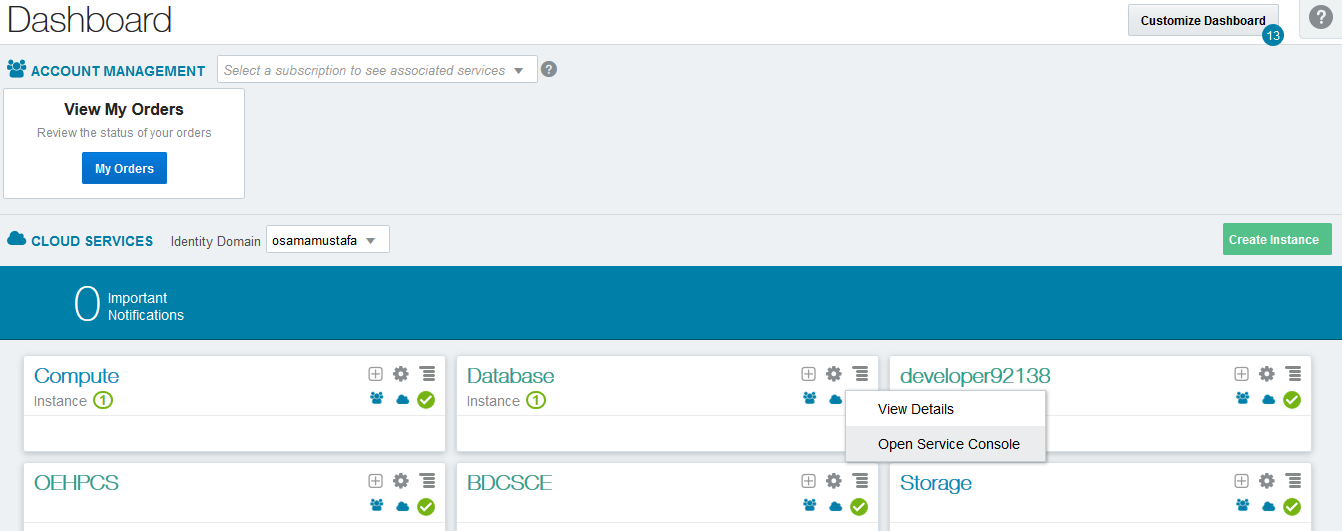
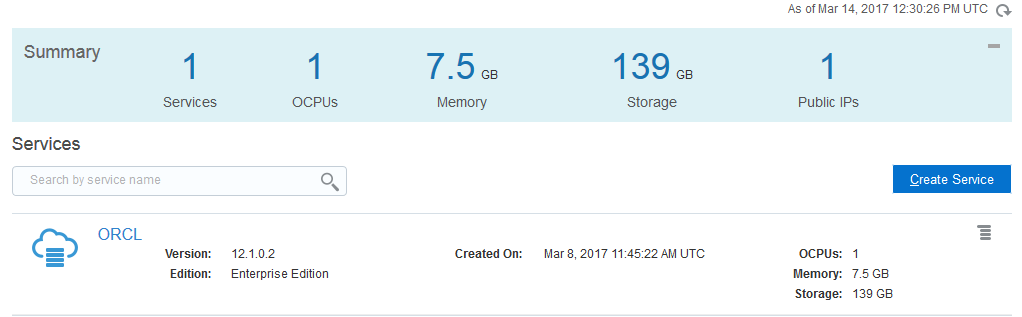
  • Open the Oracle Database Cloud Service console.
  • Click the database deployment on which you want to check patching.
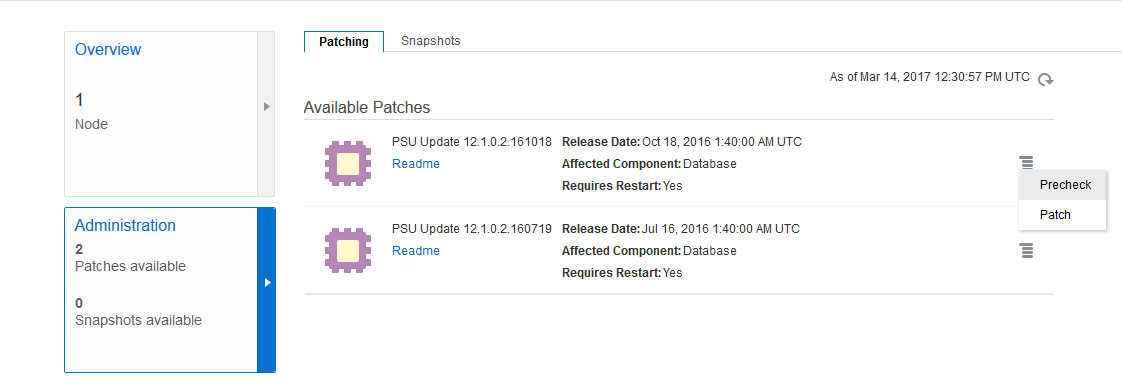
  • Click the Administration tile and then click the Patching tab.
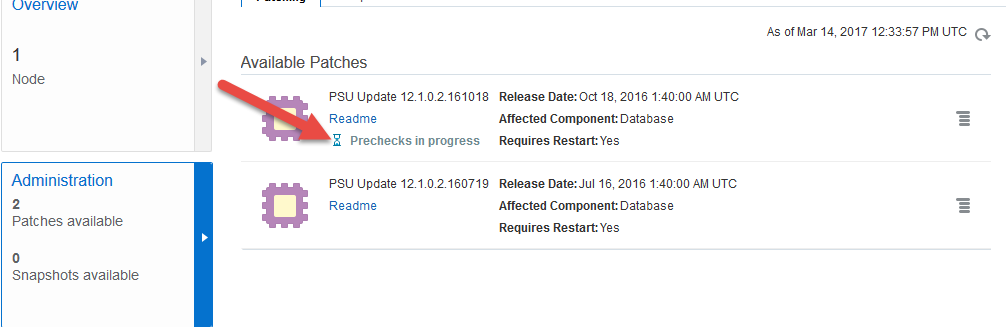
  • If you want to use command line it’s possible as well, you have to connect to the cloud using Putty on windows check the post from here that will tell you how to connect using putty to the cloud, however if the below you will see that the available patch in the picture for my Dbaas, you can check the prerequisites again by press on it. 

If you want to run the same without GUI ( Cloud Console ) you can do the following 

Remember you should configure Putty to be able to access the root on the cloud.
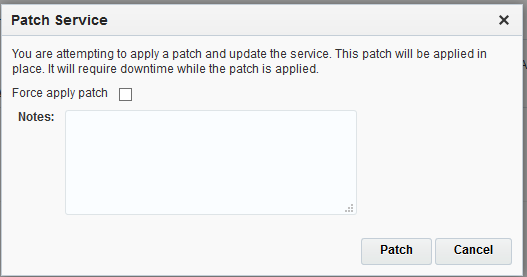
  • Now If you want to apply the patch on the cloud Using the console it’s very easy. 
Enjoy the Cloud 
Thank you 
Osama