BLOG

Enable Database Vault Using chopt Command

I post before how to enable oracle database vault using make command, in this post i will talk about how to enable database vault but using chopt command which easier and faster.

Common Syntax :-
chopt [enable | disable] db_option

Value
Description
dm
Oracle Data Mining Database Files
dv
Oracle Database Vault
lbac
Oracle Label Security
olap
Oracle OLAP
partitioning
Oracle Partitioning
rat
Oracle Real Application Testing
ode_net
Oracle Database Extensions for .NET 1.x
ode_net_2
Oracle Database Extensions for .NET 2.0

Like the other way you need to shutdown database, listener and dbconsole
cd $ORACLE_HOME/bin
chopt enable lbac
and Start database, listener, and dbconsole , Enterprise should be configured to access database vault.
Cheers
osama 

Officially Fusion Middleware 11.1.1.9 Is Available to download

“Oracle Fusion Middleware is the leading business innovation platform for the enterprise and the cloud. It enables enterprises to create and run agile, intelligent business applications while maximizing IT efficiency through full utilization of modern hardware and software architectures. Solutions and products include Exalogic Elastic Cloud, data integration, business process management, business intelligence, identity management, Cloud application foundation, service-oriented architecture, WebCenter, and development tools.”

Oracle Fusion middleware 11.1.1.9 is now available to download :-

  • Oracle Business Intelligence Enterprise Edition
  • Oracle JDeveloper and Application Development Framework (ADF)
  • Oracle Business Process Management
  • Oracle SOA Suite
  • Oracle Data Integrator
  • Oracle User Messaging Service
  • Oracle Enterprise Scheduler
  • Oracle Event Processing
  • Oracle WebCenter Suite
  • Oracle Identity Management
  • Oracle Forms and Reports
  • Oracle WebTier
  • Oracle Application Architecture Foundation Pack
To download Documentation from here
To Install Products steps from here 
to Download products from here
Thank you 
Osama Mustafa

ACFS-9459/ACFS-9201/ACFS-9459 Gird Infrastructure

Environment: –

Operating system : Oracle Linux 6.6
Oracle DB and Grid Version : 11.2.0.4.0

The Error that appeared Under Gird log :-

[client(1624)]CRS-10001:25-Mar-15 14:09 ACFS-9459: ADVM/ACFS is not supported on this OS version: ‘3.8.13-44.1.1.el6uek.x86_64’
[client(1626)]CRS-10001:25-Mar-15 14:09 ACFS-9201: Not Supported
[client(1748)]CRS-10001:25-Mar-15 14:09 ACFS-9459: ADVM/ACFS is not supported on this OS version: ‘3.8.13-44.1.1.el6uek.x86_64’

Solution: –

There is patch should be applied “Patch 16318126: UEK3 SUPPORT FOR ACFS”

Download the patch from https://support.oracle.com

and check the document
ACFS Support On OS Platforms (Certification Matrix). (Doc ID 1369107.1)

Cheers
Osama mustafa

ORA-47401: Realm violation for CREATE TABLE on SYSTEM.SYS_EXPORT_SCHEMA_07

When trying to export any user using system the below error appeared

Connected to: Oracle Database 11g Enterprise Edition Release 11.2.0.1.0 – 64bit Production
With the Partitioning, Real Application Clusters, Automatic Storage Management, Oracle Label Security,
OLAP, Data Mining, Oracle Database Vault and Real Application Testing optio
ORA-31626: job does not exist
ORA-31633: unable to create master table “SYSTEM.SYS_EXPORT_SCHEMA_07”
ORA-06512: at “SYS.DBMS_SYS_ERROR”, line 95
ORA-06512: at “SYS.KUPV$FT”, line 1020
ORA-47401: Realm violation for CREATE TABLE on SYSTEM.SYS_EXPORT_SCHEMA_07

The above error related because the system user is not allow to access data Dictionary files.

Run the below command
SQL>
BEGIN
DVSYS.DBMS_MACADM.ADD_AUTH_TO_REALM(
realm_name => ‘Oracle Data Dictionary’,
grantee => ‘SYSTEM’);
END;
/
PL/SQL procedure successfully completed.

Or you can use the GUI in Database vault and under Data Dictionray realms add the system user as participant.

Thank you  

connection to database cannot be established – DBCA

Environment :-

Oracle Grid Infrastructure 11.2.0.4
Nodes # : 4
Operating system : Redhat 6.6

When trying to configure enterprise manager the following error appeared :-

Connection to the database cannot be established because the listener could be down. Please make sure that the service is registered with a listener and the listener is up.

The listener is up, VIP is working on all nodes without any issue when check dbca logs looking for more details i found this error :-

dbca trace in $ORACLE_BASE/cfgtoollogs/dbca.

ORA-1017: invalid username/password

Both was correct, because of this i recreate password file on all nodes and restart my operation it’s working without any issue this time.

Thanks
Osama Mustafa

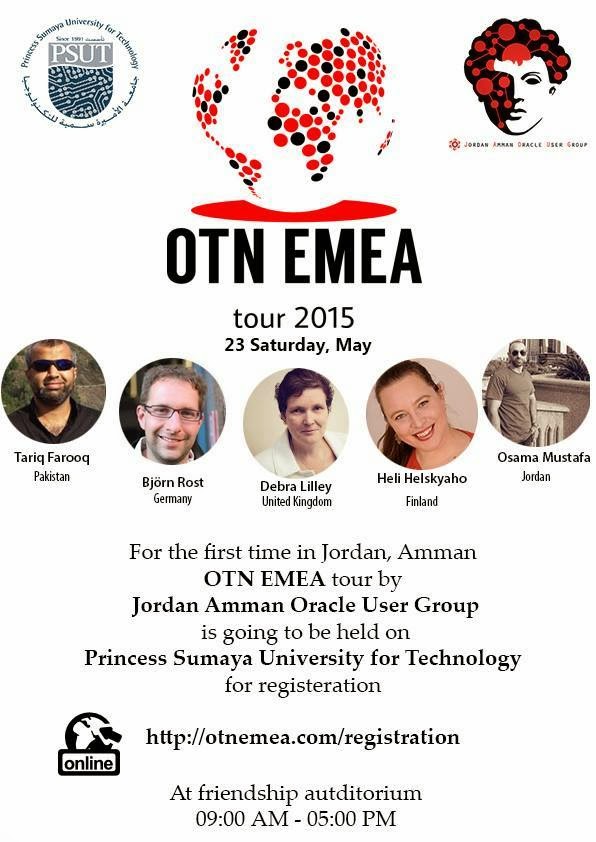
OTN EMEA Tour 2015

For second time i will be glad to Join OTN EMEA Tour 2015 with others oracle experts who consume much time in the Oracle Community.

We will cover the following country :-

  • Portugal.
  • Jordan – Amman
  • Johannesburg
date                         location
May 21st 2015 Lisbon, Portugal
May 23rd 2015 Amman, Jordan
May 26th 2015 Johannesburg, South Africa
All the information you can find it here.
Please if you will join us in any country sign up.
Thanks
Osama Mustafa