Advanced OCI Container Engine (OKE) with Network Security and Observability

Oracle Cloud Infrastructure Container Engine for Kubernetes (OKE) provides enterprise-grade Kubernetes clusters with deep integration into OCI’s native services. This comprehensive guide explores advanced OKE configurations, focusing on network security policies, observability integration, and automated deployment strategies that enterprise teams need for production workloads.

OKE Architecture Deep Dive

OKE operates on a managed control plane architecture where Oracle handles the Kubernetes master nodes, etcd, and API server components. This design eliminates operational overhead while providing high availability across multiple availability domains.

The service integrates seamlessly with OCI’s networking fabric, allowing granular control over pod-to-pod communication, ingress traffic management, and service mesh implementations. Unlike managed Kubernetes services from other providers, OKE provides native integration with Oracle’s enterprise security stack, including Identity and Access Management (IAM), Key Management Service (KMS), and Web Application Firewall (WAF).

Worker nodes run on OCI Compute instances, providing flexibility in choosing instance shapes, including bare metal, GPU-enabled, and ARM-based Ampere processors. The networking layer supports both flannel and OCI VCN-native pod networking, enabling direct integration with existing network security policies.

Advanced Networking Configuration

OKE’s network architecture supports multiple pod networking modes. The VCN-native pod networking mode assigns each pod an IP address from your VCN’s CIDR range, enabling direct application of network security lists and route tables to pod traffic.

This approach provides several advantages over traditional overlay networking. Security policies become more granular since you can apply network security lists directly to pod traffic. Network troubleshooting becomes simpler as pod traffic flows through standard OCI networking constructs. Integration with existing network monitoring tools works seamlessly since pod traffic appears as regular VCN traffic.

Load balancing integrates deeply with OCI’s Load Balancing service, supporting both Layer 4 and Layer 7 load balancing with SSL termination, session persistence, and health checking capabilities.

Production-Ready Implementation Example

Here’s a comprehensive example that demonstrates deploying a highly available OKE cluster with advanced security and monitoring configurations:

Terraform Configuration for OKE Cluster

# OKE Cluster with Enhanced Security
resource "oci_containerengine_cluster" "production_cluster" {
  compartment_id     = var.compartment_id
  kubernetes_version = var.kubernetes_version
  name              = "production-oke-cluster"
  vcn_id            = oci_core_vcn.oke_vcn.id

  endpoint_config {
    is_public_ip_enabled = false
    subnet_id           = oci_core_subnet.oke_api_subnet.id
    nsg_ids             = [oci_core_network_security_group.oke_api_nsg.id]
  }

  cluster_pod_network_options {
    cni_type = "OCI_VCN_IP_NATIVE"
  }

  options {
    service_lb_subnet_ids = [oci_core_subnet.oke_lb_subnet.id]
    
    kubernetes_network_config {
      pods_cidr     = "10.244.0.0/16"
      services_cidr = "10.96.0.0/16"
    }

    add_ons {
      is_kubernetes_dashboard_enabled = false
      is_tiller_enabled              = false
    }

    admission_controller_options {
      is_pod_security_policy_enabled = true
    }
  }

  kms_key_id = oci_kms_key.oke_encryption_key.id
}

# Node Pool with Mixed Instance Types
resource "oci_containerengine_node_pool" "production_node_pool" {
  cluster_id         = oci_containerengine_cluster.production_cluster.id
  compartment_id     = var.compartment_id
  kubernetes_version = var.kubernetes_version
  name              = "production-workers"

  node_config_details {
    placement_configs {
      availability_domain = data.oci_identity_availability_domains.ads.availability_domains[0].name
      subnet_id          = oci_core_subnet.oke_worker_subnet.id
    }
    placement_configs {
      availability_domain = data.oci_identity_availability_domains.ads.availability_domains[1].name
      subnet_id          = oci_core_subnet.oke_worker_subnet.id
    }
    
    size                    = 3
    nsg_ids                = [oci_core_network_security_group.oke_worker_nsg.id]
    is_pv_encryption_in_transit_enabled = true
  }

  node_shape = "VM.Standard.E4.Flex"
  
  node_shape_config {
    ocpus         = 2
    memory_in_gbs = 16
  }

  node_source_details {
    image_id                = data.oci_containerengine_node_pool_option.oke_node_pool_option.sources[0].image_id
    source_type            = "IMAGE"
    boot_volume_size_in_gbs = 100
  }

  initial_node_labels {
    key   = "environment"
    value = "production"
  }

  ssh_public_key = var.ssh_public_key
}

# Network Security Group for API Server
resource "oci_core_network_security_group" "oke_api_nsg" {
  compartment_id = var.compartment_id
  vcn_id        = oci_core_vcn.oke_vcn.id
  display_name  = "oke-api-nsg"
}

resource "oci_core_network_security_group_security_rule" "oke_api_ingress" {
  network_security_group_id = oci_core_network_security_group.oke_api_nsg.id
  direction                 = "INGRESS"
  protocol                  = "6"
  source                   = "10.0.0.0/16"
  source_type              = "CIDR_BLOCK"
  
  tcp_options {
    destination_port_range {
      max = 6443
      min = 6443
    }
  }
}

# Network Security Group for Worker Nodes
resource "oci_core_network_security_group" "oke_worker_nsg" {
  compartment_id = var.compartment_id
  vcn_id        = oci_core_vcn.oke_vcn.id
  display_name  = "oke-worker-nsg"
}

# Allow pod-to-pod communication
resource "oci_core_network_security_group_security_rule" "worker_pod_communication" {
  network_security_group_id = oci_core_network_security_group.oke_worker_nsg.id
  direction                 = "INGRESS"
  protocol                  = "all"
  source                   = oci_core_network_security_group.oke_worker_nsg.id
  source_type              = "NETWORK_SECURITY_GROUP"
}

# KMS Key for Cluster Encryption
resource "oci_kms_key" "oke_encryption_key" {
  compartment_id = var.compartment_id
  display_name   = "oke-cluster-encryption-key"
  
  key_shape {
    algorithm = "AES"
    length    = 256
  }
  
  management_endpoint = oci_kms_vault.oke_vault.management_endpoint
}

resource "oci_kms_vault" "oke_vault" {
  compartment_id = var.compartment_id
  display_name   = "oke-vault"
  vault_type     = "DEFAULT"
}

Kubernetes Manifests with Network Policies


# Network Policy for Application Isolation
apiVersion: networking.k8s.io/v1
kind: NetworkPolicy
metadata:
name: webapp-network-policy
namespace: production
spec:
podSelector:
matchLabels:
app: webapp
policyTypes:
- Ingress
- Egress
ingress:
- from:
- namespaceSelector:
matchLabels:
name: ingress-nginx
- podSelector:
matchLabels:
app: webapp-frontend
ports:
- protocol: TCP
port: 8080
egress:
- to:
- podSelector:
matchLabels:
app: database
ports:
- protocol: TCP
port: 5432
- to: []
ports:
- protocol: TCP
port: 443
- protocol: TCP
port: 53
- protocol: UDP
port: 53

---
# Pod Security Policy
apiVersion: policy/v1beta1
kind: PodSecurityPolicy
metadata:
name: restricted-psp
spec:
privileged: false
allowPrivilegeEscalation: false
requiredDropCapabilities:
- ALL
volumes:
- 'configMap'
- 'emptyDir'
- 'projected'
- 'secret'
- 'downwardAPI'
- 'persistentVolumeClaim'
runAsUser:
rule: 'MustRunAsNonRoot'
seLinux:
rule: 'RunAsAny'
fsGroup:
rule: 'RunAsAny'

---
# Deployment with Security Context
apiVersion: apps/v1
kind: Deployment
metadata:
name: secure-webapp
namespace: production
spec:
replicas: 3
selector:
matchLabels:
app: webapp
template:
metadata:
labels:
app: webapp
spec:
securityContext:
runAsNonRoot: true
runAsUser: 65534
fsGroup: 65534
containers:
- name: webapp
image: nginx:1.21-alpine
ports:
- containerPort: 8080
securityContext:
allowPrivilegeEscalation: false
readOnlyRootFilesystem: true
capabilities:
drop:
- ALL
resources:
limits:
cpu: 500m
memory: 512Mi
requests:
cpu: 250m
memory: 256Mi
volumeMounts:
- name: tmp-volume
mountPath: /tmp
- name: cache-volume
mountPath: /var/cache/nginx
volumes:
- name: tmp-volume
emptyDir: {}
- name: cache-volume
emptyDir: {}

Monitoring and Observability Integration

OKE integrates natively with OCI Monitoring, Logging, and Logging Analytics services. This integration provides comprehensive observability without requiring additional third-party tools or complex configurations.

The monitoring integration automatically collects cluster-level metrics including CPU utilization, memory consumption, network throughput, and storage IOPS across all worker nodes. Custom metrics can be published using the OCI Monitoring SDK, enabling application-specific dashboards and alerting rules.

Logging integration captures both system logs from Kubernetes components and application logs from pods. The unified logging agent automatically forwards logs to OCI Logging service, where they can be searched, filtered, and analyzed using structured queries.

Security Best Practices Implementation

Enterprise OKE deployments require multiple layers of security controls. Network-level security starts with proper subnet segmentation, placing API servers in private subnets accessible only through bastion hosts or VPN connections.

Pod Security Policies enforce runtime security constraints, preventing privileged containers and restricting volume types. Network policies provide microsegmentation within the cluster, controlling pod-to-pod communication based on labels and namespaces.

Image security scanning integrates with OCI Container Registry’s vulnerability scanning capabilities, automatically checking container images for known vulnerabilities before deployment.

Automated CI/CD Integration

OKE clusters integrate seamlessly with OCI DevOps service for automated application deployment pipelines. The integration supports GitOps workflows, blue-green deployments, and automated rollback mechanisms.

Pipeline configurations can reference OCI Vault secrets for secure credential management, ensuring sensitive information never appears in deployment manifests or pipeline configurations.

Performance Optimization Strategies

Production OKE deployments benefit from several performance optimization techniques. Node pool configurations should match application requirements, using compute-optimized instances for CPU-intensive workloads and memory-optimized instances for data processing applications.

Pod disruption budgets ensure application availability during cluster maintenance operations. Horizontal Pod Autoscaling automatically adjusts replica counts based on CPU or memory utilization, while Cluster Autoscaling adds or removes worker nodes based on resource demands.

This comprehensive approach to OKE deployment provides enterprise-grade container orchestration with robust security, monitoring, and automation capabilities, enabling organizations to run production workloads confidently in Oracle Cloud Infrastructure.

DELETE All the VCNs in THE OCI Using BASH SCRIPT

The script below will allow you to list all VCNs in OCI and delete all attached resources to the COMPARTMENT_OCID.

Note: I wrote the scripts to perform the tasks mentioned below, which can be updated and expanded based on the needs. Feel free to do that and say the source

Complete Resource Deletion Chain: The script now handles the proper order of deletion:

  • Compute instances first
  • Clean route tables and security lists
  • Load balancers
  • Gateways (NAT, Internet, Service, DRG attachments)
  • Subnets
  • Custom security lists, route tables, and DHCP options
  • Finally, the VCN itself
#!/bin/bash

# ✅ Set this to the target compartment OCID
COMPARTMENT_OCID="Set Your OCID Here"

# (Optional) Force region
export OCI_CLI_REGION=me-jeddah-1

echo "📍 Region: $OCI_CLI_REGION"
echo "📦 Compartment: $COMPARTMENT_OCID"
echo "⚠️  WARNING: This will delete ALL VCNs and related resources in the compartment!"
echo "Press Ctrl+C within 10 seconds to cancel..."
sleep 10

# Function to wait for resource deletion
wait_for_deletion() {
    local resource_id=$1
    local resource_type=$2
    local max_attempts=30
    local attempt=1
    
    echo "    ⏳ Waiting for $resource_type deletion..."
    while [ $attempt -le $max_attempts ]; do
        if ! oci network $resource_type get --${resource_type//-/}-id "$resource_id" &>/dev/null; then
            echo "    ✅ $resource_type deleted successfully"
            return 0
        fi
        sleep 10
        ((attempt++))
    done
    echo "    ⚠️  Timeout waiting for $resource_type deletion"
    return 1
}

# Function to check if resource is default
is_default_resource() {
    local resource_id=$1
    local resource_type=$2
    
    case $resource_type in
        "security-list")
            result=$(oci network security-list get --security-list-id "$resource_id" --query "data.\"display-name\"" --raw-output 2>/dev/null)
            [[ "$result" == "Default Security List"* ]]
            ;;
        "route-table")
            result=$(oci network route-table get --rt-id "$resource_id" --query "data.\"display-name\"" --raw-output 2>/dev/null)
            [[ "$result" == "Default Route Table"* ]]
            ;;
        "dhcp-options")
            result=$(oci network dhcp-options get --dhcp-id "$resource_id" --query "data.\"display-name\"" --raw-output 2>/dev/null)
            [[ "$result" == "Default DHCP Options"* ]]
            ;;
        *)
            false
            ;;
    esac
}

# Function to clean all route tables in a VCN
clean_all_route_tables() {
    local VCN_ID=$1
    echo "  🧹 Cleaning all route tables..."
    
    local RT_IDS=$(oci network route-table list \
        --compartment-id "$COMPARTMENT_OCID" \
        --vcn-id "$VCN_ID" \
        --query "data[?\"lifecycle-state\" == 'AVAILABLE'].id" \
        --raw-output 2>/dev/null | jq -r '.[]' 2>/dev/null)
    
    for RT_ID in $RT_IDS; do
        if [ -n "$RT_ID" ]; then
            echo "    🔧 Clearing routes in route table: $RT_ID"
            oci network route-table update --rt-id "$RT_ID" --route-rules '[]' --force &>/dev/null || true
        fi
    done
    
    # Wait a bit for route updates to propagate
    sleep 5
}

# Function to clean all security lists in a VCN
clean_all_security_lists() {
    local VCN_ID=$1
    echo "  🧹 Cleaning all security lists..."
    
    local SL_IDS=$(oci network security-list list \
        --compartment-id "$COMPARTMENT_OCID" \
        --vcn-id "$VCN_ID" \
        --query "data[?\"lifecycle-state\" == 'AVAILABLE'].id" \
        --raw-output 2>/dev/null | jq -r '.[]' 2>/dev/null)
    
    for SL_ID in $SL_IDS; do
        if [ -n "$SL_ID" ]; then
            echo "    🔧 Clearing rules in security list: $SL_ID"
            oci network security-list update \
                --security-list-id "$SL_ID" \
                --egress-security-rules '[]' \
                --ingress-security-rules '[]' \
                --force &>/dev/null || true
        fi
    done
    
    # Wait a bit for security list updates to propagate
    sleep 5
}

# Function to delete compute instances in subnets
delete_compute_instances() {
    local VCN_ID=$1
    echo "  🖥️  Checking for compute instances..."
    
    local INSTANCES=$(oci compute instance list \
        --compartment-id "$COMPARTMENT_OCID" \
        --query "data[?\"lifecycle-state\" != 'TERMINATED'].id" \
        --raw-output 2>/dev/null | jq -r '.[]' 2>/dev/null)
    
    for INSTANCE_ID in $INSTANCES; do
        if [ -n "$INSTANCE_ID" ]; then
            # Check if instance is in this VCN
            local INSTANCE_VCN=$(oci compute instance list-vnics \
                --instance-id "$INSTANCE_ID" \
                --query "data[0].\"vcn-id\"" \
                --raw-output 2>/dev/null)
            
            if [[ "$INSTANCE_VCN" == "$VCN_ID" ]]; then
                echo "    🔻 Terminating compute instance: $INSTANCE_ID"
                oci compute instance terminate --instance-id "$INSTANCE_ID" --force &>/dev/null || true
            fi
        fi
    done
}

# Main cleanup function for a single VCN
cleanup_vcn() {
    local VCN_ID=$1
    echo -e "\n🧹 Cleaning resources for VCN: $VCN_ID"
    
    # Step 1: Delete compute instances first
    delete_compute_instances "$VCN_ID"
    
    # Step 2: Clean route tables and security lists
    clean_all_route_tables "$VCN_ID"
    clean_all_security_lists "$VCN_ID"
    
    # Step 3: Delete Load Balancers
    echo "  🔻 Deleting load balancers..."
    local LBS=$(oci lb load-balancer list \
        --compartment-id "$COMPARTMENT_OCID" \
        --query "data[?\"lifecycle-state\" == 'ACTIVE'].id" \
        --raw-output 2>/dev/null | jq -r '.[]' 2>/dev/null)
    
    for LB_ID in $LBS; do
        if [ -n "$LB_ID" ]; then
            echo "    🔻 Deleting Load Balancer: $LB_ID"
            oci lb load-balancer delete --load-balancer-id "$LB_ID" --force &>/dev/null || true
        fi
    done
    
    # Step 4: Delete NAT Gateways
    echo "  🔻 Deleting NAT gateways..."
    local NAT_GWS=$(oci network nat-gateway list \
        --compartment-id "$COMPARTMENT_OCID" \
        --vcn-id "$VCN_ID" \
        --query "data[?\"lifecycle-state\" == 'AVAILABLE'].id" \
        --raw-output 2>/dev/null | jq -r '.[]' 2>/dev/null)
    
    for NAT_ID in $NAT_GWS; do
        if [ -n "$NAT_ID" ]; then
            echo "    🔻 Deleting NAT Gateway: $NAT_ID"
            oci network nat-gateway delete --nat-gateway-id "$NAT_ID" --force &>/dev/null || true
        fi
    done
    
    # Step 5: Delete DRG Attachments
    echo "  🔻 Deleting DRG attachments..."
    local DRG_ATTACHMENTS=$(oci network drg-attachment list \
        --compartment-id "$COMPARTMENT_OCID" \
        --query "data[?\"vcn-id\" == '$VCN_ID' && \"lifecycle-state\" == 'ATTACHED'].id" \
        --raw-output 2>/dev/null | jq -r '.[]' 2>/dev/null)
    
    for DRG_ATTACHMENT_ID in $DRG_ATTACHMENTS; do
        if [ -n "$DRG_ATTACHMENT_ID" ]; then
            echo "    🔻 Deleting DRG Attachment: $DRG_ATTACHMENT_ID"
            oci network drg-attachment delete --drg-attachment-id "$DRG_ATTACHMENT_ID" --force &>/dev/null || true
        fi
    done
    
    # Step 6: Delete Internet Gateways
    echo "  🔻 Deleting internet gateways..."
    local IGWS=$(oci network internet-gateway list \
        --compartment-id "$COMPARTMENT_OCID" \
        --vcn-id "$VCN_ID" \
        --query "data[?\"lifecycle-state\" == 'AVAILABLE'].id" \
        --raw-output 2>/dev/null | jq -r '.[]' 2>/dev/null)
    
    for IGW_ID in $IGWS; do
        if [ -n "$IGW_ID" ]; then
            echo "    🔻 Deleting Internet Gateway: $IGW_ID"
            oci network internet-gateway delete --ig-id "$IGW_ID" --force &>/dev/null || true
        fi
    done
    
    # Step 7: Delete Service Gateways
    echo "  🔻 Deleting service gateways..."
    local SGWS=$(oci network service-gateway list \
        --compartment-id "$COMPARTMENT_OCID" \
        --vcn-id "$VCN_ID" \
        --query "data[?\"lifecycle-state\" == 'AVAILABLE'].id" \
        --raw-output 2>/dev/null | jq -r '.[]' 2>/dev/null)
    
    for SGW_ID in $SGWS; do
        if [ -n "$SGW_ID" ]; then
            echo "    🔻 Deleting Service Gateway: $SGW_ID"
            oci network service-gateway delete --service-gateway-id "$SGW_ID" --force &>/dev/null || true
        fi
    done
    
    # Step 8: Wait for gateways to be deleted
    echo "  ⏳ Waiting for gateways to be deleted..."
    sleep 30
    
    # Step 9: Delete Subnets
    echo "  🔻 Deleting subnets..."
    local SUBNETS=$(oci network subnet list \
        --compartment-id "$COMPARTMENT_OCID" \
        --vcn-id "$VCN_ID" \
        --query "data[?\"lifecycle-state\" == 'AVAILABLE'].id" \
        --raw-output 2>/dev/null | jq -r '.[]' 2>/dev/null)
    
    for SUBNET_ID in $SUBNETS; do
        if [ -n "$SUBNET_ID" ]; then
            echo "    🔻 Deleting Subnet: $SUBNET_ID"
            oci network subnet delete --subnet-id "$SUBNET_ID" --force &>/dev/null || true
        fi
    done
    
    # Step 10: Wait for subnets to be deleted
    echo "  ⏳ Waiting for subnets to be deleted..."
    sleep 30
    
    # Step 11: Delete non-default Security Lists
    echo "  🔻 Deleting custom security lists..."
    local SL_IDS=$(oci network security-list list \
        --compartment-id "$COMPARTMENT_OCID" \
        --vcn-id "$VCN_ID" \
        --query "data[?\"lifecycle-state\" == 'AVAILABLE'].id" \
        --raw-output 2>/dev/null | jq -r '.[]' 2>/dev/null)
    
    for SL_ID in $SL_IDS; do
        if [ -n "$SL_ID" ] && ! is_default_resource "$SL_ID" "security-list"; then
            echo "    🔻 Deleting Security List: $SL_ID"
            oci network security-list delete --security-list-id "$SL_ID" --force &>/dev/null || true
        fi
    done
    
    # Step 12: Delete non-default Route Tables
    echo "  🔻 Deleting custom route tables..."
    local RT_IDS=$(oci network route-table list \
        --compartment-id "$COMPARTMENT_OCID" \
        --vcn-id "$VCN_ID" \
        --query "data[?\"lifecycle-state\" == 'AVAILABLE'].id" \
        --raw-output 2>/dev/null | jq -r '.[]' 2>/dev/null)
    
    for RT_ID in $RT_IDS; do
        if [ -n "$RT_ID" ] && ! is_default_resource "$RT_ID" "route-table"; then
            echo "    🔻 Deleting Route Table: $RT_ID"
            oci network route-table delete --rt-id "$RT_ID" --force &>/dev/null || true
        fi
    done
    
    # Step 13: Delete non-default DHCP Options
    echo "  🔻 Deleting custom DHCP options..."
    local DHCP_IDS=$(oci network dhcp-options list \
        --compartment-id "$COMPARTMENT_OCID" \
        --vcn-id "$VCN_ID" \
        --query "data[?\"lifecycle-state\" == 'AVAILABLE'].id" \
        --raw-output 2>/dev/null | jq -r '.[]' 2>/dev/null)
    
    for DHCP_ID in $DHCP_IDS; do
        if [ -n "$DHCP_ID" ] && ! is_default_resource "$DHCP_ID" "dhcp-options"; then
            echo "    🔻 Deleting DHCP Options: $DHCP_ID"
            oci network dhcp-options delete --dhcp-id "$DHCP_ID" --force &>/dev/null || true
        fi
    done
    
    # Step 14: Wait before attempting VCN deletion
    echo "  ⏳ Waiting for all resources to be cleaned up..."
    sleep 60
    
    # Step 15: Finally, delete the VCN
    echo "  🔻 Deleting VCN: $VCN_ID"
    local max_attempts=5
    local attempt=1
    
    while [ $attempt -le $max_attempts ]; do
        if oci network vcn delete --vcn-id "$VCN_ID" --force &>/dev/null; then
            echo "    ✅ VCN deletion initiated successfully"
            break
        else
            echo "    ⚠️  VCN deletion attempt $attempt failed, retrying in 30 seconds..."
            sleep 30
            ((attempt++))
        fi
    done
    
    if [ $attempt -gt $max_attempts ]; then
        echo "    ❌ Failed to delete VCN after $max_attempts attempts"
        echo "    💡 You may need to manually check for remaining dependencies"
    fi
}

# Main execution
echo -e "\n🚀 Starting VCN cleanup process..."

# Fetch all VCNs in the compartment
VCN_IDS=$(oci network vcn list \
    --compartment-id "$COMPARTMENT_OCID" \
    --query "data[?\"lifecycle-state\" == 'AVAILABLE'].id" \
    --raw-output 2>/dev/null | jq -r '.[]' 2>/dev/null)

if [ -z "$VCN_IDS" ]; then
    echo "📭 No VCNs found in compartment $COMPARTMENT_OCID"
    exit 0
fi

echo "📋 Found VCNs to delete:"
for VCN_ID in $VCN_IDS; do
    VCN_NAME=$(oci network vcn get --vcn-id "$VCN_ID" --query "data.\"display-name\"" --raw-output 2>/dev/null)
    echo "  - $VCN_NAME ($VCN_ID)"
done

# Process each VCN
for VCN_ID in $VCN_IDS; do
    if [ -n "$VCN_ID" ]; then
        cleanup_vcn "$VCN_ID"
    fi
done

echo -e "\n✅ Cleanup complete for compartment: $COMPARTMENT_OCID"
echo "🔍 You may want to verify in the OCI Console that all resources have been deleted."

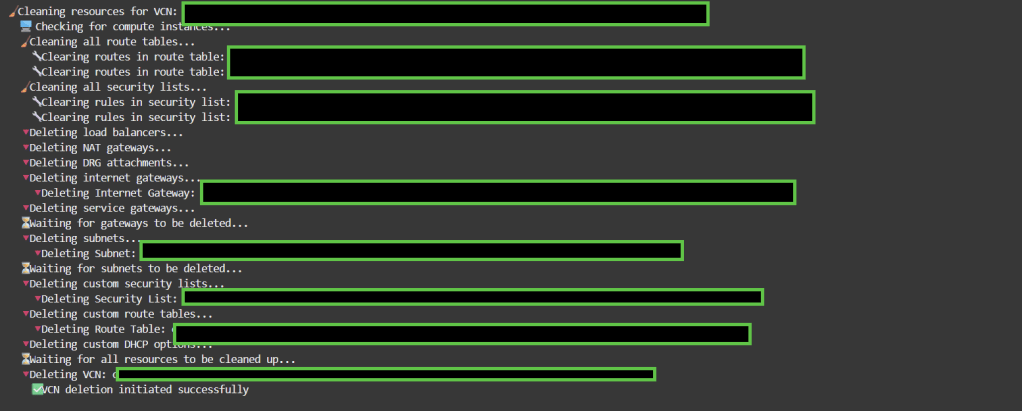
Output example

Regards

Implementing OCI Logging Analytics for Proactive Incident Detection

Oracle Cloud Infrastructure (OCI) Logging Analytics is a powerful service that helps organizations aggregate, analyze, and act on log data from across their OCI resources. In this guide, we’ll walk through setting up Logging Analytics to detect and alert on suspicious activities, using Terraform for automation and a real-world example for context.

Step 1: Enable OCI Logging Analytics

  1. Navigate to the OCI Console:
    Go to Observability & Management > Logging Analytics.

2. Create a Log Group:

oci logging-analytics log-group create \
  --compartment-id <your-compartment-ocid> \
  --display-name "Security-Logs" \
  --description "Logs for security monitoring"

Step 2: Ingest Logs from OCI Audit Service
Configure the OCI Audit service to forward logs to Logging Analytics:

Create a Service Connector:

resource "oci_sch_service_connector" "audit_to_la" {
  compartment_id = var.compartment_ocid
  display_name  = "Audit-to-Logging-Analytics"
  source {
    kind = "logging"
    log_sources {
      compartment_id = var.tenant_ocid
      log_group_id   = oci_logging_log_group.audit_logs.id
    }
  }
  target {
    kind = "loggingAnalytics"
    log_group_id = oci_logging_analytics_log_group.security_logs.id
  }
}

Step 3: Create Custom Detection Rules

Example: Detect repeated failed login attempts (brute-force attacks).

  1. Use OCI Query Language (OCIQL):
SELECT * 
FROM AuditLogs 
WHERE eventName = 'Login' AND action = 'FAIL' 
GROUP BY actorName 
HAVING COUNT(*) > 5
  1. Set Up Alerts:
    Configure an OCI Notification topic to trigger emails or PagerDuty alerts when the rule matches.

Step 4: Visualize with Dashboards

Create a dashboard to monitor security events:

  • Metrics: Failed logins, API calls from unusual IPs.

Enjoy
Osama

Setting up a High-Availability (HA) Architecture with OCI Load Balancer and Compute Instances

Ensuring high availability (HA) for your applications is critical in today’s cloud-first environment. Oracle Cloud Infrastructure (OCI) provides robust tools such as Load Balancers and Compute Instances to help you create a resilient, highly available architecture for your applications. In this post, we’ll walk through the steps to set up an HA architecture using OCI Load Balancer with multiple compute instances across availability domains for fault tolerance.

Prerequisites

  • OCI Account: A working Oracle Cloud Infrastructure account.
  • OCI CLI: Installed and configured with necessary permissions.
  • Terraform: Installed and set up for provisioning infrastructure.
  • Basic knowledge of Load Balancers and Compute Instances in OCI.

Step 1: Set Up a Virtual Cloud Network (VCN)

A VCN is required to house your compute instances and load balancers. To begin, create a new VCN with subnets in different availability domains (ADs) for high availability.

Terraform Configuration (vcn.tf):

resource "oci_core_virtual_network" "vcn" {
  compartment_id = "<compartment_ocid>"
  cidr_block     = "10.0.0.0/16"
  display_name   = "HA-Virtual-Network"
}

resource "oci_core_subnet" "subnet1" {
  compartment_id      = "<compartment_ocid>"
  vcn_id              = oci_core_virtual_network.vcn.id
  cidr_block          = "10.0.1.0/24"
  availability_domain = "AD-1"
  display_name        = "HA-Subnet-AD1"
}

resource "oci_core_subnet" "subnet2" {
  compartment_id      = "<compartment_ocid>"
  vcn_id              = oci_core_virtual_network.vcn.id
  cidr_block          = "10.0.2.0/24"
  availability_domain = "AD-2"
  display_name        = "HA-Subnet-AD2"
}

Step 2: Provision Compute Instances

Create two compute instances (one in each subnet) to ensure redundancy.

Terraform Configuration (compute.tf):

resource "oci_core_instance" "instance1" {
  compartment_id = "<compartment_ocid>"
  availability_domain = "AD-1"
  shape = "VM.Standard2.1"
  display_name = "HA-Instance-1"
  
  create_vnic_details {
    subnet_id = oci_core_subnet.subnet1.id
    assign_public_ip = true
  }

  source_details {
    source_type = "image"
    source_id = "<image_ocid>"
  }
}

resource "oci_core_instance" "instance2" {
  compartment_id = "<compartment_ocid>"
  availability_domain = "AD-2"
  shape = "VM.Standard2.1"
  display_name = "HA-Instance-2"
  
  create_vnic_details {
    subnet_id = oci_core_subnet.subnet2.id
    assign_public_ip = true
  }

  source_details {
    source_type = "image"
    source_id = "<image_ocid>"
  }
}

Step 3: Set Up the OCI Load Balancer

Now, configure the OCI Load Balancer to distribute traffic between the compute instances in both availability domains.

Terraform Configuration (load_balancer.tf):

resource "oci_load_balancer_load_balancer" "ha_lb" {
  compartment_id = "<compartment_ocid>"
  display_name   = "HA-Load-Balancer"
  shape           = "100Mbps"

  subnet_ids = [
    oci_core_subnet.subnet1.id,
    oci_core_subnet.subnet2.id
  ]

  backend_sets {
    name = "backend-set-1"

    backends {
      ip_address = oci_core_instance.instance1.private_ip
      port = 80
    }

    backends {
      ip_address = oci_core_instance.instance2.private_ip
      port = 80
    }

    policy = "ROUND_ROBIN"
    health_checker {
      port = 80
      protocol = "HTTP"
      url_path = "/health"
      retries = 3
      timeout_in_seconds = 10
      interval_in_seconds = 5
    }
  }
}

resource "oci_load_balancer_listener" "ha_listener" {
  load_balancer_id = oci_load_balancer_load_balancer.ha_lb.id
  name = "http-listener"
  default_backend_set_name = "backend-set-1"
  port = 80
  protocol = "HTTP"
}

Step 4: Set Up Health Checks for High Availability

Health checks are critical to ensure that the load balancer sends traffic only to healthy instances. The health check configuration is included in the backend set definition above, but you can customize it as needed.
Step 5: Testing and Validation

Once all resources are provisioned, test the HA architecture:

Verify Load Balancer Health: Ensure that the backend instances are marked as healthy by checking the load balancer’s health checks.

oci load-balancer backend-set get --load-balancer-id <load_balancer_id> --name backend-set-1
  1. Access the Application: Test accessing your application through the Load Balancer’s public IP. The Load Balancer should evenly distribute traffic across the two compute instances.
  2. Failover Testing: Manually shut down one of the instances to verify that the Load Balancer reroutes traffic to the other instance.

Automating Oracle Cloud Networking with OCI Service Gateway and Terraform

Oracle Cloud Infrastructure (OCI) offers a wide range of services that enable users to create secure, scalable cloud environments. One crucial aspect of a cloud deployment is ensuring secure connectivity between services without relying on public internet access. In this blog post, we’ll walk through how to set up and manage OCI Service Gateway for secure, private access to OCI services using Terraform. This step-by-step guide is intended for cloud engineers looking to leverage automation to create robust networking configurations in OCI.

Step 1: Setting up Your Environment

Before deploying the OCI Service Gateway and other networking components with Terraform, you need to set up a few prerequisites:

  1. Terraform Installation: Make sure Terraform is installed on your local machine. You can download it from Terraform’s official site.
  2. OCI CLI and API Key: Install the OCI CLI and set up your authentication key. The key must be configured in your OCI console.
  3. OCI Terraform Provider: You will also need to download the OCI Terraform provider by adding the following configuration to your provider.tf file:
provider "oci" {
  tenancy_ocid     = "<TENANCY_OCID>"
  user_ocid        = "<USER_OCID>"
  fingerprint      = "<FINGERPRINT>"
  private_key_path = "<PRIVATE_KEY_PATH>"
  region           = "us-ashburn-1"
}

Step 2: Defining the Infrastructure

The key to deploying the Service Gateway and related infrastructure is defining the resources in a main.tf file. Below is an example to create a VCN, subnets, and a Service Gateway:

resource "oci_core_vcn" "example_vcn" {
  cidr_block     = "10.0.0.0/16"
  compartment_id = "<COMPARTMENT_OCID>"
  display_name   = "example-vcn"
}

resource "oci_core_subnet" "example_subnet" {
  vcn_id             = oci_core_vcn.example_vcn.id
  compartment_id     = "<COMPARTMENT_OCID>"
  cidr_block         = "10.0.1.0/24"
  availability_domain = "<AVAILABILITY_DOMAIN>"
  display_name       = "example-subnet"
  prohibit_public_ip_on_vnic = true
}

resource "oci_core_service_gateway" "example_service_gateway" {
  vcn_id         = oci_core_vcn.example_vcn.id
  compartment_id = "<COMPARTMENT_OCID>"
  services {
    service_id = "all-oracle-services-in-region"
  }
  display_name  = "example-service-gateway"
}

resource "oci_core_route_table" "example_route_table" {
  vcn_id         = oci_core_vcn.example_vcn.id
  compartment_id = "<COMPARTMENT_OCID>"
  display_name   = "example-route-table"
  route_rules {
    destination       = "all-oracle-services-in-region"
    destination_type  = "SERVICE_CIDR_BLOCK"
    network_entity_id = oci_core_service_gateway.example_service_gateway.id
  }
}

Explanation:

  • oci_core_vcn: Defines the Virtual Cloud Network (VCN) where all resources will reside.
  • oci_core_subnet: Creates a subnet within the VCN to host compute instances or other resources.
  • oci_core_service_gateway: Configures a Service Gateway to allow private access to Oracle services such as Object Storage.
  • oci_core_route_table: Configures the route table to direct traffic through the Service Gateway for services within OCI.

Step 3: Variables for Reusability

To make the code reusable, it’s best to define variables in a variables.tf file:

variable "compartment_ocid" {
  description = "The OCID of the compartment to create resources in"
  type        = string
}

variable "availability_domain" {
  description = "The Availability Domain to launch resources in"
  type        = string
}

variable "vcn_cidr" {
  description = "The CIDR block for the VCN"
  type        = string
  default     = "10.0.0.0/16"
}

This allows you to easily modify parameters like compartment ID, availability domain, and VCN CIDR without touching the core logic.

Step 4: Running the Terraform Script

  1. Initialize TerraformTo start using Terraform with OCI, initialize your working directory using:
terraform init
  1. This command downloads the necessary providers and prepares your environment.
  2. Plan the DeploymentBefore applying changes, always run the terraform plan command. This will provide an overview of what resources will be created.
terraform plan -var-file="config.tfvars"

Apply the Changes

Once you’re confident with the plan, apply it to create your Service Gateway and networking resources:

terraform apply -var-file="config.tfvars"

Step 5: Verification

After deployment, you can verify your resources via the OCI Console. Navigate to Networking > Virtual Cloud Networks to see your VCN, subnets, and the Service Gateway. You can also validate the route table settings to ensure that the traffic routes correctly to Oracle services.

Step 6: Destroy the Infrastructure

To clean up the resources and avoid any unwanted charges, you can use the terraform destroy command:

terraform destroy -var-file="config.tfvars"

Regards
Osama

Automating Block Volume Backups in Oracle Cloud Infrastructure (OCI) using CLI and Terraform

Briefly introduce the importance of block volumes in OCI and why automated backups are essential.Mention that this blog will cover two methods: using the OCI CLI and Terraform for automation.

Automating Block Volume Backups using OCI CLI

Prerequisites:

  • Set up OCI CLI on your machine (brief steps with links).
  • Ensure that you have the right permissions to manage block volumes.

Step-by-step guide:

  • Command to create a block volume
oci bv volume create --compartment-id <your_compartment_ocid> --availability-domain <your_ad> --display-name "MyVolume" --size-in-gbs 50

Command to take a backup of the block volume:

oci bv backup create --volume-id <your_volume_ocid> --display-name "MyVolumeBackup"

Scheduling backups using cron jobs for automation.

  • Example cron job configuration
0 2 * * * /usr/local/bin/oci bv backup create --volume-id <your_volume_ocid> --display-name "ScheduledBackup" >> /var/log/oci_backup.log 2>&1

Automating Block Volume Backups using Terraform

Prerequisites

  1. OCI Credentials: Make sure you have the proper API keys and permissions configured in your OCI tenancy.
  2. Terraform Setup: Terraform should be installed and configured to interact with OCI, including the OCI provider setup in your environment.
Step 1: Define the OCI Block Volume Resource

First, define the block volume that you want to automate backups for. Here’s an example of a simple block volume resource in Terraform:

resource "oci_core_volume" "my_block_volume" {
  availability_domain = "your-availability-domain"
  compartment_id      = "ocid1.compartment.oc1..your-compartment-id"
  display_name        = "my_block_volume"
  size_in_gbs         = 50
}
Step 2: Define a Backup Policy

OCI provides predefined backup policies such as gold, silver, and bronze, which define how frequently backups are taken. You can create a custom backup policy as well, but for simplicity, we’ll use one of the predefined policies in this example. The Terraform resource oci_core_volume_backup_policy_assignment will assign a backup policy to the block volume.

Here’s an example to assign the gold backup policy to the block volume:

resource "oci_core_volume_backup_policy_assignment" "backup_assignment" {
  volume_id       = oci_core_volume.my_block_volume.id
  policy_id       = data.oci_core_volume_backup_policy.gold.id
}

data "oci_core_volume_backup_policy" "gold" {
  name = "gold"
}
Step 3: Custom Backup Policy (Optional)

If you need a custom backup policy rather than using the predefined gold, silver, or bronze policies, you can define a custom backup policy using OCI’s native scheduling.

You can create a custom schedule by combining these elements in your oci_core_volume_backup_policy resource.

resource "oci_core_volume_backup_policy" "custom_backup_policy" {
  compartment_id = "ocid1.compartment.oc1..your-compartment-id"
  display_name   = "CustomBackupPolicy"

  schedules {
    backup_type = "INCREMENTAL"
    period      = "ONE_DAY"
    retention_duration = "THIRTY_DAYS"
  }

  schedules {
    backup_type = "FULL"
    period      = "ONE_WEEK"
    retention_duration = "NINETY_DAYS"
  }
}

You can then assign this policy to the block volume using the same method as earlier.

Step 4: Apply the Terraform Configuration

Once your Terraform configuration is ready, apply it using the standard Terraform workflow:

  1. Initialize Terraform:
terraform init

Plan the Terraform deployment:

terraform plan

Apply the Terraform plan:

terraform apply

This process will automatically provision your block volumes and assign the specified backup policy.


Regards
Osama

Implementing Zero Trust Architecture in OCI

In this blog, we will explore how to implement a Zero Trust architecture in Oracle Cloud Infrastructure (OCI). We’ll cover key principles of Zero Trust, configuring identity and access management, securing the network, and monitoring for continuous security assurance.

Introduction to Zero Trust Architecture

  • Overview of Zero Trust principles: “Never trust, always verify.”
  • Importance of Zero Trust in modern cloud environments.
  • Key components: Identity, network, data, device, and workloads.

Identity and Access Management (IAM) in OCI

Configuring IAM for Zero Trust

  1. Set Up OCI IAM:
    • Use OCI IAM to manage identities and enforce strict authentication.
    • Configure Multi-Factor Authentication (MFA) for all users.
  2. Conditional Access Policies:
    • Implement policies that require additional verification for high-risk actions.

Securing OCI Network with Micro-Segmentation

Implementing Micro-Segmentation

  1. VCN and Subnet Segmentation:
    • Create Virtual Cloud Networks (VCNs) and segment your network by function, sensitivity, and environment.
  2. Network Security Groups (NSGs):
    • Apply Network Security Groups to enforce micro-segmentation policies within your VCN.

Implementing Least Privilege Access

Access Control Policies

  1. Define Fine-Grained IAM Policies:
    • Use OCI IAM to define least privilege policies that restrict user and service access based on specific needs.
  2. Role-Based Access Control (RBAC):
    • Implement RBAC to ensure users have only the permissions necessary for their roles.

Continuous Monitoring and Threat Detection

Monitoring with Oracle Cloud Guard

  1. Enable Cloud Guard:
    • Use Oracle Cloud Guard to monitor and automatically respond to potential security threats.
  2. Logging and Auditing:
    • Enable OCI Logging and Audit services to keep track of all access and configuration changes.
  3. Integrate with SIEM:
    • Integrate with Security Information and Event Management (SIEM) tools for comprehensive threat detection and incident response.

Integrating with Third-Party Security Tools

Using External Security Services

  1. Integrate Third-Party Identity Providers:
    • Use OCI’s integration capabilities to bring in third-party identity providers like Okta or Azure AD.
  2. Connect with External Threat Detection Services:
    • Utilize third-party threat detection tools for enhanced monitoring and incident response.

Regards
Osama

Enhancing Security with OCI Vault for Secrets Management

This blog will explore how to enhance the security of your Oracle Cloud Infrastructure (OCI) applications by implementing OCI Vault for secrets management. We’ll cover setting up OCI Vault, managing secrets and encryption keys, integrating with other OCI services, and best practices for secure secrets management.

Setting Up OCI Vault

Create a Vault:

  • Navigate to the OCI Console, go to “Security,” and select “Vault.”
  • Click “Create Vault,” name it, choose the compartment, and select the type (Virtual Private Vault for added security).
  • Define backup and key rotation policies.

Create Keys:

  • Within the Vault, select “Create Key.”
  • Define the key’s attributes (e.g., name, algorithm, key length) and create the key.

Create Secrets:

  • Navigate to the “Secrets” section within the Vault.
  • Click “Create Secret,” provide a name, and input the secret data (e.g., API keys, passwords).
  • Choose the encryption key you created earlier for securing the secret.

Managing Secrets and Encryption Keys

Rotating Keys and Secrets

  • Configure automatic rotation for encryption keys and secrets based on your organization’s security policies.
  • Rotate secrets manually as needed via the OCI Console or CLI.

Access Controls

  • Use OCI Identity and Access Management (IAM) to define who can access the Vault, keys, and secrets.
  • Implement fine-grained permissions to control access to specific secrets or keys.

Integrating OCI Vault with Other Services

OCI Compute

  • Securely inject secrets into OCI Compute instances at runtime using OCI Vault.
  • Example: Retrieve a database password from OCI Vault within a Compute instance using an SDK or CLI.

OCI Kubernetes (OKE)

  • Integrate OCI Vault with OKE for managing secrets in containerized applications.
  • Example: Use a sidecar container to fetch secrets from OCI Vault and inject them into application pods.

Automating Secrets Management

Using Terraform

  • Automate the creation and management of OCI Vault, keys, and secrets using Terraform.
  • Example Terraform snippet for creating a secret:
resource "oci_kms_vault" "example_vault" {
  compartment_id = var.compartment_id
  display_name   = "example_vault"
  vault_type     = "DEFAULT"
}

resource "oci_kms_key" "example_key" {
  management_endpoint = oci_kms_vault.example_vault.management_endpoint
  key_shape {
    algorithm = "AES"
    length    = 256
  }
}

resource "oci_secrets_secret" "example_secret" {
  compartment_id = var.compartment_id
  vault_id       = oci_kms_vault.example_vault.id
  key_id         = oci_kms_key.example_key.id
  secret_content {
    content = base64encode("super_secret_value")
  }
}

Using OCI SDKs

  • Programmatically manage secrets with OCI SDKs in languages like Python, Java, or Go.
  • Example: Retrieve a secret in Python:
import oci

config = oci.config.from_file("~/.oci/config", "DEFAULT")
secrets_client = oci.secrets.SecretsClient(config)
secret_id = "<your_secret_ocid>"
response = secrets_client.get_secret_bundle(secret_id)
secret_content = response.data.secret_bundle_content.content.decode("utf-8")

Notes

  • Regularly rotate encryption keys and secrets to minimize exposure.
  • Implement least privilege access controls using OCI IAM.
  • Enable auditing and logging for all key and secret management activities.
  • Use the Virtual Private Vault for sensitive data requiring higher security levels.

Implementing Multi-Region Resiliency with OCI Load Balancer

This blog will focus on building a highly resilient and globally available architecture using Oracle Cloud Infrastructure (OCI) Load Balancer. We’ll cover setting up a multi-region architecture, configuring global load balancing, and managing failover to ensure uninterrupted service availability.

Introduction to Multi-Region Resiliency

  • Overview of multi-region architecture benefits.
  • Importance of global availability and disaster recovery in cloud deployments.

2. Setting Up OCI Load Balancer

Step-by-Step Configuration

  1. Create Load Balancer:
    • Navigate to the OCI Console and access the Load Balancer service.
    • Select the load balancer type (public or private), and configure the backend sets and listeners.
  2. Configure Health Checks:
    • Set up health checks for backend servers to ensure only healthy instances receive traffic.

3. Configuring Global Load Balancing

Cross-Region Load Balancing

  • Set up load balancers in multiple OCI regions.
  • Configure policies to distribute traffic across regions based on proximity, load, or other factors.

4. Implementing DNS Failover

Using OCI DNS

  • Set up DNS zones and records for your application.
  • Implement DNS failover to route traffic to the next healthy region in case of failure.

5. Monitoring and Managing Traffic

Using OCI Monitoring

  • Monitor traffic distribution and load balancer performance using OCI Monitoring.
  • Set up alerts for traffic spikes or health check failures.

6. Optimizing for Performance and Cost

  • Use auto-scaling to adjust the number of backend instances based on demand.
  • Implement cost-saving strategies, such as traffic routing based on regional costs.

Regards
osama

Securing OCI Environments with Oracle Cloud Guard

This blog will focus on enhancing the security of your Oracle Cloud Infrastructure (OCI) environments using Oracle Cloud Guard. We’ll cover configuring Cloud Guard, creating custom detector and responder rules, and managing incidents for comprehensive cloud security.

Introduction to Oracle Cloud Guard

  • Overview of Oracle Cloud Guard and its role in OCI security.
  • Benefits of continuous monitoring and automated incident response.

2. Enabling Cloud Guard

Step-by-Step Configuration

  1. Enable Cloud Guard:
    • Navigate to the OCI Console and access Cloud Guard.
    • Enable Cloud Guard at the tenancy level.
  2. Select Target Compartment:
    • Choose the compartments you want to monitor.
    • Define the scope of resources to include.

3. Configuring Detector and Responder Rules

Creating Custom Rules

  • Define detector rules to identify security risks.
  • Create responder rules to automate the remediation process.

Example Configuration

  • Set up a detector rule to monitor unauthorized access attempts.
  • Create a responder rule to automatically block the offending IP address.

4. Automating Incident Response

Using Cloud Guard Recipes

  • Customize detector and responder recipes for specific use cases.
  • Example: A recipe to detect and respond to misconfigured security groups.

Integrating with Other OCI Services

  • Integrate Cloud Guard with OCI Logging and Notifications for comprehensive incident management.

5. Monitoring and Managing Security Posture

Using the OCI Console

  • Access the Cloud Guard dashboard for real-time insights.
  • Monitor incidents and alerts from a centralized interface.

Automating with OCI CLI

  • Example command to list Cloud Guard incidents:
oci cloud-guard detector-recipe list --compartment-id <compartment_OCID>

Best Practices for Cloud Guard Deployment

  • Regularly update and review detector and responder rules.
  • Implement least privilege principles and regularly audit IAM policies.
  • Conduct regular security assessments using Cloud Guard insights.