When the last time the password has been changed ?

Do you want to know what is the last time the DBA or developers change the password ?

Using the below table :-
Name
Null
Type
USER#       
NOT NULL
NUMBER
NAME        
NOT NULL
NUMBER        
TYPE#       
NOT NULL
VARCHAR2(30)  
PASSWORD    
        
NUMBER        
DATATS#     
NOT NULL
NUMBER        
TEMPTS#     
NOT NULL
DATE          
CTIME       
NOT NULL
DATE          
PTIME       
        
DATE          
EXPTIME     
        
DATE          
LTIME       
        
NUMBER        
RESOURCE$   
NOT NULL
VARCHAR2(38)  
AUDIT$      
        
NUMBER        
DEFROLE     
NOT NULL
NUMBER        
DEFGRP#     
        
NUMBER        
DEFGRP_SEQ# 
        
NUMBER        
ASTATUS     
NOT NULL
NUMBER        
LCOUNT      
NOT NULL
VARCHAR2(30)  
DEFSCHCLASS 
        
VARCHAR2(4000)
EXT_USERNAME
        
NUMBER        
SPARE1      
        
NUMBER        
SPARE2      
        
NUMBER        
SPARE3      
        
VARCHAR2(1000)
SPARE4      
        
VARCHAR2(1000)
SPARE5      
        
DATE
SPARE6      
        
NUMBER        
USER#       
NOT NULL
VARCHAR2(30)  
NAME        
NOT NULL
NUMBER        
TYPE#       
NOT NULL
NUMBER        
PASSWORD    
        
DATE          
DATATS#     
NOT NULL
DATE          
TEMPTS#     
NOT NULL
DATE          
CTIME       
NOT NULL
DATE          
PTIME       
        
NUMBER        
EXPTIME     
        
VARCHAR2(38)  
LTIME       
        
NUMBER        
RESOURCE$   
NOT NULL
NUMBER        
AUDIT$      
        
NUMBER        
DEFROLE     
NOT NULL
NUMBER        
DEFGRP#     
        
NUMBER        
DEFGRP_SEQ# 
        
VARCHAR2(30)  
ASTATUS     
NOT NULL
VARCHAR2(4000)
Referring to Oracle Documentation :-
     
NAME – name for user or role
TYPE# – 0 for role or 1 for user
CTIME – the date of creation
PTIME – the date the password was last changed
EXPTIME – the date the password has last expired
LTIME – the date the resource was last locked
LCOUNT – number of failed logon
You Can use this query :-

SELECT name, ctime, ptime FROM sys.user$ WHERE name = ‘USER-NAME’;

Thank you
Osama 
Change SCAN Listener from etc/host to DNS

Changing SCAN LISTENER from etc/hosts on Linux to use DNS which mean the from one IP to 3 IPs

The SCAN listener will remain the same without any change therefore like i mentioned before the these steps only provide changing for SCAN to use DNS.

“I Will not post any output”

the configuration for the IP should be added to DNS and to check this on OS level you should nslookup command :-

On node #1 run the below command to check the Listener status and see the current configuration:-

srvctl status scan
srvctl status scan_listener
srvctl config scan
srvctl config scan_listener

On node #2 run the below command to check the Listener status and see the current configuration:-

srvctl status scan
srvctl status scan_listener
srvctl config scan
srvctl config scan_listener

The output should be the same for both.

Stop all the listeners on your RAC as root :-

srvctl stop scan_listener
srvctl stop scan
srvctl status scan
srvctl status scan_listener

Remove or comment any entire in /etc/hosts after done stop the listener.

Let’s modify the scan :-

srvctl modify scan -n
srvctl modify scan_listener –u

Start listener :-

srvctl start scan
srvctl start scan_listener
srvctl status scan
srvctl status scan_listener

Thanks
Osama

ORA-12154: TNS:could not resolve the connect identifier specified” error during DBCA

While trying to install Oracle Database 11gR2 on Windows 2012R2 I faced the following error :-

ORA-12154: TNS:could not resolve the connect identifier specified” error during DBCA

After checking the logs and investigate about the issue  :-

The password was containing “@” after removed it from the password everything works perfectly.

Thanks
Osama 

CRS-5013 RAC 12c

When starting Oracle RAC 12c the following error appears :-

[root@—— bin]# ./crsctl check cluster
CRS-4535: Cannot communicate with Cluster Ready Services
CRS-4530: Communications failure contacting Cluster Synchronization Services daemon
CRS-4534: Cannot communicate with Event Manager

CRS-5013: Agent “ORAROOTAGENT” failed to start process “/grid/app/12.1.0.2/bin/osysmond” for action “start”: details at “(:CLSN00008:)” in “/grid/app/oracle/diag/crs/……/crs/trace/ohasd_orarootagent_root.trc”

The cause :- DB Node was reboot.

To solve this issue :-

CRS-2672: Attempting to start ‘ora.crf’ on CRS-2674: Start of ‘ora.crf’ on failed CRS-2679: Attempting to clean ‘ora.crf’ on (Doc ID 1902447.1)

Thanks
Osama

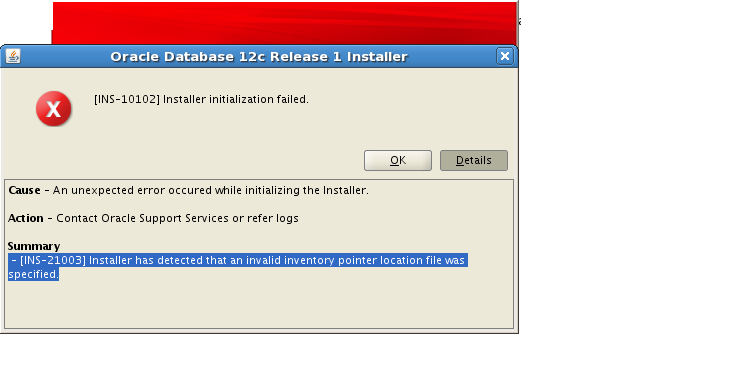
[INS-21003] Installer has detected that an invalid inventory pointer location file was specifies

This error appear while trying to install oracle database 12c on Linux 64bit to solve it i forgot to add the group on oraInst.loc
vi /etc/oraInst.loc
and add the below line :-
inst_group=dba ( depend on your group).
Thanks
osama

ORA-12054 while trying to create materialized view with sysdate

while trying to configure materialized view with sysdate today , Fast Refresh on commit , i received the following error :-

ORA-12054: cannot set the ON COMMIT refresh attribute for the materialized view.

Regarding to Oracle Documentation there is some restriction should be considered while trying to create materialized view Check Here  or here.

But there is always workaround,

1- i create dummy table contain 1 row with 1 column only contains sysdate.
2- create Job that this sysdata on daily basis.
3- call this column in where condition of materialized view.

Problem solved.

Thanks
Osama

Import hangs On index level.

Today some customer contact me complaining that they are trying to sync the development with UAT, when i check the issue everything was normal for the first time, but the alert logs indicate that database could complete the checkpoint.

so this what i did to make the import faster ( which i completed it as well ) :-

  • Change database to no archive mode.
  • increase sga_target temporary.
  • use parallel command depend on cpu core.
  • Use commit=N with import parameters.
  • you can exclude indexes by exclude=indexes but i don’t prefer this at all.
  • increase db_cache_size.
This simple steps that could help someone to make import little faster or solve hang issue.
let me know if you need anything 🙂
Cheers
Merry Christmas guys 
Osama

ORA-01502 index or partition of such index is in unusable state

The following error appeared on application side while trying to deploy the new SRF on the application, as you see from the above error it’s database error and to solve it follow the below steps :-

from database side :-

sqlplus /as sysdba

From the above picture check the index name and put it inside this query :-

select owner,index_name,table_name,status from dba_indexes where index_name=’index_name’;

OWNER    INDEX_NAME    TABLE_NAME    STATUS
—–    ———-    ———-    ——
owner    index_name     table_name    INVALID

alter index ndex_name rebuild;

Try again

Cheers
Osama 

ORA-00845: MEMORY_TARGET not supported on this system

SQL> alter system set memory_max_target=2GB scope=spfile;
System altered.
SQL> alter system set memory_target=2GB scope=spfile;
System altered.

 SQL> startup ;

ORA-00845: MEMORY_TARGET not supported on this system

Check the following Space :-

ECATSTDB oracle: :/home/oracle\>df -h
Filesystem            Size  Used Avail Use% Mounted on
/dev/mapper/Oracle-LogVol00
                       20G  3.3G   15G  18% /
/dev/mapper/Oracle-LogVol02
                       90G   45G   41G  53% /Oracle
/dev/sda1              99M   18M   77M  19% /boot
tmpfs                 3.0G     0  3.0G   0% /dev/shm

Increase the space

mount -t tmpfs shmfs -o size=6144m /dev/shm

now startup the database.

Cheers
Osama