Locking In Oracle

Locking in Oracle is one of the most common problem we will face as database administrator.

 is the locking Effect on Database performance ?

Yes . impede a transaction from finishing , since the Lock query Take long time running .

When the Locking Happened ?

I will Give you example :

Let assume that we have two Users Each Of them Update on the same table like the following :

User 1 :

SQL> update test set name=’lock’ where id=1;

1 row updated.

User didn’t commit here .

User 2 :
SQL> update test set name=’lock2′ where id=1;


User 2 will be waiting

Inforamtion about locks :
1-Locks scripts One.
2-Locks Scripts Two

Another way to Lock :

performing a DDL (alter,create….) and get an ORA-00054 error.

ORA-00054: resource busy and acquire with NOWAIT specified

 to solve this issue

SQL> select object_id from dba_objectswhere owner=’Username’  and object_name=’Table’;

 OBJECT_ID
———-
 

SELECT c.owner,
 c.object_name,
 c.object_type,
 b.sid,
 b.serial#,
 b.status,
 b.osuser,
 b.machine
FROM v$locked_object a, v$session b, dba_objects c
WHERE b.sid = a.session_id AND a.object_id = c.object_id
and a.object_id=;

Refer also to :
1-Locks

Osama Mustafa

Remove Oracle / Uninstall

I post this topics for people who want to learn how to remove Oracle For Window/Linux 


Windows :

Its easy common steps you have to follow :

  • Uninstall all Oracle components using the Oracle Universal Installer (OUI).
  • Run regedit.exe and delete the HKEY_LOCAL_MACHINE/SOFTWARE/ORACLE key. This contains registry entires for all Oracle products.
  • Delete any references to Oracle services left behind in the following part of the registry (HKEY_LOCAL_MACHINE/SYSTEM/CurrentControlSet/Services/Ora*). It should be pretty obvious which ones relate to Oracle.
  • Reboot your machine.
  • Delete the “C:\Oracle” directory, or whatever directory is your ORACLE_BASE.
  • Delete the “C:\Program Files\Oracle” directory.
  • Empty the contents of your “C:\temp” directory.
  • Empty your recycle bin.

Unix :

  • Uninstall all Oracle components using the Oracle Universal Installer (OUI).
  • Stop All Oracle Process .

lsnrctl stop
emctl stop dbconsole
emctl stop agent.

  • Delete the files and directories below the $ORACLE_HOME.
# cd $ORACLE_HOME
# rm -Rf *
  •  delete directories below the $ORACLE_BASE.

 # cd $ORACLE_BASE
# rm -Rf admin

  •  Delete the /etc/oratab file

Done .

Osama Mustafa

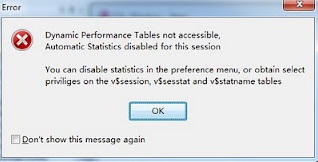
PL/SQL developer: Dynamic Performance Tables not accessible

ERROR HAPPENED WHEN :

Login into Pl/sql developer (software)


Solution:

1.grant select any dictionary to username
2.disable this function by

Tools –> Preference –> option –> uncheck option “Automatic statistics”

RMAN-20001: target database not found in recovery catalog

===================================================

RMAN-00569: =============== ERROR MESSAGE STACK FOLLOWS
RMAN-00571: ===================================================
RMAN-03002: failure of list command at 11/13/2011 03:26:18

RMAN-06004: ORACLE error from recovery catalog database: RMAN-20001: target database not found in recovery catalog

  1. Connect to RMAN Catalog
$ rman catalog rman/rman@rmancat target rmanbkup/rmanbkup@orcl
Recovery Manager: Release 11.2.0.2.0 – Production on Sun Nov 13 03:25:49 2011
Copyright (c) 1982, 2009, Oracle and/or its affiliates.  All rights reserved.
connected to target database: orcl (DBID=5858479612)
connected to recovery catalog database
  1. Unregister the database
RMAN>unregister database noprompt;
  1. Register Database to RMAN catalog
RMAN> register database;
database registered in recovery catalog
starting full resync of recovery catalog

full resync complete

Article / Data Guard

Today while I am Browsing i read this amazing article about Data Guard and want to share it .


What Is Data Guard 

Oracle Data Guard delivers high availability, data protection, and disaster recovery for the enterprise data. 

Data Guard configuration consists of one production database, having primary role, and one or more standby databases, having standby roles.

Standby database can take over the production service either for planned or unplanned outages.
Apart from that it can be used for offloading the reporting and backup operations from production.

The databases in a Data Guard configuration are connected by Oracle Net and might be arranged geographically. 

There are no strict network requirements for the databases to be in the same subnet and etc. It could be LAN, WAN or internet connection.

Data Guard configuration and control could be managed via:

  • SQL command line interface;
  • Data Guard Broker interface: using DGMRL for command line interface and GUI delivered via Oracle Enterprise Manager. Data Guard broker tool is included in Enterprise edition license. This tool provides simplified and automatic data guard maintenance and configuration procedures. How to use it I will describe later in this article.

Oracle Data Guard could be deployed among different platforms(x86, Power, Itanium, SPARC), Operating systems(32/64 bit) and Oracle software versions (32/64bit) with limitations.

Check This notes : 413484.1 and 1085687.1 On MOS.

Data Guard deployment examples


Examples provided here are using fast start failover technology for automatic failover operations.
Without fast start failover in place all failover operations must be performed manually.

 The depiction of solution above demonstrates high level HA ready deployment leveraging fast start fail-over configuration and active data guard option on physical standby for reporting&queries. 

Here observer is data guard broker executable utility, used in fast start failover configurations, which  could run on either laptop, server or workstation.


Disaster ready  setup


The depiction of solution below demonstrates high level DR ready deployment leveraging fast start failover configuration and logical standby for reporting&queries. As depicted it involves 3 different sites to provide desired functionality. Although it is not intended to provide reporting services in case of Site A outage, it could be done by putting additional standby server in site B though.


Standby databases overview

Data Guard provides three different types of standby databases:

  • Physical standby. This is physically identical copy of primary database compared on block level. All database physical and logical structures like data files, schemas are the same. Standby database is synchronized through Redo Apply mechanism, which delivers redo data and applies it on the physical standby database. For such purpose so called standby redo logs are used in standby which are providing similar functionality as online redo logs.
  • Logical standby. This type of database contains only the same logical information as the production database, but the physical structure  of the data can be different, like different data file organization and etc.  The logical standby database is synchronized through SQL Apply mechanism, which first transforms the data, in the redo received, into SQL statements – DML’s and DDL’s – and then executes them on the standby. Here LogMiner component of SQL Apply is used. Standby databases are functioning in read write mode.  
  • Snapshot standby. This type of physical standby database appeared first with 11g release. It is more like a data guard mode than a different configuration. The only difference from latter ones, when enabled it is fully operational – read and write mode –  production database copy, where users can access and perform any data manipulations. Meantime redo data is being received from the primary database, archived, but not applied until snapshot standby database is reverted back to the physical standby database.

Physical standby

  • Starting with Oracle database release 11g there is new active data guard feature which allows reporting and queries while redo apply is active on physical standby. This data guard option must be purchased as add-on to Enterprise edition license. 
  • Can be used to offload backup operations from production server. 
  • Supports all database datatypes, types of tables, DDL and DML operations

* Logical standby  

  • Typically is used for reporting and queries while sql apply is active on logical standby.
  • Could be used for database upgrades with minimal downtime.
  • Can maintain other database objects not belonging to primary database. 
  • Logical standby database has limitation on support of datatypes, types of tables, DDL and DML operations.

Data Guard protection modes

Databases running with Data Guard implemented could be configured to act differently when primary server outage is taking place


Maximum performance
Default protection mode. This protection mode provides maximum protection without affecting primary database performance. Here transactions on primary are committed as soon as redo log is filled with all relevant redo data without waiting for write accomplishment from standby databases – it is being done asynchronously. Therefore such protection mode does not guarantee complete data restore until last transaction.
Maximum availability
This protection mode guarantees that no data loss will occur if primary database fails. Transactions do not commit until all relevant redo data is written in redo and standby redo logs of standby database. In such configuration standby database is kept completely synchronized with primary. In case of standby database outage or whatever reasons preventing to write/send redo data into standby locations, primary database is kept running to preserver availability.
Maximum protection
This protection mode guarantees that no data loss will occur if primary database fails. The only difference from the Maximum Availability mode is that if primary database cannot write/send redo data into standby database locations it will be shutdown. Since such configuration prioritizes data protection over primary database’s availability, the recommended deployment is to have at least several standby databases.

How to enable, change protection modes

from SQLPlus on primary : 

ALTER DATABASE SET STANDBY DATABASE TO MAXIMIZE AVAILABILITY/PERFORMANCE/PROTECTION;

from Data Guard broker command line interface :

 DGMGRL> EDIT CONFIGURATION SET PROTECTION MODE AS MAXAVAILABILITY/MAXPROTECTION/MAXPERFORMANCE;

 Thank you
Osama Mustafa

ORA-29701: Unable to connect to Cluster Manager

ORA-29701: Unable to connect to Cluster Manager.

The reason is Oracle cssd daemon process was not running.

As Root User :

Step 1: Go to the /etc folder
Step 2: Execute the following command.

# init.cssd start

startup will be queued to init within 30 seconds

Step 3: Wait for 2 minutes and execute the following commands

# cd $ORACLE_HOME/bin
# ./localconfig delete

Stopping CSSD
Failure in CSS initialization opening OCR.
Shutdown has begun. The daemons should exit soon.

Step 4: Execute the following command

# ./localconfig add

Successfully accumulated necessary OCR keys.
Creating OCR keys for user root, privgrp ‘system’
Operation Successful
Configuration for local css has been initialized.
Adding to inittab
Startup will be queued to init within 30 seconds
Checking the status of new oracle init process..
Expecting the CRS daemons to be up within 600 seconds
CSS is active on these nodes
nodelist
CSS is active on all nodes
Oracle CSS service is installed and running under init(1M)

Step 5: Start the ASM instance now.

ORA-1652: unable to extend temp segment by % in tablespace TEMP

What does that error means:

This error is fairly self explanatory – we cannot get enough space for a temporary segment. The size reported in the error message is the number of contiguous free Oracle blocks that cannot be found in the listed tablespace.

How to approach the ORA-1652 error

There are two views in the database that help keep track of the free space in the temporary tablespace: v$sort_usage and v$tempseg_usage (from 9i onwards).

select TABLESPACE_NAME,TOTAL_BLOCKS,USED_BLOCKS,FREE_BLOCKS from v$sort_segment;
TABLESPACE_NAME                 TOTAL_BLOCKS USED_BLOCKS FREE_BLOCKS
——————————- ———— ———– ———–
TEMP                                 1310592           0     1310592

If USED_BLOCKS = TOTAL_BLOCKS, find which user and statement is using the temporary sort segment by following;

 SELECT a.username, a.sid, a.serial#, a.osuser, b.tablespace, b.blocks, c.sql_text
FROM v$session a, v$tempseg_usage b, v$sqlarea c
WHERE a.saddr = b.session_addr
AND c.address= a.sql_address
AND c.hash_value = a.sql_hash_value
ORDER BY b.tablespace, b.blocks

Conclusion

There are two ways of solving this error:

  1. Add more tempfiles, increase the size of the current ones or enable auto extend and the most important:
  2. Tune the queries/statements so that the sort operations are done in memory and not on the disk.

 Thank you
Osama Mustafa

Data Pump impdp expdp NETWORK_LINK option

First what is the network_Link Option :

you can import the schema from source database to target database. One advantage of this option you don’t need export and import as it does the export and import in single shot from the source to destination. Also, the file system space is not needed to accommodate the huge dump files as we can directly import to target using network_link. It is very amazing option with data pump. You can take the backup of source database schema from another database and you can store in dump files in target location as well.
Examples One :
SQL>  select name from v$database;
NAME
———
Production
SQL> show user
USER is “OSAMA”
SQL> select * from tab;
no rows selected
SQL> create table test1 as select * from all_objects;
Table created.
SQL> select * from tab;
TNAME                          TABTYPE  CLUSTERID
—————————— ——- ———-
test1                           TABLE
added a TNS entry (File location: $ORACLE_HOME/network/admin/tnsnames.ora) for production database in my source database box. Entry as below:

production =
   (description =
      (address =
         (protocol = tcp)
         (host = xxx.xxxx.xxx.xxx)
         (port = 1521)
      )
      (connect_data =
         (server = dedicated)
         (sid = production)
      )
   )

Make Sure you test the connection using tnsping .

Connect to source database using sqlplus and create a database link to production database with osama user
SQL> create database link production connect to osama identified by osama using ‘production’;
Database link created.
SQL> select * from tab@production
  2  ;
TNAME                          TABTYPE  CLUSTERID
—————————— ——- ———-
test1                          TABLE
import the osama schema of production database to source database without dumpfile(Run it From Source)
 
$ impdp osama/osama directory=network logfile=osama.log network_link=production
Import: Release 11.2.0.3.0 – 64bit Production on Tuesday, 24 July, 2012 01:30:35
Copyright (c) 2003, 2007, Oracle.  All rights reserved.
Connected to: Oracle Database 11g Enterprise Edition Release 11.2.0.3.0 – 64bit Production
With the Partitioning, OLAP, Data Mining and Real Application Testing options
Starting “OSAMA”.”SYS_IMPORT_SCHEMA_01″:  OSAMA/******** directory=exp_dir logfile=impnetworkscott.log network_link=prod8
Estimate in progress using BLOCKS method…
Processing object type SCHEMA_EXPORT/TABLE/TABLE_DATA
Total estimation using BLOCKS method: 12 MB
Processing object type SCHEMA_EXPORT/USER
ORA-31684: Object type USER:”OSAMA” already exists
Processing object type SCHEMA_EXPORT/SYSTEM_GRANT
Processing object type SCHEMA_EXPORT/ROLE_GRANT
Processing object type SCHEMA_EXPORT/DEFAULT_ROLE
Processing object type SCHEMA_EXPORT/PRE_SCHEMA/PROCACT_SCHEMA
Processing object type SCHEMA_EXPORT/TABLE/TABLE
. . imported “OSAMA”.”TEST1″                      11222 rows

Example Two :
we will export  schema from source database from target machine. You can store the dump in files.
 From Source Run (Copy to dump to folder network)
$ expdp osama/osama directory=network dumpfile=osama.dmp logfile=osama.log network_link=production
Export: Release 11.2.0.3.0 – 64bit Production on Tuesday, 24 July, 2012 02:05:09
Copyright (c) 2003, 2007, Oracle.  All rights reserved.
Connected to: Oracle Database 11g Enterprise Edition Release 11.2.0.3.0 – 64bit Production
With the Partitioning, OLAP, Data Mining and Real Application Testing options
Starting “OSAMA”.”SYS_EXPORT_SCHEMA_01″:  osama/******** directory=test dumpfile=osama.dmp logfile=osama.log network_link=production
Estimate in progress using BLOCKS method…
Processing object type SCHEMA_EXPORT/TABLE/TABLE_DATA
Total estimation using BLOCKS method: 12 MB
Processing object type SCHEMA_EXPORT/USER
Processing object type SCHEMA_EXPORT/SYSTEM_GRANT
Processing object type SCHEMA_EXPORT/ROLE_GRANT
Processing object type SCHEMA_EXPORT/DEFAULT_ROLE
Processing object type SCHEMA_EXPORT/PRE_SCHEMA/PROCACT_SCHEMA
Processing object type SCHEMA_EXPORT/TABLE/TABLE
. . exported “OSAMA”.”TEST1″                     9.496 MB   11222rows
Master table “osama”.”SYS_EXPORT_SCHEMA_01″ successfully loaded/unloaded
******************************************************************************
Also Check
1-Ronny Egners Blog

Enjoy 

Osama Mustafa

New Features In 11g / ADRCI

Automatic Diagnostic Repository Command Interface

What is It ? 


diagnostic data such as traces, dumps, the alert log, health monitor reports, and more. It has a unified directory structure across multiple instances and multiple products. Beginning with Release 11g, the database, Automatic Storage Management (ASM), and other Oracle products or components store all diagnostic data in the ADR. Each instance of each product stores diagnostic data underneath its own ADR home directory. The ADR’s unified directory structure enables customers and Oracle Support to correlate and analyze diagnostic data across multiple instances and multiple products.

 Contain :

Problem : critical error in the database.
Incident : single occurrence of a problem. 
Problem Key : text string that includes an error code (ORA-%)
Incident Package : collection of data about incidents for one or more problems.
ADR Home : root directory for all diagnostic data—traces, dumps, alert log.
ADR Base : permit correlation of diagnostic data across multiple ADR homes.
 How to Use for Show Errors , Alerts and Traces
adrci> show alert -tail -f
adrci> show problem
adrci> show incident
adrci> show incident -mode detail -p “incident_id=”incident_id””
adrci> show trace “trace file name
create packages and zip files for oracle support:
It gather all the required information with a method called “Incident Packaging Service” (IPS):
adrci> ips create package problem 1 correlate all
adrci> ips generate package 1 in “/home/oracle” 
Purging trace files automatically:

adrci> show tracefile -rt
adrci> show control

SHORTP_POLICY :Retention for ordinary trace files
LONGP_POLICY :Retention for like incident files

adrci> set control (SHORTP_POLICY = 360) ===>15days
adrci> set control (LONGP_POLICY = 2160) ===>90 Days
adrci> show control

Purging Trace files manually:

Following command will manually purge all tracefiles older than 2 days (2880 minutes):
adrci> purge -age 2880 -type trace
adrci> purge -age 129600 -type ALERT ===> purging ALERT older than 90 days
adrci> purge -age 43200 -type INCIDENT ===> purging INCIDENT older than 30 days
adrci> purge -age 43200 -type TRACE ===> purging TRACE older than 30 days
adrci> purge -age 43200 -type CDUMP ===> purging CDUMP older than 30 days
adrci> purge -age 43200 -type HM ===> purging HM older than 30 days
adrci> show tracefile -rt  

amazing tools for DBA, could let your job became easier .
Also Check
1-ADRCI Tips
enjoy 
Osama Mustafa