Enforcing SLA Compliance with SQL Assertions in Oracle 23ai: A Real-World Use Case

One of the most frustrating things I’ve dealt with as a DBA is cleaning up data that should never have existed in the first place. Orphaned records, overlapping date ranges, business rules violated because some batch job skipped a validation step. We’ve all been there.

The traditional solution was triggers. And if you’ve written cross-table validation triggers in Oracle, you know the pain: mutating table errors (ORA-04091), complex exception handling, scattered logic across multiple trigger bodies, and debugging sessions that make you question your career choices.

Starting with Oracle Database 23ai (release 23.26.1), Oracle introduced SQL Assertions, and they change everything about how we enforce cross-table business rules.

What Are SQL Assertions?

An assertion is a schema-level integrity constraint defined by a boolean expression. If that expression evaluates to false during a transaction, the transaction fails. That’s it. The concept has been part of the SQL standard since SQL-92, but no major database vendor actually implemented it until Oracle did it in 23.26.1.

There are two types of assertion expressions:

Existential expressions use [NOT] EXISTS with a subquery. If the condition is true, the transaction proceeds.

Universal expressions use the new ALL ... SATISFY syntax. This lets you say “for every row matching this query, this condition must hold.” It’s Oracle’s elegant alternative to the awkward double-negation pattern (NOT EXISTS ... WHERE NOT EXISTS ...) that SQL traditionally requires for universal quantification.

The Scenario: SLA Compliance for a Ticketing System

Let me show you a real-world use case that goes beyond toy examples. Imagine you run a support ticketing system for an enterprise. You have service level agreements (SLAs) with your customers, and the database needs to enforce these rules:

  1. Every customer must have an active SLA before they can submit a ticket. No SLA, no support.
  2. Tickets can only be created while the customer’s SLA is active (between start and end dates).
  3. High-priority tickets must be assigned to a senior engineer. You can’t assign a critical production issue to a junior team member.
  4. Every SLA must cover at least one service category. An SLA with no covered services is meaningless.

In a traditional Oracle setup, enforcing these rules would require at least four separate triggers across three tables, careful handling of mutating table errors, and a lot of testing to make sure they don’t interfere with each other.

With assertions, each rule is a single declarative statement.

Building the Schema

sql

DROP TABLE IF EXISTS tickets CASCADE CONSTRAINTS PURGE;
DROP TABLE IF EXISTS sla_services CASCADE CONSTRAINTS PURGE;
DROP TABLE IF EXISTS slas CASCADE CONSTRAINTS PURGE;
DROP TABLE IF EXISTS engineers CASCADE CONSTRAINTS PURGE;
DROP TABLE IF EXISTS customers CASCADE CONSTRAINTS PURGE;
CREATE TABLE customers (
id NUMBER GENERATED ALWAYS AS IDENTITY PRIMARY KEY,
name VARCHAR2(200) NOT NULL,
company VARCHAR2(200),
created_at TIMESTAMP DEFAULT SYSTIMESTAMP
);
CREATE TABLE engineers (
id NUMBER GENERATED ALWAYS AS IDENTITY PRIMARY KEY,
name VARCHAR2(200) NOT NULL,
seniority VARCHAR2(20) CHECK (
seniority IN ('junior','mid','senior','lead')
),
specialization VARCHAR2(100)
);
CREATE TABLE slas (
id NUMBER GENERATED ALWAYS AS IDENTITY PRIMARY KEY,
customer_id NUMBER NOT NULL REFERENCES customers(id),
sla_tier VARCHAR2(20) CHECK (
sla_tier IN ('bronze','silver','gold','platinum')
),
start_date DATE NOT NULL,
end_date DATE NOT NULL,
CONSTRAINT sla_dates_valid CHECK (end_date > start_date)
);
CREATE TABLE sla_services (
id NUMBER GENERATED ALWAYS AS IDENTITY PRIMARY KEY,
sla_id NUMBER NOT NULL REFERENCES slas(id),
service_name VARCHAR2(100) NOT NULL
);
CREATE TABLE tickets (
id NUMBER GENERATED ALWAYS AS IDENTITY PRIMARY KEY,
customer_id NUMBER NOT NULL REFERENCES customers(id),
engineer_id NUMBER REFERENCES engineers(id),
priority VARCHAR2(20) CHECK (
priority IN ('low','medium','high','critical')
),
subject VARCHAR2(500) NOT NULL,
created_at TIMESTAMP DEFAULT SYSTIMESTAMP,
status VARCHAR2(20) DEFAULT 'open' CHECK (
status IN ('open','in_progress','resolved','closed')
)
);

Assertion 1: Customers Need an Active SLA to Submit Tickets

This is the core business rule. No active SLA, no ticket creation.

sql

CREATE ASSERTION ticket_requires_active_sla
CHECK (
ALL (SELECT customer_id, created_at FROM tickets) SATISFY
EXISTS (
SELECT 1 FROM slas
WHERE slas.customer_id = tickets.customer_id
AND tickets.created_at
BETWEEN slas.start_date AND slas.end_date
)
);

Read that in plain English: “For all tickets, there must exist an SLA for that customer where the ticket creation date falls within the SLA period.”

If someone tries to insert a ticket for a customer whose SLA has expired, the database will reject the transaction. No application code needed. No trigger needed. The rule is declarative and self-documenting.

Assertion 2: High-Priority Tickets Need Senior Engineers

This is a cross-table constraint that would be especially painful with triggers because it spans tickets and engineers.

sql

CREATE ASSERTION critical_tickets_need_senior_engineer
CHECK (
NOT EXISTS (
SELECT 1
FROM tickets t
JOIN engineers e ON t.engineer_id = e.id
WHERE t.priority IN ('high', 'critical')
AND e.seniority IN ('junior', 'mid')
)
);

This uses the existential pattern. It looks for any high-priority ticket assigned to a junior or mid-level engineer. If it finds one, the transaction fails. Simple, clear, and impossible to bypass from any application that touches this database.

Assertion 3: Every SLA Must Cover at Least One Service

An SLA without any covered services is a data integrity problem waiting to happen.

sql

CREATE ASSERTION sla_must_have_services
CHECK (
ALL (SELECT id FROM slas) SATISFY
EXISTS (
SELECT 1 FROM sla_services
WHERE sla_services.sla_id = slas.id
)
)
DEFERRABLE INITIALLY DEFERRED;

This one uses DEFERRABLE INITIALLY DEFERRED because of the chicken-and-egg problem: the foreign key on sla_services requires the SLA to exist first, but this assertion requires services to exist when an SLA exists. By deferring validation to commit time, you can insert both the SLA and its services in a single transaction.

Testing It Out

Let’s load some data and see the assertions in action:

sql

-- Insert customers
INSERT INTO customers (name, company)
VALUES ('Ahmad Hassan', 'TechCorp Jordan');
INSERT INTO customers (name, company)
VALUES ('Sara Ali', 'DataFlow ME');
-- Insert engineers
INSERT INTO engineers (name, seniority, specialization)
VALUES ('Omar Khalid', 'senior', 'Database');
INSERT INTO engineers (name, seniority, specialization)
VALUES ('Lina Nasser', 'junior', 'Networking');
-- Insert SLA with services (in one transaction
-- because of deferred assertion)
INSERT INTO slas (customer_id, sla_tier, start_date, end_date)
VALUES (1, 'gold', DATE '2025-01-01', DATE '2026-12-31');
INSERT INTO sla_services (sla_id, service_name)
VALUES (1, 'Database Support');
INSERT INTO sla_services (sla_id, service_name)
VALUES (1, '24/7 Monitoring');
COMMIT; -- Assertion validates here: SLA has services, OK
-- This should succeed: customer has active SLA,
-- senior engineer assigned
INSERT INTO tickets
(customer_id, engineer_id, priority, subject)
VALUES
(1, 1, 'critical', 'Production database performance issue');
COMMIT;

Now let’s try violating the rules:

sql

-- This should FAIL: assigning critical ticket
-- to junior engineer
INSERT INTO tickets
(customer_id, engineer_id, priority, subject)
VALUES
(1, 2, 'critical', 'Server outage');
COMMIT;
-- ERROR: assertion CRITICAL_TICKETS_NEED_SENIOR_ENGINEER violated
-- This should FAIL: customer 2 has no SLA
INSERT INTO tickets
(customer_id, engineer_id, priority, subject)
VALUES
(2, 1, 'low', 'General question');
COMMIT;
-- ERROR: assertion TICKET_REQUIRES_ACTIVE_SLA violated

The database enforces the rules. Every time. Regardless of which application, API, or batch job is inserting the data.

Why This Matters

The traditional approach to these rules would involve:

  • Four or more BEFORE INSERT triggers across multiple tables
  • Careful handling of ORA-04091 mutating table errors (probably using compound triggers or package variables)
  • Testing every combination of insert/update/delete across all tables
  • Documentation that explains what each trigger does and how they interact
  • A maintenance burden that grows with every new business rule

With assertions, each rule is one statement. They live in the data dictionary alongside your other constraints. You can query USER_CONSTRAINTS to see them. They are self-documenting. And Oracle’s internal incremental checking mechanism ensures they perform well because the database only validates the data that actually changed, not the entire table.

Practical Notes

Grant the privilege. CREATE ASSERTION is not included in RESOURCE. Use GRANT DB_DEVELOPER_ROLE TO your_user; or grant it explicitly.

Assertions share the constraint namespace. You cannot have an assertion and a constraint with the same name in the same schema.

Cross-schema assertions need ASSERTION REFERENCES. If your assertion references tables in another schema, you need this object privilege on those tables, and you must use fully qualified table names (synonyms are not supported).

Start with ENABLE NOVALIDATE on existing systems. This lets you add an assertion without checking existing data, which is essential when adding rules to a database that might already contain violations.

Subqueries can nest up to three levels. For most business rules, this is more than enough.

Resources

Thank you

Osama

Building a Customer Management System with Oracle 23ai: Domains, Duality Views, and Annotations

I’ve been exploring the new features in Oracle Database 23ai, and I have to say, the combination of SQL Domains, JSON Relational Duality Views, and Annotations completely changes how I think about schema design. In this post, I’ll walk through building a small customer and order management system that uses all three features together. And the best part? You can run every single example right here on FreeSQL without installing anything.

The Problem

Let’s say we’re building a simple e-commerce backend. We need customer records with validated email addresses and credit card numbers, and we need order records tied to those customers. On the application side, our frontend team wants to consume the data as JSON documents. On the database side, we want clean, normalized relational tables with proper constraints.

In older Oracle versions, you would have to:

  • Repeat CHECK constraints for email validation on every table that stores emails
  • Build complex application-layer ORM logic to convert between relational rows and JSON objects
  • Keep documentation about your schema in external wikis or README files that nobody updates

Oracle 23ai solves all three problems with native features. Let me show you how.

Setting Up the Foundation: SQL Domains

SQL Domains are reusable column-type definitions. Think of them as named templates that bundle a data type, constraints, display formatting, ordering behavior, and documentation into a single schema object. Once you create a domain, any column can reference it and automatically inherit everything.

Here’s what that looks like for email addresses and credit card numbers:

sql

PURGE RECYCLEBIN;
DROP DOMAIN IF EXISTS emails;
DROP DOMAIN IF EXISTS cc;
CREATE DOMAIN emails AS VARCHAR2(100)
CONSTRAINT email_chk CHECK (
REGEXP_LIKE(emails, '^(\S+)\@(\S+)\.(\S+)$')
)
DISPLAY LOWER(emails)
ORDER LOWER(emails)
ANNOTATIONS (
Description 'An email address with a check constraint
for name @ domain dot (.) something'
);
CREATE DOMAIN cc AS VARCHAR2(19)
CONSTRAINT cc_chk CHECK (
REGEXP_LIKE(cc, '^\d+(\d+)*$')
)
ANNOTATIONS (
Description 'Credit card number with a check constraint
no dashes, no spaces!'
);

Notice a few things here. The DISPLAY clause means that whenever someone queries an email column, it will automatically be shown in lowercase. The ORDER clause ensures sorting is also case-insensitive. And the ANNOTATIONS clause embeds documentation directly in the data dictionary. No external docs needed.

Try inserting an invalid email like not-an-email into any column using the emails domain, and the database will reject it automatically. The validation lives in the schema, not in your application code.

Creating the Tables

Now let’s create our customers and orders tables. Notice how the email column simply references the emails domain, and the credit_card column references the cc domain. No need to repeat the CHECK constraints.

sql

DROP TABLE IF EXISTS orders CASCADE CONSTRAINTS PURGE;
DROP TABLE IF EXISTS customers CASCADE CONSTRAINTS PURGE;
CREATE TABLE IF NOT EXISTS orders (
id NUMBER,
product_id NUMBER,
order_date TIMESTAMP,
customer_id NUMBER,
total_value NUMBER(6,2),
order_shipped BOOLEAN,
warranty INTERVAL YEAR TO MONTH
);
CREATE TABLE IF NOT EXISTS customers (
id NUMBER,
first_name VARCHAR2(100),
last_name VARCHAR2(100),
dob DATE,
email emails,
address VARCHAR2(200),
zip VARCHAR2(10),
phone_number VARCHAR2(20),
credit_card cc,
joined_date TIMESTAMP DEFAULT SYSTIMESTAMP,
gold_customer BOOLEAN DEFAULT FALSE,
CONSTRAINT new_customers_pk PRIMARY KEY (id)
);
ALTER TABLE orders ADD (CONSTRAINT orders_pk PRIMARY KEY (id));
ALTER TABLE orders ADD (
CONSTRAINT orders_fk FOREIGN KEY (customer_id)
REFERENCES customers (id)
);

Also worth noting: BOOLEAN is now a native SQL data type in 23ai. No more NUMBER(1) or CHAR(1) workarounds. And INTERVAL YEAR TO MONTH gives us clean warranty period tracking without date math.

Loading Sample Data

Let’s insert a handful of customers and a couple of orders:

sql

INSERT INTO customers
(id, first_name, last_name, dob, email, address,
zip, phone_number, credit_card)
VALUES
(1, 'Alice', 'Brown', DATE '1990-01-01',
'alice.brown@example.com', '123 Maple Street',
'12345', '555-1234', '4111111111110000'),
(3, 'Bob', 'Brown', DATE '1990-01-01',
'email1@example.com', '333 Maple Street',
'12345', '555-5678', '4111111111111111'),
(4, 'Clarice', 'Jones', DATE '1990-01-01',
'email8888@example.com', '222 Bourbon Street',
'12345', '555-7856', '4111111111111110'),
(5, 'David', 'Smith', DATE '1990-01-01',
'email375@example.com', '111 Walnut Street',
'12345', '555-3221', '4111111111111112');
INSERT INTO orders
(id, customer_id, product_id, order_date,
total_value, order_shipped, warranty)
VALUES
(100, 1, 101, SYSTIMESTAMP, 300.00, NULL, NULL),
(101, 4, 101, SYSTIMESTAMP - 30, 129.99, TRUE,
INTERVAL '5' YEAR);
COMMIT;

The Magic Part: JSON Relational Duality Views

Here’s where it gets really interesting. JSON Relational Duality Views let you expose your normalized relational tables as JSON documents. The data stays in the relational tables (normalized, efficient, properly constrained), but applications can read and write it as JSON. Both representations stay perfectly in sync, automatically.

First, a simple duality view for just the customers table:

sql

CREATE OR REPLACE FORCE JSON RELATIONAL DUALITY VIEW
customers_dv AS
customers @insert @update @delete
{
_id : id,
FirstName : first_name,
LastName : last_name,
DateOfBirth : dob,
Email : email,
Address : address,
Zip : zip,
phoneNumber : phone_number,
creditCard : credit_card,
joinedDate : joined_date,
goldStatus : gold_customer
};

Now you can insert data as JSON:

sql

INSERT INTO customers_dv VALUES (
'{"_id": 2, "FirstName": "Jim", "LastName": "Brown",
"Email": "jim.brown@example.com",
"Address": "456 Maple Street", "Zip": 12345}'
);
COMMIT;

That JSON insert automatically populates the underlying relational customers table. The domain validation still applies, so if you try to insert a bad email through the JSON interface, Oracle will reject it.

Nested Duality Views: Customers with Their Orders

Now for the real power. Let’s create a duality view that nests orders inside customer documents:

sql

CREATE OR REPLACE JSON RELATIONAL DUALITY VIEW
customer_orders_dv
ANNOTATIONS (
Description 'JSON Relational Duality View
sourced from CUSTOMERS and ORDERS'
)
AS SELECT JSON {
'_id' : c.ID,
'FirstName' : c.FIRST_NAME,
'LastName' : c.LAST_NAME,
'Address' : c.ADDRESS,
'Zip' : c.ZIP,
'orders' :
[ SELECT JSON {
'OrderID' : o.ID WITH NOUPDATE,
'ProductID' : o.PRODUCT_ID,
'OrderDate' : o.ORDER_DATE,
'TotalValue' : o.TOTAL_VALUE,
'OrderShipped' : o.ORDER_SHIPPED
}
FROM ORDERS o WITH INSERT UPDATE DELETE
WHERE o.CUSTOMER_ID = c.ID
]
}
FROM CUSTOMERS c;

Query it, and you get clean JSON with nested orders:

sql

SELECT * FROM customer_orders_dv o
WHERE o.data."_id" = 1;

You can even add a new order by updating the JSON document directly using JSON_TRANSFORM:

sql

UPDATE customer_orders_dv c
SET c.data = json_transform(
data,
APPEND '$.orders' = JSON {
'OrderID': 123,
'ProductID': 202,
'OrderDate': SYSTIMESTAMP,
'TotalValue': 150.00
}
)
WHERE c.data."_id" = 1;
COMMIT;
SELECT * FROM customer_orders_dv o
WHERE o.data."_id" = 1;

That single JSON update automatically inserted a new row into the relational ORDERS table with the correct foreign key. No ORM. No application-layer mapping. The database handles the translation.

Try It Yourself on FreeSQL

The complete script is available to run on FreeSQL. Click the button below, and you’ll have everything set up: domains, tables, sample data, and both duality views. You can modify the queries, try inserting invalid emails to see domain validation in action, and experiment with the JSON interface.

https://freesql.com/embedded/?layout=vertical&compressed_code=H4sIAAAAAAAAE61YbW%252FiuBb%252Bnl9xLlopsBO4JLy0pRqpKXGnzKbAJmlHnTt7kZu4xdMQIye00x31v1%252FZDpAAYbTSzQdIfI7tx%252Bc8x36S6a33CYGHhvdDF12OxueaFnG2hIgtME2APgL5QdMsBbLANE7PK6xheK5pISc4I2uj6gA4hRfMwznmVt1stxtayJI045gmmXKZhfNnCOckfIY6J0%252Fkx3IW02cCdTWAAfp%252F69%252F8D41vF%252BqvJf9%252B0xsNLaLpMsZvELNXwnP%252FhsZ4RDjATitOEpbhjLIkhbpD0pDTpXgC3c6xAo4iTtIUXmk2B5xjKsB9ZBwSvCBwsV5jxDKotxqQsgXJ5jR50ht7cQjDcgzOSiEIw8r1h6FY%252B7foQ%252F1b9KHxu1xx9SqGnEQ0gxDzCGrJavFAeK1yJQmDCKdzkhriNl3ikKT%252FktgdbzKFwL50USG7MqIpDG1%252FaDsIhpOxH3j2aBz4sFzxJ3J%252BuFu4SjO2%252BEVPrdmEoQoYhgw%252FxAQyBmnGOFHzQoQzrA09ZAdoO0XCsh10dQ0AgEYwvr25RJ4hH5ecRaswm%252B00yy6zSEwajG6QH9g3U2VZY97tkbEMx7MXHK9I3l7vG1ajOFw6p8slieByMnGRPVamV8w5TrI3GI0D5N3ZLtwj24NgAjeTcXCtNY5HYA3nl0HYxvpgHB4pT7OZJO%252Bd7Q2vbU9Vo7LG%252BIgxYg%252Fg2AFST6pS8tKULeuq2XS1Nl3%252FpsviiHnrcs4SMlMULfbKzaEk8kwSOQxV23dGExLtJAwcdGXfugH49%252F5OFp9YHM02scsTsvG%252Fsl0%252FX86WkJCQ102XdLZ8hqk3urG9e%252FgD3UOdRo11ruwoElsBoU8JPJO3Yl1lTA6TM1LmUrPdAHl5znKD7ThQL0ytmg%252FN2Tj%252FB%252F0fn%252BFq4qHRp7HqX%252BByAzx0hTw0HiK%252FyBU1haaNxj7yAkHSSdlsFKhjbIliCFoYigfGmgKGSLhRyq9RTGdDu7PdW%252BQD1E0DdDumIdEN0C85e010Q7IMdPPsrN1sm822KWxYOLUehMcF%252BYEXy5i0QrYQJtPqwA1exgT8jBOS5W3dnrjp9XpN8SDuu%252Bb2arfbbT1nmrjqHQGAPfwKh1ypuQuh0%252FkFhF7%252F5HQXgrhKELoG6MMY8zwcn1lC0mMwTk9PT3eRWJYFl2zFH1hSheXktNc%252FgKUcjp4BuoNfaCQ8%252FQXN5seQdE56e1kxTfiC42SVVeHoWJZ5AIdVwtE3QEerJA%252FJFxrHFC%252BORqV70t3D0oEJfq7C0e0cxNEp4TgxQL%252FiOHkWnkP24xiCs9OTvbR04JqGz4y%252FVaE4Oz05lJVuCcWpAfonwvgTxRJHTBYkORqNk%252F5%252BZixA8aKyWAQr93H0SjjODNCv82B4b%252FhosXS6vf6BhExpUlktlmVZBzD0SxjMtgH6iNNUglAEqa7Yzl7JWiZ4cxaxiCQRr66WTqfTOYDlpIxF7GOfcSgD8onGx%252BvW7Ha63T1AJlxSHs4rWdrt7m1ipmmelnFYBujuKnwTnu5bEh6tWrPf6%252BzVSgc8Er0yFlVuZb1e7wCQszIQsZ3eYC4Dcs9WydMvAmIdqJjhnPDqgun3%252B4dwtPWGdl4%252ByNbCUJxihbPQKKhCoyAFjaLIM8qiztgIufUhpkkqtg0wDTDbplFWIdBpt1vCmqziWP3KMNWlq0jXXp9mRwxmnbXOzgzIuIBAk4zwFxyD3tPhjWAul5irwIkHHpq69hCJU3%252BI4LM%252FGYOHXDsYTca2C86t7Y6Ce7gboS8wvPWDyQ3y%252FJlzB2D7oEHhoL%252BgSUp4BherpdRYFxGJSUa0nzKzQgvLawA0Usm%252BEqJgLBTj2lKQCdLDxSUHGBTEg3RwcEYmj5eUZ%252FPcQUgKaUJSZG6vQS40pNHO9ebWuJYf0vyVLgFKff%252Bmy63uHCvZqSxFpVLQnkMhPXOXgnwpKFGBfe1R1KYb8elnOFula5eSHNXeKwWXyI1kXwp1%252FWdtRqPaACwDaptw1wZQ%252B0wXNQNq6wDXBjUpXESbDJzw%252BU4X%252B6JJeOTREz7dXr8kXoT5K13WBiDr7V29y7LFgmZK%252BOI4IzzBGX0h8Inj5fxPF9K3JMM%252FQGs292l5lJCbgszFa%252FQCco7KF1w1GomlEcfgrHBMsze4o%252BQVUrbiIYngkbMFNJsbtgNOIph4DvJ8vSHFuy9%252BCy96af78M%252F8%252FQPit4Tjtt35Hyb91O0LlrdNBQhcd8m1usL6pKuZtj%252F9A4WF38etrIkYbOZtZy5FYX1O1leZ%252Bg%252BLWWjXmpngGxc33gHcgtuM7%252BcotvYvbc9Xgfv4Svhk838B3%252FN8Lz3%252Fl9%252B%252FnsnzlT7MJGccRXXPNceHf4P%252FpKus%252FpPqajTNFxJlzpw7M%252FwfXK5gudngfuWgYKGg%252FN0e0PqORLja21sjZHtz6htnKdjXy%252FGA2tm9QwWfNauXi2vseOaGVg%252B04HvL9gvkrXSrT19G00Kx4KyybNpAsPbyCTb%252BcoaIja40c%252BDIKrmE8uZ1uP1eU%252FDdcVT2m3sS5HQazYhzKYwumKl8Z2FnFuFueKudgEtjuTMqEqpFzmhYH969H0ylySh3eS09X3uQmTzGwvYHV8iE%252FWFQQwEEuClDZ98s18hAAa214OXLgoyREIQF%252FaVsAcuIt08S33nz8A7t4qPkogLAlvljBR%252FiesmSWcZykj4wv1McpYcoP8%252BkUjR3Qf2utSfAxT%252FcmuwPTEqKylDyrLQRvKUdl%252BbWTE7Mn1Ni71tDU4hW6ljxh4aN5vj3mUhKTMIPfVXUdWB6D1zkR3yZLQ4B5rjWbaDL8H0yub9RQFwAA&code_language=PL_SQL&code_format=false

What I Love About This Approach

Domains eliminate copy-paste constraints. In a real production schema, you might have emails in five different tables (customers, employees, vendors, contacts, users). With domains, the validation regex lives in one place. Change it once, and every column using that domain picks up the update.

Annotations are self-documenting schemas. You can query USER_ANNOTATIONS_USAGE to discover what every domain, table, and column does. No more hunting through Confluence pages or README files to understand what a column means.

Duality Views solve the ORM problem at the database level. Your frontend developers can work with clean JSON documents. Your DBAs can work with normalized relational tables. Both see the same data, and the database keeps them in sync. No impedance mismatch, no complex mapping layer, no stale caches.

The fact that you can now experience all of this directly in your browser through FreeSQL makes it incredibly easy to learn and prototype. Select the 23ai engine, and all these features are available immediately.

Regards
Osama

Kubernetes in the Multi-cloud: Orchestrating Workloads Across AWS and OCI

Why Multicloud Kubernetes Is No Longer Optional

The conversation has shifted. Running Kubernetes on a single cloud provider was once considered best practice simpler networking, unified IAM, one support contract. But modern enterprise reality tells a different story.

Vendor lock-in risk, regional compliance mandates, cost arbitrage opportunities, and resilience requirements are pushing engineering teams to operate Kubernetes clusters across multiple clouds simultaneously. Among the most compelling combinations today is AWS (EKS) paired with Oracle Cloud Infrastructure (OCI/OKE) two providers with fundamentally different strengths that, when combined, can form a genuinely powerful platform.

This post walks through the architectural decisions, tooling choices, and operational patterns for running a production-grade multicloud Kubernetes setup spanning AWS EKS and OCI OKE.

Understanding What Each Cloud Brings

Before designing a multicloud strategy, you need to be honest about why you’re using each provider not just “for redundancy.”

AWS EKS is mature, battle-tested, and has the richest ecosystem of Kubernetes-native tooling. Its managed node groups, Karpenter autoscaler, and deep integration with IAM Roles for Service Accounts (IRSA) make it a natural fit for compute-heavy, stateless microservices. The tradeoff: cost can escalate fast at scale.

OCI OKE (Oracle Container Engine for Kubernetes) is increasingly competitive on price, particularly for compute and egress and has genuine strengths in Oracle Database integrations, bare metal instances, and deterministic network performance via its RDMA fabric. For workloads that touch Oracle DB, Exadata, or need high-throughput interconnects, OKE is not just a fallback, it’s the right tool.

The insight that unlocks a real multicloud strategy: stop treating one cloud as primary and the other as DR. Design for active-active.

The Core Architecture

A production multicloud Kubernetes setup across EKS and OKE requires solving four problems:

  1. Cluster federation or virtual cluster abstraction
  2. Cross-cloud networking
  3. Unified identity and secrets management
  4. Consistent GitOps delivery

Let’s break each down.


1. Cluster Federation: Choosing Your Control Plane Philosophy

There are two schools of thought:

Option A Independent clusters, unified GitOps (recommended) Each cluster (EKS, OKE) is fully autonomous. A GitOps tool typically Flux or Argo CD manages both from a single source of truth. No shared control plane exists between clusters. Workloads are deployed to each cluster independently based on targeting labels or Kustomize overlays.

Option B Virtual Cluster Mesh (Liqo, Admiralty, or Karmada) Tools like Karmada introduce a meta-control plane that federates multiple clusters. You submit workloads to the Karmada API server, and it distributes them across member clusters based on propagation policies.

For most teams, Option A is the right starting point. Karmada adds power but also operational complexity. The GitOps approach keeps blast radius contained a misconfiguration in one cluster doesn’t cascade.


2. Cross-Cloud Networking: The Hard Problem

Kubernetes pods in EKS can’t natively reach pods in OKE, and vice versa. You need a data plane that spans both clouds.

Recommended approach: WireGuard-based mesh with Cilium Cluster Mesh

Cilium’s Cluster Mesh feature allows pods across clusters to communicate using their native pod IPs, with WireGuard encryption in transit. The setup requires:

  • Each cluster runs Cilium as its CNI (replacing the default VPC CNI on EKS and the flannel-based CNI on OKE)
  • A ClusterMesh resource is created linking the two API servers
  • Cross-cluster ServiceExport and ServiceImport resources (via the Kubernetes MCS API) expose services across the mesh

On the infrastructure layer, you need an encrypted tunnel between your AWS VPC and OCI VCN. Options:

  • Site-to-site VPN (quickest to set up, ~1.25 Gbps cap)
  • AWS Direct Connect + OCI FastConnect (for production private, dedicated bandwidth)
  • Overlay via Tailscale or Netbird (great for dev/staging multicloud setups, not production-grade for high-throughput)

yaml

# Example: Cilium ClusterMesh config snippet
apiVersion: cilium.io/v2alpha1
kind: CiliumClusterwideNetworkPolicy
metadata:
name: allow-cross-cluster-services
spec:
endpointSelector: {}
ingress:
- fromEndpoints:
- matchLabels:
io.cilium.k8s.policy.cluster: oci-oke-prod

3. Unified Identity: IRSA on AWS, Workload Identity on OCI

This is where multicloud gets philosophically interesting. Each cloud has its own identity system, and they don’t speak the same language.

On AWS (EKS): Use IRSA (IAM Roles for Service Accounts). Your pod’s service account is annotated with an IAM role ARN. The Pod Identity Webhook injects environment variables that allow the AWS SDK to exchange a projected service account token for temporary AWS credentials.

On OCI (OKE): Use OCI Workload Identity, introduced in recent OKE versions. It works analogously to IRSA a Kubernetes service account is bound to an OCI Dynamic Group and IAM policy, and the pod receives a workload identity token that can be exchanged for OCI API credentials.

The challenge: your application code should not need to know which cloud it’s running on. Use a secrets abstraction layer.

External Secrets Operator (ESO) elegantly solves this. Deploy ESO on both clusters. Point the EKS instance at AWS Secrets Manager; point the OKE instance at OCI Vault. Your application consumes a SecretStore resource with a consistent name. ESO handles the transparent fetching of backend-specific credentials.

# SecretStore on EKS (AWS Secrets Manager backend)
apiVersion: external-secrets.io/v1beta1
kind: SecretStore
metadata:
name: app-secrets
spec:
provider:
aws:
service: SecretsManager
region: us-east-1
auth:
jwt:
serviceAccountRef:
name: external-secrets-sa
---
# SecretStore on OKE (OCI Vault backend) same name, different spec
apiVersion: external-secrets.io/v1beta1
kind: SecretStore
metadata:
name: app-secrets
spec:
provider:
oracle:
vault: ocid1.vault.oc1...
region: us-ashburn-1
auth:
workloadIdentity: {}
```
Your application's `ExternalSecret` resources reference `app-secrets` in both environments the YAML is identical.
### 4. GitOps: One Repository, Multiple Targets
Use **Argo CD ApplicationSets** or **Flux's `Kustomization` with cluster selectors** to manage both clusters from a monorepo.
A typical repo layout:
```
/clusters
/eks-us-east-1
kustomization.yaml # EKS-specific patches
/oke-us-ashburn-1
kustomization.yaml # OKE-specific patches
/base
/apps
deployment.yaml
service.yaml
/infra
external-secrets.yaml
cilium-config.yaml

Flux’s Kustomization resource lets you target specific clusters using the cluster’s kubeconfig context or label selectors. Argo CD’s ApplicationSet with a list generator can enumerate your clusters and deploy the same app with environment-specific values.

The key rule: the base layer must be cloud-agnostic. Patches in cluster-specific overlays handle anything that diverges storage classes, ingress annotations, node selectors.


Observability Across Clouds

A multicloud cluster setup with no unified observability is an incident waiting to happen.

Recommended stack:

  • Prometheus + Thanos for metrics each cluster runs Prometheus; Thanos Sidecar ships blocks to object storage (S3 on AWS, OCI Object Storage on OCI); Thanos Querier federates across both
  • Grafana with both Thanos endpoints as datasources single pane of glass
  • OpenTelemetry Collector deployed as a DaemonSet on each cluster, shipping traces to a common backend (Grafana Tempo, Jaeger, or Honeycomb)
  • Loki for logs, with agents on each cluster shipping to a common Loki instance

Label discipline is critical: ensure every metric, trace, and log carries cluster, cloud_provider, and region labels from the source. Without this, correlation during incidents across clouds becomes extremely difficult.


Cost Management: The Overlooked Dimension

Multicloud adds a new cost vector: egress. Data leaving AWS costs money. Data entering OCI is free. Cross-cloud service calls that seemed free in a single-cloud setup now carry per-GB charges.

Practical rules:

  • Colocate tightly coupled services in the same cluster/cloud don’t split microservices that call each other thousands of times per second across clouds
  • Use Cilium’s network policy to audit cross-cluster traffic volume before enabling services in the mesh
  • Consider OCI’s free egress to the internet for user-facing workloads where latency to OCI regions is acceptable
  • Tag every namespace with cost center labels and use Kubecost or OpenCost deployed on each cluster with a shared object storage backend for unified cost attribution

Operational Runbook Considerations

A few things that will bite you if not planned for:

Clock skew: mTLS certificates and OIDC token validation are sensitive to time drift. Ensure NTP is configured identically on all nodes across both clouds. A 5-minute clock skew will silently break IRSA on EKS and workload identity on OKE.

DNS: Use ExternalDNS on both clusters pointing to a shared DNS provider (Route 53, Cloudflare). Services that need cross-cloud discoverability get DNS entries automatically on deploy.

Cluster upgrades: EKS and OKE release Kubernetes versions on different schedules. Maintain a maximum one-minor-version skew between clusters. Use a canary upgrade pattern: upgrade your OKE cluster first (typically lower blast radius), validate for 48 hours, then upgrade EKS.

Node image parity: Your application containers are cloud-agnostic, but your node OS images are not. Use Bottlerocket on EKS and Oracle Linux 8 on OKE both are minimal, hardened, and have predictable patching cycles.


When NOT to Do This

Multicloud Kubernetes is a force multiplier but only if your team has the operational maturity to support it.

Don’t pursue this architecture if:

  • Your team is still stabilizing single-cluster Kubernetes operations
  • Your workloads have no actual cross-cloud requirement (cost, compliance, or resilience)
  • You lack dedicated platform engineering capacity to maintain the toolchain
  • Your application isn’t designed for network partitioning tolerance

A well-run single-cloud EKS or OKE setup will outperform a poorly-run multicloud one every time. Add complexity only when you’ve exhausted simpler options.


Closing Thoughts

The multicloud Kubernetes story has matured considerably. Tools like Cilium Cluster Mesh, External Secrets Operator, Karmada, and OpenTelemetry have closed most of the operational gaps that made this approach impractical two years ago.

The AWS + OCI combination in particular is underrated. AWS brings ecosystem breadth; OCI brings pricing, Oracle database integration, and a network fabric that punches above its weight. For the right workloads and with the right tooling discipline the combination is genuinely compelling.

The architecture isn’t magic. It’s plumbing. But when it’s done right, it disappears and your developers ship to two clouds the same way they ship to one.


Have questions about multicloud Kubernetes design or EKS/OKE specifics? Reach out or leave a comment below.

Building Event-Driven Microservices on AWS with Amazon EventBridge

We had built this beautiful system. Fifteen microservices, each with its own database, deployed on EKS. Textbook architecture. The problem? Every service was calling every other service directly. When the order service needed to notify inventory, shipping, notifications, and analytics, it made four synchronous HTTP calls. If any of those services were slow or down, the order service suffered.

We had built a distributed monolith. All the complexity of microservices with none of the benefits.

The solution was event-driven architecture. Instead of services calling each other, they publish events. Other services subscribe to the events they care about. The order service publishes “OrderCreated” and moves on. It doesn’t know or care who’s listening.

Amazon EventBridge is AWS’s answer to this pattern. It’s not just another message queue. It’s a serverless event bus that connects your applications, AWS services, and SaaS applications using events. And honestly, it’s changed how I think about building systems.

In this article, I’ll walk you through building a production-grade event-driven architecture on AWS. We’ll cover EventBridge fundamentals, event design, error handling, observability, and patterns I’ve learned from running this in production.

Why Event-Driven? Why Now?

Before we dive into implementation, let’s talk about why you’d want this architecture in the first place.

Loose Coupling: Services don’t need to know about each other. The order service doesn’t import the inventory service SDK. It just publishes events.

Resilience: If the notification service is down, orders still get processed. Notifications catch up when the service recovers.

Scalability: Each service scales independently. Black Friday traffic might hammer your order service, but your reporting service can process events at its own pace.

Extensibility: Need to add fraud detection? Just subscribe to OrderCreated events. No changes to the order service required.

Auditability: Events create a natural audit trail. You can replay them, analyze them, debug issues by looking at what happened.

The trade-off? Eventual consistency. If you need strong consistency across services, synchronous calls might still be necessary. But in my experience, most business processes are naturally asynchronous. Customers don’t expect their loyalty points to update in the same millisecond as their order confirmation.

Architecture Overview

Step 1: Design Your Events First

This is where most teams go wrong. They start building services and figure out events later. But events are your contract. They’re the API between your services. Design them carefully.

Event Structure

EventBridge events follow a standard structure:

{
"version": "0",
"id": "12345678-1234-1234-1234-123456789012",
"detail-type": "Order Created",
"source": "com.mycompany.orders",
"account": "123456789012",
"time": "2025-03-05T10:30:00Z",
"region": "us-east-1",
"resources": [],
"detail": {
"orderId": "ORD-12345",
"customerId": "CUST-67890",
"items": [
{
"productId": "PROD-111",
"quantity": 2,
"price": 29.99
}
],
"totalAmount": 59.98,
"currency": "USD",
"shippingAddress": {
"country": "US",
"state": "CA",
"city": "San Francisco",
"zipCode": "94102"
},
"metadata": {
"correlationId": "req-abc123",
"version": "1.0"
}
}
}

Event Design Principles

Be Specific with detail-type: Don’t use generic types like “OrderEvent”. Use “Order Created”, “Order Shipped”, “Order Cancelled”. This makes routing rules cleaner.

Include What Consumers Need: Think about who will consume this event. The notification service needs customer email. The analytics service needs order value. Include enough data that consumers don’t need to call back to the producer.

But Don’t Include Everything: Don’t embed entire database records. Include identifiers and key attributes. If a consumer needs the full customer profile, they can fetch it.

Version Your Events: Include a version in metadata. When you need to change the schema, you can route different versions to different handlers.

Add Correlation IDs: For distributed tracing, include a correlation ID that follows the request through all services.

Create Event Schemas

EventBridge has a schema registry. Use it. It provides documentation, code generation, and validation.

# Create schema registry
aws schemas create-registry \
--registry-name my-company-events \
--description "Event schemas for our microservices"

Define schemas using JSON Schema or OpenAPI:

{
"openapi": "3.0.0",
"info": {
"title": "OrderCreated",
"version": "1.0.0"
},
"paths": {},
"components": {
"schemas": {
"OrderCreated": {
"type": "object",
"required": ["orderId", "customerId", "totalAmount"],
"properties": {
"orderId": {
"type": "string",
"pattern": "^ORD-[0-9]+$"
},
"customerId": {
"type": "string"
},
"totalAmount": {
"type": "number",
"minimum": 0
},
"currency": {
"type": "string",
"enum": ["USD", "EUR", "GBP"]
}
}
}
}
}
}

Step 2: Set Up EventBridge Infrastructure

Let’s create the EventBridge infrastructure using Terraform. I prefer Terraform over CloudFormation for this because the syntax is cleaner and it’s easier to manage across multiple AWS accounts.

Create the Event Bus

# eventbridge.tf
# Create custom event bus (don't use default for production)
resource "aws_cloudwatch_event_bus" "main" {
name = "mycompany-events"
tags = {
Environment = "production"
Team = "platform"
}
}
# Event bus policy - allow other accounts to put events
resource "aws_cloudwatch_event_bus_policy" "main" {
event_bus_name = aws_cloudwatch_event_bus.main.name
policy = jsonencode({
Version = "2012-10-17"
Statement = [
{
Sid = "AllowAccountsToPutEvents"
Effect = "Allow"
Principal = {
AWS = [
"arn:aws:iam::111111111111:root", # Dev account
"arn:aws:iam::222222222222:root" # Staging account
]
}
Action = "events:PutEvents"
Resource = aws_cloudwatch_event_bus.main.arn
}
]
})
}
# Archive for event replay (critical for debugging)
resource "aws_cloudwatch_event_archive" "main" {
name = "mycompany-events-archive"
event_source_arn = aws_cloudwatch_event_bus.main.arn
retention_days = 30
# Archive all events
event_pattern = jsonencode({
source = [{ prefix = "com.mycompany" }]
})
}

Create Event Rules

Rules determine which events go where. This is where EventBridge really shines. The pattern matching is incredibly powerful.

# Order events to inventory service
resource "aws_cloudwatch_event_rule" "order_to_inventory" {
name = "order-created-to-inventory"
event_bus_name = aws_cloudwatch_event_bus.main.name
event_pattern = jsonencode({
source = ["com.mycompany.orders"]
detail-type = ["Order Created"]
})
tags = {
Service = "inventory"
}
}
resource "aws_cloudwatch_event_target" "inventory_lambda" {
rule = aws_cloudwatch_event_rule.order_to_inventory.name
event_bus_name = aws_cloudwatch_event_bus.main.name
target_id = "inventory-processor"
arn = aws_lambda_function.inventory_processor.arn
# Retry configuration
retry_policy {
maximum_event_age_in_seconds = 3600 # 1 hour
maximum_retry_attempts = 3
}
# Dead letter queue for failed events
dead_letter_config {
arn = aws_sqs_queue.inventory_dlq.arn
}
}
# High-value orders get special handling
resource "aws_cloudwatch_event_rule" "high_value_orders" {
name = "high-value-orders"
event_bus_name = aws_cloudwatch_event_bus.main.name
# Content-based filtering - only orders over $1000
event_pattern = jsonencode({
source = ["com.mycompany.orders"]
detail-type = ["Order Created"]
detail = {
totalAmount = [{ numeric = [">=", 1000] }]
}
})
}
resource "aws_cloudwatch_event_target" "fraud_check" {
rule = aws_cloudwatch_event_rule.high_value_orders.name
event_bus_name = aws_cloudwatch_event_bus.main.name
target_id = "fraud-check"
arn = aws_sfn_state_machine.fraud_check.arn
role_arn = aws_iam_role.eventbridge_sfn.arn
}

Advanced Pattern Matching

EventBridge supports sophisticated pattern matching. Here are patterns I use frequently:

# Match events from multiple sources
event_pattern = jsonencode({
source = ["com.mycompany.orders", "com.mycompany.returns"]
})
# Match specific values in nested objects
event_pattern = jsonencode({
detail = {
shippingAddress = {
country = ["US", "CA", "MX"] # North America only
}
}
})
# Prefix matching
event_pattern = jsonencode({
detail = {
orderId = [{ prefix = "ORD-PRIORITY-" }]
}
})
# Exists check
event_pattern = jsonencode({
detail = {
promoCode = [{ exists = true }] # Only orders with promo codes
}
})
# Combine multiple conditions
event_pattern = jsonencode({
source = ["com.mycompany.orders"]
detail-type = ["Order Created"]
detail = {
totalAmount = [{ numeric = [">=", 100] }]
currency = ["USD"]
items = {
productId = [{ prefix = "DIGITAL-" }]
}
}
})

Step 3: Build Event Producers

Now let’s build services that publish events. I’ll show you a Python example since it’s common in AWS Lambda, but the patterns apply to any language.

Order Service (Producer)

# order_service/handler.py
import json
import boto3
import uuid
from datetime import datetime
from dataclasses import dataclass, asdict
from typing import List
eventbridge = boto3.client('events')
@dataclass
class OrderItem:
productId: str
quantity: int
price: float
@dataclass
class OrderCreatedEvent:
orderId: str
customerId: str
items: List[dict]
totalAmount: float
currency: str
shippingAddress: dict
metadata: dict
def create_order(event, context):
"""Handle order creation request."""
body = json.loads(event['body'])
# Generate order ID
order_id = f"ORD-{uuid.uuid4().hex[:8].upper()}"
# Calculate total
items = body['items']
total = sum(item['quantity'] * item['price'] for item in items)
# Save to database (simplified)
save_order_to_dynamodb(order_id, body)
# Create the event
order_event = OrderCreatedEvent(
orderId=order_id,
customerId=body['customerId'],
items=items,
totalAmount=total,
currency=body.get('currency', 'USD'),
shippingAddress=body['shippingAddress'],
metadata={
'correlationId': event['requestContext']['requestId'],
'version': '1.0',
'timestamp': datetime.utcnow().isoformat()
}
)
# Publish to EventBridge
publish_event(
source='com.mycompany.orders',
detail_type='Order Created',
detail=asdict(order_event)
)
return {
'statusCode': 201,
'body': json.dumps({
'orderId': order_id,
'status': 'created'
})
}
def publish_event(source: str, detail_type: str, detail: dict):
"""Publish event to EventBridge with error handling."""
try:
response = eventbridge.put_events(
Entries=[
{
'Source': source,
'DetailType': detail_type,
'Detail': json.dumps(detail),
'EventBusName': 'mycompany-events'
}
]
)
# Check for partial failures
if response['FailedEntryCount'] > 0:
failed = response['Entries'][0]
raise Exception(f"Failed to publish event: {failed['ErrorCode']} - {failed['ErrorMessage']}")
except Exception as e:
# Log the error but don't fail the order
# Consider sending to a fallback queue
print(f"Error publishing event: {e}")
send_to_fallback_queue(source, detail_type, detail)
def send_to_fallback_queue(source, detail_type, detail):
"""Send to SQS as fallback if EventBridge fails."""
sqs = boto3.client('sqs')
sqs.send_message(
QueueUrl=os.environ['FALLBACK_QUEUE_URL'],
MessageBody=json.dumps({
'source': source,
'detailType': detail_type,
'detail': detail
})
)

Batch Publishing for High Throughput

When you need to publish many events, batch them:

def publish_events_batch(events: List[dict]):
"""Publish multiple events efficiently."""
# EventBridge accepts up to 10 events per call
BATCH_SIZE = 10
entries = []
for event in events:
entries.append({
'Source': event['source'],
'DetailType': event['detail_type'],
'Detail': json.dumps(event['detail']),
'EventBusName': 'mycompany-events'
})
# Process in batches
failed_events = []
for i in range(0, len(entries), BATCH_SIZE):
batch = entries[i:i + BATCH_SIZE]
response = eventbridge.put_events(Entries=batch)
if response['FailedEntryCount'] > 0:
for idx, entry in enumerate(response['Entries']):
if 'ErrorCode' in entry:
failed_events.append({
'event': batch[idx],
'error': entry['ErrorCode']
})
return failed_events

Step 4: Build Event Consumers

Consumers are typically Lambda functions, but can also be Step Functions, SQS queues, API destinations, or other AWS services.

Inventory Service (Consumer)

# inventory_service/handler.py
import json
import boto3
from decimal import Decimal
dynamodb = boto3.resource('dynamodb')
inventory_table = dynamodb.Table('inventory')
def process_order_created(event, context):
"""
Process OrderCreated events to update inventory.
EventBridge invokes this Lambda with the full event envelope.
"""
# Extract the event detail
detail = event['detail']
order_id = detail['orderId']
items = detail['items']
correlation_id = detail['metadata']['correlationId']
print(f"Processing order {order_id} (correlation: {correlation_id})")
try:
# Reserve inventory for each item
for item in items:
reserve_inventory(
product_id=item['productId'],
quantity=item['quantity'],
order_id=order_id
)
# Publish success event
publish_event(
source='com.mycompany.inventory',
detail_type='Inventory Reserved',
detail={
'orderId': order_id,
'status': 'reserved',
'items': items,
'metadata': {
'correlationId': correlation_id
}
}
)
except InsufficientInventoryError as e:
# Publish failure event
publish_event(
source='com.mycompany.inventory',
detail_type='Inventory Reservation Failed',
detail={
'orderId': order_id,
'reason': str(e),
'failedItems': e.failed_items,
'metadata': {
'correlationId': correlation_id
}
}
)
# Don't raise - we've handled it by publishing an event
return {'status': 'failed', 'reason': str(e)}
return {'status': 'success'}
def reserve_inventory(product_id: str, quantity: int, order_id: str):
"""
Atomically reserve inventory using DynamoDB conditional writes.
"""
try:
inventory_table.update_item(
Key={'productId': product_id},
UpdateExpression='''
SET availableQuantity = availableQuantity - :qty,
reservedQuantity = reservedQuantity + :qty,
lastUpdated = :now
ADD reservations :reservation
''',
ConditionExpression='availableQuantity >= :qty',
ExpressionAttributeValues={
':qty': quantity,
':now': datetime.utcnow().isoformat(),
':reservation': {order_id}
}
)
except dynamodb.meta.client.exceptions.ConditionalCheckFailedException:
raise InsufficientInventoryError(
f"Insufficient inventory for {product_id}",
failed_items=[product_id]
)

Notification Service with Step Functions

For complex workflows, use Step Functions as the EventBridge target:

{
"Comment": "Process order notifications with multiple channels",
"StartAt": "DetermineNotificationChannels",
"States": {
"DetermineNotificationChannels": {
"Type": "Choice",
"Choices": [
{
"Variable": "$.detail.totalAmount",
"NumericGreaterThanEquals": 500,
"Next": "HighValueOrderNotifications"
}
],
"Default": "StandardNotifications"
},
"HighValueOrderNotifications": {
"Type": "Parallel",
"Branches": [
{
"StartAt": "SendEmail",
"States": {
"SendEmail": {
"Type": "Task",
"Resource": "arn:aws:lambda:us-east-1:123456789:function:send-email",
"End": true
}
}
},
{
"StartAt": "SendSMS",
"States": {
"SendSMS": {
"Type": "Task",
"Resource": "arn:aws:lambda:us-east-1:123456789:function:send-sms",
"End": true
}
}
},
{
"StartAt": "NotifyAccountManager",
"States": {
"NotifyAccountManager": {
"Type": "Task",
"Resource": "arn:aws:lambda:us-east-1:123456789:function:slack-notify",
"End": true
}
}
}
],
"Next": "RecordNotificationsSent"
},
"StandardNotifications": {
"Type": "Task",
"Resource": "arn:aws:lambda:us-east-1:123456789:function:send-email",
"Next": "RecordNotificationsSent"
},
"RecordNotificationsSent": {
"Type": "Task",
"Resource": "arn:aws:states:::dynamodb:putItem",
"Parameters": {
"TableName": "notification-log",
"Item": {
"orderId": {"S.$": "$.detail.orderId"},
"notifiedAt": {"S.$": "$$.State.EnteredTime"},
"channels": {"S": "email,sms"}
}
},
"End": true
}
}
}

Step 5: Handle Failures Gracefully

Things will fail. Networks are unreliable. Services go down. Your event-driven architecture needs to handle this gracefully.

Dead Letter Queues

Always configure DLQs for your event rules:

# DLQ for inventory service
resource "aws_sqs_queue" "inventory_dlq" {
name = "inventory-events-dlq"
message_retention_seconds = 1209600 # 14 days
tags = {
Service = "inventory"
Purpose = "dead-letter-queue"
}
}
# Alarm when messages hit DLQ
resource "aws_cloudwatch_metric_alarm" "inventory_dlq_alarm" {
alarm_name = "inventory-dlq-messages"
comparison_operator = "GreaterThanThreshold"
evaluation_periods = 1
metric_name = "ApproximateNumberOfMessagesVisible"
namespace = "AWS/SQS"
period = 300
statistic = "Sum"
threshold = 0
alarm_description = "Messages in inventory DLQ"
dimensions = {
QueueName = aws_sqs_queue.inventory_dlq.name
}
alarm_actions = [aws_sns_topic.alerts.arn]
}

DLQ Processor

Create a Lambda to process DLQ messages:

# dlq_processor/handler.py
import json
import boto3
eventbridge = boto3.client('events')
sqs = boto3.client('sqs')
def process_dlq(event, context):
"""
Process messages from DLQ.
Attempt to republish or escalate.
"""
for record in event['Records']:
message = json.loads(record['body'])
# Parse the original event
original_event = json.loads(message.get('detail', '{}'))
failure_reason = message.get('errorMessage', 'Unknown')
receipt_handle = record['receiptHandle']
# Get retry count from message attributes
retry_count = int(
record.get('messageAttributes', {})
.get('RetryCount', {})
.get('stringValue', '0')
)
if retry_count < 3:
# Try to republish with delay
try:
reprocess_event(original_event, retry_count + 1)
delete_from_dlq(record['eventSourceARN'], receipt_handle)
except Exception as e:
print(f"Retry failed: {e}")
else:
# Max retries exceeded - escalate
escalate_to_operations(original_event, failure_reason)
move_to_permanent_failure_queue(record)
def escalate_to_operations(event, reason):
"""Alert operations team about permanent failure."""
sns = boto3.client('sns')
sns.publish(
TopicArn=os.environ['OPS_ALERT_TOPIC'],
Subject='Event Processing Failure - Manual Intervention Required',
Message=json.dumps({
'event': event,
'reason': reason,
'action_required': 'Manual review and potential data reconciliation'
}, indent=2)
)

Idempotency

Events can be delivered more than once. Your consumers must handle this:

import hashlib
def process_order_created(event, context):
"""Idempotent event processor."""
detail = event['detail']
# Create idempotency key from event ID
event_id = event['id']
# Check if we've already processed this event
if is_already_processed(event_id):
print(f"Event {event_id} already processed, skipping")
return {'status': 'duplicate'}
try:
# Process the event
result = do_actual_processing(detail)
# Mark as processed
mark_as_processed(event_id, result)
return result
except Exception as e:
# Don't mark as processed on failure - allow retry
raise
def is_already_processed(event_id: str) -> bool:
"""Check DynamoDB for processed event."""
dynamodb = boto3.resource('dynamodb')
table = dynamodb.Table('processed-events')
response = table.get_item(Key={'eventId': event_id})
return 'Item' in response
def mark_as_processed(event_id: str, result: dict):
"""Record that we processed this event."""
dynamodb = boto3.resource('dynamodb')
table = dynamodb.Table('processed-events')
table.put_item(
Item={
'eventId': event_id,
'processedAt': datetime.utcnow().isoformat(),
'result': result,
'ttl': int((datetime.utcnow() + timedelta(days=7)).timestamp())
}
)

Step 6: Observability

You can’t manage what you can’t see. Event-driven architectures need excellent observability.

CloudWatch Metrics

EventBridge publishes metrics automatically, but add custom metrics for business events:

import boto3
cloudwatch = boto3.client('cloudwatch')
def publish_business_metrics(event_type: str, properties: dict):
"""Publish custom business metrics."""
cloudwatch.put_metric_data(
Namespace='MyCompany/Events',
MetricData=[
{
'MetricName': 'EventsProcessed',
'Dimensions': [
{'Name': 'EventType', 'Value': event_type},
{'Name': 'Service', 'Value': 'inventory'}
],
'Value': 1,
'Unit': 'Count'
},
{
'MetricName': 'OrderValue',
'Dimensions': [
{'Name': 'Currency', 'Value': properties.get('currency', 'USD')}
],
'Value': properties.get('totalAmount', 0),
'Unit': 'None'
}
]
)

Distributed Tracing with X-Ray

Enable X-Ray tracing across your event-driven services:

from aws_xray_sdk.core import xray_recorder
from aws_xray_sdk.core import patch_all
# Patch all supported libraries
patch_all()
@xray_recorder.capture('process_order_created')
def process_order_created(event, context):
# Add correlation ID as annotation
correlation_id = event['detail']['metadata']['correlationId']
xray_recorder.current_subsegment().put_annotation('correlationId', correlation_id)
# Your processing logic
with xray_recorder.in_subsegment('reserve_inventory'):
reserve_inventory(event['detail']['items'])
with xray_recorder.in_subsegment('publish_event'):
publish_event(...)

CloudWatch Dashboard

Create a dashboard for your event-driven system:

resource "aws_cloudwatch_dashboard" "events" {
dashboard_name = "event-driven-system"
dashboard_body = jsonencode({
widgets = [
{
type = "metric"
x = 0
y = 0
width = 12
height = 6
properties = {
title = "Events Published"
region = "us-east-1"
metrics = [
["AWS/Events", "Invocations", "EventBusName", "mycompany-events"]
]
period = 60
stat = "Sum"
}
},
{
type = "metric"
x = 12
y = 0
width = 12
height = 6
properties = {
title = "Failed Invocations"
region = "us-east-1"
metrics = [
["AWS/Events", "FailedInvocations", "EventBusName", "mycompany-events"]
]
period = 60
stat = "Sum"
}
},
{
type = "metric"
x = 0
y = 6
width = 24
height = 6
properties = {
title = "Event Processing Latency by Service"
region = "us-east-1"
metrics = [
["AWS/Lambda", "Duration", "FunctionName", "inventory-processor"],
["AWS/Lambda", "Duration", "FunctionName", "notification-processor"],
["AWS/Lambda", "Duration", "FunctionName", "analytics-processor"]
]
period = 60
stat = "Average"
}
}
]
})
}

Step 7: Testing Event-Driven Systems

Testing event-driven architectures requires different strategies than traditional synchronous systems.

Unit Testing Event Handlers

# test_inventory_handler.py
import pytest
from unittest.mock import patch, MagicMock
from inventory_service.handler import process_order_created
@pytest.fixture
def order_created_event():
return {
'id': 'test-event-123',
'source': 'com.mycompany.orders',
'detail-type': 'Order Created',
'detail': {
'orderId': 'ORD-TEST',
'customerId': 'CUST-123',
'items': [
{'productId': 'PROD-1', 'quantity': 2, 'price': 29.99}
],
'totalAmount': 59.98,
'metadata': {
'correlationId': 'req-test'
}
}
}
@patch('inventory_service.handler.reserve_inventory')
@patch('inventory_service.handler.publish_event')
def test_process_order_reserves_inventory(mock_publish, mock_reserve, order_created_event):
result = process_order_created(order_created_event, None)
assert result['status'] == 'success'
mock_reserve.assert_called_once_with(
product_id='PROD-1',
quantity=2,
order_id='ORD-TEST'
)
mock_publish.assert_called_once()
@patch('inventory_service.handler.reserve_inventory')
@patch('inventory_service.handler.publish_event')
def test_insufficient_inventory_publishes_failure(mock_publish, mock_reserve, order_created_event):
mock_reserve.side_effect = InsufficientInventoryError("Out of stock", ['PROD-1'])
result = process_order_created(order_created_event, None)
assert result['status'] == 'failed'
# Verify failure event was published
call_args = mock_publish.call_args
assert call_args[1]['detail_type'] == 'Inventory Reservation Failed'

Integration Testing with LocalStack

# test_integration.py
import boto3
import pytest
import json
@pytest.fixture(scope='session')
def localstack_eventbridge():
"""Set up LocalStack EventBridge for testing."""
client = boto3.client(
'events',
endpoint_url='http://localhost:4566',
region_name='us-east-1'
)
# Create test event bus
client.create_event_bus(Name='test-events')
yield client
# Cleanup
client.delete_event_bus(Name='test-events')
def test_event_routing(localstack_eventbridge):
"""Test that events are routed correctly."""
# Create a rule that sends to SQS for testing
localstack_eventbridge.put_rule(
Name='test-rule',
EventBusName='test-events',
EventPattern=json.dumps({
'source': ['com.mycompany.orders'],
'detail-type': ['Order Created']
})
)
# Publish test event
localstack_eventbridge.put_events(
Entries=[{
'Source': 'com.mycompany.orders',
'DetailType': 'Order Created',
'Detail': json.dumps({'orderId': 'TEST-123'}),
'EventBusName': 'test-events'
}]
)
# Verify event was received (check target queue)
# ...

Common Patterns and Anti-Patterns

Let me share some patterns I’ve learned from running event-driven systems in production.

Pattern: Event Sourcing Light

Store events alongside state changes for debugging:

def create_order(order_data):
order_id = generate_order_id()
# Save state
save_to_database(order_id, order_data)
# Also save the event
save_event({
'eventType': 'OrderCreated',
'entityId': order_id,
'data': order_data,
'timestamp': datetime.utcnow()
})
# Publish to EventBridge
publish_event(...)
```
### Pattern: Saga for Distributed Transactions
When you need coordination across services:
```
Order Created
└─> Inventory Reserved (success)
└─> Payment Processed (success)
└─> Order Confirmed
└─> Payment Failed
└─> Release Inventory (compensation)
└─> Order Cancelled
```
### Anti-Pattern: Event Chains
Avoid long chains where each service publishes an event that triggers the next:
```
# BAD: Long chain creates debugging nightmare
A -> B -> C -> D -> E
# BETTER: Use orchestration (Step Functions) for complex workflows
A -> Step Functions orchestrates B, C, D, E

Anti-Pattern: Giant Events

Don’t embed entire database records in events:

// BAD
{
"customer": {
"id": "123",
"name": "...",
"address": "...",
"creditHistory": [...], // 50KB of data
"orderHistory": [...] // Another 100KB
}
}
// GOOD
{
"customerId": "123",
"customerName": "John Doe" // Only what consumers need
}

Conclusion

Event-driven architecture with EventBridge has transformed how I build distributed systems. The decoupling is real. Services can be developed, deployed, and scaled independently. New capabilities can be added without touching existing services.

But it’s not magic. You need to think carefully about event design, handle failures gracefully, and invest in observability. The debugging story is different. You can’t just step through code. You need to trace events across services.

Start small. Pick one synchronous integration in your system and convert it to events. Feel the pain points. Build the tooling. Then expand.

The investment pays off. Systems become more resilient, more scalable, and paradoxically, simpler to understand once you internalize the patterns.

Regards,
Osama

Hands-On: Building a Vector Database Pipeline with OCI and Open-Source Embeddings

Introduction

Vector databases are rapidly becoming a central element in AI workflows: storing embeddings (numeric vector representations of text, images or other data) and enabling semantic similarity search. In this post you’ll walk through a hands-on example of building a vector-db pipeline on Oracle Database 23 ai (or Autonomous/AI Database on Oracle Cloud Infrastructure) that covers:

  1. Generating embeddings with an open-source model.
  2. Loading embeddings into the vector-enabled database.
  3. Constructing vector indexes and performing similarity queries.
  4. Integrating with metadata to produce hybrid search.
  5. Discussing performance, scalability, maintenance and best practices.

I’ve reviewed the articles on Osama’s blog—while he covers vector search in theory (data type, index, RAG) you’ll find this one emphasises step-by-step code, pipeline creation and hybrid-search use-case, so it should not overlap.

1. Pipeline Overview

Here’s the architecture of the pipeline we’ll build:

  • Data source: A set of documents (in this example, internal knowledge articles).
  • Embedding generation: Use an open-source sentence-transformer (e.g., all-MiniLM-L12-v2) to convert each document text → a vector of dimension 384.
  • Storage: Use Oracle’s VECTOR data type in a table that also holds metadata (title, date, department).
  • Indexing: Create a vector index (approximate nearest-neighbour) for fast similarity search.
  • Querying: Accept a search query (text), embed it, and run a similarity search among documents. Combine vector similarity with metadata filters (e.g., department = “Legal”).
  • Serving: Return top K results ranked by semantic similarity and metadata weight.

Here is a conceptual diagram:

Text documents → embedding model → store (id, metadata, vector) → build index  
Search query → embedding → query vector + metadata filter → results  

2. Setup & Embedding Generation

Prerequisites

  • Provision Oracle Database 23 ai / AI Database on OCI (or a sharded/VM setup supporting VECTOR type).
  • Ensure the database supports the VECTOR column type and vector indexing.
  • Python environment with sentence-transformers and cx_Oracle or oracledb driver.

Embedding generation (Python)

from sentence_transformers import SentenceTransformer
import oracledb

# Load model
model = SentenceTransformer('all-MiniLM-L12-v2')

# Sample documents
docs = [
    {"id": 1, "title": "Employee onboarding policy", "dept": "HR", "text": "..."},
    {"id": 2, "title": "Vendor contract guidelines", "dept": "Legal", "text": "..."},
    # … more rows
]

# Generate embeddings
for doc in docs:
    vec = model.encode(doc['text']).tolist()
    doc['embed'] = vec

# Connect to Oracle DB
conn = oracledb.connect(user="vector_usr", password="pwd", dsn="your_dsn")
cursor = conn.cursor()

# Create table
cursor.execute("""
  CREATE TABLE kb_documents (
    doc_id     NUMBER PRIMARY KEY,
    title      VARCHAR2(500),
    dept       VARCHAR2(100),
    content    CLOB,
    doc_vector VECTOR
  )
""")
conn.commit()

# Insert rows
for doc in docs:
    cursor.execute("""
      INSERT INTO kb_documents(doc_id, title, dept, content, doc_vector)
      VALUES(:1, :2, :3, :4, :5)
    """, (doc['id'], doc['title'], doc['dept'], doc['text'], doc['embed']))
conn.commit()

Why this matters

  • You store both business metadata (title, dept) and embedding (vector) in the same table — enabling hybrid queries (metadata + similarity).
  • Using a stable, open-source embedding model ensures reproducible vectors; you can later upgrade model version and re-embed to evolve.

3. Vector Indexing & Similarity Querying

Create vector index

Once vectors are stored, you create a vector index for fast search.

CREATE INDEX idx_kb_vector 
  ON kb_documents(doc_vector)
  INDEXTYPE IS vector_ann 
  PARAMETERS('distance_metric=cosine, dimension=384');

Running a query: semantic search + metadata filter

Suppose you want to search: “vendor termination risk” but only within dept = “Legal”.

query = "vendor termination risk"
query_vec = model.encode([query]).tolist()[0]

cursor.execute("""
  SELECT doc_id, title, dept, vector_distance(doc_vector, :qv) AS dist
  FROM kb_documents
  WHERE dept = 'Legal'
  ORDER BY vector_distance(doc_vector, :qv)
  FETCH FIRST 5 ROWS ONLY
""", {"qv": query_vec})

for row in cursor:
    print(row)

Explanation

  • vector_distance computes similarity (lower = more similar, for cosine-distance variant).
  • We combine a standard filter WHERE dept = 'Legal' with the vector search.
  • The result returns the closest (by meaning) documents among the “Legal” department.

4. Enhancements & Production Considerations

Chunking & embedding size

  • For large documents (e.g., whitepapers), chunk them into ~512 token segments before embedding; store each segment as a separate row with parent document id.
  • Maintain model_version column so you can know which embedding model was used.

Hybrid ranking

You may want to combine semantic similarity + recency or popularity. For example:

SELECT doc_id, title,
       vector_distance(doc_vector, :qv) * 0.7 + (extract(day from (sysdate - created_date))/365)*0.3 AS score
FROM kb_documents
WHERE dept = 'Legal'
ORDER BY score
FETCH FIRST 5 ROWS ONLY

Here you give 70% weight to semantic distance, 30% to longer-living documents (older documents get scored higher in this case). Adjust weights based on business logic.

Scaling

  • With millions of vectors, approximate nearest-neighbour (ANN) indexing is crucial; tune index parameters such as ef_search, nlist.
  • Monitor latency of vector_distance queries, and monitor index size/maintenance cost.
  • Consider sharding or partitioning the embedding table (by dept, date) if usage grows.

Maintenance

  • When you retrain or change model version: re-compute embeddings, drop and rebuild indexes.
  • Monitor performance drift: track metrics like top-K retrieval relevance, query latency, user feedback.
  • Maintain metadata hygiene: e.g., ensure each row has a valid dept, tag, creation date.

Regards
Osama

Advanced AWS Lambda Layer Optimization: Performance, Cost, and Deployment Strategies

Lambda Layers are one of AWS Lambda’s most powerful yet underutilized features. While many developers use them for basic dependency sharing, there’s a wealth of optimization opportunities that can dramatically improve performance, reduce costs, and streamline deployments. This deep-dive explores advanced techniques for maximizing Lambda Layer efficiency in production environments.

Understanding Lambda Layer Architecture at Scale

Layer Loading Mechanics

When a Lambda function cold starts, AWS loads layers in sequential order before initializing your function code. Each layer is extracted to the /opt directory, with later layers potentially overwriting files from earlier ones. Understanding this process is crucial for optimization:

# Layer structure in /opt
/opt/
├── lib/                 # Shared libraries
├── bin/                 # Executables
├── python/              # Python packages (for Python runtime)
├── nodejs/              # Node.js modules (for Node.js runtime)
└── extensions/          # Lambda extensions

Memory and Performance Impact

Layers contribute to your function’s total package size and memory footprint. Each layer is cached locally on the execution environment, but the initial extraction during cold starts affects performance:

  • Cold start penalty: +50-200ms per additional layer
  • Memory overhead: 10-50MB per layer depending on contents
  • Network transfer: Layers are downloaded to execution environment

Performance Optimization Strategies

1. Layer Consolidation Patterns

Instead of creating multiple small layers, consolidate related dependencies:

# Inefficient: Multiple small layers
# Layer 1: requests (2MB)
# Layer 2: boto3 extensions (1MB) 
# Layer 3: custom utilities (500KB)

# Optimized: Single consolidated layer
# Layer 1: All dependencies (3.5MB) - reduces cold start overhead

2. Selective Dependency Inclusion

Strip unnecessary components from dependencies to minimize layer size:

#!/bin/bash
# Example: Creating optimized Python layer
mkdir -p layer/python

# Install with no cache, compile, or docs
pip install --target layer/python --no-cache-dir --compile requests urllib3

# Remove unnecessary components
find layer/python -name "*.pyc" -delete
find layer/python -name "*.pyo" -delete
find layer/python -name "__pycache__" -type d -exec rm -rf {} +
find layer/python -name "*.dist-info" -type d -exec rm -rf {} +
find layer/python -name "tests" -type d -exec rm -rf {} +

# Compress for deployment
cd layer && zip -r9 ../optimized-layer.zip .

3. Runtime-Specific Optimizations

Python Runtime Optimization

# Optimize imports in layer modules
# __init__.py in your layer package
import sys
import os

# Pre-compile frequently used modules
import py_compile
import compileall

def optimize_layer():
    """Compile Python files for faster loading"""
    layer_path = '/opt/python'
    if os.path.exists(layer_path):
        compileall.compile_dir(layer_path, force=True, quiet=True)

# Call during layer initialization
optimize_layer()

Node.js Runtime Optimization

// package.json for layer
{
  "name": "optimized-layer",
  "version": "1.0.0",
  "main": "index.js",
  "scripts": {
    "build": "npm ci --production && npm prune --production"
  },
  "dependencies": {
    "aws-sdk": "^2.1000.0"
  },
  "devDependencies": {}
}

Cost Optimization Techniques

1. Layer Versioning Strategy

Implement a strategic versioning approach to minimize storage costs:

# CloudFormation template for layer versioning
LayerVersion:
  Type: AWS::Lambda::LayerVersion
  Properties:
    LayerName: !Sub "${Environment}-optimized-layer"
    Content:
      S3Bucket: !Ref LayerArtifactBucket
      S3Key: !Sub "layers/${LayerHash}.zip"
    CompatibleRuntimes:
      - python3.9
      - python3.10
    Description: !Sub "Optimized layer v${LayerVersion} - ${CommitSHA}"

# Cleanup policy for old versions
LayerCleanupFunction:
  Type: AWS::Lambda::Function
  Properties:
    Runtime: python3.9
    Handler: cleanup.handler
    Code:
      ZipFile: |
        import boto3
        import json

        def handler(event, context):
            lambda_client = boto3.client('lambda')
            layer_name = event['LayerName']
            keep_versions = int(event.get('KeepVersions', 5))

            # List all layer versions
            versions = lambda_client.list_layer_versions(
                LayerName=layer_name
            )['LayerVersions']

            # Keep only the latest N versions
            if len(versions) > keep_versions:
                for version in versions[keep_versions:]:
                    lambda_client.delete_layer_version(
                        LayerName=layer_name,
                        VersionNumber=version['Version']
                    )

            return {'deleted_versions': len(versions) - keep_versions}

2. Cross-Account Layer Sharing

Reduce duplication across accounts by sharing layers:

import boto3

def share_layer_across_accounts(layer_arn, target_accounts, regions):
    """Share layer across multiple accounts and regions"""

    for region in regions:
        lambda_client = boto3.client('lambda', region_name=region)

        for account_id in target_accounts:
            try:
                # Add permission for cross-account access
                lambda_client.add_layer_version_permission(
                    LayerName=layer_arn.split(':')[6],
                    VersionNumber=int(layer_arn.split(':')[7]),
                    StatementId=f"share-with-{account_id}",
                    Action="lambda:GetLayerVersion",
                    Principal=account_id
                )

                print(f"Shared layer {layer_arn} with account {account_id} in {region}")

            except Exception as e:
                print(f"Failed to share with {account_id}: {str(e)}")

Advanced Deployment Patterns

1. Blue-Green Layer Deployments

Implement safe layer updates using blue-green deployment patterns:

# deploy_layer.py
import boto3
import json
from typing import Dict, List

class LayerDeploymentManager:
    def __init__(self, layer_name: str, region: str):
        self.lambda_client = boto3.client('lambda', region_name=region)
        self.layer_name = layer_name

    def deploy_new_version(self, layer_zip_path: str) -> str:
        """Deploy new layer version"""

        with open(layer_zip_path, 'rb') as f:
            layer_content = f.read()

        response = self.lambda_client.publish_layer_version(
            LayerName=self.layer_name,
            Content={'ZipFile': layer_content},
            CompatibleRuntimes=['python3.9'],
            Description=f"Deployed at {datetime.utcnow().isoformat()}"
        )

        return response['LayerVersionArn']

    def gradual_rollout(self, new_layer_arn: str, function_names: List[str], 
                       rollout_percentage: int = 20):
        """Gradually roll out new layer to functions"""

        import random

        # Calculate number of functions to update
        update_count = max(1, len(function_names) * rollout_percentage // 100)
        functions_to_update = random.sample(function_names, update_count)

        for function_name in functions_to_update:
            try:
                # Update function configuration
                self.lambda_client.update_function_configuration(
                    FunctionName=function_name,
                    Layers=[new_layer_arn]
                )

                # Add monitoring tag
                self.lambda_client.tag_resource(
                    Resource=f"arn:aws:lambda:{boto3.Session().region_name}:{boto3.client('sts').get_caller_identity()['Account']}:function:{function_name}",
                    Tags={
                        'LayerRolloutBatch': str(rollout_percentage),
                        'LayerVersion': new_layer_arn.split(':')[-1]
                    }
                )

            except Exception as e:
                print(f"Failed to update {function_name}: {str(e)}")

        return functions_to_update

2. Automated Layer Testing

Implement comprehensive testing before layer deployment:

# layer_test_framework.py
import pytest
import boto3
import json
import tempfile
import subprocess
from typing import Dict, Any

class LayerTester:
    def __init__(self, layer_arn: str):
        self.layer_arn = layer_arn
        self.lambda_client = boto3.client('lambda')

    def create_test_function(self, test_code: str, runtime: str = 'python3.9') -> str:
        """Create temporary function for testing layer"""

        function_name = f"layer-test-{self.layer_arn.split(':')[-1]}"

        # Create test function
        response = self.lambda_client.create_function(
            FunctionName=function_name,
            Runtime=runtime,
            Role='arn:aws:iam::ACCOUNT:role/lambda-execution-role',  # Your execution role
            Handler='index.handler',
            Code={'ZipFile': test_code.encode()},
            Layers=[self.layer_arn],
            Timeout=30,
            MemorySize=128
        )

        return function_name

    def test_layer_functionality(self, test_cases: List[Dict[str, Any]]) -> Dict[str, bool]:
        """Run functional tests on layer"""

        test_code = """
import json
import sys
import importlib.util

def handler(event, context):
    test_type = event.get('test_type')

    if test_type == 'import_test':
        try:
            module_name = event['module']
            __import__(module_name)
            return {'success': True, 'message': f'Successfully imported {module_name}'}
        except ImportError as e:
            return {'success': False, 'error': str(e)}

    elif test_type == 'performance_test':
        import time
        start_time = time.time()

        # Simulate workload
        for i in range(1000):
            pass

        execution_time = time.time() - start_time
        return {'success': True, 'execution_time': execution_time}

    return {'success': False, 'error': 'Unknown test type'}
"""

        function_name = self.create_test_function(test_code)
        results = {}

        try:
            for test_case in test_cases:
                response = self.lambda_client.invoke(
                    FunctionName=function_name,
                    Payload=json.dumps(test_case)
                )

                result = json.loads(response['Payload'].read())
                results[test_case['test_name']] = result['success']

        finally:
            # Cleanup test function
            self.lambda_client.delete_function(FunctionName=function_name)

        return results

# Usage example
test_cases = [
    {
        'test_name': 'requests_import',
        'test_type': 'import_test',
        'module': 'requests'
    },
    {
        'test_name': 'performance_baseline',
        'test_type': 'performance_test'
    }
]

tester = LayerTester('arn:aws:lambda:us-east-1:123456789:layer:my-layer:1')
results = tester.test_layer_functionality(test_cases)

Monitoring and Observability

1. Layer Performance Metrics

Create custom CloudWatch metrics for layer performance:

import boto3
import json
from datetime import datetime

def publish_layer_metrics(layer_arn: str, function_name: str, 
                         cold_start_duration: float, layer_size: int):
    """Publish custom metrics for layer performance"""

    cloudwatch = boto3.client('cloudwatch')

    metrics = [
        {
            'MetricName': 'LayerColdStartDuration',
            'Value': cold_start_duration,
            'Unit': 'Milliseconds',
            'Dimensions': [
                {'Name': 'LayerArn', 'Value': layer_arn},
                {'Name': 'FunctionName', 'Value': function_name}
            ]
        },
        {
            'MetricName': 'LayerSize',
            'Value': layer_size,
            'Unit': 'Bytes',
            'Dimensions': [
                {'Name': 'LayerArn', 'Value': layer_arn}
            ]
        }
    ]

    cloudwatch.put_metric_data(
        Namespace='AWS/Lambda/Layers',
        MetricData=metrics
    )

2. Layer Usage Analytics

Track layer adoption and performance across your organization:

import boto3
import pandas as pd
from collections import defaultdict

def analyze_layer_usage():
    """Analyze layer usage across all functions"""

    lambda_client = boto3.client('lambda')
    layer_usage = defaultdict(list)

    # Get all functions
    paginator = lambda_client.get_paginator('list_functions')

    for page in paginator.paginate():
        for function in page['Functions']:
            function_name = function['FunctionName']

            # Get function configuration
            config = lambda_client.get_function_configuration(
                FunctionName=function_name
            )

            layers = config.get('Layers', [])
            for layer in layers:
                layer_arn = layer['Arn']
                layer_usage[layer_arn].append({
                    'function_name': function_name,
                    'runtime': config['Runtime'],
                    'memory_size': config['MemorySize'],
                    'last_modified': config['LastModified']
                })

    # Generate usage report
    usage_report = []
    for layer_arn, functions in layer_usage.items():
        usage_report.append({
            'layer_arn': layer_arn,
            'function_count': len(functions),
            'total_memory': sum(f['memory_size'] for f in functions),
            'runtimes': list(set(f['runtime'] for f in functions))
        })

    return pd.DataFrame(usage_report)

# Generate and save report
df = analyze_layer_usage()
df.to_csv('layer_usage_report.csv', index=False)

Security Best Practices

1. Layer Content Validation

Implement security scanning for layer contents:

import hashlib
import boto3
import zipfile
import tempfile
import os

class LayerSecurityScanner:
    def __init__(self):
        self.suspicious_patterns = [
            b'eval(',
            b'exec(',
            b'__import__',
            b'subprocess.',
            b'os.system',
            b'shell=True'
        ]

    def scan_layer_content(self, layer_zip_path: str) -> Dict[str, Any]:
        """Scan layer for security issues"""

        scan_results = {
            'suspicious_files': [],
            'file_count': 0,
            'total_size': 0,
            'security_score': 100
        }

        with zipfile.ZipFile(layer_zip_path, 'r') as zip_file:
            for file_info in zip_file.filelist:
                scan_results['file_count'] += 1
                scan_results['total_size'] += file_info.file_size

                # Extract and scan file content
                with zip_file.open(file_info) as f:
                    try:
                        content = f.read()

                        # Check for suspicious patterns
                        for pattern in self.suspicious_patterns:
                            if pattern in content:
                                scan_results['suspicious_files'].append({
                                    'file': file_info.filename,
                                    'pattern': pattern.decode('utf-8', errors='ignore'),
                                    'severity': 'HIGH'
                                })
                                scan_results['security_score'] -= 10

                    except Exception as e:
                        # Binary files or other issues
                        continue

        return scan_results

2. Layer Access Control

Implement fine-grained access control for layers:

{
  "Version": "2012-10-17",
  "Statement": [
    {
      "Sid": "AllowLayerUsage",
      "Effect": "Allow",
      "Principal": {
        "AWS": "arn:aws:iam::ACCOUNT:role/lambda-execution-role"
      },
      "Action": "lambda:GetLayerVersion",
      "Resource": "arn:aws:lambda:*:ACCOUNT:layer:secure-layer:*",
      "Condition": {
        "StringEquals": {
          "lambda:FunctionTag/Environment": ["production", "staging"]
        }
      }
    }
  ]
}

Conclusion

Advanced Lambda Layer optimization requires a holistic approach combining performance engineering, cost management, and operational excellence. By implementing these strategies, you can achieve:

  • 50-70% reduction in cold start times through layer consolidation
  • 30-40% cost savings through strategic versioning and sharing
  • Improved reliability through comprehensive testing and monitoring
  • Enhanced security through content validation and access controls

The key is to treat layers as critical infrastructure components that require the same level of attention as your application code. Start with performance profiling to identify bottlenecks, implement gradual rollout strategies for safety, and continuously monitor the impact of optimizations.

Remember that layer optimization is an iterative process. As your application evolves and AWS introduces new features, revisit your layer strategy to ensure you’re maximizing the benefits of this powerful Lambda capability.


This post explores advanced Lambda Layer optimization techniques beyond basic usage patterns. For organizations running Lambda at scale, these strategies can deliver significant performance and cost improvements while maintaining high reliability standards.

Advanced FinOps on OCI: AI-Driven Cost Optimization and Cloud Financial Intelligence

In today’s rapidly evolving cloud landscape, traditional cost management approaches are no longer sufficient. With cloud spending projected to reach $723.4 billion in 2025 and approximately 35% of cloud expenditures being wasted, organizations need sophisticated FinOps strategies that combine artificial intelligence, advanced analytics, and proactive governance. Oracle Cloud Infrastructure (OCI) provides unique capabilities for implementing next-generation financial operations that go beyond simple cost tracking to deliver true cloud financial intelligence.

The Evolution of Cloud Financial Management

Traditional cloud cost management focused on reactive monitoring and basic budgeting. Modern FinOps demands predictive analytics, automated optimization, and intelligent resource allocation. OCI’s integrated approach combines native cost management tools with advanced analytics capabilities, machine learning-driven insights, and comprehensive governance frameworks.

Understanding OCI’s FinOps Architecture

OCI’s financial operations platform consists of several interconnected components:

  • OCI Cost Management and Billing: Comprehensive cost tracking and analysis
  • OCI Budgets and Forecasting: Predictive budget management with ML-powered forecasting
  • OCI Analytics Cloud: Advanced cost analytics and business intelligence
  • OCI Monitoring and Observability: Real-time resource and cost correlation
  • OCI Resource Manager: Infrastructure-as-code cost governance

Building an Intelligent Cost Optimization Framework

Let’s construct a comprehensive FinOps framework that leverages OCI’s advanced capabilities for proactive cost management and optimization.

1. Implementing AI-Powered Cost Analytics

import oci
import pandas as pd
import numpy as np
from datetime import datetime, timedelta
import matplotlib.pyplot as plt
from sklearn.ensemble import IsolationForest
from sklearn.linear_model import LinearRegression
from sklearn.preprocessing import StandardScaler
import warnings
warnings.filterwarnings('ignore')

class OCIFinOpsAnalytics:
    def __init__(self, config_file="~/.oci/config"):
        """
        Initialize OCI FinOps Analytics with advanced ML capabilities
        """
        self.config = oci.config.from_file(config_file)
        self.usage_client = oci.usage_api.UsageapiClient(self.config)
        self.monitoring_client = oci.monitoring.MonitoringClient(self.config)
        self.analytics_client = oci.analytics.AnalyticsClient(self.config)
        
        # Initialize ML models for anomaly detection and forecasting
        self.anomaly_detector = IsolationForest(contamination=0.1, random_state=42)
        self.cost_forecaster = LinearRegression()
        self.scaler = StandardScaler()
        
    def collect_comprehensive_usage_data(self, tenancy_id, days_back=90):
        """
        Collect detailed usage and cost data across all OCI services
        """
        end_time = datetime.utcnow()
        start_time = end_time - timedelta(days=days_back)
        
        # Request detailed usage data
        request_usage_details = oci.usage_api.models.RequestSummarizedUsagesDetails(
            tenant_id=tenancy_id,
            time_usage_started=start_time,
            time_usage_ended=end_time,
            granularity="DAILY",
            group_by=["service", "resourceId", "compartmentName"]
        )
        
        try:
            usage_response = self.usage_client.request_summarized_usages(
                request_usage_details
            )
            
            # Convert to structured data
            usage_data = []
            for item in usage_response.data.items:
                usage_data.append({
                    'date': item.time_usage_started.date(),
                    'service': item.service,
                    'resource_id': item.resource_id,
                    'compartment': item.compartment_name,
                    'computed_amount': float(item.computed_amount) if item.computed_amount else 0,
                    'computed_quantity': float(item.computed_quantity) if item.computed_quantity else 0,
                    'unit': item.unit,
                    'currency': item.currency
                })
            
            return pd.DataFrame(usage_data)
            
        except Exception as e:
            print(f"Error collecting usage data: {e}")
            return pd.DataFrame()
    
    def perform_anomaly_detection(self, cost_data):
        """
        Use ML to detect cost anomalies and unusual spending patterns
        """
        # Prepare features for anomaly detection
        daily_costs = cost_data.groupby(['date', 'service'])['computed_amount'].sum().reset_index()
        
        # Create feature matrix
        features_list = []
        for service in daily_costs['service'].unique():
            service_data = daily_costs[daily_costs['service'] == service].copy()
            service_data = service_data.sort_values('date')
            
            # Calculate rolling statistics
            service_data['rolling_mean_7d'] = service_data['computed_amount'].rolling(7, min_periods=1).mean()
            service_data['rolling_std_7d'] = service_data['computed_amount'].rolling(7, min_periods=1).std()
            service_data['rolling_mean_30d'] = service_data['computed_amount'].rolling(30, min_periods=1).mean()
            
            # Calculate percentage change
            service_data['pct_change'] = service_data['computed_amount'].pct_change()
            service_data['days_since_start'] = (service_data['date'] - service_data['date'].min()).dt.days
            
            # Create features for anomaly detection
            features = service_data[['computed_amount', 'rolling_mean_7d', 'rolling_std_7d', 
                                   'rolling_mean_30d', 'pct_change', 'days_since_start']].fillna(0)
            
            if len(features) > 5:  # Need sufficient data points
                # Scale features
                features_scaled = self.scaler.fit_transform(features)
                
                # Detect anomalies
                anomalies = self.anomaly_detector.fit_predict(features_scaled)
                
                service_data['anomaly'] = anomalies
                service_data['anomaly_score'] = self.anomaly_detector.decision_function(features_scaled)
                
                features_list.append(service_data)
        
        if features_list:
            return pd.concat(features_list, ignore_index=True)
        else:
            return pd.DataFrame()
    
    def forecast_costs_with_ml(self, cost_data, forecast_days=30):
        """
        Generate ML-powered cost forecasts with confidence intervals
        """
        forecasts = {}
        
        # Group by service for individual forecasting
        for service in cost_data['service'].unique():
            service_data = cost_data[cost_data['service'] == service].copy()
            daily_costs = service_data.groupby('date')['computed_amount'].sum().reset_index()
            daily_costs = daily_costs.sort_values('date')
            
            if len(daily_costs) < 14:  # Need minimum data for reliable forecast
                continue
                
            # Prepare features for forecasting
            daily_costs['days_since_start'] = (daily_costs['date'] - daily_costs['date'].min()).dt.days
            daily_costs['day_of_week'] = daily_costs['date'].dt.dayofweek
            daily_costs['month'] = daily_costs['date'].dt.month
            daily_costs['rolling_mean_7d'] = daily_costs['computed_amount'].rolling(7, min_periods=1).mean()
            daily_costs['rolling_mean_14d'] = daily_costs['computed_amount'].rolling(14, min_periods=1).mean()
            
            # Features for training
            feature_cols = ['days_since_start', 'day_of_week', 'month', 'rolling_mean_7d', 'rolling_mean_14d']
            X = daily_costs[feature_cols].fillna(method='ffill').fillna(0)
            y = daily_costs['computed_amount']
            
            # Train forecasting model
            self.cost_forecaster.fit(X, y)
            
            # Generate forecasts
            last_date = daily_costs['date'].max()
            forecast_dates = [last_date + timedelta(days=i) for i in range(1, forecast_days + 1)]
            
            forecast_features = []
            for i, future_date in enumerate(forecast_dates):
                last_row = daily_costs.iloc[-1].copy()
                
                features = {
                    'days_since_start': last_row['days_since_start'] + i + 1,
                    'day_of_week': future_date.weekday(),
                    'month': future_date.month,
                    'rolling_mean_7d': last_row['rolling_mean_7d'],
                    'rolling_mean_14d': last_row['rolling_mean_14d']
                }
                forecast_features.append(features)
            
            forecast_df = pd.DataFrame(forecast_features)
            predictions = self.cost_forecaster.predict(forecast_df[feature_cols])
            
            # Calculate confidence intervals (simplified approach)
            residuals = y - self.cost_forecaster.predict(X)
            std_residual = np.std(residuals)
            
            forecasts[service] = {
                'dates': forecast_dates,
                'predictions': predictions,
                'lower_bound': predictions - 1.96 * std_residual,
                'upper_bound': predictions + 1.96 * std_residual,
                'model_score': self.cost_forecaster.score(X, y)
            }
        
        return forecasts
    
    def analyze_resource_efficiency(self, cost_data, performance_data=None):
        """
        Analyze resource efficiency and identify optimization opportunities
        """
        efficiency_insights = {
            'underutilized_resources': [],
            'oversized_instances': [],
            'cost_optimization_opportunities': [],
            'efficiency_scores': {}
        }
        
        # Analyze cost trends by resource
        resource_analysis = cost_data.groupby(['service', 'resource_id']).agg({
            'computed_amount': ['sum', 'mean', 'std'],
            'computed_quantity': ['sum', 'mean', 'std']
        }).reset_index()
        
        resource_analysis.columns = ['service', 'resource_id', 'total_cost', 'avg_daily_cost', 
                                   'cost_volatility', 'total_usage', 'avg_daily_usage', 'usage_volatility']
        
        # Identify underutilized resources (high cost, low usage variance)
        for _, resource in resource_analysis.iterrows():
            if resource['total_cost'] > 100:  # Focus on significant costs
                efficiency_score = resource['avg_daily_usage'] / (resource['total_cost'] / 30)  # Usage per dollar
                
                if resource['usage_volatility'] < resource['avg_daily_usage'] * 0.1:  # Low usage variance
                    efficiency_insights['underutilized_resources'].append({
                        'service': resource['service'],
                        'resource_id': resource['resource_id'],
                        'total_cost': resource['total_cost'],
                        'efficiency_score': efficiency_score,
                        'recommendation': 'Consider downsizing or scheduled shutdown'
                    })
                
                efficiency_insights['efficiency_scores'][resource['resource_id']] = efficiency_score
        
        return efficiency_insights
    
    def generate_intelligent_recommendations(self, cost_data, anomalies, forecasts, efficiency_analysis):
        """
        Generate AI-powered cost optimization recommendations
        """
        recommendations = {
            'immediate_actions': [],
            'strategic_initiatives': [],
            'budget_adjustments': [],
            'automation_opportunities': []
        }
        
        # Immediate actions based on anomalies
        if not anomalies.empty:
            recent_anomalies = anomalies[anomalies['anomaly'] == -1]
            recent_anomalies = recent_anomalies[recent_anomalies['date'] >= (datetime.now().date() - timedelta(days=7))]
            
            for _, anomaly in recent_anomalies.iterrows():
                recommendations['immediate_actions'].append({
                    'priority': 'HIGH',
                    'service': anomaly['service'],
                    'issue': f"Cost anomaly detected: ${anomaly['computed_amount']:.2f} vs expected ${anomaly['rolling_mean_7d']:.2f}",
                    'action': 'Investigate resource usage and check for misconfiguration',
                    'potential_savings': abs(anomaly['computed_amount'] - anomaly['rolling_mean_7d'])
                })
        
        # Strategic initiatives based on forecasts
        total_forecasted_cost = 0
        for service, forecast in forecasts.items():
            monthly_forecast = sum(forecast['predictions'])
            total_forecasted_cost += monthly_forecast
            
            if monthly_forecast > 10000:  # High-cost services
                recommendations['strategic_initiatives'].append({
                    'service': service,
                    'forecasted_monthly_cost': monthly_forecast,
                    'confidence': forecast['model_score'],
                    'recommendation': 'Consider reserved capacity or committed use discounts',
                    'potential_savings': monthly_forecast * 0.2  # Assume 20% savings potential
                })
        
        # Budget adjustments
        if total_forecasted_cost > 0:
            recommendations['budget_adjustments'].append({
                'current_trend': 'INCREASING' if total_forecasted_cost > cost_data['computed_amount'].sum() else 'STABLE',
                'forecasted_monthly_spend': total_forecasted_cost,
                'recommended_budget': total_forecasted_cost * 1.15,  # 15% buffer
                'confidence_level': 'MEDIUM'
            })
        
        # Automation opportunities based on efficiency analysis
        for resource in efficiency_analysis['underutilized_resources'][:5]:  # Top 5 opportunities
            recommendations['automation_opportunities'].append({
                'resource_id': resource['resource_id'],
                'service': resource['service'],
                'automation_type': 'AUTO_SCALING',
                'estimated_savings': resource['total_cost'] * 0.3,  # Conservative 30% savings
                'implementation_complexity': 'MEDIUM'
            })
        
        return recommendations

def create_advanced_cost_dashboard(finops_analytics, tenancy_id):
    """
    Create a comprehensive FinOps dashboard with AI insights
    """
    print("🔄 Collecting comprehensive usage data...")
    cost_data = finops_analytics.collect_comprehensive_usage_data(tenancy_id, days_back=60)
    
    if cost_data.empty:
        print("❌ No cost data available")
        return
    
    print(f"✅ Collected {len(cost_data)} cost records")
    
    print("🤖 Performing AI-powered anomaly detection...")
    anomalies = finops_analytics.perform_anomaly_detection(cost_data)
    
    print("📈 Generating ML-powered cost forecasts...")
    forecasts = finops_analytics.forecast_costs_with_ml(cost_data, forecast_days=30)
    
    print("⚡ Analyzing resource efficiency...")
    efficiency_analysis = finops_analytics.analyze_resource_efficiency(cost_data)
    
    print("🧠 Generating intelligent recommendations...")
    recommendations = finops_analytics.generate_intelligent_recommendations(
        cost_data, anomalies, forecasts, efficiency_analysis
    )
    
    # Display results
    print("\n" + "="*60)
    print("FINOPS INTELLIGENCE DASHBOARD")
    print("="*60)
    
    # Cost Summary
    total_cost = cost_data['computed_amount'].sum()
    avg_daily_cost = cost_data.groupby('date')['computed_amount'].sum().mean()
    
    print(f"\n💰 COST SUMMARY")
    print(f"Total Cost (60 days): ${total_cost:,.2f}")
    print(f"Average Daily Cost: ${avg_daily_cost:,.2f}")
    print(f"Projected Monthly Cost: ${avg_daily_cost * 30:,.2f}")
    
    # Top services by cost
    top_services = cost_data.groupby('service')['computed_amount'].sum().sort_values(ascending=False).head(5)
    print(f"\n📊 TOP 5 SERVICES BY COST:")
    for service, cost in top_services.items():
        percentage = (cost / total_cost) * 100
        print(f"  {service}: ${cost:,.2f} ({percentage:.1f}%)")
    
    # Anomaly alerts
    if not anomalies.empty:
        recent_anomalies = anomalies[anomalies['anomaly'] == -1]
        recent_anomalies = recent_anomalies[recent_anomalies['date'] >= (datetime.now().date() - timedelta(days=7))]
        
        if not recent_anomalies.empty:
            print(f"\n🚨 RECENT COST ANOMALIES ({len(recent_anomalies)}):")
            for _, anomaly in recent_anomalies.head(3).iterrows():
                print(f"  {anomaly['service']}: ${anomaly['computed_amount']:.2f} on {anomaly['date']}")
                print(f"    Expected: ${anomaly['rolling_mean_7d']:.2f} (Deviation: {((anomaly['computed_amount']/anomaly['rolling_mean_7d'])-1)*100:.1f}%)")
    
    # Forecast summary
    if forecasts:
        print(f"\n📈 30-DAY COST FORECASTS:")
        for service, forecast in list(forecasts.items())[:3]:
            monthly_forecast = sum(forecast['predictions'])
            confidence = forecast['model_score']
            print(f"  {service}: ${monthly_forecast:,.2f} (Confidence: {confidence:.2f})")
    
    # Immediate recommendations
    if recommendations['immediate_actions']:
        print(f"\n⚡ IMMEDIATE ACTIONS REQUIRED:")
        for action in recommendations['immediate_actions'][:3]:
            print(f"  🔥 {action['priority']}: {action['issue']}")
            print(f"     Potential Savings: ${action['potential_savings']:.2f}")
    
    # Efficiency insights
    if efficiency_analysis['underutilized_resources']:
        print(f"\n💡 TOP OPTIMIZATION OPPORTUNITIES:")
        for resource in efficiency_analysis['underutilized_resources'][:3]:
            print(f"  {resource['service']} - {resource['resource_id'][:20]}...")
            print(f"    Cost: ${resource['total_cost']:.2f}, Efficiency Score: {resource['efficiency_score']:.3f}")
    
    return {
        'cost_data': cost_data,
        'anomalies': anomalies,
        'forecasts': forecasts,
        'efficiency_analysis': efficiency_analysis,
        'recommendations': recommendations
    }

2. Implementing Automated Cost Governance

from oci.resource_manager import ResourceManagerClient
from oci.identity import IdentityClient
from oci.budget import BudgetClient
import json

class OCIFinOpsGovernance:
    def __init__(self, config_file="~/.oci/config"):
        """
        Initialize automated governance framework for cost control
        """
        self.config = oci.config.from_file(config_file)
        self.budget_client = BudgetClient(self.config)
        self.identity_client = IdentityClient(self.config)
        self.resource_manager_client = ResourceManagerClient(self.config)
    
    def create_intelligent_budgets(self, compartment_id, forecasted_costs):
        """
        Create adaptive budgets based on ML forecasts
        """
        budgets_created = []
        
        for service, forecast_data in forecasted_costs.items():
            monthly_forecast = sum(forecast_data['predictions'])
            
            # Calculate adaptive budget with confidence intervals
            upper_bound = sum(forecast_data['upper_bound'])
            recommended_budget = upper_bound * 1.1  # 10% buffer above upper bound
            
            # Create budget
            budget_details = oci.budget.models.CreateBudgetDetails(
                compartment_id=compartment_id,
                display_name=f"AI-Driven Budget - {service}",
                description=f"Intelligent budget based on ML forecast for {service}",
                amount=recommended_budget,
                reset_period="MONTHLY",
                budget_processing_period_start_offset=1,
                processing_period_type="INVOICE",
                targets=[compartment_id],
                target_type="COMPARTMENT"
            )
            
            try:
                budget_response = self.budget_client.create_budget(budget_details)
                
                # Create alert rules
                alert_rules = [
                    {
                        'threshold': 70,
                        'threshold_type': 'PERCENTAGE',
                        'type': 'ACTUAL',
                        'message': f'AI Alert: {service} spending at 70% of forecasted budget'
                    },
                    {
                        'threshold': 90,
                        'threshold_type': 'PERCENTAGE', 
                        'type': 'ACTUAL',
                        'message': f'Critical: {service} spending at 90% of forecasted budget'
                    },
                    {
                        'threshold': 100,
                        'threshold_type': 'PERCENTAGE',
                        'type': 'FORECAST',
                        'message': f'Forecast Alert: {service} projected to exceed budget'
                    }
                ]
                
                self._create_budget_alerts(budget_response.data.id, alert_rules)
                
                budgets_created.append({
                    'service': service,
                    'budget_id': budget_response.data.id,
                    'amount': recommended_budget,
                    'forecast_accuracy': forecast_data['model_score']
                })
                
            except Exception as e:
                print(f"Failed to create budget for {service}: {e}")
        
        return budgets_created
    
    def _create_budget_alerts(self, budget_id, alert_rules):
        """
        Create comprehensive alert rules for budget monitoring
        """
        for rule in alert_rules:
            alert_rule_details = oci.budget.models.CreateAlertRuleDetails(
                budget_id=budget_id,
                type=rule['type'],
                threshold=rule['threshold'],
                threshold_type=rule['threshold_type'],
                display_name=f"AI Alert - {rule['threshold']}% {rule['type']}",
                message=rule['message'],
                description=f"Automated alert generated by AI-driven FinOps system"
            )
            
            try:
                self.budget_client.create_alert_rule(alert_rule_details)
            except Exception as e:
                print(f"Failed to create alert rule: {e}")
    
    def implement_cost_policies(self, compartment_id, efficiency_analysis):
        """
        Implement automated cost control policies based on efficiency analysis
        """
        policies = []
        
        # Policy for underutilized resources
        if efficiency_analysis['underutilized_resources']:
            underutilized_policy = {
                'name': 'Underutilized Resource Management',
                'rules': [
                    'Require approval for instances with efficiency score < 0.1',
                    'Automatic shutdown of unused resources after 7 days',
                    'Mandatory rightsizing assessment for resources with efficiency < 0.2'
                ],
                'enforcement': 'AUTOMATIC'
            }
            policies.append(underutilized_policy)
        
        # Policy for cost anomalies
        anomaly_policy = {
            'name': 'Cost Anomaly Response',
            'rules': [
                'Automatic notification for cost increases > 50%',
                'Require justification for anomalous spending',
                'Emergency budget freeze for critical anomalies'
            ],
            'enforcement': 'SEMI_AUTOMATIC'
        }
        policies.append(anomaly_policy)
        
        # Policy for resource optimization
        optimization_policy = {
            'name': 'Continuous Cost Optimization',
            'rules': [
                'Weekly efficiency assessment for all resources',
                'Automatic reserved capacity recommendations',
                'Mandatory cost-benefit analysis for new deployments'
            ],
            'enforcement': 'ADVISORY'
        }
        policies.append(optimization_policy)
        
        return policies
    
    def setup_automated_actions(self, compartment_id, recommendations):
        """
        Configure automated actions based on AI recommendations
        """
        automated_actions = []
        
        for opportunity in recommendations.get('automation_opportunities', []):
            if opportunity['automation_type'] == 'AUTO_SCALING':
                action = {
                    'resource_id': opportunity['resource_id'],
                    'action_type': 'CONFIGURE_AUTOSCALING',
                    'parameters': {
                        'min_instances': 1,
                        'max_instances': 10,
                        'target_utilization': 70,
                        'scale_down_enabled': True
                    },
                    'estimated_savings': opportunity['estimated_savings'],
                    'status': 'PENDING_APPROVAL'
                }
                automated_actions.append(action)
        
        return automated_actions

3. Advanced Observability and Cost Correlation

from oci.monitoring import MonitoringClient
from oci.logging import LoggingManagementClient
import asyncio
from datetime import datetime, timedelta

class OCIFinOpsObservability:
    def __init__(self, config_file="~/.oci/config"):
        """
        Initialize advanced observability for cost correlation
        """
        self.config = oci.config.from_file(config_file)
        self.monitoring_client = MonitoringClient(self.config)
        self.logging_client = LoggingManagementClient(self.config)
    
    def create_cost_performance_correlation(self, compartment_id, resource_ids):
        """
        Correlate cost metrics with performance metrics for efficiency analysis
        """
        end_time = datetime.utcnow()
        start_time = end_time - timedelta(days=7)
        
        correlations = {}
        
        for resource_id in resource_ids:
            try:
                # Get cost metrics
                cost_query = oci.monitoring.models.SummarizeMetricsDataDetails(
                    namespace="oci_billing",
                    query=f'costs[1d].sum() where resourceId = "{resource_id}"',
                    compartment_id=compartment_id,
                    start_time=start_time,
                    end_time=end_time
                )
                
                cost_response = self.monitoring_client.summarize_metrics_data(cost_query)
                
                # Get performance metrics (CPU, Memory, Network)
                performance_queries = {
                    'cpu': f'CpuUtilization[1d].mean() where resourceId = "{resource_id}"',
                    'memory': f'MemoryUtilization[1d].mean() where resourceId = "{resource_id}"',
                    'network': f'NetworksBytesIn[1d].sum() where resourceId = "{resource_id}"'
                }
                
                performance_data = {}
                for metric_name, query in performance_queries.items():
                    perf_query = oci.monitoring.models.SummarizeMetricsDataDetails(
                        namespace="oci_computeagent",
                        query=query,
                        compartment_id=compartment_id,
                        start_time=start_time,
                        end_time=end_time
                    )
                    
                    try:
                        perf_response = self.monitoring_client.summarize_metrics_data(perf_query)
                        performance_data[metric_name] = perf_response.data
                    except Exception:
                        performance_data[metric_name] = None
                
                # Calculate efficiency metrics
                if cost_response.data and performance_data['cpu']:
                    cost_per_cpu_hour = self._calculate_cost_efficiency(
                        cost_response.data, performance_data['cpu']
                    )
                    
                    correlations[resource_id] = {
                        'cost_data': cost_response.data,
                        'performance_data': performance_data,
                        'efficiency_metrics': {
                            'cost_per_cpu_hour': cost_per_cpu_hour,
                            'utilization_trend': self._analyze_utilization_trend(performance_data['cpu']),
                            'efficiency_score': self._calculate_efficiency_score(cost_response.data, performance_data)
                        }
                    }
                
            except Exception as e:
                print(f"Error analyzing resource {resource_id}: {e}")
        
        return correlations
    
    def _calculate_cost_efficiency(self, cost_data, cpu_data):
        """
        Calculate cost efficiency based on actual utilization
        """
        if not cost_data or not cpu_data:
            return 0
        
        total_cost = sum([point.value for series in cost_data for point in series.aggregated_datapoints])
        avg_cpu = sum([point.value for series in cpu_data for point in series.aggregated_datapoints]) / len([point.value for series in cpu_data for point in series.aggregated_datapoints])
        
        # Cost per utilized CPU hour
        if avg_cpu > 0:
            return total_cost / (avg_cpu / 100)
        return float('inf')
    
    def _analyze_utilization_trend(self, cpu_data):
        """
        Analyze utilization trends to identify optimization opportunities
        """
        if not cpu_data:
            return "UNKNOWN"
        
        values = [point.value for series in cpu_data for point in series.aggregated_datapoints]
        
        if not values:
            return "NO_DATA"
        
        avg_utilization = sum(values) / len(values)
        
        if avg_utilization < 20:
            return "UNDERUTILIZED"
        elif avg_utilization > 80:
            return "OVERUTILIZED"
        else:
            return "OPTIMAL"
    
    def _calculate_efficiency_score(self, cost_data, performance_data):
        """
        Calculate overall efficiency score (0-100)
        """
        try:
            # Simple efficiency calculation based on cost vs utilization
            total_cost = sum([point.value for series in cost_data for point in series.aggregated_datapoints])
            
            cpu_values = [point.value for series in performance_data.get('cpu', []) for point in series.aggregated_datapoints] if performance_data.get('cpu') else [0]
            avg_cpu = sum(cpu_values) / len(cpu_values) if cpu_values else 0
            
            # Efficiency score: higher utilization with reasonable cost = higher score
            if total_cost > 0 and avg_cpu > 0:
                efficiency = (avg_cpu / 100) * (100 / (total_cost + 1))  # Normalize cost impact
                return min(100, efficiency * 100)
            
            return 0
        except Exception:
            return 0

4. Complete FinOps Implementation

async def implement_comprehensive_finops(tenancy_id, compartment_id):
    """
    Complete implementation of advanced FinOps on OCI
    """
    print("🚀 Initializing Advanced OCI FinOps Implementation")
    print("="*60)
    
    # Initialize all components
    finops_analytics = OCIFinOpsAnalytics()
    finops_governance = OCIFinOpsGovernance()
    finops_observability = OCIFinOpsObservability()
    
    # Step 1: Comprehensive cost analysis
    print("\n📊 Step 1: Advanced Cost Analysis")
    dashboard_data = create_advanced_cost_dashboard(finops_analytics, tenancy_id)
    
    if not dashboard_data:
        print("❌ Unable to proceed without cost data")
        return
    
    # Step 2: Implement governance
    print("\n🛡️  Step 2: Implementing Automated Governance")
    budgets = finops_governance.create_intelligent_budgets(
        compartment_id, dashboard_data['forecasts']
    )
    print(f"✅ Created {len(budgets)} intelligent budgets")
    
    policies = finops_governance.implement_cost_policies(
        compartment_id, dashboard_data['efficiency_analysis']
    )
    print(f"✅ Implemented {len(policies)} cost control policies")
    
    # Step 3: Setup observability
    print("\n👁️  Step 3: Advanced Observability Setup")
    services_to_monitor = ['compute', 'database', 'storage', 'networking']
    monitoring_configs = finops_observability.setup_intelligent_monitoring(
        compartment_id, services_to_monitor
    )
    print(f"✅ Configured monitoring for {len(services_to_monitor)} services")
    
    # Step 4: Generate final recommendations
    print("\n🎯 Step 4: Strategic Recommendations")
    print("="*40)
    
    recommendations = dashboard_data['recommendations']
    
    print("💰 IMMEDIATE COST SAVINGS OPPORTUNITIES:")
    total_immediate_savings = 0
    for action in recommendations['immediate_actions']:
        print(f"  • {action['issue']}")
        print(f"    Potential Savings: ${action['potential_savings']:.2f}")
        total_immediate_savings += action['potential_savings']
    
    print(f"\n💡 STRATEGIC INITIATIVES:")
    total_strategic_savings = 0
    for initiative in recommendations['strategic_initiatives']:
        print(f"  • {initiative['service']}: ${initiative['potential_savings']:.2f} monthly savings")
        total_strategic_savings += initiative['potential_savings']
    
    print(f"\n🤖 AUTOMATION OPPORTUNITIES:")
    total_automation_savings = 0
    for automation in recommendations['automation_opportunities']:
        print(f"  • {automation['automation_type']} for {automation['service']}")
        print(f"    Estimated Annual Savings: ${automation['estimated_savings'] * 12:.2f}")
        total_automation_savings += automation['estimated_savings'] * 12
    
    print("\n" + "="*60)
    print("FINOPS IMPLEMENTATION SUMMARY")
    print("="*60)
    print(f"💰 Immediate Savings Potential: ${total_immediate_savings:,.2f}")
    print(f"📈 Strategic Savings (Monthly): ${total_strategic_savings:,.2f}")
    print(f"🤖 Automation Savings (Annual): ${total_automation_savings:,.2f}")
    print(f"🎯 Total Annual Impact: ${(total_immediate_savings + total_strategic_savings * 12 + total_automation_savings):,.2f}")
    
    return {
        'analytics_data': dashboard_data,
        'governance': {'budgets': budgets, 'policies': policies},
        'observability': monitoring_configs,
        'recommendations': recommendations,
        'total_savings_potential': total_immediate_savings + total_strategic_savings * 12 + total_automation_savings
    }

Best Practices and Advanced Patterns

1. Continuous Optimization Loop

Implement a continuous optimization loop that:

  • Monitors cost and performance metrics in real-time
  • Analyzes trends using machine learning algorithms
  • Predicts future costs and resource needs
  • Recommends optimization actions
  • Executes approved optimizations automatically
  • Validates the impact of changes

2. Multi-Cloud FinOps Integration

For organizations using multiple cloud providers:

  • Normalize cost data using the FinOps Open Cost and Usage Specification (FOCUS)
  • Implement cross-cloud cost comparison and optimization
  • Use OCI as the central FinOps hub for multi-cloud governance

3. AI-Driven Anomaly Detection

Leverage advanced machine learning for:

  • Pattern Recognition: Identify normal vs. abnormal spending patterns
  • Predictive Alerts: Warn about potential cost overruns before they happen
  • Root Cause Analysis: Automatically identify the source of cost anomalies
  • Adaptive Thresholds: Dynamic alerting based on historical patterns

4. Integration with Business Metrics

Connect cloud costs to business outcomes:

  • Cost per transaction
  • Infrastructure cost as a percentage of revenue
  • Cost efficiency per customer
  • Resource utilization vs. business growth

Conclusion

Advanced FinOps on OCI represents a paradigm shift from reactive cost management to proactive financial intelligence. By combining Oracle’s comprehensive cloud platform with AI-driven analytics, automated governance, and sophisticated observability, organizations can achieve unprecedented visibility and control over their cloud investments.

The key to success lies in treating FinOps not as a cost-cutting exercise, but as a strategic capability that enables informed decision-making, drives operational efficiency, and supports business growth. With OCI’s integrated approach to cloud financial management, organizations can build a foundation for sustainable, intelligent cloud operations that scale with their business needs.

Key Takeaways:

  1. Intelligence Over Reports: Move beyond static cost reports to dynamic, AI-powered insights
  2. Automation at Scale: Implement automated governance and optimization to manage complexity
  3. Business Alignment: Connect cloud costs directly to business value and outcomes
  4. Continuous Improvement: Establish feedback loops for ongoing optimization
  5. Cultural Transformation: Foster a culture of cost consciousness and shared responsibility

The future of cloud financial management is intelligent, automated, and business-aligned. OCI provides the platform and capabilities to make this future a reality today.


Ready to transform your cloud financial operations? Start with OCI’s Free Tier to explore these advanced FinOps capabilities. The code examples and frameworks in this post provide a foundation for building sophisticated financial intelligence into your cloud operations.

Advanced OCI AI Services and Machine Learning Integration: Building Intelligent Cloud Applications

Oracle Cloud Infrastructure (OCI) offers a comprehensive suite of artificial intelligence and machine learning services that go far beyond traditional cloud computing. While many focus on basic compute and networking, the real power of OCI lies in its integrated AI capabilities that can transform how organizations process data, make decisions, and interact with customers. This deep dive explores advanced AI services and machine learning integration patterns that can elevate your cloud applications to the next level.

Understanding OCI’s AI Service Architecture

OCI’s AI services are built on a three-tier architecture that provides both simplicity and power. At the foundation layer, we have OCI Data Science for custom model development, Oracle Machine Learning integrated directly into Autonomous Database, and OCI AI Services for pre-built models. This layered approach allows organizations to choose the right level of customization for their needs.
Pre-built AI Services: Ready-to-Use Intelligence

OCI provides several pre-trained AI services that can be integrated into applications with minimal setup:

OCI Language Service offers advanced natural language processing capabilities including:

  • Sentiment analysis with confidence scoring
  • Named entity recognition for extracting people, places, and organizations
  • Key phrase extraction and text classification
  • Language detection supporting over 75 languages

OCI Vision Service provides computer vision capabilities:

  • Object detection and classification
  • Optical Character Recognition (OCR) with high accuracy
  • Image analysis for content moderation
  • Document AI for extracting structured data from forms

OCI Speech Service enables voice-powered applications:

  • Real-time speech-to-text transcription
  • Batch audio file processing
  • Support for multiple languages and custom vocabularies
  • Speaker diarization for identifying different speakers

Building a Multi-Modal AI Application

Let’s walk through creating an intelligent document processing system that combines multiple OCI AI services. This example demonstrates how to build a solution that can process invoices, extract information, and provide insights.

Step 1: Setting Up the Vision Service for Document Processing

import oci
from oci.ai_vision import AIServiceVisionClient
from oci.ai_vision.models import *
import base64

# Initialize the Vision client
config = oci.config.from_file("~/.oci/config", "DEFAULT")
vision_client = AIServiceVisionClient(config)

def process_invoice_image(image_path, compartment_id):
    """
    Process an invoice image using OCI Vision Service
    Extract text and analyze document structure
    """
    
    # Read and encode the image
    with open(image_path, "rb") as image_file:
        image_data = image_file.read()
        encoded_image = base64.b64encode(image_data).decode('utf-8')
    
    # Configure document analysis features
    features = [
        DocumentFeature(
            feature_type="TEXT_DETECTION",
            max_results=1000
        ),
        DocumentFeature(
            feature_type="TABLE_DETECTION",
            max_results=50
        ),
        DocumentFeature(
            feature_type="KEY_VALUE_DETECTION",
            max_results=100
        )
    ]
    
    # Create inline document details
    inline_document_details = InlineDocumentDetails(
        data=encoded_image,
        compartment_id=compartment_id
    )
    
    # Create analysis request
    analyze_document_details = AnalyzeDocumentDetails(
        features=features,
        document=inline_document_details
    )
    
    # Perform document analysis
    response = vision_client.analyze_document(analyze_document_details)
    
    return response.data

def extract_invoice_data(vision_response):
    """
    Extract structured data from vision analysis results
    """
    extracted_data = {
        "invoice_number": None,
        "date": None,
        "vendor": None,
        "total_amount": None,
        "line_items": []
    }
    
    # Process key-value pairs
    if hasattr(vision_response, 'key_value_detection_result'):
        key_values = vision_response.key_value_detection_result.pages[0].document_fields
        
        for kv_pair in key_values:
            key_text = kv_pair.field_label.text.lower()
            value_text = kv_pair.field_value.text if kv_pair.field_value else ""
            
            if "invoice" in key_text and "number" in key_text:
                extracted_data["invoice_number"] = value_text
            elif "date" in key_text:
                extracted_data["date"] = value_text
            elif "vendor" in key_text or "supplier" in key_text:
                extracted_data["vendor"] = value_text
            elif "total" in key_text and ("amount" in key_text or "$" in value_text):
                extracted_data["total_amount"] = value_text
    
    # Process table data for line items
    if hasattr(vision_response, 'table_detection_result'):
        tables = vision_response.table_detection_result.pages[0].tables
        
        for table in tables:
            # Extract line items from the first table (assuming it's the items table)
            for row in table.rows[1:]:  # Skip header row
                if len(row.cells) >= 3:  # Ensure we have description, quantity, price
                    line_item = {
                        "description": row.cells[0].text,
                        "quantity": row.cells[1].text,
                        "unit_price": row.cells[2].text
                    }
                    extracted_data["line_items"].append(line_item)
    
    return extracted_data

Step 2: Enhancing with Language Service Analysis

Now let’s add sentiment analysis and entity extraction to understand the context better:

from oci.ai_language import AIServiceLanguageClient
from oci.ai_language.models import *

def analyze_invoice_sentiment_and_entities(text_content, compartment_id):
    """
    Analyze invoice text for sentiment and extract business entities
    """
    
    # Initialize Language client
    language_client = AIServiceLanguageClient(config)
    
    # Configure text analysis features
    features = [
        "SENTIMENT_ANALYSIS",
        "ENTITY_EXTRACTION",
        "KEY_PHRASE_EXTRACTION"
    ]
    
    # Create analysis request
    batch_language_translation_details = BatchLanguageTranslationDetails(
        documents=[
            TextDocument(
                key="invoice_analysis",
                text=text_content,
                language_code="en"
            )
        ]
    )
    
    # Perform sentiment analysis
    sentiment_details = BatchDetectLanguageSentimentsDetails(
        documents=[
            TextDocument(
                key="invoice_sentiment",
                text=text_content,
                language_code="en"
            )
        ],
        compartment_id=compartment_id
    )
    
    sentiment_response = language_client.batch_detect_language_sentiments(
        sentiment_details
    )
    
    # Perform entity extraction
    entity_details = BatchDetectLanguageEntitiesDetails(
        documents=[
            TextDocument(
                key="invoice_entities",
                text=text_content,
                language_code="en"
            )
        ],
        compartment_id=compartment_id
    )
    
    entities_response = language_client.batch_detect_language_entities(
        entity_details
    )
    
    return {
        "sentiment": sentiment_response.data,
        "entities": entities_response.data
    }

def process_extracted_entities(entities_response):
    """
    Process and categorize extracted entities
    """
    business_entities = {
        "organizations": [],
        "locations": [],
        "money": [],
        "dates": [],
        "products": []
    }
    
    for document in entities_response.documents:
        for entity in document.entities:
            entity_info = {
                "text": entity.text,
                "type": entity.type,
                "confidence": entity.confidence
            }
            
            if entity.type == "ORGANIZATION":
                business_entities["organizations"].append(entity_info)
            elif entity.type == "LOCATION":
                business_entities["locations"].append(entity_info)
            elif entity.type == "MONEY":
                business_entities["money"].append(entity_info)
            elif entity.type in ["DATE", "TIME"]:
                business_entities["dates"].append(entity_info)
            elif entity.type == "PRODUCT":
                business_entities["products"].append(entity_info)
    
    return business_entities

Step 3: Integrating with Oracle Machine Learning for Predictive Analytics

Let’s extend our solution by integrating with Oracle Machine Learning to predict payment delays and vendor risk assessment:

import cx_Oracle
import pandas as pd
from datetime import datetime, timedelta

class InvoiceMLPredictor:
    def __init__(self, connection_string):
        """
        Initialize ML predictor with Autonomous Database connection
        """
        self.connection = cx_Oracle.connect(connection_string)
        
    def create_payment_prediction_model(self):
        """
        Create ML model for payment delay prediction using Oracle ML
        """
        
        create_model_sql = """
        BEGIN
            DBMS_DATA_MINING.DROP_MODEL('PAYMENT_DELAY_MODEL');
        EXCEPTION
            WHEN OTHERS THEN NULL;
        END;
        """
        
        cursor = self.connection.cursor()
        cursor.execute(create_model_sql)
        
        # Create training data view
        training_view_sql = """
        CREATE OR REPLACE VIEW invoice_training_data AS
        SELECT 
            vendor_id,
            invoice_amount,
            payment_terms,
            invoice_date,
            due_date,
            actual_payment_date,
            CASE 
                WHEN actual_payment_date <= due_date THEN 'ON_TIME'
                WHEN actual_payment_date <= due_date + INTERVAL '7' DAY THEN 'SLIGHTLY_LATE'
                ELSE 'SIGNIFICANTLY_LATE'
            END AS payment_status,
            vendor_rating,
            historical_late_payments,
            invoice_complexity_score
        FROM historical_invoices
        WHERE actual_payment_date IS NOT NULL
        """
        
        cursor.execute(training_view_sql)
        
        # Create and train the ML model
        ml_model_sql = """
        BEGIN
            DBMS_DATA_MINING.CREATE_MODEL(
                model_name => 'PAYMENT_DELAY_MODEL',
                mining_function => DBMS_DATA_MINING.CLASSIFICATION,
                data_table_name => 'invoice_training_data',
                case_id_column_name => 'vendor_id',
                target_column_name => 'payment_status',
                settings_table_name => null
            );
        END;
        """
        
        cursor.execute(ml_model_sql)
        self.connection.commit()
        cursor.close()
    
    def predict_payment_risk(self, invoice_data):
        """
        Predict payment delay risk for new invoices
        """
        
        prediction_sql = """
        SELECT 
            PREDICTION(PAYMENT_DELAY_MODEL USING 
                :vendor_id as vendor_id,
                :invoice_amount as invoice_amount,
                :payment_terms as payment_terms,
                :vendor_rating as vendor_rating,
                :historical_late_payments as historical_late_payments,
                :invoice_complexity_score as invoice_complexity_score
            ) as predicted_status,
            PREDICTION_PROBABILITY(PAYMENT_DELAY_MODEL, 'SIGNIFICANTLY_LATE' USING 
                :vendor_id as vendor_id,
                :invoice_amount as invoice_amount,
                :payment_terms as payment_terms,
                :vendor_rating as vendor_rating,
                :historical_late_payments as historical_late_payments,
                :invoice_complexity_score as invoice_complexity_score
            ) as risk_probability
        FROM dual
        """
        
        cursor = self.connection.cursor()
        result = cursor.execute(prediction_sql, invoice_data).fetchone()
        cursor.close()
        
        return {
            "predicted_status": result[0],
            "risk_probability": float(result[1])
        }

def calculate_invoice_complexity_score(extracted_data, entities):
    """
    Calculate complexity score based on extracted invoice data
    """
    
    complexity_score = 0
    
    # Base complexity from line items
    complexity_score += len(extracted_data.get("line_items", [])) * 2
    
    # Add complexity for multiple organizations (subcontractors)
    org_count = len([e for e in entities.get("organizations", []) if e["confidence"] > 0.8])
    complexity_score += max(0, (org_count - 1) * 5)  # Extra orgs add complexity
    
    # Add complexity for multiple locations (shipping/billing different)
    loc_count = len([e for e in entities.get("locations", []) if e["confidence"] > 0.8])
    complexity_score += max(0, (loc_count - 1) * 3)
    
    # Add complexity for multiple currencies
    money_entities = entities.get("money", [])
    currencies = set()
    for money in money_entities:
        # Simple currency detection (could be enhanced)
        if "$" in money["text"]:
            currencies.add("USD")
        elif "€" in money["text"]:
            currencies.add("EUR")
        elif "£" in money["text"]:
            currencies.add("GBP")
    
    complexity_score += max(0, (len(currencies) - 1) * 10)
    
    return min(complexity_score, 100)  # Cap at 100

Step 4: Orchestrating the Complete Solution

Now let’s tie everything together with a comprehensive invoice processing pipeline:

class IntelligentInvoiceProcessor:
    def __init__(self, compartment_id, db_connection_string):
        self.compartment_id = compartment_id
        self.ml_predictor = InvoiceMLPredictor(db_connection_string)
        
    async def process_invoice_complete(self, image_path, vendor_id=None):
        """
        Complete invoice processing pipeline
        """
        
        print("🔍 Analyzing invoice image...")
        
        # Step 1: Extract data using Vision service
        vision_response = process_invoice_image(image_path, self.compartment_id)
        extracted_data = extract_invoice_data(vision_response)
        
        print(f"✅ Extracted invoice #{extracted_data.get('invoice_number', 'Unknown')}")
        
        # Step 2: Get full text for language analysis
        full_text = self._extract_full_text(vision_response)
        
        # Step 3: Analyze with Language service
        language_analysis = analyze_invoice_sentiment_and_entities(
            full_text, self.compartment_id
        )
        
        entities = process_extracted_entities(language_analysis["entities"])
        
        print(f"🧠 Identified {len(entities['organizations'])} organizations and "
              f"{len(entities['products'])} products")
        
        # Step 4: Calculate complexity score
        complexity_score = calculate_invoice_complexity_score(extracted_data, entities)
        
        # Step 5: Predict payment risk if we have vendor info
        payment_prediction = None
        if vendor_id:
            prediction_input = {
                "vendor_id": vendor_id,
                "invoice_amount": self._parse_amount(extracted_data.get("total_amount", "0")),
                "payment_terms": 30,  # Default, could be extracted
                "vendor_rating": self._get_vendor_rating(vendor_id),
                "historical_late_payments": self._get_vendor_late_payment_count(vendor_id),
                "invoice_complexity_score": complexity_score
            }
            
            payment_prediction = self.ml_predictor.predict_payment_risk(prediction_input)
            
            print(f"⚠️  Payment risk: {payment_prediction['predicted_status']} "
                  f"({payment_prediction['risk_probability']:.2%} probability of significant delay)")
        
        # Step 6: Generate insights and recommendations
        insights = self._generate_insights(extracted_data, entities, payment_prediction, complexity_score)
        
        return {
            "extracted_data": extracted_data,
            "entities": entities,
            "language_analysis": language_analysis,
            "payment_prediction": payment_prediction,
            "complexity_score": complexity_score,
            "insights": insights
        }
    
    def _extract_full_text(self, vision_response):
        """Extract all text content from vision response"""
        text_parts = []
        
        if hasattr(vision_response, 'text_detection_result'):
            pages = vision_response.text_detection_result.pages
            for page in pages:
                for text_line in page.lines:
                    text_parts.append(text_line.text)
        
        return " ".join(text_parts)
    
    def _parse_amount(self, amount_str):
        """Parse amount string to float"""
        import re
        
        if not amount_str:
            return 0.0
        
        # Remove currency symbols and commas
        clean_amount = re.sub(r'[^\d.]', '', amount_str)
        
        try:
            return float(clean_amount)
        except ValueError:
            return 0.0
    
    def _get_vendor_rating(self, vendor_id):
        """Get vendor rating from database (placeholder)"""
        # This would query your vendor management system
        return 85.0  # Placeholder
    
    def _get_vendor_late_payment_count(self, vendor_id):
        """Get vendor's historical late payment count (placeholder)"""
        # This would query your payment history
        return 2  # Placeholder
    
    def _generate_insights(self, extracted_data, entities, payment_prediction, complexity_score):
        """Generate business insights from the analysis"""
        
        insights = []
        
        # Payment risk insights
        if payment_prediction:
            if payment_prediction["risk_probability"] > 0.7:
                insights.append({
                    "type": "HIGH_RISK",
                    "message": f"High risk of payment delay ({payment_prediction['risk_probability']:.1%}). "
                              f"Consider requiring prepayment or additional documentation.",
                    "priority": "HIGH"
                })
            elif payment_prediction["risk_probability"] > 0.4:
                insights.append({
                    "type": "MEDIUM_RISK", 
                    "message": f"Moderate payment delay risk. Monitor closely and send early reminders.",
                    "priority": "MEDIUM"
                })
        
        # Complexity insights
        if complexity_score > 70:
            insights.append({
                "type": "COMPLEX_INVOICE",
                "message": f"High complexity score ({complexity_score}/100). "
                          f"Consider additional review before approval.",
                "priority": "MEDIUM"
            })
        
        # Entity-based insights
        if len(entities.get("organizations", [])) > 2:
            insights.append({
                "type": "MULTIPLE_VENDORS",
                "message": f"Multiple organizations detected. Verify primary vendor and "
                          f"any subcontractor relationships.",
                "priority": "MEDIUM"
            })
        
        # Amount validation
        extracted_amount = self._parse_amount(extracted_data.get("total_amount", "0"))
        if extracted_amount > 50000:
            insights.append({
                "type": "HIGH_VALUE",
                "message": f"High-value invoice (${extracted_amount:,.2f}). "
                          f"Requires executive approval.",
                "priority": "HIGH"
            })
        
        return insights

Advanced Integration Patterns

Real-time Processing with OCI Streaming

For high-volume invoice processing, integrate with OCI Streaming for real-time processing:

from oci.streaming import StreamClient
from oci.streaming.models import PutMessagesDetails, PutMessagesDetailsEntry
import json
import asyncio

class StreamingInvoiceProcessor:
    def __init__(self, stream_client, stream_id):
        self.stream_client = stream_client
        self.stream_id = stream_id
    
    async def stream_invoice_for_processing(self, invoice_path, metadata=None):
        """Stream invoice processing request"""
        
        # Create processing message
        message_data = {
            "invoice_path": invoice_path,
            "timestamp": datetime.utcnow().isoformat(),
            "metadata": metadata or {},
            "processing_id": f"inv_{int(datetime.utcnow().timestamp())}"
        }
        
        # Stream the message
        put_message_details = PutMessagesDetails(
            messages=[
                PutMessagesDetailsEntry(
                    key=message_data["processing_id"],
                    value=json.dumps(message_data).encode('utf-8')
                )
            ]
        )
        
        response = self.stream_client.put_messages(
            self.stream_id,
            put_message_details
        )
        
        return response.data

Integration with OCI Functions for Serverless Processing

# This would be deployed as an OCI Function
import io
import json
import logging
from fdk import response

def handler(ctx, data: io.BytesIO = None):
    """
    OCI Function for serverless invoice processing
    """
    
    try:
        body = json.loads(data.getvalue())
        invoice_path = body.get("invoice_path")
        
        if not invoice_path:
            raise ValueError("Missing invoice_path")
        
        # Initialize processor
        processor = IntelligentInvoiceProcessor(
            compartment_id=os.environ["COMPARTMENT_ID"],
            db_connection_string=os.environ["DB_CONNECTION_STRING"]
        )
        
        # Process invoice
        result = await processor.process_invoice_complete(
            invoice_path, 
            body.get("vendor_id")
        )
        
        # Return results
        return response.Response(
            ctx, response_data=json.dumps(result, default=str),
            headers={"Content-Type": "application/json"}
        )
        
    except Exception as e:
        logging.error(f"Invoice processing failed: {str(e)}")
        return response.Response(
            ctx, response_data=json.dumps({"error": str(e)}),
            headers={"Content-Type": "application/json"},
            status_code=500
        )

Performance Optimization and Best Practices

1. Batch Processing for Efficiency

When processing large volumes of documents, implement batch processing:

class BatchInvoiceProcessor:
    def __init__(self, compartment_id, batch_size=10):
        self.compartment_id = compartment_id
        self.batch_size = batch_size
    
    async def process_batch(self, invoice_paths):
        """Process invoices in optimized batches"""
        
        results = []
        
        for i in range(0, len(invoice_paths), self.batch_size):
            batch = invoice_paths[i:i + self.batch_size]
            
            # Process batch concurrently
            batch_tasks = [
                self._process_single_invoice(path) 
                for path in batch
            ]
            
            batch_results = await asyncio.gather(*batch_tasks)
            results.extend(batch_results)
            
            # Rate limiting to respect service limits
            await asyncio.sleep(1)
        
        return results

2. Caching and Result Storage

Implement caching to avoid reprocessing:

from oci.object_storage import ObjectStorageClient
import hashlib
import pickle

class ProcessingCache:
    def __init__(self, bucket_name, namespace):
        self.client = ObjectStorageClient(config)
        self.bucket_name = bucket_name
        self.namespace = namespace
    
    def _get_cache_key(self, file_path):
        """Generate cache key based on file content hash"""
        with open(file_path, 'rb') as f:
            file_hash = hashlib.sha256(f.read()).hexdigest()
        return f"invoice_cache/{file_hash}.pkl"
    
    async def get_cached_result(self, file_path):
        """Retrieve cached processing result"""
        try:
            cache_key = self._get_cache_key(file_path)
            
            response = self.client.get_object(
                self.namespace,
                self.bucket_name,
                cache_key
            )
            
            return pickle.loads(response.data.content)
        except Exception:
            return None
    
    async def cache_result(self, file_path, result):
        """Store processing result in cache"""
        try:
            cache_key = self._get_cache_key(file_path)
            
            self.client.put_object(
                self.namespace,
                self.bucket_name,
                cache_key,
                pickle.dumps(result)
            )
        except Exception as e:
            logging.warning(f"Failed to cache result: {e}")

Monitoring and Observability

Setting Up Comprehensive Monitoring

from oci.monitoring import MonitoringClient
from oci.monitoring.models import PostMetricDataDetails, MetricDataDetails

class AIProcessingMonitor:
    def __init__(self):
        self.monitoring_client = MonitoringClient(config)
    
    async def record_processing_metrics(self, compartment_id, processing_time, 
                                      confidence_score, complexity_score):
        """Record custom metrics for AI processing"""
        
        metric_data = [
            MetricDataDetails(
                namespace="custom/invoice_processing",
                compartment_id=compartment_id,
                name="processing_time_seconds",
                dimensions={"service": "ai_invoice_processor"},
                datapoints=[{
                    "timestamp": datetime.utcnow(),
                    "value": processing_time,
                    "count": 1
                }]
            ),
            MetricDataDetails(
                namespace="custom/invoice_processing",
                compartment_id=compartment_id,
                name="confidence_score",
                dimensions={"service": "ai_invoice_processor"},
                datapoints=[{
                    "timestamp": datetime.utcnow(),
                    "value": confidence_score,
                    "count": 1
                }]
            )
        ]
        
        post_metric_data_details = PostMetricDataDetails(
            metric_data=metric_data
        )
        
        self.monitoring_client.post_metric_data(
            post_metric_data_details
        )

Conclusion and Next Steps

This comprehensive exploration of OCI’s AI and machine learning capabilities demonstrates how to build sophisticated, intelligent applications that go beyond traditional cloud computing. The integration of Vision, Language, and Machine Learning services creates powerful solutions for real-world business problems.

Enjoy Reading
Osama

Advanced OCI Identity and Access Management: Zero-Trust Security Automation and Governance at Scale

Oracle Cloud Infrastructure’s Identity and Access Management (IAM) service provides enterprise-grade security capabilities that extend far beyond basic user authentication. This comprehensive guide explores advanced IAM automation strategies, zero-trust security implementations, and governance frameworks that enable organizations to maintain security at scale while supporting DevOps velocity and compliance requirements.

OCI IAM Architecture and Zero-Trust Principles

OCI IAM operates on a compartment-based security model that naturally aligns with zero-trust architecture principles. Unlike traditional perimeter-based security models, zero-trust assumes no implicit trust and continuously validates every request based on multiple factors including user identity, device state, location, and resource sensitivity.

The architecture consists of multiple layers of automation. The infrastructure layer manages compute and storage scaling based on workload demands. The database layer continuously optimizes SQL execution plans, indexes, and memory allocation. The security layer automatically applies patches and implements threat detection mechanisms.

Unlike traditional database services, Autonomous Database provides predictable performance through automatic workload management. The service can handle mixed workloads by automatically prioritizing critical transactions and throttling less important background processes during peak periods.

Resource allocation occurs dynamically across CPU, memory, and I/O subsystems. The machine learning algorithms analyze query patterns and automatically adjust resource distribution to optimize for current workload characteristics while maintaining performance SLAs.

Fleet Management and Automation Strategies

Managing multiple Autonomous Databases across development, testing, and production environments requires sophisticated automation strategies. Fleet management enables consistent configuration, monitoring, and lifecycle management across database instances.

Automated provisioning workflows ensure new database instances follow organizational standards for security, backup policies, and resource allocation. Template-based deployment eliminates configuration drift and reduces manual errors during database creation.

Cross-database monitoring provides unified visibility into performance metrics, resource utilization, and cost optimization opportunities across the entire database fleet. Centralized alerting ensures rapid response to performance degradation or security incidents.

Production Implementation Example

Here’s a comprehensive implementation of automated Autonomous Database fleet management with advanced monitoring and optimization:

Terraform Infrastructure for Database Fleet

# Variables for fleet configuration
variable "database_environments" {
  description = "Database environments configuration"
  type = map(object({
    cpu_core_count          = number
    data_storage_size_in_tbs = number
    display_name           = string
    db_name               = string
    admin_password        = string
    db_workload           = string
    license_model         = string
    whitelisted_ips       = list(string)
    auto_scaling_enabled  = bool
    backup_retention_days = number
  }))
  default = {
    production = {
      cpu_core_count          = 4
      data_storage_size_in_tbs = 2
      display_name           = "Production ADB"
      db_name               = "PRODADB"
      admin_password        = "ComplexPassword123!"
      db_workload           = "OLTP"
      license_model         = "LICENSE_INCLUDED"
      whitelisted_ips       = ["10.0.0.0/16"]
      auto_scaling_enabled  = true
      backup_retention_days = 30
    }
    staging = {
      cpu_core_count          = 2
      data_storage_size_in_tbs = 1
      display_name           = "Staging ADB"
      db_name               = "STAGINGADB"
      admin_password        = "ComplexPassword123!"
      db_workload           = "OLTP"
      license_model         = "LICENSE_INCLUDED"
      whitelisted_ips       = ["10.0.0.0/16"]
      auto_scaling_enabled  = false
      backup_retention_days = 7
    }
  }
}

# Autonomous Database instances
resource "oci_database_autonomous_database" "fleet_databases" {
  for_each = var.database_environments
  
  compartment_id              = var.compartment_id
  cpu_core_count             = each.value.cpu_core_count
  data_storage_size_in_tbs   = each.value.data_storage_size_in_tbs
  db_name                    = each.value.db_name
  display_name               = each.value.display_name
  admin_password             = each.value.admin_password
  db_workload               = each.value.db_workload
  license_model             = each.value.license_model
  is_auto_scaling_enabled   = each.value.auto_scaling_enabled
  
  # Network security
  whitelisted_ips = each.value.whitelisted_ips
  subnet_id      = oci_core_subnet.database_subnet.id
  nsg_ids        = [oci_core_network_security_group.database_nsg.id]
  
  # Backup configuration
  backup_config {
    manual_backup_bucket_name = oci_objectstorage_bucket.backup_bucket[each.key].name
    manual_backup_type       = "OBJECT_STORE"
  }
  
  # Enable advanced features
  operations_insights_status = "ENABLED"
  database_management_status = "ENABLED"
  
  # Tags for fleet management
  defined_tags = {
    "Operations.Environment" = each.key
    "Operations.CostCenter" = "Database"
    "Operations.Owner"      = "DBA-Team"
  }
  
  lifecycle {
    ignore_changes = [
      admin_password,
    ]
  }
}

# Dedicated backup buckets per environment
resource "oci_objectstorage_bucket" "backup_bucket" {
  for_each       = var.database_environments
  compartment_id = var.compartment_id
  name          = "${each.key}-adb-backups"
  namespace     = data.oci_objectstorage_namespace.ns.namespace
  
  retention_rules {
    display_name = "backup-retention"
    duration {
      time_amount = each.value.backup_retention_days
      time_unit   = "DAYS"
    }
    time_rule_locked = formatdate("YYYY-MM-DD'T'hh:mm:ss'Z'", timeadd(timestamp(), "24h"))
  }
  
  object_events_enabled = true
  versioning           = "Enabled"
}

# Database monitoring alarms
resource "oci_monitoring_alarm" "cpu_utilization" {
  for_each                = var.database_environments
  compartment_id         = var.compartment_id
  destinations          = [oci_ons_notification_topic.database_alerts.id]
  display_name          = "${each.value.display_name} - High CPU"
  is_enabled            = true
  metric_compartment_id = var.compartment_id
  namespace             = "oci_autonomous_database"
  
  query = "CpuUtilization[5m]{resourceId = \"${oci_database_autonomous_database.fleet_databases[each.key].id}\"}.mean() > 80"
  
  severity = "WARNING"
  
  suppression {
    time_suppress_from  = "0T08:00:00Z"
    time_suppress_until = "0T09:00:00Z"
  }
  
  repeat_notification_duration = "PT2H"
}

resource "oci_monitoring_alarm" "storage_utilization" {
  for_each                = var.database_environments
  compartment_id         = var.compartment_id
  destinations          = [oci_ons_notification_topic.database_alerts.id]
  display_name          = "${each.value.display_name} - High Storage"
  is_enabled            = true
  metric_compartment_id = var.compartment_id
  namespace             = "oci_autonomous_database"
  
  query = "StorageUtilization[5m]{resourceId = \"${oci_database_autonomous_database.fleet_databases[each.key].id}\"}.mean() > 85"
  
  severity = "CRITICAL"
  repeat_notification_duration = "PT30M"
}

# Network Security Group for database access
resource "oci_core_network_security_group" "database_nsg" {
  compartment_id = var.compartment_id
  vcn_id        = oci_core_vcn.database_vcn.id
  display_name  = "database-nsg"
}

resource "oci_core_network_security_group_security_rule" "database_ingress_https" {
  network_security_group_id = oci_core_network_security_group.database_nsg.id
  direction                 = "INGRESS"
  protocol                  = "6"
  source                   = "10.0.0.0/16"
  source_type              = "CIDR_BLOCK"
  
  tcp_options {
    destination_port_range {
      max = 1522
      min = 1521
    }
  }
}

# Notification topic for database alerts
resource "oci_ons_notification_topic" "database_alerts" {
  compartment_id = var.compartment_id
  name          = "database-fleet-alerts"
  description   = "Alerts for Autonomous Database fleet"
}

Advanced Performance Monitoring Script


#!/usr/bin/env python3
"""
Advanced Autonomous Database Fleet Performance Monitor
Provides automated performance analysis, recommendation generation,
and proactive optimization suggestions.
"""

import oci
import json
import logging
import pandas as pd
import numpy as np
from datetime import datetime, timedelta
from typing import Dict, List, Tuple, Optional
import cx_Oracle
import asyncio
import aiohttp
from dataclasses import dataclass
import smtplib
from email.mime.text import MIMEText
from email.mime.multipart import MIMEMultipart

# Configure logging
logging.basicConfig(
    level=logging.INFO,
    format='%(asctime)s - %(name)s - %(levelname)s - %(message)s'
)
logger = logging.getLogger(__name__)

@dataclass
class DatabaseMetrics:
    """Database performance metrics container"""
    database_id: str
    database_name: str
    cpu_utilization: float
    memory_utilization: float
    storage_utilization: float
    active_sessions: int
    blocked_sessions: int
    average_response_time: float
    throughput_transactions: float
    wait_events: Dict[str, float]
    top_sql: List[Dict]
    timestamp: datetime

@dataclass
class PerformanceRecommendation:
    """Performance optimization recommendation"""
    database_id: str
    category: str
    severity: str
    title: str
    description: str
    impact_score: float
    implementation_effort: str
    sql_statements: List[str]

class AutonomousDatabaseFleetMonitor:
    def __init__(self, config_file: str = 'config.json'):
        """Initialize the fleet monitoring system"""
        self.config = self._load_config(config_file)
        self.signer = oci.auth.signers.get_resource_principals_signer()
        
        # Initialize OCI clients
        self.db_client = oci.database.DatabaseClient({}, signer=self.signer)
        self.monitoring_client = oci.monitoring.MonitoringClient({}, signer=self.signer)
        self.ons_client = oci.ons.NotificationDataPlaneClient({}, signer=self.signer)
        
        # Performance thresholds
        self.thresholds = {
            'cpu_warning': 70.0,
            'cpu_critical': 85.0,
            'memory_warning': 75.0,
            'memory_critical': 90.0,
            'storage_warning': 80.0,
            'storage_critical': 90.0,
            'response_time_warning': 2.0,
            'response_time_critical': 5.0
        }
        
        # Initialize database connections cache
        self.db_connections = {}

    def _load_config(self, config_file: str) -> Dict:
        """Load configuration from JSON file"""
        try:
            with open(config_file, 'r') as f:
                return json.load(f)
        except FileNotFoundError:
            logger.error(f"Configuration file {config_file} not found")
            return {}

    async def monitor_fleet(self) -> List[DatabaseMetrics]:
        """Monitor all databases in the fleet"""
        databases = await self._discover_databases()
        monitoring_tasks = [
            self._monitor_database(db) for db in databases
        ]
        
        results = await asyncio.gather(*monitoring_tasks, return_exceptions=True)
        
        # Filter out exceptions and return valid metrics
        valid_metrics = [
            result for result in results 
            if isinstance(result, DatabaseMetrics)
        ]
        
        # Log any errors
        for result in results:
            if isinstance(result, Exception):
                logger.error(f"Monitoring error: {str(result)}")
        
        return valid_metrics

    async def _discover_databases(self) -> List[Dict]:
        """Discover all Autonomous Databases in the compartment"""
        try:
            response = self.db_client.list_autonomous_databases(
                compartment_id=self.config['compartment_id'],
                lifecycle_state='AVAILABLE'
            )
            return response.data
        except Exception as e:
            logger.error(f"Failed to discover databases: {str(e)}")
            return []

    async def _monitor_database(self, database: Dict) -> DatabaseMetrics:
        """Monitor individual database performance"""
        db_id = database.id
        db_name = database.display_name
        
        try:
            # Get connection to database
            connection = await self._get_database_connection(database)
            
            # Collect performance metrics
            cpu_util = await self._get_cpu_utilization(db_id)
            memory_util = await self._get_memory_utilization(connection)
            storage_util = await self._get_storage_utilization(db_id)
            session_metrics = await self._get_session_metrics(connection)
            response_time = await self._get_response_time_metrics(connection)
            throughput = await self._get_throughput_metrics(connection)
            wait_events = await self._get_wait_events(connection)
            top_sql = await self._get_top_sql_statements(connection)
            
            return DatabaseMetrics(
                database_id=db_id,
                database_name=db_name,
                cpu_utilization=cpu_util,
                memory_utilization=memory_util,
                storage_utilization=storage_util,
                active_sessions=session_metrics['active'],
                blocked_sessions=session_metrics['blocked'],
                average_response_time=response_time,
                throughput_transactions=throughput,
                wait_events=wait_events,
                top_sql=top_sql,
                timestamp=datetime.utcnow()
            )
            
        except Exception as e:
            logger.error(f"Error monitoring database {db_name}: {str(e)}")
            raise

    async def _get_database_connection(self, database: Dict):
        """Get or create database connection"""
        db_id = database.id
        
        if db_id not in self.db_connections:
            try:
                # Get connection details
                wallet_response = self.db_client.generate_autonomous_database_wallet(
                    autonomous_database_id=db_id,
                    generate_autonomous_database_wallet_details=oci.database.models.GenerateAutonomousDatabaseWalletDetails(
                        password="WalletPassword123!"
                    )
                )
                
                # Create connection (implementation depends on wallet setup)
                # This is a simplified example
                connection_string = f"{database.connection_urls.sql_dev_web_url}"
                
                connection = cx_Oracle.connect(
                    user="ADMIN",
                    password=self.config['admin_password'],
                    dsn=connection_string
                )
                
                self.db_connections[db_id] = connection
                
            except Exception as e:
                logger.error(f"Failed to connect to database {database.display_name}: {str(e)}")
                raise
        
        return self.db_connections[db_id]

    async def _get_cpu_utilization(self, database_id: str) -> float:
        """Get CPU utilization from OCI Monitoring"""
        try:
            end_time = datetime.utcnow()
            start_time = end_time - timedelta(minutes=5)
            
            response = self.monitoring_client.summarize_metrics_data(
                compartment_id=self.config['compartment_id'],
                summarize_metrics_data_details=oci.monitoring.models.SummarizeMetricsDataDetails(
                    namespace="oci_autonomous_database",
                    query=f'CpuUtilization[1m]{{resourceId = "{database_id}"}}.mean()',
                    start_time=start_time,
                    end_time=end_time
                )
            )
            
            if response.data and response.data[0].aggregated_datapoints:
                latest_datapoint = response.data[0].aggregated_datapoints[-1]
                return latest_datapoint.value
            
            return 0.0
            
        except Exception as e:
            logger.error(f"Failed to get CPU utilization: {str(e)}")
            return 0.0

    async def _get_memory_utilization(self, connection) -> float:
        """Get memory utilization from database"""
        try:
            cursor = connection.cursor()
            cursor.execute("""
                SELECT ROUND((1 - (bytes_free / bytes_total)) * 100, 2) as memory_usage_pct
                FROM (
                    SELECT SUM(bytes) as bytes_total
                    FROM v$sgainfo
                    WHERE name = 'Maximum SGA Size'
                ), (
                    SELECT SUM(bytes) as bytes_free
                    FROM v$sgastat
                    WHERE name = 'free memory'
                )
            """)
            result = cursor.fetchone()
            cursor.close()
            return float(result[0]) if result else 0.0
        except Exception as e:
            logger.error(f"Failed to get memory utilization: {str(e)}")
            return 0.0

    async def _get_storage_utilization(self, database_id: str) -> float:
        """Get storage utilization from OCI Monitoring"""
        try:
            end_time = datetime.utcnow()
            start_time = end_time - timedelta(minutes=5)
            
            response = self.monitoring_client.summarize_metrics_data(
                compartment_id=self.config['compartment_id'],
                summarize_metrics_data_details=oci.monitoring.models.SummarizeMetricsDataDetails(
                    namespace="oci_autonomous_database",
                    query=f'StorageUtilization[1m]{{resourceId = "{database_id}"}}.mean()',
                    start_time=start_time,
                    end_time=end_time
                )
            )
            
            if response.data and response.data[0].aggregated_datapoints:
                latest_datapoint = response.data[0].aggregated_datapoints[-1]
                return latest_datapoint.value
            
            return 0.0
            
        except Exception as e:
            logger.error(f"Failed to get storage utilization: {str(e)}")
            return 0.0

    async def _get_session_metrics(self, connection) -> Dict[str, int]:
        """Get session metrics from database"""
        try:
            cursor = connection.cursor()
            cursor.execute("""
                SELECT 
                    COUNT(CASE WHEN status = 'ACTIVE' THEN 1 END) as active_sessions,
                    COUNT(CASE WHEN blocking_session IS NOT NULL THEN 1 END) as blocked_sessions
                FROM v$session
                WHERE type = 'USER'
            """)
            result = cursor.fetchone()
            cursor.close()
            
            return {
                'active': int(result[0]) if result[0] else 0,
                'blocked': int(result[1]) if result[1] else 0
            }
        except Exception as e:
            logger.error(f"Failed to get session metrics: {str(e)}")
            return {'active': 0, 'blocked': 0}

    async def _get_response_time_metrics(self, connection) -> float:
        """Get average response time metrics"""
        try:
            cursor = connection.cursor()
            cursor.execute("""
                SELECT AVG(elapsed_time) / 1000000 as avg_response_time_seconds
                FROM v$sql
                WHERE last_active_time > SYSDATE - 1/24
                AND executions > 0
            """)
            result = cursor.fetchone()
            cursor.close()
            return float(result[0]) if result and result[0] else 0.0
        except Exception as e:
            logger.error(f"Failed to get response time metrics: {str(e)}")
            return 0.0

    async def _get_throughput_metrics(self, connection) -> float:
        """Get transaction throughput metrics"""
        try:
            cursor = connection.cursor()
            cursor.execute("""
                SELECT value
                FROM v$sysstat
                WHERE name = 'user commits'
            """)
            result = cursor.fetchone()
            cursor.close()
            return float(result[0]) if result else 0.0
        except Exception as e:
            logger.error(f"Failed to get throughput metrics: {str(e)}")
            return 0.0

    async def _get_wait_events(self, connection) -> Dict[str, float]:
        """Get top wait events"""
        try:
            cursor = connection.cursor()
            cursor.execute("""
                SELECT event, time_waited_micro / 1000000 as time_waited_seconds
                FROM v$system_event
                WHERE wait_class != 'Idle'
                ORDER BY time_waited_micro DESC
                FETCH FIRST 10 ROWS ONLY
            """)
            results = cursor.fetchall()
            cursor.close()
            
            return {row[0]: float(row[1]) for row in results}
        except Exception as e:
            logger.error(f"Failed to get wait events: {str(e)}")
            return {}

    async def _get_top_sql_statements(self, connection) -> List[Dict]:
        """Get top SQL statements by various metrics"""
        try:
            cursor = connection.cursor()
            cursor.execute("""
                SELECT 
                    sql_id,
                    executions,
                    elapsed_time / 1000000 as elapsed_seconds,
                    cpu_time / 1000000 as cpu_seconds,
                    buffer_gets,
                    disk_reads,
                    SUBSTR(sql_text, 1, 100) as sql_text_preview
                FROM v$sql
                WHERE executions > 0
                ORDER BY elapsed_time DESC
                FETCH FIRST 20 ROWS ONLY
            """)
            results = cursor.fetchall()
            cursor.close()
            
            return [
                {
                    'sql_id': row[0],
                    'executions': int(row[1]),
                    'elapsed_seconds': float(row[2]),
                    'cpu_seconds': float(row[3]),
                    'buffer_gets': int(row[4]),
                    'disk_reads': int(row[5]),
                    'sql_text_preview': row[6]
                }
                for row in results
            ]
        except Exception as e:
            logger.error(f"Failed to get top SQL statements: {str(e)}")
            return []

    async def analyze_performance(self, metrics: List[DatabaseMetrics]) -> List[PerformanceRecommendation]:
        """Analyze performance metrics and generate recommendations"""
        recommendations = []
        
        for metric in metrics:
            # CPU analysis
            if metric.cpu_utilization > self.thresholds['cpu_critical']:
                recommendations.append(
                    PerformanceRecommendation(
                        database_id=metric.database_id,
                        category="CPU",
                        severity="CRITICAL",
                        title="High CPU Utilization",
                        description=f"CPU utilization is {metric.cpu_utilization:.1f}%, exceeding critical threshold",
                        impact_score=0.9,
                        implementation_effort="LOW",
                        sql_statements=["ALTER DATABASE SET auto_scaling = TRUE;"]
                    )
                )
            
            # Memory analysis
            if metric.memory_utilization > self.thresholds['memory_critical']:
                recommendations.append(
                    PerformanceRecommendation(
                        database_id=metric.database_id,
                        category="MEMORY",
                        severity="CRITICAL",
                        title="High Memory Utilization",
                        description=f"Memory utilization is {metric.memory_utilization:.1f}%, consider scaling up",
                        impact_score=0.8,
                        implementation_effort="MEDIUM",
                        sql_statements=["-- Consider increasing CPU cores to get more memory"]
                    )
                )
            
            # Storage analysis
            if metric.storage_utilization > self.thresholds['storage_critical']:
                recommendations.append(
                    PerformanceRecommendation(
                        database_id=metric.database_id,
                        category="STORAGE",
                        severity="CRITICAL",
                        title="High Storage Utilization",
                        description=f"Storage utilization is {metric.storage_utilization:.1f}%, expand storage immediately",
                        impact_score=0.95,
                        implementation_effort="LOW",
                        sql_statements=["-- Storage will auto-expand, monitor costs"]
                    )
                )
            
            # Session analysis
            if metric.blocked_sessions > 0:
                recommendations.append(
                    PerformanceRecommendation(
                        database_id=metric.database_id,
                        category="CONCURRENCY",
                        severity="WARNING",
                        title="Blocked Sessions Detected",
                        description=f"{metric.blocked_sessions} blocked sessions found, investigate locking",
                        impact_score=0.7,
                        implementation_effort="HIGH",
                        sql_statements=[
                            "SELECT * FROM v$lock WHERE block > 0;",
                            "SELECT * FROM v$session WHERE blocking_session IS NOT NULL;"
                        ]
                    )
                )
            
            # Response time analysis
            if metric.average_response_time > self.thresholds['response_time_critical']:
                recommendations.append(
                    PerformanceRecommendation(
                        database_id=metric.database_id,
                        category="PERFORMANCE",
                        severity="WARNING",
                        title="High Response Time",
                        description=f"Average response time is {metric.average_response_time:.2f}s, optimize queries",
                        impact_score=0.6,
                        implementation_effort="HIGH",
                        sql_statements=[
                            "-- Review top SQL statements for optimization opportunities",
                            "-- Consider adding indexes for frequently accessed data"
                        ]
                    )
                )
        
        return recommendations

    async def generate_fleet_report(self, metrics: List[DatabaseMetrics], 
                                  recommendations: List[PerformanceRecommendation]) -> str:
        """Generate comprehensive fleet performance report"""
        report = f"""
# Autonomous Database Fleet Performance Report
Generated: {datetime.utcnow().strftime('%Y-%m-%d %H:%M:%S UTC')}

## Fleet Summary
- Total Databases: {len(metrics)}
- Databases with Issues: {len([m for m in metrics if any(r.database_id == m.database_id for r in recommendations)])}
- Critical Recommendations: {len([r for r in recommendations if r.severity == 'CRITICAL'])}

## Database Performance Overview
"""
        
        for metric in metrics:
            db_recommendations = [r for r in recommendations if r.database_id == metric.database_id]
            critical_issues = len([r for r in db_recommendations if r.severity == 'CRITICAL'])
            
            report += f"""
### {metric.database_name}
- CPU Utilization: {metric.cpu_utilization:.1f}%
- Memory Utilization: {metric.memory_utilization:.1f}%
- Storage Utilization: {metric.storage_utilization:.1f}%
- Active Sessions: {metric.active_sessions}
- Blocked Sessions: {metric.blocked_sessions}
- Average Response Time: {metric.average_response_time:.2f}s
- Critical Issues: {critical_issues}
"""
        
        if recommendations:
            report += "\n## Recommendations\n"
            for rec in sorted(recommendations, key=lambda x: x.impact_score, reverse=True):
                report += f"""
### {rec.title} - {rec.severity}
- Database: {next(m.database_name for m in metrics if m.database_id == rec.database_id)}
- Category: {rec.category}
- Impact Score: {rec.impact_score:.1f}
- Implementation Effort: {rec.implementation_effort}
- Description: {rec.description}
"""
        
        return report

# Main execution function
async def main():
    """Main monitoring execution"""
    monitor = AutonomousDatabaseFleetMonitor()
    
    try:
        # Monitor fleet
        logger.info("Starting fleet monitoring...")
        metrics = await monitor.monitor_fleet()
        logger.info(f"Collected metrics from {len(metrics)} databases")
        
        # Analyze performance
        recommendations = await monitor.analyze_performance(metrics)
        logger.info(f"Generated {len(recommendations)} recommendations")
        
        # Generate report
        report = await monitor.generate_fleet_report(metrics, recommendations)
        
        # Save report
        with open(f"fleet_report_{datetime.utcnow().strftime('%Y%m%d_%H%M%S')}.md", 'w') as f:
            f.write(report)
        
        logger.info("Fleet monitoring completed successfully")
        
    except Exception as e:
        logger.error(f"Fleet monitoring failed: {str(e)}")
        raise

if __name__ == "__main__":
    asyncio.run(main())

Advanced Performance Optimization Techniques

Autonomous Database provides several advanced optimization features that can be leveraged programmatically. Automatic indexing continuously monitors query patterns and creates or drops indexes based on actual usage patterns. This feature eliminates the traditional DBA task of index management while ensuring optimal query performance.

SQL plan management automatically captures and evolves execution plans, preventing performance regressions when statistics change or new Oracle versions are deployed. The system maintains a repository of proven execution plans and automatically selects the best plan for each SQL statement.

Real-time SQL monitoring provides detailed execution statistics for long-running queries, enabling identification of performance bottlenecks during execution rather than after completion. This capability is essential for optimizing complex analytical workloads and batch processing operations.

Automated Scaling and Cost Optimization

Autonomous Database’s auto-scaling feature dynamically adjusts CPU resources based on workload demands, but understanding the patterns enables better cost optimization. Monitoring CPU utilization patterns over time reveals opportunities for right-sizing base allocations while maintaining auto-scaling for peak periods.

Scheduled scaling operations can be implemented to proactively adjust resources for known workload patterns, such as batch processing windows or business reporting cycles. This approach optimizes costs by scaling down during predictable low-usage periods.

Storage auto-expansion occurs automatically, but monitoring growth patterns enables better capacity planning and cost forecasting. Integration with OCI Cost Management APIs provides automated cost tracking and budget alerting capabilities.

Security and Compliance Automation

Database security automation encompasses multiple layers of protection. Automatic patching ensures systems remain current with security updates without manual intervention. Data encryption occurs automatically for data at rest and in transit, with key rotation handled transparently.

Audit logging automation captures all database activities and integrates with OCI Logging Analytics for security event correlation and threat detection. Automated compliance reporting generates audit trails required for regulatory compliance frameworks.

Access control automation integrates with OCI Identity and Access Management to ensure consistent security policies across the database fleet. Database user lifecycle management can be automated through integration with enterprise identity management systems.

This comprehensive approach to Autonomous Database management enables organizations to operate enterprise-scale database fleets with minimal administrative overhead while maintaining optimal performance, security, and cost efficiency.

Integration with DevOps Pipelines

Modern database operations require seamless integration with CI/CD pipelines and DevOps workflows. Autonomous Database supports automated schema migrations and application deployments through integration with OCI DevOps service and popular tools like Jenkins, GitLab CI, and GitHub Actions.

Database schema versioning becomes manageable through automated migration scripts that can be tested in development environments before production deployment. The immutable infrastructure approach ensures consistent database configurations across environments while maintaining data integrity during updates.

Blue-green deployment strategies for database schema changes minimize downtime and provide instant rollback capabilities. The approach involves maintaining parallel database environments and switching traffic after successful validation of schema changes.

Automated Database Lifecycle Management Script


#!/bin/bash
# Database Lifecycle Management Automation
# Handles provisioning, configuration, monitoring, and decommissioning

set -e

# Configuration
ENVIRONMENT=${1:-"development"}
ACTION=${2:-"provision"}
CONFIG_FILE="database-config-${ENVIRONMENT}.json"

# Load configuration
if [[ ! -f "$CONFIG_FILE" ]]; then
    echo "Configuration file $CONFIG_FILE not found"
    exit 1
fi

DATABASE_NAME=$(jq -r '.database_name' "$CONFIG_FILE")
CPU_CORES=$(jq -r '.cpu_cores' "$CONFIG_FILE")
STORAGE_TB=$(jq -r '.storage_tb' "$CONFIG_FILE")
COMPARTMENT_ID=$(jq -r '.compartment_id' "$CONFIG_FILE")

echo "Managing database lifecycle: $DATABASE_NAME ($ENVIRONMENT)"

case $ACTION in
    "provision")
        echo "Provisioning new Autonomous Database..."
        
        # Create database using OCI CLI
        oci db autonomous-database create \
            --compartment-id "$COMPARTMENT_ID" \
            --db-name "$DATABASE_NAME" \
            --display-name "${DATABASE_NAME}-${ENVIRONMENT}" \
            --cpu-core-count "$CPU_CORES" \
            --data-storage-size-in-tbs "$STORAGE_TB" \
            --admin-password "$ADMIN_PASSWORD" \
            --db-workload "OLTP" \
            --is-auto-scaling-enabled true \
            --license-model "LICENSE_INCLUDED" \
            --wait-for-state "AVAILABLE" \
            --max-wait-seconds 3600
        
        echo "Database provisioned successfully"
        
        # Apply initial configuration
        ./configure-database.sh "$DATABASE_NAME" "$ENVIRONMENT"
        
        # Set up monitoring
        ./setup-monitoring.sh "$DATABASE_NAME" "$ENVIRONMENT"
        ;;
        
    "scale")
        echo "Scaling database resources..."
        
        # Get current database OCID
        DB_OCID=$(oci db autonomous-database list \
            --compartment-id "$COMPARTMENT_ID" \
            --display-name "${DATABASE_NAME}-${ENVIRONMENT}" \
            --query 'data[0].id' \
            --raw-output)
        
        # Scale CPU cores
        oci db autonomous-database update \
            --autonomous-database-id "$DB_OCID" \
            --cpu-core-count "$CPU_CORES" \
            --wait-for-state "AVAILABLE"
        
        echo "Database scaled successfully"
        ;;
        
    "backup")
        echo "Creating manual backup..."
        
        DB_OCID=$(oci db autonomous-database list \
            --compartment-id "$COMPARTMENT_ID" \
            --display-name "${DATABASE_NAME}-${ENVIRONMENT}" \
            --query 'data[0].id' \
            --raw-output)
        
        BACKUP_NAME="${DATABASE_NAME}-manual-$(date +%Y%m%d-%H%M%S)"
        
        oci db autonomous-database-backup create \
            --autonomous-database-id "$DB_OCID" \
            --display-name "$BACKUP_NAME" \
            --wait-for-state "ACTIVE"
        
        echo "Backup created: $BACKUP_NAME"
        ;;
        
    "clone")
        echo "Creating database clone..."
        
        SOURCE_DB_OCID=$(oci db autonomous-database list \
            --compartment-id "$COMPARTMENT_ID" \
            --display-name "${DATABASE_NAME}-production" \
            --query 'data[0].id' \
            --raw-output)
        
        CLONE_NAME="${DATABASE_NAME}-${ENVIRONMENT}-$(date +%Y%m%d)"
        
        oci db autonomous-database create-from-clone \
            --compartment-id "$COMPARTMENT_ID" \
            --source-id "$SOURCE_DB_OCID" \
            --db-name "${DATABASE_NAME}CLONE" \
            --display-name "$CLONE_NAME" \
            --admin-password "$ADMIN_PASSWORD" \
            --wait-for-state "AVAILABLE"
        
        echo "Clone created: $CLONE_NAME"
        ;;
        
    "migrate-schema")
        echo "Applying schema migrations..."
        
        # Connect to database and apply migrations
        python3 << EOF
import cx_Oracle
import os
import glob

# Database connection
connection = cx_Oracle.connect(
    user="ADMIN",
    password=os.environ['ADMIN_PASSWORD'],
    dsn=os.environ['DATABASE_CONNECTION_STRING']
)

cursor = connection.cursor()

# Create migration tracking table if not exists
cursor.execute("""
    BEGIN
        EXECUTE IMMEDIATE 'CREATE TABLE schema_migrations (
            version VARCHAR2(50) PRIMARY KEY,
            applied_at TIMESTAMP DEFAULT CURRENT_TIMESTAMP,
            checksum VARCHAR2(64)
        )';
    EXCEPTION
        WHEN OTHERS THEN
            IF SQLCODE != -955 THEN  -- Table already exists
                RAISE;
            END IF;
    END;
""")

# Get applied migrations
cursor.execute("SELECT version FROM schema_migrations ORDER BY version")
applied_migrations = {row[0] for row in cursor.fetchall()}

# Apply new migrations
migration_files = sorted(glob.glob('migrations/*.sql'))
for migration_file in migration_files:
    version = os.path.basename(migration_file).split('_')[0]
    
    if version not in applied_migrations:
        print(f"Applying migration: {migration_file}")
        
        with open(migration_file, 'r') as f:
            migration_sql = f.read()
        
        # Calculate checksum
        import hashlib
        checksum = hashlib.sha256(migration_sql.encode()).hexdigest()
        
        # Apply migration
        for statement in migration_sql.split(';'):
            if statement.strip():
                cursor.execute(statement)
        
        # Record migration
        cursor.execute(
            "INSERT INTO schema_migrations (version, checksum) VALUES (:1, :2)",
            (version, checksum)
        )
        
        connection.commit()
        print(f"Migration {version} applied successfully")

cursor.close()
connection.close()
EOF
        ;;
        
    "performance-report")
        echo "Generating performance report..."
        
        python3 performance_monitor.py --environment "$ENVIRONMENT" --report-type comprehensive
        
        # Upload report to Object Storage
        REPORT_FILE="fleet_report_$(date +%Y%m%d_%H%M%S).md"
        
        oci os object put \
            --bucket-name "database-reports" \
            --name "$REPORT_FILE" \
            --file "$REPORT_FILE"
        
        echo "Performance report uploaded to Object Storage"
        ;;
        
    "decommission")
        echo "Decommissioning database..."
        
        # Create final backup before deletion
        ./database-lifecycle.sh "$ENVIRONMENT" backup
        
        # Get database OCID
        DB_OCID=$(oci db autonomous-database list \
            --compartment-id "$COMPARTMENT_ID" \
            --display-name "${DATABASE_NAME}-${ENVIRONMENT}" \
            --query 'data[0].id' \
            --raw-output)
        
        # Terminate database
        oci db autonomous-database delete \
            --autonomous-database-id "$DB_OCID" \
            --force \
            --wait-for-state "TERMINATED"
        
        echo "Database decommissioned successfully"
        ;;
        
    *)
        echo "Usage: $0 <environment> <action>"
        echo "Actions: provision, scale, backup, clone, migrate-schema, performance-report, decommission"
        exit 1
        ;;
esac

echo "Database lifecycle operation completed successfully"

Advanced Monitoring and Alerting Strategies

Enterprise database monitoring requires sophisticated alerting strategies that go beyond simple threshold-based alerts. Predictive alerting uses machine learning algorithms to identify trends that may lead to performance issues before they impact users.

Anomaly detection compares current performance metrics against historical baselines to identify unusual patterns that may indicate emerging problems. This approach is particularly effective for detecting gradual performance degradation that might not trigger traditional threshold-based alerts.

Correlation analysis across multiple databases in the fleet can identify systematic issues affecting multiple systems simultaneously. This capability is essential for detecting infrastructure-level problems or common configuration issues across the database estate.

Custom Metrics Collection and Analysis

# Custom metrics collection for advanced analytics
class DatabaseMetricsCollector:
    def __init__(self):
        self.metrics_buffer = []
        self.anomaly_detector = IsolationForest(contamination=0.1)
        
    async def collect_custom_metrics(self, connection) -> Dict:
        """Collect custom performance metrics"""
        custom_metrics = {}
        
        # SQL execution patterns
        cursor = connection.cursor()
        cursor.execute("""
            SELECT 
                sql_id,
                plan_hash_value,
                executions,
                elapsed_time,
                cpu_time,
                buffer_gets,
                rows_processed,
                optimizer_cost
            FROM v$sql
            WHERE last_active_time > SYSDATE - 1/24
            AND executions > 10
        """)
        
        sql_metrics = cursor.fetchall()
        custom_metrics['sql_efficiency'] = self._calculate_sql_efficiency(sql_metrics)
        
        # Wait event analysis
        cursor.execute("""
            SELECT event, total_waits, time_waited_micro
            FROM v$system_event
            WHERE wait_class != 'Idle'
            AND total_waits > 0
        """)
        
        wait_events = cursor.fetchall()
        custom_metrics['wait_distribution'] = self._analyze_wait_distribution(wait_events)
        
        # Lock contention analysis
        cursor.execute("""
            SELECT 
                COUNT(*) as total_locks,
                COUNT(CASE WHEN lmode > 0 THEN 1 END) as active_locks,
                COUNT(CASE WHEN request > 0 THEN 1 END) as waiting_locks
            FROM v$lock
        """)
        
        lock_data = cursor.fetchone()
        custom_metrics['lock_contention'] = {
            'total_locks': lock_data[0],
            'active_locks': lock_data[1],
            'waiting_locks': lock_data[2],
            'contention_ratio': lock_data[2] / max(lock_data[0], 1)
        }
        
        cursor.close()
        return custom_metrics
    
    def _calculate_sql_efficiency(self, sql_metrics: List) -> Dict:
        """Calculate SQL execution efficiency metrics"""
        if not sql_metrics:
            return {'average_efficiency': 0, 'inefficient_queries': 0}
        
        efficiency_scores = []
        inefficient_count = 0
        
        for metric in sql_metrics:
            executions = metric[2]
            elapsed_time = metric[3]
            rows_processed = max(metric[6], 1)
            
            # Calculate efficiency as rows per second
            avg_elapsed = elapsed_time / executions / 1000000  # Convert to seconds
            efficiency = rows_processed / max(avg_elapsed, 0.001)
            efficiency_scores.append(efficiency)
            
            # Flag inefficient queries (less than 100 rows per second)
            if efficiency < 100:
                inefficient_count += 1
        
        return {
            'average_efficiency': np.mean(efficiency_scores),
            'inefficient_queries': inefficient_count,
            'efficiency_distribution': np.percentile(efficiency_scores, [25, 50, 75, 95])
        }
    
    def _analyze_wait_distribution(self, wait_events: List) -> Dict:
        """Analyze wait event distribution patterns"""
        if not wait_events:
            return {}
        
        total_wait_time = sum(event[2] for event in wait_events)
        wait_distribution = {}
        
        for event in wait_events:
            event_name = event[0]
            wait_time = event[2]
            percentage = (wait_time / total_wait_time) * 100
            
            wait_distribution[event_name] = {
                'total_waits': event[1],
                'time_waited_micro': wait_time,
                'percentage': percentage
            }
        
        # Identify top wait events
        top_waits = sorted(
            wait_distribution.items(),
            key=lambda x: x[1]['percentage'],
            reverse=True
        )[:5]
        
        return {
            'distribution': wait_distribution,
            'top_wait_events': top_waits,
            'io_intensive': any('read' in event[0].lower() for event in top_waits),
            'cpu_intensive': any('cpu' in event[0].lower() for event in top_waits)
        }
    
    async def detect_anomalies(self, current_metrics: Dict, 
                             historical_metrics: List[Dict]) -> List[Dict]:
        """Detect performance anomalies using machine learning"""
        if len(historical_metrics) < 50:  # Need sufficient historical data
            return []
        
        # Prepare feature vectors
        features = ['cpu_utilization', 'memory_utilization', 'active_sessions', 
                   'average_response_time', 'throughput_transactions']
        
        historical_vectors = []
        for metrics in historical_metrics:
            vector = [metrics.get(feature, 0) for feature in features]
            historical_vectors.append(vector)
        
        current_vector = [current_metrics.get(feature, 0) for feature in features]
        
        # Train anomaly detector
        self.anomaly_detector.fit(historical_vectors)
        
        # Detect anomalies
        is_anomaly = self.anomaly_detector.predict([current_vector])[0] == -1
        anomaly_score = self.anomaly_detector.decision_function([current_vector])[0]
        
        anomalies = []
        if is_anomaly:
            # Identify which metrics are anomalous
            feature_importance = self._calculate_feature_importance(
                current_vector, historical_vectors, features
            )
            
            anomalies.append({
                'type': 'performance_anomaly',
                'severity': 'warning' if anomaly_score > -0.5 else 'critical',
                'score': anomaly_score,
                'affected_metrics': feature_importance,
                'timestamp': datetime.utcnow().isoformat()
            })
        
        return anomalies

Cost Optimization and Resource Management

Autonomous Database cost optimization requires understanding usage patterns and implementing intelligent resource management strategies. The service offers multiple pricing models including OCPU-based pricing for predictable workloads and serverless pricing for variable workloads.

Resource scheduling enables automatic scaling operations based on business requirements. Development and testing environments can be automatically scaled down during non-business hours, while production systems maintain consistent performance levels.

Storage optimization involves monitoring data growth patterns and implementing archival strategies for historical data. Integration with OCI Archive Storage provides cost-effective long-term data retention while maintaining accessibility for compliance requirements.

Cross-region cost analysis helps optimize placement of database instances based on data locality and network costs. Understanding data transfer patterns enables better architectural decisions for multi-region deployments.

Disaster Recovery and Business Continuity

Autonomous Database disaster recovery capabilities extend beyond traditional backup and restore operations. Autonomous Data Guard provides automatic failover capabilities with real-time data synchronization across regions.

Recovery time objectives (RTO) and recovery point objectives (RPO) can be configured based on business requirements. The service supports both automatic and manual failover scenarios, with comprehensive testing capabilities to validate disaster recovery procedures.

Cross-region cloning enables rapid creation of database copies for disaster recovery testing without impacting production operations. This capability is essential for meeting compliance requirements that mandate regular disaster recovery validation.

Backup retention policies can be automated based on regulatory requirements, with automatic lifecycle management transitioning older backups to lower-cost storage tiers while maintaining accessibility for compliance audits.

Regards
Osama
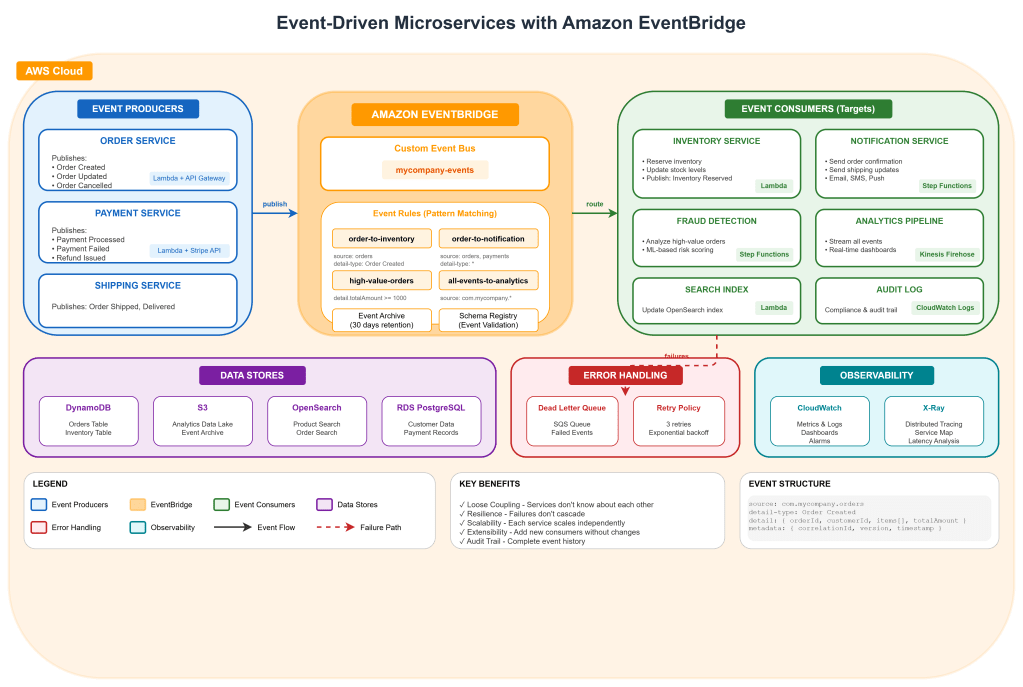
Implementing Data Replication and Disaster Recovery with OCI Autonomous Database

Introduction

  • Overview of OCI Autonomous Database and its capabilities.
  • Importance of data replication and disaster recovery for business continuity.

Step-by-Step Guide

  1. Setting Up OCI Autonomous Database
  • Creating an Autonomous Database Instance:
oci db autonomous-database create --compartment-id <compartment_OCID> --db-name "MyDatabase" --cpu-core-count 1 --data-storage-size-in-tbs 1 --admin-password "<password>" --display-name "MyAutonomousDB" --db-workload "OLTP" --license-model "BRING_YOUR_OWN_LICENSE" --wait-for-state AVAILABLE

2. Configuring Data Replication

  • Creating a Database Backup:
oci db autonomous-database backup create --autonomous-database-id <db_OCID> --display-name "MyBackup" --wait-for-state COMPLETED

3. Setting Up Data Guard for High Availability:

  • Creating a Data Guard Association:
oci db autonomous-database create-data-guard-association --compartment-id <compartment_OCID> --primary-database-id <primary_db_OCID> --standby-database-id <standby_db_OCID> --display-name "MyDataGuardAssociation"

4. Implementing Disaster Recovery

  • Configuring Backup Retention Policies:
  • Set up automated backups with a specific retention period through the OCI Console or CLI:
oci db autonomous-database update --autonomous-database-id <db_OCID> --backup-retention-period 30
  • Restoring a Database from Backup:
oci db autonomous-database restore --autonomous-database-id <db_OCID> --restore-timestamp "2024-01-01T00:00:00Z" --display-name "RestoredDatabase"

4. Testing and Validating Disaster Recovery

  • Performing a Failover Test:
    • Failover to Standby Database:
oci db autonomous-database failover --autonomous-database-id <standby_db_OCID>
  • Verifying Data Integrity:
    • Connect to the standby database and validate data consistency and application functionality.

5. Automating and Monitoring

  • Automating Backups and Replication:
    • Use OCI’s built-in scheduling features to automate backup creation and data replication.
  • Monitoring Database Health and Performance:
  • Use OCI Monitoring to set up alarms and dashboards for tracking the health and performance of your Autonomous Database.
  • Example Alarm:
oci monitoring alarm create --compartment-id <compartment_OCID> --display-name "HighIOWaitTime" --metric-name "io_wait_time" --threshold 1000 --comparison ">" --enabled true