Prerequisite check "CheckActiveFilesAndExecutables" failed

Oracle Home       : /u01/app/oracle/product/11.2.0/db_home1
Central Inventory : /u01/app/oraInventory
   from           : /u01/app/oracle/product/11.2.0/db_home1/oraInst.loc
OPatch version    : 11.2.0.3.6
OUI version       : 11.2.0.3.0
Log file location : /u01/app/oracle/product/11.2.0/db_home1/cfgtoollogs/opatch/opatch2015-03-09_16-45-09PM_1.log
Verifying environment and performing prerequisite checks…
Prerequisite check “CheckActiveFilesAndExecutables” failed.
The details are:

Following executables are active :
/u01/app/oracle/product/11.2.0/db_home1/lib/libclntsh.so.11.1
UtilSession failed: Prerequisite check “CheckActiveFilesAndExecutables” failed.
Log file location: /u01/app/oracle/product/11.2.0/db_home1/cfgtoollogs/opatch/opatch2015-03-09_16-45-09PM_1.log

When trying to apply OPatch the above error appear , 
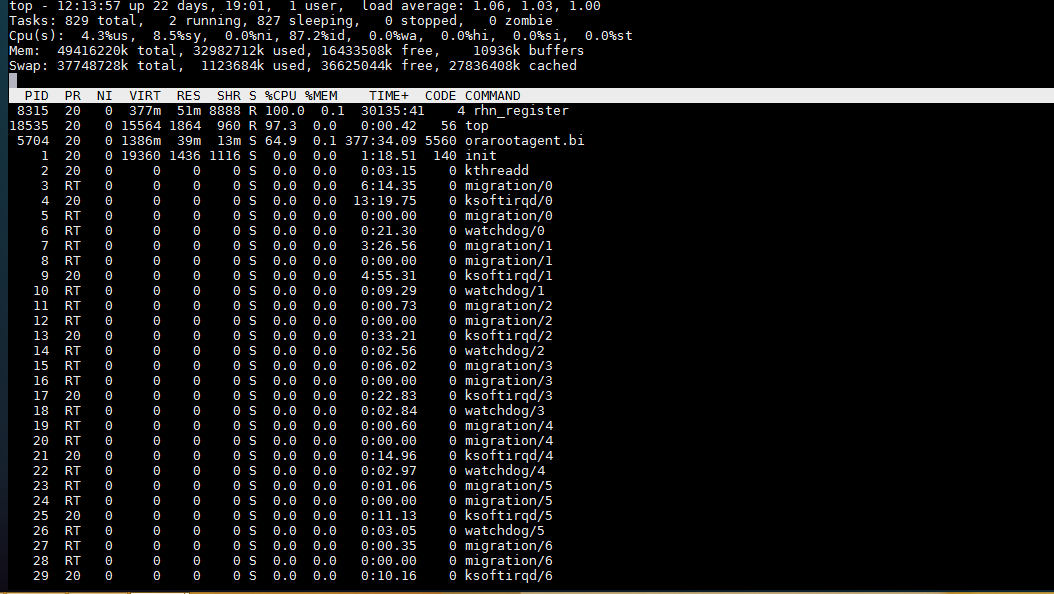
Some process hanged 

oracle@–:~/database_patches/19769496$ fuser /u01/app/oracle/product/11.2.0/db_home1/lib/libclntsh.so.11.1
/u01/app/oracle/product/11.2.0/db_home1/lib/libclntsh.so.11.1:    58536m

Kill -9 58536
Cheers
Thank you 

Shutdown Immediate Hangs

Today i faced Strange issue with Shutdown immediate command on cluster database which is when run shutdown immediate the command hangs and take so long and sometimes it’s working and most of the time not working.

the below command was working without any problem :-

SQL > shutdown abort

to solve this issue & trace the error since the alertlog not indicating to anything interesting i have to dump systemstate every 5 minutes  to know what going on :-

connect / as sysdba
alter session set events ‘10400 trace name context forever, level 1’; 

After this you can kill the session that preventing shutdown.

The hangs usually happened for two reasons :-

  • Query running on Database.
  • Transaction happened while you are trying to shutdown database.
For the first reason :

use v$session_longops Read more here.

Run the below query to check the query.

select count(*) from v$session_longops where time_remaining>0;

Second reason you can use

v$transaction Read from here.

Useful Document :-
Alert Log: Shutdown Waiting for Active Calls to Complete (Doc ID 1039389.6)

Thank you
Osama Mustafa

Dealing with Crontab

Schedule tasks under Linux is an powerful procedure which is used by almost everyone, and to do this using program called cron. more about it here .

Procedure :

make a new text file, and enter this line in that text file like the below :-

crontab myfirstjob

Formatting crontab file :-

what this file contains

Number
Meaning
Allowed range
1
Minutes
0-59
2
Hours
0-23
3
Days
1-31
4
Months
1-12 OR First 3 letters of the Month name
5
Days of the week
0-7 OR First 3 letters of the Day name
6
Name of the program
Any program

Some useful command can be used with cron :-

Show all the task running under cron.

crontab -l

edit the crontab

crontab -e

Some example from crontab file :-

# Minute   Hour      Day of Month       Month                 Day of Week        Command  
# (0-59)     (0-23)     (1-31)             (1-12 or Jan-Dec)    (0-6 or Sun-Sat)              
    0               12           *                             *                         *            /u01/backup.sh

For more example about crontab press here

Cheers
Osama Mustafa

ORA-27102: out of memory

Operating system : Solaris Sparc 11.2
Database Version : 11.2.0.3.0

When Trying to startup the database the following error appeared :-

SQL> startup nomount ;
ORA-27102: out of memory
SVR4 Error: 22: Invalid argument

Even when trying to know which instance process do this :-

SQL> oradebug setmypid
ORA-01034: ORACLE not available
ORA-27101: shared memory realm does not exist
SVR4 Error: 2: No such file or directory
ORA-01034: ORACLE not available
ORA-27101: shared memory realm does not exist
SVR4 Error: 2: No such file or directory 

SQL> oradebug ipc
ORA-01034: ORACLE not available
ORA-27101: shared memory realm does not exist
SVR4 Error: 2: No such file or directory
ORA-01034: ORACLE not available
ORA-27101: shared memory realm does not exist
SVR4 Error: 2: No such file or directory 

After investigation i found the cause for this error, the solaris SHMMAX was not set correctly on OS level which mean the database was configured more than permitted memory on OS.

to solve the above error

Find which project oracle user run using the below command :-

id -p
uid=59008(oracle) gid=10001(dba) projid=3(default)  

Then

prctl -n project.max-shm-memory -i project 3 

project: 3: default
NAME    PRIVILEGE       VALUE    FLAG   ACTION                       RECIPIENT
project.max-shm-memory
        privileged      35GB      –   deny                                 –
        system          24EB    max   deny                                 –

So i have to increase it

prctl -n project.max-shm-memory -r -v 40G -i project 3

Note the above changes will be temporary till the next restart.

Cheers
Osama  

sshUserSetup.sh & runcluvfy.sh

Oracle 11gR2 RAC Grid install includes a useful script that can be used to make your life easier no more copying and waiting for errors the above scripts will make your easier simply.

./sshUserSetup.sh 

useful script to establish and exchange ssh keys between all the nodes of the cluster called sshUserSetup.sh

And Can Be Used like the below :-

./sshUserSetup.sh -user oracle -hosts “node1 node2” -noPromptPassphrase
./sshUserSetup.sh -user grid   -hosts “node1 node2” -noPromptPassphrase

./runcluvfy.sh

Cluster Verification Utility

Regarding to Oracle documentation :-

“performs system checks in preparation for installation, patch updates, or other system changes. Using CVU ensures that you have completed the required system configuration and preinstallation steps so that your Oracle Grid Infrastructure or Oracle Real Application Clusters (Oracle RAC) installation, update, or patch operation completes successfully.”

you can learn More Here

Example :-
./runcluvfy.sh stage -pre crsinst -n  node1,node -fixup -verbose

How to add storage to ESXI 5.5

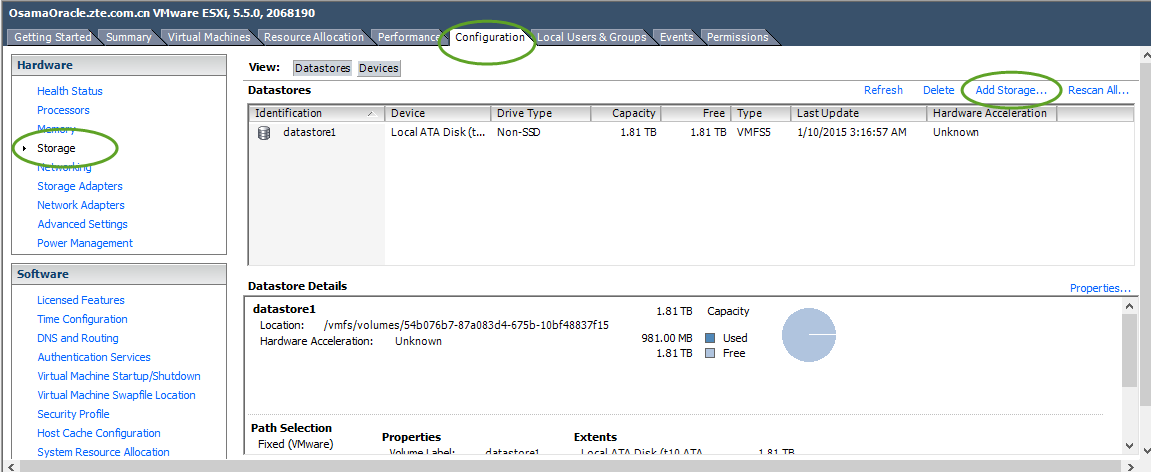
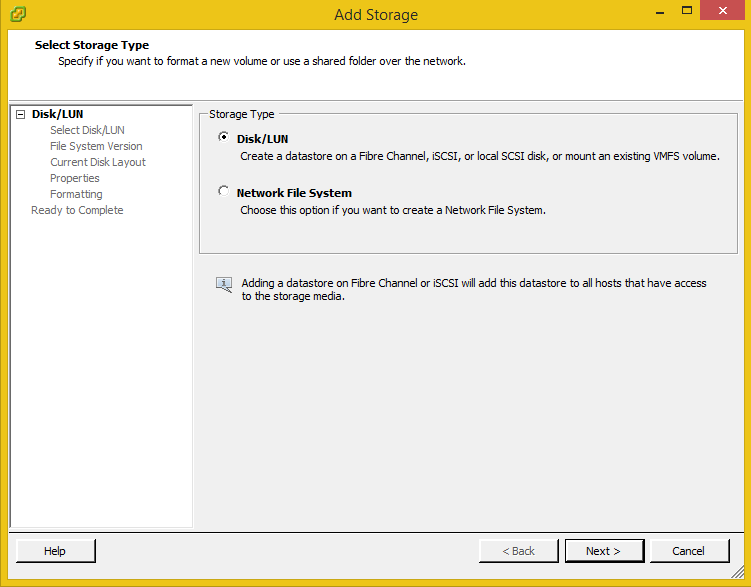
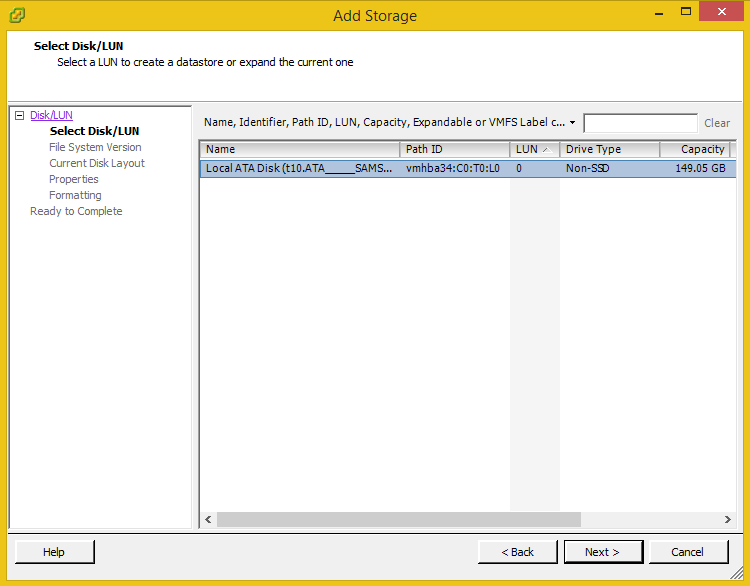
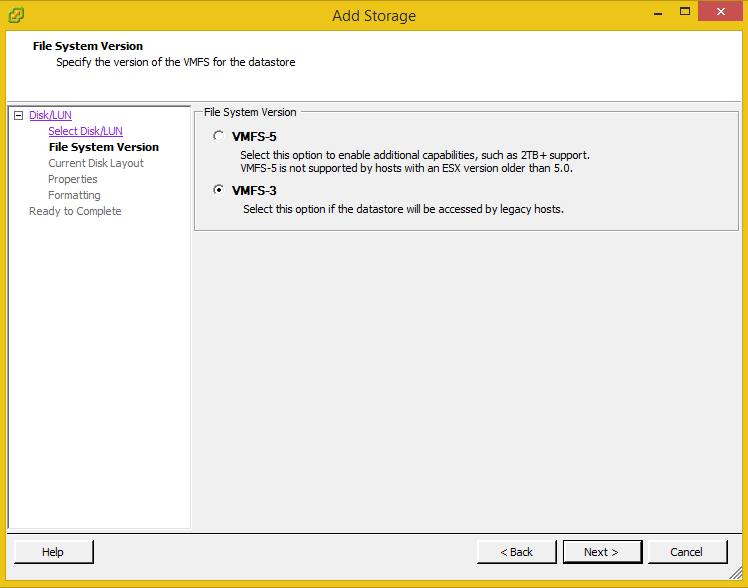
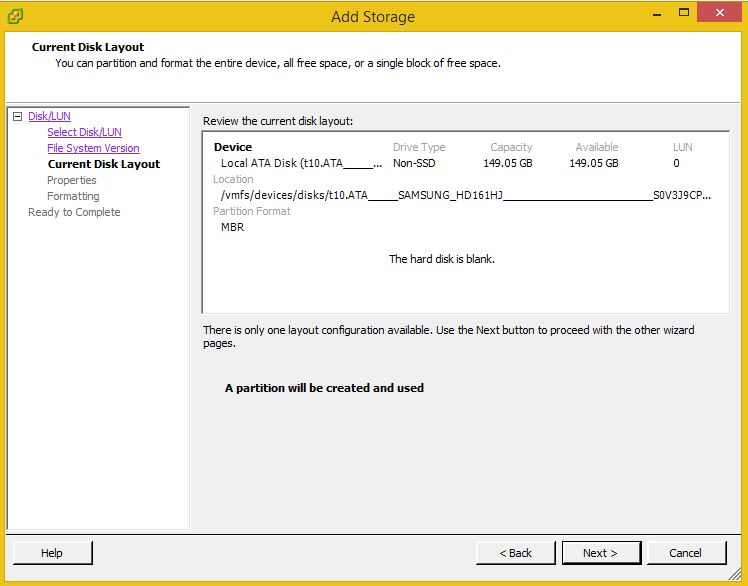
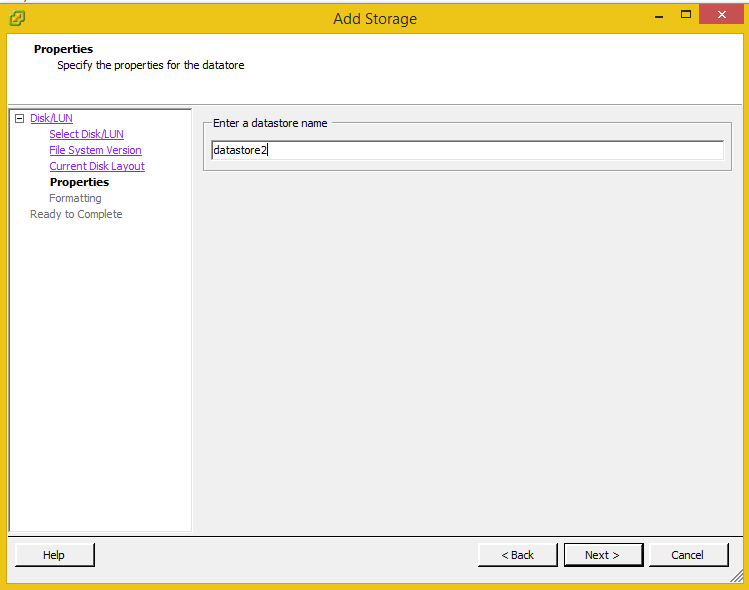
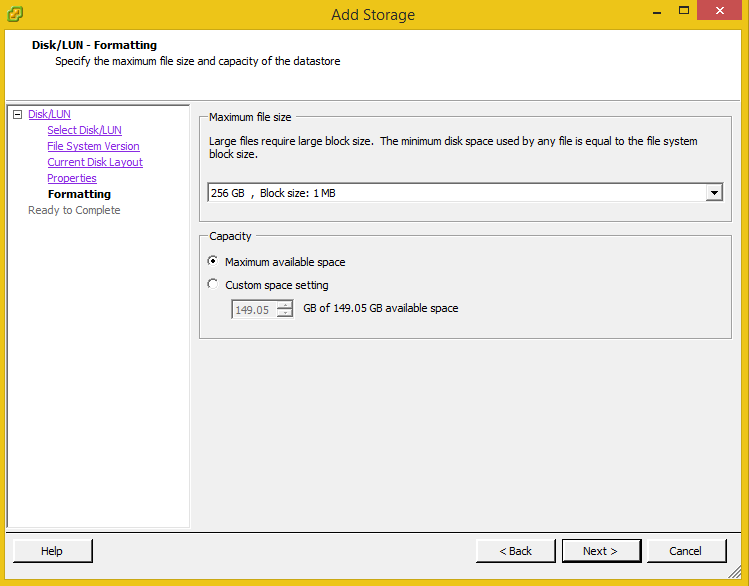
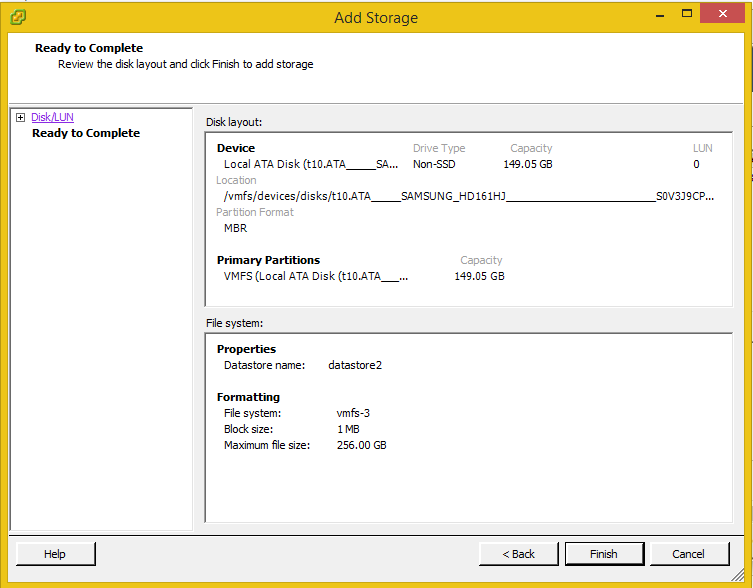
in this post i will show you how to add New Storage to ESXI 5.5 using vsphere client follow the screenshot :-

  1. Login to Vsphere client
  2. Select the host and then choose the Configuration tab –> Storage. like below


  • Storage Type :-

  • Which Storage you want add :-
  • VMFS-3 For our case

  • Storage Name

  • maximum file size and capacity of the database.

  • Press Finish
  • Summary 

Cheers
osama mustafa

Unable to Ping ESXI 5.5 Host

while i am continue working on my  Lab and configure ESXI i faced another problem and took 2 days to solve it maybe someone faced this issue but this will help other people as well.

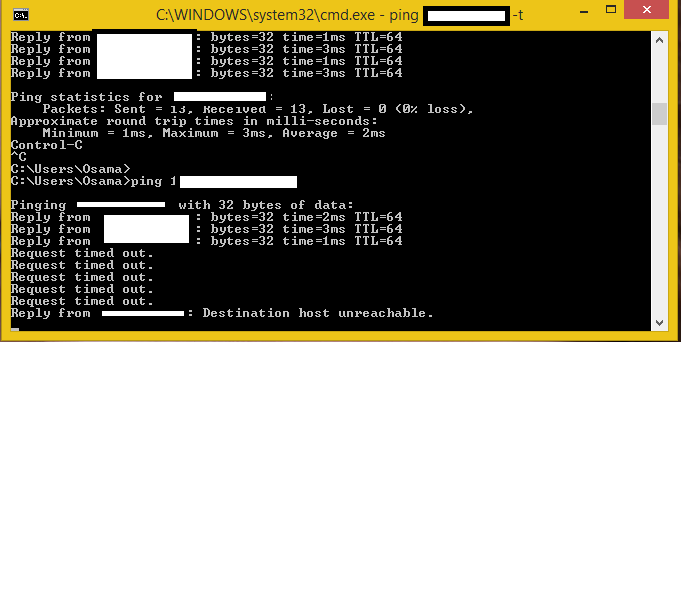
The problem description like this :- after assigned IP to the server i want like normal people connect to this server using my laptop but simply when trying to ping :-

“Detestation unreachable” 

I thought at first it was my network card issue and maybe it’s not supported By ESXI, But this is not valid option because the weirdest part in this issue was when restart the server and ESXI loading the services i was able to ping without any problem then the message appeared again.

as you see from the above screenshoot ping then not ping !!!!!
The solution very simple i start missing with BIOS options and found new option there called “Network Stack” all you have to do is enable this option and link to IPV4.
Cheers
Osama Mustafa

Configure NIC/Ethernet On ESXI 5.5

Happy new year and healthy 2015.

During the Holiday I was working on my mini Lab and Upgrading the Server i want to use ESXI 5.5 this time,usually the built-in Ethernet card  Intel or Realtek ( Mine ) while the installation i faced an issue that ESXI 5.5 doesn’t identify my Ethernet card and the installation failed.

To solve this issue the normal ESXI iso will not work, because of this you have to create something called ESXI custom ISO using Software called ESXI customizer.

Download it from here.

You make this software work you need to install the original ESXI ISO.

Download it from here.

and The most important thing which is the driver that you need it for Ethernet Card, the driver usually depend on the PC just like to told you before I am using Realtek and you can download :-

  • net-r8168+r8111e From here.
  • net-r8169 From here.
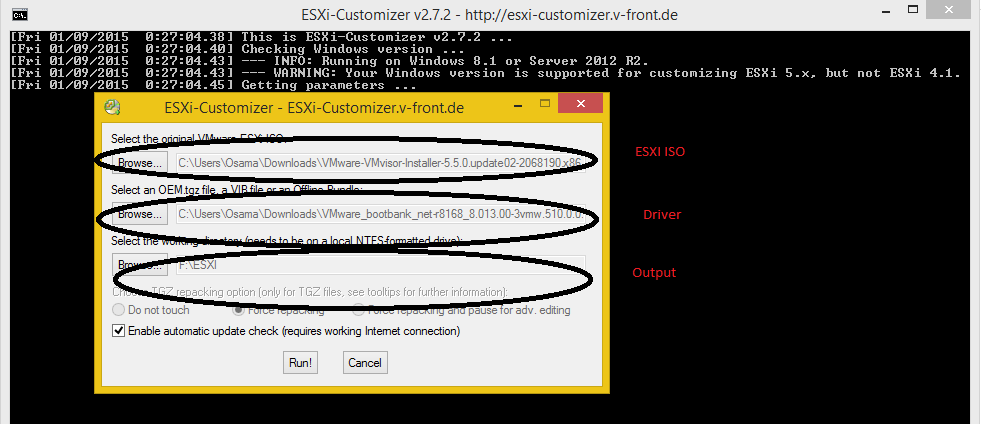
Now you have all the software,  Original ESXI , Driver and the customizer.
Open the ESXI customizer new GUI screen will be open with three box like the below.
Now RUN Button and Check the output Directory Burn the ISO and This is should solve the issue.
Cheers
Osama Mustafa