Migrate the database From File System to ASM

I posted before Migration Database from ASM to File System,But today i will talk about How to migration File System to ASM and this is the common case I hope i will describe this topics so well,Please if you have any In-query Contact me,Comment i will answer you,Helping you is my pleasure:


Steps:

1.configure flash recovery area.
2.Migrate datafiles to ASM.
3.Control file to ASM.
4.Create Temporary tablespace.
5.Migrate Redo logfiles
6.Migrate spfile to ASM.


step 1:Configure flash recovery area.

SQL> connect sys/sys@orcl as sysdba
Connected.
 
SQL> alter database disable block change tracking;

Database altered.

SQL> alter system set db_recovery_file_dest_size=500m;

System altered.

SQL> alter system set db_recovery_file_dest=’+FRAG’;

System altered

step 2 and 3: Migrate data files and control file to ASM

Use RMAN to migrate the data files to ASM disk groups,All data files will be migrated to the newly
 created disk group, DATA
 
SQL> alter system set db_create_file_dest='+DATA';

System altered.

SQL> alter system set control_files='+DATA/control_new.ctl' scope=spfile;

System altered.

SQL> shutdown immediate

[oracle@rac1 bin]$ ./rman target /


RMAN> startup nomount
RMAN> restore controlfile from '/u01/new/oracle/oradata/mydb/control01.ctl';
RMAN> alter database mount;
RMAN> backup as copy database format '+DATA';
RMAN> switch database to copy;
RMAN> alter database open;

RMAN>Exit ;

SQL> conn sys/oracle as sysdba

Connected.

SQL> select tablespace_name,file_name from dba_data_files;

TABLESPACE_NAME FILE_NAME

------------------------------ ---------------------------------------------

USERS +DATA/mydb/datafile/users.261.705064915

UNDOTBS1 +DATA/mydb/datafile/undotbs1.259.705064821

SYSAUX +DATA/mydb/datafile/sysaux.258.705064283

SYSTEM +DATA/mydb/datafile/system.257.705063763


SQL> select name from v$controlfile;


NAME
----

+DATA/control_new.ctl


step 4:Migrate temp tablespace to ASM.
 
SQL> alter tablespace temp add tempfile size 100m;

Tablespace altered.

SQL> select file_name from dba_temp_files;
FILE_NAME

---------------------------------------------

+DATA/mydb/tempfile/temp.263.705065455

otherwise,Create temporary tablespace in ASM disk group.

SQL> CREATE TABLESPACE temp1 TEMPFILE ‘+diskgroup1’;

SQL> alter database default temporary tablespace temp1;

Database altered.


step 5:Migrate redo logs to ASM.
 
SQL> select member,group# from v$logfile;

you will find i above query the redo-log in file system start adding new one to ASM after this you can delete .

SQL> alter database add logfile group 5 size 5m;

Database altered.

SQL> alter database add logfile group 6 size 5m;

Database altered.

For example to drop , you can do the following :

SQL> alter system switch logfile;

System altered.

SQL> alter database drop logfile group 2;

Database altered.

SQL> alter database drop logfile group 3;

Database altered.

SQL> alter database drop logfile group 4;

Database altered.

SQL> alter database drop logfile group 1;

Database altered.

Now we can say we finish But we have to do Two More Steps 


Add additional control file


SQL> connect sys/sys@ORCL as sysdba
Connected to an idle instance.
SQL> startup mount
ORACLE instance started.

SQL> alter database backup controlfile to '+DATA/Control_new02.ctl';

Database altered.

SQL> alter system set control_files='+DATA/
Control_new.ctl '
,'+DATA/
Control_new02.ctl' scope=spfile;

System altered.

SQL> shutdown immediate;
ORA-01109: database not open

Database dismounted.
ORACLE instance shut down.
SQL> startup
ORACLE instance started.


Step 6:Migrate spfile to ASM:

Create a copy of the SPFILE in the ASM disk group.
 
If the database is using an SPFILE already, then run these commands:

run {
BACKUP AS BACKUPSET SPFILE;
RESTORE SPFILE TO "+DISK/spfile";

But if you are not using One :

SQL> create spfile='+DISK/spfile' from pfile='$ORACLE_HOME/dbs/initORCL.ora';


 Thank you
Osama mustafa


Check memory On Linux

Sometime you as DBA you need to check your memory On Operating System Level, i will give you some command will useful to you :

1-free -m / free -g

m : megabytes
g : gigabytes

              total    used     free   shared  buffers   cached 
Mem: 503 451 52 0 14 293
-/+ buffers/cache: 143 360
Swap: 1027 0 1027

 another example :

free -t -m
       total       used       free     shared    buffers     cached
Mem: 750 625 125 0 35 335
-/+ buffers/cache: 253 496
Swap: 956 0 956
Total: 1707 625 1082
2-vmstat

procs -----------memory---------- ---swap-- -----io---- --system-- ----cpu----
r b swpd free buff cache si so bi bo in cs us sy id wa
1 0 0 131620 35432 341496 0 0 42 82 737 1364 15 3 81 1


3-top 


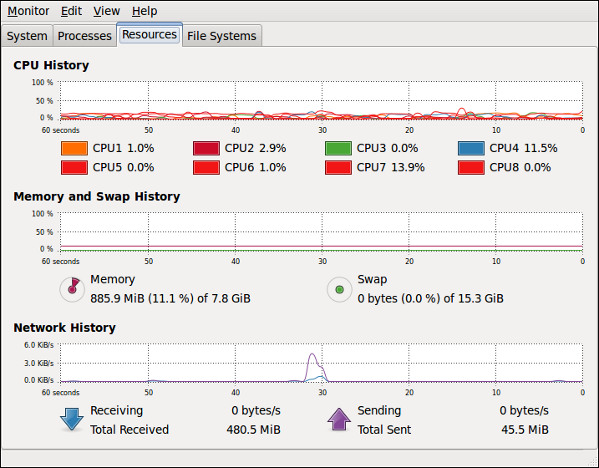
4-gnome-system-monitor


The below Command for clear cache memory in linux 

sync; 
echo 3 > /proc/sys/vm/drop_caches
 you can make it as job in linux save in it crontab 
0 * * * * /root/clearcache.sh
 
Create a file in '/root' called 'clearcache.sh' with the following content:

#!/bin/sh  
sync; echo 3 > /proc/sys/vm/drop_caches
 
  
Thank you 
osama mustafa 

Duplicate Database Using RMAN / Clone Database

Step By Step : Cloning Database On the Same Server / Using Rman Duplicate From Active Database

The Below Link Contain Document Describe Step by Step how to Duplicate Database Using RMAN ,

Cloning Database / Duplicate Database Using RMAN

Enjoy

Thank you
Osama mustafa

Set Listener Password

In Oracle 10g and above, the listener is secured by default, and only user who started the listener can run the commands.

In order to set password on listener, follow the steps:

1) LSNRCTL> set current_listener
2) LSNRCTL> change_password
Old password:
New password: yourpassword
Reenter new password: yourpassword
3) LSNRCTL> save_config
4) LSNRCTL> status

Now Any One Want Start Administrating Listener Will be Asked for Password , After This you can manager Your Listener .

As the another user, enter the password to administer the listener:

1) LSNRCTL> set password
Password: yourpassword
2) LSNRCTL> stop

Thank you
Osama mustafa

Step By Step To Migration ASM to File System

There’s More than One Way For this Migration you can use what you want

Lets Get The Database Data Files :


1-See your Database Files :

SQL>select file_name from dba_data_files;

 +DATA/test/datafile/undotbs1.301.697649965
+DATA/test/datafile/sysaux.300.697649963
+DATA/test/datafile/system.299.697649963
+DATA/test/datafile/users.302.697649965
+DATA/test/datafile/users.309.697650601

select tablespace_name,count(file_name) from dba_data_files group by tablespace_name ORDER BY 2

Use the above query to see how many data files under tablespace .

Now After see the DataFile , we need to create new Directory to copy the data file to it .
  mkdir /app/oracle/TEST


2- We Will Create Our Own Script And Copy our Database File to our new location :

sqlplus / as sysdba

set lines 120 pages 0

select ‘copy datafile ‘||file_id||’ to ‘||”’/app/oracle/TEST/’||substr(file_name,21,instr(file_name,’.’)-21)||’_01.dbf”’||’;’ from dba_data_files order by 1;

copy datafile 1 to ‘/app/oracle/TEST/system_01.dbf’;

copy datafile 2 to ‘/app/oracle/TEST/sysaux_01.dbf’;

copy datafile 3 to ‘/app/oracle/TEST/undotbs1_01.dbf’;

copy datafile 4 to ‘/app/oracle/TEST/users_01.dbf’;

copy datafile 5 to ‘/app/oracle/TEST/users_02.dbf’;

shutdown immediate;

startup mount;

exit

rman target /

copy datafile 1 to ‘/app/oracle/TEST/system_01.dbf’;

copy datafile 2 to ‘/app/oracle/TEST/sysaux_01.dbf’;

copy datafile 3 to ‘/app/oracle/TEST/undotbs1_01.dbf’;

copy datafile 4 to ‘/app/oracle/TEST/users_01.dbf’;

copy datafile 5 to ‘/app/oracle/TEST/users_02.dbf’;

exit

sql / as sysdba

select ‘alter database rename file ”’||file_name||”’ to ‘||”’/app/oracle/TEST/’||substr(file_name,21,instr(file_name,’.’)-21)||’_01.dbf”’||’;’ from dba_data_files order by 1;

alter database rename file ‘+DATA/test/datafile/sysaux.300.697649963’ to ‘/app/oracle/TEST/sysaux_01.dbf’;

alter database rename file ‘+DATA/test/datafile/system.299.697649963’ to ‘/app/oracle/TEST/system_01.dbf’;
alter database rename file ‘+DATA/test/datafile/undotbs1.301.697649965’ to ‘/app/oracle/TEST/undotbs1_01.dbf’;
alter database rename file ‘+DATA/test/datafile/users.302.697649965’ to ‘/app/oracle/TEST/users_01.dbf’;

alter database rename file ‘+DATA/test/datafile/users.309.697650601’ to ‘/app/oracle/TEST/users_02.dbf’;

 
 3- This not the finish , there’s some file still On A, Check it by :

open database

select name from v$controlfile
union
select name from v$tempfile
union
select member from v$logfile
union
select filename from v$block_change_tracking;

NAME
——————————————————————————–
+DATA/test/controlfile/current.303.697650047
+DATA/test/onlinelog/group_1.304.697650049
+DATA/test/onlinelog/group_2.305.697650049
+DATA/test/onlinelog/group_3.306.697650049
+DATA/test/tempfile/temp.307.697650095
+FRA/test/controlfile/current.260.697650047
+FRA/test/onlinelog/group_1.261.697650049
+FRA/test/onlinelog/group_2.262.697650049
+FRA/test/onlinelog/group_3.263.697650051

alter database rename file ‘+DATA/test/datafile/sysaux.300.697649963’ to ‘/app/oracle/TEST/sysaux_01.dbf’;

alter database rename file ‘+DATA/test/datafile/system.299.697649963’ to ‘/app/oracle/TEST/system_01.dbf’;

alter database rename file ‘+DATA/test/datafile/undotbs1.301.697649965’ to ‘/app/oracle/TEST/undotbs1_01.dbf’;

alter database rename file ‘+DATA/test/datafile/users.302.697649965’ to ‘/app/oracle/TEST/users_01.dbf’;

alter database rename file ‘+DATA/test/datafile/users.309.697650601’ to ‘/app/oracle/TEST/users_02.dbf’;

ALTER DATABASE ADD LOGFILE GROUP 4 (‘/app/oracle/TEST/redo_04a.dbf’,’/app/oracle/TEST/redo_04b.dbf’) size 50M;

ALTER DATABASE ADD LOGFILE GROUP 5 (‘/app/oracle/TEST/redo_05a.dbf’,’/app/oracle/TEST/redo_05b.dbf’) size 50M;

ALTER DATABASE ADD LOGFILE GROUP 6 (‘/app/oracle/TEST/redo_06a.dbf’,’/app/oracle/TEST/redo_06b.dbf’) size 50M; 

4-the Last Step for Control file and Spfile :


SQL>show parameter control
control_files 
————————–
+DATA/test/controlfile/current .303.697650047
SQL > Create Pfile=” from spfile ;

After Creating Pfile , Open it modify Control File Location to Our New Location /app/oracle/TEST/…

*.control_files=’/app/oracle/TEST/control01.ctl’,’/app/oracle/TEST/control02.ctl’

startup nomount

$rman target /

 restore controlfile from ‘+DATA/test/controlfile/current.303.697650047’;

 exit

create spfile=’/app/oracle/product/11.1.0/db_1/dbs/spfileTEST.ora’ from pfile=’/home/oracle/john.ora’;

File created.

shutdown immediate;
startup

show parameter control

control_files  /app/oracle/TEST/control01.ctl , /app/oracle/TEST/control02.ctl

This Steps Without Using RMAN , I will Post Another Steps Using RMAN

Thank you
Osama mustafa

Documents For Upgrade Oracle 10g to 11gR2

I Upload Documents for Upgrading Oracle 10g to 11gR2

The Following Documents like the followings :


1- Upgrade Oracle 10g Clusterware to 11gR2 Clusterware.

 ClusterWare Upgrade

2- Upgrade ASM 10g to 11gR2 .

ASM Upgrade

3- Upgrade Database 10g to 11gR2 .

Database Upgrade

Enjoy

Thank you
Osama mustafa

Failed to unlock all EM related accounts

This problem can occur if the default Profile settings have been modified and are no longer the “default” settings..

The following query will reveal the profile:

        SQL> select profile, resource_name, limit

        from dba_profiles

        where resource_type='PASSWORD' order by 1,2;
 

The default 10.2.0.1.0 profile for SYSMAN has the following parameters:

PROFILE………..RESOURCE_NAME…………….                LIMIT
———————————————————————————–
DEFAULT………..FAILED_LOGIN_ATTEMPTS……..    10
DEFAULT………..PASSWORD_GRACE_TIME……….    UNLIMITED
DEFAULT………..PASSWORD_LIFE_TIME………..         UNLIMITED
DEFAULT………..PASSWORD_LOCK_TIME………..      UNLIMITED
DEFAULT………..PASSWORD_REUSE_MAX………. .    UNLIMITED
DEFAULT………..PASSWORD_REUSE_TIME………       UNLIMITED
DEFAULT………..PASSWORD_VERIFY_FUNCTION…..NULL

DBSNMP uses the MONITORING_PROFILE, which is defined the same except for the FAILED_LOGIN_ATTEMPTS, which is set to UNLIMITED.
The failing instance, in one case, showed the following for the DEFAULT profile:

PROFILE………..RESOURCE_NAME……..LIMIT
—————————— ——————————————-
DEFAULT………..FAILED_LOGIN_ATTEMPTS………         4
DEFAULT………..PASSWORD_GRACE_TIME………..         1
DEFAULT………..PASSWORD_LIFE_TIME…………             60
DEFAULT………..PASSWORD_LOCK_TIME……….. .         0138
DEFAULT………..PASSWORD_REUSE_MAX…………        100
DEFAULT………..PASSWORD_REUSE_TIME………..         UNLIMITED
DEFAULT………..PASSWORD_VERIFY_FUNCTION……  NULL

Solution :

1.  In SQL*Plus, logon as SYS and change DBSNMP’s MONITORING_PROFILE, for example:

ALTER PROFILE MONITORING_PROFILE 

LIMIT FAILED_LOGIN_ATTEMPTS UNLIMITED

PASSWORD_GRACE_TIME UNLIMITED

PASSWORD_LIFE_TIME UNLIMITED

PASSWORD_LOCK_TIME UNLIMITED

PASSWORD_REUSE_MAX UNLIMITED

PASSWORD_REUSE_TIME UNLIMITED

PASSWORD_VERIFY_FUNCTION NULL;

2.  Then modify SYSMAN’s DEFAULT:

ALTER PROFILE DEFAULT 

LIMIT FAILED_LOGIN_ATTEMPTS 10

PASSWORD_GRACE_TIME UNLIMITED

PASSWORD_LIFE_TIME UNLIMITED

PASSWORD_LOCK_TIME UNLIMITED

PASSWORD_REUSE_MAX UNLIMITED

PASSWORD_REUSE_TIME UNLIMITED

PASSWORD_VERIFY_FUNCTION NULL;

After this Drop with following Steps : 

 SQL> drop role mgmt_user;
SQL> drop user sysman cascade;
SQL> drop user MGMT_VIEW cascade;
SQL> drop public synonym mgmt_target_blackouts;
SQL> drop public synonym setemviewusercontext;

 -Recreate EM 

 emca -dbcontrol db -repos create ;

Thank you
Osama mustafa


DBSNMP User Dose not Exists

This error appear while you are trying to create enterprise manager via DBCA 

Casue :

DBSNMP Not Found On dba_users

Solution:

So Simple run the following scripts :

@?/rdbms/admin/catnsnmp.sql    

@?/rdbms/admin/catsnmp.sql      

Thank you
Osama mustafa

Dealing with OCR Backup ( Oracle Cluster Registery)

OCR calls Oracle Cluster Registry. It stores cluster configuration information. It is also shared disk component. It must be accessed by all nodes in cluster environment.It also keeps information of Which database instance run on which nodes and which service runs on which database.The process daemon OCSSd manages the configuration info in OCR and maintains the changes to cluster in the registry.

There’s Two Kind Of OCR Backup :

1-Automatic Backup By Oracle CRS , You can check 

$ORA_CRS_HOME/cdata 
Or
ocrconfig -showbackup 

 Want to change The Default Location for automatic backup :

ocrconfig -backuploc

2- Manual Backup 

$ocrconfig -export /u04/crs_backup/ocrbackup/exports/OCRFile_expBackup.dmp

 Recover OCR from Physical Backup(AUTOMATIC):

$ocrconfig -showbackup 
$srvctl -stop database -d ORCL (Shutdown all RAC instances and RAC database)
$crsctl stop crs (Shutdown Cluster)
#ocrconfig -restore /u02/apps/crs/cdata/crs/backup00.ocr
$crsctl start crs (After issuing start cluster check status of cluster using ‘crs_stat -t’)
$srvctl start database -d ORCL (Start Oracle RAC database and RAC instances)

  Recover OCR from Physical Backup (MANUAL): 

$srvctl -stop database -d ORCL (Shutdown all RAC instances and RAC database)
$crsctl stop crs (Shutdown Cluster)

SAME process should need to repeat for OCR mirror also.

ocrconfig -import /u04/crs_backup/ocrbackup/exports/OCRFile_exp_Backup.dmp (Import metadata of OCR using command)
$crsctl start crs (After issuing start cluster check status of cluster using ‘crs_stat -t’)
$srvctl start database -d ORCL (Start Oracle RAC database and RAC instances)

 Some Important Notes :

  • Oracle takes physical backup of OCR automatically.
  • No Cluster downtime or RAC database down time requires for PHYSICAL backup of OCR.
  • No Cluster downtime or RAC database down time requires for MANUAL export backup of OCR.
  • For recovery of OCR from any of above backup it should need to down ALL.
  • All procedure requires ROOT login. 

Thank you
Osama mustafa

ORA-39002,ORA-39070,ORA-29283,ORA-06512

ORA-39002: invalid operation
ORA-39070: Unable to open the log file.
ORA-29283: invalid file operation
ORA-06512: at “SYS.UTL_FILE”, line 475
ORA-29283: invalid file operation
This problem is encountered when you try to import a data-pump dump file.
Actually, it is somewhere related to permission issues and also due to mismatch of the steps performed during import operation.
You can Check you permission by below command :

select * from all_directories where directory_name = ‘DIRECTORY_NAME‘;

select * from user_tab_privs
where table_name = ‘DIRECTORY_NAME‘;

select * from user_sys_privs

where privilege = 'CREATE ANY DIRECTORY';

Check the Below Steps : 

 1) Create data-pump directory

CONN / AS SYSDBA

CREATE OR REPLACE DIRECTORY test_dir AS '';

2.) Grant permission now to this directory

GRANT READ, WRITE ON DIRECTORY test_dir TO ;

3.)Copy the desired dump-file at directory Location :
4.)Start import now .

Good Luck

Thank you
Osama mustafa