1-tablespace growth details/Scripts 1
2-tablespace growth details/Scripts 2
3-List Object growth Over Last N Days
Thank you
Enjoy
Osama Mustafa
For the people who think differently Welcome aboard
Thank you
Enjoy
Osama Mustafa
1-Listing of temp segments
2-Temp segment usage per session
Thank you
Osama Mustafa
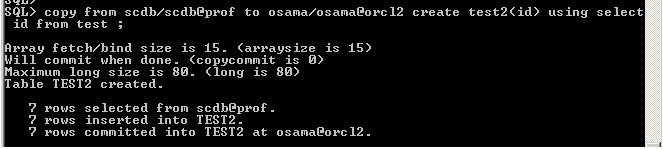
its usual used for copy tables from database to Another , but you have to know this way is very useful specially if you have long Data type in your tables , i will explain it , and Define Two Database in your TNS.
create table osama as select * from long_table ;You will Get this error :ERROR at line 1:ORA-00997: illegal use of LONG datatype
copy from user1/password@orcl to user2/password@orcl2 create
The Output :
Table osama created.
Simple !!!
Useful Link :
1-Oracle Document .
2-Examples.
Thank you
Osama Mustafa
1. Install 11.2.0.2 into a separate ORACLE_HOME.
2. Take a full backup of the database.
3. Always shutdown the database cleanly
After Installing 11.2.0.2 , Go to 11.2.0.1 database and run :
Connect as sys
SQL> spool pre_upgrade.log
SQL> @ORACLE_HOME/rdbms/admin/utlu112i.sql
SQL> spool off
To check Data Dictionary
Connect as sys
SQL> EXECUTE dbms_stats.gather_dictionary_stats;
Note: Ignore if dbms_stats.gather_dictionary_stats was run once.To Fix invalid Object in the database :
connect as sys
SQL> @$ORACLE_HOME/rdbms/admin/utlrp.sql
Run pre-upgrade diagnostic utility dbupgradiag.sql
$ cd $ORACLE_HOME/rdbms/admin
$ sqlplus “/ as sysdba”
SQL> spool pre_dbupgdiag.log
SQL>@dbupgdiag.sql
SQL>spool off
if the dbupgdiag.sql script reports any invalid objects, run $ORACLE_HOME/rdbms/admin/utlrp.sql
Configure the 11.2.0.1 database environment for 11.2.0.2 Upgrade
Copy the following Files to New Home 11.2.0.2 :
Set The environment to 11.2.0.2
export ORACLE_HOME=/u01/app/oracle/prouct/11.2.0.2
export ORACLE_SID=ORCL
Note : Replace the Path , LD_Library_Path to new Home .
Upgrade 11.2.0.1 database to 11.2.0.2
sqlplus / as sysdba
spool upgrade.log
startup upgrade
set echo on
@?/rdbms/admin/catupgrd.sql;
spool off
shutdown immediate
Restart the database in normal mode
sqlplus / as sysdba
@/opt/app/oracle/product/11.2.0.2/rdbms/admin/catuppst.sql;
@/opt/app/oracle/product/11.2.0.2/rdbms/admin/utlrp.sql;
select comp_name,version,status from dba_registry;
select owner,count(*) from dba_objects where status != ‘VALID’ group by owner;
Change the compatibility parameter
Change the compatible parameter and restart the database.
And Please Make Sure the listener has been started from the new home not the old one .
I will Post Upgrade to 11.2.0.3 “Enshalla”
Thank you
Osama Mustafa
But you can avoide this Using :
exec dbms_utility.exec_ddl_statement@db_link(‘your statment’);
Thank you
Osama Mustafa
Sometimes When you are doing some testing on one machine and have more than one instance with limited hardware resource , Oracle let control that resource by caging its new feature in 11g its method to cage or bound the instance to use a certain number of cpu instead to take all available CPU simple way :
Alter system set CPU_Count = 2
Just as note this method work with Resource Manager so you need to enable it , and create resource manager plan first before doing Instance Caging .
Thank you
Osama Mustafa
DIM-00014: Cannot open the Windows NT Service Control Manager.
O/S-Error: (OS 5) Access is denied.
Solution :
Run DBCA as administrator .
Click on start button -> All programs -> Accessories -> right click the command prompt icon > choose run as administrator ->
invoke dbca in the commandline or oradim can also be used.
Thank you
Osama mustafa
ORA-00322: log 3 of thread 1 is not current copy
ORA-00312: online log 3 thread 1 :
‘/u01/app/oracle/flash_recovery_area/ORCL/onlinelog/o1_mf_3_79fz3gx8_.log’
ORA-00322: log 3 of thread 1 is not current copy
ORA-00312: online log 3 thread 1 :
‘/u01/app/oracle/oradata/ORCL/onlinelog/o1_mf_3_79fz3g1v_.log’
Solution
Step-One :
conn / as sysdba
shutdown immediate ;
startup mount ;
Step-Two :
Recover database using backup controlfile;
Note :
Provide path where your redo log file locate , in My case “/u01/app/oracle/oradata/ORCL/”
Step-three:
alter database open resetlogs;
shutdown immediate;
startup;
Thank you
Osama Mustafa
select sid,
to_char(logon_time,'MMDDYYYY:HH24:MI') logon_time,
username,
type,
status,
process,
sql_address,
sql_hash_value
from v$session
where username is not null
Active SQL:
select sesion.sid,
sesion.username,
optimizer_mode,
hash_value,
address,
cpu_time,
elapsed_time,
sql_text
from v$sqlarea sqlarea, v$session sesion
where sesion.sql_hash_value = sqlarea.hash_value
and sesion.sql_address = sqlarea.address
and sesion.username is not null
Show Full SQL Executing For Active Session :
select sesion.sid,
sql_text
from v$sqltext sqltext, v$session sesion
where sesion.sql_hash_value = sqltext.hash_value
and sesion.sql_address = sqltext.address
and sesion.username is not null
order by sqltext.piece
Show Last executed SQL :
select sesion.sid,
sql_text
from v$sqltext sqltext, v$session sesion
where sesion.sql_hash_value = sqltext.hash_value
and sesion.sql_address = sqltext.address
and sesion.username is not null
order by sqltext.piece
is has another name called Oracle total Recall , and its ability to track and store all transactional changes to a table over its lifetime.
How Can I Use it ?
Step One
create default flashback archive on an existing tablespace.
Suntax :
create flashback archive default tablespace retention ;
Example :
conn / a sysdba
SQL > create flashback archive default Osama tablespace User retention 1 year;
Create Table to Store Information inside it
Conn Osama/Osama
Sql > Create table Store as select * from dba_objects; — For example
We Need to enable flash archive on same table by
Sql > alter table Store flashback archive;
-You need to check time by :
select systimestamp from dual;
– Check Created Point By
select timestamp_to_scn(systimestamp) from dual;
The Above is the main Steps To Enable FlashBack data Archive.
Thank you
Osama Mustafa
Example Links :
1-Recall Example
2-Recall Example
3-Recall Example
4-Using Flashback Data Archive