Link Here
Author: Osama Mustafa
OTech Magazine 2014
The first edition will be published Fall 2013. OTech Magazine articles are written by the Top-100 consultants in the Oracle-field around the globe. Only selected authors can publish in OTech Magazine.
OTech Magazine offers insight in complex Oracle projects and solutions.
My Article Included in this Version of OTech Magazine You Can Check The Magazine Here
I Want to take this Opportunity to Thanks Douwe Pieter for his great efforts.
Weblogic 12c installation
are:-
Simplified Deployment and Management with Virtualization
Integrated Traffic Management
Integrated WebLogic/RAC Clusters
Seamless Upgrade From WebLogic, iAS and Others
This Document Describe steps to install Oracle weblogic 12c, operating system Oracle Linux 6.4, You can Download Document here
Thank you
Osama Mustafa
Managed Server ERROR: transport error 202: bind failed: Address already in use
ERROR: transport error 202: bind failed: Address already in use
ERROR: JDWP Transport dt_socket failed to initialize, TRANSPORT_INIT(510)
JDWP exit error AGENT_ERROR_TRANSPORT_INIT(197): No transports initialized [../../../src/share/back/debugInit.c:750]
- Inside Domain Path for example /u01/app/fmw/domains/Base_domain/bin
- Edit setDomainEnv.sh and search for the below :-
if [ “${DEBUG_PORT}” = “” ] ; then
DEBUG_PORT=”8453″
export DEBUG_PORT
fi
if [ “${SERVER_NAME}” = “” ] ; then
SERVER_NAME=”AdminServer”
export SERVER_NAME
fi
- Add New Lines under the above to contain server name and available DEBUG_PORT on the server like the below:-
if [ “${SERVER_NAME}” = “soa_server1” ] ; then
DEBUG_PORT=”7453″
export DEBUG_PORT
fiif [ “${SERVER_NAME}” = “osb_server1” ] ; then
DEBUG_PORT=”7454″
export DEBUG_PORT
fi
Now Restart AdminServer and Try to start Managed Server, Take Backup from setDomainEvn.sh before editing.
Thank you
Osama mustafa
Oracle Solaris 11.2 Launch On 29/04
Some of the new features :-
- Reduce management effort via OpenStack integration
- Further increase the flexibility of Solaris system virtualization
- Add unique software-defined networking (SDN) capabilities
- Simplify the creation of private and public clouds
The Link for the Event Here.
Oracle Linux 7 First Look Installation
( Installation Part ) , You can Download and Check the Document Here.
Thank you
Osama mustafa
Oracle Linux 7 Beta Released
Red Hat and enhanced with an “unbreakable” Linux kernel and now it’s Ready for your Testing.
- RHEL 7 Will now format drives with the XFS filesystem by default.
- enabling volumes of up to 500TB in size.
- if you prefer the older ext4 filesystem it’s now supports 50TB volumes.
- improves support for large-scale enterprise storage arrays.
- provides new tools for managing heterogeneous storage.
- New Version of SAMBA 4.1.
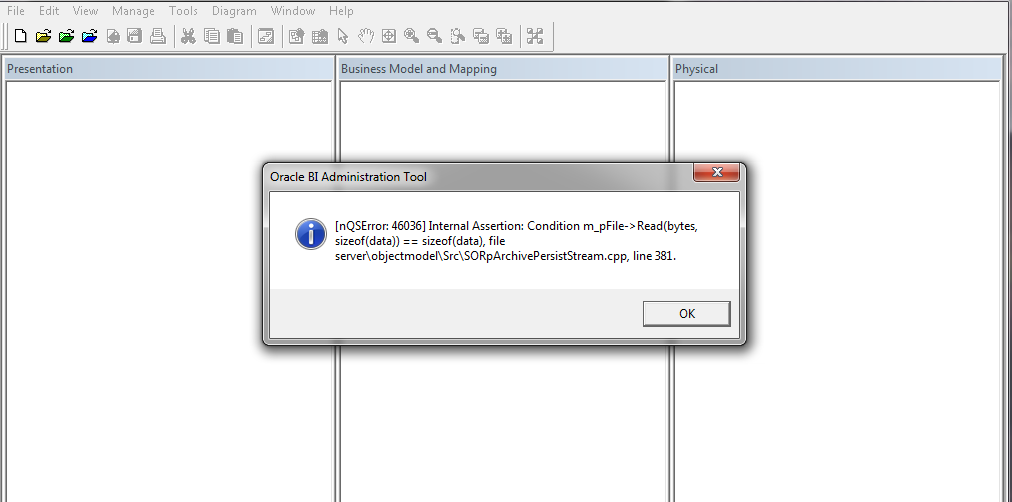
NQSError 46036 Oracle BI Administration Tools Client
when trying to open oracle bi administration tool client, You can download oracle bi administration tool client from here.
Cause :-
Most probably this error related to version mismatch between OBIEE Server and Administration Tool Client in my case OBIEE Version 11.1.1.7.1 and Administration Tool client 11.1.1.7.0
Solution :-
1- Download Upgrade Patch 17530796 From http://support.oracle.com depend on operating system
2- Patch contain multiple file search for this one :- p17463403_111170_Generic.zip
3- inside this zip file browse
17463403\files\clients\biserver\
4- you will find two files biee_client_install_x64.exe Or biee_client_install.exe depend on version.
5- Install One of this file to upgrade Administration tools, Use Repair Option.
Thank you
Osama Mustafa
No Backup !!! Think Again
Trying to Recover Database and Open it with Resetlogs will lead to this error :-
ORA-01547: warning: RECOVER succeeded but OPEN RESETLOGS would get error below
ORA-01194: file 1 needs more recovery to be consistent
ORA-01110: data file 1: ‘/u01/app/oracle/oradata/NPDB/system01.dbf’
This Error is only apart of the problem, To solve it :-
Recover database using file name (Redolog) to get the current filename :-
SQL > Startup mount ;
SQL > select member from v$logfile lf , v$log l where l.status=’CURRENT’ and lf.group#=l.group#;
MEMBER
——————————————-
/u01/app/oracle/oradata/NPDB/redo03.log
SQL > Recover database using backup controlfile until cancel ;
Specify log: {=suggested | filename | AUTO | CANCEL}
/u01/app/oracle/oradata/NPDB/redo03.log ( From the Above Query ).
Log applied.
Media recovery complete.
Trying to open database :-
SQL > Alter database open Resetlogs ;
Failed !!!! with Another Datafile which is UNDO.
ORA-01110: data file 4:’/u01/app/oracle/oradata/NPDB/UNDOTBS01.DBF’
SQL > Create Pfile from Spfile ;
Modify the pfile and add the hidden parameter :-
_allow_resetlogs_corruption=True
But this Not Solved the problem either.
Again Edit Pfile But this Time :-
undo_management=manual
undo_tablespace=UNDOTBS1
SQL> select name from v$datafile;
NAME
——————————————–
/u01/app/oracle/oradata/NPDB/SYSTEM01.DBF
/u01/app/oracle/oradata/NPDB/UNDOTBS01.DBF
/u01/app/oracle/oradata/NPDB/SYSAUX01.DBF
/u01/app/oracle/oradata/NPDB/USERS01.DBF
……………………
SQL > alter database datafile ‘/u01/app/oracle/oradata/NPDB/UNDOTBS01.DBF’ offline drop;
ERROR at line 1:
ORA-01548: active rollback segment ‘_SYSSMU11$’ found, terminate dropping tablespace
Check Segment that Needs Recovery :-
SQL>select segment_name,status,tablespace_name from dba_rollback_segs where status=’NEEDS RECOVERY’;
SEGMENT_NAME STATUS TABLESPACE_NAME
—————————— —————- —————–
_SYSSMU11$ NEEDS RECOVERY UNDOTBS1
_SYSSMU12$ NEEDS RECOVERY UNDOTBS1
_SYSSMU13$ NEEDS RECOVERY UNDOTBS1
Add the following line to pfile:
_corrupted_rollback_segments = (‘_SYSSMU11$’,’_SYSSMU12$’,’_SYSSMU13$’);
SQL > Startup mount pfile=’/u01/osama.ini’;
SQL > drop rollback segment “_SYSSMU11$” –> Drop all the above Segments ;
Drop the Undo And Recreate it again.
SQL > Startup ;
SQL> create undo tablespace UNDOTBS2
datafile ‘/u01/app/oracle/oradata/NPDB/UNDOTBS02.DBF’ size 1G;
Remove All Hidden Parameter and restore UNDO_Managment Parameter to AUTO and UNDO_TABLESPACE=UNDOTBS2 then :-
SQL> create spfile from pfile;
first Advice Enable RMAN Please
Thank you
Osama Mustafa
Reference :-
1- Doc ID 94114.1
2- Doc ID 1295294.1
3- Doc ID 28226.1
Configure PHP With Oracle HTTP Server (OHS)
Oracle HTTP Server is the web server component in Oracle Fusion Middleware. Based on the Apache infrastructure, Oracle HTTP Server allows developers to program their site in a variety of languages and technologies.
PHP (recursive acronym for “PHP: Hypertext Preprocessor”) is a general-purpose scripting language often used for generating web sites. The object model of PHP 5 facilitates project development using standard object-oriented methodologies.
To Configure PHP with Oracle OHS Follow the below steps :-
Step #1:-
export ORACLE_HOME=/Siebel/ohs/Middleware/Oracle_WT1/
export ORACLE_INSTANCE=/Siebel/ohs/Middleware/Oracle_WT1/instances/instance1/
export CONFIG_FILE_PATH=/Siebel/ohs/Middleware/Oracle_WT1/instances/instance1/config/OHS/ohs1/
Step #2:
Download PHP From here.
Upload the file to the server ( should be on the same OHS Server).
gunzip php-5.4.27.tar.gz
tar -xvf php-5.4.27.tar
cd /Siebel/php-5.4.27
I Used this version because older version contains bugs
conflicting types for ‘zendparse’
Step #3:-
$./configure –with-apxs2=$ORACLE_HOME/ohs/bin/apxs –prefix=$ORACLE_HOME –with-config-file-path=$CONFIG_FILE_PATH
make
make install
libphp5.so is generated inside php/libs
cp php.ini-production $CONFIG_FILE_PATH/php.ini
AddType application/x-httpd-php .php .phtml
./opmnctl stopall
./opmnctl startall
Install Demo Files HereExtract demo file to $CONFIG_FILE_PATH/htdocs
