ora-27086 unable to lock file / Alertlog

ORA-27086:unable to lock file – already in use
Cause:the file is locked by another process, indicating that it is currently in use by a database instance.
Action:determine which database instance legitimately owns this file.

If you check the above Picture you will there’s two Pmon process for the same instance, So what you do is the follwing

export ORACLE_SID=swf33
export ORACLE_HOME=
sqlplus / as sysdba
Shutdown immediate;
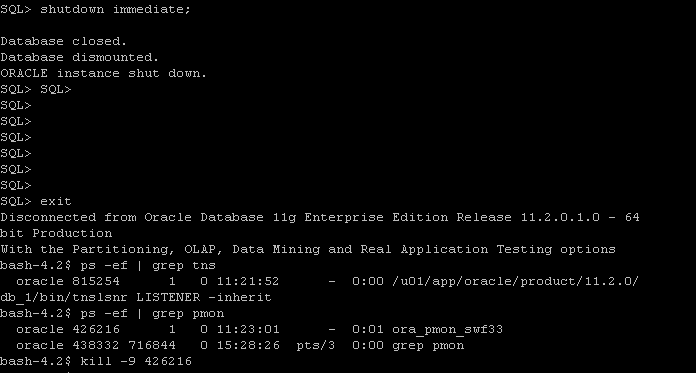
 After shutdown database another process still up use kill -9 OS command to kill it and startup database.

Thank you
Osama Mustafa

Applying Critical Patch Updates (CPU).

A Critical Patch Update is a collection of patches for multiple security vulnerabilities. Critical Patch Update patches are usually cumulative but each advisory describes only the security fixes added since the previous Critical Patch Update advisory. Thus, prior Critical Patch Update advisories should be reviewed for information regarding earlier published security fixes.its released on January, April, July &October.

Steps to Apply CPU: 

Pre-Installation:

  1. Shutdown all the instance , and oracle services such as listener. 
  2. ensure $PATH variable.
  3. Download Patchand unzip it.
  4. Use the Opatch like this : opatch napply -skip_subset -skip_duplicate.
  5. Startup databas.

Post-Installation :

  1.  cd $ORACLE_HOME/rdbms/admin
  2. sqlplus / as sysdba
  3. SQL> @catbundle.sql cpu apply


Note : For rac database nothing diffrenece unless you have to shutdown services node by node and patching ( you can patch one node then the other one).

Useful MOS notes :
Introduction To Oracle Database catbundle.sql [ID 605795.1]

 Thank you 
Osama Mustafa

Check Default Tablespace For User and Change it

Check the Below Demo how you can check tablespace for specific User and how can  you change it

Create New User Without Determine which Tablespace:

SQL > Create User test Identified by test ;

Check TableSpace for Test User:

 SQL> select default_tablespace from dba_users where username=’TEST’;

DEFAULT_TABLESPACE
——————————
USERS

Change TableSpace For Test User :

Solution One : Change Default TableSpace For Database By :

 SQL> alter database default tablespace ;

Solution two : define Tablespace When Creating User

 SQL > create user Test identified by Test default tablespace USER

Thank you
Osama Mustafa

ORA-01151: use media recovery to recover block, restore backup if needed

SQL> startup
ORACLE instance started.

Total System Global Area 599785472 bytes
Fixed Size 1288820 bytes
Variable Size 192939404 bytes
Database Buffers 402653184 bytes
Redo Buffers 2904064 bytes
Database mounted.
ORA-01172: recovery of thread 1 stuck at block 4545 of file 1
ORA-01151: use media recovery to recover block, restore backup if needed
SQL>

Cause :
  There is block corruption in tablespace.

Solution :

 SQL> shutdown immediate;
SQL> startup mount;
SQL> recover database;
SQL> alter database open;


Find Resote Point Rman

Some Times you need to Restore your Database To Earlier time , and before doing that you have to check weather database have valid to do that or not

Simple Query :

SQL>  select resetlogs_change#,to_char(resetlogs_time,
 'DD-MON-YYYY HH24:MI:SS') Last_resetlog_time from v$database_incarnation;
 
RESETLOGS_CHANGE# LAST_RESETLOG_TIME
----------------- --------------------
1 11-SEP-2008 22:57:51
88033 23-MAY-2011 10:12:42
 
Or Sometimes you could Use v$restore_point , Such as
 
SELECT scn, time, database_incarnation#, guarantee_flashback_database from
v$restore_point;
 
 
Thank you 
Osama Mustafa 

ORA-20222: Workload was not captured in the current database


Happy New Year For All , And Wish you All Best 

ORA-20222 “Given capture_id \”%s\” is invalid or the corresponding capture failed”

ORA-20222: Workload was not captured in the current database. Cannot export!
ORA-06512: at “SYS.DBMS_WORKLOAD_CAPTURE”, line 1588
ORA-06512: at line 2

 Regarding to Https://support.oracle.com Note :

DATABASE CAPTURE AND REPLAY COMMON ERRORS AND REASONS [ID 463263.1]
This Error 

is a generic error message that can occur due other underlying error during Capture.
Check the error accompanying with ORA-20222.

Ensure correct directory name is used including check the case-sensitivity of the directory name.
The directory name is case sensitive. Ensure READ and WRITE privilege on the DIRECTORY object to the which is the capture is written.

Thank you 
Osama mustafa

Happy New Year Again . 

Oracle Physical Standby Modes


Regarding to Oracle Documents That Describe Standby Modes, There’s Are Three Types you can follow the documentation.

Check Standby Modes :
SQL> select PROTECTION_MODE from v$database ;

PROTECTION_MODE
——————–
MAXIMUM PERFORMANCE
Primary Database: prim
Standby Database: stdby 

Note: the below Commands Should Apply on Primary Database on Mount Mode Then Open database.

Convert Between Modes (Switch Modes)

MAXIMIZE AVAILABILITY 

SQL> alter system set log_archive_dest_2=’SERVICE=stdby AFFIRM SYNC VALID_FOR=(online_logfiles,primary_role) db_unique_name=stdby’;
System altered.

 SQL> alter database set standby Database to MAXIMIZE AVAILABILITY ;
Database altered.
MAXIMIZE PERFORMANCE

 SQL>ALTER SYSTEM SET LOG_ARCHIVE_DEST_2=’SERVICE=stby NOAFFIRM ASYNC VALID_FOR=(ONLINE_LOGFILES,PRIMARY_ROLE) DB_UNIQUE_NAME=stdby’;
 System Altered  
SQL>ALTER DATABASE SET STANDBY DATABASE TO MAXIMIZE PERFORMANCE;
Database Altered
MAXIMIZE Proctection

SQL> alter system set log_archive_dest_2=’SERVICE=stdby AFFIRM SYNC VALID_FOR=(online_logfiles,primary_role) db_unique_name=stdby’;
System altered.
shutdown immediate ; 
Startup mount ;
Alter database set standby database to maximize Protection ;
Alter database open ; 

Some Useful Sites:
1-Convert Modes Using dgmgrl

Thank you

Osama Mustafa

ORA-01210: data file header is media corrupt

ORA-00283: recovery session canceled due to errors
ORA-01110: data file 24: ‘/ora/data/gamesds/system02.DBF’
ORA-01122: database file 24 failed verification check
ORA-01110: data file 24: ‘/ora/data/gamesds/system02.DBF’
ORA-01210: data file header is media corrupt

Error Cause:
The file header block is internally inconsistent. The beginning of the block has a header with a checksum and other data for insuring the consistancy of the block. It is possible that the last disk write did not operate correctly. The most likely problem is that this is not a datafile for any database. 
 
 
Solution :
Have operating system make correct file available to database. If the trace file dump indicates that only the checksum is wrong, restore from a backup and do media recovery.

 Or The Below Solution , You Must Be Sure that you have Valid Backup to restore it .

SQL> shutdown immediate
SQL > Startup mount
SQL> ALTER DATABASE DATAFILE '/ora/data/gamesds/system02.DBF' OFFLINE ;
SQL > ALTER database Open ;

Thank you
Osama Mustafa

Startup/Shutdown Logical Standby Database

Simple Steps to do that


Shutdown Steps :

On Primary do the following :

SQL > alter system switch logfile ;
SQL > alter system archive log current ; 

Go to Standby :

SQL> ALTER DATABASE STOP LOGICAL STANDBY APPLY;
SQL> shutdown immediate;

Primary Database :

SQL> shutdown immediate;

Startup Steps :

Primary Database

SQL>startup;

 Standby Database:

SQL > startup
SQL > alter database start logical standby apply immediate ;

Thank you
Osama Mustafa
