Increase /tmp Using Zfs Solaris 11

zfs create -V 1gb rpool/newtmp
swap -a /dev/zvol/dsk/rpool/newtmp

 Old Size :

swap                   159M   212K       159M     1%    /tmp
rpool/export            78G    32K        67G     1%    /export
rpool/export/home       78G    32K        67G     1%    /export/home
rpool/export/home/omnix
                        78G   790K        67G     1%    /export/home/omnix
oracle                 118G   1.1M        11G     1%    /oracle
rpool                   78G    39K        67G     1%    /rpool
oracle/u01             118G    93G        25G    79%    /u01
/oracle                 11G   1.1M        11G     1%    /home/oracle

New Size :

root@HMMDB:/# zfs create -V 1gb rpool/extraswap
root@HMMDB:/# zfs list
NAME                      USED  AVAIL  REFER  MOUNTPOINT
oracle                    107G  10.6G  1.11M  /oracle
oracle/u01               92.6G  25.0G  92.6G  /u01
rpool                    12.6G  65.6G    39K  /rpool
rpool/ROOT               5.39G  65.6G    31K  legacy
rpool/ROOT/solaris       5.39G  65.6G  5.03G  /
rpool/ROOT/solaris/var    316M  65.6G   312M  /var
rpool/dump               1.03G  65.7G  1.00G  –
rpool/export              854K  65.6G    32K  /export
rpool/export/home         822K  65.6G    32K  /export/home
rpool/export/home/omnix   790K  65.6G   790K  /export/home/omnix
rpool/extraswap          1.03G  66.7G    16K  –
rpool/swap               5.16G  65.8G  5.00G  –

root@HMMDB:/# swap -a /dev/zvol/dsk/rpool/extraswap

Now Check New Size for /tmp

swap                   1.2G   212K       1.2G     1%    /tmp
rpool/export            78G    32K        66G     1%    /export
rpool/export/home       78G    32K        66G     1%    /export/hom

Thank you
Osama Mustafa

Enable FTP On Redhat

to enable FTP on Redhat on you have to follow to follow the below step,you need to define which user will use the FTP, in this article i will use root user :

Edit the files /etc/vsftpd.ftpusers and /etc/vsftpd.user_list looks like :

#

# List of users denied access to the FTP server, see ftpusers(4).
#
root
daemon
bin
sys
adm
lp
uucp
nuucp
dladm
netadm
netcfg
smmsp
xvm
mysql
openldap
webservd
nobody
noaccess
nobody4
unknown
zfssnap
aiuser

and remove root user from each file.

You can control ftp as services from

/etc/init.d/vsftpd

Thank you
Osama Mustafa

Add New Mount On Linux ( Redhat 6)

Sometime you need to add new mount to Linux after creation the following article will describe how to do this , all the steps tested on Redhat 6.1 , after add disk

[root@localhost Desktop]# fdisk -l
Disk /dev/sda: 85.9 GB, 85899345920 bytes
255 heads, 63 sectors/track, 10443 cylinders
Units = cylinders of 16065 * 512 = 8225280 bytes
Sector size (logical/physical): 512 bytes / 512 bytes
I/O size (minimum/optimal): 512 bytes / 512 bytes
Disk identifier: 0x000be2c2
   Device Boot      Start         End      Blocks   Id  System
/dev/sda1   *           1         262     2097152   83  Linux
Partition 1 does not end on cylinder boundary.
/dev/sda2             262        2220    15728640   83  Linux
/dev/sda3            2220        3525    10485760   83  Linux
/dev/sda4            3525        7833    34601984    5  Extended
/dev/sda5            3525        4831    10485760   83  Linux
/dev/sda6            4831        5484     5242880   82  Linux swap / Solaris
/dev/sda7            5484        5745     2097152   8e  Linux LVM
/dev/sda8            5745        7833    16772096   83  Linux
Disk /dev/sdb: 26.8 GB, 26843545600 bytes
255 heads, 63 sectors/track, 3263 cylinders
Units = cylinders of 16065 * 512 = 8225280 bytes
Sector size (logical/physical): 512 bytes / 512 bytes
I/O size (minimum/optimal): 512 bytes / 512 bytes
Disk identifier: 0x00000000

as you see in the red line , I added disk with size 26G.
I need to prepare this disk :

[root@localhost Desktop]# fdisk /dev/sdb

Device contains neither a valid DOS partition table, nor Sun, SGI or OSF disklabel
Building a new DOS disklabel with disk identifier 0xe88f8de7.
Changes will remain in memory only, until you decide to write them.
After that, of course, the previous content won’t be recoverable.
Warning: invalid flag 0x0000 of partition table 4 will be corrected by w(rite)
WARNING: DOS-compatible mode is deprecated. It’s strongly recommended to
         switch off the mode (command ‘c’) and change display units to
         sectors (command ‘u’).
Command (m for help): n
Command action
   e   extended
   p   primary partition (1-4)
p
Partition number (1-4): 1
First cylinder (1-3263, default 1):
Using default value 1
Last cylinder, +cylinders or +size{K,M,G} (1-3263, default 3263):
Using default value 3263
Command (m for help): w
The partition table has been altered!
Calling ioctl() to re-read partition table.
Syncing disks.

After create disk i need to format the disk i choose ext3 :

[root@localhost Desktop]# mkfs -t ext3 /dev/sdb1
mke2fs 1.41.12 (17-May-2010)
Filesystem label=
OS type: Linux
Block size=4096 (log=2)
Fragment size=4096 (log=2)
Stride=0 blocks, Stripe width=0 blocks
1638400 inodes, 6552504 blocks
327625 blocks (5.00%) reserved for the super user
First data block=0
Maximum filesystem blocks=0
200 block groups
32768 blocks per group, 32768 fragments per group
8192 inodes per group
Superblock backups stored on blocks:
32768, 98304, 163840, 229376, 294912, 819200, 884736, 1605632, 2654208,
4096000
Writing inode tables: done                          
Creating journal (32768 blocks): done
Writing superblocks and filesystem accounting information: done
This filesystem will be automatically checked every 28 mounts or
180 days, whichever comes first.  Use tune2fs -c or -i to override.

Link the disk with new folder 

[root@localhost Desktop]#mkdir /u03
[root@localhost Desktop]# mount -t ext3 /dev/sdb1 /u03
[root@localhost Desktop]#
[root@localhost Desktop]#
[root@localhost Desktop]#
[root@localhost Desktop]# df -h
/dev/sdb1              25G  173M   24G   1% /u03

Don’t forget to add to /etc/fstab 
Thank you 
Osama mustafa

Hack Root Password With Protected Grub

I post before Article talking about “Hack Root Password With Protected Grub” Here .

But what if GRUB was Locked By password and you forget Root Password, There’s always away to do it but you need the same media for Operating system ( Never tried to use different distribution ) after boot :

In the above screen Type ” linux rescue ” and then Press enter

After follow the instruction and Enter Bash

chroot /mnt/sysimage [Enter]
cd /boot/grub [Enter]
vi menu.lst

Now In that file you see word “Password”  Remove Line, This will remove Grub password after save it the OS will Reboot but this time Grub will be UN-Protected , Remove CD and follow the normal instruction in Article Number one Here.

Thank you
Osama Mustafa

Reset/Hack Linux Root Password ( Unprocted GRUB )

Do you want to learn something New ? Hack/Reset Root Linux Password Then Continue Reading.

Root is the user name or account that by default has access to all commands and files on a Linux or other Unix-like operating system. It is also referred to as the root account, root user and the superuser.

What If I Forget Root Password? Check The below

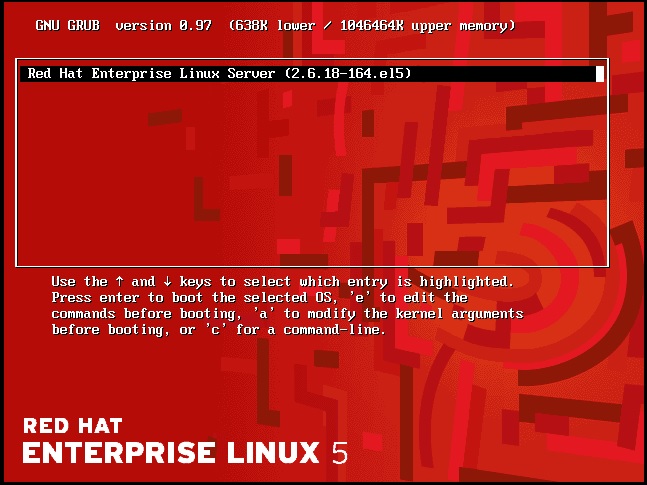
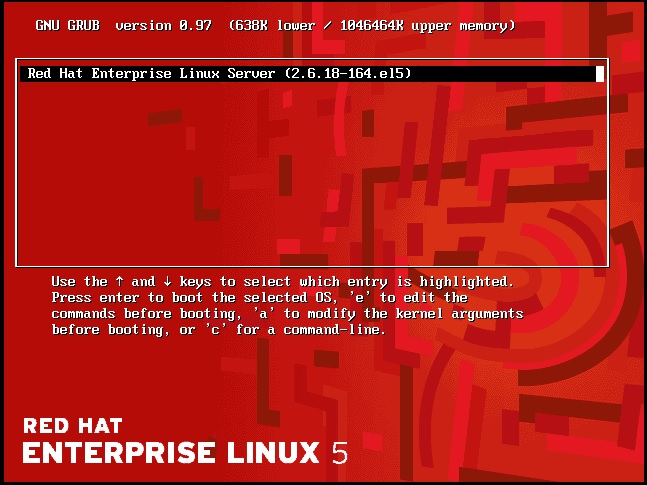
Restart The Server and you must see this screen Pause it click arrow :

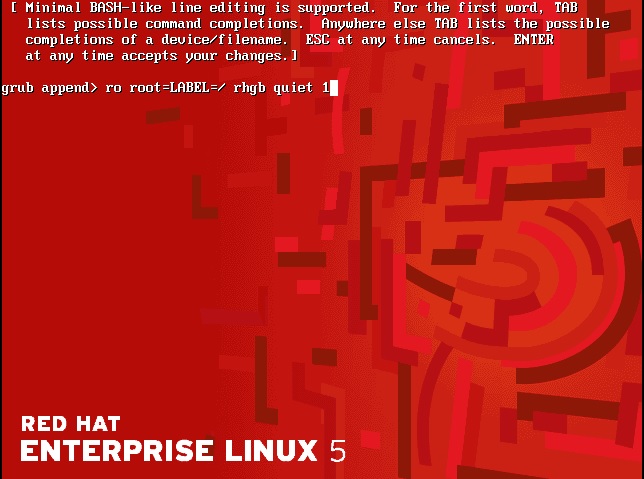
Second Press “a” then add “1” like the below screen after finish Press enter :

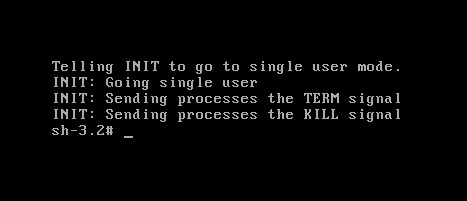
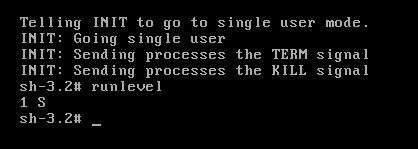
Now Black Screen :

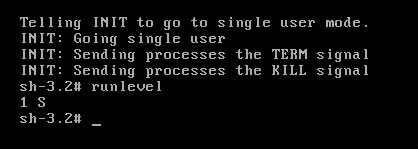
Print “Runlevel”

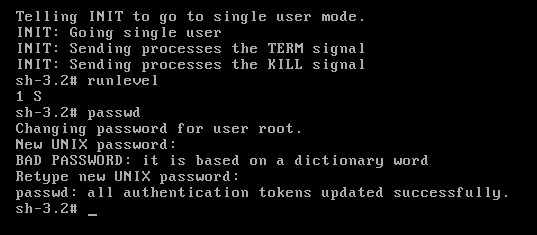
and Reset Root Password like the below by type “passwd” command :

Note : This Way works with Redhat , Fedora and CentOs i didn’t try it on Ubuntu

Thank you
Osama mustafa


The Fastest Way to Create SSH between Servers

In this short Topic i will provide the 3 steps to create SSH ( User Equivalence ) Without Password you can find lot of way but it’s just simple way and don’t need much steps to create SSH between server.

Introduction for SSH, “Ssh is a secure remote login program that is similar to rlogin and rsh. The major difference between ssh and other remote login programs is that ssh encrypts the password and other information so that it can’t be “sniffed” by others as you type it. Ssh also sets up X11 connections, so the DISPLAY variable does not have to be set on remote machines. Scp is another program used to securely copy files from one host to another.”

Example To Use SSH in Oracle : Real Application Cluster ( RAC ).

The Steps :

#1:

Create New SSH Key

oracle@PrimNode$ ssh-keygen
Generating public/private rsa key pair.
Enter file in which to save the key (/home/oracle/.ssh/id_rsa):[Enter key]
Enter passphrase (empty for no passphrase): [Press enter key]
Enter same passphrase again: [Pess enter key]
Your identification has been saved in /home/oracle/.ssh/id_rsa.
Your public key has been saved in /home/oracle/.ssh/id_rsa.pub.
The key fingerprint is:
33:b3:fe:af:95:95:18:11:31:d5:de:96:2f:f2:35:f9

#2:

This Step will Just copy the password File Generated in Step 1 to Server 2.

oracle@PrimNode$ ssh-copy-id -i ~/.ssh/id_rsa.pub You need to use ip/hostname to another server.
oracle@Server2 password:
Now try logging into the machine, with “ssh ‘remote-host'”, and check in:
.ssh/authorized_keys
to make sure we haven’t added extra keys that you weren’t expecting.

#3:

Just Check

oracle@PrimNode$ ssh Server2
Last login: Thu Mar 28 01:54:21 2013 from primora10g
[Test it no password]
oracle@Server2$

Thank you
Osama Mustafa

RunLevel Mode In Linux

As Database administrator you dealing with Different operating system everyday, most of this operating system is Linux/Unix, During the boot up for Linux the init command open files called “/etc/initab”  this file linux start decide which run level the system should booted to. After start the OS you can check “/etc/initab” using Editor (vim command).

there’s different type of run level in linux you should know about them :

  • 0 – halt (Do NOT set initdefault to this).
  • 1 – Single user mode.
  • 2 – Multiuser, without NFS (The same as 3, if you do not have networking).
  • 3 – Full multiuser mode.
  • 4 – unused.
  • 5 – X11.
  • 6 – reboot (Do NOT set initdefault to this).

The Above modes available in /etc/initaband you can check them, when you open the files you will see lines

 id:5:initdefault:

 Which indicate for default level. and you can change it.

Short Description for the RunLevels :

Runlevel 0:

Cause the system shutdown , and you can’t set this as default. no reason to do that.

RunLevel 1:

in this Level System start in something called Single User Mode which mean root user only who can log in to the system.and notice there’s no networking in this mode it will be useful for repair and maintenance.

RunLevel 2:

The System Will log in to mutli user mode which mean you can log in to any users but without networking .

RunLevel 3:

Its same as Runlevel 2 but with networking, This level is common for most linux.

RunLevel 4:

Custom Level, or Custom Boot Level ( Undefined one).

RunLevel 5:

Networking, Multi user Mode With X window Which mean when the OS end of boot the GUI screen will appear to users “Welcome Screen” and can log in, this is what you see in the Linux For example Redhat.

RunLevel 6:

Reboot your Operating System, Sure you don’t want to set this to default.

you can use any runlevel by command –> init ‘run-level-number’

Thank you
Osama Mustafa

Another Linux Command

1-Check Memory :

[oracle@192 ~]$ free -m

             total       used       free     shared    buffers     cached
Mem:          1010        997         13          0         71        685
-/+ buffers/cache:        240        770
Swap:         2000          0       2000

[oracle@192 ~]$ vmstat

procs ———–memory———- —swap– —–io—- –system– —–cpu——
 r  b   swpd   free   buff  cache   si   so    bi    bo   in   cs us sy id wa st
 0  0      0  28820  72248 704336    0    0   117    49 1026  239  3  1 93  3  0

[oracle@192 ~]$ dmesg | grep RAM

BIOS-provided physical RAM map:
hdc: ATAPI 1X DVD-ROM DVD-R-RAM CD-R/RW drive, 32kB Cache, UDMA(33)

Finally : top command that you could use.

2-How Much this Os was running
 
[oracle@192 ~]$ uptime

 23:03:17 up  1:44,  2 users,  load average: 0.04, 0.11, 0.08

3-Check Some Hardware Information

CPU :

[oracle@192 ~]$ cat /proc/cpuinfo

processor       : 0
vendor_id       : GenuineIntel
cpu family      : 6
model           : 37
model name      : Intel(R) Core(TM) i5 CPU       M 430  @ 2.27GHz
stepping        : 2
cpu MHz         : 2261.079
cache size      : 3072 KB
fdiv_bug        : no
hlt_bug         : no
f00f_bug        : no
coma_bug        : no
fpu             : yes
fpu_exception   : yes
cpuid level     : 11
wp              : yes
flags           : fpu vme de pse tsc msr pae mce cx8 apic mtrr pge mca cmov pat pse36 clflush dts acpi mmx fxsr sse sse2 ss nx rdtscp lm constant_tsc up ida nonstop_tsc pni cx16 popcnt lahf_lm [8]
bogomips        : 4522.15

 Thank you
Osama mustafa

Zombie process

Zombie process is an inactive computer process,according to wikipedia article, “…On Unix operating systems, a zombie process or defunct process is a process that has completed execution but still has an entry in the process table, allowing the process that started it to read its exit status. In the term’s colorful metaphor, the child process has died but has not yet been reaped…”

Find zombie by :

# ps aux | awk '{ print $8 " " $2 }' | grep -w Z

 after that use kill -9  PID

Thank you
osama mustafa

Useful Linux Commands For DBA

Show Routing Table :
 
netstat -r

Check ORA errors in the Logs:

grep ^ORA- *log |cut -f2 -d"-"|cut -f1 -d:|awk '{print "ORA-" $1}'|sort -u
Inzip CPIO Files :
 
cpio -idmv < 

 Sort Files By Size :

ls -l |sort -k 5

Find Command archive and move to another Folder :

find ./ -name "*.arch" -mtime +1 -exec mv {} /u01/;

Find Command archive and Remove it:

find ./ -name "*.ARC" -mtime +1 -exec rm {} \;

Find Command with Zip :

find ./ -name "*.ARC" -mtime +1 -exec gzip {} \;

 Find Command With List :


 find ./ -name “*.ARC” -mtime +1 -ls 

Thank you
Osama Mustafa