Some Oracle Installation file is .CPIO
what this file mean : extension is a UNIX and its file archive .
How to Extract this file :
For the people who think differently Welcome aboard
what this file mean : extension is a UNIX and its file archive .
How to Extract this file :
chkconfig libvirtd on
service libvirtd start
Also you can enable it or check the status for libvirtd by :
/etc/init.d/libvirtd [status|start|stop]
Thank you
Osama mustafa
But After finishing KVM installation and see everything is working fine i knew its deserve every moments . I believe in what they say now ” Never Give Up ” . I posting this article today for the people who wants to learn something new. And if you face any problem you can contact me here, I Wrote this because there’s no much information about the package that you should install while you are working on Virtualization But Hope you will find this useful.
you can install the package from Redhat Media , some Package will Generate what called Package Dependency , You will start searching for missing Package on media with same name as appear to you . its waste of time , i will post under this topic the most important package that you need to install to avoid this error.
Some Other Information you need to know To Check If KVM Support :
Solution One Using :
/proc/cpuinfo , the output :
The flags to look out for are:
vmx — Intel VT-x, basic virtualization svm — AMD SVM, basic virtualization ept — Extended Page Tables, an Intel feature to make emulation of guest page tables faster. vpid — VPID, an Intel feature to make expensive TLB flushes unnecessary when context switching between guests. npt — AMD Nested Page Tables, similar to EPT. tpr_shadow and flexpriority — Intel feature that reduces calls into the hypervisor when accessing the Task Priority Register, which helps when running certain types of SMP guests. vnmi — Intel Virtual NMI feature which helps with certain sorts of interrupt events in guests. Solution Two :
dmesg | less
The two messages to look out for are:
kvm: no hardware support and
kvm: disabled by bios
To load KVM:
Intel
modprobe kvm_intel
AMD :
modprobe kvm_amd
Package that you need to install (Sorted) :
etherboot-zroms-kvm-5.4.4-10.el5.x86_64.rpm
kmod-kvm-83-105.el5.x86_64.rpm
celt051-0.5.1.3-0.el5.x86_64.rpm
log4cpp-1.0-4.el5.x86_64.rpm
qpixman-0.13.3-4.el5.x86_64.rpm
qcairo-1.8.7.1-3.el5.x86_64.rpm
qffmpeg-libs-0.4.9-0.15.20080908.el5.x86_64.rpm
qspice-libs-0.3.0-39.el5.x86_64.rpm
kvm-83-105.el5.x86_64.rpm
cyrus-sasl-md5-2.1.22-5.el5.x86_64.rpm
iscsi-initiator-utils-6.2.0.871-0.10.el5.x86_64.rpm
bridge-utils-1.1-2.x86_64.rpm
kvm-qemu-img-83-105.el5.x86_64.rpm
gnome-python2-gnomekeyring-2.16.0-3.el5.x86_64.rpm
gtk-vnc-0.3.8-3.el5.x86_64.rpm
gtk-vnc-python-0.3.8-3.el5.x86_64.rpm
xen-libs-3.0.3-94.el5.x86_64.rpm
xen-devel-3.0.3-94.el5.x86_64.rpm
libvirt-0.6.3-20.el5.x86_64.rpm
virt-viewer-0.0.2-3.el5.x86_64.rpm
libvirt-python-0.6.3-20.el5.x86_64.rpm
python-virtinst-0.400.3-5.el5.noarch.rpm
virt-manager-0.6.1-8.el5.x86_64.rpm
Some Other package you need to install for avoiding dependency error :
xz-lib-***
xz-4.***
If you need to Run convirt install the below package also (Sorted) :
kernel-xen-2.6.18-164.el5
xen-3.0.3-94.el5
gpg-pubkey-32a349c9-493c185a
socat-1.6.0.1-1.el5.rf
tunctl-1.5-2.el5
python-crypto-2.0.1-13.1.el5.kb.1
python-paramiko-1.7.4-1.el5
convirt-1.1-1.fedora
Thank you
Osama Mustafa
to find a file in a directory:-
$ find (directory_path) -name (file_name)
to find a value in a vi editor:-
in vi editor [esc] & :/(find_value)
to delete a value in a vi editor:-
in vi editor [esc] & :%s /delete_value
to delete contents in a file:-
in vi editor [esc] & :/%d
to replace a value in a vi editor:-
in vi editor [esc] & :%s /search_value/replace_value
to see the size of a file (or) directory:-
$du -csh (file or directory name)
to count the files & directories in a directory:-
$ls -l |wc -l
to count the files in a directory:-
$find . -type f |wc -l
to count the directries in a directory:-
$find . -type d |wc -l
to see the file-system in linux:-
$file /sbin/init
(or)
$getconf LONG_BIT
How to mount Windows shared folder in Linux: –
$mount.cifs //IPAddrss/share_folder_name/ /mnt -o user=username
Thank you
Osama Mustafa
For installation of Oracle on windows doesn’t require any other user creation, we can perform oracle installation using “administrator” superuser of windows. For installation of Oracle on Unix/linux required to creating separate operating system user account. Using super user “root” we doesn’t require to perform Oracle installation.
For installation of Oracle on windows, if we create separate operating system then it should be group of super user administrator. For installation of Oracle on Unix/Linux, when we create operating system user then it should be not part of super user group.
Default location of password file and parameter file for Windows is ORACLE_HOME\database folder.Default location of password file and parameter file for Unix/Linux is ORACLE_HOME/dbs folder.
ORACLE_BASE,ORACLE_HOME,ORACLE_SID are defined in registry of Windows as HKEY_LOCAL_MACHINE\SOFTWARE\ORACLE\HOME0. ORACLE_BASE,ORACLE_HOME,ORACLE_SID are defined as user’s environment variables in Unix/Linux.
Symbolic links are NOT supported for user’s environment variables or registry parameter in Windows. Symbolic links are supported for user’s environment variables in Unix/Linux.
In windows we should need to set environment variable using “set” command and it doesn’t save in user profile. In Unix and Linux we should need to set environment variable using “export” command and it can save using .profile (in Unix) and .bash_profile (in Linux).
Oracle’s shared libraries are called as shared DLL in windows. Oracle’s shared libraries are available in Unix/Linux.
Relinking of Oracle executable is not available in Windows. Relinking of Oracle executable is available in Unix/Linux.
Shared memory , shared segments and semaphores are NOT adjustable in Windows. Shared memory segment(SHMMAX), shared segments (SHMMNI) and semaphores (SEMMNS) are adjustable using kernel parameters in Unix/Linux.
Oracle’s SGA locking in real memory doesn’t possible in Windows. Oracle’s SGA locking in real memory is possible in Unix/Linux.
Each background process of Oracle is implementing as Thread inside single process in Windows. Each background process of Oracle is a process in Unix/Linux.
Windows called as GUI because it provides Graphical User Interface. Unix and Linux called as CLUI called Command Line User Interface. Due to this reason Unix and Linux provides more performance than Windows due to resource utilization.
Windows is flat file system. Unix and Linux is hierarchical model file system. Windows kernel stores in couple of files like Registry. Unix and Linux kernel stores in many files which are hierarchy. It is very easy to understand Unix and Linux file systems in any version.
Earlier FAT and FAT32 file system has no security in Windows. Using NTFS file system windows use file permission based security. In Unix and Linux has traditional file permission security with owner,group and other users.Unix has greater built-in security and permissions features than Windows. Linux contains also same type of security and permissions logic like Unix.
There are very few utilities available in Windows for performance monitoring and administration. There are lot of command line utilities are available in Unix/Linux for performance monitoring and administration.
Source code of Operating system doesn’t available in Windows. Source code of Operating system is available in some of Linux flavors, means we can modify source code of operating system.
Oracle on Windows magnetize because easy to understand, easy to maintain, easy to develop, resource availability and with good support. Oracle on Unix/Linux is not easy to understand,easy to maintain or easy to develop because it requires high skill set and depth knowledge.
Oracle deployment is very easy in Windows because not need to more knowledge or special skill sets. Oracle deployment is not easy in Unix/Linux because it requires special skill sets.
Windows is user friendly operating system. Unix and Linux doesn’t user friendly operating system.
There is high risk of virus attacks on Windows. Because majority of windows users run as Administrator and virus can be affecting on any of files of kernel due to super user account. There is minimum risk for virus attacks on Unix and Linux. Because most of Unix box or Linux box is being run by user interface not using “root” super user. Due to this reason virus attacker cannot able to modify kernel of operating system.
Thank you
Osama Mustafa
Mon Aug 06 03:57:54 2012
OER 7451 in Load Indicator : Error Code = OSD-04500: illegal option specified
O/S-Error: (OS 1) Incorrect function. !
OER 7451 in Load Indicator : Error Code = OSD-04500: illegal option specified
O/S-Error: (OS 1) Incorrect function. !
Mon Aug 06 03:58:04 2012
OER 7451 in Load Indicator : Error Code = OSD-04500: illegal option specified
O/S-Error: (OS 1) Incorrect function. !
OER 7451 in Load Indicator : Error Code = OSD-04500: illegal option specified
O/S-Error: (OS 1) Incorrect function. !
Mon Aug 06 03:58:14 2012
OER 7451 in Load Indicator : Error Code = OSD-04500: illegal option specified
O/S-Error: (OS 1) Incorrect function. !
OER 7451 in Load Indicator : Error Code = OSD-04500: illegal option specified
O/S-Error: (OS 1) Incorrect function. !
Mon Aug 06 03:58:24 2012
OER 7451 in Load Indicator : Error Code = OSD-04500: illegal option specified
O/S-Error: (OS 1) Incorrect function. !
OER 7451 in Load Indicator : Error Code = OSD-04500: illegal option specified
O/S-Error: (OS 1) Incorrect function. !
Mon Aug 06 03:58:34 2012
OER 7451 in Load Indicator : Error Code = OSD-04500: illegal option specified
O/S-Error: (OS 1) Incorrect function. !
OER 7451 in Load Indicator : Error Code = OSD-04500: illegal option specified
O/S-Error: (OS 1) Incorrect function. !
Mon Aug 06 03:58:44 2012
OER 7451 in Load Indicator : Error Code = OSD-04500: illegal option specified
O/S-Error: (OS 1) Incorrect function. !
OER 7451 in Load Indicator : Error Code = OSD-04500: illegal option specified
O/S-Error: (OS 1) Incorrect function. !
Mon Aug 06 03:59:05 2012
O/S-Error: (OS 1) Incorrect function. !
Oracle Support points to Doc. ID 1060806.1
m : megabytes
g : gigabytes
              total    used     free   shared  buffers   cached
 Mem:           503     451       52        0       14      293
 -/+ buffers/cache:     143      360
 Swap:         1027       0     1027
another example :
free -t -mtotal used free shared buffers cached
Mem: 750 625 125 0 35 335
-/+ buffers/cache: 253 496
Swap: 956 0 956
Total: 1707 625 1082
procs -----------memory---------- ---swap-- -----io---- --system-- ----cpu----
r  b   swpd   free   buff  cache   si   so    bi    bo   in    cs us sy id wa
1  0      0 131620  35432 341496    0    0    42    82  737  1364 15  3 81  1
3-top

4-gnome-system-monitor
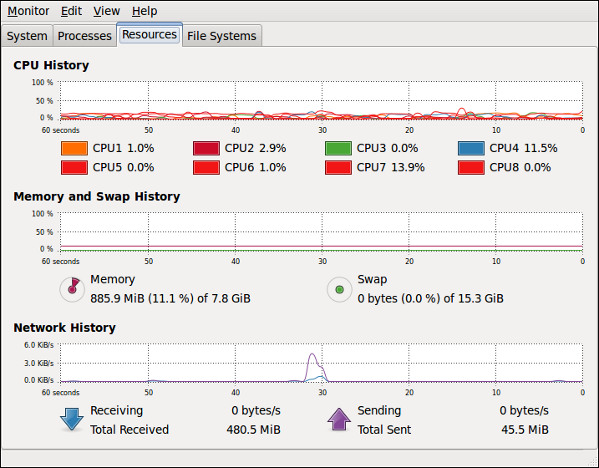
The below Command for clear cache memory in linux
sync;echo 3 > /proc/sys/vm/drop_caches
you can make it as job in linux save in it crontab
0 * * * * /root/clearcache.sh
Create a file in '/root' called 'clearcache.sh' with the following content:
#!/bin/sh
 sync; echo 3 > /proc/sys/vm/drop_caches
Thank you
osama mustafa
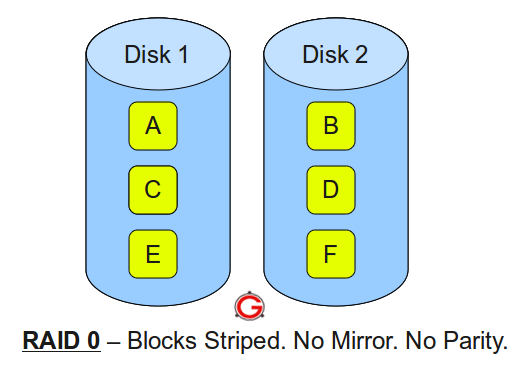
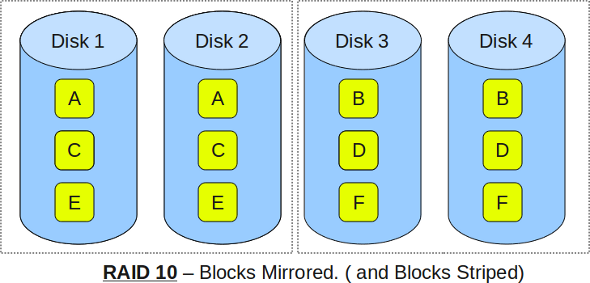
RAID TYPE :
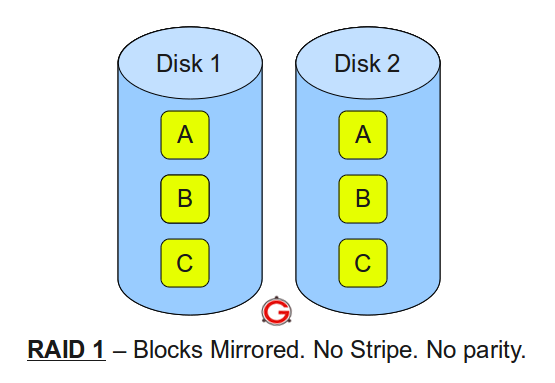
Following are the key points to remember for RAID level 1.

Cygwin comes with a normal setup.exe to install in Windows, but there are a couple steps you will need to pay attention to, so we will walk you through the installation.

To keep the installation small while saving bandwidth for you and Cygwin, the default installer will download only the files you need from the internet.

The default install path is C:\Cygwin

Click next until you come to a download mirror selection. Unfortunately, the installer does not say where the mirrors are located so in most cases you might as well just guess which mirror works best.

After you have selected a mirror, the installer will download a list of available packages for you to install. Here is where things get a bit more intimidating.
There will be hundreds of packages available separated by multiple different categories. If you don’t know what the package is you can leave the default selection and install additional packages later by running the installer again.

If you know what package you need, you can search for it and the results will be automatically filtered.

Once you click next, it will take a little while to download all the selected tools and then finish the installation.
In the left column click on advanced system settings to open the system properties window we are looking for

From the advanced tab, click on environment variables at the bottom.

Then in the system variables, locate the path variable and click edit.

At the end of the variable value option, add the Cygwin bin location like so.
;C:\Cygwin\bin
Note: Make sure you add a semicolon to separate it from the other values.

Click OK to close out of the window and then open a command prompt to test out a few Linux commands.
Enjoy
Osama Mustafa
Hdx could be hda, hdb etc. In the second example gzip is used to compress the image if it is really just a backup.
gzip -dc /path/to/image.gz | dd of=/dev/hdx
In order to backup only the first few bytes containing the MBR and the partition table you can use dd as well.
dd if=/dev/hdx of=/path/to/image count=1 bs=512
dd if=/path/to/image of=/dev/hdx
 Technology Geek