Oracle Password Security

As Certified Ethical hacker and Penetration  Testing Always people Asked me about if the Oracle Password can be Cracked or not ? You need to know that if the hacker want to get into your database and he will all you can do is make it harder for him , so don’t choose Easy password to crack

I post these topics not to use it in wrong way , No as DBA you need to know about Securing you database
and How to make it unbreakable.

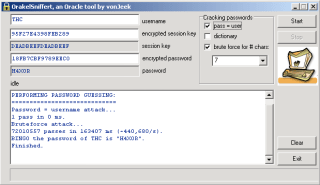
For example check the below tools that used to crack Oracle Password

And Others Tools Found for free On Internet , for example Red database security (which is amazing company and website provide you with article/topics about oracle security ) provide some of these tools for free.

Thank you
Osama Mustafa

Oracle security Function for password changing

Check this function that is used for changing user password , you need to watch out from functions like that i post this function as an example

FUNCTION CHGPWD (
P_USER VARCHAR2,
P_PWD VARCHAR2)
RETURN BOOLEAN IS
L_STMT VARCHAR2(255);
BEGIN
L_STMT:= ‘ALTER USER “‘ || P_USER || ‘” IDENTIFIED BY “‘ || P_PWD||’”‘;
EXECUTE IMMEDIATE L_STMT;
RETURN TRUE;
END;

Thank you

I will Post More and More Topics about Oracle security

Change SYSMAN Password


SYSMAN : User in database used for Enterprise manager .


Be notice any failed with these steps you to recreate EM again .
Step-1

SQL> conn sysman/sysman1@oem
Connected.
SQL> password
Changing password for SYSMAN
Old password:
New password:
Retype new password:
Password changed

Step-2
emctl stop dbconsole
Step-3
edit emoms.properties ($ORACLE_HOME/localhost.domainname_sid/sysman/config/)
**emoms.properties:

FROM :

oracle.sysman.eml.mntr.emdRepPwd=”c7021fd3720a0f18″ replace with PASSWORD
oracle.sysman.eml.mntr.emdRepPwdEncrypted=”TRUE” replace with FALSE

TO:

oracle.sysman.eml.mntr.emdRepPwd=ORACLE
oracle.sysman.eml.mntr.emdRepPwdEncrypted=FALSE

edit targets.xml files ($ORACLE_HOME/localhost.domainname_sid/sysman/emd/)
**targets.xml
FROM :
[Property NAME=”UserName” VALUE=”80ec9025e45b2d20″ ENCRYPTED=”TRUE”/]
[Property NAME=”password” VALUE=”94124d177df7c5d9″ ENCRYPTED=”TRUE”/]

TO :

Replace username value with “SYSMAN” and password value with “SYSMAN PASSWORD”

[Property NAME=”UserName” VALUE=”SYSMAN” ENCRYPTED=”TRUE”/]
[Property NAME=”password” VALUE=”ORACLE” ENCRYPTED=”TRUE”/]

Step-4:
emctl start dbconsole 
Step-5 (in case sysman is locked)
Select Username , account_status from dba_users where username=upper(‘sysman’);
If its locked then
alter user sysman account unlock ;
Thank you
Osama Mustafa 

Locking In Oracle

Locking in Oracle is one of the most common problem we will face as database administrator.

 is the locking Effect on Database performance ?

Yes . impede a transaction from finishing , since the Lock query Take long time running .

When the Locking Happened ?

I will Give you example :

Let assume that we have two Users Each Of them Update on the same table like the following :

User 1 :

SQL> update test set name=’lock’ where id=1;

1 row updated.

User didn’t commit here .

User 2 :
SQL> update test set name=’lock2′ where id=1;


User 2 will be waiting

Inforamtion about locks :
1-Locks scripts One.
2-Locks Scripts Two

Another way to Lock :

performing a DDL (alter,create….) and get an ORA-00054 error.

ORA-00054: resource busy and acquire with NOWAIT specified

 to solve this issue

SQL> select object_id from dba_objectswhere owner=’Username’  and object_name=’Table’;

 OBJECT_ID
———-
 

SELECT c.owner,
 c.object_name,
 c.object_type,
 b.sid,
 b.serial#,
 b.status,
 b.osuser,
 b.machine
FROM v$locked_object a, v$session b, dba_objects c
WHERE b.sid = a.session_id AND a.object_id = c.object_id
and a.object_id=;

Refer also to :
1-Locks

Osama Mustafa

Remove Oracle / Uninstall

I post this topics for people who want to learn how to remove Oracle For Window/Linux 


Windows :

Its easy common steps you have to follow :

  • Uninstall all Oracle components using the Oracle Universal Installer (OUI).
  • Run regedit.exe and delete the HKEY_LOCAL_MACHINE/SOFTWARE/ORACLE key. This contains registry entires for all Oracle products.
  • Delete any references to Oracle services left behind in the following part of the registry (HKEY_LOCAL_MACHINE/SYSTEM/CurrentControlSet/Services/Ora*). It should be pretty obvious which ones relate to Oracle.
  • Reboot your machine.
  • Delete the “C:\Oracle” directory, or whatever directory is your ORACLE_BASE.
  • Delete the “C:\Program Files\Oracle” directory.
  • Empty the contents of your “C:\temp” directory.
  • Empty your recycle bin.

Unix :

  • Uninstall all Oracle components using the Oracle Universal Installer (OUI).
  • Stop All Oracle Process .

lsnrctl stop
emctl stop dbconsole
emctl stop agent.

  • Delete the files and directories below the $ORACLE_HOME.
# cd $ORACLE_HOME
# rm -Rf *
  •  delete directories below the $ORACLE_BASE.

 # cd $ORACLE_BASE
# rm -Rf admin

  •  Delete the /etc/oratab file

Done .

Osama Mustafa

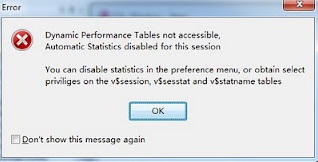
PL/SQL developer: Dynamic Performance Tables not accessible

ERROR HAPPENED WHEN :

Login into Pl/sql developer (software)


Solution:

1.grant select any dictionary to username
2.disable this function by

Tools –> Preference –> option –> uncheck option “Automatic statistics”

Oracle On Windows vs Linux

Today i will talk about Compare Oracle Installation On Windows vs Linux , and just to let you know oracle recommended Linux .

1-Installation Oracle on Windows / Linux

For installation of Oracle on windows doesn’t require any other user creation, we can perform oracle installation using “administrator” superuser of windows. For installation of Oracle on Unix/linux required to creating separate operating system user account. Using super user “root” we doesn’t require to perform Oracle installation.

For installation of Oracle on windows, if we create separate operating system then it should be group of super user administrator. For installation of Oracle on Unix/Linux, when we create operating system user then it should be not part of super user group.

2-Default Location Of Windows , Linux :

Default location of password file and parameter file for Windows is ORACLE_HOME\database folder.Default location of password file and parameter file for Unix/Linux is ORACLE_HOME/dbs folder.

ORACLE_BASE,ORACLE_HOME,ORACLE_SID are defined in registry of Windows as HKEY_LOCAL_MACHINE\SOFTWARE\ORACLE\HOME0. ORACLE_BASE,ORACLE_HOME,ORACLE_SID are defined as user’s environment variables in Unix/Linux.

3-Symbolic Links windows , Linux

Symbolic links are NOT supported for user’s environment variables or registry parameter in Windows. Symbolic links are supported for user’s environment variables in Unix/Linux.

4-Enviorment variable in Windows, Linux 

In windows we should need to set environment variable using “set” command and it doesn’t save in user profile. In Unix and Linux we should need to set environment variable using “export” command and it can save using .profile (in Unix) and .bash_profile (in Linux).

5-Shared Library DLL windows , Linux 

Oracle’s shared libraries are called as shared DLL in windows. Oracle’s shared libraries are available in Unix/Linux.

6-Relinking On Windows , Linux

Relinking of Oracle executable is not available in Windows. Relinking of Oracle executable is available in Unix/Linux.

7-Shared memory Segment Windows, Linux

Shared memory , shared segments and semaphores are NOT adjustable in Windows. Shared memory segment(SHMMAX), shared segments (SHMMNI) and semaphores (SEMMNS) are adjustable using kernel parameters in Unix/Linux.

8-Memory and processes In Windows , Linux

Oracle’s SGA locking in real memory doesn’t possible in Windows. Oracle’s SGA locking in real memory is possible in Unix/Linux.

Each background process of Oracle is implementing as Thread inside single process in Windows. Each background process of Oracle is a process in Unix/Linux.

9-GUI , CLUI Windows , Linux 

Windows called as GUI because it provides Graphical User Interface. Unix and Linux called as CLUI called Command Line User Interface. Due to this reason Unix and Linux provides more performance than Windows due to resource utilization.

10-File System , Security Windows , Linux

Windows is flat file system. Unix and Linux is hierarchical model file system. Windows kernel stores in couple of files like Registry. Unix and Linux kernel stores in many files which are hierarchy. It is very easy to understand Unix and Linux file systems in any version.

Earlier FAT and FAT32 file system has no security in Windows. Using NTFS file system windows use file permission based security. In Unix and Linux has traditional file permission security with owner,group and other users.Unix has greater built-in security and permissions features than Windows. Linux contains also same type of security and permissions logic like Unix.

11-Mointer Oracle In Windows, Linux

There are very few utilities available in Windows for performance monitoring and administration. There are lot of command line utilities are available in Unix/Linux for performance monitoring and administration.

12-Source Code Windows , Linux 

Source code of Operating system doesn’t available in Windows. Source code of Operating system is available in some of Linux flavors, means we can modify source code of operating system.

13-Skills Windows , Linux 

Oracle on Windows magnetize because easy to understand, easy to maintain, easy to develop, resource availability and with good support. Oracle on Unix/Linux is not easy to understand,easy to maintain or easy to develop because it requires high skill set and depth knowledge.

Oracle deployment is very easy in Windows because not need to more knowledge or special skill sets. Oracle deployment is not easy in Unix/Linux because it requires special skill sets.

Windows is user friendly operating system. Unix and Linux doesn’t user friendly operating system.

14-Virus Windows , Linux 

There is high risk of virus attacks on Windows. Because majority of windows users run as Administrator and virus can be affecting on any of files of kernel due to super user account. There is minimum risk for virus attacks on Unix and Linux. Because most of Unix box or Linux box is being run by user interface not using “root” super user. Due to this reason virus attacker cannot able to modify kernel of operating system. 

Thank you
Osama Mustafa
RMAN-20001: target database not found in recovery catalog

===================================================

RMAN-00569: =============== ERROR MESSAGE STACK FOLLOWS
RMAN-00571: ===================================================
RMAN-03002: failure of list command at 11/13/2011 03:26:18

RMAN-06004: ORACLE error from recovery catalog database: RMAN-20001: target database not found in recovery catalog

  1. Connect to RMAN Catalog
$ rman catalog rman/rman@rmancat target rmanbkup/rmanbkup@orcl
Recovery Manager: Release 11.2.0.2.0 – Production on Sun Nov 13 03:25:49 2011
Copyright (c) 1982, 2009, Oracle and/or its affiliates.  All rights reserved.
connected to target database: orcl (DBID=5858479612)
connected to recovery catalog database
  1. Unregister the database
RMAN>unregister database noprompt;
  1. Register Database to RMAN catalog
RMAN> register database;
database registered in recovery catalog
starting full resync of recovery catalog

full resync complete