Terraform for Oracle Cloud infrastructure

This post provide steps for downloading and installing both Terraform and the Oracle Cloud Infrastructure Terraform provider.

Terraform Overview

Terraform is “infrastructure-as-code” software that allows you to define your infrastructure resources in files that you can persist, version, and share. These files describe the steps required to provision your infrastructure and maintain its desired state; it then executes these steps and builds out the described infrastructure.

Infrastructure as Code is becoming very popular. It allows you to describe a complete blueprint of a datacentre using a high-level configuration syntax, that can be versioned and script-automated, Terraform can seamlessly work with major cloud vendors, including Oracle, AWS, MS Azure, Google, etc

Download and Install Terraform

In this section, i will show and explain how to download and install Terraform on  your laptop/PC Host Operating System, you can download using the below link :-

Terraform Download
  • After you download the terraform, Unzip the Terraform to whatever location you want to run it from. Then, add that location to your OS PATH.
    • Windows : By adding to Path –> environment variables
    • Linux : Profile –> export Path

You can check by run the CMD and check the version:-

Check Terraform commands

Download the OCI  Terraform Provider

Prerequisites:-

  • OCI User credentials that has  sufficient permission to  execute a Terraform plan.
  • Required keys and Oracle Cloud Infrastructure IDs (OCIDs).
  • The correct Terraform binary file for your operating system

Installing and Configuring the Terraform Provider

In my personal opioion about this section (The title of the section same as Oracle Documentation) I found it wrong, i worked with Terraform in different cloud vendor, AWS, Azure and OCI so Terraform will recognize it and automatically install the provider for you.

to do that, all of you have to do is create folder , then create file “variables.tf” that only contains

provider "oci" {<br>}

and run terraform command

terraform init

Now Let’s Talk small examples about OCI and Terraform, First you have to read “Creating Module” to understand the rest of this post here.

I will upload to my Github here Small Sample for OCI Terraform to allow you underatand how we can use it instead of the GUI and make it easy for you.

I upload to my github example of Terraform for OCI Proiver, In the this example i will create autonomous database but not using the GUI,

to work with Terraform, you have to understand what is the OCI Provider and the parameters of it.

The Terraform configuration resides in two files: variables.tf (which defines the provider oci) and main.tf (which defines the resource).

For more terraform examples here

Configuration File Requirements

Terraform configuration (.tf) files have specific requirements, depending on the components that are defined in the file. For example, you might have your Terraform provider defined in one file (provider.tf), your variables defined in another (variables.tf), your data sources defined in yet another.

Some of the examples for Terraform files here

Provider Definitions

The provider definition relies on variables so that the configuration file itself does not contain sensitive data. Including sensitive data creates a security risk when exchanging or sharing configuration files.

To understand more about provider read here

provider "oci" {
   tenancy_ocid = "${var.tenancy_ocid}"
   user_ocid = "${var.user_ocid}"
   fingerprint = "${var.fingerprint}"
   private_key_path = "${var.private_key_path}"
   region = "${var.region}"
}

Variable Definitions

Variables in Terraform represent parameters for Terraform modules. In variable definitions, each block configures a single input variable, and each definition can take any or all of three optional arguments:

  • Type (Optional): Defines the variable type as one of three allowed values: string, list, and map. If this argument is not used, the variable type is inferred based on default. If no default is provided, the type is assumed to be string
  • Default (Optional) : Sets the default value for the variable. If no default value is provided, the caller must provide a value or Terraform throws an error.
  • Description (Optional) : A human-readable description of the variable.

More information here

For example

variable "AD" {
    default     = "1"
    description = "Availability Domain"
}

Output Configuration

Output variables provide a means to support Terraform end-user queries. This allows users to extract meaningful data from among the potentially massive amount of data associated with a complex infrastructure.

More information here

Example

output "InstancePublicIPs" {
value = ["${oci_core_instance.TFInstance.*.public_ip}"]
}

Resource Configuration

Resources are components of your Oracle Cloud Infrastructure. These resources include everything from low-level components such as physical and virtual servers, to higher-level components such as email and database providers, your DNS record.

For more information here

One of the example :-

resource "oci_core_virtual_network" "vcn1" {
   cidr_block = "10.0.0.0/16"
   dns_label = "vcn1"
   compartment_id = "${var.compartment_ocid}"
   display_name = "vcn1"
}

Data Source Configuration

Data sources represent read-only views of existing infrastructure intended for semantic use in Terraform configurations, for example Get DB node list

data "oci_database_db_nodes" "DBNodeList" {
  compartment_id = "${var.compartment_ocid}"
  db_system_id = "${oci_database_db_system.TFDBNode.id}"
}

Another example, Gets the OCID of the first (default) vNIC


data "oci_core_vnic" "DBNodeVnic" {
  vnic_id = "${data.oci_database_db_node.DBNodeDetails.vnic_id}"
}

Follow me on GitHub here

Cheers

Osama

Apply for Oracle exam extension

As we already know oracle has been providing free exam and materials for siz track like the following till 15 May 2020: –

and because of the high demand since there are not available slot anymore, Oracle now providing extension BUT you have to apply for this

Follow this Video :-

How to ask for extension

Enjoy

Osama

Create Your First VM with Azure Cloud In different ways

To create your first server/VM on Azure cloud, you have different ways to do that :-

  • Azure Resource Manager
  • Azure PowerShell
  • Azure CLI
  • Azure REST API
  • Azure Client SDK
  • Azure VM Extensions
  • Azure Automation Services

The Azure portal is the easiest way to create resources such as VMs, i will describe each one of them,

The first way which is The Portal here, to do this it’s very simple :-

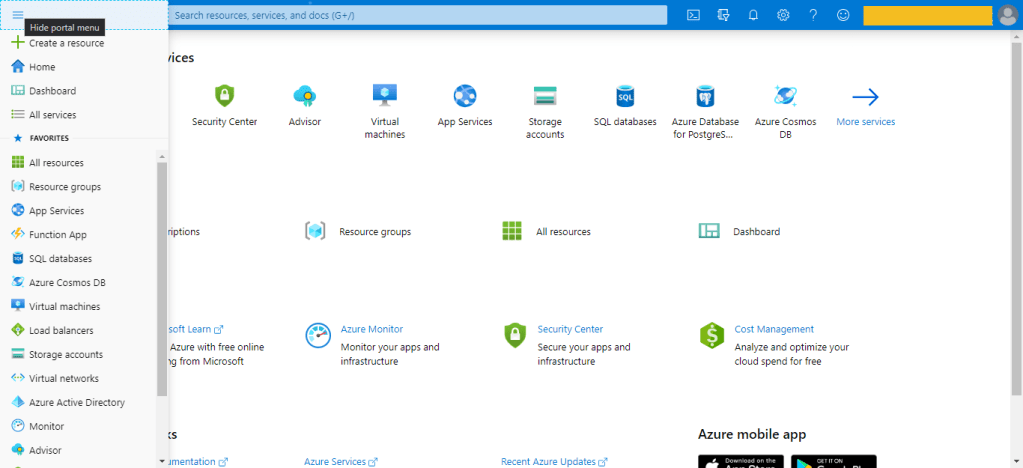
  • Click on the Create a resource option in the top-left corner of the portal page.
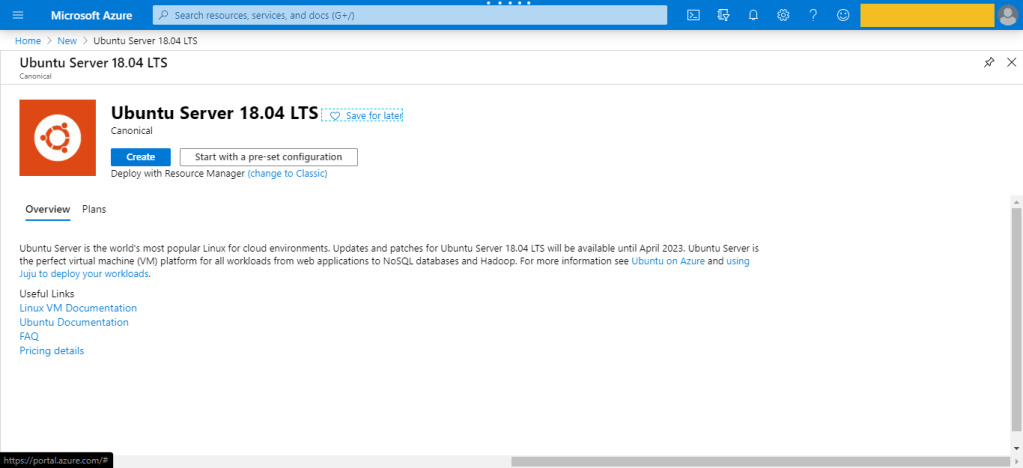
  • Use the Search the Marketplace search bar to find “Ubuntu Server” for example.
  • Press on Create , then new page will be open.
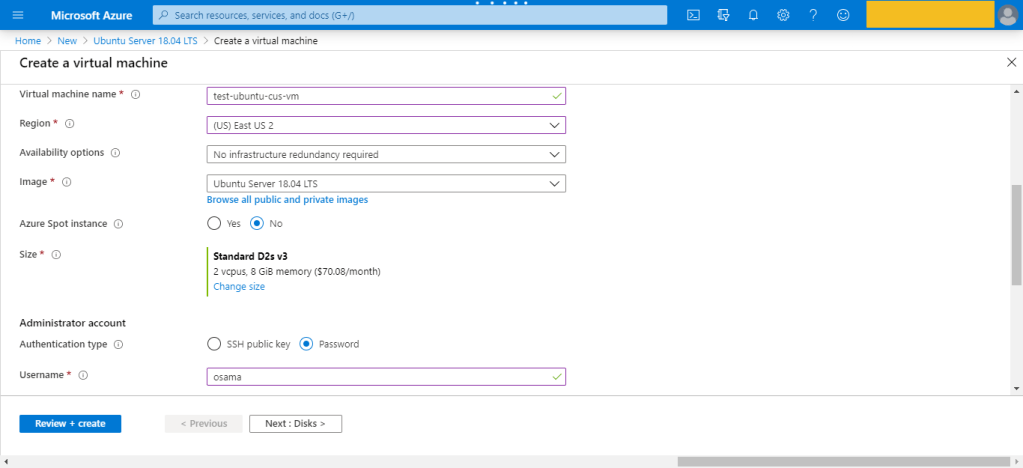
  • Configure the VM, by enter the name, the region, The Subscription,Availability options
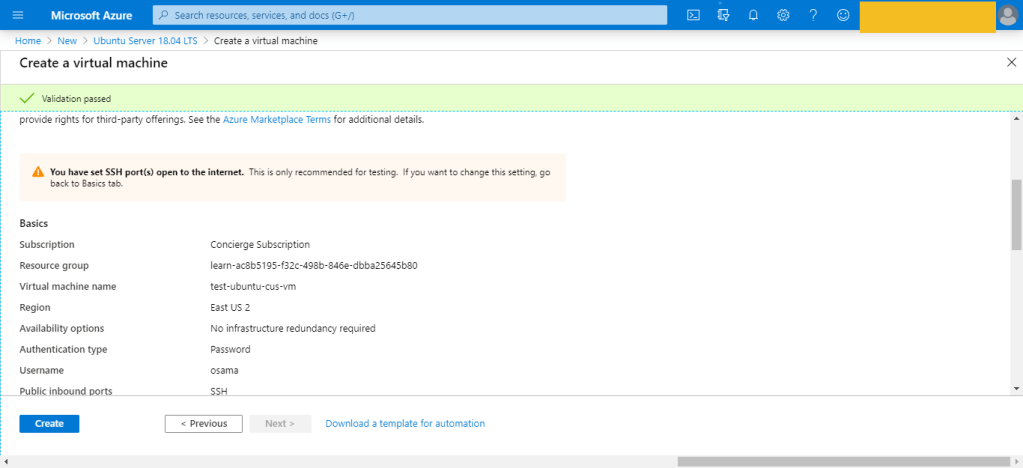
  • There are several other tabs you can explore to see the settings you can influence during the VM creation. Once you’re finished exploring, click Review + create to review and validate the settings.
  • On the review screen, Azure will validate your settings. You might need to supply some additional information based on the requirements of the image creator.


This is was the first way to create the VM which is consider the easiet one also.

Azure Resource Manager

assumig you want to create a copy of a VM with the same settings. You could create a VM image, upload it to Azure, and reference it as the basis for your new VM,Azure provides you with the option to create a template from which to create an exact copy of a VM.

You can do this, after create the VM –> Setting –> export template.

Azure PowerShell

Azure PowerShell is ideal for one-off interactive tasks and/or the automation of repeated tasks, note that PowerShell is a cross-platform shell that provides services like the shell window and command parsing.

New-AzVm  -ResourceGroupName "TestResourceGroup"  -Name "test-wp1-eus-vm"  -Location "East US"  -VirtualNetworkName "test-wp1-eus-network"  -SubnetName "default"  -SecurityGroupName "test-wp1-eus-nsg"  -PublicIpAddressName "test-wp1-eus-pubip"  -OpenPorts 80,3389

Azure CLI

The Azure CLI is Microsoft’s cross-platform command-line tool for managing Azure resources such as virtual machines and disks from the command line. It’s available for macOS, Linux, and Windows, this is also found in Different cloud vendor for example For Amazon it’s called aws cli, for Oracle it’s Called OCI-CLI and Google it’s called GCP-CLI.

az vm create --resource-group TestResourceGroup --name test-wp1-eus-vm --image win2016datacenter --admin-username osama --admin-password anything

Programmatic (APIs)

This is no my expertise so i will no go deep dive with it, But we were talking about Azure CLI and powershell, you can install something called Azure REST API and start using differen programing language to deal with Azure, i did this with python for AWS using Boto3 module, i post about it before here.

The same can be done for Azure or any Cloud vendor.

Azure VM Extensions

Azure VM extensions are small applications that allow you to configure and automate tasks on Azure VMs after initial deployment. Azure VM extensions can be run with the Azure CLI, PowerShell, Azure Resource Manager templates, and the Azure portal.

Thank you

Osama Mustafa

Cloud Talk : How much my IaaS will cost on the cloud ?

When the company will move to the cloud, the biggest question to ask , how much it will cost ? there are different ways to determine your IaaS cost, but at first you need to know that PaaS and IaaS much cheapter than IaaS, Each cloud vendor having their own calculator so at least you can estimate the value for one year or understand how much it will cost ? which is good.

Azure

Let’s Start with Azure for example ( since i post a lot about it recently )

When you are estimate the price for any cloud you should take different factors in your mind such as the following :-

  • Region
  • Tier it’s free , Basic … etc
  • How will the clinet/customer pay ? monthly , Yearly , Pay as you go .. etc
  • Supprot for the cloud which option you will choose
  • The deployement princing for example in Azure Dev/test .. etc

Now Azure provides the client with real pricing calculator that allow people to estimate the cost, From here.

to use the portal you should know what services you will choose, and some esstinal information such as How many VM, Database, networking, after you add all the information the report will be generated depends on the period of paying.

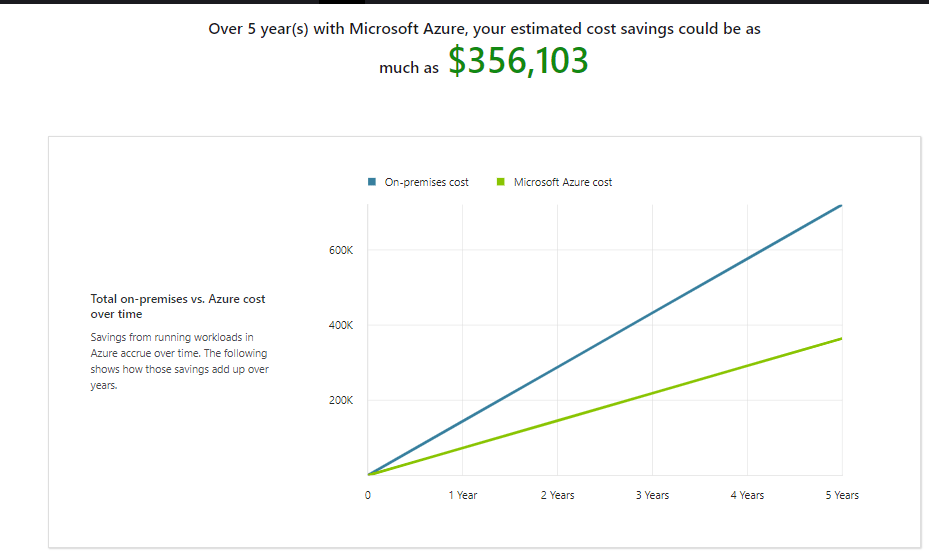
But what if i want to move from On Premis to the cloud , is this tool will work ? Total Cost of Ownership or TCO from here

The TCO Calculator helps you understand the cost areas that affect your applications today, such as server hardware, software licenses, electricity, and labor by Define the following :-

  • Servers : -details of your current on-premises
  • Databases :- on-premises database infrastructure
  • Storage :- on-premises storage infrastructure
  • Networking :- on-premises environment

The Genterated report will be like this :-

Amazon

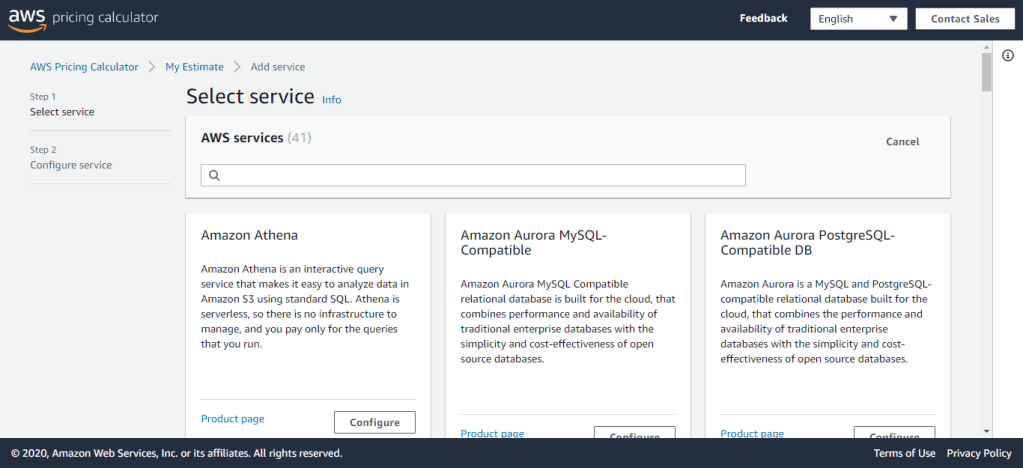
As i already mentioned each Cloud vendor having different apporach of Cloud Pricing but it’s all the same, in AWS you can access the pricing from here , also they have somthing called SIMPLE MONTHLY CALCULATOR From here.

When you generate an estimate, you can either add services directly to your estimate or create a group and add the services to your group.

The AWS Pricing Calculator is an estimation tool that provides an approximate cost of using AWS services based on the usage parameters that you specify. The AWS Pricing Calculator is not a quote tool, and does not guarantee the cost for your actual use of AWS services. The cost estimated by the AWS Pricing Calculator may vary from your actual costs for a number of reasons. Common reasons the estimate may be different from your actual cost include different thing such as Actual Usage, Region used, Change in price, Taxes ( depends on the Region ) .. etc

Oracle

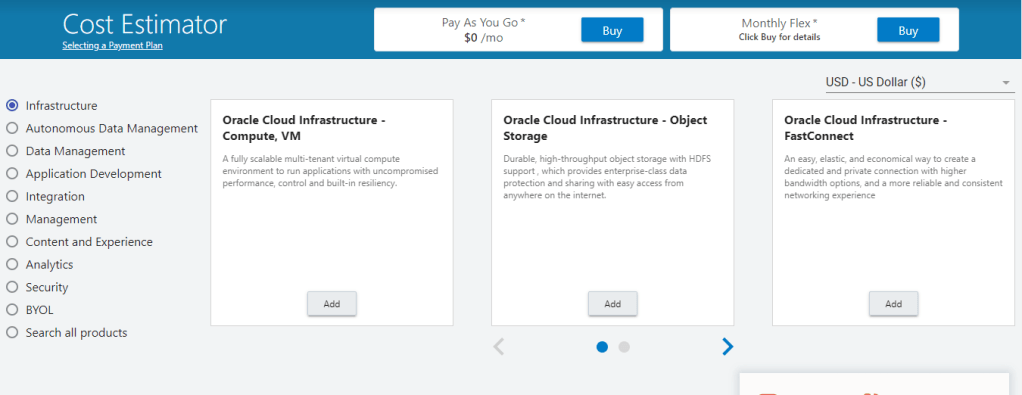
From Oracle , the portal is very simple to use, you can estimate everything using this portal here from Infrastcure cost, database, Application, … etc .

Cheers

Osama

Encryption on Azure

What is encryption?

Encryption is the process of making data unreadable and unusable to unauthorized viewers. To use or read the encrypted data, it must be decrypted, which requires the use of a secret key. 

There are two different type :-

  • Symmetric encryption :– Which mean you will use same key  to encrypt and decrypt the data
  • Asymmetric encryption :– Which mean you will use different key , for example Private and public key.

both of these two type having two different ways :-

  • Encryption at rest which mean data stored in a database, or data stored in a storage account.
  • Encryption in transit which means  data actively moving from one location to another.

So, there are different type of Encryption provided by Azure:-

  • Encrypt raw storage
    • Azure Storage Service Encryption :-  encrypts your data before persisting it to Azure Managed Disks, Azure Blob storage, Azure Files, or Azure Queue storage, and decrypts the data before retrieval.
    • Encrypt virtual machine disks low-level encryption protection for data written to physical disk
  • Azure Disk Encryption : this method helps you to encruypt the actually windows or Linux disk, the best way to do this is h Azure Key Vault.
  • Encrypt databases
    • Transparent data encryption :- helps protect Azure SQL Database and Azure Data Warehouse against the threat of malicious activity. It performs real-time encryption and decryption of the database.

The best way to do this which is Azure Key Vault,  cloud service for storing your application secrets. Key Vault helps you control your applications’ secrets by keeping them in a single, why should i use it :-

  • Centralizing the solutions.
  • Securely stored secrets and keys.
  • Monitor access and use.
  • Simplified administration of application secrets.

There are also two different kind of certificate in Azure which will helps you to encrypt for example the website or application, you need to know that Certificates used in Azure are x.509 v3 and can be signed by a trusted certificate authority, or they can be self-signed.

Types of certificates

  • Service certificates are used for cloud services
  • Management certificates are used for authenticating with the management API

Service certificates

which is attached to cloud services and enable secure communication to and from the service. For example, if you deploy a web site, you would want to supply a certificate that can authenticate an exposed HTTPS endpoint. Service certificates, which are defined in your service definition, are automatically deployed to the VM that is running an instance of your role.

Management certificates

allow you to authenticate with the classic deployment model. Many programs and tools (such as Visual Studio or the Azure SDK) use these certificates to automate configuration and deployment of various Azure services. However, these types of certificates are not related to cloud services.

Be noted that you can use Azure Key Vault to store your certificates.

Cheers

Osama

Where is the DBA in the DevOps tools ?

  • Database administrator job has been changed and it’s not like before any more, In the past The DBA responsibility was limited within database which mean troubleshooting, backup , Performance tuning, high availability .. etc after few years new layer has been added to the responsibility which is application server layer for example weblogic ,Oracle embedded the weblogic with most of their products such as enterprise manager cloud, E-business suits, as i remember after three years another layer added to DBA knowledge which is virtualization and regarding to this virtualization  made the DBA life more easier and not like before, solution providing another layer of backup and server management.

However now everything has been changed and the market working under new term which is CLOUD including different vendor AWS, Azure, and Oracle, As DBA your knowledge shouldn’t stop by only Database, within cloud there is new tools that can help the DBA with their daily Job and it’s called Devops.

DBA usually review each change request to ensure that it is well thought out,They are in charge of monitoring their databases and keeping them available and high-performing, manage access to and the overall security of the platform.

Database automation frees the DBA from the bottleneck of the past that delayed application releases since there is different environment production, Pre-Production, Development or Testing, the DevOps Automation relieved of the pressures of constantly having to juggle and merge various teams’ database changes, are now free to help their organisations take bigger steps forward in ongoing innovation.

But what is the Devops ? And How can i use to make my Job Easier

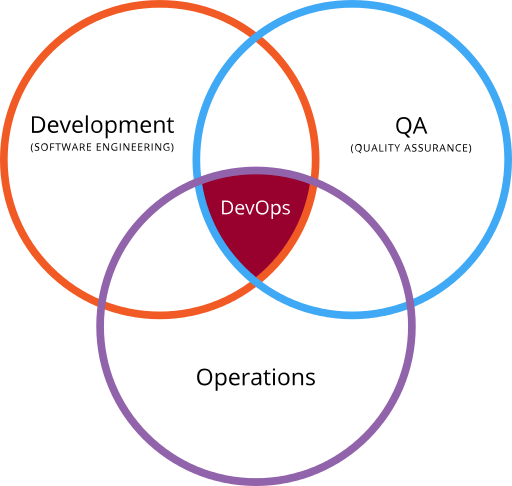
DevOps is the combination of cultural philosophies, practices, and tools that increases an organization’s ability to deliver applications and services at high velocity: evolving and improving products at a faster pace than organizations using traditional software development and infrastructure management processes. This speed enables organizations to better serve their customers and compete more effectively in the market.

Benefits of DevOps
  • Speed
  • Rapid Delivery
  • Reliability
  • Scale
  • Security

DevOps Practices

  • Continuous Integration
  • Continuous Delivery
  • Microservices
  • Infrastructure as Code
  • Monitoring and Logging
  • Communication and Collaboration
DevOps practices for DBA and Data Team focus on the Tools, practices and techniques that are useful for the Data team to use for Development activities, Testing setup and execution, Collaboration techniques and Deployment tools and techniques. The aim of this site is to further the practice and help the DBA’s and Data team to use these practices to become productive and become part of the delivery team and embrace the devops movement.
DevOps Tools
  • Docker
  • Jenkins
  • Ansible
  • Puppet
  • Nagios
  • Monit
  • Behat
  • Chef
There is more tools for sure each one of these tools having it’s own purpose for example Docker is one of the powerful container solutions, A container image is a lightweight, stand-alone, executable package of a piece of software that includes everything needed to run it: code, runtime, system tools, system libraries, settings Available for both Linux and Windows based apps, containerized software will always run the same, regardless of the environment. Containers isolate software from its surroundings, for example differences between development and staging environments and help reduce conflicts between teams running different software on the same infrastructure.
Cheers
Osama Mustafa 

Migrating From AWS to Oracle Using SQL Developer

The Data Uploaded to the Cloud Vendor Amazon web services ( AWS ) But the client decided to move their data on-premises for the first sight you will think this is hard and needs  a lot of work but thank you SQL Developer and Jeff Smith and he is the product manage for SQL Developer amazing man by the way and crossfitter  at the same time 😛

However Lets start :-

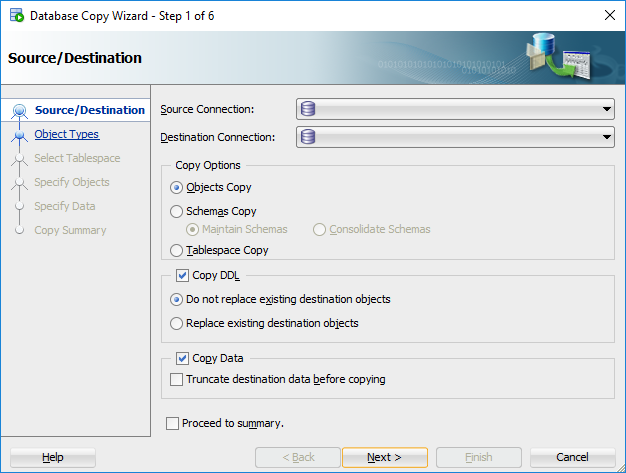
  •  Open SQL developer
  • Choose Database copy option from tools menu.
  • Select source database should be AWS
    • Provide hostname only for the AWS
    • Listener Port
    • DB Name
    • Username/Password 
    • Test your connection.
  • Select destination database should be Oracle 

  • Provide hostname only for the AWS.
      • Provide hostname/IP for the server.
      • Listener Port
      • DB Name
      • Username/Password 
      • Test your connection.

    • Press Next Button, if the migration done before on the same schema press replace and next.


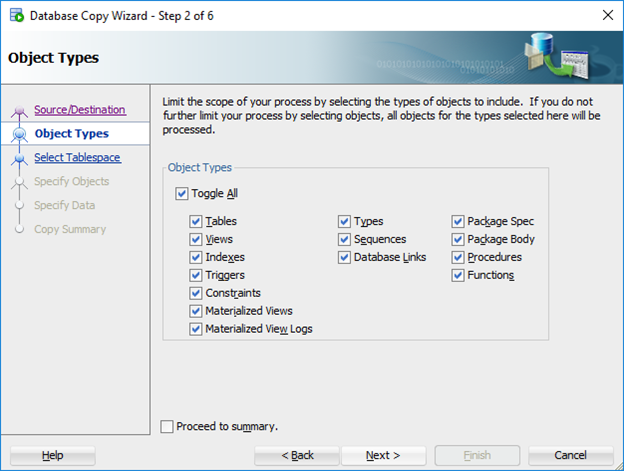
    • Press Next after choose what you want to move, Data, Functions , Or trigger … etc
    • Check Proceed to summary and Press the finish button the migration will start after this,  it will take some time depend on internet connection and data size.
    Enjoy the migration
    Osama Mustafa

    Moving from VMware/KVM to the Oracle Cloud

    Are you running Vmware or KVM solution in your infrastructure and you are afraid to move your infrastructure to the cloud, Oracle provide and gives one simple solution without losing anything Now you can now easily move your virtual machines to the Oracle cloud using Ravello

    and you don’t have to change anything from network, storage or anything you did on your local infrastructure to know more about this product.

    You can request a free trial account to experience the Ravello’s unique features and
    capabilities. For any questions please contact your local Oracle Cloud Infrastructure and
    Platform Sales Executive. The following is the URL for requesting the Free Trail
    account.

    https://www.ravellosystems.com/.

    Thank you
    Osama 

    Access Dbaas monitor

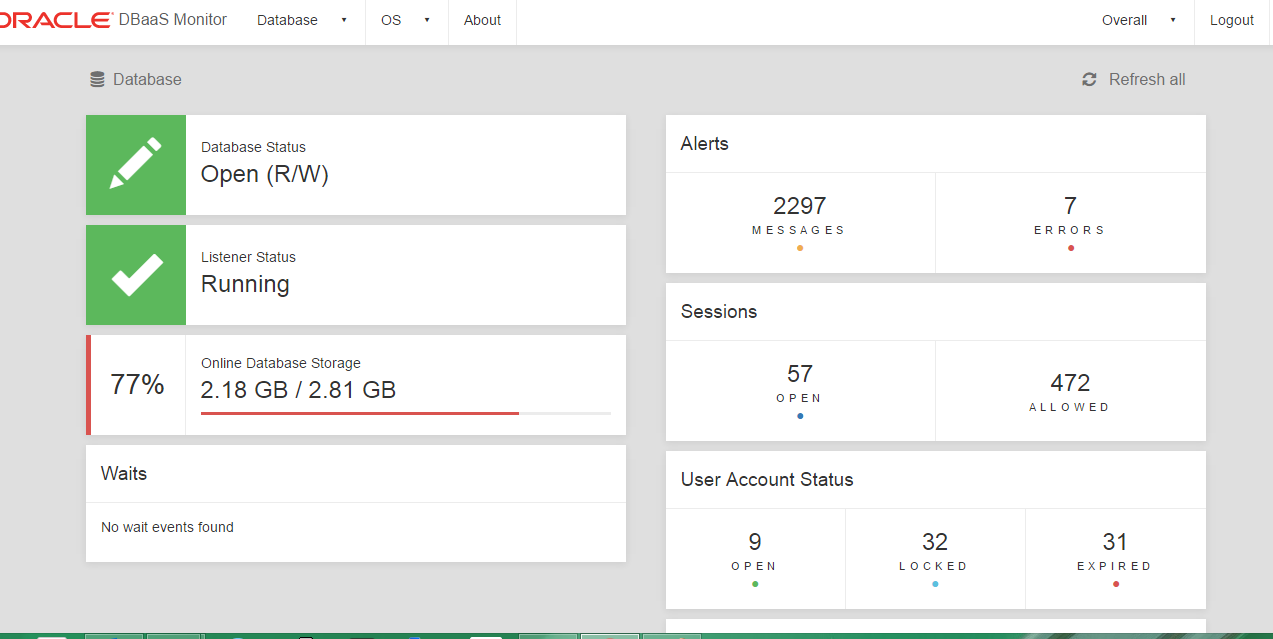
    To access Oracle DBaaS Monitor when the HTTPS port is unblocked ( i blogged about this before and how to enable it )

    • Open the Oracle Database Cloud Service console, from the console 
    • From the right panel of the services choose Database services monitor and then press on it.
    • New Screen will be opened
      • Username –> dbaas_monitor
      • Password –>  the same password you put it for the Dbaas creation.
    Thank you 
    Osama Mustafa

    Oracle Cloud Services

    During the last week i was working on Oracle Cloud Closely and i would like to summarize what Oracle Cloud Services Provide,and Short Description for each services :-
    • Oracle Compute Cloud Service

    In this Services you control the cloud, use a variety of Oracle Compute Cloud Service resources and you can control form here the following :

      • disk images.
      • compute shapes
      • storage volumes.
      • IP reservations.
      • security lists.
      • security rules.
      • secure shell.
    • Oracle Storage Cloud Service containers

     In this Following servvices, back up to cloud storage, vy  using Oracle Storage Cloud Service containers as repositories for backups to the cloud But before you start working on this you should create container and active account.

    • Oracle Application container Services 

    Provides a lightweight infrastructure so that you can run applications in the Oracle Cloud.

    • Oracle Big Data Cloud Services 

    The power of Hadoop and Spark delivered as a secure, automated, high-performance service, which can be fully integrated with existing enterprise data but in the cloud.

    • Oracle Cloud Stack Services 

    to create and use templates that automate the provisioning of services like Oracle Compute Cloud Service in different format HTML, PDF, ePub and Mobi formats.

    • Oracle Event Hub Cloud Services 

    delivers the power of Kafka as a managed streaming data platform integrated with the rest of Oracle’s Cloud. with services you can loading and analyzing streaming data.

    • Oracle Golden Gate Cloud Services.

    GoldenGate Cloud Service is a cloud based real-time data integration and replication service, which provides seamless data movement from various on-premises relational databases to databases in the cloud with sub-second latency while maintaining data consistency and offering fault tolerance and resiliency. 

    • Oracle Java Cloud Services 

    provides an enterprise-grade platform to develop and deploy Java applications in the public cloud.

    • Oracle MYSQL Cloud Services

    Delivers a secure, cost-effective and enterprise-grade MySQL database service. Built on MySQL Enterprise Edition and powered by the Oracle Cloud, it provides a simple, automated, integrated and enterprise ready MySQL cloud service, enabling organizations to increase business agility and reduce costs.

    •  Oracle SOA Cloud Services 

    Provides a PaaS computing platform for running Oracle SOA Suite, Oracle Service Bus and Integration Analytics in the cloud this cloud services supports multiple service types in case any of integration will happened.

    I tried to make everything simple, each one of these services have a complete Oracle documentation how to work on it.

    Thanks
    Osama