One of the bigges conference in europe, if you want to learn something new, DON’T MISS THE CHANCE

The Agenda is here
Register now here
See you there
Cheers
Osama
For the people who think differently Welcome aboard

I will have two presentation about the DevOps
You can register here
The hashtag in use is #APACGBT2021
Enjoy
Cheers

Quest Oracle Community is home to 25,000+ users of JD Edwards, PeopleSoft, Oracle Cloud apps and Oracle Database products. We connect Oracle users to technology leaders and Oracle experts from companies who are driving innovation and leading through their use of Oracle products.
The Quest Oracle Community is dedicated to helping Oracle users develop skills and expand knowledge by connecting with other Oracle users and experts for education and networking.
I will present about the automation
You can register for the event from here
Thank you

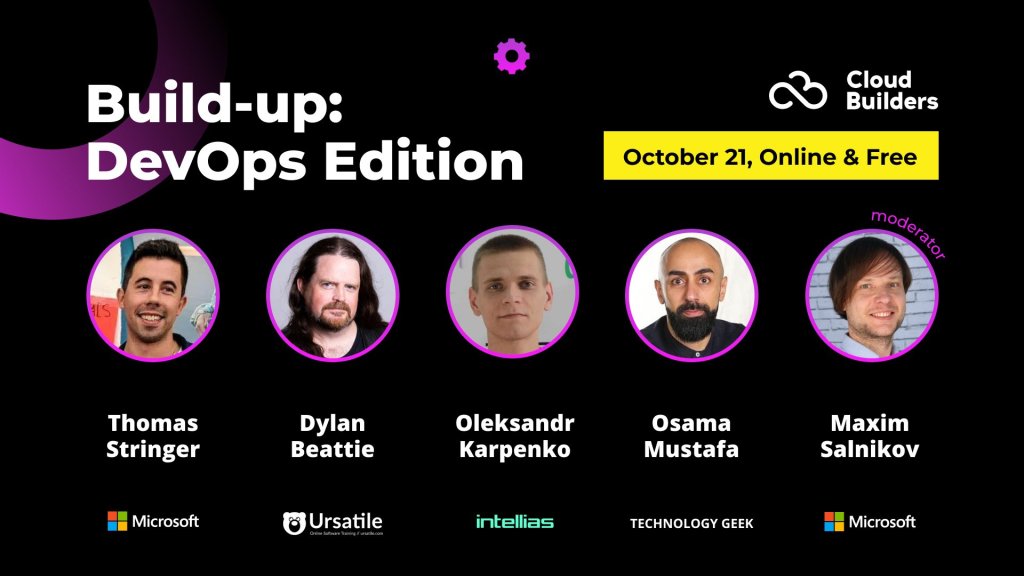
I will be speak Build Up – DevOps Edition, it’s more disussion like about DevOps and why it’s important now , Don’t forget to register and learn something new.
The Link here
Regards
Osama
A VPC peering connection is a networking connection between two VPCs that lets you route traffic between them privately.
A VPC peering connection is highly available. This is because it is neither a gateway nor a VPN connection and does not rely on a separate piece of physical hardware. There is no bandwidth bottleneck or single point of failure for communication. A VPC peering connection helps to facilitate the transfer of data.
You can establish peering relationships between VPCs across different AWS Regions. This is called inter-Region VPC peering. It permits VPC resources that run in different AWS Regions to communicate securely with each other. Examples of these resources include EC2 instances, Amazon Relational Database Service (Amazon RDS) databases, and AWS Lambda functions. This communication is accomplished using private IP addresses, without requiring gateways, VPN connections, or separate network appliances. All inter-Region traffic is encrypted with no single point of failure or bandwidth bottleneck. Traffic always stays on the global AWS backbone and never traverses the public internet, which reduces threats such as common exploits and distributed denial of service (DDoS) attacks. Inter-Region VPC peering provides an uncomplicated and cost-effective way to share resources between Regions or replicate data for geographic redundancy.
You can also create a VPC connection between VPCs in different AWS accounts.
Full sharing of resources between all VPCs
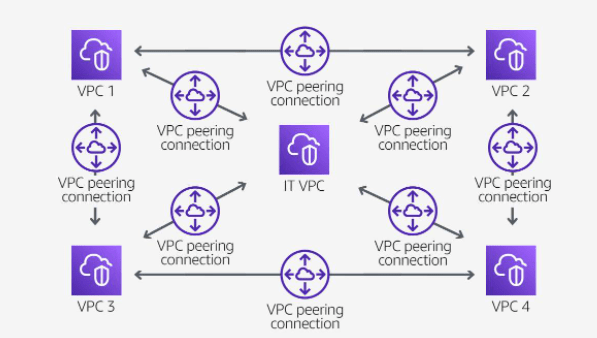
Your organization has company services distributed across four VPCs and a single VPC dedicated to centralized IT services and logging. To facilitate data sharing, the IT department constructed a fully mesh network design using VPC peering to connect each VPC to every other VPC in the organization.
Each VPC must have a one-to-one connection with each VPC it is approved to communicate with. This is because each VPC peering connection is nontransitive in nature and does not allow network traffic to pass from one peering connection to another.
For example, VPC 1 is peered with VPC 2, and VPC 2 is peered with VPC 4. You cannot route packets from VPC 1 to VPC 4 through VPC 2. To route packets directly between VPC 1 and VPC 4, you can create a separate VPC peering connection between them.
Partial sharing of centralized resources
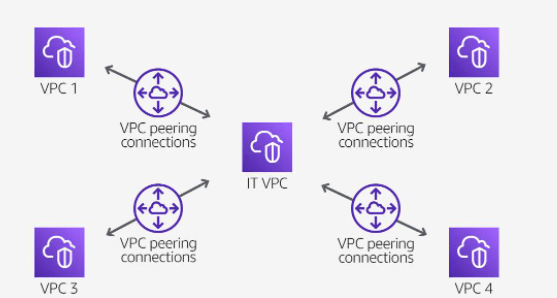
Your organization’s IT department maintains a central VPC for file sharing. Multiple VPCs require access to this resource but do not need to send traffic to each other. A peering connection is established to connect the VPCs solely to this resource.
Overlapping CIDR blocks
You cannot create a VPC peering connection between VPCs with matching or overlapping IPv4 Classless Inter-Domain Routing (CIDR) blocks. This limitation also applies to VPCs that have nonoverlapping IPv6 CIDR blocks. You cannot create a VPC peering connection if the VPCs have matching or overlapping IPv4 CIDR blocks. This applies even if you intend to use the VPC peering connection for IPv6 communication only.
Transitive peering
You have a VPC peering connection between VPC A and VPC B, and between VPC A and VPC C. There is no VPC peering connection between VPC B and VPC C. You cannot route packets directly from VPC B to VPC C through VPC A.
Edge-to-edge routing through a gateway or private connection
If either VPC in a peering relationship has one of the following connections, you cannot extend the peering relationship to that connection:
Cheers 🥂
Osama
When building and testing a function, you must specify three primary configuration settings: memory, timeout, and concurrency. These settings are important in defining how each function performs. Deciding how to configure memory, timeout, and concurrency comes down to testing your function in real-world scenarios and against peak volume. As you monitor your functions, you must adjust the settings to optimize costs and ensure the desired customer experience with your application.
Memory
You can allocate up to 10 GB of memory to a Lambda function. Lambda allocates CPU and other resources linearly in proportion to the amount of memory configured. Any increase in memory size triggers an equivalent increase in CPU available to your function. To find the right memory configuration for your functions, use the AWS Lambda Power Tuning tool.
Timeout
The AWS Lambda timeout value dictates how long a function can run before Lambda terminates the Lambda function. At the time of this publication, the maximum timeout for a Lambda function is 900 seconds. This limit means that a single invocation of a Lambda function cannot run longer than 900 seconds (which is 15 minutes).
It is important to analyze how long your function runs. When you analyze the duration, you can better determine any problems that might increase the invocation of the function beyond your expected length. Load testing your Lambda function is the best way to determine the optimum timeout value.
With AWS Lambda, you pay only for what you use. You are charged based on the number of requests for your functions and the duration, the time it takes for your code to run. Lambda counts a request each time it starts running in response to an event notification or an invoke call, including test invokes from the console.
Duration is calculated from the time your code begins running until it returns or otherwise terminates, rounded up to the nearest 1 ms. Price depends on the amount of memory you allocate to your function, not the amount of memory your function uses. If you allocate 10 GB to a function and the function only uses 2 GB, you are charged for the 10 GB. This is another reason to test your functions using different memory allocations to determine which is the most beneficial for the function and your budget.
In the AWS Lambda resource model, you can choose the amount of memory you want for your function and are allocated proportional CPU power and other resources. An increase in memory triggers an equivalent increase in CPU available to your function. The AWS Lambda Free Tier includes 1 million free requests per month and 400,000 GB-seconds of compute time per month.
Depending on the function, you might find that the higher memory level might actually cost less because the function can complete much more quickly than at a lower memory configuration.
You can use an open-source tool called Lambda Power Tuning to find the best configuration for a function. The tool helps you to visualize and fine-tune the memory and power configurations of Lambda functions. The tool runs in your own AWS account—powered by AWS Step Functions—and supports three optimization strategies: cost, speed, and balanced. It’s language-agnostic so that you can optimize any Lambda functions in any of your languages.
Concurrency and scaling
Concurrency is the third major configuration that affects your function’s performance and its ability to scale on demand. Concurrency is the number of invocations your function runs at any given moment. When your function is invoked, Lambda launches an instance of the function to process the event. When the function code finishes running, it can handle another request. If the function is invoked again while the first request is still being processed, another instance is allocated. Having more than one invocation running at the same time is the function’s concurrency.
As an analogy, you can think of concurrency as the total capacity of a restaurant for serving a certain number of diners at one time. If you have seats in the restaurant for 100 diners, only 100 people can sit at the same time. Anyone who comes while the restaurant is full must wait for a current diner to leave before a seat is available. If you use a reservation system, and a dinner party has called to reserve 20 seats, only 80 of those 100 seats are available for people without a reservation. Lambda functions also have a concurrency limit and a reservation system that can be used to set aside runtime for specific instances.
Unreserved concurrency
The amount of concurrency that is not allocated to any specific set of functions. The minimum is 100 unreserved concurrency. This allows functions that do not have any provisioned concurrency to still be able to run. If you provision all your concurrency to one or two functions, no concurrency is left for any other function. Having at least 100 available allows all your functions to run when they are invoked.
Reserved concurrency
Guarantees the maximum number of concurrent instances for the function. When a function has reserved concurrency, no other function can use that concurrency. No charge is incurred for configuring reserved concurrency for a function.
Provisioned concurrency
Initializes a requested number of runtime environments so that they are prepared to respond immediately to your function’s invocations. This option is used when you need high performance and low latency.
You pay for the amount of provisioned concurrency that you configure and for the period of time that you have it configured.
For example, you might want to increase provisioned concurrency when you are expecting a significant increase in traffic. To avoid paying for unnecessary warm environments, you scale back down when the event is over.
Limit a function’s concurrency to achieve the following:
Reserve function concurrency to achieve the following:
When your function finishes processing an event, Lambda sends metrics about the invocation to Amazon CloudWatch. You can build graphs and dashboards with these metrics in the CloudWatch console. You can also set alarms to respond to changes in use, performance, or error rates.
CloudWatch includes two built-in metrics that help determine concurrency: ConcurrentExecutions and UnreservedConcurrentExecutions.
ConcurrentExecutions
Shows the sum of concurrent invocations for a given function at a given point in time. Provides historical data on how functions are performing.
You can view all functions in the account or only the functions that have a custom concurrency limit specified.
UnreservedConcurrentExecutions
Shows the sum of the concurrency for the functions that do not have a custom concurrency limit specified.
Enjoy the Cloud
Osama
Cheers
This is another DevOps Project, the idea of this project like the following:-
sample django web application on with the following specs:–
The complete Project uploaded to my GitHub HERE.
Thank you
Enjoy the automation
Osama
In this post i created Terraform/terragrunt to bulid fully infrastructure enviroment, i uploaded the code to my GitHub, You can find the code HERE
Enjoy the automation
Osama
The following project having these requriment:-
Another Things to add to this project which is the follwong :-
The Link for the Project HERE
Enjoy the automation
Osama
Imagine you are having multiple instances and you want to change something, if you will do this manually it will take time from you why not to automte the process ?
I upladed one of the projects to automate the process, this will allow to automate the simplest things for example new employee joined and you need to add his SSH key to your instances (You can even choose which VM you want to him/her to acces) , just add the key in the roles and configure the pipeline on your rep and the code will run Automtically.
I uploaded the project on my github HERE.
Ragards
Enjoy the power of automation.
Osama
 Technology Geek