You need to develop and deploy a python app that writes a new file to S3 on every execution. These files need to be maintained only for 24h.
The content of the file is not important, but add the date and time as prefix for you files name.
The name of the buckets should be the following ones for QA and Staging respectively:
qa-FIRSTNAME-LASTNAME-platform-challenge
staging-FIRSTNAME-LASTNAME-platform-challenge
The app will be running as a docker container in a Kubernetes cluster every 5 minutes. There is a Namespace for QA and a different Namespace for Staging in the cluster. You don’t need to provide tests but you need to be sure the app will work.
Review the built-in Amazon CloudWatch metrics and their dimensions for each of the services you plan to use so that you can decide how to best leverage them vs. adding custom metrics. There are also many third-party tools that provide monitoring and metrics reporting from CloudWatch data.
Business metrics
Business Key Performance Indicators (KPIs) measure your application performance against business goals. It is extremely important to know when something is critically affecting your overall business (revenue wise or not).
Customer experience data dictates not only the overall effectiveness of the UI/UX but also whether changes or anomalies are affecting the customer experience in a particular section of your application. These metrics are often measured in percentiles to prevent outliers when trying to understand the impact over time and how widespread it is across your customer base.
Examples: Perceived latency, time it takes to add an item to a basket/to checkout, page load times
System metrics
Vendor and application metrics are important to underpin root causes. System metrics also tell you if your systems are healthy, at risk, or already impacting your customers.
Examples: Percentage of HTTP errors/success, memory utilization, function duration/error/throttling, queue length, stream records length, integration latency
Operational metrics
Ops metrics are important to understand sustainability and maintenance of a given system and crucial to pinpoint how stability has progressed/degraded over time.
Examples: Number of tickets([un]successful resolutions, etc.), number of times people on-call were paged, availability, CI/CD pipeline stats (successful/failed deployments, feedback time, cycle and lead time)
Logs let you dig into specific issues, but you can also use log data to create business-level metrics via CloudWatch Logs metric filters. You can interact with logs via CloudWatch Logs to drill into any specific log entry or filter them based on a pattern to create your own metrics. See how the services listed below interact with CloudWatch Logs.
Lambda logs
Lambda automatically logs all requests handled by your function and stores them in CloudWatch Logs. This gives you access to information about each invocation of your Lambda function.
You can log almost anything to CloudWatch Logs by using print or standard out statements in your functions. When you create custom logs, use a structured format like a JSON event to make it easier to report from them.
API Gateway execution and access logs
API Gateway execution logs include information on errors as well as execution traces. Info like parameter values, payload, Lambda authorizers used, and API keys appear in the execution logs. You can log just errors or errors and info. Logging is set up per API stage. These logs are detailed, so you want to be thoughtful about what you need. Also, log groups don’t expire by default, so make sure to set retention values suitable to your workload.
You can also create custom access logs and send them to your preferred CloudWatch group to track who is accessing your APIs and how. You can specify the access details by selecting context variables and choosing the format you want to use.
CloudWatch Logs Insights
CloudWatch Log Insights lets you use prebuilt or custom queries on your logs to provide aggregated views and reporting. If you’ve created structured custom logs, CloudWatch Logs Insights can automatically discover the fields in your logs to make it easy to query and group your log data.
X-RAY
When a transaction fails, or completes slower than expected, how do you figure out where in the flow of services it failed? X-Ray gives you a visual representation of your services—a service map—that illustrates each integration point, and gives you quick insight into successes and failures. Then, you can drill down into the details of each individual trace.
You can enable X-Ray with one click for Lambda, API Gateway, and Amazon SNS. You can also turn it on for SQS queues that are not Lambda event sources, and you can add custom instrumentation to your function using the X-Ray SDK to write your own code. X-Ray integrations support both active and passive instrumentation.
-Ray instrumentation
You can add custom instrumentation to your function using the X-Ray SDK to write your own code. X-Ray integrations support both active and passive instrumentation:
Service Integrations
Active Instrumentation
Passive Instrumentation
Samples and instruments incoming requests
Instruments requests that have been sampled by another service
Writes traces to X-Ray
Can add information to traces
AWS Lambda
✔️
✔️
Amazon API Gateway
✔️
✔️
Amazon SNS
✔️
Amazon SQS
✔️
CloudWatch metrics – To view how resources are performing, CloudWatch metrics is the best solution. If a developer needs to check how many times a Lambda function has been invoked,
CloudWatch Logs Insights – CloudWatch Logs Insights enables you to interactively query your log data in CloudWatch Logs. If a team wants to search and query their logs for their API, CloudWatch Logs Insights would be the best option.
CloudWatch Logs – You can insert logging statements into your code to help you validate that your code is working as expected. Lambda automatically integrates with CloudWatch Logs and pushes all logs from your code to CloudWatch. If an engineer wants to see what parameters are being passed into a function, they can insert logging statements in the code and check the response in CloudWatch Logs.
X-Ray – X-Ray provides a visual map of successes and failures and lets you drill into individual traces for an execution and drill down into the details of how long each leg of the execution took.
AWS CloudTrail
Records IAM user, IAM role, and AWS service API activity in your account.
Is enabled when you create an account.
Provides full details about the API action, like identity of the requestor, time of the API call, request parameters, and response elements returned by the service.
CloudTrail event
When activity occurs in your AWS account, that activity is recorded in a CloudTrail event, and you can see recent events in the event history.
The CloudTrail event history provides a viewable, searchable, and downloadable record of the past 90 days of CloudTrail events. Use this history to gain visibility into actions taken in your AWS account in the AWS Management Console, AWS SDKs, command line tools, and other AWS services.
CloudTrail Trails
A trail is a configuration that enables delivery of CloudTrail events to an Amazon S3 bucket, CloudWatch Logs, and CloudWatch Events. If you need to maintain a longer history of events, you can create your own trail. When you create a trail, it tracks events performed on or within resources in your AWS account and writes them to an S3 bucket you specify.
For example, a trail could capture modifications to your API Gateway APIs. You can optionally add data events to track S3 object-level API activity (like when someone uploads something to the bucket) or Lambda invoke API operations on one or all future Lambda functions in the account.
You can configure CloudTrail Insights on your trails to help you identify and respond to unusual activity associated with write API calls. CloudTrail Insights is a feature that tracks your normal patterns of API call volume and generates Insights events when the volume is outside normal patterns.
Quest Oracle Community is home to 25,000+ users of JD Edwards, PeopleSoft, Oracle Cloud apps and Oracle Database products. We connect Oracle users to technology leaders and Oracle experts from companies who are driving innovation and leading through their use of Oracle products.
The Quest Oracle Community is dedicated to helping Oracle users develop skills and expand knowledge by connecting with other Oracle users and experts for education and networking.
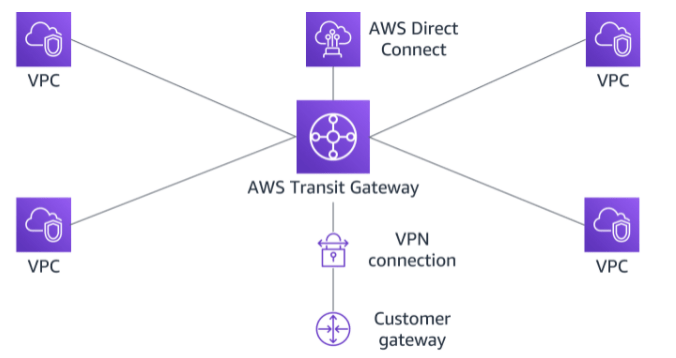
AWS Transit Gateway is a highly available and scalable service that provides interconnectivity between VPCs and your on-premises network. Within a Region, AWS Transit Gateway provides a method for consolidating and centrally managing routing between VPCs with a hub-and-spoke network architecture.
Between Regions, AWS Transit Gateway supports inter-regional peering with other transit gateways. It does this to facilitate routing network traffic between VPCs of different Regions over the AWS global backbone. This removes the need to route traffic over the internet. AWS Transit Gateway also integrates with hybrid network configurations when a Direct Connect or AWS Site-to-Site VPN connection is connected to the transit gateway.
AWS Transit Gateway concepts
Attachments
AWS Transit Gateway supports the following connections:
One or more VPCs
A compatible Software-Defined Wide Area Network (SD-WAN) appliance
A Direct Connect gateway
A peering connection with another transit gateway
A VPN connection to a transit gateway
AWS Transit Gateway MTU
AWS Transit Gateway supports an MTU of 8,500 bytes for:
VPC connections
Direct Connect connections
Connections to other transit gateways
Peering connections
AWS Transit Gateway supports an MTU of 1,500 bytes for VPN connections.
AWS Transit Gateway route table
A transit gateway has a default route table and can optionally have additional route tables. A route table includes dynamic and static routes that decide the next hop based on the destination IP address of the packet. The target of these routes can be any transit gateway attachment.
Associations
Each attachment is associated with exactly one route table. Each route table can be associated with zero to many attachments.
Route propagation
A VPC, VPN connection, or Direct Connect gateway can dynamically propagate routes to a transit gateway route table. With a Direct Connect attachment, the routes are propagated to a transit gateway route table by default.
With a VPC, you must create static routes to send traffic to the transit gateway.
With a VPN connection or a Direct Connect gateway, routes are propagated from the transit gateway to your on-premises router using BGP.
With a peering attachment, you must create a static route in the transit gateway route table to point to the peering attachment.
AWS Transit Gateway inter-regional peering
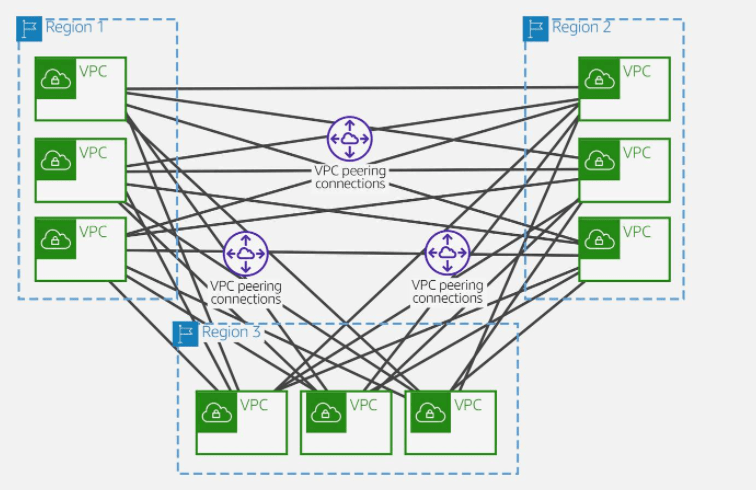
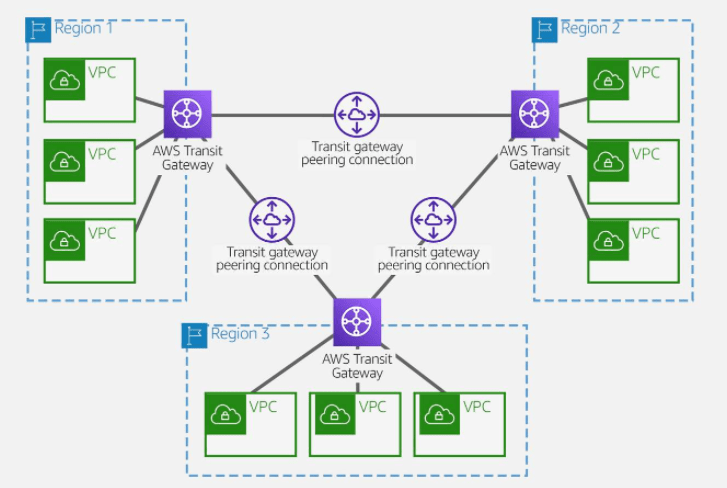
AWS offers two types of peering connections for routing traffic between VPCs in different Regions: VPC peering and transit gateway peering. Both peering types are one-to-one, but transit gateway peering connections have a simpler network design and more consolidated management.
Suppose a customer has multiple VPCs in three different Regions. As the following diagram illustrates, to permit network traffic to route between each VPC requires creating 72 VPC peering connections. Each VPC needs 8 different routing configurations and security policies.
With AWS Transit Gateway, the same environment only needs three peering connections. The transit gateway in each Region facilitates routing network traffic to all the VPCs in its Region. Because all routing can be managed by the transit gateway, the customer only needs to maintain three routing configurations, simplifying management.
AWS Site-to-Site VPN enables you to securely connect your on-premises network to Amazon VPC, for example your branch office site.
AWS Client VPN enables you to securely connect users to AWS or on-premises networks, for example remote employees.
AWS Site-to-Site VPN
ased on IPsec technology, AWS Site-to-Site VPN uses a VPN tunnel to pass data from the customer network to or from AWS.
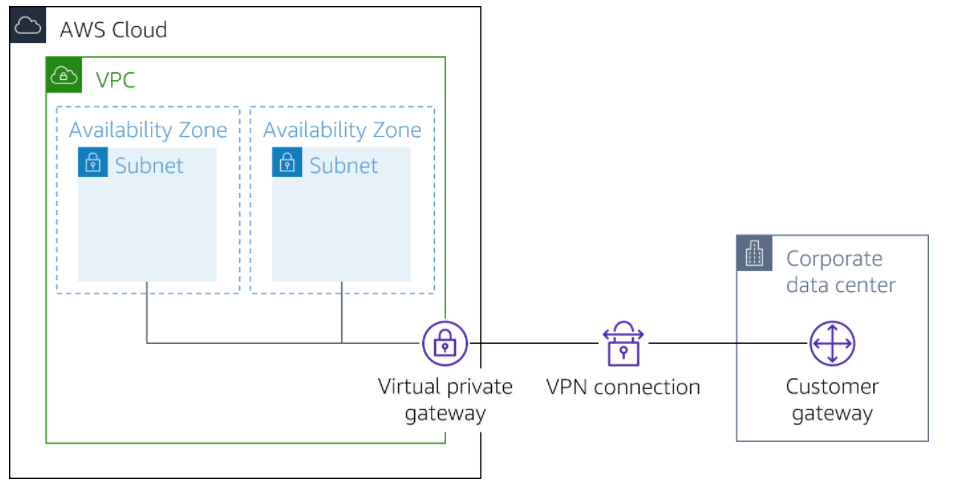
One AWS Site-to-Site VPN connection consists of two tunnels. Each tunnel terminates in a different Availability Zone on the AWS side, but it must terminate on the same customer gateway on the customer side.
AWS Site-to-Site VPN components
Customer gateway
A resource you create and configure in AWS that represents your on-premise gateway device. The resource contains information about the type of routing used by the Site-to-Site VPN, BGP, ASN and other optional configuration information.
Customer gateway device
A customer gateway device is a physical device or software application on your side of the AWS Site-to-Site VPN connection.
Virtual private gateway
A virtual private gateway is the VPN concentrator on the Amazon side of the AWS Site-to-Site VPN connection. You use a virtual private gateway or a transit gateway as the gateway for the Amazon side of the AWS Site-to-Site VPN connection.
Transit gateway
A transit gateway is a transit hub that can be used to interconnect your VPCs and on-premises networks. You use a transit gateway or virtual private gateway as the gateway for the Amazon side of the AWS Site-to-Site VPN connection.
AWS Site-to-Site VPN limitations
IPv6 traffic is partially supported. AWS Site-to-Site VPN supports IPv4/IPv6-Dualstack through separate tunnels for inner traffic. IPv6 for outer tunnel connection not supported.
AWS Site-to-Site VPN does not support Path MTU Discovery. The greatest Maximum Transmission Unit (MTU) available on the inside tunnel interface is 1,399 bytes.
Throughput of AWS Site-to-Site VPN connections is limited. When terminating on a virtual private gateway, only one tunnel out of the pair can be active and carry a maximum of 1.25 Gbps. However, real-life throughput will be about 1 Gbps. When terminating on AWS Transit Gateway, both tunnels in the pair can be active and carry an aggregate maximum of 2.5 Gbps. However, real-life throughput will be 2 Gbps. Each flow (for example, TCP stream) will still be limited to a maximum of 1.25 Gbps, with a real-life value of about 1 Gbps.
Maximum packets per second (PPS) per VPN tunnel is 140,000.
AWS Site-to-Site VPN terminating on AWS Transit Gateway supports equal-cost multi-path routing (ECMP) and multi-exit discriminator (MED) across tunnels in the same and different connection. ECMP is only supported for Site-to-Site VPN connections activated on an AWS Transit Gateway. MED is used to identify the primary tunnel for Site-to-Site VPN conncetions that use BGP. Note, BFD is not yet supported on AWS Site-to-Site VPN, though it is supported on Direct Connect.
AWS Site-to-Site VPN endpoints use public IPv4 addresses and therefore require a public virtual interface to transport traffic over Direct Connect. Support for AWS Site-to-Site VPN over private Direct Connect is not yet available.
For globally distributed applications, the accelerated Site-to-Site VPN option provides a connection to the global AWS backbone through AWS Global Accelerator. Because the Global Accelerator IP space is not announced over a Direct Connect public virtual interface, you cannot use accelerated Site-to-Site VPN with a Direct Connect public virtual interface.
In addition, when you connect your VPCs to a common on-premises network, it’s recommend that you use nonoverlapping CIDR blocks for your networks.
Client VPN
Based on OpenVPN technology, Client VPN is a managed client-based VPN service that lets you securely access your AWS resources and resources in your on-premises network. With Client VPN, you can access your resources from any location using an OpenVPN-based VPN client.
Client VPN components
Client VPN endpoint
Your Client VPN administrator creates and configures a Client VPN endpoint in AWS. Your administrator controls which networks and resources you can access when you establish a VPN connection.
VPN client application
This is the software application that you use to connect to the Client VPN endpoint and establish a secure VPN connection.
Client VPN endpoint configuration file
This is a configuration file that is provided to you by your Client VPN administrator. The file includes information about the Client VPN endpoint and the certificates required to establish a VPN connection. You load this file into your chosen VPN client application.
Client VPN limitations
Client VPN supports IPv4 traffic only. IPv6 is not supported.
Security Assertion Markup Language (SAML) 2.0-based federated authentication only works with an AWS provided client v1.2.0 or later.
SAML integration with AWS Single Sign-On requires a workaround. Better integration is being worked on.
Client CIDR ranges must have a block size of at least /22 and must not be greater than /12.
A Client VPN endpoint does not support subnet associations in a dedicated tenancy VPC.
Client VPN is not compliant with Federal Information Processing Standards (FIPS).
Client CIDR ranges cannot overlap with the local CIDR of the VPC in which the associated subnet is located. It also cannot overlap any routes manually added to the Client VPN endpoint’s route table.
A portion of the addresses in the client CIDR range is used to support the availability model of the Client VPN endpoint and cannot be assigned to clients. Therefore, we recommend that you assign a CIDR block that contains twice the number of required IP addresses. This will ensure the maximum number of concurrent connections that you plan to support on the Client VPN endpoint.
The client CIDR range cannot be changed after you create the Client VPN endpoint.
The subnets associated with a Client VPN endpoint must be in the same VPC.
You cannot associate multiple subnets from the same Availability Zone with a Client VPN endpoint.
AWS Certificate Manager (ACM) certificates are not supported with mutual authentication because you cannot extract the private key. You can use an ACM server as the server-side certificate. But, to add a client certificate to your customer configuration, you cannot use a general ACM certificate because you can’t extract the required private key details. So you must access the keys in one of two ways. Either generate your own certificate where you have the key or use AWS Certificate Manager Private Certificate Authority (ACM PCA), which gives the private keys. If the customer is authenticating based on Active Directory or SAML, they can use a general ACM-generated certificate because only the server certificate is required.
CRS-5013: Agent “ORAROOTAGENT” failed to start process “/grid/app/12.1.0.2/bin/osysmond” for action “start”: details at “(:CLSN00008:)” in “/grid/app/oracle/diag/crs/……/crs/trace/ohasd_orarootagent_root.trc”
The cause :- DB Node was reboot.
To solve this issue :-
CRS-2672: Attempting to start ‘ora.crf’ on CRS-2674: Start of ‘ora.crf’ on failed CRS-2679: Attempting to clean ‘ora.crf’ on (Doc ID 1902447.1)


 Technology Geek