Check Oracle Process On Windows Using SQL

Usually When You want to check oracle process on Linux OS you are using “ps” command but what if you want to check and display all the oracle process on windows :

sqlplus / as sysdba

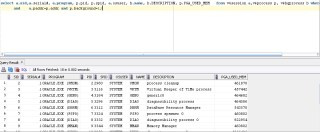
select a.sid,a.serial#, a.program, p.pid, p.spid, a.osuser, b.name, b.DESCRIPTION, p.PGA_USED_MEM   from v$session a,v$process p, v$bgprocess b where a.paddr=b.paddr
and    a.paddr=p.addr and p.background=1;

The above picture taken by SQL Developer.

RunLevel Mode In Linux

As Database administrator you dealing with Different operating system everyday, most of this operating system is Linux/Unix, During the boot up for Linux the init command open files called “/etc/initab”  this file linux start decide which run level the system should booted to. After start the OS you can check “/etc/initab” using Editor (vim command).

there’s different type of run level in linux you should know about them :

  • 0 – halt (Do NOT set initdefault to this).
  • 1 – Single user mode.
  • 2 – Multiuser, without NFS (The same as 3, if you do not have networking).
  • 3 – Full multiuser mode.
  • 4 – unused.
  • 5 – X11.
  • 6 – reboot (Do NOT set initdefault to this).

The Above modes available in /etc/initaband you can check them, when you open the files you will see lines

 id:5:initdefault:

 Which indicate for default level. and you can change it.

Short Description for the RunLevels :

Runlevel 0:

Cause the system shutdown , and you can’t set this as default. no reason to do that.

RunLevel 1:

in this Level System start in something called Single User Mode which mean root user only who can log in to the system.and notice there’s no networking in this mode it will be useful for repair and maintenance.

RunLevel 2:

The System Will log in to mutli user mode which mean you can log in to any users but without networking .

RunLevel 3:

Its same as Runlevel 2 but with networking, This level is common for most linux.

RunLevel 4:

Custom Level, or Custom Boot Level ( Undefined one).

RunLevel 5:

Networking, Multi user Mode With X window Which mean when the OS end of boot the GUI screen will appear to users “Welcome Screen” and can log in, this is what you see in the Linux For example Redhat.

RunLevel 6:

Reboot your Operating System, Sure you don’t want to set this to default.

you can use any runlevel by command –> init ‘run-level-number’

Thank you
Osama Mustafa

ORA-27086: unable to lock file – already in use

In Alert log :

Thu Feb 14 09:34:57 EST 2013
Errors in file /u01/app/oracle/admin/rdmetdev/udump/rdmetdev_ora_6321.trc:
ORA-27050: function called with invalid FIB/IOV structure
Additional information: 2
ORA-27086: unable to lock file – already in use
Linux-x86_64 Error: 37: No locks available
Additional information: 10

usually this problem occurred because NFS is Hanged,and can check OS logs to find “statd: server localhost not responding, timed out”.

1- Check rpc.stat is working and you can restart again , and you have to Restart NFS Services also

Stop :

# service nfslock stop
# service nfs stop
# service portmap stop
# umount /proc/fs/nfsd

 Start :

# service portmap start
# service nfs start
# service nfslock start
# mount -t nfsd nfsd /proc/fs/nfsd

Please follow the order, also note that when you restart the NFS service the server could hang at most for 1 minute.

Finally you should Reboot your server.

Thank you
Osama Mustafa

Basic Backup Techniques

Oracle Provide you with More than Way to Backup Let’s talk about them shortly :

1- Hot Backup

performed on data even though it is actively accessible to users and may currently be in a state of being updated.

– Connect / as sysdba
– alter database begin backup;
– copy all data files using OS command / not necessary to copy temp datafile.
– alter database end backup;
– alter system switch log;
– alter database backup control files to ‘’;

 2- Cold backup

Here all you have to do is shutdown database Copy Files ( Controlfile , Datafiles , Redolog …. ) using OS Command.

3- Backup Using RMAN

RMAN is most powerful utility for Backup in Oracle gives you lot of options, the simple script is below :

set/export ORACLE_SID=
rman target /
run {
backup database;
backup archivelog all;
}

4- Export/import Commands

The Export utility provides a simple way for you to transfer data objects between Oracle databases, even if they reside on platforms with different hardware and software configurations.

Check Oracle documentation and example here.

Thank you
Osama Mustafa

How To Monitor Oracle Database

I talked before about Oracle Users, and The effect Of them In Our Database , Today i will Share Some Idea to monitor Oracle Database in Simple Way without any third Party

Any Company should be Concern about Powerful user in their company, i am talking here about database users. Specially In Production System.

as we all know Oracle database comes with two powerful account SYSTEM, SYS Very often individual accounts with DBA roles also are created for DBAs to perform their daily duties without using the SYS or SYSTEM accounts.These admin accounts in the Oracle database usually have the ability to manage user security, maintain database storage, and perform backup and recovery tasks.but when the both left without monitored they may perform fraudulent activities without leaving any trace, Stealing Backup, Data or even take look at some personal Data such as Credit card number , Social Number and Mobile number for example.Granting DBA access to business owners is a blatant violation of segregation of duties. However, the list of powerful users should not be limited to these admin accounts. Users with special database privileges such as UPDATE ALL TABLE and SELECT ALL TABLE should also be considered powerful users and should be targets of database monitoring.

 usually you need to monitor different activities on your system/applications or database.the  best practices of monitoring database for example : logon/logoff activities of SYS/SYSTEM, database schema structure changes and DML (update, insert, delete) on different tables such as tables contain sensentive data ( bank account …. ) .

 Oracle Provide with basic and Easy tools to do all the above such:
1- Basic Oracle Audit Trail 

By enable AUDIT_TRAIL Parameter ( DB,OS ,NONE) Check Oracle Documentation here, For Example if you set this parameter to OS you should Check AUDIT_FILE_DEST, On another hand if you set this parameter to DB the audit trail will be recorded in a system table named SYS.AUD$ and e SYS user will be audited if the AUDIT_SYS_OPERATIONS parameter is set to TRUE.

Oracle audit utilities allow one to audit by session, user, action and object.   also privilege and object can be audited For example, to audit the TEST user’s login activity, one can issue the following statement: AUDIT SESSION BY TEST.In addition to the standard audit features, Oracle’s finegrained audit package DBMS_FGA allows the monitoring of data access based on content. One can specify value-based audit policies using SQL statements while using the finegrained audit package.

2- Create Your Own Trigger

Triggers are database procedures fired off by a specified event. Database triggers can be associated with a table, schema or database. They also can be used as a complementary mechanism to the standard features of Oracle audit facilities

3- Emails 

You can enable this feature by command line or by OEM, This utility allow you to receive any error in alert log.

4-LOGMINER/Archivelog

LogMiner Can detect wrongdoings by the database users. Most production databases have turned on the archive log to write archive logs to multiple destinations. The archive logs are used to restore Oracle databases to a point in time. All DDL and DML activities can be reversed using the archive logs. The fraudulent activities of SYS or SYSTEM are recorded there.You can Check V$SQL_TEX.

Thank you
Osama Mustafa
Corruption In Oracle Database

There are two types of corruption in Oracle database physical and logical what is the difference between them,Database written to blocks if this write failed then Database Corruption happened Sometimes because I/O Problems, Power Problem … etc which cause no time for header to been updated, usually Oracle Corruption will not effecting on your work until you try to read this block. There are two types of Corruption:

1- Physical Corruption  (Media Corruption)

2- Logical Corruption (Soft Corruption) 

The Details can be Find in Alertlog
ORA-01578:ORACLE data block corrupted (file # string, block # string)


Physical Corruption :

this kind of corruption can be happened when I/O Problems, Memory Failure, Server Controller

Regarding to Oracle documentation the corruption could be happened by:

  • Bad header:the beginning of the block (cache header) is corrupt with invalid values.
  • Block is Fractured/Incomplete:Information from the block header does not match the block tail
  • Block checksum is invalid
  • Block is misplaced
you can DB_BLOCK_CHECKSUM init parameter are used to identify if the block was changed by something external to Oracle and after the block was last written by Oracle. You can check the Parameter documentation Here.
Logical Corruption:

this kind of corruption you will not find it alertlog only by DBVerify utility, also be noted if db_block_checking Parameter is enabled, it may produce the internal error ORA-600 [kddummy_blkchk]

So , the difference between both kind is clear , Logical Corruption is Header/Footer and database will try to read that block , In the physical Corruption Something prevent us to read that block.

How can i know i have Corruption:

1- RMAN
2- DBVerify

DBVerify :

DBVERIFY is an external command-line utility that performs a physical data structure integrity check on an offline database. It can be used against backup files and online files (or pieces of files). You use DBVERIFY primarily when you need to ensure that a backup database (or datafile) is valid before it is restored or as a diagnostic aid when you have encountered data corruption problems.

Documentation is here.

RMAN

Rman could Detect both corruption logical/physical , check the below script that could check if the database contains corruption without even take backup:

RMAN> configure device type disk parallelism 4;
RMAN> backup validate check logical database;
OR
RMAN> run {
allocate channel diskl1 type disk;
allocate channel disk2 type disk;
allocate channel disk3 type disk;
allocate channel disk4 type disk;
backup validate check logical database;
}

The above script to check Database Validation.


Which Is Better :

  1. RMAN can be run with PARALLELISM option
  2. DB Verfiy Check Empty Block.
  3. Both Tools Can check for Rang Blocks.

RMAN:
VALIDATE DATAFILE 1 BLOCK …. to ……

DBV:
start=… end=….

Some Other Blogs Could Be useful :
1- Database Corruption
2-  Other Tools To Check Corruption

Thank you
Osama mustafa


Read ORACLE_SID and ORACLE_HOME Inside PL/SQL Code

 DECLARE 

   V_ORACLE_HOME  VARCHAR2 (2000); 
   V_ORACLE_SID  VARCHAR2 (256); 

 BEGIN 

   DBMS_SYSTEM.GET_ENV (‘ORACLE_HOME’, V_ORACLE_HOME); 
   DBMS_SYSTEM.GET_ENV (‘ORACLE_SID’, V_ORACLE_SID ); 
  
   –The below line will print Oracle_home
   DBMS_OUTPUT.PUT_LINE (‘ORACLE_HOME :- ‘ || V_ORACLE_HOME); 
  
   — the below line will print Oracle_SID
   DBMS_OUTPUT.PUT_LINE (‘ORACLE_HOME :-‘ || V_ORACLE_SID); 
 END; 

Reference :
1-OTN Forum

Thank you
Osama Mustafa

Gather System Statistics

This procedure gathers system statistics. Which is Important for Index and Tablespace. it’s very Good to use in SQL performance.

There are different Mode for Gather_system_stat like the following :

  • NOWORKLOAD: Will capture characteristics of the I/O system. Gathering may take a few minutes and depends on the size of the database. During this period Oracle will estimate the average read seek time and transfer speed for the I/O system. This mode is suitable for the all workloads. Oracle recommends to run GATHER_SYSTEM_STATS (‘noworkload’) after creation of the database and tablespaces. To fine tune system statistics for the workload use ‘START’ and ‘STOP’ or ‘INTERVAL’ options. If you gather both ‘NOWORKLOAD’ and workload specific (statistics collected using ‘INTERVAL’ or ‘START’ and ‘STOP’ ), the workload statistics will be used by optimizer. Collected components: cpuspeednw, ioseektim, iotfrspeed.
     
  • INTERVAL: Captures system activity during a specified interval. This works in combination with the interval parameter. You should provide an interval value in minutes, after which system statistics are created or updated in the dictionary or stattab. You can use GATHER_SYSTEM_STATS (gathering_mode=>’STOP’) to stop gathering earlier than scheduled. Collected components: maxthr, slavethr, cpuspeed, sreadtim, mreadtim, mbrc.
     
  • START | STOP: Captures system activity during specified start and stop times and refreshes the dictionary or stattab with statistics for the elapsed period. Interval value is ignored. Collected components: maxthr, slavethr, cpuspeed, sreadtim, mreadtim, mbrc.

For Example :

exec dbms_stats.gather_system_stats(‘Start’);exec dbms_stats.gather_system_stats(‘Stop’); 

 After run the system_stat all the information inserted in table called “aux_stats$”  Like the following :

  • CPUSPEEDNW —–> CPU speed
  • IOSEEKTIM ——>    I/O seek time in milliseconds
  • IOTFRSPEED ——> I/O transfer speed in millisecond

The above output similar when you have No Workload , but what if you have One :

  • MBRC —-> Average blocks read per Multi block read.
  • MAXTHR —-> Maximum I/O throughput
  • SLAVETHR
  • SREADTIM  —->Single block read time in milliseconds
  • MREADTIM —–> Multiblock read time in ms
  • CPUSPEED
Reference :
1- Oracle Dcoumentation
2- OTN threads

Thank you 
Osama Mustafa


Another Linux Command

1-Check Memory :

[oracle@192 ~]$ free -m

             total       used       free     shared    buffers     cached
Mem:          1010        997         13          0         71        685
-/+ buffers/cache:        240        770
Swap:         2000          0       2000

[oracle@192 ~]$ vmstat

procs ———–memory———- —swap– —–io—- –system– —–cpu——
 r  b   swpd   free   buff  cache   si   so    bi    bo   in   cs us sy id wa st
 0  0      0  28820  72248 704336    0    0   117    49 1026  239  3  1 93  3  0

[oracle@192 ~]$ dmesg | grep RAM

BIOS-provided physical RAM map:
hdc: ATAPI 1X DVD-ROM DVD-R-RAM CD-R/RW drive, 32kB Cache, UDMA(33)

Finally : top command that you could use.

2-How Much this Os was running
 
[oracle@192 ~]$ uptime

 23:03:17 up  1:44,  2 users,  load average: 0.04, 0.11, 0.08

3-Check Some Hardware Information

CPU :

[oracle@192 ~]$ cat /proc/cpuinfo

processor       : 0
vendor_id       : GenuineIntel
cpu family      : 6
model           : 37
model name      : Intel(R) Core(TM) i5 CPU       M 430  @ 2.27GHz
stepping        : 2
cpu MHz         : 2261.079
cache size      : 3072 KB
fdiv_bug        : no
hlt_bug         : no
f00f_bug        : no
coma_bug        : no
fpu             : yes
fpu_exception   : yes
cpuid level     : 11
wp              : yes
flags           : fpu vme de pse tsc msr pae mce cx8 apic mtrr pge mca cmov pat pse36 clflush dts acpi mmx fxsr sse sse2 ss nx rdtscp lm constant_tsc up ida nonstop_tsc pni cx16 popcnt lahf_lm [8]
bogomips        : 4522.15

 Thank you
Osama mustafa

Drop Undo Tablespace Online

SQL> show parameter undo

NAME                                 TYPE        VALUE
———————————— ———– ——————————
undo_management                 string       AUTO
undo_retention                       integer     900
undo_tablespace                    string       UNDOTBS1

CREATE UNDO TABLESPACE undotbs2
DATAFILE’/u01/app/oracle/oradata/orcl/undotbs02.dbf’ SIZE 50M AUTOEXTEND ON NEXT 5M;

Tablespace created.

SQL> ALTER SYSTEM SET UNDO_TABLESPACE=UNDOTBS2 SCOPE=BOTH;

System altered.

SQL> show parameter undo ;

NAME                                 TYPE        VALUE
———————————— ———– ——————————
undo_management                 string          AUTO
undo_retention                       integer        900
undo_tablespace                    string          UNDOTBS2

 Now you need to check if there’s any segment used old undo tablespace to ensure you will not loose any Data

SQL> select segment_name,owner,tablespace_name,status from dba_rollback_segs where tablespace_name like ‘%UND%’;

SEGMENT_NAME                   OWNER  TABLESPACE_NAME                STATUS
—————————— —— —————————— —————-
_SYSSMU11$                     PUBLIC UNDOTBS2                       ONLINE
_SYSSMU12$                     PUBLIC UNDOTBS2                       ONLINE
_SYSSMU13$                     PUBLIC UNDOTBS2                       ONLINE
_SYSSMU14$                     PUBLIC UNDOTBS2                       ONLINE
_SYSSMU15$                     PUBLIC UNDOTBS2                       ONLINE
_SYSSMU16$                     PUBLIC UNDOTBS2                       ONLINE
_SYSSMU17$                     PUBLIC UNDOTBS2                       ONLINE
_SYSSMU18$                     PUBLIC UNDOTBS2                       ONLINE
_SYSSMU19$                     PUBLIC UNDOTBS2                       ONLINE
_SYSSMU20$                     PUBLIC UNDOTBS2                       ONLINE

Make Sure that you don’t have any Segment Using Undo01/Old Undo Tablespace and if you have one wait until the transaction become Invalid Or expired.

SQL> DROP TABLESPACE undotbs1 INCLUDING CONTENTS AND DATAFILES;
Tablespace dropped.

 Mission Done.

Thank you
Osama Mustafa