Create Database Link

This Topics talks About how to create Database link , what i need

Solution

1-If you are creating public dblink, you will need a user with the following permissions:

create public database link 
drop public database link 

 If you are creating dblink, you will need a user with the following permission: 

create database link

2-check Global_names parameter in database , if you create public database link its should be TRUE, otherwise FALSE 

How To check it :

-Show Parameter global 
OR
SELECT name, valueFROM gv$parameter WHERE name =’global_names’;

To Change its Value :

Alter system set = Scope=Spfile/Memory 

3) Create the database link: 

SQL> CREATE [SHARED] [PUBLIC] DATABASE LINK CONNECT TO CURRENT_USER USING ”;

 Please note that: 
* The single quotes around the service name are mandatory 
* The service name used above must be in the TNSNAMES.ORA file on the server. If it does not existyou can create one like below: 

connection_link = 
(DESCRIPTION =(ADDRESS_LIST =(ADDRESS = (PROTOCOL = TCP)(HOST = n host name>)

(PORT = 1521)))(CONNECT_DATA =(SERVICE_NAME = )))

4) Make sure that the database link is created:

SQL> SELECT * FROM user_db_links;

Also you Can Check Database Domain :

SQL> SELECT name, valueFROM gv$parameter WHERE name IN (‘db_name’, ‘db_domain’);

sometimes you need to set database domain , refer to  Note 578668.1

Enjoy 

Osama Mustafa  
Oracle OpenWorld 2012: Focus On Database Security

Oracle OpenWorld 2012 is going to be the place to learn about Oracle Database Security solutions including Oracle Advanced Security with transparent data encryption, Database Vault, Audit Vault and Database Firewall, Label Security, and more.
We’ve put together this Focus On Database Security document so you’ll know when and where to attend the key database security sessions, and not miss a thing.

Thank you
Osama Mustafa

Determine The DBID When Using RMAN

1)If your database is open you may issue the following query:

SQL>SELECT dbid FROM v$database;

DBID
———-
1411146558

2) If you are using a recovery catalog then connect to the recovery catalog via
RMAN and issue the “list incarnation” command. You must first nomount the target
database. For example:

D:\> rman target /@mydb rcvcat /@rcat

Recovery Manager: Release 8.1.7.4.1 – Production

RMAN-06193: connected to target database (not started)
RMAN-06008: connected to recovery catalog database

RMAN> startup nomount

RMAN-06196: Oracle instance started

Total System Global Area      94980124 bytes

Fixed Size 75804 bytes
Variable Size57585664 bytes
Database Buffers 37240832 bytes
Redo Buffers 77824 bytes

RMAN> list incarnation;

RMAN-03022: compiling command: list

List of Database Incarnations
DB Key ; Inc Key DB Name ; DB ID CUR Reset SCN; Reset Time
——- ——- ——– —————- — ———- ———-
1 YES                                              282854     03-DEC-02
——————————————————————————–

3) If you have a saved copy of the screen details from a previous RMAN session
you may refer to this output for the dbid. For example:

D:\> rman target /@mydb rcvcat /@rcat

Recovery Manager: Release 8.1.7.4.1 – Production

RMAN-06005: connected to target database: ORCL817 (DBID=1411146558)
RMAN-06008: connected to recovery catalog database
——————————————————————————–

4)If you are using RMAN with version 9i you have the ability to configure the
automatic backup of your control files. If you have this feature on locate one
of your control file autobackups The name of this file will tell you the dbid
of your database. For example:

D:\ORACLE\ORA92\DATABASE> dir
Volume in drive D has no label.
Volume Serial Number is 3E3B-12FD

Directory of D:\ORACLE\ORA92\DATABASE

In this case 2282329623 is the dbid for this database.

5)If the four steps above are not available because you have lost all the files
for your database, you are not using a recovery catalog, you are not using
autobackup of your controlfile, etc., but you have an old control file available,
mount the database with the old control file then query v$database as in step 1
to obtain the dbid of your database.

6)If the platform is UNIX and you have a datafile still on disk for the problem database, you may
be able to obtain the DBID using the strings command as in the following example:

$ strings undotbs01.dbf | grep MAXVALUE

3587267724, MAXVALUE
… etc.

The output above shows the DBID in this example to be 3587267724

Source Site :
1-Mike Blog

Thank you
Osama Mustafa
Sharing for Knowledge

ORA-39083/ORA-02304 during impdp

Error :

ORA-39083: Object type TYPE failed to create with error:
ORA-02304: invalid object identifier literal

Cause:
 OID should be unique in a database. the OID in the impdp create statemene was used by old schema. 

solution:

impdp again with parameter transform=OID:n

Example :

impdp username/password@SID DIRECTORY=DMP LOGFILE=impdp.log transform=OID:n
DUMPFILE=%.dmp

Query To give Dba Object for specific User

Simple Topic let you know what is the database object for specific user

SELECT object_name, object_type
FROM   all_objects
WHERE  owner = 'SYS'
AND    object_type IN ('PACKAGE', 'PACKAGE BODY')
ORDER BY object_name, object_type;

Thank you
Osama Mustafa

Dataguard on Different Operating Systems

In 10g, dataguard started to support different binaries on primary and standby database servers with the same OS family.

  For example :

Microsoft Windows 64-bit on primary and Microsoft Windows 32-bit
Microsoft Windows 64-bit for AMD on standby database server.

However with 11g, dataguard also supports different OS on primary and standby servers. I wanted to share the support matrix for this feature.

 Check this Blog which is talking about this topics and post some Notes From My Oracle Support :

Emre Baransel.


Thank you
Osama Mustafa

Copy Command in Sqlplus

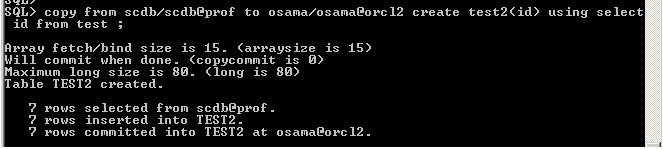
Today as any Database administrator i wake up on new task , they want import some tables from Developer environment to Production , So I used Copy Command .

its usual used for copy tables from database to Another  , but you have to know this way is very useful specially if you have long Data type in your tables , i will explain it , and Define Two Database in your TNS.

create table osama as select * from long_table ;

You will Get this error :

ERROR at line 1:

ORA-00997: illegal use of LONG datatype

copy from user1/password@orcl  to user2/password@orcl2 create

using ;

The Output :

Array fetch/bind size is 30. (arraysize is 30)
Will commit when done. (copycommit is 0)
Maximum long size is 40. (long is 40)

Table osama created.

Simple !!!

Useful Link : 
1-Oracle Document .
2-Examples. 

Thank you 
Osama Mustafa 

Oracle Databases from 11.2.0.1 to 11.2.0.2

Basic Steps : 

1. Install 11.2.0.2 into a separate ORACLE_HOME.
2. Take a full backup of the database.
3. Always shutdown the database cleanly

After Installing 11.2.0.2 , Go to 11.2.0.1 database and run :

Connect as sys
SQL> spool pre_upgrade.log
SQL> @ORACLE_HOME/rdbms/admin/utlu112i.sql
SQL> spool off 

 To check Data Dictionary 

Connect as sys
SQL> EXECUTE dbms_stats.gather_dictionary_stats;
Note: Ignore if dbms_stats.gather_dictionary_stats was run once.

To Fix invalid Object in the database :

connect as sys
SQL> @$ORACLE_HOME/rdbms/admin/utlrp.sql

Run pre-upgrade diagnostic utility dbupgradiag.sql

$ cd $ORACLE_HOME/rdbms/admin
$ sqlplus “/ as sysdba”
SQL> spool pre_dbupgdiag.log
SQL>@dbupgdiag.sql
SQL>spool off 

 if the dbupgdiag.sql script reports any invalid objects, run $ORACLE_HOME/rdbms/admin/utlrp.sql 

Configure the 11.2.0.1 database environment for 11.2.0.2 Upgrade 

Copy the following Files to New Home 11.2.0.2 :

  1. Spfile/Pfile/init.ora
  2. orapwd
  3. tnsname.ora
  4. Listener.ora
  5. OC4J Home (ORACLE_HOME/oc4j/j2ee/OC4J_DBConsole_) Only if you have enterprise manager

Set The environment to 11.2.0.2

export ORACLE_HOME=/u01/app/oracle/prouct/11.2.0.2
export ORACLE_SID=ORCL

Note : Replace the Path , LD_Library_Path to new Home .

Upgrade 11.2.0.1 database to 11.2.0.2

sqlplus  / as sysdba
 spool upgrade.log
startup upgrade
set echo on
@?/rdbms/admin/catupgrd.sql;
spool off
shutdown immediate

Restart the database in normal mode

sqlplus  / as sysdba
 @/opt/app/oracle/product/11.2.0.2/rdbms/admin/catuppst.sql;
@/opt/app/oracle/product/11.2.0.2/rdbms/admin/utlrp.sql;
select comp_name,version,status from dba_registry;
select owner,count(*) from dba_objects where status != ‘VALID’ group by owner;

Change the compatibility parameter

Change the compatible parameter and restart the database.

SQL> alter system set compatible=’11.2.0.2.0′ scope=spfile;
SQL> shutdown immediate;
SQL> startup;

And Please Make Sure the listener has been started from the new home not the old one .

I will Post Upgrade to 11.2.0.3 “Enshalla”

Thank you
Osama Mustafa