connection to database cannot be established – DBCA

Environment :-

Oracle Grid Infrastructure 11.2.0.4
Nodes # : 4
Operating system : Redhat 6.6

When trying to configure enterprise manager the following error appeared :-

Connection to the database cannot be established because the listener could be down. Please make sure that the service is registered with a listener and the listener is up.

The listener is up, VIP is working on all nodes without any issue when check dbca logs looking for more details i found this error :-

dbca trace in $ORACLE_BASE/cfgtoollogs/dbca.

ORA-1017: invalid username/password

Both was correct, because of this i recreate password file on all nodes and restart my operation it’s working without any issue this time.

Thanks
Osama Mustafa

OTN EMEA Tour 2015

For second time i will be glad to Join OTN EMEA Tour 2015 with others oracle experts who consume much time in the Oracle Community.

We will cover the following country :-

  • Portugal.
  • Jordan – Amman
  • Johannesburg
date                         location
May 21st 2015 Lisbon, Portugal
May 23rd 2015 Amman, Jordan
May 26th 2015 Johannesburg, South Africa
All the information you can find it here.
Please if you will join us in any country sign up.
Thanks
Osama Mustafa

mkdir No such file or directory Solaris 11.2

root@TT:/#mkdir –/u01/app/oracle/product/TimesTen/
mkdir: Failed to make directory “/u01/app/oracle/product/TimesTen/”; No such file or directory

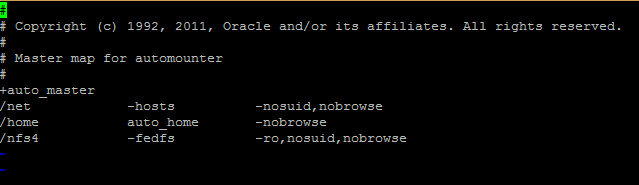
simply this error related to auto_master all you have to do is to remove the entry /home from the auto_master
vi /etc/auto_master

and remove the entry 
Try again.
Thank You 
Osama Mustafa

Jordan Amman Oracle User Group

It’s almost here, 09/04/2015 I published before about first event for JAOUG, I am so excited, organizing the event not easy needs a lot of work , commitment and dedication. finally we are here.

Since this is the first event before the biggest one, it’s only introduction for the group and to introduce the local people and let them know about the group.

We prepare the poster today and seems perfect.

Thanks for the amazing Volunteer and PSUT to make this dream come true.
Osama Mustafa

Jordan Amman Oracle User Group First Event

as most of you know that i created new oracle group in Jordan to allow people involve in oracle community and teach them more about oracle, this step was huge for me and the group established in 2014

Now it’s Officially, the first event will be organized 09/April/2015 as introduction to this group, the volunteers working so hard, the second event will be surprise since it will be the biggest one in Jordan i will be announce about it soon. we still working on the logo but this is the initial one.

Thank you 
Osama Mustafa

Configure RMAN Backup On Windows

Database is supported on windows and some people using Windows As Production and RMAN need to be configured to ensure backup for Database in such failure or something to do this follow the below steps :-

  • Create first text file called backup and change the format to “bat”, inside the file add the following lines :-

C:
cd E:\app\ADM-BSS01\product\11.2.0\dbhome_1\BIN
rman @E:\RMAN\Scripts\backup.rman

  • Create 3 folders in E for example :-
    • backup
    • Archivelog
    • Controlfile
  • Create second file name it Backup.rman and add the Rman Script like below 

connect target /
run
{
ALLOCATE CHANNEL c1 DEVICE TYPE disk;
ALLOCATE CHANNEL c2 DEVICE TYPE disk;
ALLOCATE CHANNEL c3 DEVICE TYPE disk;
ALLOCATE CHANNEL c4 DEVICE TYPE disk;
backup AS COMPRESSED BACKUPSET tag Full_database_open format ‘E:\RMAN\backup\db_%t_%s_p%p.bkp’ database;
backup AS COMPRESSED BACKUPSET archivelog all format ‘E:\RMAN\backup\archivelog\al_%t_%s_p%p.arch’ delete all input;
backup AS COMPRESSED BACKUPSET current controlfile tag =cf1 format ‘E:\RMAN\backup\cf_%t_%s_p%p.bkp’;
backup tag ORCL_CONTROL current controlfile format ‘E:\RMAN\Controlfile\%d_%T_%s_%p_CONTROL’;
delete noprompt expired backup;
release channel c1;
release channel c2;
release channel c3;
release channel c4;
}

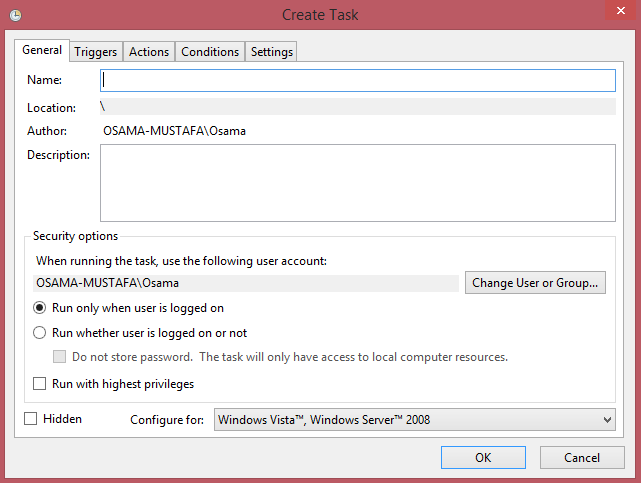
  • Follow the screen now :-
      • Add Task Name and Description :-
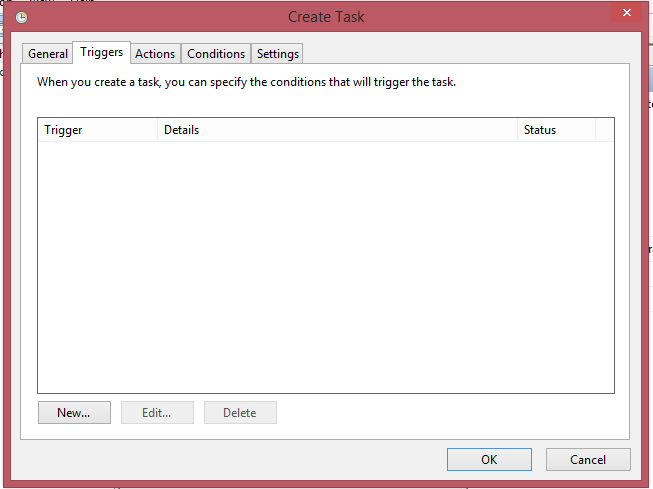
      • Add The Time for this Task in this tab 
      • Another Screen :-
      • In This Screen Add Bat File in our case backup.bat