BLOG

Building Event-Driven Microservices on AWS with Amazon EventBridge

We had built this beautiful system. Fifteen microservices, each with its own database, deployed on EKS. Textbook architecture. The problem? Every service was calling every other service directly. When the order service needed to notify inventory, shipping, notifications, and analytics, it made four synchronous HTTP calls. If any of those services were slow or down, the order service suffered.

We had built a distributed monolith. All the complexity of microservices with none of the benefits.

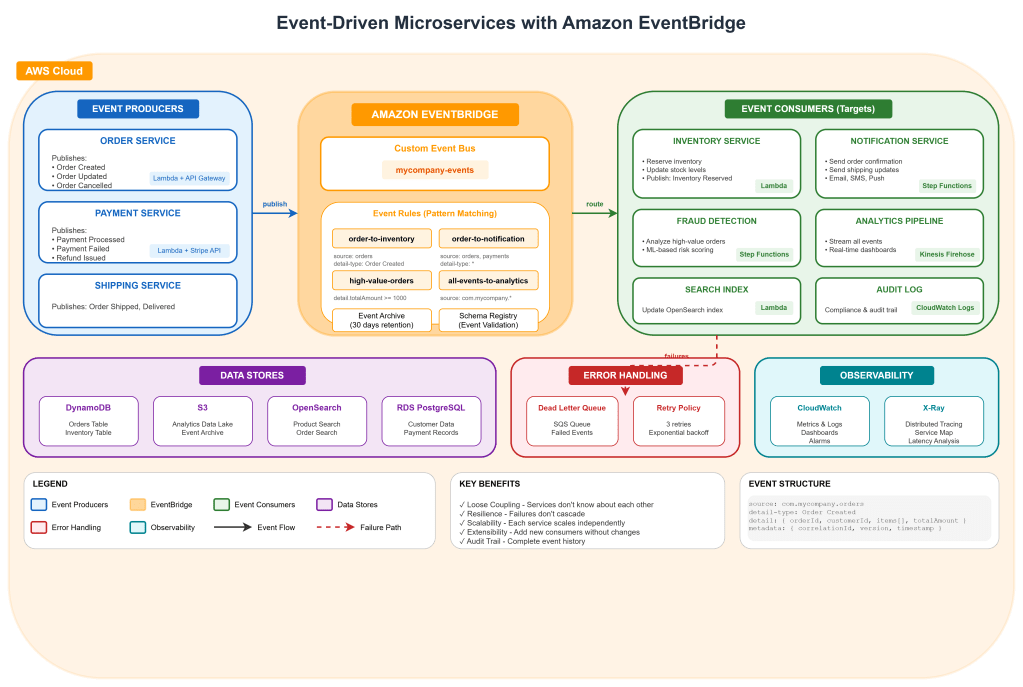
The solution was event-driven architecture. Instead of services calling each other, they publish events. Other services subscribe to the events they care about. The order service publishes “OrderCreated” and moves on. It doesn’t know or care who’s listening.

Amazon EventBridge is AWS’s answer to this pattern. It’s not just another message queue. It’s a serverless event bus that connects your applications, AWS services, and SaaS applications using events. And honestly, it’s changed how I think about building systems.

In this article, I’ll walk you through building a production-grade event-driven architecture on AWS. We’ll cover EventBridge fundamentals, event design, error handling, observability, and patterns I’ve learned from running this in production.

Why Event-Driven? Why Now?

Before we dive into implementation, let’s talk about why you’d want this architecture in the first place.

Loose Coupling: Services don’t need to know about each other. The order service doesn’t import the inventory service SDK. It just publishes events.

Resilience: If the notification service is down, orders still get processed. Notifications catch up when the service recovers.

Scalability: Each service scales independently. Black Friday traffic might hammer your order service, but your reporting service can process events at its own pace.

Extensibility: Need to add fraud detection? Just subscribe to OrderCreated events. No changes to the order service required.

Auditability: Events create a natural audit trail. You can replay them, analyze them, debug issues by looking at what happened.

The trade-off? Eventual consistency. If you need strong consistency across services, synchronous calls might still be necessary. But in my experience, most business processes are naturally asynchronous. Customers don’t expect their loyalty points to update in the same millisecond as their order confirmation.

Architecture Overview

Step 1: Design Your Events First

This is where most teams go wrong. They start building services and figure out events later. But events are your contract. They’re the API between your services. Design them carefully.

Event Structure

EventBridge events follow a standard structure:

{
"version": "0",
"id": "12345678-1234-1234-1234-123456789012",
"detail-type": "Order Created",
"source": "com.mycompany.orders",
"account": "123456789012",
"time": "2025-03-05T10:30:00Z",
"region": "us-east-1",
"resources": [],
"detail": {
"orderId": "ORD-12345",
"customerId": "CUST-67890",
"items": [
{
"productId": "PROD-111",
"quantity": 2,
"price": 29.99
}
],
"totalAmount": 59.98,
"currency": "USD",
"shippingAddress": {
"country": "US",
"state": "CA",
"city": "San Francisco",
"zipCode": "94102"
},
"metadata": {
"correlationId": "req-abc123",
"version": "1.0"
}
}
}

Event Design Principles

Be Specific with detail-type: Don’t use generic types like “OrderEvent”. Use “Order Created”, “Order Shipped”, “Order Cancelled”. This makes routing rules cleaner.

Include What Consumers Need: Think about who will consume this event. The notification service needs customer email. The analytics service needs order value. Include enough data that consumers don’t need to call back to the producer.

But Don’t Include Everything: Don’t embed entire database records. Include identifiers and key attributes. If a consumer needs the full customer profile, they can fetch it.

Version Your Events: Include a version in metadata. When you need to change the schema, you can route different versions to different handlers.

Add Correlation IDs: For distributed tracing, include a correlation ID that follows the request through all services.

Create Event Schemas

EventBridge has a schema registry. Use it. It provides documentation, code generation, and validation.

# Create schema registry
aws schemas create-registry \
--registry-name my-company-events \
--description "Event schemas for our microservices"

Define schemas using JSON Schema or OpenAPI:

{
"openapi": "3.0.0",
"info": {
"title": "OrderCreated",
"version": "1.0.0"
},
"paths": {},
"components": {
"schemas": {
"OrderCreated": {
"type": "object",
"required": ["orderId", "customerId", "totalAmount"],
"properties": {
"orderId": {
"type": "string",
"pattern": "^ORD-[0-9]+$"
},
"customerId": {
"type": "string"
},
"totalAmount": {
"type": "number",
"minimum": 0
},
"currency": {
"type": "string",
"enum": ["USD", "EUR", "GBP"]
}
}
}
}
}
}

Step 2: Set Up EventBridge Infrastructure

Let’s create the EventBridge infrastructure using Terraform. I prefer Terraform over CloudFormation for this because the syntax is cleaner and it’s easier to manage across multiple AWS accounts.

Create the Event Bus

# eventbridge.tf
# Create custom event bus (don't use default for production)
resource "aws_cloudwatch_event_bus" "main" {
name = "mycompany-events"
tags = {
Environment = "production"
Team = "platform"
}
}
# Event bus policy - allow other accounts to put events
resource "aws_cloudwatch_event_bus_policy" "main" {
event_bus_name = aws_cloudwatch_event_bus.main.name
policy = jsonencode({
Version = "2012-10-17"
Statement = [
{
Sid = "AllowAccountsToPutEvents"
Effect = "Allow"
Principal = {
AWS = [
"arn:aws:iam::111111111111:root", # Dev account
"arn:aws:iam::222222222222:root" # Staging account
]
}
Action = "events:PutEvents"
Resource = aws_cloudwatch_event_bus.main.arn
}
]
})
}
# Archive for event replay (critical for debugging)
resource "aws_cloudwatch_event_archive" "main" {
name = "mycompany-events-archive"
event_source_arn = aws_cloudwatch_event_bus.main.arn
retention_days = 30
# Archive all events
event_pattern = jsonencode({
source = [{ prefix = "com.mycompany" }]
})
}

Create Event Rules

Rules determine which events go where. This is where EventBridge really shines. The pattern matching is incredibly powerful.

# Order events to inventory service
resource "aws_cloudwatch_event_rule" "order_to_inventory" {
name = "order-created-to-inventory"
event_bus_name = aws_cloudwatch_event_bus.main.name
event_pattern = jsonencode({
source = ["com.mycompany.orders"]
detail-type = ["Order Created"]
})
tags = {
Service = "inventory"
}
}
resource "aws_cloudwatch_event_target" "inventory_lambda" {
rule = aws_cloudwatch_event_rule.order_to_inventory.name
event_bus_name = aws_cloudwatch_event_bus.main.name
target_id = "inventory-processor"
arn = aws_lambda_function.inventory_processor.arn
# Retry configuration
retry_policy {
maximum_event_age_in_seconds = 3600 # 1 hour
maximum_retry_attempts = 3
}
# Dead letter queue for failed events
dead_letter_config {
arn = aws_sqs_queue.inventory_dlq.arn
}
}
# High-value orders get special handling
resource "aws_cloudwatch_event_rule" "high_value_orders" {
name = "high-value-orders"
event_bus_name = aws_cloudwatch_event_bus.main.name
# Content-based filtering - only orders over $1000
event_pattern = jsonencode({
source = ["com.mycompany.orders"]
detail-type = ["Order Created"]
detail = {
totalAmount = [{ numeric = [">=", 1000] }]
}
})
}
resource "aws_cloudwatch_event_target" "fraud_check" {
rule = aws_cloudwatch_event_rule.high_value_orders.name
event_bus_name = aws_cloudwatch_event_bus.main.name
target_id = "fraud-check"
arn = aws_sfn_state_machine.fraud_check.arn
role_arn = aws_iam_role.eventbridge_sfn.arn
}

Advanced Pattern Matching

EventBridge supports sophisticated pattern matching. Here are patterns I use frequently:

# Match events from multiple sources
event_pattern = jsonencode({
source = ["com.mycompany.orders", "com.mycompany.returns"]
})
# Match specific values in nested objects
event_pattern = jsonencode({
detail = {
shippingAddress = {
country = ["US", "CA", "MX"] # North America only
}
}
})
# Prefix matching
event_pattern = jsonencode({
detail = {
orderId = [{ prefix = "ORD-PRIORITY-" }]
}
})
# Exists check
event_pattern = jsonencode({
detail = {
promoCode = [{ exists = true }] # Only orders with promo codes
}
})
# Combine multiple conditions
event_pattern = jsonencode({
source = ["com.mycompany.orders"]
detail-type = ["Order Created"]
detail = {
totalAmount = [{ numeric = [">=", 100] }]
currency = ["USD"]
items = {
productId = [{ prefix = "DIGITAL-" }]
}
}
})

Step 3: Build Event Producers

Now let’s build services that publish events. I’ll show you a Python example since it’s common in AWS Lambda, but the patterns apply to any language.

Order Service (Producer)

# order_service/handler.py
import json
import boto3
import uuid
from datetime import datetime
from dataclasses import dataclass, asdict
from typing import List
eventbridge = boto3.client('events')
@dataclass
class OrderItem:
productId: str
quantity: int
price: float
@dataclass
class OrderCreatedEvent:
orderId: str
customerId: str
items: List[dict]
totalAmount: float
currency: str
shippingAddress: dict
metadata: dict
def create_order(event, context):
"""Handle order creation request."""
body = json.loads(event['body'])
# Generate order ID
order_id = f"ORD-{uuid.uuid4().hex[:8].upper()}"
# Calculate total
items = body['items']
total = sum(item['quantity'] * item['price'] for item in items)
# Save to database (simplified)
save_order_to_dynamodb(order_id, body)
# Create the event
order_event = OrderCreatedEvent(
orderId=order_id,
customerId=body['customerId'],
items=items,
totalAmount=total,
currency=body.get('currency', 'USD'),
shippingAddress=body['shippingAddress'],
metadata={
'correlationId': event['requestContext']['requestId'],
'version': '1.0',
'timestamp': datetime.utcnow().isoformat()
}
)
# Publish to EventBridge
publish_event(
source='com.mycompany.orders',
detail_type='Order Created',
detail=asdict(order_event)
)
return {
'statusCode': 201,
'body': json.dumps({
'orderId': order_id,
'status': 'created'
})
}
def publish_event(source: str, detail_type: str, detail: dict):
"""Publish event to EventBridge with error handling."""
try:
response = eventbridge.put_events(
Entries=[
{
'Source': source,
'DetailType': detail_type,
'Detail': json.dumps(detail),
'EventBusName': 'mycompany-events'
}
]
)
# Check for partial failures
if response['FailedEntryCount'] > 0:
failed = response['Entries'][0]
raise Exception(f"Failed to publish event: {failed['ErrorCode']} - {failed['ErrorMessage']}")
except Exception as e:
# Log the error but don't fail the order
# Consider sending to a fallback queue
print(f"Error publishing event: {e}")
send_to_fallback_queue(source, detail_type, detail)
def send_to_fallback_queue(source, detail_type, detail):
"""Send to SQS as fallback if EventBridge fails."""
sqs = boto3.client('sqs')
sqs.send_message(
QueueUrl=os.environ['FALLBACK_QUEUE_URL'],
MessageBody=json.dumps({
'source': source,
'detailType': detail_type,
'detail': detail
})
)

Batch Publishing for High Throughput

When you need to publish many events, batch them:

def publish_events_batch(events: List[dict]):
"""Publish multiple events efficiently."""
# EventBridge accepts up to 10 events per call
BATCH_SIZE = 10
entries = []
for event in events:
entries.append({
'Source': event['source'],
'DetailType': event['detail_type'],
'Detail': json.dumps(event['detail']),
'EventBusName': 'mycompany-events'
})
# Process in batches
failed_events = []
for i in range(0, len(entries), BATCH_SIZE):
batch = entries[i:i + BATCH_SIZE]
response = eventbridge.put_events(Entries=batch)
if response['FailedEntryCount'] > 0:
for idx, entry in enumerate(response['Entries']):
if 'ErrorCode' in entry:
failed_events.append({
'event': batch[idx],
'error': entry['ErrorCode']
})
return failed_events

Step 4: Build Event Consumers

Consumers are typically Lambda functions, but can also be Step Functions, SQS queues, API destinations, or other AWS services.

Inventory Service (Consumer)

# inventory_service/handler.py
import json
import boto3
from decimal import Decimal
dynamodb = boto3.resource('dynamodb')
inventory_table = dynamodb.Table('inventory')
def process_order_created(event, context):
"""
Process OrderCreated events to update inventory.
EventBridge invokes this Lambda with the full event envelope.
"""
# Extract the event detail
detail = event['detail']
order_id = detail['orderId']
items = detail['items']
correlation_id = detail['metadata']['correlationId']
print(f"Processing order {order_id} (correlation: {correlation_id})")
try:
# Reserve inventory for each item
for item in items:
reserve_inventory(
product_id=item['productId'],
quantity=item['quantity'],
order_id=order_id
)
# Publish success event
publish_event(
source='com.mycompany.inventory',
detail_type='Inventory Reserved',
detail={
'orderId': order_id,
'status': 'reserved',
'items': items,
'metadata': {
'correlationId': correlation_id
}
}
)
except InsufficientInventoryError as e:
# Publish failure event
publish_event(
source='com.mycompany.inventory',
detail_type='Inventory Reservation Failed',
detail={
'orderId': order_id,
'reason': str(e),
'failedItems': e.failed_items,
'metadata': {
'correlationId': correlation_id
}
}
)
# Don't raise - we've handled it by publishing an event
return {'status': 'failed', 'reason': str(e)}
return {'status': 'success'}
def reserve_inventory(product_id: str, quantity: int, order_id: str):
"""
Atomically reserve inventory using DynamoDB conditional writes.
"""
try:
inventory_table.update_item(
Key={'productId': product_id},
UpdateExpression='''
SET availableQuantity = availableQuantity - :qty,
reservedQuantity = reservedQuantity + :qty,
lastUpdated = :now
ADD reservations :reservation
''',
ConditionExpression='availableQuantity >= :qty',
ExpressionAttributeValues={
':qty': quantity,
':now': datetime.utcnow().isoformat(),
':reservation': {order_id}
}
)
except dynamodb.meta.client.exceptions.ConditionalCheckFailedException:
raise InsufficientInventoryError(
f"Insufficient inventory for {product_id}",
failed_items=[product_id]
)

Notification Service with Step Functions

For complex workflows, use Step Functions as the EventBridge target:

{
"Comment": "Process order notifications with multiple channels",
"StartAt": "DetermineNotificationChannels",
"States": {
"DetermineNotificationChannels": {
"Type": "Choice",
"Choices": [
{
"Variable": "$.detail.totalAmount",
"NumericGreaterThanEquals": 500,
"Next": "HighValueOrderNotifications"
}
],
"Default": "StandardNotifications"
},
"HighValueOrderNotifications": {
"Type": "Parallel",
"Branches": [
{
"StartAt": "SendEmail",
"States": {
"SendEmail": {
"Type": "Task",
"Resource": "arn:aws:lambda:us-east-1:123456789:function:send-email",
"End": true
}
}
},
{
"StartAt": "SendSMS",
"States": {
"SendSMS": {
"Type": "Task",
"Resource": "arn:aws:lambda:us-east-1:123456789:function:send-sms",
"End": true
}
}
},
{
"StartAt": "NotifyAccountManager",
"States": {
"NotifyAccountManager": {
"Type": "Task",
"Resource": "arn:aws:lambda:us-east-1:123456789:function:slack-notify",
"End": true
}
}
}
],
"Next": "RecordNotificationsSent"
},
"StandardNotifications": {
"Type": "Task",
"Resource": "arn:aws:lambda:us-east-1:123456789:function:send-email",
"Next": "RecordNotificationsSent"
},
"RecordNotificationsSent": {
"Type": "Task",
"Resource": "arn:aws:states:::dynamodb:putItem",
"Parameters": {
"TableName": "notification-log",
"Item": {
"orderId": {"S.$": "$.detail.orderId"},
"notifiedAt": {"S.$": "$$.State.EnteredTime"},
"channels": {"S": "email,sms"}
}
},
"End": true
}
}
}

Step 5: Handle Failures Gracefully

Things will fail. Networks are unreliable. Services go down. Your event-driven architecture needs to handle this gracefully.

Dead Letter Queues

Always configure DLQs for your event rules:

# DLQ for inventory service
resource "aws_sqs_queue" "inventory_dlq" {
name = "inventory-events-dlq"
message_retention_seconds = 1209600 # 14 days
tags = {
Service = "inventory"
Purpose = "dead-letter-queue"
}
}
# Alarm when messages hit DLQ
resource "aws_cloudwatch_metric_alarm" "inventory_dlq_alarm" {
alarm_name = "inventory-dlq-messages"
comparison_operator = "GreaterThanThreshold"
evaluation_periods = 1
metric_name = "ApproximateNumberOfMessagesVisible"
namespace = "AWS/SQS"
period = 300
statistic = "Sum"
threshold = 0
alarm_description = "Messages in inventory DLQ"
dimensions = {
QueueName = aws_sqs_queue.inventory_dlq.name
}
alarm_actions = [aws_sns_topic.alerts.arn]
}

DLQ Processor

Create a Lambda to process DLQ messages:

# dlq_processor/handler.py
import json
import boto3
eventbridge = boto3.client('events')
sqs = boto3.client('sqs')
def process_dlq(event, context):
"""
Process messages from DLQ.
Attempt to republish or escalate.
"""
for record in event['Records']:
message = json.loads(record['body'])
# Parse the original event
original_event = json.loads(message.get('detail', '{}'))
failure_reason = message.get('errorMessage', 'Unknown')
receipt_handle = record['receiptHandle']
# Get retry count from message attributes
retry_count = int(
record.get('messageAttributes', {})
.get('RetryCount', {})
.get('stringValue', '0')
)
if retry_count < 3:
# Try to republish with delay
try:
reprocess_event(original_event, retry_count + 1)
delete_from_dlq(record['eventSourceARN'], receipt_handle)
except Exception as e:
print(f"Retry failed: {e}")
else:
# Max retries exceeded - escalate
escalate_to_operations(original_event, failure_reason)
move_to_permanent_failure_queue(record)
def escalate_to_operations(event, reason):
"""Alert operations team about permanent failure."""
sns = boto3.client('sns')
sns.publish(
TopicArn=os.environ['OPS_ALERT_TOPIC'],
Subject='Event Processing Failure - Manual Intervention Required',
Message=json.dumps({
'event': event,
'reason': reason,
'action_required': 'Manual review and potential data reconciliation'
}, indent=2)
)

Idempotency

Events can be delivered more than once. Your consumers must handle this:

import hashlib
def process_order_created(event, context):
"""Idempotent event processor."""
detail = event['detail']
# Create idempotency key from event ID
event_id = event['id']
# Check if we've already processed this event
if is_already_processed(event_id):
print(f"Event {event_id} already processed, skipping")
return {'status': 'duplicate'}
try:
# Process the event
result = do_actual_processing(detail)
# Mark as processed
mark_as_processed(event_id, result)
return result
except Exception as e:
# Don't mark as processed on failure - allow retry
raise
def is_already_processed(event_id: str) -> bool:
"""Check DynamoDB for processed event."""
dynamodb = boto3.resource('dynamodb')
table = dynamodb.Table('processed-events')
response = table.get_item(Key={'eventId': event_id})
return 'Item' in response
def mark_as_processed(event_id: str, result: dict):
"""Record that we processed this event."""
dynamodb = boto3.resource('dynamodb')
table = dynamodb.Table('processed-events')
table.put_item(
Item={
'eventId': event_id,
'processedAt': datetime.utcnow().isoformat(),
'result': result,
'ttl': int((datetime.utcnow() + timedelta(days=7)).timestamp())
}
)

Step 6: Observability

You can’t manage what you can’t see. Event-driven architectures need excellent observability.

CloudWatch Metrics

EventBridge publishes metrics automatically, but add custom metrics for business events:

import boto3
cloudwatch = boto3.client('cloudwatch')
def publish_business_metrics(event_type: str, properties: dict):
"""Publish custom business metrics."""
cloudwatch.put_metric_data(
Namespace='MyCompany/Events',
MetricData=[
{
'MetricName': 'EventsProcessed',
'Dimensions': [
{'Name': 'EventType', 'Value': event_type},
{'Name': 'Service', 'Value': 'inventory'}
],
'Value': 1,
'Unit': 'Count'
},
{
'MetricName': 'OrderValue',
'Dimensions': [
{'Name': 'Currency', 'Value': properties.get('currency', 'USD')}
],
'Value': properties.get('totalAmount', 0),
'Unit': 'None'
}
]
)

Distributed Tracing with X-Ray

Enable X-Ray tracing across your event-driven services:

from aws_xray_sdk.core import xray_recorder
from aws_xray_sdk.core import patch_all
# Patch all supported libraries
patch_all()
@xray_recorder.capture('process_order_created')
def process_order_created(event, context):
# Add correlation ID as annotation
correlation_id = event['detail']['metadata']['correlationId']
xray_recorder.current_subsegment().put_annotation('correlationId', correlation_id)
# Your processing logic
with xray_recorder.in_subsegment('reserve_inventory'):
reserve_inventory(event['detail']['items'])
with xray_recorder.in_subsegment('publish_event'):
publish_event(...)

CloudWatch Dashboard

Create a dashboard for your event-driven system:

resource "aws_cloudwatch_dashboard" "events" {
dashboard_name = "event-driven-system"
dashboard_body = jsonencode({
widgets = [
{
type = "metric"
x = 0
y = 0
width = 12
height = 6
properties = {
title = "Events Published"
region = "us-east-1"
metrics = [
["AWS/Events", "Invocations", "EventBusName", "mycompany-events"]
]
period = 60
stat = "Sum"
}
},
{
type = "metric"
x = 12
y = 0
width = 12
height = 6
properties = {
title = "Failed Invocations"
region = "us-east-1"
metrics = [
["AWS/Events", "FailedInvocations", "EventBusName", "mycompany-events"]
]
period = 60
stat = "Sum"
}
},
{
type = "metric"
x = 0
y = 6
width = 24
height = 6
properties = {
title = "Event Processing Latency by Service"
region = "us-east-1"
metrics = [
["AWS/Lambda", "Duration", "FunctionName", "inventory-processor"],
["AWS/Lambda", "Duration", "FunctionName", "notification-processor"],
["AWS/Lambda", "Duration", "FunctionName", "analytics-processor"]
]
period = 60
stat = "Average"
}
}
]
})
}

Step 7: Testing Event-Driven Systems

Testing event-driven architectures requires different strategies than traditional synchronous systems.

Unit Testing Event Handlers

# test_inventory_handler.py
import pytest
from unittest.mock import patch, MagicMock
from inventory_service.handler import process_order_created
@pytest.fixture
def order_created_event():
return {
'id': 'test-event-123',
'source': 'com.mycompany.orders',
'detail-type': 'Order Created',
'detail': {
'orderId': 'ORD-TEST',
'customerId': 'CUST-123',
'items': [
{'productId': 'PROD-1', 'quantity': 2, 'price': 29.99}
],
'totalAmount': 59.98,
'metadata': {
'correlationId': 'req-test'
}
}
}
@patch('inventory_service.handler.reserve_inventory')
@patch('inventory_service.handler.publish_event')
def test_process_order_reserves_inventory(mock_publish, mock_reserve, order_created_event):
result = process_order_created(order_created_event, None)
assert result['status'] == 'success'
mock_reserve.assert_called_once_with(
product_id='PROD-1',
quantity=2,
order_id='ORD-TEST'
)
mock_publish.assert_called_once()
@patch('inventory_service.handler.reserve_inventory')
@patch('inventory_service.handler.publish_event')
def test_insufficient_inventory_publishes_failure(mock_publish, mock_reserve, order_created_event):
mock_reserve.side_effect = InsufficientInventoryError("Out of stock", ['PROD-1'])
result = process_order_created(order_created_event, None)
assert result['status'] == 'failed'
# Verify failure event was published
call_args = mock_publish.call_args
assert call_args[1]['detail_type'] == 'Inventory Reservation Failed'

Integration Testing with LocalStack

# test_integration.py
import boto3
import pytest
import json
@pytest.fixture(scope='session')
def localstack_eventbridge():
"""Set up LocalStack EventBridge for testing."""
client = boto3.client(
'events',
endpoint_url='http://localhost:4566',
region_name='us-east-1'
)
# Create test event bus
client.create_event_bus(Name='test-events')
yield client
# Cleanup
client.delete_event_bus(Name='test-events')
def test_event_routing(localstack_eventbridge):
"""Test that events are routed correctly."""
# Create a rule that sends to SQS for testing
localstack_eventbridge.put_rule(
Name='test-rule',
EventBusName='test-events',
EventPattern=json.dumps({
'source': ['com.mycompany.orders'],
'detail-type': ['Order Created']
})
)
# Publish test event
localstack_eventbridge.put_events(
Entries=[{
'Source': 'com.mycompany.orders',
'DetailType': 'Order Created',
'Detail': json.dumps({'orderId': 'TEST-123'}),
'EventBusName': 'test-events'
}]
)
# Verify event was received (check target queue)
# ...

Common Patterns and Anti-Patterns

Let me share some patterns I’ve learned from running event-driven systems in production.

Pattern: Event Sourcing Light

Store events alongside state changes for debugging:

def create_order(order_data):
order_id = generate_order_id()
# Save state
save_to_database(order_id, order_data)
# Also save the event
save_event({
'eventType': 'OrderCreated',
'entityId': order_id,
'data': order_data,
'timestamp': datetime.utcnow()
})
# Publish to EventBridge
publish_event(...)
```
### Pattern: Saga for Distributed Transactions
When you need coordination across services:
```
Order Created
└─> Inventory Reserved (success)
└─> Payment Processed (success)
└─> Order Confirmed
└─> Payment Failed
└─> Release Inventory (compensation)
└─> Order Cancelled
```
### Anti-Pattern: Event Chains
Avoid long chains where each service publishes an event that triggers the next:
```
# BAD: Long chain creates debugging nightmare
A -> B -> C -> D -> E
# BETTER: Use orchestration (Step Functions) for complex workflows
A -> Step Functions orchestrates B, C, D, E

Anti-Pattern: Giant Events

Don’t embed entire database records in events:

// BAD
{
"customer": {
"id": "123",
"name": "...",
"address": "...",
"creditHistory": [...], // 50KB of data
"orderHistory": [...] // Another 100KB
}
}
// GOOD
{
"customerId": "123",
"customerName": "John Doe" // Only what consumers need
}

Conclusion

Event-driven architecture with EventBridge has transformed how I build distributed systems. The decoupling is real. Services can be developed, deployed, and scaled independently. New capabilities can be added without touching existing services.

But it’s not magic. You need to think carefully about event design, handle failures gracefully, and invest in observability. The debugging story is different. You can’t just step through code. You need to trace events across services.

Start small. Pick one synchronous integration in your system and convert it to events. Feel the pain points. Build the tooling. Then expand.

The investment pays off. Systems become more resilient, more scalable, and paradoxically, simpler to understand once you internalize the patterns.

Regards,
Osama

Building a Multi-Cloud Secrets Management Strategy with HashiCorp Vault

Let me ask you something. Where are your database passwords right now? Your API keys? Your TLS certificates?

If you’re like most teams I’ve worked with, the honest answer is “scattered everywhere.” Some are in environment variables. Some are in Kubernetes secrets (base64 encoded, which isn’t encryption by the way). A few are probably still hardcoded in configuration files that someone committed to Git three years ago.

I’m not judging. We’ve all been there. But as your infrastructure grows across multiple clouds, this approach becomes a ticking time bomb. One leaked credential can compromise everything.

In this article, I’ll show you how to build a centralized secrets management strategy using HashiCorp Vault. We’ll deploy it properly, integrate it with AWS, Azure, and GCP, and set up dynamic secrets that rotate automatically. No more shared passwords. No more “who has access to what” mysteries.

Why Vault? Why Now?

Before we dive into implementation, let me explain why I recommend Vault over cloud-native solutions like AWS Secrets Manager, Azure Key Vault, or GCP Secret Manager.

Don’t get me wrong. Those services are excellent. If you’re running entirely on one cloud, they might be all you need. But here’s the reality for most organizations:

You have workloads on AWS. Your data team uses GCP for BigQuery. Your enterprise applications run on Azure. Maybe you still have some on-premises systems. And you need a consistent way to manage secrets across all of them.

Vault gives you that single control plane. One audit log. One policy engine. One place to rotate credentials. And it integrates with everything.

Architecture Overview

Here’s what we’re building:

The key principle here is that applications never store long-lived credentials. Instead, they authenticate to Vault and receive short-lived, automatically rotated credentials for the specific resources they need.


Building a Multi-Cloud Secrets Management Strategy with HashiCorp Vault

Let me ask you something. Where are your database passwords right now? Your API keys? Your TLS certificates?

If you’re like most teams I’ve worked with, the honest answer is “scattered everywhere.” Some are in environment variables. Some are in Kubernetes secrets (base64 encoded, which isn’t encryption by the way). A few are probably still hardcoded in configuration files that someone committed to Git three years ago.

I’m not judging. We’ve all been there. But as your infrastructure grows across multiple clouds, this approach becomes a ticking time bomb. One leaked credential can compromise everything.

In this article, I’ll show you how to build a centralized secrets management strategy using HashiCorp Vault. We’ll deploy it properly, integrate it with AWS, Azure, and GCP, and set up dynamic secrets that rotate automatically. No more shared passwords. No more “who has access to what” mysteries.

Why Vault? Why Now?

Before we dive into implementation, let me explain why I recommend Vault over cloud-native solutions like AWS Secrets Manager, Azure Key Vault, or GCP Secret Manager.

Don’t get me wrong. Those services are excellent. If you’re running entirely on one cloud, they might be all you need. But here’s the reality for most organizations:

You have workloads on AWS. Your data team uses GCP for BigQuery. Your enterprise applications run on Azure. Maybe you still have some on-premises systems. And you need a consistent way to manage secrets across all of them.

Vault gives you that single control plane. One audit log. One policy engine. One place to rotate credentials. And it integrates with everything.

Architecture Overview

Here’s what we’re building:

The key principle here is that applications never store long-lived credentials. Instead, they authenticate to Vault and receive short-lived, automatically rotated credentials for the specific resources they need.

Step 1: Deploy Vault on Kubernetes

I prefer running Vault on Kubernetes because it gives you high availability, easy scaling, and integrates beautifully with your existing workloads. We’ll use the official Helm chart.

Prerequisites

You’ll need a Kubernetes cluster. Any managed Kubernetes service works: EKS, AKS, GKE, or even OKE. For this guide, I’ll use commands that work across all of them.

Create the Namespace and Storage

bash

kubectl create namespace vault
# Create storage class for Vault data
# This example uses AWS EBS, adjust for your cloud
cat <<EOF | kubectl apply -f -
apiVersion: storage.k8s.io/v1
kind: StorageClass
metadata:
name: vault-storage
provisioner: ebs.csi.aws.com
parameters:
type: gp3
encrypted: "true"
reclaimPolicy: Retain
volumeBindingMode: WaitForFirstConsumer
EOF

Configure Vault Helm Values

yaml

# vault-values.yaml
global:
enabled: true
tlsDisable: false
injector:
enabled: true
replicas: 2
resources:
requests:
memory: 256Mi
cpu: 250m
limits:
memory: 512Mi
cpu: 500m
server:
enabled: true
# Run 3 replicas for high availability
ha:
enabled: true
replicas: 3
# Use Raft for integrated storage
raft:
enabled: true
setNodeId: true
config: |
ui = true
listener "tcp" {
tls_disable = false
address = "[::]:8200"
cluster_address = "[::]:8201"
tls_cert_file = "/vault/userconfig/vault-tls/tls.crt"
tls_key_file = "/vault/userconfig/vault-tls/tls.key"
}
storage "raft" {
path = "/vault/data"
retry_join {
leader_api_addr = "https://vault-0.vault-internal:8200"
leader_ca_cert_file = "/vault/userconfig/vault-tls/ca.crt"
}
retry_join {
leader_api_addr = "https://vault-1.vault-internal:8200"
leader_ca_cert_file = "/vault/userconfig/vault-tls/ca.crt"
}
retry_join {
leader_api_addr = "https://vault-2.vault-internal:8200"
leader_ca_cert_file = "/vault/userconfig/vault-tls/ca.crt"
}
}
service_registration "kubernetes" {}
seal "awskms" {
region = "us-east-1"
kms_key_id = "alias/vault-unseal-key"
}
resources:
requests:
memory: 1Gi
cpu: 500m
limits:
memory: 2Gi
cpu: 2000m
dataStorage:
enabled: true
size: 20Gi
storageClass: vault-storage
auditStorage:
enabled: true
size: 10Gi
storageClass: vault-storage
# Service account for cloud integrations
serviceAccount:
create: true
annotations:
eks.amazonaws.com/role-arn: arn:aws:iam::ACCOUNT_ID:role/vault-server-role
ui:
enabled: true
serviceType: LoadBalancer
annotations:
service.beta.kubernetes.io/aws-load-balancer-type: nlb
service.beta.kubernetes.io/aws-load-balancer-internal: "true"

Generate TLS Certificates

Vault should always use TLS. Here’s how to create certificates using cert-manager:

yaml

# vault-certificate.yaml
apiVersion: cert-manager.io/v1
kind: Certificate
metadata:
name: vault-tls
namespace: vault
spec:
secretName: vault-tls
duration: 8760h # 1 year
renewBefore: 720h # 30 days
subject:
organizations:
- YourCompany
commonName: vault.vault.svc.cluster.local
dnsNames:
- vault
- vault.vault
- vault.vault.svc
- vault.vault.svc.cluster.local
- vault-0.vault-internal
- vault-1.vault-internal
- vault-2.vault-internal
- "*.vault-internal"
ipAddresses:
- 127.0.0.1
issuerRef:
name: cluster-issuer
kind: ClusterIssuer

Install Vault

bash

helm repo add hashicorp https://helm.releases.hashicorp.com
helm repo update
helm install vault hashicorp/vault \
--namespace vault \
--values vault-values.yaml \
--version 0.27.0

Initialize and Unseal

This is a one-time operation. Keep these keys safe. I mean really safe. Like offline, in multiple secure locations.

bash

# Initialize Vault
kubectl exec -n vault vault-0 -- vault operator init \
-key-shares=5 \
-key-threshold=3 \
-format=json > vault-init.json
# The output contains your unseal keys and root token
# Store these securely!
# If not using auto-unseal, you'd need to unseal manually:
# kubectl exec -n vault vault-0 -- vault operator unseal <key1>
# kubectl exec -n vault vault-0 -- vault operator unseal <key2>
# kubectl exec -n vault vault-0 -- vault operator unseal <key3>
# With AWS KMS auto-unseal configured, Vault unseals automatically

Step 2: Configure Authentication Methods

Now we need to tell Vault how applications will authenticate. This is where it gets interesting.

Kubernetes Authentication

Applications running in Kubernetes can authenticate using their service account tokens. No passwords needed.

bash

# Enable Kubernetes auth
vault auth enable kubernetes
# Configure it to trust our cluster
vault write auth/kubernetes/config \
kubernetes_host="https://$KUBERNETES_PORT_443_TCP_ADDR:443" \
token_reviewer_jwt="$(cat /var/run/secrets/kubernetes.io/serviceaccount/token)" \
kubernetes_ca_cert=@/var/run/secrets/kubernetes.io/serviceaccount/ca.crt \
issuer="https://kubernetes.default.svc.cluster.local"

AWS IAM Authentication

For workloads running on EC2, Lambda, or ECS, they can authenticate using their IAM roles.

bash

# Enable AWS auth
vault auth enable aws
# Configure AWS credentials for Vault to verify requests
vault write auth/aws/config/client \
secret_key=$AWS_SECRET_KEY \
access_key=$AWS_ACCESS_KEY
# Create a role that EC2 instances can use
vault write auth/aws/role/ec2-app-role \
auth_type=iam \
bound_iam_principal_arn="arn:aws:iam::ACCOUNT_ID:role/app-server-role" \
policies=app-policy \
ttl=1h

Azure Authentication

For Azure workloads using Managed Identities:

bash

# Enable Azure auth
vault auth enable azure
# Configure Azure
vault write auth/azure/config \
tenant_id=$AZURE_TENANT_ID \
resource="https://management.azure.com/" \
client_id=$AZURE_CLIENT_ID \
client_secret=$AZURE_CLIENT_SECRET
# Create a role for Azure VMs
vault write auth/azure/role/azure-app-role \
policies=app-policy \
bound_subscription_ids=$AZURE_SUBSCRIPTION_ID \
bound_resource_groups=production-rg \
ttl=1h

GCP Authentication

For GCP workloads using service accounts:

bash

# Enable GCP auth
vault auth enable gcp
# Configure GCP
vault write auth/gcp/config \
credentials=@gcp-credentials.json
# Create a role for GCE instances
vault write auth/gcp/role/gce-app-role \
type="gce" \
policies=app-policy \
bound_projects="my-project-id" \
bound_zones="us-central1-a,us-central1-b" \
ttl=1h

Step 3: Set Up Dynamic Secrets

Here’s where the magic happens. Instead of storing static database passwords, Vault can generate unique credentials on demand and revoke them automatically when they expire.

Dynamic AWS Credentials

bash

# Enable AWS secrets engine
vault secrets enable aws
# Configure root credentials (Vault uses these to create dynamic creds)
vault write aws/config/root \
access_key=$AWS_ACCESS_KEY \
secret_key=$AWS_SECRET_KEY \
region=us-east-1
# Create a role that generates S3 read-only credentials
vault write aws/roles/s3-reader \
credential_type=iam_user \
policy_document=-<<EOF
{
"Version": "2012-10-17",
"Statement": [
{
"Effect": "Allow",
"Action": [
"s3:GetObject",
"s3:ListBucket"
],
"Resource": [
"arn:aws:s3:::my-bucket",
"arn:aws:s3:::my-bucket/*"
]
}
]
}
EOF
# Now any authenticated client can get temporary AWS credentials
vault read aws/creds/s3-reader
# Returns:
# access_key AKIA...
# secret_key xyz123...
# lease_duration 1h
# These credentials will be automatically revoked after 1 hour

Dynamic Database Credentials

This is probably my favorite feature. Every time an application needs to connect to a database, it gets a unique username and password that only it knows.

bash

# Enable database secrets engine
vault secrets enable database
# Configure PostgreSQL connection
vault write database/config/production-postgres \
plugin_name=postgresql-database-plugin \
allowed_roles="app-readonly,app-readwrite" \
connection_url="postgresql://{{username}}:{{password}}@db.example.com:5432/appdb?sslmode=require" \
username="vault_admin" \
password="vault_admin_password"
# Create a read-only role
vault write database/roles/app-readonly \
db_name=production-postgres \
creation_statements="CREATE ROLE \"{{name}}\" WITH LOGIN PASSWORD '{{password}}' VALID UNTIL '{{expiration}}'; \
GRANT SELECT ON ALL TABLES IN SCHEMA public TO \"{{name}}\";" \
revocation_statements="DROP ROLE IF EXISTS \"{{name}}\";" \
default_ttl="1h" \
max_ttl="24h"
# Create a read-write role
vault write database/roles/app-readwrite \
db_name=production-postgres \
creation_statements="CREATE ROLE \"{{name}}\" WITH LOGIN PASSWORD '{{password}}' VALID UNTIL '{{expiration}}'; \
GRANT SELECT, INSERT, UPDATE, DELETE ON ALL TABLES IN SCHEMA public TO \"{{name}}\";" \
revocation_statements="DROP ROLE IF EXISTS \"{{name}}\";" \
default_ttl="1h" \
max_ttl="24h"

Now when your application requests credentials:

bash

vault read database/creds/app-readonly
# Returns:
# username v-kubernetes-app-readonly-abc123
# password A1B2C3D4E5F6...
# lease_duration 1h

Every request gets a different username and password. If credentials are compromised, they expire automatically. And you have a complete audit trail of who accessed what, when.

Dynamic Azure Credentials

bash

# Enable Azure secrets engine
vault secrets enable azure
# Configure Azure
vault write azure/config \
subscription_id=$AZURE_SUBSCRIPTION_ID \
tenant_id=$AZURE_TENANT_ID \
client_id=$AZURE_CLIENT_ID \
client_secret=$AZURE_CLIENT_SECRET
# Create a role that generates Azure Service Principals
vault write azure/roles/contributor \
ttl=1h \
azure_roles=-<<EOF
[
{
"role_name": "Contributor",
"scope": "/subscriptions/$AZURE_SUBSCRIPTION_ID/resourceGroups/production-rg"
}
]
EOF

Step 4: Application Integration

Let’s see how applications actually use Vault. I’ll show you several patterns.

Pattern 1: Vault Agent Sidecar (Kubernetes)

This is my recommended approach for Kubernetes. Vault Agent runs alongside your application and handles authentication and secret retrieval automatically.

yaml

# deployment.yaml
apiVersion: apps/v1
kind: Deployment
metadata:
name: my-app
spec:
template:
metadata:
annotations:
# These annotations tell Vault Agent what to do
vault.hashicorp.com/agent-inject: "true"
vault.hashicorp.com/role: "my-app-role"
vault.hashicorp.com/agent-inject-secret-db-creds: "database/creds/app-readonly"
vault.hashicorp.com/agent-inject-template-db-creds: |
{{- with secret "database/creds/app-readonly" -}}
export DB_USERNAME="{{ .Data.username }}"
export DB_PASSWORD="{{ .Data.password }}"
{{- end }}
spec:
serviceAccountName: my-app
containers:
- name: my-app
image: my-app:latest
command: ["/bin/sh", "-c"]
args:
- source /vault/secrets/db-creds && ./start-app.sh

When this pod starts, Vault Agent automatically:

  1. Authenticates to Vault using the Kubernetes service account
  2. Retrieves database credentials
  3. Writes them to /vault/secrets/db-creds
  4. Renews the credentials before they expire
  5. Updates the file when credentials change

Your application just reads from a file. It doesn’t need to know anything about Vault.

Pattern 2: Direct SDK Integration

For applications that need more control, you can use the Vault SDK directly:

python

# Python example
import hvac
import os
def get_vault_client():
"""Create Vault client using Kubernetes auth."""
client = hvac.Client(url=os.environ['VAULT_ADDR'])
# Read the service account token
with open('/var/run/secrets/kubernetes.io/serviceaccount/token') as f:
jwt = f.read()
# Authenticate to Vault
client.auth.kubernetes.login(
role='my-app-role',
jwt=jwt,
mount_point='kubernetes'
)
return client
def get_database_credentials():
"""Get dynamic database credentials."""
client = get_vault_client()
# Request new database credentials
response = client.secrets.database.generate_credentials(
name='app-readonly',
mount_point='database'
)
return {
'username': response['data']['username'],
'password': response['data']['password'],
'lease_id': response['lease_id'],
'lease_duration': response['lease_duration']
}
def connect_to_database():
"""Connect to database with dynamic credentials."""
creds = get_database_credentials()
connection = psycopg2.connect(
host='db.example.com',
database='appdb',
user=creds['username'],
password=creds['password']
)
return connection

Pattern 3: External Secrets Operator

If you prefer Kubernetes-native secrets, use External Secrets Operator to sync Vault secrets to Kubernetes:

yaml

# external-secret.yaml
apiVersion: external-secrets.io/v1beta1
kind: ExternalSecret
metadata:
name: app-secrets
spec:
refreshInterval: 1h
secretStoreRef:
kind: ClusterSecretStore
name: vault-backend
target:
name: app-secrets
creationPolicy: Owner
data:
- secretKey: api-key
remoteRef:
key: secret/data/app/api-key
property: value
- secretKey: db-password
remoteRef:
key: secret/data/app/database
property: password

Step 5: Policies and Access Control

Vault policies determine who can access what. Be specific and follow the principle of least privilege.

hcl

# app-policy.hcl
# Allow reading dynamic database credentials
path "database/creds/app-readonly" {
capabilities = ["read"]
}
# Allow reading application secrets
path "secret/data/app/*" {
capabilities = ["read", "list"]
}
# Deny access to admin paths
path "sys/*" {
capabilities = ["deny"]
}
# Allow the app to renew its own token
path "auth/token/renew-self" {
capabilities = ["update"]
}

Apply the policy:

bash

vault policy write app-policy app-policy.hcl
# Create a Kubernetes auth role that uses this policy
vault write auth/kubernetes/role/my-app-role \
bound_service_account_names=my-app \
bound_service_account_namespaces=production \
policies=app-policy \
ttl=1h

Step 6: Monitoring and Audit

You need visibility into who’s accessing secrets. Enable audit logging:

bash

# Enable file audit device
vault audit enable file file_path=/vault/audit/vault-audit.log
# Enable syslog for centralized logging
vault audit enable syslog tag="vault" facility="AUTH"

For monitoring, Vault exposes Prometheus metrics:

yaml

# ServiceMonitor for Prometheus
apiVersion: monitoring.coreos.com/v1
kind: ServiceMonitor
metadata:
name: vault
namespace: vault
spec:
selector:
matchLabels:
app.kubernetes.io/name: vault
endpoints:
- port: http
path: /v1/sys/metrics
params:
format: ["prometheus"]
scheme: https
tlsConfig:
insecureSkipVerify: true

Key metrics to alert on:

yaml

# Prometheus alerting rules
groups:
- name: vault
rules:
- alert: VaultSealed
expr: vault_core_unsealed == 0
for: 1m
labels:
severity: critical
annotations:
summary: "Vault is sealed"
description: "Vault instance {{ $labels.instance }} is sealed and unable to serve requests"
- alert: VaultTooManyPendingTokens
expr: vault_token_count > 10000
for: 5m
labels:
severity: warning
annotations:
summary: "Too many Vault tokens"
description: "Vault has {{ $value }} active tokens. Consider reducing TTLs."
- alert: VaultLeadershipLost
expr: increase(vault_core_leadership_lost_count[5m]) > 0
labels:
severity: warning
annotations:
summary: "Vault leadership changes detected"

Common Mistakes to Avoid

Let me save you some headaches by sharing mistakes I’ve seen (and made):

Mistake 1: Using the root token for applications

The root token has unlimited access. Create specific policies and tokens for each application.

Mistake 2: Not rotating the root token

After initial setup, generate a new root token and revoke the original:

bash

vault operator generate-root -init
# Follow the process to generate a new root token
vault token revoke <old-root-token>

Mistake 3: Setting TTLs too long

Short TTLs mean compromised credentials are valid for less time. Start with 1 hour and adjust based on your needs.

Mistake 4: Not testing recovery procedures

Practice unsealing Vault. Practice recovering from backup. Do it regularly. The worst time to learn is during an actual incident.

Mistake 5: Storing unseal keys together

Distribute unseal keys to different people in different locations. Use a threshold scheme (3 of 5) so no single person can unseal Vault.

Regards, Enjoy the Cloud
Osama

Building a Multi-Cloud Architecture with OCI and AWS: A Real-World Integration Guide

I’ll tell you something that might sound controversial in cloud circles: the best cloud is often more than one cloud.

I’ve worked with dozens of enterprises over the years, and here’s what I’ve noticed. Some started with AWS years ago and built their entire infrastructure there. Then they realized Oracle Autonomous Database or Exadata could dramatically improve their database performance. Others were Oracle shops that wanted to leverage AWS’s machine learning services or global edge network.

The question isn’t really “which cloud is better?” The question is “how do we get the best of both?”

In this article, I’ll walk you through building a practical multi-cloud architecture connecting OCI and AWS. We’ll cover secure networking, data synchronization, identity federation, and the operational realities of running workloads across both platforms.

Why Multi-Cloud Actually Makes Sense

Let me be clear about something. Multi-cloud for its own sake is a terrible idea. It adds complexity, increases operational burden, and creates more things that can break. But multi-cloud for the right reasons? That’s a different story.

Here are legitimate reasons I’ve seen organizations adopt OCI and AWS together:

Database Performance: Oracle Autonomous Database and Exadata Cloud Service are genuinely difficult to match for Oracle workloads. If you’re running complex OLTP or analytics on Oracle, OCI’s database offerings are purpose-built for that.

AWS Ecosystem: AWS has services that simply don’t exist elsewhere. SageMaker for ML, Lambda’s maturity, CloudFront’s global presence, or specialized services like Rekognition and Comprehend.

Vendor Negotiation: Having workloads on multiple clouds gives you negotiating leverage. I’ve seen organizations save millions in licensing by demonstrating they could move workloads.

Acquisition and Mergers: Company A runs on AWS, Company B runs on OCI. Now they’re one company. Multi-cloud by necessity.

Regulatory Requirements: Some industries require data sovereignty or specific compliance certifications that might be easier to achieve with a particular provider in a particular region.

If none of these apply to you, stick with one cloud. Seriously. But if they do, keep reading.

Architecture Overview

Let’s design a realistic scenario. We have an e-commerce company with:

  • Application tier running on AWS (EKS, Lambda, API Gateway)
  • Core transactional database on OCI (Autonomous Transaction Processing)
  • Data warehouse on OCI (Autonomous Data Warehouse)
  • Machine learning workloads on AWS (SageMaker)
  • Shared data that needs to flow between both clouds


Setting Up Cross-Cloud Networking

The foundation of any multi-cloud architecture is networking. You need a secure, reliable, and performant connection between clouds.

Option 1: IPSec VPN (Good for Starting Out)

IPSec VPN is the quickest way to connect AWS and OCI. It runs over the public internet but encrypts everything. Good for development, testing, or low-bandwidth production workloads.

On OCI Side:

First, create a Dynamic Routing Gateway (DRG) and attach it to your VCN:

bash

# Create DRG
oci network drg create \
--compartment-id $COMPARTMENT_ID \
--display-name "aws-interconnect-drg"
# Attach DRG to VCN
oci network drg-attachment create \
--drg-id $DRG_ID \
--vcn-id $VCN_ID \
--display-name "vcn-attachment"

Create a Customer Premises Equipment (CPE) object representing AWS:

bash

# Create CPE for AWS VPN endpoint
oci network cpe create \
--compartment-id $COMPARTMENT_ID \
--ip-address $AWS_VPN_PUBLIC_IP \
--display-name "aws-vpn-endpoint"

Create the IPSec connection:

bash

# Create IPSec connection
oci network ip-sec-connection create \
--compartment-id $COMPARTMENT_ID \
--cpe-id $CPE_ID \
--drg-id $DRG_ID \
--static-routes '["10.1.0.0/16"]' \
--display-name "oci-to-aws-vpn"

On AWS Side:

Create a Customer Gateway pointing to OCI:

bash

# Create Customer Gateway
aws ec2 create-customer-gateway \
--type ipsec.1 \
--public-ip $OCI_VPN_PUBLIC_IP \
--bgp-asn 65000
# Create VPN Gateway
aws ec2 create-vpn-gateway \
--type ipsec.1
# Attach to VPC
aws ec2 attach-vpn-gateway \
--vpn-gateway-id $VGW_ID \
--vpc-id $VPC_ID
# Create VPN Connection
aws ec2 create-vpn-connection \
--type ipsec.1 \
--customer-gateway-id $CGW_ID \
--vpn-gateway-id $VGW_ID \
--options '{"StaticRoutesOnly": true}'

Update route tables on both sides:

bash

# AWS: Add route to OCI CIDR
aws ec2 create-route \
--route-table-id $ROUTE_TABLE_ID \
--destination-cidr-block 10.2.0.0/16 \
--gateway-id $VGW_ID
# OCI: Add route to AWS CIDR
oci network route-table update \
--rt-id $ROUTE_TABLE_ID \
--route-rules '[{
"destination": "10.1.0.0/16",
"destinationType": "CIDR_BLOCK",
"networkEntityId": "'$DRG_ID'"
}]'

Option 2: Private Connectivity (Production Recommended)

For production workloads, you want dedicated private connectivity. This means OCI FastConnect paired with AWS Direct Connect, meeting at a common colocation facility.

The good news is that Oracle and AWS both have presence in major colocation providers like Equinix. The setup involves:

  1. Establishing FastConnect to your colocation
  2. Establishing Direct Connect to the same colocation
  3. Connecting them via a cross-connect in the facility

hcl

# Terraform for FastConnect virtual circuit
resource "oci_core_virtual_circuit" "aws_interconnect" {
compartment_id = var.compartment_id
display_name = "aws-fastconnect"
type = "PRIVATE"
bandwidth_shape_name = "1 Gbps"
cross_connect_mappings {
customer_bgp_peering_ip = "169.254.100.1/30"
oracle_bgp_peering_ip = "169.254.100.2/30"
}
customer_asn = "65001"
gateway_id = oci_core_drg.main.id
provider_name = "Equinix"
region = "Dubai"
}

hcl

# Terraform for AWS Direct Connect
resource "aws_dx_connection" "oci_interconnect" {
name = "oci-direct-connect"
bandwidth = "1Gbps"
location = "Equinix DX1"
provider_name = "Equinix"
}
resource "aws_dx_private_virtual_interface" "oci" {
connection_id = aws_dx_connection.oci_interconnect.id
name = "oci-vif"
vlan = 4094
address_family = "ipv4"
bgp_asn = 65002
amazon_address = "169.254.100.5/30"
customer_address = "169.254.100.6/30"
dx_gateway_id = aws_dx_gateway.main.id
}

Honestly, setting this up involves coordination with both cloud providers and the colocation facility. Budget 4-8 weeks for the physical connectivity and plan for redundancy from day one.

Database Connectivity from AWS to OCI

Now that we have network connectivity, let’s connect AWS applications to OCI databases.

Configuring Autonomous Database for External Access

First, enable private endpoint access for your Autonomous Database:

bash

# Update ADB to use private endpoint
oci db autonomous-database update \
--autonomous-database-id $ADB_ID \
--is-access-control-enabled true \
--whitelisted-ips '["10.1.0.0/16"]' \ # AWS VPC CIDR
--is-mtls-connection-required false # Allow TLS without mTLS for simplicity

Get the connection string:

bash

oci db autonomous-database get \
--autonomous-database-id $ADB_ID \
--query 'data."connection-strings".profiles[?consumer=="LOW"].value | [0]'

Application Configuration on AWS

Here’s a practical Python example for connecting from AWS Lambda to OCI Autonomous Database:

python

# lambda_function.py
import cx_Oracle
import os
import boto3
from botocore.exceptions import ClientError
def get_db_credentials():
"""Retrieve database credentials from AWS Secrets Manager"""
secret_name = "oci-adb-credentials"
region_name = "us-east-1"
session = boto3.session.Session()
client = session.client(
service_name='secretsmanager',
region_name=region_name
)
try:
response = client.get_secret_value(SecretId=secret_name)
return json.loads(response['SecretString'])
except ClientError as e:
raise e
def handler(event, context):
# Get credentials
creds = get_db_credentials()
# Connection string format for Autonomous DB
dsn = """(description=
(retry_count=20)(retry_delay=3)
(address=(protocol=tcps)(port=1522)
(host=adb.me-dubai-1.oraclecloud.com))
(connect_data=(service_name=xxx_atp_low.adb.oraclecloud.com))
(security=(ssl_server_dn_match=yes)))"""
connection = cx_Oracle.connect(
user=creds['username'],
password=creds['password'],
dsn=dsn,
encoding="UTF-8"
)
cursor = connection.cursor()
cursor.execute("SELECT * FROM orders WHERE order_date = TRUNC(SYSDATE)")
results = []
for row in cursor:
results.append({
'order_id': row[0],
'customer_id': row[1],
'amount': float(row[2])
})
cursor.close()
connection.close()
return {
'statusCode': 200,
'body': json.dumps(results)
}

For containerized applications on EKS, use a connection pool:

python

# db_pool.py
import cx_Oracle
import os
class OCIDatabasePool:
_pool = None
@classmethod
def get_pool(cls):
if cls._pool is None:
cls._pool = cx_Oracle.SessionPool(
user=os.environ['OCI_DB_USER'],
password=os.environ['OCI_DB_PASSWORD'],
dsn=os.environ['OCI_DB_DSN'],
min=2,
max=10,
increment=1,
encoding="UTF-8",
threaded=True,
getmode=cx_Oracle.SPOOL_ATTRVAL_WAIT
)
return cls._pool
@classmethod
def get_connection(cls):
return cls.get_pool().acquire()
@classmethod
def release_connection(cls, connection):
cls.get_pool().release(connection)

Kubernetes deployment for the application:

yaml

# deployment.yaml
apiVersion: apps/v1
kind: Deployment
metadata:
name: order-service
namespace: production
spec:
replicas: 3
selector:
matchLabels:
app: order-service
template:
metadata:
labels:
app: order-service
spec:
containers:
- name: order-service
image: 123456789.dkr.ecr.us-east-1.amazonaws.com/order-service:v1.0
ports:
- containerPort: 8080
env:
- name: OCI_DB_USER
valueFrom:
secretKeyRef:
name: oci-db-credentials
key: username
- name: OCI_DB_PASSWORD
valueFrom:
secretKeyRef:
name: oci-db-credentials
key: password
- name: OCI_DB_DSN
valueFrom:
configMapKeyRef:
name: oci-db-config
key: dsn
resources:
requests:
cpu: 250m
memory: 512Mi
limits:
cpu: 1000m
memory: 1Gi
livenessProbe:
httpGet:
path: /health
port: 8080
initialDelaySeconds: 30
periodSeconds: 10

Data Synchronization Between Clouds

Real multi-cloud architectures need data flowing between clouds. Here are practical patterns:

Pattern 1: Event-Driven Sync with Kafka

Use a managed Kafka service as the bridge:

python

# AWS Lambda producer - sends events to Kafka
from kafka import KafkaProducer
import json
producer = KafkaProducer(
bootstrap_servers=['kafka-broker-1:9092', 'kafka-broker-2:9092'],
value_serializer=lambda v: json.dumps(v).encode('utf-8'),
security_protocol='SASL_SSL',
sasl_mechanism='PLAIN',
sasl_plain_username=os.environ['KAFKA_USER'],
sasl_plain_password=os.environ['KAFKA_PASSWORD']
)
def handler(event, context):
# Process order and send to Kafka for OCI consumption
order_data = process_order(event)
producer.send(
'orders-topic',
key=str(order_data['order_id']).encode(),
value=order_data
)
producer.flush()
return {'statusCode': 200}

OCI side consumer using OCI Functions:

python

# OCI Function consumer
import io
import json
import logging
import cx_Oracle
from kafka import KafkaConsumer
def handler(ctx, data: io.BytesIO = None):
consumer = KafkaConsumer(
'orders-topic',
bootstrap_servers=['kafka-broker-1:9092'],
auto_offset_reset='earliest',
enable_auto_commit=True,
group_id='oci-order-processor',
value_deserializer=lambda x: json.loads(x.decode('utf-8'))
)
connection = get_adb_connection()
cursor = connection.cursor()
for message in consumer:
order = message.value
cursor.execute("""
MERGE INTO orders o
USING (SELECT :order_id AS order_id FROM dual) src
ON (o.order_id = src.order_id)
WHEN MATCHED THEN
UPDATE SET amount = :amount, status = :status, updated_at = SYSDATE
WHEN NOT MATCHED THEN
INSERT (order_id, customer_id, amount, status, created_at)
VALUES (:order_id, :customer_id, :amount, :status, SYSDATE)
""", order)
connection.commit()
cursor.close()
connection.close()

Pattern 2: Scheduled Batch Sync

For less time-sensitive data, batch synchronization is simpler and more cost-effective:

python

# AWS Step Functions state machine for batch sync
{
"Comment": "Sync data from AWS to OCI",
"StartAt": "ExtractFromAWS",
"States": {
"ExtractFromAWS": {
"Type": "Task",
"Resource": "arn:aws:lambda:us-east-1:123456789:function:extract-data",
"Next": "UploadToS3"
},
"UploadToS3": {
"Type": "Task",
"Resource": "arn:aws:lambda:us-east-1:123456789:function:upload-to-s3",
"Next": "CopyToOCI"
},
"CopyToOCI": {
"Type": "Task",
"Resource": "arn:aws:lambda:us-east-1:123456789:function:copy-to-oci-bucket",
"Next": "LoadToADB"
},
"LoadToADB": {
"Type": "Task",
"Resource": "arn:aws:lambda:us-east-1:123456789:function:load-to-adb",
"End": true
}
}
}

The Lambda function to copy data to OCI Object Storage:

python

# copy_to_oci.py
import boto3
import oci
import os
def handler(event, context):
# Get file from S3
s3 = boto3.client('s3')
s3_object = s3.get_object(
Bucket=event['bucket'],
Key=event['key']
)
file_content = s3_object['Body'].read()
# Upload to OCI Object Storage
config = oci.config.from_file()
object_storage = oci.object_storage.ObjectStorageClient(config)
namespace = object_storage.get_namespace().data
object_storage.put_object(
namespace_name=namespace,
bucket_name="data-sync-bucket",
object_name=event['key'],
put_object_body=file_content
)
return {
'oci_bucket': 'data-sync-bucket',
'object_name': event['key']
}

Load into Autonomous Database using DBMS_CLOUD:

sql

-- Create credential for OCI Object Storage access
BEGIN
DBMS_CLOUD.CREATE_CREDENTIAL(
credential_name => 'OCI_CRED',
username => 'your_oci_username',
password => 'your_auth_token'
);
END;
/
-- Load data from Object Storage
BEGIN
DBMS_CLOUD.COPY_DATA(
table_name => 'ORDERS_STAGING',
credential_name => 'OCI_CRED',
file_uri_list => 'https://objectstorage.me-dubai-1.oraclecloud.com/n/namespace/b/data-sync-bucket/o/orders_*.csv',
format => JSON_OBJECT(
'type' VALUE 'CSV',
'skipheaders' VALUE '1',
'dateformat' VALUE 'YYYY-MM-DD'
)
);
END;
/
-- Merge staging into production
MERGE INTO orders o
USING orders_staging s
ON (o.order_id = s.order_id)
WHEN MATCHED THEN
UPDATE SET o.amount = s.amount, o.status = s.status
WHEN NOT MATCHED THEN
INSERT (order_id, customer_id, amount, status)
VALUES (s.order_id, s.customer_id, s.amount, s.status);

Identity Federation

Managing identities across clouds is a headache unless you set up proper federation. Here’s how to enable SSO between AWS and OCI using a common identity provider.

Using Azure AD as Common IdP (Yes, a Third Cloud)

This is actually quite common. Many enterprises use Azure AD for identity even if their workloads run elsewhere.

Configure OCI to Trust Azure AD:

bash

# Create Identity Provider in OCI
oci iam identity-provider create-saml2-identity-provider \
--compartment-id $TENANCY_ID \
--name "AzureAD-Federation" \
--description "Federation with Azure AD" \
--product-type "IDCS" \
--metadata-url "https://login.microsoftonline.com/$TENANT_ID/federationmetadata/2007-06/federationmetadata.xml"

Configure AWS to Trust Azure AD:

bash

# Create SAML provider in AWS
aws iam create-saml-provider \
--saml-metadata-document file://azure-ad-metadata.xml \
--name AzureAD-Federation
# Create role for federated users
aws iam create-role \
--role-name AzureAD-Admins \
--assume-role-policy-document '{
"Version": "2012-10-17",
"Statement": [{
"Effect": "Allow",
"Principal": {"Federated": "arn:aws:iam::123456789:saml-provider/AzureAD-Federation"},
"Action": "sts:AssumeRoleWithSAML",
"Condition": {
"StringEquals": {
"SAML:aud": "https://signin.aws.amazon.com/saml"
}
}
}]
}'

Now your team can use the same Azure AD credentials to access both clouds.

Monitoring Across Clouds

You need unified observability. Here’s a practical approach using Grafana as the common dashboard:

yaml

# docker-compose.yml for centralized Grafana
version: '3.8'
services:
grafana:
image: grafana/grafana:latest
ports:
- "3000:3000"
volumes:
- grafana-data:/var/lib/grafana
- ./provisioning:/etc/grafana/provisioning
environment:
- GF_SECURITY_ADMIN_PASSWORD=secure_password
- GF_INSTALL_PLUGINS=oci-metrics-datasource
volumes:
grafana-data:

Configure data sources:

yaml

# provisioning/datasources/datasources.yaml
apiVersion: 1
datasources:
- name: AWS-CloudWatch
type: cloudwatch
access: proxy
jsonData:
authType: keys
defaultRegion: us-east-1
secureJsonData:
accessKey: ${AWS_ACCESS_KEY}
secretKey: ${AWS_SECRET_KEY}
- name: OCI-Monitoring
type: oci-metrics-datasource
access: proxy
jsonData:
tenancyOCID: ${OCI_TENANCY_OCID}
userOCID: ${OCI_USER_OCID}
region: me-dubai-1
secureJsonData:
privateKey: ${OCI_PRIVATE_KEY}

Create a unified dashboard that shows both clouds:

json

{
"title": "Multi-Cloud Overview",
"panels": [
{
"title": "AWS EKS CPU Utilization",
"datasource": "AWS-CloudWatch",
"targets": [{
"namespace": "AWS/EKS",
"metricName": "node_cpu_utilization",
"dimensions": {"ClusterName": "production"}
}]
},
{
"title": "OCI Autonomous DB Sessions",
"datasource": "OCI-Monitoring",
"targets": [{
"namespace": "oci_autonomous_database",
"metric": "CurrentOpenSessionCount",
"resourceGroup": "production-adb"
}]
},
{
"title": "Cross-Cloud Latency",
"datasource": "Prometheus",
"targets": [{
"expr": "histogram_quantile(0.95, rate(cross_cloud_request_duration_seconds_bucket[5m]))"
}]
}
]
}

Cost Management

Multi-cloud cost visibility is challenging. Here’s a practical approach:

python

# cost_aggregator.py
import boto3
import oci
from datetime import datetime, timedelta
def get_aws_costs(start_date, end_date):
client = boto3.client('ce')
response = client.get_cost_and_usage(
TimePeriod={
'Start': start_date.strftime('%Y-%m-%d'),
'End': end_date.strftime('%Y-%m-%d')
},
Granularity='DAILY',
Metrics=['UnblendedCost'],
GroupBy=[{'Type': 'DIMENSION', 'Key': 'SERVICE'}]
)
return response['ResultsByTime']
def get_oci_costs(start_date, end_date):
config = oci.config.from_file()
usage_api = oci.usage_api.UsageapiClient(config)
response = usage_api.request_summarized_usages(
request_summarized_usages_details=oci.usage_api.models.RequestSummarizedUsagesDetails(
tenant_id=config['tenancy'],
time_usage_started=start_date,
time_usage_ended=end_date,
granularity="DAILY",
group_by=["service"]
)
)
return response.data.items
def generate_report():
end_date = datetime.now()
start_date = end_date - timedelta(days=30)
aws_costs = get_aws_costs(start_date, end_date)
oci_costs = get_oci_costs(start_date, end_date)
total_aws = sum(float(day['Total']['UnblendedCost']['Amount']) for day in aws_costs)
total_oci = sum(item.computed_amount for item in oci_costs)
print(f"30-Day Multi-Cloud Cost Summary")
print(f"{'='*40}")
print(f"AWS Total: ${total_aws:,.2f}")
print(f"OCI Total: ${total_oci:,.2f}")
print(f"Combined Total: ${total_aws + total_oci:,.2f}")

Lessons Learned

After running multi-cloud architectures for several years, here’s what I’ve learned:

Network is everything. Invest in proper connectivity upfront. The $500/month you save on VPN versus dedicated connectivity will cost you thousands in debugging performance issues.

Pick one cloud for each workload type. Don’t run the same thing in both clouds. Use OCI for Oracle databases, AWS for its unique services. Avoid the temptation to replicate everything everywhere.

Standardize your tooling. Terraform works on both clouds. Use it. Same for monitoring, logging, and CI/CD. The more consistent your tooling, the less your team has to context-switch.

Document your data flows. Know exactly what data goes where and why. This will save you during security audits and incident response.

Test cross-cloud failures. What happens when the VPN goes down? Can your application degrade gracefully? Find out before your customers do.

Conclusion

Multi-cloud between OCI and AWS isn’t simple, but it’s absolutely achievable. The key is having clear reasons for using each cloud, solid networking fundamentals, and consistent operational practices.

Start small. Connect one application to one database across clouds. Get that working reliably before expanding. Build your team’s confidence and expertise incrementally.

The organizations that succeed with multi-cloud are the ones that treat it as an architectural choice, not a checkbox. They know exactly why they need both clouds and have designed their systems accordingly.

Regards,
Osama

Designing a Disaster Recovery Strategy on Oracle Cloud Infrastructure: A Practical Guide

Let me be honest with you. Nobody likes thinking about disasters. It’s one of those topics we all know is important, but it often gets pushed to the bottom of the priority list until something goes wrong. And when it does go wrong, it’s usually at 3 AM on a Saturday.

I’ve seen organizations lose days of productivity, thousands of dollars, and sometimes customer trust because they didn’t have a proper disaster recovery plan. The good news? OCI makes disaster recovery achievable without breaking the bank or requiring a dedicated team of engineers.

In this article, I’ll walk you through building a realistic DR strategy on OCI. Not the theoretical stuff you find in whitepapers, but the practical decisions you’ll actually face when setting this up.

Understanding Recovery Objectives

Before we touch any OCI console, we need to talk about two numbers that will drive every decision we make.

Recovery Time Objective (RTO) answers the question: How long can your business survive without this system? If your e-commerce platform goes down, can you afford to be offline for 4 hours? 1 hour? 5 minutes?

Recovery Point Objective (RPO) answers a different question: How much data can you afford to lose? If we restore from a backup taken 2 hours ago, is that acceptable? Or do you need every single transaction preserved?

These aren’t technical questions. They’re business questions. And honestly, the answers might surprise you. I’ve worked with clients who assumed they needed zero RPO for everything, only to realize that most of their systems could tolerate 15-30 minutes of data loss without significant business impact.

Here’s how I typically categorize systems:

TierRTORPOExamples
Critical< 15 minNear zeroPayment processing, core databases
Important1-4 hours< 1 hourCustomer portals, internal apps
Standard4-24 hours< 24 hoursDev environments, reporting systems

Once you know your tiers, the technical implementation becomes much clearer.

OCI Regions and Availability Domains

OCI’s physical infrastructure is your foundation for DR. Let me explain how it works in plain terms.

Regions are geographically separate data center locations. Think Dubai, Jeddah, Frankfurt, London. They’re far enough apart that a natural disaster affecting one region won’t touch another.

Availability Domains (ADs) are independent data centers within a region. Not all regions have multiple ADs, but the larger ones do. Each AD has its own power, cooling, and networking.

Fault Domains are groupings within an AD that protect against hardware failures. Think of them as different racks or sections of the data center.

For disaster recovery, you’ll typically replicate across regions. For high availability within normal operations, you spread across ADs and fault domains.

Here’s what this looks like in practice:

Primary Region: Dubai (me-dubai-1)
├── Availability Domain 1
│ ├── Fault Domain 1: Web servers (set 1)
│ ├── Fault Domain 2: Web servers (set 2)
│ └── Fault Domain 3: Application servers
└── Availability Domain 2
└── Database primary + standby
DR Region: Jeddah (me-jeddah-1)
└── Full replica (activated during disaster)

Database Disaster Recovery with Data Guard

Let’s start with databases because that’s usually where the most critical data lives. OCI Autonomous Database and Base Database Service both support Data Guard, which handles replication automatically.

For Autonomous Database, enabling DR is surprisingly simple:

bash

# Create a cross-region standby for Autonomous Database
oci db autonomous-database create-cross-region-disaster-recovery-details \
--autonomous-database-id ocid1.autonomousdatabase.oc1.me-dubai-1.xxx \
--disaster-recovery-type BACKUP_BASED \
--remote-disaster-recovery-type SNAPSHOT \
--dr-region-name me-jeddah-1

But here’s where it gets interesting. You have choices:

Backup-Based DR copies backups to the remote region. It’s cheaper but has higher RPO (you might lose the data since the last backup). Good for Tier 2 and Tier 3 systems.

Real-Time DR uses Active Data Guard to replicate changes continuously. Near-zero RPO but costs more because you’re running a standby database. Essential for Tier 1 systems.

For Base Database Service with Data Guard, you configure it like this:

bash

# Enable Data Guard for DB System
oci db data-guard-association create \
--database-id ocid1.database.oc1.me-dubai-1.xxx \
--creation-type NewDbSystem \
--database-admin-password "YourSecurePassword123!" \
--protection-mode MAXIMUM_PERFORMANCE \
--transport-type ASYNC \
--peer-db-system-id ocid1.dbsystem.oc1.me-jeddah-1.xxx

The protection modes matter:

  • Maximum Performance: Transactions commit without waiting for standby confirmation. Best performance, slight risk of data loss during failover.
  • Maximum Availability: Transactions wait for standby acknowledgment but fall back to Maximum Performance if standby is unreachable.
  • Maximum Protection: Transactions fail if standby is unreachable. Zero data loss, but availability depends on standby.

Most production systems use Maximum Performance or Maximum Availability. Maximum Protection is rare because it can halt your primary if the network between regions has issues.

Compute and Application Layer DR

Databases are just one piece. Your application servers, load balancers, and supporting infrastructure also need DR planning.

Option 1: Pilot Light

This is my favorite approach for most organizations. You keep a minimal footprint running in the DR region, just enough to start recovery quickly.

hcl

# Terraform for pilot light infrastructure in DR region
# Minimal compute that can be scaled up during disaster
resource "oci_core_instance" "dr_pilot" {
availability_domain = data.oci_identity_availability_domain.dr_ad.name
compartment_id = var.compartment_id
shape = "VM.Standard.E4.Flex"
shape_config {
ocpus = 1 # Minimal during normal ops
memory_in_gbs = 8
}
display_name = "dr-pilot-instance"
source_details {
source_type = "image"
source_id = var.application_image_id
}
metadata = {
ssh_authorized_keys = var.ssh_public_key
user_data = base64encode(file("./scripts/pilot-light-startup.sh"))
}
}
# Load balancer ready but with no backends attached
resource "oci_load_balancer" "dr_lb" {
compartment_id = var.compartment_id
display_name = "dr-load-balancer"
shape = "flexible"
shape_details {
minimum_bandwidth_in_mbps = 10
maximum_bandwidth_in_mbps = 100
}
subnet_ids = [oci_core_subnet.dr_public_subnet.id]
}

The startup script keeps the instance ready without consuming resources:

bash

#!/bin/bash
# pilot-light-startup.sh
# Install application but don't start it
yum install -y application-server
# Pull latest configuration from Object Storage
oci os object get \
--bucket-name dr-config-bucket \
--name app-config.tar.gz \
--file /opt/app/config.tar.gz
tar -xzf /opt/app/config.tar.gz -C /opt/app/
# Leave application stopped until failover activation
echo "Pilot light instance ready. Application not started."

Option 2: Warm Standby

For systems that need faster recovery, you run a scaled-down version of your production environment continuously:

hcl

# Warm standby with reduced capacity
resource "oci_core_instance_pool" "dr_app_pool" {
compartment_id = var.compartment_id
instance_configuration_id = oci_core_instance_configuration.app_config.id
placement_configurations {
availability_domain = data.oci_identity_availability_domain.dr_ad.name
primary_subnet_id = oci_core_subnet.dr_app_subnet.id
}
size = 2 # Production runs 6, DR runs 2
display_name = "dr-app-pool"
}
# Autoscaling policy to expand during failover
resource "oci_autoscaling_auto_scaling_configuration" "dr_scaling" {
compartment_id = var.compartment_id
auto_scaling_resources {
id = oci_core_instance_pool.dr_app_pool.id
type = "instancePool"
}
policies {
display_name = "failover-scale-up"
policy_type = "threshold"
rules {
action {
type = "CHANGE_COUNT_BY"
value = 4 # Add 4 instances to match production
}
metric {
metric_type = "CPU_UTILIZATION"
threshold {
operator = "GT"
value = 70
}
}
}
}
}

Object Storage Replication

Your files, backups, and static assets need protection too. OCI Object Storage supports cross-region replication:

bash

# Create replication policy
oci os replication create-replication-policy \
--bucket-name production-assets \
--destination-bucket-name dr-assets \
--destination-region me-jeddah-1 \
--name "prod-to-dr-replication"

One thing people often miss: replication is asynchronous. For critical files that absolutely cannot be lost, consider writing to both regions from your application:

python

# Python example: Writing to both regions
import oci
def upload_critical_file(file_path, object_name):
config_primary = oci.config.from_file(profile_name="PRIMARY")
config_dr = oci.config.from_file(profile_name="DR")
primary_client = oci.object_storage.ObjectStorageClient(config_primary)
dr_client = oci.object_storage.ObjectStorageClient(config_dr)
with open(file_path, 'rb') as f:
file_content = f.read()
# Write to primary
primary_client.put_object(
namespace_name="your-namespace",
bucket_name="critical-files",
object_name=object_name,
put_object_body=file_content
)
# Write to DR region
dr_client.put_object(
namespace_name="your-namespace",
bucket_name="critical-files-dr",
object_name=object_name,
put_object_body=file_content
)
print(f"File {object_name} written to both regions")

DNS and Traffic Management

When disaster strikes, you need to redirect users to your DR region. OCI DNS with Traffic Management makes this manageable:

hcl

# Traffic Management Steering Policy
resource "oci_dns_steering_policy" "failover" {
compartment_id = var.compartment_id
display_name = "app-failover-policy"
template = "FAILOVER"
# Primary region answers
answers {
name = "primary"
rtype = "A"
rdata = var.primary_lb_ip
pool = "primary-pool"
is_disabled = false
}
# DR region answers
answers {
name = "dr"
rtype = "A"
rdata = var.dr_lb_ip
pool = "dr-pool"
is_disabled = false
}
rules {
rule_type = "FILTER"
}
rules {
rule_type = "HEALTH"
}
rules {
rule_type = "PRIORITY"
default_answer_data {
answer_condition = "answer.pool == 'primary-pool'"
value = 1
}
default_answer_data {
answer_condition = "answer.pool == 'dr-pool'"
value = 2
}
}
}
# Health check for primary region
resource "oci_health_checks_http_monitor" "primary_health" {
compartment_id = var.compartment_id
display_name = "primary-region-health"
interval_in_seconds = 30
targets = [var.primary_lb_ip]
protocol = "HTTPS"
port = 443
path = "/health"
timeout_in_seconds = 10
}

The Failover Runbook

All this infrastructure means nothing without a clear process. Here’s a realistic runbook:

Automated Detection

python

# OCI Function to detect and alert on regional issues
import oci
import json
def handler(ctx, data: io.BytesIO = None):
signer = oci.auth.signers.get_resource_principals_signer()
monitoring_client = oci.monitoring.MonitoringClient(config={}, signer=signer)
# Check critical metrics
response = monitoring_client.summarize_metrics_data(
compartment_id="ocid1.compartment.xxx",
summarize_metrics_data_details=oci.monitoring.models.SummarizeMetricsDataDetails(
namespace="oci_lbaas",
query='UnHealthyBackendServers[5m].sum() > 2'
)
)
if response.data:
# Trigger alert
notifications_client = oci.ons.NotificationDataPlaneClient(config={}, signer=signer)
notifications_client.publish_message(
topic_id="ocid1.onstopic.xxx",
message_details=oci.ons.models.MessageDetails(
title="DR Alert: Primary Region Degraded",
body="Multiple backend servers unhealthy. Consider initiating failover."
)
)
return response

Manual Failover Steps

bash

#!/bin/bash
# failover.sh - Execute with caution
set -e
echo "=== OCI DISASTER RECOVERY FAILOVER ==="
echo "This will switch production traffic to the DR region."
read -p "Type 'FAILOVER' to confirm: " confirmation
if [ "$confirmation" != "FAILOVER" ]; then
echo "Failover cancelled."
exit 1
fi
echo "[1/5] Initiating database switchover..."
oci db data-guard-association switchover \
--database-id $PRIMARY_DB_ID \
--data-guard-association-id $DG_ASSOCIATION_ID
echo "[2/5] Scaling up DR compute instances..."
oci compute instance-pool update \
--instance-pool-id $DR_INSTANCE_POOL_ID \
--size 6
echo "[3/5] Waiting for instances to be running..."
sleep 120
echo "[4/5] Updating load balancer backends..."
oci lb backend-set update \
--load-balancer-id $DR_LB_ID \
--backend-set-name "app-backend-set" \
--backends file://dr-backends.json
echo "[5/5] Updating DNS steering policy..."
oci dns steering-policy update \
--steering-policy-id $STEERING_POLICY_ID \
--rules file://failover-rules.json
echo "=== FAILOVER COMPLETE ==="
echo "Verify application at: https://app.example.com"

Testing Your DR Plan

Here’s the uncomfortable truth: a DR plan that hasn’t been tested is just documentation. You need to actually run failovers.

I recommend this schedule:

  • Monthly: Tabletop exercise. Walk through the runbook with your team without actually executing anything.
  • Quarterly: Partial failover. Switch one non-critical component to DR and back.
  • Annually: Full DR test. Fail over completely and run production from the DR region for at least 4 hours.

Document everything:

markdown

## DR Test Report - Q4 2025
**Date**: December 15, 2025
**Participants**: Ahmed, Sarah, Mohammed
**Test Type**: Full failover
### Timeline
- 09:00 - Initiated failover sequence
- 09:03 - Database switchover complete
- 09:08 - Compute instances running in DR
- 09:12 - DNS propagation confirmed
- 09:15 - Application accessible from DR region
### Issues Discovered
1. SSL certificate for DR load balancer had expired
- Resolution: Renewed certificate, added calendar reminder
2. One microservice had hardcoded primary region endpoint
- Resolution: Updated to use DNS name instead
### RTO Achieved
15 minutes (Target: 30 minutes) ✓
### RPO Achieved
< 30 seconds of transaction loss ✓
### Action Items
- [ ] Automate certificate renewal monitoring
- [ ] Audit all services for hardcoded endpoints
- [ ] Update runbook with SSL verification step

Cost Optimization

DR doesn’t have to be expensive. Here are real strategies I use:

Right-size your DR tier: Not everything needs instant failover. Be honest about what’s truly critical.

Use preemptible instances for testing: When you’re just validating your DR setup works, you don’t need full-price compute:

hcl

resource "oci_core_instance" "dr_test" {
# ... other config ...
preemptible_instance_config {
preemption_action {
type = "TERMINATE"
preserve_boot_volume = false
}
}
}

Schedule DR resources: If you’re running warm standby, scale it down during your off-peak hours:

bash

# Scale down at night, scale up in morning
# Cron job or OCI Scheduler
0 22 * * * oci compute instance-pool update --instance-pool-id $POOL_ID --size 1
0 6 * * * oci compute instance-pool update --instance-pool-id $POOL_ID --size 2

Leverage reserved capacity: If you’re committed to DR, reserved capacity in your DR region is cheaper than on-demand.

Building a Production-Grade Observability Stack on Kubernetes with Prometheus, Grafana, and Loki

Observability is no longer optional for production Kubernetes environments. As microservices architectures grow in complexity, the ability to understand system behavior through metrics, logs, and traces becomes critical for maintaining reliability and reducing mean time to resolution (MTTR).

This article walks through deploying a complete observability stack on Kubernetes using Prometheus for metrics, Grafana for visualization, and Loki for log aggregation. We’ll cover high-availability configurations, persistent storage, alerting, and best practices for production deployments.

Prerequisites

Before starting, ensure you have:

  • Kubernetes cluster (1.25+) with at least 3 worker nodes
  • kubectl configured with cluster admin access
  • Helm 3.x installed
  • Storage class configured for persistent volumes
  • Minimum 8GB RAM and 4 vCPUs per node for production workloads

Step 1: Create Dedicated Namespace

Isolate observability components in a dedicated namespace:

kubectl create namespace observability

kubectl label namespace observability \
  monitoring=enabled \
  pod-security.kubernetes.io/enforce=privileged

Step 2: Deploy Prometheus with High Availability

We’ll use the kube-prometheus-stack Helm chart, which includes Prometheus Operator, Alertmanager, and common exporters.

Add Helm Repository

helm repo add prometheus-community \
  https://prometheus-community.github.io/helm-charts
helm repo update

Create Values File

# prometheus-values.yaml
prometheus:
  prometheusSpec:
    replicas: 2
    retention: 30d
    retentionSize: 40GB
    
    resources:
      requests:
        cpu: 500m
        memory: 2Gi
      limits:
        cpu: 2000m
        memory: 8Gi
    
    storageSpec:
      volumeClaimTemplate:
        spec:
          storageClassName: gp3
          accessModes: ["ReadWriteOnce"]
          resources:
            requests:
              storage: 50Gi
    
    podAntiAffinity: hard
    
    additionalScrapeConfigs:
    - job_name: 'kubernetes-pods'
      kubernetes_sd_configs:
      - role: pod
      relabel_configs:
      - source_labels: [__meta_kubernetes_pod_annotation_prometheus_io_scrape]
        action: keep
        regex: true
      - source_labels: [__meta_kubernetes_pod_annotation_prometheus_io_path]
        action: replace
        target_label: __metrics_path__
        regex: (.+)
      - source_labels: [__address__, __meta_kubernetes_pod_annotation_prometheus_io_port]
        action: replace
        regex: ([^:]+)(?::\d+)?;(\d+)
        replacement: $1:$2
        target_label: __address__

alertmanager:
  alertmanagerSpec:
    replicas: 3
    storage:
      volumeClaimTemplate:
        spec:
          storageClassName: gp3
          accessModes: ["ReadWriteOnce"]
          resources:
            requests:
              storage: 10Gi
    
    podAntiAffinity: hard

  config:
    global:
      resolve_timeout: 5m
      slack_api_url: 'https://hooks.slack.com/services/YOUR/SLACK/WEBHOOK'
    
    route:
      group_by: ['alertname', 'namespace', 'severity']
      group_wait: 30s
      group_interval: 5m
      repeat_interval: 4h
      receiver: 'slack-notifications'
      routes:
      - match:
          severity: critical
        receiver: 'slack-critical'
        repeat_interval: 1h
      - match:
          severity: warning
        receiver: 'slack-notifications'
    
    receivers:
    - name: 'slack-notifications'
      slack_configs:
      - channel: '#alerts'
        send_resolved: true
        title: '{{ .Status | toUpper }}: {{ .CommonLabels.alertname }}'
        text: >-
          {{ range .Alerts }}
          *Namespace:* {{ .Labels.namespace }}
          *Pod:* {{ .Labels.pod }}
          *Description:* {{ .Annotations.description }}
          {{ end }}
    
    - name: 'slack-critical'
      slack_configs:
      - channel: '#alerts-critical'
        send_resolved: true

nodeExporter:
  enabled: true

kubeStateMetrics:
  enabled: true

grafana:
  enabled: true
  replicas: 2
  
  persistence:
    enabled: true
    storageClassName: gp3
    size: 10Gi
  
  adminPassword: "CHANGE_ME_SECURE_PASSWORD"
  
  datasources:
    datasources.yaml:
      apiVersion: 1
      datasources:
      - name: Prometheus
        type: prometheus
        url: http://prometheus-kube-prometheus-prometheus:9090
        access: proxy
        isDefault: true
      - name: Loki
        type: loki
        url: http://loki-gateway.observability.svc.cluster.local
        access: proxy
  
  dashboardProviders:
    dashboardproviders.yaml:
      apiVersion: 1
      providers:
      - name: 'default'
        orgId: 1
        folder: ''
        type: file
        disableDeletion: false
        editable: true
        options:
          path: /var/lib/grafana/dashboards/default
  
  dashboards:
    default:
      kubernetes-cluster:
        gnetId: 7249
        revision: 1
        datasource: Prometheus
      node-exporter:
        gnetId: 1860
        revision: 31
        datasource: Prometheus
      kubernetes-pods:
        gnetId: 6417
        revision: 1
        datasource: Prometheus

  ingress:
    enabled: true
    ingressClassName: nginx
    annotations:
      cert-manager.io/cluster-issuer: letsencrypt-prod
    hosts:
      - grafana.example.com
    tls:
      - secretName: grafana-tls
        hosts:
          - grafana.example.com

Install Prometheus Stack

helm install prometheus prometheus-community/kube-prometheus-stack \
  --namespace observability \
  --values prometheus-values.yaml \
  --version 55.5.0

Verify Deployment

kubectl get pods -n observability -l app.kubernetes.io/name=prometheus

kubectl get pods -n observability -l app.kubernetes.io/name=alertmanager

Step 3: Deploy Loki for Log Aggregation

Loki provides cost-effective log aggregation by indexing only metadata (labels) rather than full log content.

Create Loki Values File

# loki-values.yaml
loki:
  auth_enabled: false
  
  commonConfig:
    replication_factor: 3
    path_prefix: /var/loki
  
  storage:
    type: s3
    bucketNames:
      chunks: loki-chunks-bucket
      ruler: loki-ruler-bucket
      admin: loki-admin-bucket
    s3:
      endpoint: s3.us-east-1.amazonaws.com
      region: us-east-1
      secretAccessKey: ${AWS_SECRET_ACCESS_KEY}
      accessKeyId: ${AWS_ACCESS_KEY_ID}
      s3ForcePathStyle: false
      insecure: false
  
  schemaConfig:
    configs:
    - from: 2024-01-01
      store: tsdb
      object_store: s3
      schema: v13
      index:
        prefix: loki_index_
        period: 24h
  
  limits_config:
    retention_period: 744h  # 31 days
    ingestion_rate_mb: 10
    ingestion_burst_size_mb: 20
    max_streams_per_user: 10000
    max_line_size: 256kb
  
  compactor:
    working_directory: /var/loki/compactor
    shared_store: s3
    compaction_interval: 10m
    retention_enabled: true
    retention_delete_delay: 2h

deploymentMode: Distributed

ingester:
  replicas: 3
  persistence:
    enabled: true
    size: 10Gi
    storageClass: gp3
  
  resources:
    requests:
      cpu: 500m
      memory: 1Gi
    limits:
      cpu: 2000m
      memory: 4Gi

distributor:
  replicas: 3
  resources:
    requests:
      cpu: 250m
      memory: 512Mi
    limits:
      cpu: 1000m
      memory: 1Gi

querier:
  replicas: 3
  resources:
    requests:
      cpu: 500m
      memory: 1Gi
    limits:
      cpu: 2000m
      memory: 4Gi

queryFrontend:
  replicas: 2
  resources:
    requests:
      cpu: 250m
      memory: 512Mi
    limits:
      cpu: 1000m
      memory: 1Gi

queryScheduler:
  replicas: 2

compactor:
  replicas: 1
  persistence:
    enabled: true
    size: 10Gi
    storageClass: gp3

gateway:
  replicas: 2
  ingress:
    enabled: true
    ingressClassName: nginx
    hosts:
      - host: loki.example.com
        paths:
          - path: /
            pathType: Prefix

Install Loki

helm repo add grafana https://grafana.github.io/helm-charts
helm repo update

helm install loki grafana/loki \
  --namespace observability \
  --values loki-values.yaml \
  --version 5.41.0

Step 4: Deploy Promtail for Log Collection

Promtail runs as a DaemonSet to collect logs from all nodes and forward them to Loki.

# promtail-values.yaml
config:
  clients:
    - url: http://loki-gateway.observability.svc.cluster.local/loki/api/v1/push
      tenant_id: default
  
  snippets:
    pipelineStages:
    - cri: {}
    - multiline:
        firstline: '^\d{4}-\d{2}-\d{2}'
        max_wait_time: 3s
    - json:
        expressions:
          level: level
          msg: msg
          timestamp: timestamp
    - labels:
        level:
    - timestamp:
        source: timestamp
        format: RFC3339

  scrapeConfigs: |
    - job_name: kubernetes-pods
      pipeline_stages:
        {{- toYaml .Values.config.snippets.pipelineStages | nindent 8 }}
      kubernetes_sd_configs:
        - role: pod
      relabel_configs:
        - source_labels:
            - __meta_kubernetes_pod_controller_name
          regex: ([0-9a-z-.]+?)(-[0-9a-f]{8,10})?
          action: replace
          target_label: __tmp_controller_name
        - source_labels:
            - __meta_kubernetes_pod_label_app_kubernetes_io_name
            - __meta_kubernetes_pod_label_app
            - __tmp_controller_name
            - __meta_kubernetes_pod_name
          regex: ^;*([^;]+)(;.*)?$
          action: replace
          target_label: app
        - source_labels:
            - __meta_kubernetes_pod_label_app_kubernetes_io_instance
            - __meta_kubernetes_pod_label_instance
          regex: ^;*([^;]+)(;.*)?$
          action: replace
          target_label: instance
        - source_labels:
            - __meta_kubernetes_pod_label_app_kubernetes_io_component
            - __meta_kubernetes_pod_label_component
          regex: ^;*([^;]+)(;.*)?$
          action: replace
          target_label: component
        - action: replace
          source_labels:
            - __meta_kubernetes_pod_node_name
          target_label: node_name
        - action: replace
          source_labels:
            - __meta_kubernetes_namespace
          target_label: namespace
        - action: replace
          replacement: $1
          separator: /
          source_labels:
            - namespace
            - app
          target_label: job
        - action: replace
          source_labels:
            - __meta_kubernetes_pod_name
          target_label: pod
        - action: replace
          source_labels:
            - __meta_kubernetes_pod_container_name
          target_label: container
        - action: replace
          replacement: /var/log/pods/*$1/*.log
          separator: /
          source_labels:
            - __meta_kubernetes_pod_uid
            - __meta_kubernetes_pod_container_name
          target_label: __path__
        - action: replace
          regex: true/(.*)
          replacement: /var/log/pods/*$1/*.log
          separator: /
          source_labels:
            - __meta_kubernetes_pod_annotationpresent_kubernetes_io_config_hash
            - __meta_kubernetes_pod_annotation_kubernetes_io_config_hash
            - __meta_kubernetes_pod_container_name
          target_label: __path__

daemonset:
  enabled: true

resources:
  requests:
    cpu: 100m
    memory: 128Mi
  limits:
    cpu: 500m
    memory: 512Mi

tolerations:
  - key: node-role.kubernetes.io/master
    operator: Exists
    effect: NoSchedule
  - key: node-role.kubernetes.io/control-plane
    operator: Exists
    effect: NoSchedule

Install Promtail

helm install promtail grafana/promtail \
  --namespace observability \
  --values promtail-values.yaml \
  --version 6.15.3

Step 5: Configure Custom Alerts

Create PrometheusRule resources for critical alerts:

# custom-alerts.yaml
apiVersion: monitoring.coreos.com/v1
kind: PrometheusRule
metadata:
  name: custom-application-alerts
  namespace: observability
  labels:
    release: prometheus
spec:
  groups:
  - name: application.rules
    rules:
    - alert: HighErrorRate
      expr: |
        (
          sum(rate(http_requests_total{status=~"5.."}[5m])) by (namespace, service)
          /
          sum(rate(http_requests_total[5m])) by (namespace, service)
        ) > 0.05
      for: 5m
      labels:
        severity: critical
      annotations:
        summary: "High error rate detected"
        description: "Service {{ $labels.service }} in namespace {{ $labels.namespace }} has error rate of {{ $value | humanizePercentage }}"
    
    - alert: HighLatency
      expr: |
        histogram_quantile(0.95, 
          sum(rate(http_request_duration_seconds_bucket[5m])) by (le, namespace, service)
        ) > 1
      for: 5m
      labels:
        severity: warning
      annotations:
        summary: "High latency detected"
        description: "Service {{ $labels.service }} p95 latency is {{ $value | humanizeDuration }}"
    
    - alert: PodCrashLooping
      expr: |
        increase(kube_pod_container_status_restarts_total[1h]) > 5
      for: 10m
      labels:
        severity: warning
      annotations:
        summary: "Pod crash looping"
        description: "Pod {{ $labels.namespace }}/{{ $labels.pod }} has restarted {{ $value }} times in the last hour"
    
    - alert: PersistentVolumeUsageHigh
      expr: |
        (
          kubelet_volume_stats_used_bytes
          /
          kubelet_volume_stats_capacity_bytes
        ) > 0.85
      for: 15m
      labels:
        severity: warning
      annotations:
        summary: "PV usage high"
        description: "PersistentVolume {{ $labels.persistentvolumeclaim }} is {{ $value | humanizePercentage }} full"

  - name: infrastructure.rules
    rules:
    - alert: NodeMemoryPressure
      expr: |
        (
          node_memory_MemAvailable_bytes
          /
          node_memory_MemTotal_bytes
        ) < 0.1
      for: 5m
      labels:
        severity: critical
      annotations:
        summary: "Node memory pressure"
        description: "Node {{ $labels.instance }} has only {{ $value | humanizePercentage }} memory available"
    
    - alert: NodeDiskPressure
      expr: |
        (
          node_filesystem_avail_bytes{mountpoint="/"}
          /
          node_filesystem_size_bytes{mountpoint="/"}
        ) < 0.1
      for: 10m
      labels:
        severity: critical
      annotations:
        summary: "Node disk pressure"
        description: "Node {{ $labels.instance }} has only {{ $value | humanizePercentage }} disk space available"
    
    - alert: NodeCPUHigh
      expr: |
        100 - (avg by(instance) (irate(node_cpu_seconds_total{mode="idle"}[5m])) * 100) > 85
      for: 10m
      labels:
        severity: warning
      annotations:
        summary: "High CPU usage"
        description: "Node {{ $labels.instance }} CPU usage is {{ $value | humanize }}%"

Apply the alerts:

kubectl apply -f custom-alerts.yaml

Step 6: Create Custom Grafana Dashboard

Create a ConfigMap with a custom dashboard for application metrics:

# application-dashboard.yaml
apiVersion: v1
kind: ConfigMap
metadata:
  name: application-dashboard
  namespace: observability
  labels:
    grafana_dashboard: "1"
data:
  application-overview.json: |
    {
      "annotations": {
        "list": []
      },
      "editable": true,
      "fiscalYearStartMonth": 0,
      "graphTooltip": 0,
      "id": null,
      "links": [],
      "liveNow": false,
      "panels": [
        {
          "datasource": {
            "type": "prometheus",
            "uid": "prometheus"
          },
          "fieldConfig": {
            "defaults": {
              "color": {
                "mode": "palette-classic"
              },
              "mappings": [],
              "thresholds": {
                "mode": "absolute",
                "steps": [
                  {"color": "green", "value": null},
                  {"color": "yellow", "value": 0.01},
                  {"color": "red", "value": 0.05}
                ]
              },
              "unit": "percentunit"
            }
          },
          "gridPos": {"h": 8, "w": 12, "x": 0, "y": 0},
          "id": 1,
          "options": {
            "colorMode": "value",
            "graphMode": "area",
            "justifyMode": "auto",
            "orientation": "auto",
            "reduceOptions": {
              "calcs": ["lastNotNull"],
              "fields": "",
              "values": false
            },
            "textMode": "auto"
          },
          "targets": [
            {
              "expr": "sum(rate(http_requests_total{status=~\"5..\"}[5m])) / sum(rate(http_requests_total[5m]))",
              "refId": "A"
            }
          ],
          "title": "Error Rate",
          "type": "stat"
        },
        {
          "datasource": {
            "type": "prometheus",
            "uid": "prometheus"
          },
          "fieldConfig": {
            "defaults": {
              "color": {"mode": "palette-classic"},
              "unit": "reqps"
            }
          },
          "gridPos": {"h": 8, "w": 12, "x": 12, "y": 0},
          "id": 2,
          "targets": [
            {
              "expr": "sum(rate(http_requests_total[5m])) by (service)",
              "legendFormat": "{{service}}",
              "refId": "A"
            }
          ],
          "title": "Requests per Second",
          "type": "timeseries"
        }
      ],
      "schemaVersion": 38,
      "style": "dark",
      "tags": ["application", "custom"],
      "templating": {"list": []},
      "time": {"from": "now-1h", "to": "now"},
      "title": "Application Overview",
      "uid": "app-overview"
    }

Step 7: ServiceMonitor for Application Metrics

Enable Prometheus to scrape your application metrics:

# application-servicemonitor.yaml
apiVersion: monitoring.coreos.com/v1
kind: ServiceMonitor
metadata:
  name: application-metrics
  namespace: observability
  labels:
    release: prometheus
spec:
  selector:
    matchLabels:
      monitoring: enabled
  namespaceSelector:
    matchNames:
      - production
      - staging
  endpoints:
  - port: metrics
    interval: 30s
    path: /metrics
    scheme: http

Add labels to your application service:

yaml

apiVersion: v1
kind: Service
metadata:
  name: api-service
  namespace: production
  labels:
    monitoring: enabled
spec:
  ports:
  - name: http
    port: 8080
  - name: metrics
    port: 9090
  selector:
    app: api-service

Production Best Practices

Resource Planning

ComponentMin ReplicasCPU RequestMemory RequestStorage
Prometheus2500m2Gi50Gi
Alertmanager3100m256Mi10Gi
Grafana2250m512Mi10Gi
Loki Ingester3500m1Gi10Gi
Loki Querier3500m1Gi
PromtailDaemonSet100m128Mi

Retention Policies

# Prometheus: Balance storage cost with query needs
retention: 30d
retentionSize: 40GB

# Loki: Configure compactor for automatic cleanup
limits_config:
  retention_period: 744h  # 31 days

Security Hardening

# Network Policy for Prometheus
apiVersion: networking.k8s.io/v1
kind: NetworkPolicy
metadata:
  name: prometheus-network-policy
  namespace: observability
spec:
  podSelector:
    matchLabels:
      app.kubernetes.io/name: prometheus
  policyTypes:
  - Ingress
  - Egress
  ingress:
  - from:
    - namespaceSelector:
        matchLabels:
          monitoring: enabled
    ports:
    - protocol: TCP
      port: 9090
  egress:
  - to:
    - namespaceSelector: {}
    ports:
    - protocol: TCP
      port: 9090
    - protocol: TCP
      port: 443

Implementing GitOps with ArgoCD on Amazon EKS

GitOps has emerged as the dominant paradigm for managing Kubernetes deployments at scale. By treating Git as the single source of truth for declarative infrastructure and applications, teams achieve auditability, rollback capabilities, and consistent deployments across environments.

In this article, we’ll build a production-grade GitOps pipeline using ArgoCD on Amazon EKS, covering cluster setup, ArgoCD installation, application deployment patterns, secrets management, and multi-environment promotion strategies.

Why GitOps?

Traditional CI/CD pipelines push changes to clusters. GitOps inverts this model: the cluster pulls its desired state from Git. This approach provides:

  • Auditability: Every change is a Git commit with author, timestamp, and approval history
  • Declarative Configuration: The entire system state is version-controlled
  • Drift Detection: ArgoCD continuously reconciles actual vs. desired state
  • Simplified Rollbacks: Revert a deployment by reverting a commit

Architecture Overview

The architecture consists of:

  • Amazon EKS cluster running ArgoCD
  • GitHub repository containing Kubernetes manifests
  • AWS Secrets Manager for sensitive configuration
  • External Secrets Operator for secret synchronization
  • ApplicationSets for multi-environment deployments

Step 1: EKS Cluster Setup

First, create an EKS cluster with the necessary add-ons:

eksctl create cluster \
  --name gitops-cluster \
  --version 1.29 \
  --region us-east-1 \
  --nodegroup-name workers \
  --node-type t3.large \
  --nodes 3 \
  --nodes-min 2 \
  --nodes-max 5 \
  --managed

Enable OIDC provider for IAM Roles for Service Accounts (IRSA):

eksctl utils associate-iam-oidc-provider \
  --cluster gitops-cluster \
  --region us-east-1 \
  --approve

Step 2: Install ArgoCD

Create the ArgoCD namespace and install using the HA manifest:

kubectl create namespace argocd

kubectl apply -n argocd -f \
  https://raw.githubusercontent.com/argoproj/argo-cd/stable/manifests/ha/install.yaml

For production, configure ArgoCD with an AWS Application Load Balancer:

# argocd-server-ingress.yaml
apiVersion: networking.k8s.io/v1
kind: Ingress
metadata:
  name: argocd-server
  namespace: argocd
  annotations:
    kubernetes.io/ingress.class: alb
    alb.ingress.kubernetes.io/scheme: internet-facing
    alb.ingress.kubernetes.io/target-type: ip
    alb.ingress.kubernetes.io/certificate-arn: arn:aws:acm:us-east-1:ACCOUNT:certificate/CERT-ID
    alb.ingress.kubernetes.io/listen-ports: '[{"HTTPS":443}]'
    alb.ingress.kubernetes.io/backend-protocol: HTTPS
spec:
  rules:
  - host: argocd.example.com
    http:
      paths:
      - path: /
        pathType: Prefix
        backend:
          service:
            name: argocd-server
            port:
              number: 443

Retrieve the initial admin password:

kubectl -n argocd get secret argocd-initial-admin-secret \
  -o jsonpath="{.data.password}" | base64 -d

Base Deployment

# apps/base/deployment.yaml
apiVersion: apps/v1
kind: Deployment
metadata:
  name: api-service
spec:
  selector:
    matchLabels:
      app: api-service
  template:
    metadata:
      labels:
        app: api-service
    spec:
      serviceAccountName: api-service
      containers:
      - name: api
        image: api-service:latest
        ports:
        - containerPort: 8080
        resources:
          requests:
            cpu: 100m
            memory: 128Mi
          limits:
            cpu: 500m
            memory: 512Mi
        livenessProbe:
          httpGet:
            path: /health
            port: 8080
          initialDelaySeconds: 10
          periodSeconds: 5
        readinessProbe:
          httpGet:
            path: /ready
            port: 8080
          initialDelaySeconds: 5
          periodSeconds: 3
        env:
        - name: DB_HOST
          valueFrom:
            secretKeyRef:
              name: api-secrets
              key: db-host

Environment Overlay (Production)

apiVersion: kustomize.config.k8s.io/v1beta1
kind: Kustomization

namespace: production

resources:
- ../../base

images:
- name: api-service
  newName: 123456789.dkr.ecr.us-east-1.amazonaws.com/api-service
  newTag: v1.2.3

patches:
- path: patches/replicas.yaml

commonLabels:
  environment: production
apiVersion: apps/v1
kind: Deployment
metadata:
  name: api-service
spec:
  replicas: 5

Step 4: Secrets Management with External Secrets Operator

Never store secrets in Git. Use External Secrets Operator to synchronize from AWS Secrets Manager:

helm repo add external-secrets https://charts.external-secrets.io
helm install external-secrets external-secrets/external-secrets \
  -n external-secrets --create-namespace

Create an IAM role for the operator:

eksctl create iamserviceaccount \
  --cluster=gitops-cluster \
  --namespace=external-secrets \
  --name=external-secrets \
  --attach-policy-arn=arn:aws:iam::aws:policy/SecretsManagerReadWrite \
  --approve

Configure the SecretStore:

apiVersion: external-secrets.io/v1beta1
kind: ClusterSecretStore
metadata:
  name: aws-secrets-manager
spec:
  provider:
    aws:
      service: SecretsManager
      region: us-east-1
      auth:
        jwt:
          serviceAccountRef:
            name: external-secrets
            namespace: external-secrets

Define an ExternalSecret for your application:

apiVersion: external-secrets.io/v1beta1
kind: ExternalSecret
metadata:
  name: api-secrets
spec:
  refreshInterval: 1h
  secretStoreRef:
    kind: ClusterSecretStore
    name: aws-secrets-manager
  target:
    name: api-secrets
    creationPolicy: Owner
  data:
  - secretKey: db-host
    remoteRef:
      key: prod/api-service/database
      property: host
  - secretKey: db-password
    remoteRef:
      key: prod/api-service/database
      property: password

Step 5: ArgoCD ApplicationSet for Multi-Environment

ApplicationSets enable templated, multi-environment deployments from a single definition:

apiVersion: argoproj.io/v1alpha1
kind: ApplicationSet
metadata:
  name: api-service
  namespace: argocd
spec:
  generators:
  - list:
      elements:
      - env: dev
        cluster: https://kubernetes.default.svc
        namespace: development
      - env: staging
        cluster: https://kubernetes.default.svc
        namespace: staging
      - env: prod
        cluster: https://prod-cluster.example.com
        namespace: production
  template:
    metadata:
      name: 'api-service-{{env}}'
    spec:
      project: default
      source:
        repoURL: https://github.com/org/gitops-repo.git
        targetRevision: HEAD
        path: 'apps/overlays/{{env}}'
      destination:
        server: '{{cluster}}'
        namespace: '{{namespace}}'
      syncPolicy:
        automated:
          prune: true
          selfHeal: true
        syncOptions:
        - CreateNamespace=true
        retry:
          limit: 5
          backoff:
            duration: 5s
            factor: 2
            maxDuration: 3m

Step 6: Sync Waves and Hooks

Control deployment ordering using sync waves:

# Deploy secrets first (wave -1)
apiVersion: external-secrets.io/v1beta1
kind: ExternalSecret
metadata:
  name: api-secrets
  annotations:
    argocd.argoproj.io/sync-wave: "-1"
# ...

# Deploy ConfigMaps second (wave 0)
apiVersion: v1
kind: ConfigMap
metadata:
  name: api-config
  annotations:
    argocd.argoproj.io/sync-wave: "0"
# ...

# Deploy application third (wave 1)
apiVersion: apps/v1
kind: Deployment
metadata:
  name: api-service
  annotations:
    argocd.argoproj.io/sync-wave: "1"
# ...

Add a pre-sync hook for database migrations:

apiVersion: batch/v1
kind: Job
metadata:
  name: db-migrate
  annotations:
    argocd.argoproj.io/hook: PreSync
    argocd.argoproj.io/hook-delete-policy: HookSucceeded
spec:
  template:
    spec:
      containers:
      - name: migrate
        image: api-service:v1.2.3
        command: ["./migrate", "--apply"]
      restartPolicy: Never
  backoffLimit: 3

Step 7: Notifications and Monitoring

Configure ArgoCD notifications to Slack:

apiVersion: v1
kind: ConfigMap
metadata:
  name: argocd-notifications-cm
  namespace: argocd
data:
  service.slack: |
    token: $slack-token
  template.app-sync-status: |
    message: |
      Application {{.app.metadata.name}} sync status: {{.app.status.sync.status}}
      Health: {{.app.status.health.status}}
  trigger.on-sync-failed: |
    - when: app.status.sync.status == 'OutOfSync'
      send: [app-sync-status]
  subscriptions: |
    - recipients:
      - slack:deployments
      triggers:
      - on-sync-failed

Production Best Practices

Repository Access

Use deploy keys with read-only access:

apiVersion: v1
kind: Secret
metadata:
  name: gitops-repo
  namespace: argocd
  labels:
    argocd.argoproj.io/secret-type: repository
stringData:
  type: git
  url: git@github.com:org/gitops-repo.git
  sshPrivateKey: |
    -----BEGIN OPENSSH PRIVATE KEY-----
    ...
    -----END OPENSSH PRIVATE KEY-----

Resource Limits for ArgoCD

apiVersion: apps/v1
kind: Deployment
metadata:
  name: argocd-repo-server
  namespace: argocd
spec:
  template:
    spec:
      containers:
      - name: argocd-repo-server
        resources:
          requests:
            cpu: 500m
            memory: 512Mi
          limits:
            cpu: 2
            memory: 2Gi

RBAC Configuration

apiVersion: v1
kind: ConfigMap
metadata:
  name: argocd-rbac-cm
  namespace: argocd
data:
  policy.csv: |
    p, role:developer, applications, get, */*, allow
    p, role:developer, applications, sync, dev/*, allow
    p, role:ops, applications, *, */*, allow
    g, dev-team, role:developer
    g, ops-team, role:ops
  policy.default: role:readonly

Enjoy
Osama

Deep Dive into Oracle Kubernetes Engine Security and Networking in Production

Oracle Kubernetes Engine is often introduced as a managed Kubernetes service, but its real strength only becomes clear when you operate it in production. OKE tightly integrates with OCI networking, identity, and security services, which gives you a very different operational model compared to other managed Kubernetes platforms.

This article walks through OKE from a production perspective, focusing on security boundaries, networking design, ingress exposure, private access, and mutual TLS. The goal is not to explain Kubernetes basics, but to explain how OKE behaves when you run regulated, enterprise workloads.

Understanding the OKE Networking Model

OKE does not abstract networking away from you. Every cluster is deeply tied to OCI VCN constructs.

Core Components

An OKE cluster consists of:

  • A managed Kubernetes control plane
  • Worker nodes running in OCI subnets
  • OCI networking primitives controlling traffic flow

Key OCI resources involved:

  • Virtual Cloud Network
  • Subnets for control plane and workers
  • Network Security Groups
  • Route tables
  • OCI Load Balancers

Unlike some platforms, security in OKE is enforced at multiple layers simultaneously.

Worker Node and Pod Networking

OKE uses OCI VCN-native networking. Pods receive IPs from the subnet CIDR through the OCI CNI plugin.

What this means in practice

  • Pods are first-class citizens on the VCN
  • Pod IPs are routable within the VCN
  • Network policies and OCI NSGs both apply

Example subnet design:

VCN: 10.0.0.0/16

Worker Subnet: 10.0.10.0/24
Load Balancer Subnet: 10.0.20.0/24
Private Endpoint Subnet: 10.0.30.0/24

This design allows you to:

  • Keep workers private
  • Expose only ingress through OCI Load Balancer
  • Control east-west traffic using Kubernetes NetworkPolicies and OCI NSGs together

Security Boundaries in OKE

Security in OKE is layered by design.

Layer 1: OCI IAM and Compartments

OKE clusters live inside OCI compartments. IAM policies control:

  • Who can create or modify clusters
  • Who can access worker nodes
  • Who can manage load balancers and subnets

Example IAM policy snippet:

Allow group OKE-Admins to manage cluster-family in compartment OKE-PROD
Allow group OKE-Admins to manage virtual-network-family in compartment OKE-PROD

This separation is critical for regulated environments.

Layer 2: Network Security Groups

Network Security Groups act as virtual firewalls at the VNIC level.

Typical NSG rules:

  • Allow node-to-node communication
  • Allow ingress from load balancer subnet only
  • Block all public inbound traffic

Example inbound NSG rule:

Source: 10.0.20.0/24
Protocol: TCP
Port: 443

This ensures only the OCI Load Balancer can reach your ingress controller.

Layer 3: Kubernetes Network Policies

NetworkPolicies control pod-level traffic.

Example policy allowing traffic only from ingress namespace:

apiVersion: networking.k8s.io/v1
kind: NetworkPolicy
metadata:
  name: allow-from-ingress
  namespace: app-prod
spec:
  podSelector: {}
  ingress:
    - from:
        - namespaceSelector:
            matchLabels:
              role: ingress

This blocks all lateral movement by default.

Ingress Design in OKE

OKE integrates natively with OCI Load Balancer.

Public vs Private Ingress

You can deploy ingress in two modes:

  • Public Load Balancer
  • Internal Load Balancer

For production workloads, private ingress is strongly recommended.

Example service annotation for private ingress:

service.beta.kubernetes.io/oci-load-balancer-internal: "true"
service.beta.kubernetes.io/oci-load-balancer-subnet1: ocid1.subnet.oc1..

This ensures the load balancer has no public IP.

Private Access to the Cluster Control Plane

OKE supports private API endpoints.

When enabled:

  • The Kubernetes API is accessible only from the VCN
  • No public endpoint exists

This is critical for Zero Trust environments.

Operational impact:

  • kubectl access requires VPN, Bastion, or OCI Cloud Shell inside the VCN
  • CI/CD runners must have private connectivity

This dramatically reduces the attack surface.

Mutual TLS Inside OKE

TLS termination at ingress is not enough for sensitive workloads. Many enterprises require mTLS between services.

Typical mTLS Architecture

  • TLS termination at ingress
  • Internal mTLS between services
  • Certificate management via Vault or cert-manager

Example cert-manager issuer using OCI Vault:

apiVersion: cert-manager.io/v1
kind: ClusterIssuer
metadata:
  name: oci-vault-issuer
spec:
  vault:
    server: https://vault.oci.oraclecloud.com
    path: pki/sign/oke

Each service receives:

  • Its own certificate
  • Short-lived credentials
  • Automatic rotation

Traffic Flow Example

End-to-end request path:

  1. Client connects to OCI Load Balancer
  2. Load Balancer forwards traffic to NGINX Ingress
  3. Ingress enforces TLS and headers
  4. Service-to-service traffic uses mTLS
  5. NetworkPolicy restricts lateral movement
  6. NSGs enforce VCN-level boundaries

Every hop is authenticated and encrypted.


Observability and Security Visibility

OKE integrates with:

  • OCI Logging
  • OCI Flow Logs
  • Kubernetes audit logs

This allows:

  • Tracking ingress traffic
  • Detecting unauthorized access attempts
  • Correlating pod-level events with network flows

Regards
Osama

Enabling TLS Encryption on a PubSub+ Broker – Technical Guide

Secure communication between clients and your messaging broker is critical in modern distributed systems. Transport Layer Security (TLS) protects data in transit from eavesdropping and tampering by encrypting the connection between clients and the broker. In this guide, you’ll learn how to generate certificates, configure TLS on a Solace PubSub+ broker, and validate secure connections.

1. Overview

PubSub+ supports TLS encryption (e.g., TLSv1.1 and TLSv1.2) for secure client connections. This guide focuses on server-side authentication only (the broker authenticating to clients).

2. Certificate and Key Generation

Before enabling TLS, you must create the cryptographic materials:

2.1 Generate a Private Key (RSA 2048 bit)

Use OpenSSL to create a password-protected RSA private key in PEM format:

openssl genpkey -algorithm RSA \
  -aes-256-cbc \
  -out private_key.pem \
  -pkeyopt rsa_keygen_bits:2048

You will be prompted for a passphrase — make sure to record it.

2.2 Extract Public Key

From the private key, export the public key. You will need this later:

ssh-keygen -e -f private_key.pem > public_key.pem

Again you will enter the passphrase you set earlier.

2.3 Create a Certificate Signing Request (CSR)

Generate a CSR to issue a certificate:

openssl req -new -key private_key.pem -out certificate.csr

You will be asked to complete the Distinguished Name (DN) attributes (e.g., Common Name, Organization). Use your broker’s real hostname in Common Name (CN) — this ensures hostname verification works during TLS handshakes.

2.4 Generate the TLS Certificate

You can use the CSR to create a self-signed certificate (for testing), or send the CSR to a CA (recommended for production).

For a self-signed certificate:

openssl x509 -req -in certificate.csr \
  -signkey private_key.pem \
  -days 365 \
  -out server_certificate.pem

This results in a PEM-encoded TLS certificate valid for one year.

3. Prepare the PubSub+ Broker

TLS on PubSub+ requires the certificate file and key to be available in the broker’s certificate directory (/usr/sw/jail/certs)

4. Configure TLS on Solace PubSub+

4.1 Load the Certificate File

Transfer the certificate file to the broker’s /certs directory, for example using SFTP:

solace# copy sftp://admin@<host-ip>/server_certificate.pem /certs/server_certificate.pem

Replace <host-ip> and credentials as appropriate.

4.2 Set the Server Certificate

In the broker CLI:

solace(configure)# ssl
solace(configure/ssl)# server-certificate server_certificate.pem

This tells the broker to use that certificate for all TLS connections. Solace

⚠️ Only one TLS certificate can be active at a time.

4.3 Cipher Suite (Optional, Recommended)

Solace supports selecting specific cipher suites. For example:

solace(configure/ssl)# cipher-suite msg-backbone name AES256-SHA

This forces a secure symmetric cipher for session encryption.

5. Client-Side Requirements

5.1 Trust Store

Clients must trust the CA that signed the server’s certificate. For self-signed certificates, distribute the root certificate to all clients’ trust stores. If using a public CA, clients will automatically trust the certificate.

5.2 Secure Connection URI

Instead of using plaintext connections like:

tcp://broker.example.com:55555

Clients must connect over TLS, e.g.:

tcps://broker.example.com:55443

Where tcps:// indicates TLS transport.

6. Verify the Setup

Once TLS is enabled, attempt a secure connection from a client using TLS-enabled APIs (e.g., Solace Messaging APIs or MQTT with TLS support):

  • Confirm that the TLS handshake completes
  • Ensure the client validates the server certificate and hostname
  • Observe that plaintext connections are rejected

Tools like openssl s_client can also be used for validation:

openssl s_client -connect broker.example.com:55443 \
  -CAfile rootCA.pem

If the certificate is trusted and connection succeeds, you should see handshake details and certificate information.

Regards
Osama

Basic Guide to Build a Production-Architecture on OCI

1. Why OCI for Modern Architecture?

Many architects underestimate how much OCI has matured. Today, OCI offers:

  • Low-latency networking with deterministic performance.
  • Flexible compute shapes (standard, dense I/O, high memory).
  • A Kubernetes service (OKE) with enterprise-level resilience.
  • Cloud-native storage (Block, Object, File).
  • A full security stack (Vault, Cloud Guard, WAF, IAM policies).
  • A pricing model that is often 30–50% cheaper than equivalent hyperscaler deployments.

Reference: OCI Overview
https://docs.oracle.com/en-us/iaas/Content/home.htm

2. Multi-Tier Production Architecture Overview

A typical production workload on OCI includes:

  • Network Layer: VCN, subnets, NAT, DRG, Load Balancers
  • Compute Layer: OKE, VMs, Functions
  • Data Layer: Autonomous DB, PostgreSQL, MySQL, Object Storage
  • Security Layer: OCI Vault, WAF, IAM policies
  • Observability Layer: Logging, Monitoring, Alarms, Prometheus/Grafana
  • Automation Layer: Terraform, OCI CLI, GitHub Actions/Azure DevOps

3. Networking Foundation

You start with a Virtual Cloud Network (VCN), structured in a way that isolates traffic properly:

VCN Example Layout

  • 10.10.0.0/16 — VCN Root
    • 10.10.1.0/24 — Public Subnet (Load Balancers)
    • 10.10.2.0/24 — Private Subnet (Applications / OKE Nodes)
    • 10.10.3.0/24 — DB Subnet
    • 10.10.4.0/24 — Bastion Subnet

Terraform Example

resource "oci_core_vcn" "main" {
  cidr_block = "10.10.0.0/16"
  compartment_id = var.compartment_ocid
  display_name = "prod-vcn"
}

resource "oci_core_subnet" "private_app" {
  vcn_id = oci_core_vcn.main.id
  cidr_block = "10.10.2.0/24"
  prohibit_public_ip_on_vnic = true
  display_name = "app-private-subnet"
}

Reference: OCI Networking Concepts
https://docs.oracle.com/en-us/iaas/Content/Network/Concepts/overview.htm


4. Deploying Workloads on OKE (Oracle Kubernetes Engine)

OKE is one of OCI’s strongest services due to:

  • Native integration with VCN
  • Worker nodes running inside your own subnets
  • The ability to use OCI Load Balancers or NGINX ingress
  • Strong security by default

Cluster Creation Example (CLI)

oci ce cluster create \
  --name prod-oke \
  --vcn-id ocid1.vcn.oc1... \
  --kubernetes-version "1.30.1" \
  --compartment-id <compartment_ocid>

Node Pool Example

oci ce node-pool create \
  --name prod-nodepool \
  --cluster-id <cluster_ocid> \
  --node-shape VM.Standard3.Flex \
  --node-shape-config '{"ocpus":4,"memoryInGBs":32}' \
  --subnet-ids '["<subnet_ocid>"]'

5. Adding Ingress Traffic: OCI LB + NGINX

In multi-cloud architectures (Azure, GCP, OCI), it’s common to use Cloudflare or F5 for global routing, but within OCI you typically rely on:

  • OCI Load Balancer (Layer 4/7)
  • NGINX Ingress Controller on OKE

Example: Basic Ingress for Microservices

apiVersion: networking.k8s.io/v1
kind: Ingress
metadata:
  name: payments-ingress
spec:
  ingressClassName: nginx
  rules:
  - host: payments.example.com
    http:
      paths:
      - path: /
        pathType: Prefix
        backend:
          service:
            name: payments-svc
            port:
              number: 8080

6. Secure Secrets With OCI Vault

Never store secrets in ConfigMaps or Docker images.
OCI Vault integrates tightly with:

  • Kubernetes Secrets via CSI Driver
  • Database credential rotation
  • Key management (KMS)

Example: Using OCI Vault with Kubernetes

apiVersion: v1
kind: Secret
metadata:
  name: db-secret
type: Opaque
stringData:
  username: appuser
  password: ${OCI_VAULT_SECRET_DB_PASSWORD}

7. Observability: Logging + Monitoring + Prometheus

OCI Monitoring handles metrics out of the box (CPU, memory, LB metrics, OKE metrics).
But for application-level observability, you deploy Prometheus/Grafana.

Prometheus Helm Install

helm install prometheus prometheus-community/kube-prometheus-stack \
  --namespace monitoring

Add ServiceMonitor for your applications:

apiVersion: monitoring.coreos.com/v1
kind: ServiceMonitor
metadata:
  name: payments-monitor
spec:
  selector:
    matchLabels:
      app: payments
  endpoints:
  - port: http

8. Disaster Recovery and Multi-Region Strategy

OCI provides:

  • Block Volume replication
  • Object Storage Cross-Region Replication
  • Multi-AD (Availability Domain) deployment
  • Cross-region DR using Remote Peering

Example: Autonomous DB Cross-Region DR

oci db autonomous-database create-adb-cross-region-disaster-recovery \
  --autonomous-database-id <db_ocid> \
  --disaster-recovery-region "eu-frankfurt-1"

9. CI/CD on OCI Using GitHub Actions

Example pipeline to build a Docker image and deploy to OKE:

name: Deploy to OKE

on:
  push:
    branches: [ "main" ]

jobs:
  build-deploy:
    runs-on: ubuntu-latest
    steps:
    - uses: actions/checkout@v3

    - name: Build Docker Image
      run: docker build -t myapp:${{ github.sha }} .

    - name: OCI CLI Login
      run: |
        oci session authenticate

    - name: Push Image to OCIR
      run: |
        docker tag myapp:${{ github.sha }} \
        iad.ocir.io/tenancy/myapp:${{ github.sha }}
        docker push iad.ocir.io/tenancy/myapp:${{ github.sha }}

    - name: Deploy to OKE
      run: |
        kubectl set image deployment/myapp myapp=iad.ocir.io/tenancy/myapp:${{ github.sha }}

The Final Architecture will look like this

Building a Fully Private, Zero-Trust API Platform on OCI Using API Gateway, Private Endpoints, and VCN Integration

1. Why a Private API Gateway Matters

A typical API Gateway sits at the edge and exposes public REST endpoints.
But some environments require:

  • APIs callable only from internal systems
  • Backend microservices running in private subnets
  • Zero inbound public access
  • Authentication and authorization enforced at gateway level
  • Isolation between dev, test, pprd, prod

These requirements push you toward a private deployment using Private Endpoint Mode.

This means:

  • The API Gateway receives traffic only from inside your VCN
  • Clients must be inside the private network (on-prem, FastConnect, VPN, or private OCI services)
  • The entire flow stays within the private topology

2. Architecture Overview

A private API Gateway requires several OCI components working together:

  • API Gateway (Private Endpoint Mode)
  • VCN with private subnets
  • Service Gateway for private object storage access
  • Private Load Balancer for backend microservices
  • IAM policies controlling which groups can deploy APIs
  • VCN routing configuration to direct requests correctly
  • Optional WAF (private) for east-west inspection inside the VCN

The call flow:

  1. A client inside your VCN sends a request to the Gateway’s private IP.
  2. The Gateway handles authentication, request validation, and OCI IAM signature checks.
  3. The Gateway forwards traffic to a backend private LB or private OKE services.
  4. Logs go privately to Logging service via the service gateway.

All traffic stays private. No NAT, no public egress.

3. Deploying the Gateway in Private Endpoint Mode

When creating the API Gateway:

  • Choose Private Gateway Type
  • Select the VCN and Private Subnet
  • Ensure the subnet has no internet gateway
  • Disable public routing

You will receive a private IP instead of a public endpoint.

Example shape:

Private Gateway IP: 10.0.4.15
Subnet: app-private-subnet-1
VCN CIDR: 10.0.0.0/16

Only systems inside the 10.x.x.x network (or connected networks) can call it.

4. Routing APIs to Private Microservices

Your backend might be:

  • A microservice running in OKE
  • A VM instance
  • A container on Container Instances
  • A private load balancer
  • A function in a private subnet
  • An internal Oracle DB REST endpoint

For reliable routing:

a. Attach a Private Load Balancer

It’s best practice to put microservices behind an internal load balancer.

Example LB private IP: 10.0.20.10

b. Add Route Table Entries

Ensure the subnet hosting the API Gateway can route to the backend:

Destination: 10.0.20.0/24
Target: local

If OKE is involved, ensure proper security list or NSG rules:

  • Allow port 80 or 443 from Gateway subnet to LB subnet
  • Allow health checks

5. Creating an API Deployment (Technical Example)

Here is a minimal private deployment using a backend running at internal LB:

Deployment specification

{
  "routes": [
    {
      "path": "/v1/customer",
      "methods": ["GET"],
      "backend": {
        "type": "HTTP_BACKEND",
        "url": "http://10.0.20.10:8080/api/customer"
      }
    }
  ]
}

Upload this JSON file and create a new deployment under your private API Gateway.

The Gateway privately calls 10.0.20.10 using internal routing.

6. Adding Authentication and Authorization

OCI API Gateway supports:

  • OCI IAM Authorization (for IAM-authenticated clients)
  • JWT validation (OIDC tokens)
  • Custom authorizers using Functions

Example: validate a token from an internal identity provider.

"authentication": {
  "type": "JWT_AUTHENTICATION",
  "tokenHeader": "Authorization",
  "jwksUri": "https://id.internal.example.com/.well-known/jwks.json"
}

This ensures zero-trust by requiring token validation even inside the private network.

7. Logging, Metrics, and Troubleshooting 100 Percent Privately

Because we are running in private-only mode, logs and metrics must also stay private.

Use:

  • Service Gateway for Logging service
  • VCN Flow Logs for traffic inspection
  • WAF (private deployment) if deeper L7 filtering is needed

Enable Access Logs:

Enable access logs: Yes
Retention: 90 days

You will see logs in the Logging service with no public egress.

8. Common Mistakes and How to Avoid Them

Route table missing entries

Most issues come from mismatched route tables between:

  • Gateway subnet
  • Backend subnet
  • OKE node pools

Security Lists or NSGs blocking traffic

Ensure the backend allows inbound traffic from the Gateway subnet.

Incorrect backend URL

Use private IP or private LB hostname.

Backend certificate errors

If using HTTPS internally, ensure trusted CA is loaded on Gateway.

Regards

Osama