ORA-39181: Only partial table data may be exported due to fine grain access control

The below error appeared when trying to export the Schema using System User :-

ORA-39181: Only partial table data may be exported due to fine grain access control on “SOAPRD_MDS”.”MDS_DEPL_LINEAGES”
. . exported “SOAPRD_MDS”.”MDS_DEPL_LINEAGES”            5.164 KB       1 rows
ORA-39181: Only partial table data may be exported due to fine grain access control on “SOAPRD_MDS”.”MDS_LABELS”

the weird thing that VPD is not enabled to show this error but once i grant the system the required privileges the error stop appearing in the logs.

grant EXEMPT ACCESS POLICY to System;

Thanks
Osama

Enable Database Vault Using chopt Command

I post before how to enable oracle database vault using make command, in this post i will talk about how to enable database vault but using chopt command which easier and faster.

Common Syntax :-
chopt [enable | disable] db_option

Value
Description
dm
Oracle Data Mining Database Files
dv
Oracle Database Vault
lbac
Oracle Label Security
olap
Oracle OLAP
partitioning
Oracle Partitioning
rat
Oracle Real Application Testing
ode_net
Oracle Database Extensions for .NET 1.x
ode_net_2
Oracle Database Extensions for .NET 2.0

Like the other way you need to shutdown database, listener and dbconsole
cd $ORACLE_HOME/bin
chopt enable lbac
and Start database, listener, and dbconsole , Enterprise should be configured to access database vault.
Cheers
osama 

ACFS-9459/ACFS-9201/ACFS-9459 Gird Infrastructure

Environment: –

Operating system : Oracle Linux 6.6
Oracle DB and Grid Version : 11.2.0.4.0

The Error that appeared Under Gird log :-

[client(1624)]CRS-10001:25-Mar-15 14:09 ACFS-9459: ADVM/ACFS is not supported on this OS version: ‘3.8.13-44.1.1.el6uek.x86_64’
[client(1626)]CRS-10001:25-Mar-15 14:09 ACFS-9201: Not Supported
[client(1748)]CRS-10001:25-Mar-15 14:09 ACFS-9459: ADVM/ACFS is not supported on this OS version: ‘3.8.13-44.1.1.el6uek.x86_64’

Solution: –

There is patch should be applied “Patch 16318126: UEK3 SUPPORT FOR ACFS”

Download the patch from https://support.oracle.com

and check the document
ACFS Support On OS Platforms (Certification Matrix). (Doc ID 1369107.1)

Cheers
Osama mustafa

ORA-47401: Realm violation for CREATE TABLE on SYSTEM.SYS_EXPORT_SCHEMA_07

When trying to export any user using system the below error appeared

Connected to: Oracle Database 11g Enterprise Edition Release 11.2.0.1.0 – 64bit Production
With the Partitioning, Real Application Clusters, Automatic Storage Management, Oracle Label Security,
OLAP, Data Mining, Oracle Database Vault and Real Application Testing optio
ORA-31626: job does not exist
ORA-31633: unable to create master table “SYSTEM.SYS_EXPORT_SCHEMA_07”
ORA-06512: at “SYS.DBMS_SYS_ERROR”, line 95
ORA-06512: at “SYS.KUPV$FT”, line 1020
ORA-47401: Realm violation for CREATE TABLE on SYSTEM.SYS_EXPORT_SCHEMA_07

The above error related because the system user is not allow to access data Dictionary files.

Run the below command
SQL>
BEGIN
DVSYS.DBMS_MACADM.ADD_AUTH_TO_REALM(
realm_name => ‘Oracle Data Dictionary’,
grantee => ‘SYSTEM’);
END;
/
PL/SQL procedure successfully completed.

Or you can use the GUI in Database vault and under Data Dictionray realms add the system user as participant.

Thank you  

connection to database cannot be established – DBCA

Environment :-

Oracle Grid Infrastructure 11.2.0.4
Nodes # : 4
Operating system : Redhat 6.6

When trying to configure enterprise manager the following error appeared :-

Connection to the database cannot be established because the listener could be down. Please make sure that the service is registered with a listener and the listener is up.

The listener is up, VIP is working on all nodes without any issue when check dbca logs looking for more details i found this error :-

dbca trace in $ORACLE_BASE/cfgtoollogs/dbca.

ORA-1017: invalid username/password

Both was correct, because of this i recreate password file on all nodes and restart my operation it’s working without any issue this time.

Thanks
Osama Mustafa

Configure RMAN Backup On Windows

Database is supported on windows and some people using Windows As Production and RMAN need to be configured to ensure backup for Database in such failure or something to do this follow the below steps :-

  • Create first text file called backup and change the format to “bat”, inside the file add the following lines :-

C:
cd E:\app\ADM-BSS01\product\11.2.0\dbhome_1\BIN
rman @E:\RMAN\Scripts\backup.rman

  • Create 3 folders in E for example :-
    • backup
    • Archivelog
    • Controlfile
  • Create second file name it Backup.rman and add the Rman Script like below 

connect target /
run
{
ALLOCATE CHANNEL c1 DEVICE TYPE disk;
ALLOCATE CHANNEL c2 DEVICE TYPE disk;
ALLOCATE CHANNEL c3 DEVICE TYPE disk;
ALLOCATE CHANNEL c4 DEVICE TYPE disk;
backup AS COMPRESSED BACKUPSET tag Full_database_open format ‘E:\RMAN\backup\db_%t_%s_p%p.bkp’ database;
backup AS COMPRESSED BACKUPSET archivelog all format ‘E:\RMAN\backup\archivelog\al_%t_%s_p%p.arch’ delete all input;
backup AS COMPRESSED BACKUPSET current controlfile tag =cf1 format ‘E:\RMAN\backup\cf_%t_%s_p%p.bkp’;
backup tag ORCL_CONTROL current controlfile format ‘E:\RMAN\Controlfile\%d_%T_%s_%p_CONTROL’;
delete noprompt expired backup;
release channel c1;
release channel c2;
release channel c3;
release channel c4;
}

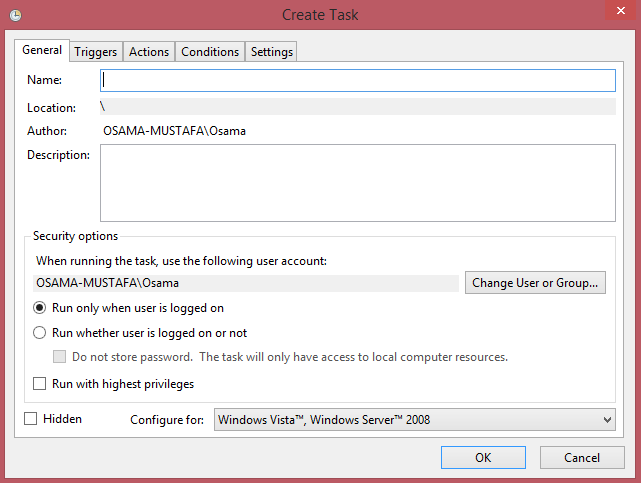
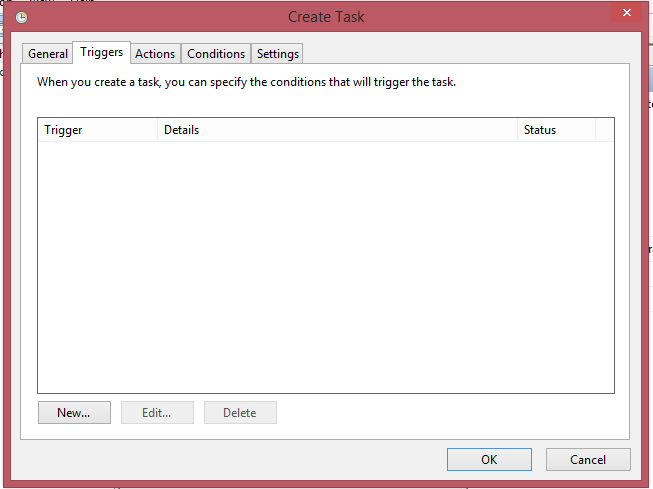
  • Follow the screen now :-
      • Add Task Name and Description :-
      • Add The Time for this Task in this tab 
      • Another Screen :-
      • In This Screen Add Bat File in our case backup.bat
       

      Oracle Streams ORA-44001: invalid schema

      SQL> SQL> SQL> 2 3 4 5 6 7 8 9 10 11 12 13 14 15 16 17 18 19 20 21 job finished
        DECLARE
      *
      ERROR at line 1:
      ORA-23616: Failure in executing block 7 for script
      13F5CD569383406C82E7F63EE3F927E0 with
      ORA-44001: invalid schema
      ORA-06512: at “SYS.DBMS_RECO_SCRIPT_INVOK”, line 139
      ORA-06512: at “SYS.DBMS_STREAMS_RPC”, line 465
      ORA-06512: at “SYS.DBMS_RECOVERABLE_SCRIPT”, line 659
      ORA-06512: at “SYS.DBMS_RECOVERABLE_SCRIPT”, line 682
      ORA-06512: at “SYS.DBMS_STREAMS_MT”, line 7972
      ORA-06512: at “SYS.DBMS_STREAMS_ADM”, line 2674
      ORA-06512: at line 5

      The error related to apply_queue parameter in oracle stream is not set with valid value, therefore set the parameter correctly like the below

      apply_queue_user => ‘STREAM_ADMIN’ 

      Cheers
      Osama Mustafa