Top 10 Database Threats
You can Register Here
All Thanks Goes to Francisco Munoz Alvarez For His Amazing Effort in Oracle Community.
Thank you
Osama Mustafa
For the people who think differently Welcome aboard
Top 10 Database Threats
You can Register Here
All Thanks Goes to Francisco Munoz Alvarez For His Amazing Effort in Oracle Community.
Thank you
Osama Mustafa
TEST siebel: :/Siebel/iPlanet/webserver7/https-Osama_TST/bin\>./startserv
Oracle iPlanet Web Server 7.0.15 B04/19/2012 21:52
info: CORE5076: Using [Java HotSpot(TM) 64-Bit Server VM, Version 1.6.0_24] from [Sun Microsystems Inc.]
startup failure: could not bind to port 8080 (Address already in use)
failure: HTTP3127: http-listener-1: http://TEST:8080: Error creating socket (Address already in use)
failure: HTTP3094: 1 listen sockets could not be created
failure: server initialization failed
From the above error you notice that Port 8080 is already in use.
The Solution :
ps -ef |grep webservd
and Use Kill -9
Try Again Now
Thank you
Osama Mustafa
The Above Error Appears when trying to connect RAC database Using SCAN Listener through JDBC, I checked everything and it was working without any problem, I could not find any reason why this issue happened, nothing in the Listener.log.
So I Used the below connection String instead of above one.
jdbc:oracle:thin:@(DESCRIPTION=(ADDRESS=(PROTOCOL=TCP)(HOST=SCAN-LISTENER-NAME)(PORT=1530))(CONNECT_DATA=(SERVICE_NAME=Service-name)))
Thank you
Osama Mustafa
COLLABORATE 14 Just over 2 months away, The Place will be in Las Vegas from April 7-11, 2014 at the Venetian and Sands Expo Center, you can join the experts and learn from them, attend to the session and have with lot of Activity.
By registering specifically with IOUG for COLLABORATE 14, you’ll reap the following benefits:
• Pre-conference Workshops
• Strategic Leadership Program
• IOUG Attendee Lounge Access
• Priority Access to Hands-on Labs
Register by February 12 and save up to $300 off the onsite rate! When you register, please enter my name in the “Recruit a New Attendee” section.
Register and check the Website here
Official Hash-tag #C14LV
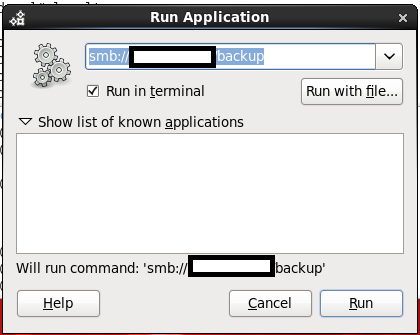
Option #1:
SMB
By Press ( ALT+F2 ) the new dialog will be opened just type in the box the below :
smb://windows-server-ip/shared folder
mount -t smbfs -o username=administrator,password=administratorpassword //windowsip/backup /windwos-backup
Thank you
Osama mustafa
Reference :
1- cyberciti Here
you can download the document from Here.
Thank you
Osama Mustafa
On Linux :
Usually it’s Located in /home/oracle
cd ./sqldeveloper/4.0.0/
Edit Product.conf
and Search For setJavaHome to new One
On Windows :
It’s Depend on user :
C:\Users\Osama\AppData\Roaming\sqldeveloper\4.0.0
and edit the same file.
Thank you
Osama Mustafa
You Can Download the document from here
Thank you
Osama Mustafa
Operating system : Oracle Linux 6.4
Oracle WebTier OHS 11.1.1.7
if you want to configure OHS ( WT ) to work on port 80 ( http ) avoiding insert Port.
For Example :
OHS default Port is 7777, if you want to leave it like this any call for the server should be like this :
But if you are using port 80 you have to do the below :
But on Linux if you need to use port 80 you have to be root, to do this follow the below step :
[root@TST-WT1 bin]# pwd
/u01/fmw/Oracle_WT1/ohs/bin
[root@TST-WT1 bin]# chown root .apachectl
[root@TST-WT1 bin]# chmod 6750 .apachectl
[oracle@TST-WT1 ~]$ cd /u01/fmw/admin/config/OHS/ohs1/
[oracle@SCADNP-WT1 ohs1]$ ls http*
httpd.conf