Steps To Clone Oracle EBS R12

There’s Two major Parts In This Topics :
1- Pre Clone Steps .
2 – Post Clone Steps.

LETS START :

1- Pre Clone Steps : 

On Application Tier : 

1-    Execute Apps environment file
2-    cd $ADMIN_SCRIPTS_HOME
3-    ./adautocfg.sh
4-    Perl adpreclone.pl appsTier

Database Tier : 

1-    Execute Database environment ( under ORACLE_HOME)
2-    cd $ORACLE_HOME/appsutil/scripts/(CONTEXT_NAME)
3-    ./adautocfg.sh
4-    perl adpreclone.pl dbTier

shutdown application and database Copy your virtual nodes on new servers .

Post clone Steps:

Database Server

1-    cd $ORACLE_HOME/appsutil/clone/bin
2-    perl adcfgclone.pl dbTier

Application Server:

1-    cd $COMMON_TOP/clone/bin
2-    perl adcfgclone.pl appsTier

Notes:
$COMMON_TOP: APPLICATION_BASE/apps/apps_st/comn
CONTEXT_NAME: SERVICE_NAME_HOSTNAME

Thank you
Osama mustafa
ORA-16038 ORA-19504

Archiver Hung in Oracle database 
Summary
1. check how much space is used by archiver
2. check the last good backup of the database
3. delete archive log files older than last good backup
4. crosscheck archive log
1. check how much space is used by archiver
  Sql>  select count(*),sum(blocks*block_size) from v$archived_log where    backup_count=0 and      deleted=’NO’;
   Sql> select * from v$flash_recovery_area_usage;
2. check the last good backup of the database

  set pages 999 lines 120

   col STATUS format a9
   col hrs format 999.99
   col start_time format a15
   col end_time format a15
   col dev format a5
   col inbytes format a10
   col outbytes format a10
   select
       INPUT_TYPE, STATUS,
       to_char(START_TIME,’mm/dd/yy hh24:mi’) start_time,
       to_char(END_TIME,’mm/dd/yy hh24:mi’)   end_time,
       elapsed_seconds/3600                   hrs,
       output_device_type dev,
       input_bytes_display inbytes,
       output_bytes_display outbytes
    from V$RMAN_BACKUP_JOB_DETAILS
   order by session_key;

   3. delete archive log files older than last good backup
rman target / nocatalog
 allocate channel for maintenance device type disk;
 crosscheck archivelog all;
 delete noprompt archivelog until time ‘sysdate – 1’;
 delete noprompt expired archivelog all;
 delete noprompt obsolete device type disk;   

4. crosscheck archive log
crosscheck archivelog all;
 release channel;
 exit;  
Thank you 
Osama mustafa

ORA-06512: at "SYS.DBMS_SNAPSHOT_UTL", line 960

This Error Appear when you try to create MATERIALIZED VIEW On remote View 

First you have to know it

 Bug 5583712  ORA-942 on create materialized view on remote view

Product (Component) Oracle Server (Rdbms)
Range of versions believed to be affected Versions < 11
Versions confirmed as being affected
Platforms affected Generic (all / most platforms affected

 You can check Metalink Doc : 5583712.8 


But I would Share this solution All you Have to do is follow the below steps :

CREATE   MATERIALIZED VIEW RHC
  BUILD IMMEDIATE
  USING INDEX
  REFRESH COMPLETE ON DEMAND START WITH SYSDATE+1 NEXT SYSDATE + 8/24
  AS SELECT * FROM vw_RHC@remotedb;
 

ORA-00942: TABLE OR VIEW does NOT exist
ORA-06512: AT “SYS.DBMS_SNAPSHOT_UTL”, line 960
ORA-06512: AT line 1

The Solution is :

CREATE   MATERIALIZED VIEW RHC
  BUILD IMMEDIATE
  USING INDEX
  REFRESH COMPLETE ON DEMAND START WITH SYSDATE+1  NEXT   SYSDATE + 8/24
  AS   AS SELECT * FROM (SELECT * FROM vw_employees@remotedb);

Materialized VIEW created.

Thank you
Osama mustafa

Check RMAN Backup Status

The Below Scripts To Check Backup Status Via Sqlplus , Maybe you will find Same Or Another Scripts In the Same way : 

Sqlplus / as sysdba

This script will report on all backups – full, incremental and archivelog backups –

col STATUS format a9
col hrs format 999.99
select
SESSION_KEY, INPUT_TYPE, STATUS,
to_char(START_TIME,'mm/dd/yy hh24:mi') start_time,
to_char(END_TIME,'mm/dd/yy hh24:mi') end_time,
elapsed_seconds/3600 hrs
from V$RMAN_BACKUP_JOB_DETAILS
order by session_key;
 

This script will report all on full and incremental backups, not archivelog backups –

col STATUS format a9
col hrs format 999.99
select
SESSION_KEY, INPUT_TYPE, STATUS,
to_char(START_TIME,'mm/dd/yy hh24:mi') start_time,
to_char(END_TIME,'mm/dd/yy hh24:mi') end_time,
elapsed_seconds/3600 hrs
from V$RMAN_BACKUP_JOB_DETAILS
where input_type='DB INCR'
order by session_key;

I would Love to Thank gavin soorma – OCM For His Amazing Effort . Share it For Knowledge .

Thank you
Osama Mustafa

What Is $ADMIN_SCRIPT_HOME ???

As We All Know if you need to start/shutdown Oracle Apps you need go $ADMIN_SCRIPT_HOME In R12 Or $CONTEXT_HOME in R11

This Article Explain What These Scripts Do : 

adstrtal.sh

Master script to start all components/services of middle tier or application tier. This script will use Service Control API to start all services which are enabled after checking them in context file (SID_HOSTNAME.xml or CONTEXT_NAME.xml)

adstpall.sh

Master script to stop all components/services of middle tier or application tier


adalnctl.sh

Script to start / stop apps listener (FNDFS and FNDFS). This listener will file will be in 10.1.2 ORACLE_HOME (i.e. Forms & Reports Home)
listener.ora file will be in $INST_TOP/apps/$CONTEXT_NAME/ora/10.1.2/network/admin directory
(Mostly similar to one in 11i with only change in ORACLE_HOME i.e. from 8.0.6 to 10.1.2 )

adapcctl.sh

Script to start/stop Web Server or Oracle HTTP Server. This script uses opmn (Oracle Process Manager and Notification Server) with syntax similar to opmnctl [startstop]proc ohslike opmnctl stopproc ohs .

adcmctl.sh

Script to start / stop concurrent manager,

adformsctl.sh

Script to start / stop Forms OC4J from 10.1.3 Oracle_Home. This script will also use opmnctl to start/stop Forms OC4J like
opmnctl stopproc type=oc4j instancename=forms

adformsrvctl.sh

This script is used only if you wish to start forms in socket mode. Default forms connect method in R12 is servlet.
If started this will start frmsrv executable from 10.1.2 Oracle_Home in Apps R12

adoacorectl.sh

This script will start/stop oacore OC4J in 10.1.3 Oracle_Home. This scripts will also use opmnctl (similar to adapcctl & adformsctl) to start oacore instance of OC4J like
opmnctl startproc type=oc4j instancename=oacore

adoafmctl.sh

 This script will start/stop oafm OC4J in 10.1.3 Oracle_Home. This scripts will also use opmnctl (similar to above) to start oacore instance of OC4J like
opmnctl startproc type=oc4j instancename=oafm

adopmnctl.sh

This script will start/stop opmn service in 10.1.3 Oracle_Home. opmn will control all services in 10.1.3 Oracle_Home like web server or various oc4j instances. If any services are stopped abnormally opmn will/should start them automatically.

Thank You 
Osama Mustafa 
     

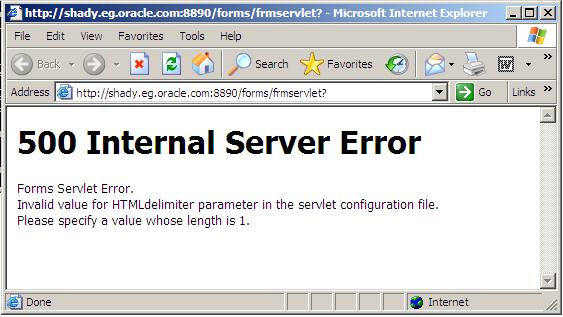
500 Internal Server Error / Oracle Application Server

There’s more than One Reason For this i will provide you with two solutions (Meta-link Note):

Solution One : 

1. Backup and edit the forms configuration file (Default= formsweb.cfg)
2. Modify the HTMLdelimiter to have only one character as a value 

HTMLdelimiter=%

3. Save and exit the file.

Solution Two :

Edit oracle_apache.conf and comment out the include related to the forms.conf  as the following :

# Oracle Forms Developer
#include “/oas/product/oas2/forms/server/forms.conf”

Thank You
osama mustafa

Dealing With Database Gaurd

Database Switchover 

Using this method you can switch backwards and forwards between the primary and DR servers (e.g. so that the primary can become DR and DR can become primary) without having to rebuild either environment:


On Primary Server:
SQL> alter database commit to switchover to standby;
This may cause the following error to be generated:
ERROR at line 1:
ORA-01093: ALTER DATABASE CLOSE only permitted with no sessions connected
If this does occur then restart the database, as below, before retrying the above command:
SQL> shutdown immediate
SQL> startup


SQL> shutdown immediate
SQL> startup nomount
SQL> alter database mount standby database;
SQL> alter database recover managed standby database disconnect;

The primary server is now configured as a DR standby database.
On DR Server:
SQL> alter database recover managed standby database cancel;
SQL> alter database commit to switchover to primary;
SQL> shutdown immediate
SQL> startup
The DR server is now configured as the primary database.
To switch back you just need to repeat the above process but the other way around (e.g. convert the DR database back to a standby and the primary database back to primary).

Activating a Standby Database

If the primary database is not available the standby database can be converted into the primary database as follows:


SQL> alter database recover managed standby database cancel;
SQL> alter database activate standby database;
SQL> shutdown immediate
SQL> startup
The original primary database is now obsolete and can be rebuilt as a standby database once it is available again.

Opening the Standby Database in Read Only Mode


The standby database can be opened in read only mode for querying and then converted back into a standby database without affecting the primary.
On standby server:
SQL> alter database recover managed standby database cancel;
SQL> alter database open read only;
The standby database is now open and available for querying in read only mode.
To put the standby database back into standby mode:
SQL> shutdown immediate
SQL> startup nomount
SQL> alter database mount standby database;
SQL> alter database recover managed standby database disconnect;

How to check whether the Standby Database is in Sync

On the primary server:

SQL> SELECT max(sequence#) AS “PRIMARY” FROM v$log_history;

 
On the standby server:

SQL> SELECT max(sequence#) AS “STANDBY”, applied
          FROM v$archived_log GROUP BY applied;

The standby database is in sync with the primary database if the above PRIMARY value matches the above STANDBY value where applied = ‘YES’.


Some Basic To backup Voting Disk And OCR For Oracle RAC

We Need To Backup Voting Disk and OCR For Oracle RAC For Disaster Situation :

Add Voting Disk :

# crsctl add css votedisk

To remove a voting disk:

# crsctl delete css votedisk

If Oracle Clusterware is down on all nodes, use the –force option:

# crsctl add css votedisk -force
# crsctl delete css votedisk -force

 Backup Voting Disk :

$ crsctl query css votedisk
$ dd if= of= bs=4k

OCR BACKUP :

Oracle RAC Taking Backup For OCR By Default , You will Find It On :

 cd $ORACLE_BASE/Crs/cdata/jfv_clus

Change the default automatic backup location:

# ocrconfig –backuploc /shared/bak

Back Up OCR Manually :

 # ocrconfig –export file name

 Recover OCR Using Physical Backups:

1.Locate a physical backup:
 $ ocrconfigshowbackup
2.Review its contents:

# ocrdumpbackupfile file_name
 3.Stop Oracle Clusterwareon all nodes:

 # crsctl stop crs
4.Restore the physical OCR backup:

# ocrconfig –restore <CRS HOME>/cdata/jfv_clus/day.ocr

5.Restart Oracle Clusterware on all nodes:

 # crsctl start crs
6.Check OCR integrity:

$ cluvfy comp ocr -n all

Thank You
Osama Mustafa 


ocfs2console: o2cb_ctl: Unable to access cluster service while creating node

For the first time, during configuring the nodes, ocfs2console fails with message:
“o2cb_ctl: Unable to access cluster service while creating node”
TODO:
– Quit ocfs2console
– Stop the service
– Remove file /etc/ocfs2/cluster.conf
– Restart ocfs2console
– Configure the nodes again

[root@rac1 ~]#  /etc/init.d/ocfs2 stop
Stopping Oracle Cluster File System (OCFS2) [ OK ]

[root@rac1 ~]# /etc/init.d/o2cb offline ocfs2

[root@rac1 ~]# /etc/init.d/o2cb unload
Unmounting ocfs2_dlmfs filesystem: OK
Unloading module "ocfs2_dlmfs": OK
Unmounting configfs filesystem: OK
Unloading module "configfs": OK

[root@rac1 ~]# rm -f /etc/ocfs2/cluster.conf
[root@rac1 ~]# /usr/sbin/ocfs2console &