AWS database services part 2

Part one https://osamaoracle.com/2023/01/03/aws-database-services/

Amazon RDS

Amazon RDS is a web service that makes it easy to set up, operate, and scale a relational database in the cloud. It provides cost-efficient and resizable capacity while managing time-consuming database administration tasks. This allows you to focus on your applications and business. Amazon RDS gives you access to the full capabilities of a MySQL, Oracle, SQL Server, or Aurora database engines. This means that the code, applications, and tools you already use today with your existing databases can be used with Amazon RDS. 

Amazon RDS automatically patches the database software and backs up your database. It stores the backups for a user-defined retention period and provides point-in-time recovery. You benefit from the flexibility of scaling the compute resources or storage capacity associated with your relational DB instance with a single API call.

Amazon RDS is available on six database engines, which optimize for memory, performance, or I/O. The database engines include:

  • Amazon Aurora
  • PostgreSQL
  • MySQL
  • MariaDB
  • Oracle Database
  • SQL Server

Amazon RDS Multi-AZ deployments

Amazon RDS Multi-AZ deployments provide enhanced availability and durability for DB instances, making them a natural fit for production database workloads. When you provision a Multi-AZ DB instance, Amazon RDS synchronously replicates the data to a standby instance in a different Availability Zone. 

You can modify your environment from Single-AZ to Multi-AZ at any time. Each Availability Zone runs on its own physically distinct, independent infrastructure and is engineered to be highly reliable. Upon failure, the secondary instance picks up the load. Note that this is not used for read-only scenarios.

Read replicas

With Amazon RDS, you can create read replicas of your database. Amazon automatically keeps them in sync with the primary DB instance. Read replicas are available in Amazon RDS for Aurora, MySQL, MariaDB, PostgreSQL, Oracle, and Microsoft SQL Server. Read replicas can help you:

  • Relieve pressure on your primary node with additional read capacity.
  • Bring data close to your applications in different AWS Regions.
  • Promote a read replica to a standalone instance as a disaster recovery (DR) solution if the primary DB instance fails.

You can add read replicas to handle read workloads so your primary database doesn’t become overloaded with read requests. Depending on the database engine, you can also place your read replica in a different Region from your primary database. This gives you the ability to have a read replica closer to a particular locality.

You can configure a source database as Multi-AZ for high availability and create a read replica (in Single-AZ) for read scalability. With RDS for MySQL and MariaDB, you can also set the read replica as Multi-AZ, and as a DR target. When you promote the read replica to be a standalone database, it will be replicated to multiple Availability Zones.

Amazon DynamoDB tables

DynamoDB is a fully managed NoSQL database service. DynamoDB uses primary keys to uniquely identify each item in a table and secondary indexes to provide more querying flexibility. When creating a table, you must specify a table name and a primary key. These are the only two required entities.

There are two types of primary keys supported:

  • Simple primary key: A simple primary key is composed of just one attribute designated as the partition key. If you use only the partition, no two items can have the same value.
  • Composite primary key: A composite primary key is composed of both a partition key and a sort key. In this case the partition key value for multiple items can be the same, but their sort key values must be different.

You work with the core components: tables, items, and attributes. A table is a collection of items, and each item is a collection of attributes. In the example above, the table includes two items, with primary keys Nikki Wolf and John Stiles. The item with the primary key Nikki Wolf includes three attributes: Role, Year, and Genre. The primary key for John Stiles includes a Height attribute, and it does not include the Genre attribute.

Amazon DynamoDB consistency options

When your application writes data to a DynamoDB table and receives an HTTP 200 response (OK), the write has occurred and is durable. The data is eventually consistent across all storage locations, usually within one second or less. DynamoDB supports eventually consistent and strongly consistent reads.

DynamoDB uses eventually consistent reads, unless you specify otherwise. Read operations (such as GetItem, Query, and Scan) provide a ConsistentRead parameter. If you set this parameter to true, DynamoDB uses strongly consistent reads during the operation.

EVENTUALLY CONSISTENT READS

When you read data from a DynamoDB table, the response might not reflect the results of a recently completed write operation. The response might include some stale data. If you repeat your read request after a short time, the response should return the latest data.

STRONGLY CONSISTENT READS

When you request a strongly consistent read, DynamoDB returns a response with the most up-to-date data, reflecting the updates from all prior write operations that were successful. A strongly consistent read might not be available if there is a network delay or outage.

Amazon DynamoDB global tables

global table is a collection of one or more DynamoDB tables, all owned by a single AWS account, identified as replica tables. A replica table (or replica, for short) is a single DynamoDB table that functions as part of a global table. Each replica stores the same set of data items. Any given global table can only have one replica table per Region, and every replica has the same table name and the same primary key schema.

DynamoDB global tables provide a fully managed solution for deploying a multi-Region, multi-active database, without having to build and maintain your own replication solution. When you create a global table, you specify the AWS Regions where you want the table to be available. DynamoDB performs all the necessary tasks to create identical tables in these Regions and propagate ongoing data changes to all of them.

Database Caching

Without caching, EC2 instances read and write directly to the database. With a caching, instances first attempt to read from a cache which uses high performance memory. They use a cache cluster that contains a set of cache nodes distributed between subnets. Resources within those subnets have high-speed access to those nodes.

Common caching strategies

There are multiple strategies for keeping information in the cache in sync with the database. Two common caching strategies include lazy loading and write-through.

Lazy loading

In lazy loading, updates are made to the database without updating the cache. In the case of a cache miss, the information retrieved from the database can be subsequently written to the cache. Lazy loading ensures that the data loaded in the cache is data needed by the application but can result in high cache-miss-to-cache-hit ratios in some use cases.

Write-through

An alternative strategy is to write through to the cache every time the database is accessed. This approach results in fewer cache misses. This improves performance but requires additional storage for data, which may not be needed by the applications.

Managing your cache

As your application writes to the cache, you need to consider cache validity and make sure that the data written to the cache is accurate. You also need to develop a strategy for managing cache memory. When your cache is full, you determine which items should be deleted by setting an eviction policy.

CACHE VALIDITY

Lazy loading allows for stale data but doesn’t fail with empty nodes. Write-through ensures that data is always fresh but can fail with empty nodes and can populate the cache with superfluous data. By adding a time to live (TTL) value to each write to the cache, you can ensure fresh data without cluttering up the cache with extra data. 

TTL is an integer value that specifies the number of seconds or milliseconds, until the key expires. When an application attempts to read an expired key, it is treated as though the data is not found in cache, meaning that the database is queried and the cache is updated. This keeps data from getting too stale and requires that values in the cache are occasionally refreshed from the database.

MANAGING MEMORY

When cache memory is full, the cache engine removes data from memory to make space for new data. It chooses this data based on the eviction policy you set. An eviction policy evaluates the following characteristics of your data:

  • Which were accessed least recently?
  • Which have been accessed least frequently?
  • Which have a TTL set and the TTL value?

Amazon Elasticache

Amazon ElastiCache is a web service that makes it easy to set up, manage, and scale a distributed in-memory data store or cache environment in the cloud. When you’re using a cache for a backend data store, a side-cache is perhaps the most commonly known approach. Redis and Memcached are general-purpose caches that are decoupled from the underlying data store.

Use ElastiCache for Memcached for data-intensive apps. The service works as an in-memory data store and cache to support the most demanding applications requiring sub-millisecond response times. It is fully managed, scalable, and secure—making it an ideal candidate for cases where frequently accessed data must be in memory. The service is a popular choice for web, mobile apps, gaming, ad tech, and e-commerce. 

ElastiCache for Redis is an in-memory data store that provides sub-millisecond latency at internet scale. It can power the most demanding real-time applications in gaming, ad tech, e-commerce, healthcare, financial services, and IoT. 

ElastiCache engines

ElastiCache for MemcachedElastiCache for Redis
Simple cache to offload database burdenYesYes
Ability to scale horizontally for writes and storageYesYes
(if cluster mode is enabled)
Multi-threaded performanceYes
Advanced data typesYes
Sorting and ranking data setsYes
Pub and sub capabilityYes
Multi-AZ with Auto FailoverYes
Backup and restoreYes

Amazon DynamoDB Accelerator

DynamoDB is designed for scale and performance. In most cases, the DynamoDB response times can be measured in single-digit milliseconds. However, there are certain use cases that require response times in microseconds. For those use cases, DynamoDB Accelerator (DAX) delivers fast response times for accessing eventually consistent data.

DAX is an Amazon DynamoDB compatible caching service that provides fast in-memory performance for demanding applications.

AWS Database Migration Service

AWS Database Migration Service (AWS DMS) supports migration between the most widely used databases like Oracle, PostgreSQL, SQL Server, Amazon Redshift, Aurora, MariaDB, and MySQL. AWS DMS supports both homogeneous (same engine) and heterogeneous (different engines) migrations.

  • The service can be used to migrate between databases on Amazon EC2, Amazon RDS, and on-premises. Either the target or the source database must be located in Amazon EC2. It cannot be used to migrate between two on-premises databases.
  • AWS DMS automatically handles formatting of the source data for consumption by the target database. It does not perform schema or code conversion.
  • For homogenous migrations, you can use native tools to perform these conversions. For heterogeneous migrations, you can use the AWS Schema Conversion Tool (AWS SCT).

AWS Schema Conversion Tool

The AWS Schema Conversion Tool (AWS SCT) automatically converts the source database schema and a majority of the database code objects. The conversion includes views, stored procedures, and functions. They are converted to a format that is compatible with the target database. Any objects that cannot be automatically converted are marked so that they can be manually converted to complete the migration.

Source databasesTarget databases on AWS
Oracle database
Oracle data warehouse
Azure SQL
SQL server
Teradata
IBM Netezza
Greenplum
HPE Vertica
MySQL and MariaDB
PostgreSQL
Aurora
IBM DB2 LUW
Apache Cassandra
SAP ASE
AWS SCTMySQL
PostgreSQL
Oracle
AmazonDB
RDS for MySQL
Aurora for MySQL
RDS for PostgreSQL
Aurora PostgreSQL

The AWS SCT can also scan your application source code for embedded SQL statements and convert them as part of a database schema conversion project. During this process, the AWS SCT performs cloud native code optimization by converting legacy Oracle and SQL Server functions to their equivalent AWS service, modernizing the applications at the same time of migration. 

Regards

Osama

AWS Step Functions

It’s common for modern cloud applications to be composed of many services and components. As applications grow, an increasing amount of code needs to be written to coordinate the interaction of all components. With AWS Step Functions, you can focus on defining the component interactions, rather than writing all the software to make the interactions work.

AWS Step Functions integrates with the AWS services listed below. You can directly call API actions from the Amazon States Language in AWS Step Functions and pass parameters to the APIs of these services:

  • Compute services (AWS Lambda, Amazon ECS, Amazon EKS, and AWS Fargate)
  • Database services (Amazon DynamoDB)
  • Messaging services (Amazon SNS and Amazon SQS)
  • Data processing and analytics services (Amazon Athena, AWS Batch, AWS Glue, Amazon EMR, and AWS Glue DataBrew)
  • Machine learning services (Amazon SageMaker)
  • APIs created by API Gateway

You can configure your AWS Step Functions workflow to call other AWS services using AWS Step Functions service tasks. 

Step Functions: State machine

A state machine is an object that has a set number of operating conditions that depend on its previous condition to determine output.

A common example of a state machine is the soda vending machine. The machine starts in the operating state (waiting for a transaction), and then moves to soda selection when money is added. After that, it enters a vending state, where the soda is deployed to the customer. After completion, the state returns back to operating.

Build workflows using state types

States are elements in your state machine. A state is referred to by its name, which can be any string, but must be unique within the scope of the entire state machine.

States can perform a variety of functions in your state machine:

  • Do some work in your state machine (a Task state)
  • Make a choice between different branches to run (a Choice state)
  • Stop with a failure or success (a Fail or Succeed state)
  • Pass its input to its output or inject some fixed data (a Pass state)
  • Provide a delay for a certain amount of time or until a specified time or date (a Wait state)
  • Begin parallel branches (a Parallel state)
  • Dynamically iterate steps (a Map state)

Orchestration of complex distributed workflows

Express Workflows are ideal for high-volume, event-processing workloads such as IoT data ingestion, streaming data processing and transformation, and mobile application backends. They can run for up to 5 minutes. Express Workflows employ an at-least-once model, where there is a possibility that a code might be run more than once. This makes them ideal for orchestrating idempotent actions such as transforming input data and storing using PUT in DynamoDB. Express Workflow executions are billed by the number of executions, the duration of execution, and the memory consumed.

Regards

Osama

Amazon Kinesis

Amazon Kinesis for data collection and analysis

With Amazon Kinesis, you:

  • Collect, process, and analyze data streams in real time. Kinesis has the capacity to process streaming data at any scale. It provides you the flexibility to choose the tools that best suit the requirements of your application in a cost-effective way.
  • Ingest real-time data such as video, audio, application logs, website clickstreams, and Internet of Things (IoT) telemetry data. The ingested data can be used for machine learning, analytics, and other applications.
  • Can process and analyze data as it arrives, and respond instantly. You don’t have to wait until all data is collected before the processing begins.

Amazon Kinesis Data Streams

To get started using Amazon Kinesis Data Streams, create a stream and specify the number of shards. Each shard is a unit of read and write capacity. Each shard can read up to 1 MB of data per second and write at a rate of 2 MB per second. The total capacity of a stream is the sum of the capacities of its shards. Increase or decrease the number of shards in a stream as needed. Data being written is in the form of a record, which can be up to 1 MB in size.

  • Producers write data into the stream. A producer might be an Amazon EC2 instance, a mobile client, an on-premises server, or an IoT device.
  • Consumers receive the streaming data that the producers generate. A consumer might be an application running on an EC2 instance or AWS Lambda. If it’s on an Amazon EC2 instance, the application will need to scale as the amount of streaming data increases. If this is the case, run it in an Auto Scaling group. 
  • Each consumer reads from a particular shard. There might be more than one application processing the same data. 
  • Another way to write a consumer application is to use AWS Lambda, which lets you run code without having to provision or manage servers. 
  • The results of the consumer applications can be stored by AWS services such as Amazon S3, Amazon DynamoDB, and Amazon RedShift.

Amazon Kinesis Data Firehose

Amazon Kinesis Data Firehose starts to process data in near-real time. Kinesis Data Firehose can send records to Amazon S3, Amazon Redshift, Amazon Elasticsearch Service (ES), and any HTTP endpoint owned by you. It can also send records to any of your third-party service providers, including Datadog, New Relic, and Splunk.

Regards

Osama

SQS vs. SNS

Loose coupling with Amazon Simple Queue Service

Amazon Simple Queue Service (SQS) is a fully managed message queuing service that use use to you to decouple and scale microservices, distributed systems, and serverless applications The service works on a massive scale, processing billions of messages per day. It stores all message queues and messages within a single, highly available AWS Region with multiple redundant Availability Zones. This ensures that no single computer, network, or Availability Zone failure can make messages inaccessible. Messages can be sent and read simultaneously.

A loosely coupled workload involves processing a large number of smaller jobs. The loss of one node or job in a loosely coupled workload usually doesn’t delay the entire calculation. The lost work can be picked up later or omitted altogether.

With Amazon SQS, you can decouple pre-processing steps from compute steps and post-processing steps. Building applications from individual components that perform discrete functions improves scalability and reliability. Decoupling components is a best practice for designing modern applications. Amazon SQS frequently lies at the heart of cloud-native loosely coupled solutions.

SQS queue types

Amazon SQS offers two types of message queues


STANDARD QUEUES

Standard queues support at-least-once message delivery and provide best-effort ordering. Messages are generally delivered in the same order in which they are sent. However, because of the highly distributed architecture, more than one copy of a message might be delivered out of order. Standard queues can handle a nearly unlimited number of API calls per second. You can use standard message queues if your application can process messages that arrive repetitively and out of order.

FIFO QUEUES

FIFO (First-In-First-Out) queues are designed to enhance messaging between applications when the order of operations and events is critical or where duplicates can’t be tolerated. FIFO queues also provide exactly-once processing but have a limited number of API calls per second. FIFO queues are designed to enhance messaging between applications when the order of operations and events is critical.

Optimizing your Amazon SQS queue configurations

When creating an Amazon SQS queue, you need to consider how your application interacts with the queue. This information will help you optimize the configuration of your queue to control costs and increase performance.

TUNE YOUR VISIBILITY TIMEOUT

When a consumer receives an SQS message, that message remains in the queue until the consumer deletes it. You can configure the SQS queue’s visibility timeout setting to make that message invisible to other consumers for a period of time. This helps to prevent another consumer from processing the same message. The default visibility timeout is 30 seconds. The consumer deletes the message once it completes processing the message. If the consumer fails to delete the message before the visibility timeout expires, it becomes visible to other consumers and can be processed again. 

Typically, you should set the visibility timeout to the maximum time that it takes your application to process and delete a message from the queue. Setting too short of a timeout increases the possibility of your application processing a message twice. Too long of a visibility timeout delays subsequent attempts at processing a message.

CHOOSE THE RIGHT POLLING TYPE

You can configure an Amazon SQS queue to use either short polling or long polling. Queues with short polling:

  • Send a response to the consumer immediately after receiving a request providing a faster response
  • Increases the number of responses and therefore costs. 

SQS queues with long polling:

  • Do not return a response until at least one message arrives or the poll times out.
  • Less frequent responses but decreases costs.

Depending on the frequency of messages arriving in your queue, many of the responses from a queue using short polling could just be reporting an empty queue. Unless your application requires an immediate response to its poll requests, long polling is the preferable option.

Amazon SNS

Amazon SNS is a web service that makes it easy to set up, operate, and send notifications from the cloud. The service follows the publish-subscribe (pub-sub) messaging paradigm, with notifications being delivered to clients using a push mechanism.

Amazon SNS publisher to multiple SQS queues

Using highly available services, such as Amazon SNS, to perform basic message routing is an effective way of distributing messages to microservices. The two main forms of communications between microservices are request-response, and observer. In the example, an observer type is used to fan out orders to two different SQS queues based on the order type. 

To deliver Amazon SNS notifications to an SQS queue, you subscribe to a topic specifying Amazon SQS as the transport and a valid SQS queue as the endpoint. To permit the SQS queue to receive notifications from Amazon SNS, the SQS queue owner must subscribe the SQS queue to the topic for Amazon SNS. If the user owns the Amazon SNS topic being subscribed to and the SQS queue receiving the notifications, nothing else is required. Any message published to the topic will automatically be delivered to the specified SQS queue. If the owner of the SQS queue is not the owner of the topic, Amazon SNS requires an explicit confirmation to the subscription request.

Amazon SNS and Amazon SQS

FeaturesAmazon SNSAmazon SQS
Message persistenceNoYes
Delivery mechanismPush (passive)Poll (active)
Producer and consumerPublisher and subscriberSend or receive
Distribution modelOne to manyOne to one

Regards

Osama

AWS API GATEWAY

With API Gateway, you can create, publish, maintain, monitor, and secure APIs.

With API Gateway, you can connect your applications to AWS services and other public or private websites. It provides consistent RESTful and HTTP APIs for mobile and web applications to access AWS services and other resources hosted outside of AWS.

As a gateway, it handles all the tasks involved in accepting and processing up to hundreds of thousands of concurrent API calls. These include traffic management, authorization and access control, monitoring, and API version management.

API Gateway sample architecture

API Gateway integrates with Amazon CloudWatch by sending log messages and detailed metrics to it. You can activate logging for each stage in your API or for each method. You can set the verbosity of the logging (Error or Info), and if full request and response data should be logged.

The detailed metrics that API Gateway can send to Amazon CloudWatch are:

  • Number of API calls
  • Latency
  • Integration latency
  • HTTP 400 and 500 errors

API Gateway features

Creates a unified API front end for multiple microservices.
Provides DDoS protection and throttling for your backend.
Authenticates and authorizes requests to a backend.
Throttles, meters, and monetizes API usage by third-party developers.

Regards

Osama

VPC Peering

Connecting VPCs with VPC peering

When your business or architecture becomes large enough, you will find the need to separate logical elements for security or architectural needs, or just for simplicity’s sake. 

A VPC peering connection is a one-to-one relationship between two VPCs. There can only be one peering resource between any two VPCs. You can create multiple VPC peering connections for each VPC that you own, but transitive peering relationships are not supported. You will not have any peering relationship with VPCs that your VPC is not directly peered with. You can create a VPC peering connection between your own VPCs, or with a VPC in another AWS account within a single Region.

To establish a VPC peering connection, the owner of the requester VPC (or local VPC) sends a request to the owner of the peer VPC. You or another AWS account can own the peer VPC. It cannot have a Classless Inter-Domain Routing (CIDR) block that overlaps with your requester VPC’s CIDR block. The owner of the peer VPC has to accept the VPC peering connection request to activate the VPC peering connection. 

To permit the flow of traffic between the peer VPCs using private IP addresses, add a route to one or more of your VPC’s route tables that points to the IP address range of the peer VPC. The owner of the peer VPC adds a route to one of their VPC’s route tables that points to the IP address range of your VPC. You might also need to update the security group rules that are associated with your instance to ensure that traffic to and from the peer VPC is not restricted. 

Benefits of VPC peering

Review some of the benefits of using VPC peering to connect multiple VPCs together.

  • bulletBypass the internet gateway or virtual private gateway. Use VPC peering to quickly connect two or more of your networks without needing other virtual appliances in your environment.
  • bulletUse highly available connections. VPC peering connections are redundant by default. AWS manages your connection.
  • bulletAvoid bandwidth bottlenecks. All inter-Region traffic is encrypted with no single point of failure or bandwidth bottlenecks. Traffic always stays on the global AWS backbone, and never traverses the public internet, which reduces threats, such as common exploits, and distributed denial of service (DDoS) attacks.
  • bulletUse private IP addresses to direct traffic. The VPC peering traffic remains in the private IP space.

 VPC peering for shared services

your security team provides you with a shared services VPC that each department can peer with. This VPC allows your resources to connect to a shared directory service, security scanning tools, monitoring or logging tools, and other services.

A VPC peering connection with a VPC in a different Region is present. Inter-Region VPC peering allows VPC resources that run in different AWS Regions to communicate with each other using private IP addresses. You won’t be required to use gateways, virtual private network (VPN) connections, or separate physical hardware to send traffic between your Regions.

full mesh VPC peering

each VPC must have a one-to-one connection with each VPC with which it is approved to communicate. This is because each VPC peering connection is nontransitive in nature and does not permit network traffic to pass from one peering connection to another.

The number of connections required has a direct impact on the number of potential points of failure and the requirement for monitoring. The fewer connections you need, the fewer you need to monitor and the fewer potential points of failure.

Regards

Osama

AWS Community Builder

I woke up today with fantastic news: AWS Community Builder has been renewed for the second time.

The AWS Community Builders program offers technical resources, education, and networking opportunities to AWS technical enthusiasts and emerging thought leaders passionate about sharing knowledge and connecting with the technical community.

Interested AWS builders should apply to the program to build relationships with AWS product teams, AWS Heroes, and the AWS community.

You can check the program here.

Regards

Osama

VPC endpoints

A VPC endpoint enables private connections between your VPC and supported AWS services without requiring an internet gateway, NAT device, VPN connection, or Direct Connect connection. Instances in your VPC do not require public IP addresses to communicate with resources in the service. Traffic between your VPC and the other service does not leave the AWS network.

Endpoints are virtual devices. They are horizontally scaled, redundant, and highly available VPC components. They permit communication between instances in your VPC and services without imposing availability risks or bandwidth constraints on your network traffic.

Types of VPC endpoints

GATEWAY ENDPOINT

Specify a gateway endpoint as a route target in your route table. A gateway endpoint is meant for traffic destined to Amazon S3, or Amazon DynamoDB and remains inside the AWS network.

instance A in the public subnet communicates with Amazon S3 via an internet gateway. Instance A has a route to local destinations in the VPC. Instance B communicates with an Amazon S3 bucket and an Amazon DynamoDB table using unique gateway endpoints. The diagram shows an example of a private route table. The private route table directs your Amazon S3 and DynamoDB requests through each gateway endpoint using routes. The route table uses a prefix list to target the specific Region for each service.

INTERFACE ENDPOINT

With an interface VPC endpoint (interface endpoint), you can privately connect your VPC to services as if they were in your VPC. When the interface endpoint is created, traffic is directed to the new endpoint without changes to any route tables in your VPC.

For example, a Region is shown with Systems Manager outside of the example VPC. The example VPC has a public and private subnet with an Amazon Elastic Compute Cloud (Amazon EC2) instance in each. Systems Manager traffic sent to ssm.region.amazonaws.com is sent to an elastic network interface in the private subnet.

Gateway VPC endpoints and interface VPC endpoints help you access services over the AWS backbone.

gateway VPC endpoint (gateway endpoint) is a gateway that you specify as a target for a route in your route table for traffic destined for a supported AWS service. The following AWS services are supported: Amazon S3 and Amazon DynamoDB.

An interface VPC endpoint (interface endpoint) is an elastic network interface with a private IP address from the IP address range of your subnet. The network interface serves as an entry point for traffic destined to a supported service. AWS PrivateLink powers interface endpoints and it avoids exposing traffic to the public internet.

Regards

Osama

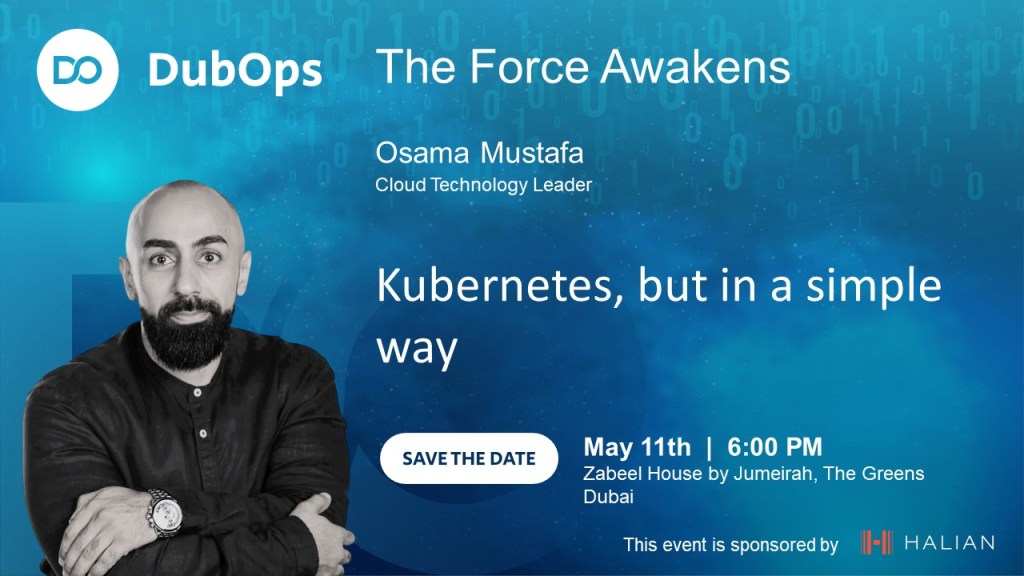
DubOPS Event

DubOps is a unique event that brings together DevOps, IT operations, and software development experts to share their knowledge and insights with the community. This event provides a platform for attendees to learn about the latest trends and best practices in the industry, as well as network with peers and thought leaders.

Registration for the Dubops event is now open, and we encourage anyone interested in attending to sign up early, as space is limited. Don’t miss this chance to expand your knowledge, connect with peers, and stay ahead of the curve in the ever-changing world of DevOps and IT operations.

Date: May 11th, 2023
Time: 18:00 – 21:00
Location: Zabeel House, Dubai, UAE
Registration link: https://lnkd.in/dCd7V-vv
We look forward to seeing you there!

Regards

Osama