Collect, process, and analyze data streams in real time. Kinesis has the capacity to process streaming data at any scale. It provides you the flexibility to choose the tools that best suit the requirements of your application in a cost-effective way.
Ingest real-time data such as video, audio, application logs, website clickstreams, and Internet of Things (IoT) telemetry data. The ingested data can be used for machine learning, analytics, and other applications.
Can process and analyze data as it arrives, and respond instantly. You don’t have to wait until all data is collected before the processing begins.
Amazon Kinesis Data Streams
To get started using Amazon Kinesis Data Streams, create a stream and specify the number of shards. Each shard is a unit of read and write capacity. Each shard can read up to 1 MB of data per second and write at a rate of 2 MB per second. The total capacity of a stream is the sum of the capacities of its shards. Increase or decrease the number of shards in a stream as needed. Data being written is in the form of a record, which can be up to 1 MB in size.
Producers write data into the stream. A producer might be an Amazon EC2 instance, a mobile client, an on-premises server, or an IoT device.
Consumers receive the streaming data that the producers generate. A consumer might be an application running on an EC2 instance or AWS Lambda. If it’s on an Amazon EC2 instance, the application will need to scale as the amount of streaming data increases. If this is the case, run it in an Auto Scaling group.
Each consumer reads from a particular shard. There might be more than one application processing the same data.
Another way to write a consumer application is to use AWS Lambda, which lets you run code without having to provision or manage servers.
The results of the consumer applications can be stored by AWS services such as Amazon S3, Amazon DynamoDB, and Amazon RedShift.
Amazon Kinesis Data Firehose
Amazon Kinesis Data Firehose starts to process data in near-real time. Kinesis Data Firehose can send records to Amazon S3, Amazon Redshift, Amazon Elasticsearch Service (ES), and any HTTP endpoint owned by you. It can also send records to any of your third-party service providers, including Datadog, New Relic, and Splunk.
Amazon Simple Queue Service (SQS) is a fully managed message queuing service that use use to you to decouple and scale microservices, distributed systems, and serverless applications The service works on a massive scale, processing billions of messages per day. It stores all message queues and messages within a single, highly available AWS Region with multiple redundant Availability Zones. This ensures that no single computer, network, or Availability Zone failure can make messages inaccessible. Messages can be sent and read simultaneously.
A loosely coupled workload involves processing a large number of smaller jobs. The loss of one node or job in a loosely coupled workload usually doesn’t delay the entire calculation. The lost work can be picked up later or omitted altogether.
With Amazon SQS, you can decouple pre-processing steps from compute steps and post-processing steps. Building applications from individual components that perform discrete functions improves scalability and reliability. Decoupling components is a best practice for designing modern applications. Amazon SQS frequently lies at the heart of cloud-native loosely coupled solutions.
SQS queue types
Amazon SQS offers two types of message queues
STANDARD QUEUES
Standard queues support at-least-once message delivery and provide best-effort ordering. Messages are generally delivered in the same order in which they are sent. However, because of the highly distributed architecture, more than one copy of a message might be delivered out of order. Standard queues can handle a nearly unlimited number of API calls per second. You can use standard message queues if your application can process messages that arrive repetitively and out of order.
FIFO QUEUES
FIFO (First-In-First-Out) queues are designed to enhance messaging between applications when the order of operations and events is critical or where duplicates can’t be tolerated. FIFO queues also provide exactly-once processing but have a limited number of API calls per second. FIFO queues are designed to enhance messaging between applications when the order of operations and events is critical.
Optimizing your Amazon SQS queue configurations
When creating an Amazon SQS queue, you need to consider how your application interacts with the queue. This information will help you optimize the configuration of your queue to control costs and increase performance.
TUNE YOUR VISIBILITY TIMEOUT
When a consumer receives an SQS message, that message remains in the queue until the consumer deletes it. You can configure the SQS queue’s visibility timeout setting to make that message invisible to other consumers for a period of time. This helps to prevent another consumer from processing the same message. The default visibility timeout is 30 seconds. The consumer deletes the message once it completes processing the message. If the consumer fails to delete the message before the visibility timeout expires, it becomes visible to other consumers and can be processed again.
Typically, you should set the visibility timeout to the maximum time that it takes your application to process and delete a message from the queue. Setting too short of a timeout increases the possibility of your application processing a message twice. Too long of a visibility timeout delays subsequent attempts at processing a message.
CHOOSE THE RIGHT POLLING TYPE
You can configure an Amazon SQS queue to use either short polling or long polling. Queues with short polling:
Send a response to the consumer immediately after receiving a request providing a faster response
Increases the number of responses and therefore costs.
SQS queues with long polling:
Do not return a response until at least one message arrives or the poll times out.
Less frequent responses but decreases costs.
Depending on the frequency of messages arriving in your queue, many of the responses from a queue using short polling could just be reporting an empty queue. Unless your application requires an immediate response to its poll requests, long polling is the preferable option.
Amazon SNS
Amazon SNS is a web service that makes it easy to set up, operate, and send notifications from the cloud. The service follows the publish-subscribe (pub-sub) messaging paradigm, with notifications being delivered to clients using a push mechanism.
Amazon SNS publisher to multiple SQS queues
Using highly available services, such as Amazon SNS, to perform basic message routing is an effective way of distributing messages to microservices. The two main forms of communications between microservices are request-response, and observer. In the example, an observer type is used to fan out orders to two different SQS queues based on the order type.
To deliver Amazon SNS notifications to an SQS queue, you subscribe to a topic specifying Amazon SQS as the transport and a valid SQS queue as the endpoint. To permit the SQS queue to receive notifications from Amazon SNS, the SQS queue owner must subscribe the SQS queue to the topic for Amazon SNS. If the user owns the Amazon SNS topic being subscribed to and the SQS queue receiving the notifications, nothing else is required. Any message published to the topic will automatically be delivered to the specified SQS queue. If the owner of the SQS queue is not the owner of the topic, Amazon SNS requires an explicit confirmation to the subscription request.
With API Gateway, you can create, publish, maintain, monitor, and secure APIs.
With API Gateway, you can connect your applications to AWS services and other public or private websites. It provides consistent RESTful and HTTP APIs for mobile and web applications to access AWS services and other resources hosted outside of AWS.
As a gateway, it handles all the tasks involved in accepting and processing up to hundreds of thousands of concurrent API calls. These include traffic management, authorization and access control, monitoring, and API version management.
API Gateway sample architecture
API Gateway integrates with Amazon CloudWatch by sending log messages and detailed metrics to it. You can activate logging for each stage in your API or for each method. You can set the verbosity of the logging (Error or Info), and if full request and response data should be logged.
The detailed metrics that API Gateway can send to Amazon CloudWatch are:
Number of API calls
Latency
Integration latency
HTTP 400 and 500 errors
API Gateway features
Creates a unified API front end for multiple microservices.
Provides DDoS protection and throttling for your backend.
Authenticates and authorizes requests to a backend.
Throttles, meters, and monetizes API usage by third-party developers.
When your business or architecture becomes large enough, you will find the need to separate logical elements for security or architectural needs, or just for simplicity’s sake.
A VPC peering connection is a one-to-one relationship between two VPCs. There can only be one peering resource between any two VPCs. You can create multiple VPC peering connections for each VPC that you own, but transitive peering relationships are not supported. You will not have any peering relationship with VPCs that your VPC is not directly peered with. You can create a VPC peering connection between your own VPCs, or with a VPC in another AWS account within a single Region.
To establish a VPC peering connection, the owner of the requester VPC (or local VPC) sends a request to the owner of the peer VPC. You or another AWS account can own the peer VPC. It cannot have a Classless Inter-Domain Routing (CIDR) block that overlaps with your requester VPC’s CIDR block. The owner of the peer VPC has to accept the VPC peering connection request to activate the VPC peering connection.
To permit the flow of traffic between the peer VPCs using private IP addresses, add a route to one or more of your VPC’s route tables that points to the IP address range of the peer VPC. The owner of the peer VPC adds a route to one of their VPC’s route tables that points to the IP address range of your VPC. You might also need to update the security group rules that are associated with your instance to ensure that traffic to and from the peer VPC is not restricted.
Benefits of VPC peering
Review some of the benefits of using VPC peering to connect multiple VPCs together.
bulletBypass the internet gateway or virtual private gateway. Use VPC peering to quickly connect two or more of your networks without needing other virtual appliances in your environment.
bulletUse highly available connections. VPC peering connections are redundant by default. AWS manages your connection.
bulletAvoid bandwidth bottlenecks. All inter-Region traffic is encrypted with no single point of failure or bandwidth bottlenecks. Traffic always stays on the global AWS backbone, and never traverses the public internet, which reduces threats, such as common exploits, and distributed denial of service (DDoS) attacks.
bulletUse private IP addresses to direct traffic. The VPC peering traffic remains in the private IP space.
VPC peering for shared services
your security team provides you with a shared services VPC that each department can peer with. This VPC allows your resources to connect to a shared directory service, security scanning tools, monitoring or logging tools, and other services.
A VPC peering connection with a VPC in a different Region is present. Inter-Region VPC peering allows VPC resources that run in different AWS Regions to communicate with each other using private IP addresses. You won’t be required to use gateways, virtual private network (VPN) connections, or separate physical hardware to send traffic between your Regions.
full mesh VPC peering
each VPC must have a one-to-one connection with each VPC with which it is approved to communicate. This is because each VPC peering connection is nontransitive in nature and does not permit network traffic to pass from one peering connection to another.
The number of connections required has a direct impact on the number of potential points of failure and the requirement for monitoring. The fewer connections you need, the fewer you need to monitor and the fewer potential points of failure.
I woke up today with fantastic news: AWS Community Builder has been renewed for the second time.
The AWS Community Builders program offers technical resources, education, and networking opportunities to AWS technical enthusiasts and emerging thought leaders passionate about sharing knowledge and connecting with the technical community.
Interested AWS builders should apply to the program to build relationships with AWS product teams, AWS Heroes, and the AWS community.
A VPC endpoint enables private connections between your VPC and supported AWS services without requiring an internet gateway, NAT device, VPN connection, or Direct Connect connection. Instances in your VPC do not require public IP addresses to communicate with resources in the service. Traffic between your VPC and the other service does not leave the AWS network.
Endpoints are virtual devices. They are horizontally scaled, redundant, and highly available VPC components. They permit communication between instances in your VPC and services without imposing availability risks or bandwidth constraints on your network traffic.
Types of VPC endpoints
GATEWAY ENDPOINT
Specify a gateway endpoint as a route target in your route table. A gateway endpoint is meant for traffic destined to Amazon S3, or Amazon DynamoDB and remains inside the AWS network.
instance A in the public subnet communicates with Amazon S3 via an internet gateway. Instance A has a route to local destinations in the VPC. Instance B communicates with an Amazon S3 bucket and an Amazon DynamoDB table using unique gateway endpoints. The diagram shows an example of a private route table. The private route table directs your Amazon S3 and DynamoDB requests through each gateway endpoint using routes. The route table uses a prefix list to target the specific Region for each service.
INTERFACE ENDPOINT
With an interface VPC endpoint (interface endpoint), you can privately connect your VPC to services as if they were in your VPC. When the interface endpoint is created, traffic is directed to the new endpoint without changes to any route tables in your VPC.
For example, a Region is shown with Systems Manager outside of the example VPC. The example VPC has a public and private subnet with an Amazon Elastic Compute Cloud (Amazon EC2) instance in each. Systems Manager traffic sent to ssm.region.amazonaws.com is sent to an elastic network interface in the private subnet.
Gateway VPC endpoints and interface VPC endpoints help you access services over the AWS backbone.
A gateway VPC endpoint (gateway endpoint) is a gateway that you specify as a target for a route in your route table for traffic destined for a supported AWS service. The following AWS services are supported: Amazon S3 and Amazon DynamoDB.
An interface VPC endpoint (interface endpoint) is an elastic network interface with a private IP address from the IP address range of your subnet. The network interface serves as an entry point for traffic destined to a supported service. AWS PrivateLink powers interface endpoints and it avoids exposing traffic to the public internet.
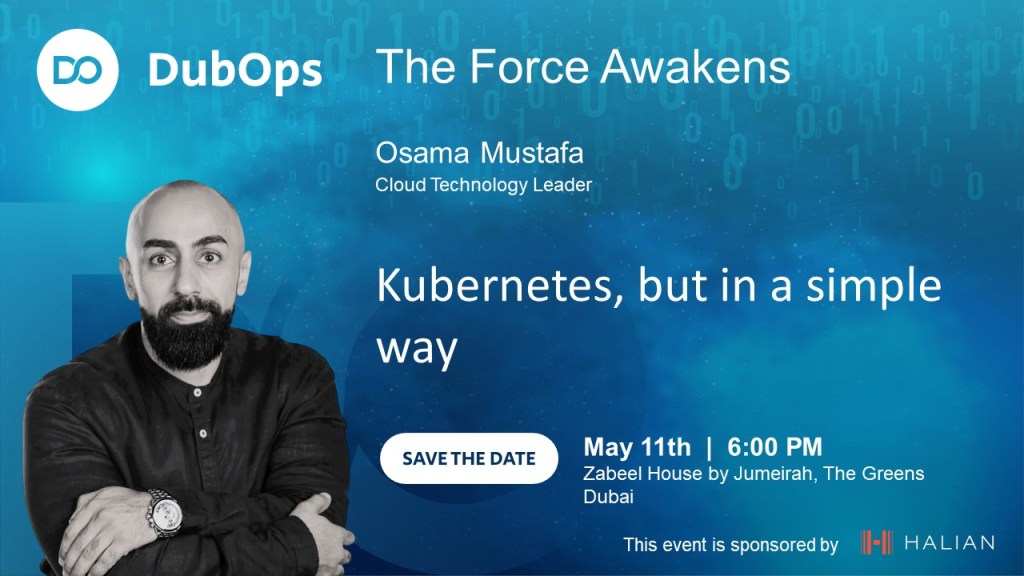
DubOps is a unique event that brings together DevOps, IT operations, and software development experts to share their knowledge and insights with the community. This event provides a platform for attendees to learn about the latest trends and best practices in the industry, as well as network with peers and thought leaders.
Registration for the Dubops event is now open, and we encourage anyone interested in attending to sign up early, as space is limited. Don’t miss this chance to expand your knowledge, connect with peers, and stay ahead of the curve in the ever-changing world of DevOps and IT operations.
Date: May 11th, 2023 Time: 18:00 – 21:00 Location: Zabeel House, Dubai, UAE Registration link: https://lnkd.in/dCd7V-vv We look forward to seeing you there!
Oracle Database 23c Free Version Now Available to Developers.
The new Oracle Database 23c Free – Developer Release is a free version of the trusted Oracle Database used by businesses of all sizes around the globe. Obtaining the only converged database that works with any data model and any task type is as easy as downloading it from the internet with no oracle.com user account or license click-through requirements.
If you’re looking for a free database to use for developing data-driven applications, look no further than Oracle Database 23c Free – Developer Release. Users can upgrade to other Oracle Database products at any moment because of its backwards compatibility with Oracle Database Enterprise Edition and Oracle Database cloud services.
The AWS Global Cloud Infrastructure is the most secure, extensive, and reliable cloud platform, offering over 200 fully featured services from data centers globally.
AWS Data Center
AWS pioneered cloud computing in 2006 to provide rapid and secure infrastructure. AWS continuously innovates on the design and systems of data centers to protect them from man-made and natural risks. Today, AWS provides data centers at a large, global scale. AWS implements controls, builds automated systems, and conducts third-party audits to confirm security and compliance. As a result, the most highly-regulated organizations in the world trust AWS every day.
Availability Zone – AZ
An Availability Zone (AZ) is one or more discrete data centers with redundant power, networking, and connectivity in an AWS Region. Availability Zones are multiple, isolated areas within a particular geographic location. When you launch an instance, you can select an Availability Zone or let AWS choose one for you. If you distribute your instances across multiple Availability Zones and one instance fails, you can design your application so that an instance in another Availability Zone can handle requests.
Region
Each AWS Region consists of multiple, isolated, and physically separate Availability Zones within a geographic area. This achieves the greatest possible fault tolerance and stability. In your account, you determine which Regions you need. You can run applications and workloads from a Region to reduce latency to end users. You can do this while avoiding the upfront expenses, long-term commitments, and scaling challenges associated with maintaining and operating a global infrastructure.
AWS Local Zone
AWS Local Zones can be used for highly demanding applications that require single-digit millisecond latency to end users. Media and entertainment content creation, real-time multiplayer gaming, and Machine learning hosting and training are some use cases for AWS Local Zones.
CloudFront – Edge Location
An edge location is the nearest point to a requester of an AWS service. Edge locations are located in major cities around the world. They receive requests and cache copies of your content for faster delivery.
The AWS Snow Family is a collection of physical devices that help to physically transport up to exabytes of data into and out of AWS.
AWS Snow Family is composed of AWS Snowcone, AWS Snowball, and AWS Snowmobile.
These devices offer different capacity points, and most include built-in computing capabilities. AWS owns and manages the Snow Family devices and integrates with AWS security, monitoring, storage management, and computing capabilities.
AWS Snowcone
AWS Snowcone is a small, rugged, and secure edge computing and data transfer device.
It features 2 CPUs, 4 GB of memory, and 8 TB of usable storage.
Snowball Edge Storage Optimized devices are well suited for large-scale data migrations and recurring transfer workflows, in addition to local computing with higher capacity needs.
Storage: 80 TB of hard disk drive (HDD) capacity for block volumes and Amazon S3 compatible object storage, and 1 TB of SATA solid state drive (SSD) for block volumes.
Compute: 40 vCPUs, and 80 GiB of memory to support Amazon EC2 sbe1 instances (equivalent to C5).
Snowball Edge Compute Optimized provides powerful computing resources for use cases such as machine learning, full motion video analysis, analytics, and local computing stacks.
Storage: 42-TB usable HDD capacity for Amazon S3 compatible object storage or Amazon EBS compatible block volumes and 7.68 TB of usable NVMe SSD capacity for Amazon EBS compatible block volumes.
Compute: 52 vCPUs, 208 GiB of memory, and an optional NVIDIA Tesla V100 GPU. Devices run Amazon EC2 sbe-c and sbe-g instances, which are equivalent to C5, M5a, G3, and P3 instances.
AWS Snowmobile
AWS Snowmobile is an exabyte-scale data transfer service used to move large amounts of data to AWS.
You can transfer up to 100 petabytes of data per Snowmobile, a 45-foot long ruggedized shipping container, pulled by a semi trailer truck.

 Technology Geek