Drop DB Control Repository

I know that i post this topic before , you use emca to drop dbcontrol but what if this command fails 

what should i do ? I post This Topic to show second way to drop dbcontrol let Start :
 
emca
should be used to drop DB Control repository as follows:
emca -deconfig dbcontrol db -repos drop

Steps :

1.Shutdown database

 SHUTDOWN IMMEDIATE;

2.Remove EM job

EXEC sysman.emd_maintenance.remove_em_dbms_jobs;

3.Revoke DBA privilages from SYSMAN user

REVOKE dba FROM sysman;

4.Run 

DECLARE
  CURSOR c1 IS
  SELECT owner, synonym_name name
  FROM dba_synonyms
  WHERE table_owner = 'SYSMAN';
BEGIN
  FOR r1 IN c1 LOOP
    IF r1.owner = 'PUBLIC' THEN
      EXECUTE IMMEDIATE 'DROP PUBLIC SYNONYM '||r1.name;
    ELSE
      EXECUTE IMMEDIATE 'DROP SYNONYM '||r1.owner||'.'||r1.name;
    END IF;
  END LOOP;
END;
/

 5.Drop MGMT_VIEW user.

DROP USER MGMT_VIEW CASCADE;

6.Drop MGMT_VIEW role

DROP ROLE mgmt_user;

7.Drop SYSMAN user

DROP USER sysman CASCADE;

8.Disable restricted mode

ALTER SYSTEM DISABLE RESTRICTED SESSION;

 Thank you
Osama

    Database Vulnerabilities

    in this post you will find 10 ways make your database easy to hack ,Special thank for Team Shatter , I post online Article about Database security before and as reminder read it again it . LETS START


    1-default-blank-and-weak-username-and-passwords

    We All know What we mean by Defaults and weak password (which not complex)

    To create a strong password:

    • Don’t use words that can be easily guessed or found in the dictionary
    • Use a combination of letters, numbers and characters
    • Create a complex sentence instead of a word
    • Do not share your password with anyone or write it down and leave it in your desk drawer

    2-sql-injections-in-the-database

    sql injection : attack vector in the DBMS through Web applications because of a failure to sanitize user inputs.
    SQL Injection in the DBMS exploits passing SQL commands as a parameter of a function or stored procedure. This will then execute the malicious SQL commands in the context of the component that provides the called function. This is often done using components with system or admin privileges resulting in privilege escalation.

    3-excessive-user-and-group-privileges

    avoid extensive user and group privileges:

    • Map Job Functions to Privileges on IT assets
    • Never Assign Privileges Directly to Guest Accounts or Public
    • Untangle The Web of User Entitlements
    • Implement Compensating Controls for What You Can’t Fix

    4-Unnecessary Enabled Database Features.


    These features provide database application developers with a lot more power when working with a DBMS.  The flipside of the coin is, the more power you give a developer, the more attack vectors you potentially expose to the bad guys.

    5-check-your-database-configurations with your company Goal.

    6-Buffer Overflows 

    A buffer overflow is when the input to a function contains more data than the input buffer can hold. If the size of the input is not checked during the copy to that buffer, adjacent memory that is used for other purposes might get overwritten.

     In most cases, this will be more or less random and can lead to unpredictable behavior, like crashing the server. However, if an attacker is able to also change the code execution pointer to the location of the overwritten memory, it is possible to execute any kind of malicious code using the context of the DBMS process.

     This could lead to a potential total compromise of the system, resulting in loss of sensitive information and overall security.
    To protect against these types of attacks, it is important to always keep your DBMS updated with the latest security patches available from the vendor, as well as monitoring for known attack signatures.

     7-Privilege Escalation 

    privilege escalation attack is when the attacker is exploiting a known vulnerability in a DBMS that allows a user account with restricted privileges to execute instructions or query data that that typically requires higher privileges. Thus unlocking the locks in the candy store.

    There are different common vulnerabilities that allow for privilege escalation. Sometimes misusing a function that runs under a sysdba, sa or similar security context. In other cases it is done by exploiting vulnerabilities that allow a low-privileged account to grant itself more rights.

    To protect against these types of attacks, it is important to always keep your DBMS updated with the latest security patches available from the vendor, as well as continuously monitor for known attack signatures.

    8-Denial of Service Attack DoS

    Think of a washing machine. The more clothes you put in it, the more work it needs to do. If you overfill it with clothes, it gets overwhelmed and stops working.

    The same thing happens with a Denial of Service attack. It creates so much traffic on a site, a server or even sections of the internet that it cannot function and shuts down.

    The most infamous DoS involving database servers was in 2003 when a computer worm called the SQL Slammer compromised more than 75,000 servers and slowed internet traffic to a halt.

    9-Unpatched Databases

     Many organizations don’t implement patches right away – some even wait a year or more. The most common excuses are the downtime involved with implementing patches and the time involved with testing these patches to make sure they don’t affect the production software. Whatever the excuse may be, organizations should use database activity monitoring to manage the gap between patches on its databases containing critical information PII data.

    10-Unencrypted sensitive data


    Encryption is an important part of housing sensitive data. Network traffic should also be encrypted to ensure that the passwords used to access sensitive, critical data cannot be seen by traffic.

    Any information that goes over the network or stored in the database should be encrypted and kept from prying eyes. Some network configurations and database management systems might allow for critical information to be sent in clear text. To ensure this doesn’t occur, make sure you have the latest version of software and turn off text indexing.

    Remember to back to my online article .
    Thank you

    Useful Link :
    1-Team Shatter

    Osama Mustafa

    Oracle Password Security

    As Certified Ethical hacker and Penetration  Testing Always people Asked me about if the Oracle Password can be Cracked or not ? You need to know that if the hacker want to get into your database and he will all you can do is make it harder for him , so don’t choose Easy password to crack

    I post these topics not to use it in wrong way , No as DBA you need to know about Securing you database
    and How to make it unbreakable.

    For example check the below tools that used to crack Oracle Password

    And Others Tools Found for free On Internet , for example Red database security (which is amazing company and website provide you with article/topics about oracle security ) provide some of these tools for free.

    Thank you
    Osama Mustafa

    Oracle security Function for password changing

    Check this function that is used for changing user password , you need to watch out from functions like that i post this function as an example

    FUNCTION CHGPWD (
    P_USER VARCHAR2,
    P_PWD VARCHAR2)
    RETURN BOOLEAN IS
    L_STMT VARCHAR2(255);
    BEGIN
    L_STMT:= ‘ALTER USER “‘ || P_USER || ‘” IDENTIFIED BY “‘ || P_PWD||’”‘;
    EXECUTE IMMEDIATE L_STMT;
    RETURN TRUE;
    END;

    Thank you

    I will Post More and More Topics about Oracle security

    Change SYSMAN Password


    SYSMAN : User in database used for Enterprise manager .


    Be notice any failed with these steps you to recreate EM again .
    Step-1

    SQL> conn sysman/sysman1@oem
    Connected.
    SQL> password
    Changing password for SYSMAN
    Old password:
    New password:
    Retype new password:
    Password changed

    Step-2
    emctl stop dbconsole
    Step-3
    edit emoms.properties ($ORACLE_HOME/localhost.domainname_sid/sysman/config/)
    **emoms.properties:

    FROM :

    oracle.sysman.eml.mntr.emdRepPwd=”c7021fd3720a0f18″ replace with PASSWORD
    oracle.sysman.eml.mntr.emdRepPwdEncrypted=”TRUE” replace with FALSE

    TO:

    oracle.sysman.eml.mntr.emdRepPwd=ORACLE
    oracle.sysman.eml.mntr.emdRepPwdEncrypted=FALSE

    edit targets.xml files ($ORACLE_HOME/localhost.domainname_sid/sysman/emd/)
    **targets.xml
    FROM :
    [Property NAME=”UserName” VALUE=”80ec9025e45b2d20″ ENCRYPTED=”TRUE”/]
    [Property NAME=”password” VALUE=”94124d177df7c5d9″ ENCRYPTED=”TRUE”/]

    TO :

    Replace username value with “SYSMAN” and password value with “SYSMAN PASSWORD”

    [Property NAME=”UserName” VALUE=”SYSMAN” ENCRYPTED=”TRUE”/]
    [Property NAME=”password” VALUE=”ORACLE” ENCRYPTED=”TRUE”/]

    Step-4:
    emctl start dbconsole 
    Step-5 (in case sysman is locked)
    Select Username , account_status from dba_users where username=upper(‘sysman’);
    If its locked then
    alter user sysman account unlock ;
    Thank you
    Osama Mustafa 

    Locking In Oracle

    Locking in Oracle is one of the most common problem we will face as database administrator.

     is the locking Effect on Database performance ?

    Yes . impede a transaction from finishing , since the Lock query Take long time running .

    When the Locking Happened ?

    I will Give you example :

    Let assume that we have two Users Each Of them Update on the same table like the following :

    User 1 :

    SQL> update test set name=’lock’ where id=1;

    1 row updated.

    User didn’t commit here .

    User 2 :
    SQL> update test set name=’lock2′ where id=1;


    User 2 will be waiting

    Inforamtion about locks :
    1-Locks scripts One.
    2-Locks Scripts Two

    Another way to Lock :

    performing a DDL (alter,create….) and get an ORA-00054 error.

    ORA-00054: resource busy and acquire with NOWAIT specified

     to solve this issue

    SQL> select object_id from dba_objectswhere owner=’Username’  and object_name=’Table’;

     OBJECT_ID
    ———-
     

    SELECT c.owner,
     c.object_name,
     c.object_type,
     b.sid,
     b.serial#,
     b.status,
     b.osuser,
     b.machine
    FROM v$locked_object a, v$session b, dba_objects c
    WHERE b.sid = a.session_id AND a.object_id = c.object_id
    and a.object_id=;

    Refer also to :
    1-Locks

    Osama Mustafa

    Remove Oracle / Uninstall

    I post this topics for people who want to learn how to remove Oracle For Window/Linux 


    Windows :

    Its easy common steps you have to follow :

    • Uninstall all Oracle components using the Oracle Universal Installer (OUI).
    • Run regedit.exe and delete the HKEY_LOCAL_MACHINE/SOFTWARE/ORACLE key. This contains registry entires for all Oracle products.
    • Delete any references to Oracle services left behind in the following part of the registry (HKEY_LOCAL_MACHINE/SYSTEM/CurrentControlSet/Services/Ora*). It should be pretty obvious which ones relate to Oracle.
    • Reboot your machine.
    • Delete the “C:\Oracle” directory, or whatever directory is your ORACLE_BASE.
    • Delete the “C:\Program Files\Oracle” directory.
    • Empty the contents of your “C:\temp” directory.
    • Empty your recycle bin.

    Unix :

    • Uninstall all Oracle components using the Oracle Universal Installer (OUI).
    • Stop All Oracle Process .

    lsnrctl stop
    emctl stop dbconsole
    emctl stop agent.

    • Delete the files and directories below the $ORACLE_HOME.
    # cd $ORACLE_HOME
    # rm -Rf *
    •  delete directories below the $ORACLE_BASE.

     # cd $ORACLE_BASE
    # rm -Rf admin

    •  Delete the /etc/oratab file

    Done .

    Osama Mustafa

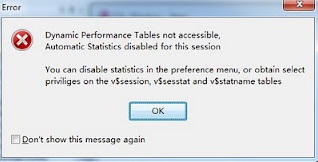
    PL/SQL developer: Dynamic Performance Tables not accessible

    ERROR HAPPENED WHEN :

    Login into Pl/sql developer (software)


    Solution:

    1.grant select any dictionary to username
    2.disable this function by

    Tools –> Preference –> option –> uncheck option “Automatic statistics”

    Oracle On Windows vs Linux

    Today i will talk about Compare Oracle Installation On Windows vs Linux , and just to let you know oracle recommended Linux .

    1-Installation Oracle on Windows / Linux

    For installation of Oracle on windows doesn’t require any other user creation, we can perform oracle installation using “administrator” superuser of windows. For installation of Oracle on Unix/linux required to creating separate operating system user account. Using super user “root” we doesn’t require to perform Oracle installation.

    For installation of Oracle on windows, if we create separate operating system then it should be group of super user administrator. For installation of Oracle on Unix/Linux, when we create operating system user then it should be not part of super user group.

    2-Default Location Of Windows , Linux :

    Default location of password file and parameter file for Windows is ORACLE_HOME\database folder.Default location of password file and parameter file for Unix/Linux is ORACLE_HOME/dbs folder.

    ORACLE_BASE,ORACLE_HOME,ORACLE_SID are defined in registry of Windows as HKEY_LOCAL_MACHINE\SOFTWARE\ORACLE\HOME0. ORACLE_BASE,ORACLE_HOME,ORACLE_SID are defined as user’s environment variables in Unix/Linux.

    3-Symbolic Links windows , Linux

    Symbolic links are NOT supported for user’s environment variables or registry parameter in Windows. Symbolic links are supported for user’s environment variables in Unix/Linux.

    4-Enviorment variable in Windows, Linux 

    In windows we should need to set environment variable using “set” command and it doesn’t save in user profile. In Unix and Linux we should need to set environment variable using “export” command and it can save using .profile (in Unix) and .bash_profile (in Linux).

    5-Shared Library DLL windows , Linux 

    Oracle’s shared libraries are called as shared DLL in windows. Oracle’s shared libraries are available in Unix/Linux.

    6-Relinking On Windows , Linux

    Relinking of Oracle executable is not available in Windows. Relinking of Oracle executable is available in Unix/Linux.

    7-Shared memory Segment Windows, Linux

    Shared memory , shared segments and semaphores are NOT adjustable in Windows. Shared memory segment(SHMMAX), shared segments (SHMMNI) and semaphores (SEMMNS) are adjustable using kernel parameters in Unix/Linux.

    8-Memory and processes In Windows , Linux

    Oracle’s SGA locking in real memory doesn’t possible in Windows. Oracle’s SGA locking in real memory is possible in Unix/Linux.

    Each background process of Oracle is implementing as Thread inside single process in Windows. Each background process of Oracle is a process in Unix/Linux.

    9-GUI , CLUI Windows , Linux 

    Windows called as GUI because it provides Graphical User Interface. Unix and Linux called as CLUI called Command Line User Interface. Due to this reason Unix and Linux provides more performance than Windows due to resource utilization.

    10-File System , Security Windows , Linux

    Windows is flat file system. Unix and Linux is hierarchical model file system. Windows kernel stores in couple of files like Registry. Unix and Linux kernel stores in many files which are hierarchy. It is very easy to understand Unix and Linux file systems in any version.

    Earlier FAT and FAT32 file system has no security in Windows. Using NTFS file system windows use file permission based security. In Unix and Linux has traditional file permission security with owner,group and other users.Unix has greater built-in security and permissions features than Windows. Linux contains also same type of security and permissions logic like Unix.

    11-Mointer Oracle In Windows, Linux

    There are very few utilities available in Windows for performance monitoring and administration. There are lot of command line utilities are available in Unix/Linux for performance monitoring and administration.

    12-Source Code Windows , Linux 

    Source code of Operating system doesn’t available in Windows. Source code of Operating system is available in some of Linux flavors, means we can modify source code of operating system.

    13-Skills Windows , Linux 

    Oracle on Windows magnetize because easy to understand, easy to maintain, easy to develop, resource availability and with good support. Oracle on Unix/Linux is not easy to understand,easy to maintain or easy to develop because it requires high skill set and depth knowledge.

    Oracle deployment is very easy in Windows because not need to more knowledge or special skill sets. Oracle deployment is not easy in Unix/Linux because it requires special skill sets.

    Windows is user friendly operating system. Unix and Linux doesn’t user friendly operating system.

    14-Virus Windows , Linux 

    There is high risk of virus attacks on Windows. Because majority of windows users run as Administrator and virus can be affecting on any of files of kernel due to super user account. There is minimum risk for virus attacks on Unix and Linux. Because most of Unix box or Linux box is being run by user interface not using “root” super user. Due to this reason virus attacker cannot able to modify kernel of operating system. 

    Thank you
    Osama Mustafa