Check TimeZone Before Upgrades

Lot of question Regarding to TimeZone While Upgrade Oracle Database, You have to Check TimeZone When you have Data Or Schedule Job With Timezone info.

There are three Cases I will Describe them later In this article , but First You need to check Timezone

SQL> select version from v$timezone_file;

After Doing That you will Have Number As Output , This Number Should Compare to 4 ( value ) with Three below Cases :
1- Output =  4

You could Contuine with Upgrade without Do anything

2- Output >  4
Actions for the DSTv4 update in the 10.2.0.4 patchset [ID 553812.1]
Updated DST transitions and new Time Zones in Oracle Time Zone File patches [ID 412160.1]

3 – Output < 4 
You have to download utltzpv4.sqlfrom MOS (https://support.oracle.com)
With This Script also you have two case
if script returns no rows, there is nothing that needs to be done. Just proceed with the upgrade.

If script retunrs the detail of columns that contain TZ data which may be affected by the upgrade, then follow document Actions for the DSTv4 update in the 10.2.0.4 patchset [ID 553812.1]

Thank you
Osama Mustafa

Stop Standby Database And Work As Standalone

Sometimes you need to disconnect Standby Database, Or even Delete the Configuration And let the primary Is StandAlone Database to do that you have Temporary way or Permanet Way :

 1 – Temporary :

Run the below command in standby Database:

SQL> alter database recover managed standby database cancel;

2- Permant With The Following Steps :

Run the below command in standby Database: 

SQL> alter database recover managed standby database cancel;

 Shutdown Standby Database.
change the parameters LOG_ARCHIVE_DEST_n/LOG_ARCHIVE_CONFIG (if set).
 Remove tnsnames.ora for standby In primary Database.

Thank you
Osama mustafa

Compare Two AWR/ Different Period

Very and Useful Article To learn how to compare between AWR With Different Period

Press the Link Here.

Or

1-Use  DBMS_WORKLOAD_REPOSITORY.CREATE_BASLELINE_TEMPLATE to instruct Oracle to keep the snapshots for (for example) every Sunday.
2- generate comparison reports with the awrddrpt.sql Comparing any Sunday.

Thank you
Osama Mustafa

Moving Undo/Temporary Tablespace

To Move these tablespace Easily you can create them By Following the below Steps :

sqlplus '/as sysdba'
 
SQL>CREATE TEMPORARY TABLESPACE 
TEMPFILE '/new_location/.dbf' 
SIZE 64M REUSE AUTOEXTEND ON NEXT 28 MAXSIZE unlimited;
 
SQL>ALTER DATABASE DEFAULT TEMPORARY TABLESPACE
 
Drop the Old One By Run the Below Command :
 
SQL>DROP TABLESPACE temp INCLUDING CONTENTS AND DATAFILES;
 
 
For Undo Tablespace Check the below Steps:

 
SQL>create undo tablespace
 datafile '/new_location/.dbf' size 2000m;
 
Make New Tablespace for Database:
 
SQL> alter system set undo_tablespace= undotbs2 ;
 
Drop Old Tablespace
:
 
SQL> drop tablespace undotbs including contents;
 
Thank you 
Osama Mustafa 

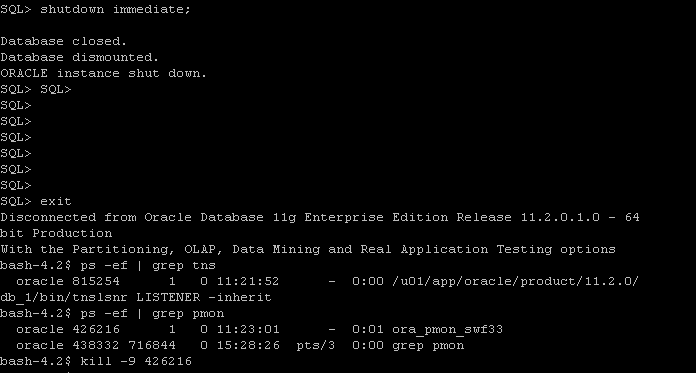
ora-27086 unable to lock file / Alertlog

ORA-27086:unable to lock file – already in use
Cause:the file is locked by another process, indicating that it is currently in use by a database instance.
Action:determine which database instance legitimately owns this file.

If you check the above Picture you will there’s two Pmon process for the same instance, So what you do is the follwing

export ORACLE_SID=swf33
export ORACLE_HOME=
sqlplus / as sysdba
Shutdown immediate;

 After shutdown database another process still up use kill -9 OS command to kill it and startup database.

Thank you
Osama Mustafa

Applying Critical Patch Updates (CPU).

A Critical Patch Update is a collection of patches for multiple security vulnerabilities. Critical Patch Update patches are usually cumulative but each advisory describes only the security fixes added since the previous Critical Patch Update advisory. Thus, prior Critical Patch Update advisories should be reviewed for information regarding earlier published security fixes.its released on January, April, July &October.

Steps to Apply CPU: 

Pre-Installation:

  1. Shutdown all the instance , and oracle services such as listener. 
  2. ensure $PATH variable.
  3. Download Patchand unzip it.
  4. Use the Opatch like this : opatch napply -skip_subset -skip_duplicate.
  5. Startup databas.

Post-Installation :

  1.  cd $ORACLE_HOME/rdbms/admin
  2. sqlplus / as sysdba
  3. SQL> @catbundle.sql cpu apply


Note : For rac database nothing diffrenece unless you have to shutdown services node by node and patching ( you can patch one node then the other one).

Useful MOS notes :
Introduction To Oracle Database catbundle.sql [ID 605795.1]

 Thank you 
Osama Mustafa

privileges Scripts

These script made by René Nyffenegger and shared here for knowledge

List user role and privileges :

select
lpad(' ', 2*level) || granted_role "User, his roles and privileges"
from
(
/* THE USERS */
select
null grantee,
username granted_role
from
dba_users
where
username like upper('%&enter_username%')
/* THE ROLES TO ROLES RELATIONS */
union
select
grantee,
granted_role
from
dba_role_privs
/* THE ROLES TO PRIVILEGE RELATIONS */
union
select
grantee,
privilege
from
dba_sys_privs
)
start with grantee is null
connect by grantee = prior granted_role;

Check System privileges:

select
lpad(' ', 2*level) || c "Privilege, Roles and Users"
from
(
/* THE PRIVILEGES */
select
null p,
name c
from
system_privilege_map
where
name like upper('%&enter_privliege%')
/* THE ROLES TO ROLES RELATIONS */
union
select
granted_role p,
grantee c
from
dba_role_privs
/* THE ROLES TO PRIVILEGE RELATIONS */
union
select
privilege p,
grantee c
from
dba_sys_privs
)
start with p is null
connect by p = prior c;

Object Privileges :

select
case when level = 1 then own || '.' || obj || ' (' || typ || ')' else
lpad (' ', 2*(level-1)) || obj || nvl2 (typ, ' (' || typ || ')', null)
end
from
(
/* THE OBJECTS */
select
null p1,
null p2,
object_name obj,
owner own,
object_type typ
from
dba_objects
where
owner not in
('SYS', 'SYSTEM', 'WMSYS', 'SYSMAN','MDSYS','ORDSYS','XDB', 'WKSYS', 'EXFSYS',
'OLAPSYS', 'DBSNMP', 'DMSYS','CTXSYS','WK_TEST', 'ORDPLUGINS', 'OUTLN')
and object_type not in ('SYNONYM', 'INDEX')
/* THE OBJECT TO PRIVILEGE RELATIONS */
union
select
table_name p1,
owner p2,
grantee,
grantee,
privilege
from
dba_tab_privs
/* THE ROLES TO ROLES/USERS RELATIONS */
union
select
granted_role p1,
granted_role p2,
grantee,
grantee,
null
from
dba_role_privs
)
start with p1 is null and p2 is null
connect by p1 = prior obj and p2 = prior own;
 
 Thank you 
Osama Mustafa 

Zombie process

Zombie process is an inactive computer process,according to wikipedia article, “…On Unix operating systems, a zombie process or defunct process is a process that has completed execution but still has an entry in the process table, allowing the process that started it to read its exit status. In the term’s colorful metaphor, the child process has died but has not yet been reaped…”

Find zombie by :

# ps aux | awk '{ print $8 " " $2 }' | grep -w Z

 after that use kill -9  PID

Thank you
osama mustafa

Useful Linux Commands For DBA

Show Routing Table :
 
netstat -r

Check ORA errors in the Logs:

grep ^ORA- *log |cut -f2 -d"-"|cut -f1 -d:|awk '{print "ORA-" $1}'|sort -u
Inzip CPIO Files :
 
cpio -idmv < 

 Sort Files By Size :

ls -l |sort -k 5

Find Command archive and move to another Folder :

find ./ -name "*.arch" -mtime +1 -exec mv {} /u01/;

Find Command archive and Remove it:

find ./ -name "*.ARC" -mtime +1 -exec rm {} \;

Find Command with Zip :

find ./ -name "*.ARC" -mtime +1 -exec gzip {} \;

 Find Command With List :


 find ./ -name “*.ARC” -mtime +1 -ls 

Thank you
Osama Mustafa

Check Default Tablespace For User and Change it

Check the Below Demo how you can check tablespace for specific User and how can  you change it

Create New User Without Determine which Tablespace:

SQL > Create User test Identified by test ;

Check TableSpace for Test User:

 SQL> select default_tablespace from dba_users where username=’TEST’;

DEFAULT_TABLESPACE
——————————
USERS

Change TableSpace For Test User :

Solution One : Change Default TableSpace For Database By :

 SQL> alter database default tablespace ;

Solution two : define Tablespace When Creating User

 SQL > create user Test identified by Test default tablespace USER

Thank you
Osama Mustafa