BLOG

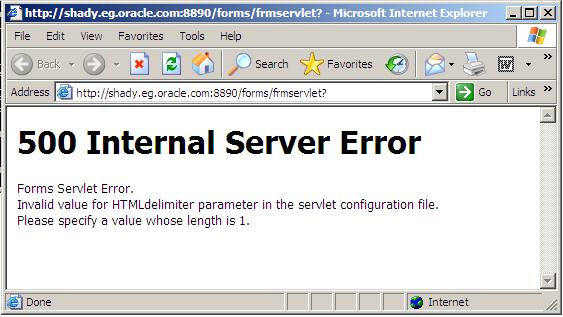
500 Internal Server Error / Oracle Application Server

There’s more than One Reason For this i will provide you with two solutions (Meta-link Note):

Solution One : 

1. Backup and edit the forms configuration file (Default= formsweb.cfg)
2. Modify the HTMLdelimiter to have only one character as a value 

HTMLdelimiter=%

3. Save and exit the file.

Solution Two :

Edit oracle_apache.conf and comment out the include related to the forms.conf  as the following :

# Oracle Forms Developer
#include “/oas/product/oas2/forms/server/forms.conf”

Thank You
osama mustafa

RAID PRINCIPLE

RAID : Redundant Array of Inexpensive (Independent) Disks

RAID TYPE :

  • RAID 0
  • RAID 1
  • RAID 5
  • RAID 10 (also known as RAID 1+0)

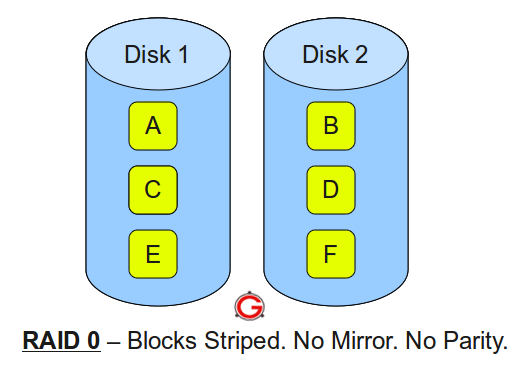
RAID LEVEL 0


  Following are the key points to remember for RAID level 0.

  • Minimum 2 disks.
  • Excellent performance ( as blocks are striped ).
  • No redundancy ( no mirror, no parity ).
  • Don’t use this for any critical system.

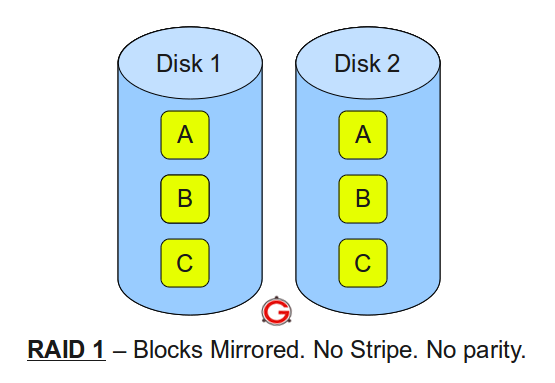
RAID LEVEL 1


Following are the key points to remember for RAID level 1.

  • Minimum 2 disks.
  • Good performance ( no striping. no parity ).
  • Excellent redundancy ( as blocks are mirrored ).


RAID LEVEL 5

 Following are the key points to remember for RAID level 5.

  • Minimum 3 disks.
  • Good performance ( as blocks are striped ).
  • Good redundancy ( distributed parity ).
  • Best cost effective option providing both performance and redundancy. Use this for DB that is heavily read oriented. Write operations will be slow.

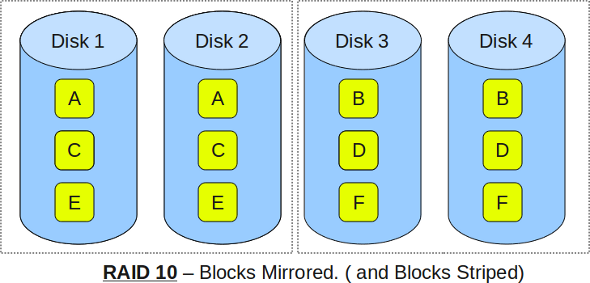
RAID LEVEL 10


 Following are the key points to remember for RAID level 10. 

  • Minimum 4 disks.
  • This is also called as “stripe of mirrors”
  • Excellent redundancy ( as blocks are mirrored )
  • Excellent performance ( as blocks are striped )
  • If you can afford the dollar, this is the BEST option for any mission critical applications (especially databases).


IMP-00003 With ORA-03113/ORA-03114

Error

“IMP-00003: ORACLE error 3113 encountered, ORA-03113: end-of-file on communication channel”
 OR
“IMP-00003: ORACLE error 3114 encountered, ORA-03114: not connected to ORACLE”

Cause

 database corruption or deletion of any critical files from the Oracle database which further makes the data stored in the database inaccessible , this error can appear on any platform .

Solution

  • Login as “sys” in SQLPLUS and run the below Sqls.
  • $OH/rdbms/admin/prvtread.plb.
  • $OH/rdbms/admin/dbmsread.sql.

Retry Your Import .

Thank you
Osama Mustafa.

Automatic Storage Management (ASM) / Part 1

using SQL*Plus connect to the idle instance.

export ORACLE_SID=+ASM
sqlplus / as sysdba

Startup and Shutdown of ASM Instances


ASM instance are started and stopped in a similar way to normal database instances. The options for the STARTUP command are:

  • FORCE – Performs a SHUTDOWN ABORT before restarting the ASM instance.
  • MOUNT – Starts the ASM instance and mounts the disk groups specified by the ASM_DISKGROUPS parameter.
  • NOMOUNT – Starts the ASM instance without mounting any disk groups.
  • OPEN – This is not a valid option for an ASM instance.

The options for the SHUTDOWN command are:

  • NORMAL – The ASM instance waits for all connected ASM instances and SQL sessions to exit then shuts down.
  • IMMEDIATE – The ASM instance waits for any SQL transactions to complete then shuts down. It doesn’t wait for sessions to exit.
  • TRANSACTIONAL – Same as IMMEDIATE.
  • ABORT – The ASM instance shuts down instantly.


ASM Disk Groups

  level of redundancy:


  • NORMAL REDUNDANCY – Two-way mirroring, requiring two failure groups.
  • HIGH REDUNDANCY – Three-way mirroring, requiring three failure groups.
  • EXTERNAL REDUNDANCY – No mirroring for disks that are already protected using hardware mirroring or RAID. If you have hardware RAID it should be used in preference to ASM redundancy, so this will be the standard option for most installations.

Create Example : 

CREATE DISKGROUP disk_group_1 NORMAL REDUNDANCY
FAILGROUP failure_group_1 DISK
'/devices/diska1' NAME diska1,
'/devices/diska2' NAME diska2
FAILGROUP failure_group_2 DISK
'/devices/diskb1' NAME diskb1,
'/devices/diskb2' NAME diskb2;

DROP Example : 

DROP DISKGROUP disk_group_1 INCLUDING CONTENTS;

Using Alter to Add Disk : 

ALTER DISKGROUP disk_group_1 ADD DISK
'/devices/disk*3',
'/devices/disk*4';

Using Alter to Drop Disk :

ALTER DISKGROUP disk_group_1 DROP DISK diska2;

Using Alter to Re-size Disk : 

ALTER DISKGROUP disk_group_1
RESIZE DISK diska1 SIZE 100G;

 Using Alter to Re-size all disk in Failure Group:

ALTER DISKGROUP disk_group_1
RESIZE DISKS IN FAILGROUP failure_group_1 SIZE 100G;

 Using Alter to Resize all Disk In DiskGroup :

ALTER DISKGROUP disk_group_1
RESIZE ALL SIZE 100G;

Using Alter To dismiss pending disk to be Dropped :

ALTER DISKGROUP disk_group_1 UNDROP DISKS;

 Some Useful Command to Mount ASM disk group Manually : 

ALTER DISKGROUP ALL DISMOUNT;
ALTER DISKGROUP ALL MOUNT;
ALTER DISKGROUP disk_group_1 DISMOUNT;
ALTER DISKGROUP disk_group_1 MOUNT;

 Thank You 

Osama mustafa

Changing Archive Log Destination

Today I am Gonna Show you How to change Archive log Destination in Two Ways :

1.Temporarily Changing the Destination Using SQL*Plus

sqlplus / as sysdba

sql> archive log list;

Database log mode Archive Mode
Automatic archival Enabled
Archive destination /u01/app/oracle/product/10.2.0/db_1/dbs/arch
Oldest online log sequence 9285
Next log sequence to archive 9287
Current log sequence 9287

 To change the location

sql>ARCHIVE LOG START ‘/u01/arch’;

To Verify your changes:

sql> archive log list;
Database log mode Archive Mode
Automatic archival Enabled
Archive destination /oracle/arch
Oldest online log sequence 9285
Next log sequence to archive 9287
Current log sequence 9287

2-Permanently Changing the Destination Using SQL*Plus

sqlplus / as sysdba

ALTER SYSTEM SET log_archive_dest =’/oradata/arch’ scope=both;

To Verify your changes:

sql> archive log list;

Database log mode Archive Mode
Automatic archival Enabled
Archive destination /oracle/arch
Oldest online log sequence 9285
Next log sequence to archive 9287
Current log sequence 9287   

To change the size of archive log

SQL> alter system SET DB_RECOVERY_FILE_DEST_SIZE = 10G SCOPE=BOTH SID=’orcl’;

System altered. 

Thank You
Osama Mustafa


ORA-16018 ORA-16019

Cause : 
These two errors come whenever LOG_ARCHIVE_DEST is set as archival location and you want to set DB_RECOVERY_FILE_DEST

Solution : 

1- You need to see Archive log destination First .

SQL > archive log list ; 

Database log mode Archive Mode
Automatic archival Enabled
Archive destination USE_DB_RECOVERY_FILE_DEST
Oldest online log sequence 215
Next log sequence to archive 217
Current log sequence 217

2-You Can Check Archive Location  By Check Database Parameter

SQL> show parameter DB_RECOVERY_FILE_DEST

NAME TYPE VALUE
———————————— ———– ——————————
db_recovery_file_dest string /oradata
 db_recovery_file_dest_size big integer 10G

 3-Set New Archive Log Location

SQL> alter system set log_archive_dest=’/u01′;

alter system set log_archive_dest=’/u01′
*
ERROR at line 1:
ORA-02097: parameter cannot be modified because specified value is invalid
ORA-16018: cannot use LOG_ARCHIVE_DEST with LOG_ARCHIVE_DEST_n or
DB_RECOVERY_FILE_DEST

4- If you want to set log_archive_dest first reset DB_RECOVERY_FILE_DEST and then set .

SQL> alter system set DB_RECOVERY_FILE_DEST=”;

System altered.

SQL> alter system set log_archive_dest=’/u01′;

System altered.

 SQL> archive log list

Database log mode Archive Mode
Automatic archival Enabled
Archive destination /u01

Oldest online log sequence 215
Next log sequence to archive 217
Current log sequence 217

5-Also if you now want to set DB_RECOVERY_FILE_DEST ORA-16019: will occur.

SQL> alter system set DB_RECOVERY_FILE_DEST=’/u02′;

alter system set DB_RECOVERY_FILE_DEST=’/u02′
*
ERROR at line 1:
ORA-02097: parameter cannot be modified because specified value is invalid
ORA-16019: cannot use db_recovery_file_dest with LOG_ARCHIVE_DEST or
LOG_ARCHIVE_DUPLEX_DEST

 6-To set DB_RECOVERY_FILE_DEST first reset LOG_ARCHIVE_DEST.

SQL> alter system set log_archive_dest=”;

System altered.

SQL> alter system set DB_RECOVERY_FILE_DEST=’/u02′;

System altered.

 SQL> archive log list
Database log mode Archive Mode
Automatic archival Enabled
Archive destination USE_DB_RECOVERY_FILE_DEST
Oldest online log sequence 215
Next log sequence to archive 217
Current log sequence 217

To set multiple location of archival destination set another log_archive_dest_n parameter like,
SQL> alter system set log_archive_dest_3=’LOCATION=/u02′;
System altered.

Thank you
Osama mustafa
 

Remove Node From Oracle Rac 10g ( Part-2)

 Remove Node From The Database :  ( From The Node You want to Delete) 


**Before You Start Deleting Node From Database You need To update inventory by :

./runInstallerupdateNodeList ORACLE_HOME=<Database home> “CLUSTER_NODES=<node to be removed>” –local

After Perform This You can Start De-install Process Like The Following : 

 You now need to update the corresponding  inventory on the remaining nodes. You can use the following command from the first node:
./runInstallerupdateNodeList ORACLE_HOME=<Database home> “CLUSTER_NODES=<remaining nodes>”

Remove Node From ASM : 

maybe some of us will be conflict with the above steps , I Above Step we Remove ASM from Node that we want to delete But ASM still exists , And On Remaining Node The Deleted Node For ASM still exists So We Need To update the ASM to Delete  Like The Following :

Update Inventory From Node We Want delete : 

./runInstallerupdateNodeList ORACLE_HOME=<ASM home> “CLUSTER_NODES=<node to be removed>” –local

 
update the corresponding inventory on the remaining nodes. You can use the following command from the first node:
./runInstallerupdateNodeList ORACLE_HOME=<ASM home> “CLUSTER_NODES=<remaining nodes>”

Remove Node From Oracle Clusterware From The First Node Do the Below Steps : 


1-Run This Command :

<Oracle Clusterware home>/bin/racgons remove_config <Node to be removed>:6200 
**6200 : Can Be Changed, And Its Called Remote Port 

<Oracle Clusterware home>/opmn/conf/ons.config 


2-From The Node You want To remove as root User : 

<Oracle Clusterwarehome>/install/rootdelete.sh

3-From The First Node as Root User : 

<Oracle Clusterware home>/bin/olsnodes –n
Then 
<Oracle Clusterware home>/install/rootdeletenode.sh <node name to be deleted>,<node number to be deleted>.


Remove Node From Oracle Cluster-ware (From The Node You want to be Delete)


To Update Inventory Run The Following Command : 


<Oracle Clusterwarehome>/oui/bin/runInstaller  –updateNodeList ORACLE_HOME=<Oracle Clusterwarehome>  “CLUSTER_NODES=<Node to be deleted>”   CRS=TRUE -local

Run Installer — > De-install 

From The First Node after Finish The De-install :
<Oracle Clusterwarehome>/oui/bin/runInstallerupdateNodeList  ORACLE_HOME=<Oracle Clusterware home>  “CLUSTER_NODES=<Remaining nodes>” CRS=TRUE
 Now You Are Delete The Node ..
To Check

 •srvctl  status nodeapps -n <Deleted node>should get a message saying Invalid node.
crs_stat | grep -i <Deleted node>should not get any output.
olsnodes –n should get all the present nodes list without the deleted node.
Thank You
Osama  Mustafa 
Remove Node From Oracle RAC 10g (Part-1)

In This Article I Will Show You How to Remove Node From Oracle Real Application Cluster 10g :

Let’s Start : 

Main Steps To Remove Node From Oracle Real Application Cluster : 

1.Delete the instance on the node to be deleted.
2.Clean up the ASM instance.
3.Remove the listener from the node to be deleted.
4.Remove the node from the database.
5.Remove the node from ASM.
6.Remove ONS configuration from the node to be deleted.
7.Remove the node from the cluster-ware.
 **The First Steps Is To Delete Instance On The Node (From The Node you want to delete) —- >  DBCA
 
  
On The Above Message Press Ok .
**Clean Up The ASM Instance : (From node you want to delete) 


you need to manually remove the initialization parameter file of that ASM instance
 
remove all the log files of that ASM instance. These files are generally located in the $ORACLE_BASE/admin directory then remove the associated ASM entry from the /etc/oratabfile
 
Remove The Listener (From the Node You want to delete )——> NETCA

Note : You need to choose the Node you want to be deleted , Not Select All .

Part Two In Separate Article 

Oracle Rac 10g Add Node Steps

This Article Discuss Adding/Remove Node In Oracle Real application Cluster 10g The below Steps easy all you have to do is follow up with them Let’s Start :

ADD NODE : 

1-Check Pre-requisities On All Node , This Include Old Node And New Node .

cluvfy  stage -pre crsinst -n -r 10gR2

 2-From the First Node , Execute the following Command :

/oui/bin/addNode.sh

The Final Result For Step 2 .

3-We need to configure new ONS (From The First Node) :

cd cluster_home/bin
cat cluster_home/opmn/conf/ons.config (to get the remoteport)
./racgons add_config Node-name:6200 (remoteport)

4-Optional : needed Only If Specific Home Directory to host ASM (From the First Node)

cluster_home/bin/addnode.sh

5- From The First node we need to Add RAC

cd cluster_home/bin

./addnode.sh

6-Add Listener , Do This Steps From The New Node On Terminal

netca –> Cluster Configuration —>Name of New Node

7-Final Step , Add Database Instance To new node ( from the First Node ) Using

DBCA —> Oracle Real Application Cluster —> Instance Management —> Add Instance


\

You Need Follow Up with Screen as Normal Installation Of Database
List of cluster databases.select your RAC database and enter SYS credentials 
List of cluster database instances , next
Instance naming and node selection . Instance Name
Note
 
if you are using ASM for your database storage,the DBCA detects the need for an ASM instance creation on the new nodeThis must be done before the DBCA can create the database instance on that node. Click Yes.

Thank You
Osama Mustafa

I will Talk Later How To Remove Node From Oracle Real Application Cluster .

Dealing With Database Gaurd

Database Switchover 

Using this method you can switch backwards and forwards between the primary and DR servers (e.g. so that the primary can become DR and DR can become primary) without having to rebuild either environment:


On Primary Server:
SQL> alter database commit to switchover to standby;
This may cause the following error to be generated:
ERROR at line 1:
ORA-01093: ALTER DATABASE CLOSE only permitted with no sessions connected
If this does occur then restart the database, as below, before retrying the above command:
SQL> shutdown immediate
SQL> startup


SQL> shutdown immediate
SQL> startup nomount
SQL> alter database mount standby database;
SQL> alter database recover managed standby database disconnect;

The primary server is now configured as a DR standby database.
On DR Server:
SQL> alter database recover managed standby database cancel;
SQL> alter database commit to switchover to primary;
SQL> shutdown immediate
SQL> startup
The DR server is now configured as the primary database.
To switch back you just need to repeat the above process but the other way around (e.g. convert the DR database back to a standby and the primary database back to primary).

Activating a Standby Database

If the primary database is not available the standby database can be converted into the primary database as follows:


SQL> alter database recover managed standby database cancel;
SQL> alter database activate standby database;
SQL> shutdown immediate
SQL> startup
The original primary database is now obsolete and can be rebuilt as a standby database once it is available again.

Opening the Standby Database in Read Only Mode


The standby database can be opened in read only mode for querying and then converted back into a standby database without affecting the primary.
On standby server:
SQL> alter database recover managed standby database cancel;
SQL> alter database open read only;
The standby database is now open and available for querying in read only mode.
To put the standby database back into standby mode:
SQL> shutdown immediate
SQL> startup nomount
SQL> alter database mount standby database;
SQL> alter database recover managed standby database disconnect;

How to check whether the Standby Database is in Sync

On the primary server:

SQL> SELECT max(sequence#) AS “PRIMARY” FROM v$log_history;

 
On the standby server:

SQL> SELECT max(sequence#) AS “STANDBY”, applied
          FROM v$archived_log GROUP BY applied;

The standby database is in sync with the primary database if the above PRIMARY value matches the above STANDBY value where applied = ‘YES’.