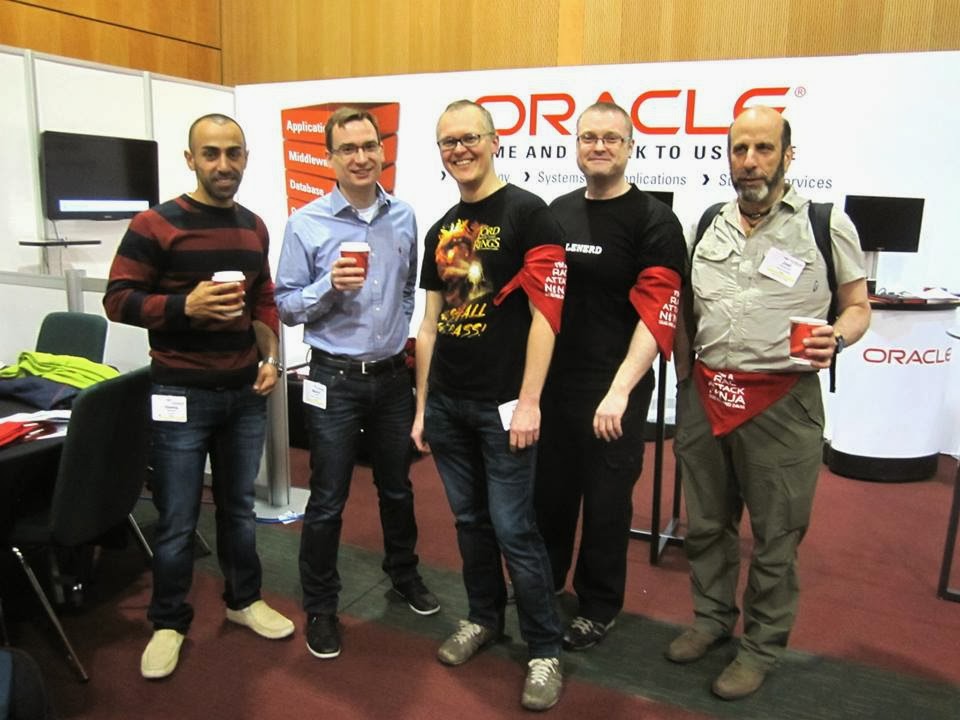
OUG Ireland 2014

11/03 it’s Date For Oracle User Group Ireland.
Location : Dublin Convention Center.

Like any other Flights it’s took me 10 hours to be in Dublin,After Checked in the hotel First thing I did is attending Oracle ACE dinner and meet some Folks.

There was lot of Oracle Experts Speaker, Once the conference started I spent most of my day in RAC ATTACK Location and I would thank Mina Zadeh for this amazing Arrangement. it was really nice to meet her in person.

 Presentations was really amazing and useful, I would thank Oracle User Group Ireland for organizing and running this event so well.

Thank you
Osama Mustafa

soft limit maximum user processes/Oracle Linux

As Root User access to
[root@EM12C Packages]# vi /etc/security/limits.conf

Then add the below line or modify it :

oracle              soft    nproc   2047
oracle              hard    nproc   16384
oracle              soft    nofile  4096
oracle              hard    nofile  65536
oracle              soft    stack   10240

Thank you
Osama Mustafa 

HTTP3094: 1 listen sockets could not be created / Oracle IPlant

When Trying to Startup iplant Instance the below error Appearing every-time :

TEST siebel: :/Siebel/iPlanet/webserver7/https-Osama_TST/bin\>./startserv
Oracle iPlanet Web Server 7.0.15 B04/19/2012 21:52
info: CORE5076: Using [Java HotSpot(TM) 64-Bit Server VM, Version 1.6.0_24] from [Sun Microsystems Inc.]
startup failure: could not bind to port 8080 (Address already in use)
failure: HTTP3127: http-listener-1: http://TEST:8080: Error creating socket (Address already in use)
failure: HTTP3094: 1 listen sockets could not be created
failure: server initialization failed

From the above error you notice that Port 8080 is already in use.

The Solution :

ps -ef |grep webservd

and Use Kill -9

Try Again Now

Thank you
Osama Mustafa

COLLABORATE 14 IOUG

Have you made your Oracle training plans for 2014 ?

COLLABORATE 14 Just over 2 months away,  The Place will be in Las Vegas from April 7-11, 2014 at the Venetian and Sands Expo Center, you can join the experts and learn from them, attend to the session and have with lot of Activity.

By registering specifically with IOUG for COLLABORATE 14, you’ll reap the following benefits:

• Pre-conference Workshops
• Strategic Leadership Program
 • IOUG Attendee Lounge Access
 • Priority Access to Hands-on Labs

Register by February 12 and save up to $300 off the onsite rate! When you register, please enter my name in the “Recruit a New Attendee” section.

Register and check the Website here

Official Hash-tag #C14LV

Thank you 
Osama Mustafa

Share Folder as File System From Windows to Linux

in this post i will show you how to share folder from windows to Linux , you can use smb but in this post i will use it in command line.

Option #1:
SMB

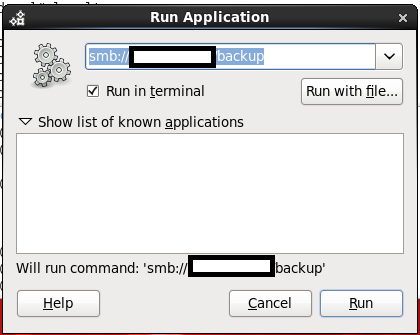
By Press ( ALT+F2 ) the new dialog will be opened just type in the box the below :

smb://windows-server-ip/shared folder 

Option #2: 
Using command line.
  • mkdir /windows-backup
  • as root user
  • mount -t cifs //windowsip/sharefolder -o username=administrator,password=administratorpassword /windows-backup.
  • run df -h to make sure the folder has been mounted.
Note :
If you are using RHEL 4 the above command will not work, check the below

mount -t smbfs -o username=administrator,password=administratorpassword //windowsip/backup /windwos-backup

Thank you
Osama mustafa

Reference :
1- cyberciti Here

Configure Linux NFS File System

NFS : Network File System

Before Start Configure NFS you have to Understand When to use it ? and What is it ?

NFS file system usually read from Source Called Server , If this server goes down, it will not be available for the other resource, From this we understand that i should configure NFS On both Side Server and Client.

Read More About it Here.

Note : 

Server IP : 192.168.1.100
Client IP : 192.168.1.101

In this Blog I will Use NFSV4 

1- You need to install two Package ( as root user )
**nfs-ultis-lib
**portmap ( if you are asking nfs4 this is not needed anymore )

2-  As Root Run the below Command to Start nfs Serivces :

[root@TEST share]# /etc/init.d/nfs start
Starting NFS services:                                     [  OK  ]
Starting NFS quotas:                                       [  OK  ]
Starting NFS mountd:                                      [  OK  ]
Stopping RPC idmapd:                                    [  OK  ]
Starting RPC idmapd:                                      [  OK  ]
Starting NFS daemon:                                     [  OK  ]

3- Create folder under /u01/app/shared , give permission to oracle and chmod 775 
4- on NFS Server ( you will own the folder ) , vi /etc/exports add the below line :

/u01/app/shared [Client-IP] (rw,sync,no_root_squash) 

5- NFS Server is done , Go to NFS Client ( Node 2 )  as root user run the below command :

#/etc/init.d/nfs start
#showmount -e 192.168.1.101

The Output Will be like the below :

Export list for 192.168.1.100:
/u01/app/shared 192.168.1.101

6-On Node 2 ( As Root User ) –> #  mount -t nfs 192.168.1.100:/u01/app/shared/ /u01/app/shared/
7- Check using df -h 

**Remove:-

8- umount /u01/app/shared ( on Node 2 ) 

Important Command :
showmount -e : Shows the available shares on your local machine
exportfs -v : Displays a list of shares files and options on a server

Thank you
Osama Mustafa

Steps To Create ODBC Connection in Linux


In this Document i will describe how to create ODBC Connection in Linux Step by Step. I uploaded my document to slideshare as usual you can download it from here.

Thanks for my friend Ilmar Kerm . 

Thank you 
Osama mustafa 

Start Managed Server Failed With "Access not allowed for subject: principals=[]"

When Trying to Start Managed Server From Admin Console it’s Failed with

weblogic.management.NoAccessRuntimeException: Access not allowed for subject: principals=[], on ResourceType: Application Action: write, Target: Deployed”

After Check Everything and Configuration i found the following :

  • My Admin Server Already have More than one managed Server : SOA, ODI , BAM.
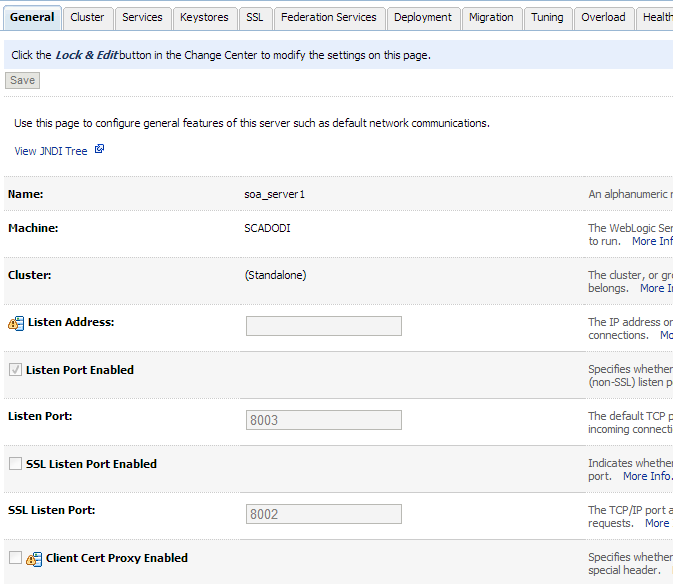
  • SOA and ODI Using the Same Port which is 8001 Which caused Conflict.

I Changed SOA Port to Work On 8003 From Admin Server Console. Like the Below