Oracle Real Application Cluster Lesson # 1

Sometimes we need Solutions to keep our database Available all the time, There are lot of solutions one of these solutions called  Oracle Real Application Cluster (RAC)/High Availability

As Lesson Number One i will take on Oracle Real Application Cluster Basics .

Lets Start :

Oracle RAC allows multiple computers to run Oracle RDBMS software simultaneously while accessing a single database, thus providing a clustered database.
In a non-RAC Oracle database, a single instance accesses a single database. The database consists of a collection of data files, control files, and redo logs located on disk. The instance comprises the collection of Oracle-related memory and operating system processes that run on a computer system.
In an Oracle RAC environment, two or more computers (each with an instance) concurrently access a single database. This allows an application or user to connect to either computer and have access to a single coordinated set of data.
Assume the  installation of Oracle 10g release 2 (10.2) RAC on Red Hat Enterprise Linux 4.

Hardware
At the hardware level, each node in a RAC cluster shares three things:

  1. Access to shared disk storage
  2. Connection to a private network
  3. Access to a public network.


Shared Disk Storage
Oracle RAC relies on a shared disk architecture. The database files, online redo logs, and control files for the database must be accessible to each node in the cluster. The shared disks also store the Oracle Cluster Registry and Voting Disk (discussed later). There are a variety of ways to configure shared storage including direct attached disks (typically SCSI over copper or fiber), Storage Area Networks (SAN), and Network Attached Storage (NAS).

Supported Shared Storage In RAC :

1-Oracle Cluster File System (OCFS) is a shared file system designed specifically for Oracle Real Application Cluster OCFS eliminates the requirement that Oracle database files be linked to logical drives and enables all nodes to share a single Oracle Home
2-ASM
3-RAW Device

Private Network
Each cluster node is connected to all other nodes via a private high-speed network, also known as the cluster interconnect or high-speed interconnect (HSI). This network is used by Oracle’s Cache Fusion technology to effectively combine the physical memory (RAM) in each host into a single cache. Oracle Cache Fusion allows data stored in the cache of one Oracle instance to be accessed by any other instance by transferring it across the private network. It also preserves data integrity and cache coherency by transmitting locking and other synchronization information across cluster nodes.
The private network is typically built with Gigabit Ethernet, but for high-volume environments, many vendors offer proprietary low-latency, high-bandwidth solutions specifically designed for Oracle RAC. Linux also offers a means of bonding multiple physical NICs into a single virtual NIC (not covered here) to provide increased bandwidth and availability.

Public Network
To maintain high availability, each cluster node is assigned a virtual IP address (VIP). In the event of node failure, the failed node’s IP address can be reassigned to a surviving node to allow applications to continue accessing the database through the same IP address.

Configuring the Cluster Hardware
There are many different ways to configure the hardware for an Oracle RAC cluster. Our configuration here uses two servers with two CPUs, 1GB RAM, two Gigabit Ethernet NICs, a dual channel SCSI host bus adapter (HBA), and eight SCSI disks connected via copper to each host (four disks per channel). The disks were configured as Just a Bunch Of Disks (JBOD)—that is, with no hardware RAID controller. 


Software
At the software level, each node in a RAC cluster needs:

  1. An operating system
  2. Oracle Clusterware
  3. Oracle RAC software
  4. An Oracle Automatic Storage Management (ASM) instance (optional).

Operating System
Oracle RAC is supported on many different operating systems. This guide focuses on Linux. The operating system must be properly configured for the OS–including installing the necessary software packages, setting kernel parameters, configuring the network, establishing an account with the proper security, configuring disk devices, and creating directory structures. All these tasks are described in this guide.

Oracle Cluster Ready Services becomes Oracle Clusterware
Oracle RAC 10g Release 1 introduced Oracle Cluster Ready Services (CRS), a platform-independent set of system services for cluster environments. In Release 2, Oracle has renamed this product to Oracle Clusterware.
Clusterware maintains two files: the Oracle Cluster Registry (OCR) and the Voting Disk. The OCR and the Voting Disk must reside on shared disks as either raw partitions or files in a cluster filesystem. This guide describes creating the OCR and Voting Disks using a cluster filesystem (OCFS2) and walks through the CRS installation.

Oracle RAC Software
Oracle RAC 10g Release 2 software is the heart of the RAC database and must be installed on each cluster node. Fortunately, the Oracle Universal Installer (OUI) does most of the work of installing the RAC software on each node. You only have to install RAC on one node—OUI does the rest.

Oracle Automatic Storage Management (ASM) / Or other shared Storage .
ASM is a new feature in Oracle Database 10g that provides the services of a filesystem, logical volume manager, and software RAID in a platform-independent manner. Oracle ASM can stripe and mirror your disks, allow disks to be added or removed while the database is under load, and automatically balance I/O to remove “hot spots.” It also supports direct and asynchronous I/O and implements the Oracle Data Manager API (simplified I/O system call interface) introduced in Oracle9i.

Some Other Stuff you need To check Before Installation : 

1-Crossover cables are not supported (use a high-speed switch).
2-Use at least a gigabit Ethernet for optimal performance.
3-Increase the UDP buffer sizes to the OS maximum.
4-Turn on UDP checksumming.
5-Oracle Support strongly recommends the use of UDP (TCP for WIndows )
6-SSH Connectivity .

Thank you
Osama mustafa

waiting for dictionary redo first scn

Capture status : Streams Waiting for dictionary first scn

Example :

Capture is waiting on redo log file with SCN 5611274208824
Capture

The First SCN 5611441137818
Start SCN 5611441137818

Applied Scn 5611441373264
Required SCN 5611441137818

You can get the above information from enterprise manager
Maintenance -> Stream -> management -> capture (choose capture name and edit).

Note : 
1-Applied Scn +  Required SCN : you can’t change them (read only).

2-Set First SCN + Start SCN same as Required SCN .

 [Document 313279.1] Master Note for Troubleshooting Streams capture ‘WAITING For REDO’ or INITIALIZING

ACTION Plan #1 :

A) Restore archived redo logs starting with sequence   
B) If you can not restore logs, then capture must be droppend and recreated.
Note 471695.1 – Required Steps to Recreate a Capture Process

You should be running dbms_capture_adm.build on a regular basis to allow you to rebuild capture without having to resync.

ACTION Plan #2 :

look at the output from below sql and ensure that ALL logs (by time) are online and available.

++ Registered Log Files for Capture ++
COLUMN CONSUMER_NAME HEADING ‘Capture|Process|Name’ FORMAT A15
COLUMN SOURCE_DATABASE HEADING ‘Source|Database’ FORMAT A10
COLUMN SEQUENCE# HEADING ‘Sequence|Number’ FORMAT 999999
COLUMN NAME HEADING ‘Archived Redo Log|File Name’ format a35
column first_scn HEADING ‘Archived Log|First SCN’
COLUMN FIRST_TIME HEADING ‘Archived Log Begin|Timestamp’
column next_scn HEADING ‘Archived Log|Last SCN’
COLUMN NEXT_TIME HEADING ‘Archived Log Last|Timestamp’
COLUMN MODIFIED_TIME HEADING ‘Archived Log|Registered Time’
COLUMN DICTIONARY_BEGIN HEADING ‘Dictionary|Build|Begin’ format A6
COLUMN DICTIONARY_END HEADING ‘Dictionary|Build|End’ format A6
COLUMN PURGEABLE HEADING ‘Purgeable|Archive|Log’ format a9

SELECT r.CONSUMER_NAME,
r.SOURCE_DATABASE,
r.SEQUENCE#,
r.NAME,
r.first_scn,
r.FIRST_TIME,
r.next_scn,
r.next_time,
r.MODIFIED_TIME,
r.DICTIONARY_BEGIN,
r.DICTIONARY_END,
r.purgeable
FROM DBA_REGISTERED_ARCHIVED_LOG r, DBA_CAPTURE c
WHERE r.CONSUMER_NAME = c.CAPTURE_NAME
AND r.SEQUENCE# > 48056
ORDER BY source_database, consumer_name, r.first_scn;

After verifying that all those logs are available, then for capture , advance first/start snc
login to strmadmin

exec dbms_capture_adm.alter_capture(‘capture-name’,first_scn=>same as the above);
exec dbms_capture_adm.alter_capture(‘capture-name’,start_scn=>same as the above);

Verify

SELECT CAPTURE_NAME, FIRST_SCN, START_SCN, APPLIED_SCN, REQUIRED_CHECKPOINT_SCN FROM ALL_CAPTURE;

Restart capture.

 ##To check if SCN changed :

SELECT SUBSTR(s.PROGRAM,INSTR(S.PROGRAM,'(‘)+1,4) PROCESS_NAME,
c.CAPTURE_NAME,
C.STARTUP_TIME,
c.SID,
c.SERIAL#,
c.STATE,
c.state_changed_time,
FROM gV$STREAMS_CAPTURE c, gV$SESSION s
WHERE c.SID = s.SID AND
c.SERIAL# = s.SERIAL#;

ACTION PLAN #3 : 

If the Missing Archivelog found on ASM but Capture can’t see them you have to do the following :

ALTER DATABASE REGISTER LOGICAL LOGFILE ” FOR ”; 

OR

ALTER DATABASE REGISTER OR REPLACE LOGICAL LOGFILE ‘PATH’ FOR ‘Capture-name’;

Then Check By :

select name, sequence# from v$archived_log — use gv$archived_log in RAC
where between FIRST_CHANGE# and NEXT_CHANGE#
order by name;

Hope this will be Useful for you
Finally Don’t forget after you resolve the problem ro run this command once everyday to rebuild capture without having to resync

SQL> exec DBMS_CAPTURE_ADM.BUILD;

Check This Link : Stream Capture

 Thank you
Osama Mustafa
Oracle Database Consultant


Replicating data via materialized views

Sometimes We Need The Same Data For specific Tables On Other Database , What Should I Do ?

As We Know There’s Oracle Solution For this issue :
1- Oracle Stream.
2- Golden Gate.
3-Standby Database.

The Above Solution Depends On what you need . What If I need One Table Or Two Or Three Table on another Database Some will say export/import , Sql Loader .

But why we don’t Use Materialized Views ,The below Steps Shows how to Replicating data via materialized views

The main difference between regular and materialized view is that the latter does not query the original tables for every user request. The materialized view holds a copy of their data instead.

Source Database : Source
Target Database: Target
 

1-create the USERS table and add some sample records inside.


SQL> CONNECT SYSTEM/*********@Source
Connected.
SQL> CREATE USER APP1 IDENTIFIED BY APP1;

User created.

SQL> GRANT CONNECT,RESOURCE TO APP1;

Grant succeeded.

SQL> CONNECT APP1/APP1@Source
Connected.
 
SQL> CREATE TABLE USERS (USER_ID INTEGER PRIMARY KEY,
FIRST_NAME VARCHAR2(30), LAST_NAME VARCHAR2(30), PASSWORD VARCHAR2(20));


Table created.

SQL> INSERT INTO USERS VALUES (1, 'BRIAN', 'ALDISS', 'PASS1')

1 row created.

SQL> INSERT INTO USERS VALUES (2, 'POUL', 'ANDERSON', 'PASS2')

1 row created.

SQL> INSERT INTO USERS VALUES (3, 'NEAL', 'ASHER', 'PASS3')

1 row created.

SQL> COMMIT

Commit complete.

2-After That We need Move to The Target Database , We need to Create Database Link to make connection between the two databases , editing the TNSNAMES.ORA file and adding a record for Source there

Source =
(DESCRIPTION =
(ADDRESS_LIST =
(ADDRESS = (PROTOCOL = TCP)(HOST = 172.11.11.10)
(PORT = 1522))
)
(CONNECT_DATA =
(SERVICE_NAME = orcl)
)
)

 We need to test it by “tnsping Source” .

3-connect to the local database (Target) and create the user account for the APP2 application.

SQL> CREATE USER APP2 IDENTIFIED BY APP2

User created.

SQL> GRANT CONNECT, RESOURCE, CREATE MATERIALIZED VIEW, CREATE DATABASE LINK TO APP2

Grant succeeded.

4-Connect To APP2 (User that we create it On target Database ).

SQL> CONNECT APP2@Target
Enter password:
Connected.

SQL> CREATE DATABASE LINK Source CONNECT TO APP1 IDENTIFIED BY APP1 USING 'Source';

Database link created.

 Now You must be able to Select any table from user APP1 On Source Database .
For Example :

Select * from User@source .

5-After we did the above steps we will create materialized view On target Database : 


SQL> CREATE MATERIALIZED VIEW V_USERS REFRESH NEXT
SYSDATE+INTERVAL '10' MINUTE WITH ROWID AS SELECT * FROM USERS@Source;

“REFRESH NEXT SYSDATE + INTERVAL ’10’ MINUTE asks the database to refresh the materialized view every 10 minutes”

Notices : There’s Lot Of Attribute for  materialized view You don’t have to use the same Sentence its depend on what you need and how you will use it.

6- To Test It 

On APP2@Target  Users

SQL > SELECT COUNT(*) FROM V_USERS

It Must Give you same Number Of Row In APP1@Source , If you want to test synchronization All you have to do is

On Source Database :

APP1@source

INSERT INTO USERS VALUES (4, 'ROBERT', 'ASPRIN', 'PASS4')

Wait For Sync .

Hope its Simple and Easy 
Osama Mustafa 

FRM-92102 : A network error has occured

FRM-92102 is Gerneric Error maybe occur for more than one reasons :

1-Network 
2-Proxy
3-http
4-Session Time 


But today i will discuss the problem On oracle Application server 10g .
Description for the problem like the following when you try to connect on your deploy application On OAS 10g it’s gives the above error from 1-5 minutes.

I will give you more than one solution maybe it will be related to the above problem and you try them separately to see which one will be valid for you : 

1-Netowrk Parameters :

You will find it $ORACLE_HOME/forms/server/default.env
Just increase the value .

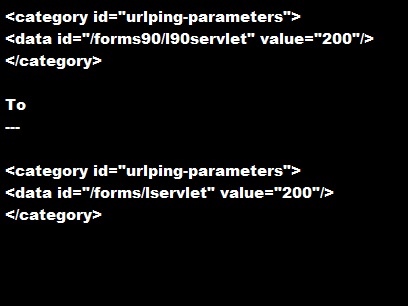
2-do the following change in opmn.xml (under $ORACLE_HOME/opmn/conf/):


3-SET Inbound_connection_timeout In sqlnet.ora to ZERO .

Sqlnet.Inbound_connection_timeout = 0

Note : if your can’t find this parameter in the SQLNET.ORA you cant add it .

5- Change the following $ORACLE_HOME/opmn/conf/opmn.xml


Hope this will work 

Thank you 
Osama mustafa 

ORA-12528 tns listener all appropriate instances are blocking new connections

SQL> set ORACLE_SID=ORCL
SQL> startup nomount
ORACLE instance started.

Total System Global Area 263639040 bytes
Fixed Size 1332552 bytes
Variable Size 222300856 bytes
Database Buffers 33554432 bytes
Redo Buffers 6451200 bytes

C:\>lsnrctl services

LSNRCTL for 32-bit Windows: Version 11.1.0.6.0 - Production

Service "ORCL" has 2 instance(s).
Instance "ORCL", status UNKNOWN, has 1 handler(s) for this service...
Handler(s):
"DEDICATED" established:0 refused:59
LOCAL SERVER
Instance "ORCL", status BLOCKED, has 1 handler(s) for this service...
Handler(s):
"DEDICATED" established:0 refused:0 state:ready
LOCAL SERVER
Service "ORCL_XPT" has 1 instance(s).
Instance "ORCL", status BLOCKED, has 1 handler(s) for this service...
Handler(s):
"DEDICATED" established:0 refused:0 state:ready
LOCAL SERVER
 
 
Want Solution Do the following : 
 
you can add the new TNS connect string (UR = A) to the tnsnames entry.
 
ORCL =
(DESCRIPTION =
(ADDRESS_LIST =
(ADDRESS = (PROTOCOL = TCP)(HOST = localhost)(PORT = 1521))
)
(CONNECT_DATA =
(SERVICE_NAME = ORCL)
(UR = A)
)
 
if the above Solution not working Make sure your listener look like :
 
SID_LIST_LISTENER =
(SID_LIST =
(SID_DESC =
(SID_NAME = CLRExtProc)
(ORACLE_HOME = D:\app\oraserver\product\11.2.0\dbhome_1)
(PROGRAM = extproc)
(ENVS = "EXTPROC_DLLS=ONLY:D:\app\oraserver\product\11.2.0\dbhome_1\bin\oraclr11.dll")
)
(SID_DESC =
(SID_NAME=orcl)
(ORACLE_HOME=D:\app\oraserver\product\11.2.0\dbhome_1)
)
)

LISTENER =
(DESCRIPTION_LIST =
(DESCRIPTION =
(ADDRESS = (PROTOCOL = IPC)(KEY = EXTPROC1521))
(ADDRESS = (PROTOCOL = TCP)(HOST = localhost)(PORT = 1521))
)
)


Thank you 
Osama Mustafa

RAC TO SINGLE NODE STEPS

Take RMAN backup of the production RAC database

1-
RMAN> run{
allocate channel c1 type disk format ‘/tmp/%U’;
backup database;
backup archivelog all;

backup controlfile ;
}

2-Create Pfile from RAC for single Node Using SQLPLUS :
 SQL>create pfile ” from spfile ;

3-Open pfile that you create it and modify the following parameters manually:
%dest, control_files
log_archive_dest_1
cluster_database_instances

4-Use the pfile created above to STARTUP NOMOUNT the database on the new host
$ sqlplus / as sysdba
SQL> startup nomount;

5-rman target /
A-restore controlfile from ‘/tmp/’;
OR
  restore controlfile from ‘/media/moh_1509/MEPSLIVE_20110919_762231895_3885.ctl’


B-ALTER DATABASE MOUNT ;
C.catalog backuppiece  ‘.bkp’ repeat it for all of backupset .
D.catalog backuppiece  ‘.arch’ repeat it for all of ARCHIVELOG.

E.
run
{
set newname for datafile 1 to ”;
set newname for datafile 2 to  ”;
set newname for datafile 3 to ”;
set newname for datafile 4 to  ”;
set newname for datafile 5 to  ”;
set newname for datafile 6 to  ”;
     restore database;
     switch datafile all;
}

NOTE : datafile number must be taken from the production system .

F.
sqlplus / as sysdba

alter database rename file ” to ”;

G.
alter database clear logfile group 1;
alter database clear logfile group 2;
alter database clear logfile group 3;

Then Delete unnecessary Redolog .

6.RMAN TARGET /
RMAN>RECOVER DATABASE ;

7.SQL> alter database open resetlogs;

If open database fail with error ORA-38856
then, Set the following parameter in the init.ora file:

_no_recovery_through_resetlogs=TRUE

8. 
SQL> select THREAD#, STATUS, ENABLED 2 from v$thread;

SQL> select group# from v$log where THREAD#=2;
SQL> alter database disable thread 2;

9.DROP REDO LOG FROM NEW SINGLE NODE BY :
 SQL> alter database clear unarchived logfile group ;  
SQL>alter database drop logfile group ;

After doing this you can remove undo tablespace for other instance 

10.To Remove it :
 SQL> show parameter undo;
SQL> select tablespace_name from dba_tablespaces where contents=’UNDO’;
SQL> drop tablespace UNDOTBS2 including contents and datafiles; 

Now you have single node instance 🙂

Thank you
Osama Mustafa

Change Listener Port For Oracle RAC

I think its useful to document this since maybe i will need it too 🙂

Environment

2 Node , Linux  …..

RAC database name: ORCL
Node 1 vip: myhost1-vip
Node 2 vip: myhost2-vip
Instance 1: ORCL1
Instance 2: ORCL2
Version: 11.1.0.7
New port: 1522

STEPS :

1) First, use netca to adjust the the listener port from 1521 to 1522. It’s a good idea to use netca to do this cluster-wide and keep the OCR in check.  
NOTE: This will shutdown the listeners across both nodes.

2)

2) In the tnsnames.ora for ASM and RDBMS, ensure the following entry exists (they’ll probably be there but with the 1521 port, so adjust accordingly):

LISTENERS_ORCL=
(ADDRESS_LIST =
(ADDRESS = (PROTOCOL = TCP)(HOST = myhost1-vip)(PORT = 1522))
(ADDRESS = (PROTOCOL = TCP)(HOST = myhost2-vip)(PORT = 1522))
)

LISTENER_ORCL2=
(ADDRESS = (PROTOCOL = TCP)(HOST = myhost2-vip)(PORT = 1522))

LISTENER_ORCL1=
(ADDRESS = (PROTOCOL = TCP)(HOST = myhost1-vip)(PORT = 1522))

3)
Connect to each instance and set the local_listener to parameter to either LISTENER_MYRACDB1 or 2 depending on the instance you connect to. Ensure you do this so it applies to the instance you are connected to only, and does not apply globally.

e.g. if connected to ORCL1

alter system set local_listener=’LISTENER_ORCL1′ sid=’ORCL1′;

4) Set the remote_listener parameter to LISTENERS_MYRACDB across all instances

e.g. alter system set remote_listener=’LISTENERS_ORCL’;

5) Repeat the above for both ASM instances

6) You should be able to start the listener on each node now.

e.g. srvctl start listener -n myhost1 

Thank you

Note :

On Single node instance all you need to do is
1-stop the listener
lsnrctl stop

2-Go to $ORACLE_HOME/network/admin/listener.ora
modified the port for new one .

3-start the listener
lsnrctl start

DONE

Osama mustafa
Oracle Database consultant

Resize Redo Log

Here is a newly created database redo log information:

SQL> select * from v$log;

GROUP# THREAD# SEQUENCE# BYTES MEMBERS ARC STATUS FIRST_CHANGE# FIRST_TIME
———- ———- ———- ———- ———- — —————- ————- ——————-
1 1 17 52428800 1 NO INACTIVE 996238 06/09/2007 22:01:59
2 1 18 52428800 1 NO INACTIVE 1006432 06/09/2007 22:13:32
3 1 19 52428800 1 NO CURRENT 1036439 07/09/2007 09:56:44

SQL> select * from v$logfile;

GROUP# STATUS TYPE MEMBER
———- ——- ——- ————————————————-
3 ONLINE /database/data/redo03.log
2 ONLINE /database/data/redo02.log
1 ONLINE /database/data/redo01.log


Here is how i changed this to five 200M redo logs:

SQL> alter database add logfile group 4 (‘/database/data/redo04.log’) size 200M;
SQL> alter database add logfile group 5 (‘/database/data/redo05.log’) size 200M;

while running following sql commands, if you hit an error like this:

ORA-01623: log 3 is current log for instance RPTDB (thread 1) – cannot drop
ORA-00312: online log 3 thread 1: ‘/database/data/redo03.log’

you should run ” alter system switch logfile;” until current log is 4 or 5. Then execute “alter system checkpoint;”

SQL> alter database drop logfile group 1;
SQL> alter database drop logfile group 2;
SQL> alter database drop logfile group 3;

then move (or maybe drop) old redo logs

mv /database/data/redo01.log /database/data/redo01_old.log
mv /database/data/redo02.log /database/data/redo02_old.log
mv /database/data/redo03.log /database/data/redo03_old.log

finally

SQL> alter database add logfile group 1 (‘/database/data/redo01.log’) size 200M;
SQL> alter database add logfile group 2 (‘/database/data/redo02.log’) size 200M;
SQL> alter database add logfile group 3 (‘/database/data/redo03.log’) size 200M;

Linux Command On Windows :)

Install Cygwin

Cygwin comes with a normal setup.exe to install in Windows, but there are a couple steps you will need to pay attention to, so we will walk you through the installation.

To keep the installation small while saving bandwidth for you and Cygwin, the default installer will download only the files you need from the internet.

The default install path is C:\Cygwin

Click next until you come to a download mirror selection. Unfortunately, the installer does not say where the mirrors are located so in most cases you might as well just guess which mirror works best.

After you have selected a mirror, the installer will download a list of available packages for you to install. Here is where things get a bit more intimidating.
There will be hundreds of packages available separated by multiple different categories. If you don’t know what the package is you can leave the default selection and install additional packages later by running the installer again.


If you know what package you need, you can search for it and the results will be automatically filtered.

Once you click next, it will take a little while to download all the selected tools and then finish the installation.

Add Cygwin Path to Windows Environment Variable

In the left column click on advanced system settings to open the system properties window we are looking for


From the advanced tab, click on environment variables at the bottom.

Then in the system variables, locate the path variable and click edit.

At the end of the variable value option, add the Cygwin bin location like so.
;C:\Cygwin\bin
Note: Make sure you add a semicolon to separate it from the other values.


Click OK to close out of the window and then open a command prompt to test out a few Linux commands.

Enjoy

Osama Mustafa