-
SELECT SID, Serial#, UserName, Status, SchemaName, Logon_Time
-
FROM V$Session
-
WHERE
-
Status=‘ACTIVE’ AND
-
UserName IS NOT NULL;
Enjoy
Thank you
Osama mustafa
For the people who think differently Welcome aboard
Enjoy
Thank you
Osama mustafa
1-
SQL>Show parameter Spfile ;
NAME TYPE VALUE
------------------------------------ ----------- ------------------------------
spfile string +DATA/orcl/spfileorcl.ora
2-
Create pfile=’/u01/new.pfile’ from spfile ;
3-
Create spfile=’/u01/app/oracle/product/10.2.0/db_1/dbs/newspfile.ora’ from
pfile=’/u01/new.pfile’;
4-
Shutdown immediate ;
startup ;
5-
Check new Location For Spfile ;
Thank you
Osama Mustafa
SQL> connect / as sysdba
SQL> show parameter spfile
NAME TYPE VALUE
------- ------- ------------------------------
spfile string /u01/app/oracle/product/11.2.0/db_1/dbs/spfileracdb11.ora
SQL> create pfile='/u01/app/oracle/product/11.2.0/db_1/dbs/initracdb11.ora' from spfile='/u01/app/oracle/product/11.2.0/db_1/dbs/spfileracdb11.ora';
SQL> create pfile from spfile
File created.
SQL> create spfile='+DATA' from pfile='/u01/app/oracle/product/11.2.0/db_1/dbs/initracdb11.ora';
File created.
SQL> exit
2. Modify initracdb11.ora on rac1 and initracdb12.ora on rac2 files to point to location in ASM
[oracle@rac1 dbs]$ echo "SPFILE='+RACDB_DATA/racdb1/spfileracdb1.ora'" > /u01/app/oracle/product/11.2.0/db_1/dbs/initracdb11.ora
[oracle@rac1 dbs]$ ssh rac2 "echo \"SPFILE='+RACDB_DATA/racdb1/spfileracdb1.ora'\" > /u01/app/oracle/product/11.2.0/db_1/dbs/initracdb12.ora"
3. Update OCR with new SPFILE location
[oracle@rac1 dbs]$ srvctl modify database -d racdb1 -p +RACDB_DATA/racdb1/spfileracdb1.ora
4. Rename any existing spfiles in $ORACLE_HOME/dbs
5. Restart all instances to switch to new SPFILE
6. Check New Location For Spfile .
Thank you
Osama mustafa
% sqlplus apps/apps
To retrieve the current value of ‘THREADS’ parameter:
SQL> select parameter_value
from pay_action_parameters
where parameter_name = 'THREADS';
SQL> update pay_action_parameters
set parameter_value = <number_of_threads>
where parameter_name = ‘THREADS’;
SQL> commit;
if you don't have thread value use the below sql :
SQL> insert into PAY_ACTION_PARAMETERS values ('THREADS', 'XXXX');
SQL>commit;
thank you
Osama mustafa
sql > SELECT OWNER,TABLE_NAME,STATTYPE_LOCKEDFROM DBA_TAB_STATISTICSWHERE STATTYPE_LOCKED IS NOT NULL;
sql> exec dbms_stats.unlock_schema_stats(‘schema_owner’);e.g : sql> exec dbms_stats.unlock_schema_stats(‘apps’);
sql> exec dbms_stats.unlock_schema_stats(‘table_owner’,’table_name’);e.g : sql > exec dbms_stats.unlock_schema_stats(‘AR’,’AR_REV_REC_QT’);
SQL> select a.column_name, nvl(a.hsize,254) hsizefrom FND_HISTOGRAM_COLS awhere table_name = ‘JE_BE_LINE_TYPE_MAP’order by column_name;
COLUMN_NAME HSIZE—————————— ———-SOURCE 254SOURCE 254
select table_name, column_name, count(*)from FND_HISTOGRAM_COLSgroup by table_name, column_namehaving count(*) > 1;
delete from FND_HISTOGRAM_COLSwhere table_name = ‘&TABLE_NAME’and column_name = ‘&COLUMN_NAME’and rownum=1;
delete from FND_HISTOGRAM_COLSwhere (table_name, column_name) in(select hc.table_name, hc.column_namefrom FND_HISTOGRAM_COLS hc , dba_tab_columns tcwhere hc.table_name =’&TABLE_NAME’and hc.table_name= tc.table_name (+)and hc.column_name = tc.column_name (+)and tc.column_name is null);
Summary of Possible Reasons and Solutions for the Problem Where All Concurrent Requests Stuck in Pending Phase
Below are several different possible solutions to the problem where concurrent
requests are stuck in pending status:
This is non-destructive. Concurrent Manager views can be rebuild by running the following command at the command line:
Ensure that concurrent manager is shutdown.
FNDLIBR FND FNDCPBWV apps/apps SYSADMIN ‘System Administrator’ SYSADMIN
restart the concurrent mgr.
1. Log into Oracle Applications as SYSADMIN.
2. Select System Administrator responsibility.
3. Navigate to PROFILE –> SYSTEM.
4. Query for %CONC%ACTIVE%.
5. Change the profile option for Concurrent: Active Request Limit to Null (blank).
6. Exit Oracle Applications and log in again for the change to take affect.
7. Run a new concurrent request.
.
sql> update fnd_concurrent_requests
set status_code=’X’, phase_code=’C’
where status_code=’T’;
sql> commit;
Set the control_code to ‘A’ in fnd_concurrent_queues for the Conflict Resolution Manager:
1. Logon to Oracle Applications database server as ‘applmgr’.
2. Verify the Applications environment is setup correctly ($ORACLE_HOME and $ORACLE_SID).
3. Logon to SQL*Plus as ‘APPS’ and run the following SQL statement:
update fnd_concurrent_queues
set control_code = ‘A’
where concurrent_queue_name = ‘FNDCRM’;
commit;
If the CRM is still not active, bounce (deactivate, activate) the Internal Concurrent Manager. This is done through the Concurrent -> Manager ->
Administer form from the ‘System Administrator’ responsibility. It can also be done through the CONCSUB command at the command level.
Setting the control_code to ‘A’ in the fnd_concurrent_queues table for the Conflict Resolution Manager indicates that this concurrent manager is to be activated with the parameter values specified through this table for this manager (MAX_PROCESSES, CACHE_SIZE, etc).
If concurrent requests are rarely prioritized and there are managers that service short-running requests, consider setting the cache size to equal at least twice the number of target processes. This increases the throughput of the concurrent manaagers by attempting to avoid any sleep time. For example, if more than one manager or worker processes the same type of requests with only a small cache size, it may be unable to process any jobs in a single processing cycle, because other processes have already run the cached requests. When this happens, it is important to note that the manager will sleep before refreshign its cache. To increase manager throughput where there are sufficient requests of the required type in the queue, increase the cache size to improve the chance of the manager finding work to process and thus avoid having to enter a sleep phase.
TIP: Ensure that the system is not resource-constrained before attempting to increase the rate of concurrent processing in this way; otherwise, these changes may actually reduce concurrent processing throughput because jobs take longer to run..
Enter the number of requests your manager remembers each time it reads which requests to run. For example, if a manager’s workshift has 1 target process and a cache value of 3, it will read three requests,, and will wait until these three requests have been run before reading new requests.
In reading requests, the manager will only put requests it is allowed to run into its cache. For example, if you have defined your manager to run only Order Entry reports then the manager will put only Order Entry requests into its cache.
If you enter 1, the concurrent manager must look at its requests list each time it is ready to process another request. By setting the cache size at a higher number, the concurrent manager does not have to read its requests list each time it runs a request. However, the manager does not recognizea nay priority changes you make for a particular request if it has already read that request into its cache. Further, even if you give a higher priority to a new request, that new request must wait until the buffer isempty and the manager returns to look at the requests list. That request may have to wait a long time if you set the buffer size to a high number.
You should use cache size to tune your concurrent managers to work most efficiently for you site’s needs. If your organization tends to reprioritize jobs going to a certain manager, that manager should have its buffer size set fairly low.
*Suggestion: *Enter a value of 1 when defining a manager that runs long, time-consuming jobs, and a value of 3 or 4 for managers that run small, quick jobs.
1. Check for the value set for the sleep seconds for the concurrent manager using the following path: System Administrator Responsibilty -> Concurrent -> Manager -> Define.
2. Check the processes running for the concurent manager using the following command:
ps -ef | grep ‘INVLIBR’
As all concurrent programs are dealt by INVLIBR, the number of processes returned here must tally with the value specified for the processes defined for the concurrent manager.
3. Also, check for the duration for which the processes are sleeping. Reducing the value assigned for it would improve performance.
|
AWRRPT.SQL
|
Basic AWR reports
|
|
AWRSQRPT.SQL
|
Standrad SQL Statement Report
|
|
AWRDDRPT.SQL
|
Period Diff on current Instance
|
|
AWRRPTI.SQL
|
Workload Repository Report Instance (RAC)
|
|
AWRGRPT.SQL
|
AWR GLOBAL Report(RAC)
|
|
AWRGDRPT.SQL
|
AWR GLOBAL DIFF Report (RAC)
|
|
AWRINFO.SQL
|
Script to Output General AWR Information
|
For most people the awrrpt.sql and awrsqrpt.sql are likely to be sufficient, but the “difference between two periods” can be very useful – especially if you do things like regularly forcing an extra snapshot at the start and end of the overnight batch so that you can (when necessary) find the most significant differences in behaviour between the batch runs on two different nights.
If you get into the ‘RAC difference report’ you’ll need a very wide page – and very good eyesight !
There are also a lot of “infrastructure and support” bits – some of the “input” files give you some nice ideas about how you can write your own code to do little jobs like: “run the most recent AWR report automatically”:
awrblmig.sql |
AWR Baseline Migrate |
awrload.sql |
AWR LOAD: load awr from dump file |
awrextr.sql |
AWR Extract |
awrddinp.sql |
Get inputs for diff report |
awrddrpi.sql |
Workload Repository Compare Periods Report |
awrgdinp.sql |
Get inputs for global diff reports |
awrgdrpi.sql |
Workload Repository Global Compare Periods Report |
awrginp.sql |
AWR Global Input |
awrgrpti.sql |
Workload Repository RAC (Global) Report |
awrinpnm.sql |
AWR Input Name |
awrinput.sql |
Get inputs for AWR report |
awrsqrpi.sql |
Workload Repository SQL Report Instance |
There are also a couple of deceptively named files that you might miss in 11.2:
spawrrac.sql |
Server Performance AWR RAC report |
spawrio.sql |
AWR IO Intensity Report |
spadvrpt.sql |
Streams Performance Advisor report |
Enjoy
Thank you
Osama Mustafa
Check the “DB Time” metric. If it is much higher than the elapsed time, then it indicates that the sessions are waiting for something.
Here in this example, the Elapsed Time is around 60 minutes while the DB Time is around 700 minutes. This means that 700 minutes of time is spent by the sessions on waiting.
2) Next thing to be looked is the following:-
Instance Efficiency Percentages (Target 100%) Buffer Nowait %: 100.00 Redo NoWait %: 100.00 Buffer Hit %: 98.67 In-memory Sort %: 100.00 Library Hit %: 98.60 Soft Parse %: 99.69 Execute to Parse %: 5.26 Latch Hit %: 99.31 Parse CPU to Parse Elapsd %: 12.78 %Non-Parse CPU: 99.10 Shared Pool Statistics Begin End Memory Usage %: 85.49 80.93 % SQL with executions>1: 42.46 82.96 % Memory for SQL w/exec>1: 47.77 81.03 The memory usage statistics of shared pool is shown.
Idealy this should be lesser. If it is very high like beyond 90, this shows the contention in the shared pool.
4) Next thing to be looked after is the Top 5 Timed Events table.
This shows the most significant waits contributing to the DB Time.
Top 5 Timed Events Event Waits Time(s) Avg Wait(ms) % Total Call Time Wait Class db file sequential read 4,076,086 28,532 7 66.9 User I/O CPU time 11,214 26.3 Backup: sbtbackup 4 4,398 1,099,452 10.3 Administrative log file sync 37,365 2,421 65 5.7 Commit log file parallel write 37,928 1,371 36 3.2 System I/O Here, the significant wait is the db file sequential read which contributes to 67% of DB Time.
SQL StatisticsSQL ordered by Elapsed Time SQL ordered by CPU Time SQL ordered by Gets SQL ordered by Reads SQL Statistics section would have commonly the above four sections.
Each section shows the list of SQLs based on the order of the respective metric.
For example, SQL ordered by Elapsed Time section shows the list of SQLs in the order
of the Elapsed Time. High resource consuming SQLs can be spotted out and meant for
tuning.
Note: All the above four sections of SQL Statistics show the list of SQLs in descending order.
i.e, For ex: Highest elapsed time is shown as first.
6) Then comes the IO Stats section.
This shows the IO Statistics for each tablespaces in the database.
As the thumb rule, the Av Rd(ms) [Average Reads in milliseconds] should not cross beyond 30, add myself(not greater that 30)
which is considered to be IO bottleneck.
Tablespace IO Statsordered by IOs (Reads + Writes) desc In the above example, the Av Rd(ms) is high in all tablespaces indicating the IO contention.
7) Then , Advisory Statistics can be checked.
This section shows the following:-
Buffer Pool Advisory PGA Aggr Summary PGA Aggr Target Stats PGA Aggr Target Histogram PGA Memory Advisory Shared Pool Advisory SGA Target Advisory Streams Pool Advisory Java Pool Advisory It is very commonly used to check the advisories for the most important SGA structures like shared pool, buffer cache etc and PGA.
8) Then finally, init.ora Parameters is shown which shows the list of parameters set at instance level.
init.ora ParametersAll the above said sections except the DB Time can be checked from Statspack report also.
The statspack snapshots are not generated automatically as in AWR.It has to be generated during the problem period as follows:-
Take 2 snapshots between 60 minutes interval during the problem and generate the statspack report
Please run $ORACLE_HOME/rdbms/admin/spreport.sql
and specify BEGIN and END ID’s of the snapshots taken during the problem.
Some Other Links Will Be Useful :
1-statspack examples.
2-Analyaz statspack.
3-Active Session History.
4-Statspack Article.
5-About Statspack.
6-Using Statspack.
7-AWR Reports
Thank you
Osama mustafa
V$SESS_TIME_MODEL and V$SYS_TIME_MODEL views.V$ACTIVE_SESSION_HISTORY view.V$SYSSTAT and V$SESSTAT views.Step 1: Go to $ORACLE_HOME.
Step 2: Once in $ORACLE_HOME go to cd rdbms and then cd admin.
Step 3: Run command ‘ls –ltr awr*’.
Step 4: Go to ‘sqlplus / as sysdba
Step 5: In sqlplus the following is run ‘SQL> @awrrpt.sql. Select the format for the report as either ‘HTML’ or ‘TEXT’.
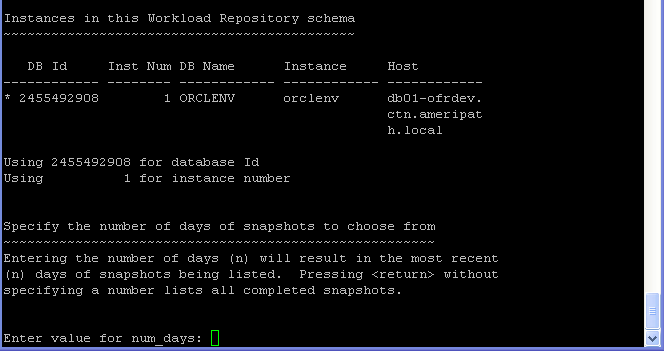
Step 6: Select number of days you want to go back or just hit enter for listing all
completed snapshots, if you press ENTER it will give you all snapshot .
Step 7: Then specify Begin and End snapshot Ids.
Step 8: Here you specify the name of the report or select the default name assigned.
Exit Sql , And Search for your report_name in the Same Directory .
Just As Note :
@?/rdbms/admin/awrrpti.sql – Script can be used for the specified database and instance so the script in addition will prompt for dbid and instance number.
@?/rdbms/admin/awrddrpt.sql – Script can be used to generate a combine report of 2 different snapshots for comparison of performance in one report so it will prompt for two pairs of snapshot snapshots to compare against.
@?/rdbms/admin/awrinfo.sql – Script print AWR information like space usage by AWR, subset of AWR snap ids, Automatic Database Diagnostic Monitor (ADDM), Active Session History (ASH) information.
@?/rdbms/admin/awrrpt.sql – It is an interactive script that can be used to generate HTML or text reports. The script prompts for type of report requested and prompts for number of days of snapshots to choose from so based on that it displays snap ids to choose the start and end snapshot it.
The Next Post will be How to read AWR Tips .
Enjoy
Osama Mustafa
SYS_CONTEXT. The syntax of this function goes like this:
SYS_CONTEXT ( 'namespace' , 'parameter' [, length] )
SYS_CONTEXT returns the value of parameter associated with the context namespace. You can use this function in both SQL and PL/SQL statements.
What makes this function more interesting is the fact that Oracle provides a built-in namespace called USERENV with predefined parameters, which describes the current session. Go ahead and run the following query:
select
sys_context('USERENV','AUTHENTICATION_TYPE')
,sys_context('USERENV','CURRENT_SCHEMA')
,sys_context('USERENV','CURRENT_SCHEMAID')
,sys_context('USERENV','CURRENT_USER')
,sys_context('USERENV','CURRENT_USERID')
,sys_context('USERENV','DB_DOMAIN')
,sys_context('USERENV','DB_NAME')
,sys_context('USERENV','HOST')
,sys_context('USERENV','INSTANCE')
,sys_context('USERENV','IP_ADDRESS')
,sys_context('USERENV','ISDBA')
,sys_context('USERENV','LANG')
,sys_context('USERENV','LANGUAGE')
,sys_context('USERENV','NETWORK_PROTOCOL')
,sys_context('USERENV','NLS_CALENDAR')
,sys_context('USERENV','NLS_CURRENCY')
,sys_context('USERENV','NLS_DATE_FORMAT')
,sys_context('USERENV','NLS_DATE_LANGUAGE')
,sys_context('USERENV','NLS_TERRITORY')
,sys_context('USERENV','OS_USER')
,sys_context('USERENV','SESSION_USER')
,sys_context('USERENV','SESSION_USERID')
,sys_context('USERENV','SESSIONID')
,sys_context('USERENV','TERMINAL')
from dual
Amazing , you can Use this Function in Oracle Security .
Enjoy
Thank you
Osama mustafa