
I will have two presentation about the DevOps
- Database Automation, Is this even possible ?
- Kuberenetes in Depth but in simple way
You can register here
The hashtag in use is #APACGBT2021
Enjoy
Cheers
For the people who think differently Welcome aboard
I will have two presentation about the DevOps
You can register here
The hashtag in use is #APACGBT2021
Enjoy
Cheers

Quest Oracle Community is home to 25,000+ users of JD Edwards, PeopleSoft, Oracle Cloud apps and Oracle Database products. We connect Oracle users to technology leaders and Oracle experts from companies who are driving innovation and leading through their use of Oracle products.
The Quest Oracle Community is dedicated to helping Oracle users develop skills and expand knowledge by connecting with other Oracle users and experts for education and networking.
I will present about the automation
You can register for the event from here
Thank you
we’ll look at considerations for migrating existing applications to serverless and common ways for extending the serverless
At a high level, there are three migration patterns that you might follow to migrate your legacy your applications to a serverless model.
Leapfrog
As the name suggests, you bypass interim steps and go straight from an on-premises legacy architecture to a serverless cloud architecture
Organic
You move on-premises applications to the cloud in more of a “lift and shift” model. In this model, existing applications are kept intact, either running on Amazon Elastic Compute Cloud (Amazon EC2) instances or with some limited rewrites to container services like Amazon Elastic Kubernetes Service (Amazon EKS)/Amazon Elastic Container Service (Amazon ECS) or AWS Fargate.
Developers experiment with Lambda in low-risk internal scenarios like log processing or cron jobs. As you gain more experience, you might use serverless components for tasks like data transformations and parallelization of processes.
At some point in the adoption curve, you take a more strategic look at how serverless and microservices might address business goals like market agility, developer innovation, and total cost of ownership.
You get buy-in for a more long-term commitment to invest in modernizing your applications and select a production workload as a pilot. With initial success and lessons learned, adoption accelerates, and more applications are migrated to microservices and serverless.
Strangler
With the strangler pattern, an organization incrementally and systematically decomposes monolithic applications by creating APIs and building event-driven components that gradually replace components of the legacy application.
Distinct API endpoints can point to old vs. new components, and safe deployment options (like canary deployments) let you point back to the legacy version with very little risk.
New feature branches can be “serverless first,” and legacy components can be decommissioned as they are replaced. This pattern represents a more systematic approach to adopting serverless, allowing you to move to critical improvements where you see benefit quickly but with less risk and upheaval than the leapfrog pattern.
Migration questions to answer:
Application Load Balancer vs. API Gateway for directing traffic to serverless targets
| Application Load Balancer | Amazon API Gateway |
|---|---|
| Easier to transition existing compute stack where you are already using an Application Load Balancer | Good for building REST APIs and integrating with other services and Lambda functions |
| Supports authorization via OIDC-capable providers, including Amazon Cognito user pools | Supports authorization via AWS Identity and Access Management (IAM), Amazon Cognito, and Lambda authorizers |
| Charged by the hour, based on Load Balancer Capacity Units | Charged based on requests served |
| May be more cost-effective for a steady stream of traffic | May be more cost-effective for spiky patterns |
| Additional features for API management: Export SDK for clients Use throttling and usage plans to control access Maintain multiple versions of an APICanary deployments |
Consider three factors when comparing costs of ownership:
Reference
Cheers
Osama
AWS Transit Gateway is a highly available and scalable service that provides interconnectivity between VPCs and your on-premises network. Within a Region, AWS Transit Gateway provides a method for consolidating and centrally managing routing between VPCs with a hub-and-spoke network architecture.
Between Regions, AWS Transit Gateway supports inter-regional peering with other transit gateways. It does this to facilitate routing network traffic between VPCs of different Regions over the AWS global backbone. This removes the need to route traffic over the internet. AWS Transit Gateway also integrates with hybrid network configurations when a Direct Connect or AWS Site-to-Site VPN connection is connected to the transit gateway.
Attachments
AWS Transit Gateway supports the following connections:
AWS Transit Gateway MTU
AWS Transit Gateway supports an MTU of 8,500 bytes for:
AWS Transit Gateway supports an MTU of 1,500 bytes for VPN connections.
AWS Transit Gateway route table
A transit gateway has a default route table and can optionally have additional route tables. A route table includes dynamic and static routes that decide the next hop based on the destination IP address of the packet. The target of these routes can be any transit gateway attachment.
Associations
Each attachment is associated with exactly one route table. Each route table can be associated with zero to many attachments.
Route propagation
A VPC, VPN connection, or Direct Connect gateway can dynamically propagate routes to a transit gateway route table. With a Direct Connect attachment, the routes are propagated to a transit gateway route table by default.
With a VPC, you must create static routes to send traffic to the transit gateway.
With a VPN connection or a Direct Connect gateway, routes are propagated from the transit gateway to your on-premises router using BGP.
With a peering attachment, you must create a static route in the transit gateway route table to point to the peering attachment.
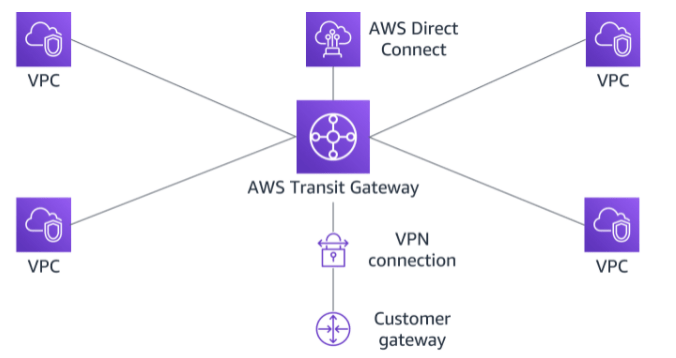
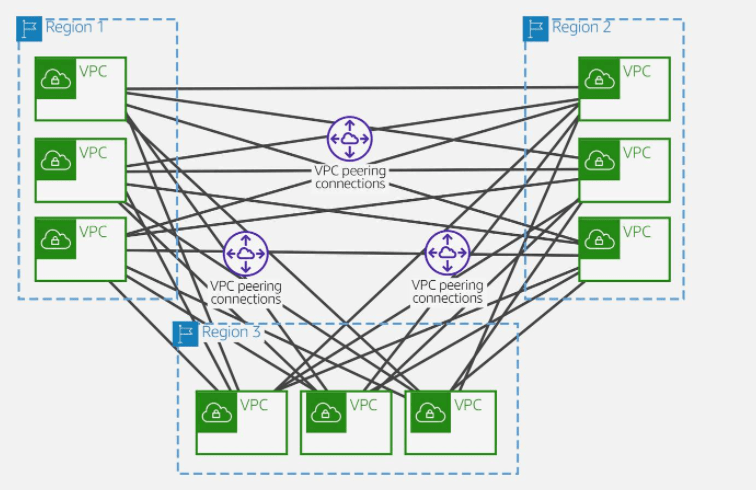
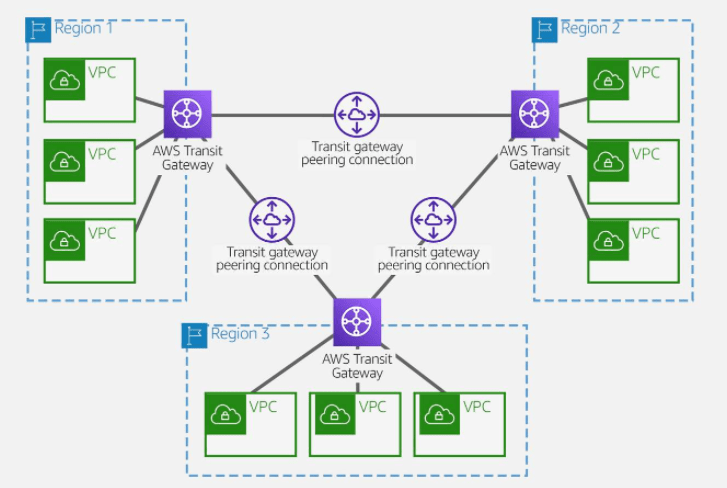
AWS offers two types of peering connections for routing traffic between VPCs in different Regions: VPC peering and transit gateway peering. Both peering types are one-to-one, but transit gateway peering connections have a simpler network design and more consolidated management.
Suppose a customer has multiple VPCs in three different Regions. As the following diagram illustrates, to permit network traffic to route between each VPC requires creating 72 VPC peering connections. Each VPC needs 8 different routing configurations and security policies.
With AWS Transit Gateway, the same environment only needs three peering connections. The transit gateway in each Region facilitates routing network traffic to all the VPCs in its Region. Because all routing can be managed by the transit gateway, the customer only needs to maintain three routing configurations, simplifying management.
Cheers
Osama
AWS VPN is comprised of two services:
ased on IPsec technology, AWS Site-to-Site VPN uses a VPN tunnel to pass data from the customer network to or from AWS.
One AWS Site-to-Site VPN connection consists of two tunnels. Each tunnel terminates in a different Availability Zone on the AWS side, but it must terminate on the same customer gateway on the customer side.
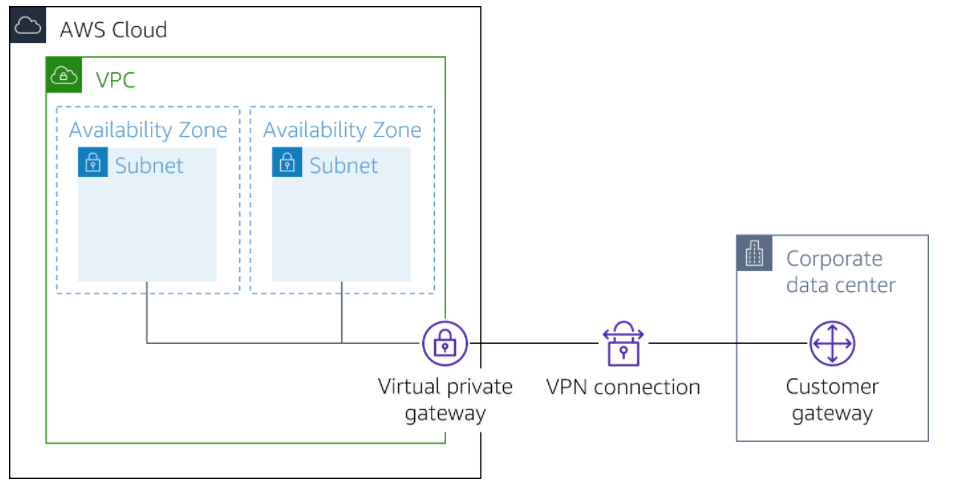
Customer gateway
A resource you create and configure in AWS that represents your on-premise gateway device. The resource contains information about the type of routing used by the Site-to-Site VPN, BGP, ASN and other optional configuration information.
Customer gateway device
A customer gateway device is a physical device or software application on your side of the AWS Site-to-Site VPN connection.
Virtual private gateway
A virtual private gateway is the VPN concentrator on the Amazon side of the AWS Site-to-Site VPN connection. You use a virtual private gateway or a transit gateway as the gateway for the Amazon side of the AWS Site-to-Site VPN connection.
Transit gateway
A transit gateway is a transit hub that can be used to interconnect your VPCs and on-premises networks. You use a transit gateway or virtual private gateway as the gateway for the Amazon side of the AWS Site-to-Site VPN connection.
In addition, when you connect your VPCs to a common on-premises network, it’s recommend that you use nonoverlapping CIDR blocks for your networks.
Based on OpenVPN technology, Client VPN is a managed client-based VPN service that lets you securely access your AWS resources and resources in your on-premises network. With Client VPN, you can access your resources from any location using an OpenVPN-based VPN client.
Client VPN endpoint
Your Client VPN administrator creates and configures a Client VPN endpoint in AWS. Your administrator controls which networks and resources you can access when you establish a VPN connection.
VPN client application
This is the software application that you use to connect to the Client VPN endpoint and establish a secure VPN connection.
Client VPN endpoint configuration file
This is a configuration file that is provided to you by your Client VPN administrator. The file includes information about the Client VPN endpoint and the certificates required to establish a VPN connection. You load this file into your chosen VPN client application.
Cheers
Osama
Continue to pervious post of Configure Kubernetes on my blog.
This post will discuss how to scale the pods, I will assume the Kubernetes installed if not back to the above post.
If you did these steps below , you can skip
Initialize the cluster
kubeadm init --pod-network-cidr=10.244.0.0/16 --kubernetes-version=v1.11.3
As mentioned the command will generate commands like the picture.
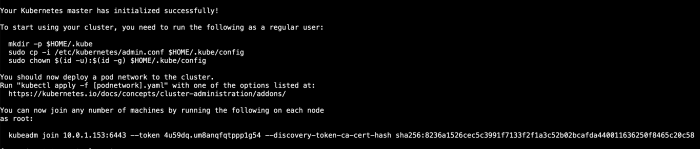
mkdir -p $HOME/.kube

sudo cp -i /etc/kubernetes/admin.conf $HOME/.kube/config

sudo chown $(id -u):$(id -g) $HOME/.kube/configFlannel is an open-source virtual network project managed by CoreOS network designed for Kubernetes. Each host in a flannel cluster runs an agent called flanneld . It assigns each host a subnet, which acts as the IP address pool for containers running on the host.
kubectl apply -f https://raw.githubusercontent.com/coreos/flannel/v0.9.1/Documentation/kube-flannel.yml
vi deployment.ymlapiVersion: apps/v1
kind: Deployment
metadata:
name: httpd-deployment
labels:
app: httpd
spec:
replicas: 3
selector:
matchLabels:
app: httpd
template:
metadata:
labels:
app: httpd
spec:
containers:
- name: httpd
image: httpd:latest
ports:
- containerPort: 80kubectl create -f deployment.yml
vim service.ymlkind: Service
apiVersion: v1
metadata:
name: service-deployment
spec:
selector:
app: httpd
ports:
- protocol: TCP
port: 80
targetPort: 80
type: NodePortkubectl create -f service.yml
vi deployment.ymlChange the number of replicas to 5:
spec: replicas: 5
kubectl apply -f deployment.ymlEnjoy
Hope it’s useful
Osama
The Flask Application uploaded to my GitHub Here
I will dockerize the above application and show you the steps to do that
Let’s Start 🤞
vim .dockerignore

.dockerignore

Dockerfile

.gitignore

Pipfile.lock

migrations/
FROM python:3


ENV PYBASE /pybase

ENV PYTHONUSERBASE $PYBASE

ENV PATH $PYBASE/bin:$PATH

RUN pip install pipenv

WORKDIR /tmp

COPY Pipfile .

RUN pipenv lock

RUN PIP_USER=1 PIP_IGNORE_INSTALLED=1 pipenv install -d --system --ignore-pipfile

COPY . /app/notes


WORKDIR /app/notes

EXPOSE 80

CMD ["flask", "run", "--port=80", "--host=0.0.0.0"]docker build -t notesapp:0.1 .
docker run --rm -it --network notes -v /home/Osama/notes/migrations:/app/notes/migrations notesapp:0.1 bash
The above commands build and run the container, once you are inside the container configure the database
flask db init

flask db migrate

flask db upgradedocker run --rm -it --network notes -p 80:80 notesapp:0.1Perfect , we are done now
Enjoy the learning 👍
Osama
This time how to store your data to Azure Blog Storage 👍
Let’s start
Configuration
az loginStorage
az storage account list | grep name | head -1Copy the name of the Storage account to the clipboard.
export AZURE_STORAGE_ACCOUNT=<COPIED_STORAGE_ACCOUNT_NAME>az storage account keys list --account-name=$AZURE_STORAGE_ACCOUNTCopy the key1 “value” for later use.
export AZURE_STORAGE_ACCESS_KEY=<KEY1_VALUE>sudo rpm -Uvh https://packages.microsoft.com/config/rhel/7/packages-microsoft-prod.rpm
sudo yum install blobfuse fuse -ysudo sed -ri 's/# user_allow_other/user_allow_other/' /etc/fuse.confUse Azure Blob container Storage
sudo mkdir -p /mnt/Osama /mnt/blobfusetmpsudo chown cloud_user /mnt/Osama/ /mnt/blobfusetmp/blobfuse /mnt/Osama --container-name=website --tmp-path=/mnt/blobfusetmp -o allow_other cp -r ~/web/* /mnt/Osama/ll /mnt/Osama/az storage blob list -c website --output tabledocker run -d --name web1 -p 80:80 --mount type=bind,source=/mnt/Osama,target=/usr/local/apache2/htdocs,readonly httpd:2.4Enjoy 🎉😁
Osama
As we already know oracle has been providing free exam and materials for siz track like the following till 15 May 2020: –
and because of the high demand since there are not available slot anymore, Oracle now providing extension BUT you have to apply for this
Follow this Video :-
Enjoy
Osama
To create your first server/VM on Azure cloud, you have different ways to do that :-
The Azure portal is the easiest way to create resources such as VMs, i will describe each one of them,
The first way which is The Portal here, to do this it’s very simple :-
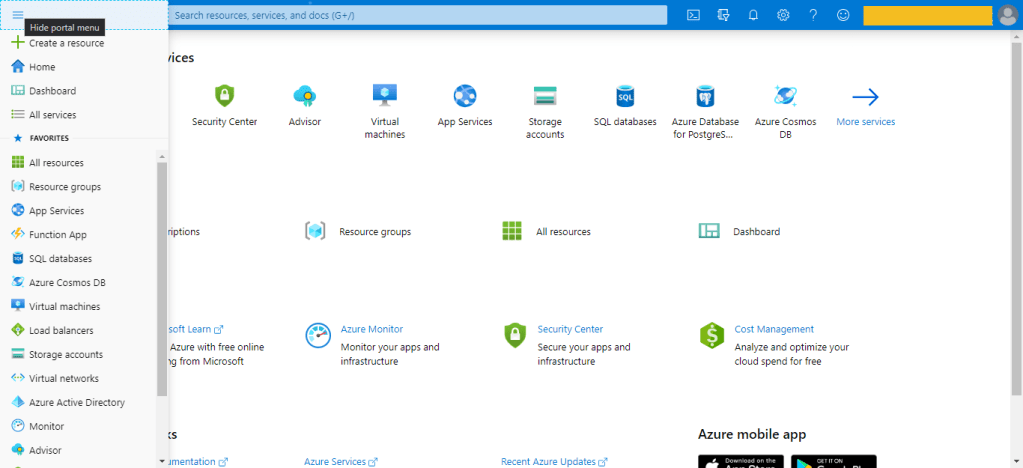

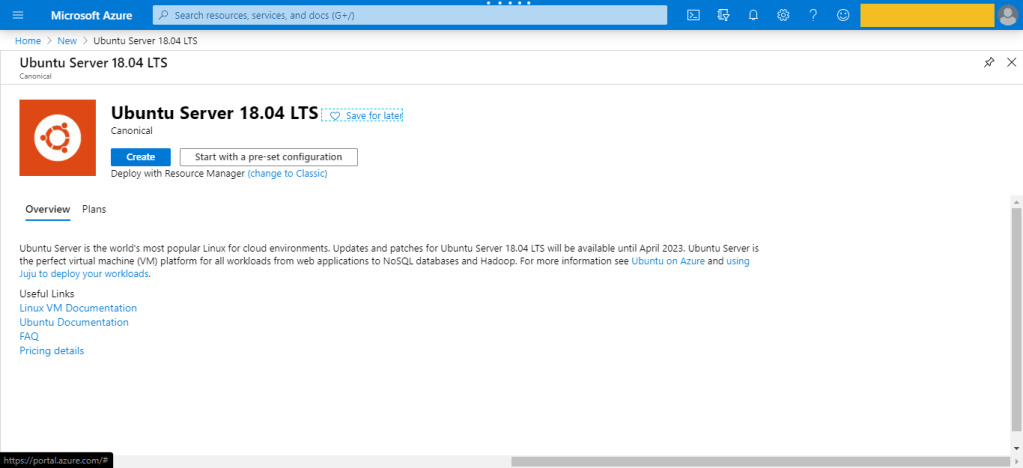
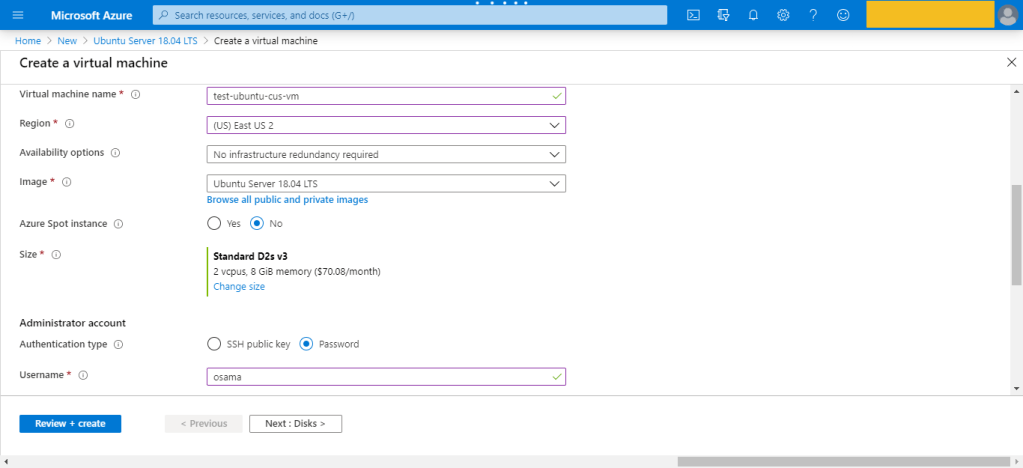
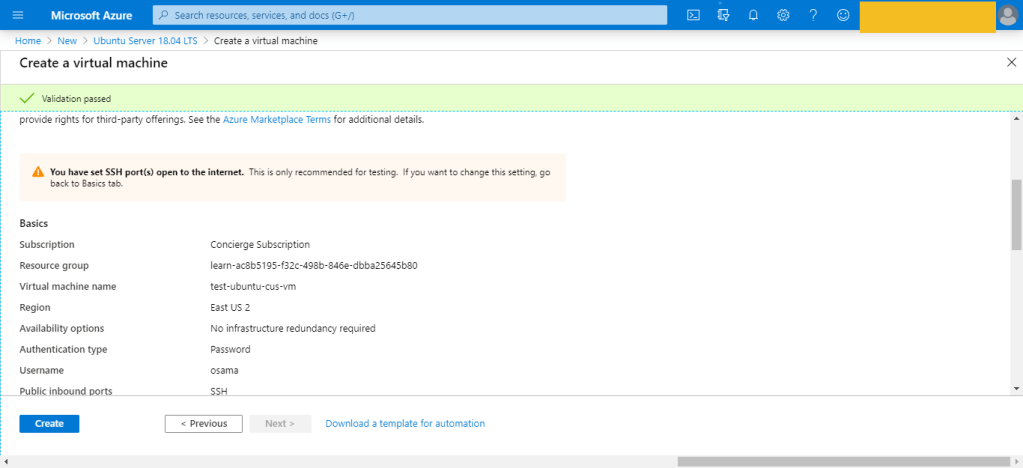
This is was the first way to create the VM which is consider the easiet one also.
Azure Resource Manager
assumig you want to create a copy of a VM with the same settings. You could create a VM image, upload it to Azure, and reference it as the basis for your new VM,Azure provides you with the option to create a template from which to create an exact copy of a VM.
You can do this, after create the VM –> Setting –> export template.
Azure PowerShell
Azure PowerShell is ideal for one-off interactive tasks and/or the automation of repeated tasks, note that PowerShell is a cross-platform shell that provides services like the shell window and command parsing.
New-AzVm -ResourceGroupName "TestResourceGroup" -Name "test-wp1-eus-vm" -Location "East US" -VirtualNetworkName "test-wp1-eus-network" -SubnetName "default" -SecurityGroupName "test-wp1-eus-nsg" -PublicIpAddressName "test-wp1-eus-pubip" -OpenPorts 80,3389Azure CLI
The Azure CLI is Microsoft’s cross-platform command-line tool for managing Azure resources such as virtual machines and disks from the command line. It’s available for macOS, Linux, and Windows, this is also found in Different cloud vendor for example For Amazon it’s called aws cli, for Oracle it’s Called OCI-CLI and Google it’s called GCP-CLI.
az vm create --resource-group TestResourceGroup --name test-wp1-eus-vm --image win2016datacenter --admin-username osama --admin-password anythingProgrammatic (APIs)
This is no my expertise so i will no go deep dive with it, But we were talking about Azure CLI and powershell, you can install something called Azure REST API and start using differen programing language to deal with Azure, i did this with python for AWS using Boto3 module, i post about it before here.
The same can be done for Azure or any Cloud vendor.
Azure VM Extensions
Azure VM extensions are small applications that allow you to configure and automate tasks on Azure VMs after initial deployment. Azure VM extensions can be run with the Azure CLI, PowerShell, Azure Resource Manager templates, and the Azure portal.
Thank you
Osama Mustafa
 Technology Geek