AWS Systems Manager Parameter Store: Secure Configuration Management and Automation

Configuration management is a critical aspect of modern cloud infrastructure, and AWS Systems Manager Parameter Store provides an elegant solution for storing, retrieving, and managing configuration data securely. This centralized service eliminates the need to hardcode sensitive information in your applications while enabling dynamic configuration management across your AWS environment.

Understanding AWS Systems Manager Parameter Store

AWS Systems Manager Parameter Store is a secure, hierarchical storage service for configuration data and secrets management. It integrates seamlessly with other AWS services and provides fine-grained access control through IAM policies. The service supports both standard and advanced parameters, with advanced parameters offering enhanced capabilities like larger storage size, parameter policies, and intelligent tiering.

The service organizes parameters in a hierarchical structure using forward slashes, similar to a file system. This organization allows for logical grouping of related parameters and enables bulk operations on parameter trees. For example, you might organize database connection strings under /myapp/database/ and API keys under /myapp/api/.

Key Features and Capabilities

Parameter Store offers several parameter types to meet different use cases. String parameters store plain text values, while StringList parameters contain comma-separated values. SecureString parameters encrypt sensitive data using AWS Key Management Service (KMS), ensuring that secrets remain protected both at rest and in transit.

The service provides version control for parameters, maintaining a history of changes and allowing rollback to previous versions when needed. This versioning capability is particularly valuable in production environments where configuration changes need to be tracked and potentially reversed.

Parameter policies add another layer of sophistication, enabling automatic parameter expiration, notification policies, and lifecycle management. These policies help enforce security best practices and reduce operational overhead.

Practical Implementation: Multi-Environment Application Configuration

Let’s explore a comprehensive example that demonstrates Parameter Store’s capabilities in a real-world scenario. We’ll build a microservices application that uses Parameter Store for configuration management across development, staging, and production environments.

Setting Up the Parameter Hierarchy

First, we’ll establish a logical parameter hierarchy for our application:

# Database configuration parameters
aws ssm put-parameter \
    --name "/myapp/dev/database/host" \
    --value "dev-db.internal.company.com" \
    --type "String" \
    --description "Development database host"

aws ssm put-parameter \
    --name "/myapp/dev/database/port" \
    --value "5432" \
    --type "String" \
    --description "Development database port"

aws ssm put-parameter \
    --name "/myapp/dev/database/username" \
    --value "dev_user" \
    --type "String" \
    --description "Development database username"

aws ssm put-parameter \
    --name "/myapp/dev/database/password" \
    --value "dev_secure_password_123" \
    --type "SecureString" \
    --key-id "alias/parameter-store-key" \
    --description "Development database password"

# API configuration parameters
aws ssm put-parameter \
    --name "/myapp/dev/api/rate_limit" \
    --value "1000" \
    --type "String" \
    --description "API rate limit for development"

aws ssm put-parameter \
    --name "/myapp/dev/api/timeout" \
    --value "30" \
    --type "String" \
    --description "API timeout in seconds"

aws ssm put-parameter \
    --name "/myapp/dev/external/payment_api_key" \
    --value "sk_test_123456789" \
    --type "SecureString" \
    --key-id "alias/parameter-store-key" \
    --description "Payment gateway API key"

Python Application Integration

Here’s a Python application that demonstrates how to retrieve and use these parameters:

import boto3
import json
from botocore.exceptions import ClientError
from typing import Dict, Any, Optional

class ConfigurationManager:
    def __init__(self, environment: str = "dev", region: str = "us-east-1"):
        self.ssm_client = boto3.client('ssm', region_name=region)
        self.environment = environment
        self.parameter_cache = {}
        
    def get_parameter(self, parameter_name: str, decrypt: bool = True) -> Optional[str]:
        """
        Retrieve a single parameter from Parameter Store
        """
        try:
            response = self.ssm_client.get_parameter(
                Name=parameter_name,
                WithDecryption=decrypt
            )
            return response['Parameter']['Value']
        except ClientError as e:
            print(f"Error retrieving parameter {parameter_name}: {e}")
            return None
    
    def get_parameters_by_path(self, path: str, decrypt: bool = True) -> Dict[str, Any]:
        """
        Retrieve all parameters under a specific path
        """
        try:
            paginator = self.ssm_client.get_paginator('get_parameters_by_path')
            parameters = {}
            
            for page in paginator.paginate(
                Path=path,
                Recursive=True,
                WithDecryption=decrypt
            ):
                for param in page['Parameters']:
                    # Remove the path prefix and convert to nested dict
                    key = param['Name'].replace(path, '').lstrip('/')
                    parameters[key] = param['Value']
            
            return parameters
        except ClientError as e:
            print(f"Error retrieving parameters by path {path}: {e}")
            return {}
    
    def get_application_config(self) -> Dict[str, Any]:
        """
        Load complete application configuration
        """
        base_path = f"/myapp/{self.environment}"
        
        # Get all parameters for the environment
        all_params = self.get_parameters_by_path(base_path)
        
        # Organize into logical groups
        config = {
            'database': {
                'host': all_params.get('database/host'),
                'port': int(all_params.get('database/port', 5432)),
                'username': all_params.get('database/username'),
                'password': all_params.get('database/password')
            },
            'api': {
                'rate_limit': int(all_params.get('api/rate_limit', 100)),
                'timeout': int(all_params.get('api/timeout', 30))
            },
            'external': {
                'payment_api_key': all_params.get('external/payment_api_key')
            }
        }
        
        return config
    
    def update_parameter(self, parameter_name: str, value: str, 
                        parameter_type: str = "String", overwrite: bool = True):
        """
        Update or create a parameter
        """
        try:
            self.ssm_client.put_parameter(
                Name=parameter_name,
                Value=value,
                Type=parameter_type,
                Overwrite=overwrite
            )
            print(f"Successfully updated parameter: {parameter_name}")
        except ClientError as e:
            print(f"Error updating parameter {parameter_name}: {e}")

# Example usage in a Flask application
from flask import Flask, jsonify
import os

app = Flask(__name__)

# Initialize configuration manager
config_manager = ConfigurationManager(
    environment=os.getenv('ENVIRONMENT', 'dev')
)

# Load configuration at startup
app_config = config_manager.get_application_config()

@app.route('/health')
def health_check():
    return jsonify({
        'status': 'healthy',
        'environment': config_manager.environment,
        'database_host': app_config['database']['host']
    })

@app.route('/config')
def get_config():
    # Return non-sensitive configuration
    safe_config = {
        'database': {
            'host': app_config['database']['host'],
            'port': app_config['database']['port']
        },
        'api': app_config['api']
    }
    return jsonify(safe_config)

if __name__ == '__main__':
    app.run(debug=True)

Infrastructure as Code with CloudFormation

Here’s a CloudFormation template that creates the parameter hierarchy and associated IAM roles:

AWSTemplateFormatVersion: '2010-09-09'
Description: 'Parameter Store configuration for multi-environment application'

Parameters:
  Environment:
    Type: String
    Default: dev
    AllowedValues: [dev, staging, prod]
    Description: Environment name
  
  ApplicationName:
    Type: String
    Default: myapp
    Description: Application name

Resources:
  # KMS Key for SecureString parameters
  ParameterStoreKMSKey:
    Type: AWS::KMS::Key
    Properties:
      Description: KMS Key for Parameter Store SecureString parameters
      KeyPolicy:
        Statement:
          - Sid: Enable IAM User Permissions
            Effect: Allow
            Principal:
              AWS: !Sub 'arn:aws:iam::${AWS::AccountId}:root'
            Action: 'kms:*'
            Resource: '*'
          - Sid: Allow Parameter Store
            Effect: Allow
            Principal:
              Service: ssm.amazonaws.com
            Action:
              - kms:Decrypt
              - kms:DescribeKey
            Resource: '*'

  ParameterStoreKMSKeyAlias:
    Type: AWS::KMS::Alias
    Properties:
      AliasName: !Sub 'alias/${ApplicationName}-parameter-store-key'
      TargetKeyId: !Ref ParameterStoreKMSKey

  # Database configuration parameters
  DatabaseHostParameter:
    Type: AWS::SSM::Parameter
    Properties:
      Name: !Sub '/${ApplicationName}/${Environment}/database/host'
      Type: String
      Value: !Sub '${Environment}-db.internal.company.com'
      Description: !Sub 'Database host for ${Environment} environment'

  DatabasePortParameter:
    Type: AWS::SSM::Parameter
    Properties:
      Name: !Sub '/${ApplicationName}/${Environment}/database/port'
      Type: String
      Value: '5432'
      Description: Database port

  DatabaseUsernameParameter:
    Type: AWS::SSM::Parameter
    Properties:
      Name: !Sub '/${ApplicationName}/${Environment}/database/username'
      Type: String
      Value: !Sub '${Environment}_user'
      Description: Database username

  DatabasePasswordParameter:
    Type: AWS::SSM::Parameter
    Properties:
      Name: !Sub '/${ApplicationName}/${Environment}/database/password'
      Type: SecureString
      Value: !Sub '${Environment}_secure_password_123'
      KeyId: !Ref ParameterStoreKMSKey
      Description: Database password

  # API configuration parameters
  APIRateLimitParameter:
    Type: AWS::SSM::Parameter
    Properties:
      Name: !Sub '/${ApplicationName}/${Environment}/api/rate_limit'
      Type: String
      Value: '1000'
      Description: API rate limit

  APITimeoutParameter:
    Type: AWS::SSM::Parameter
    Properties:
      Name: !Sub '/${ApplicationName}/${Environment}/api/timeout'
      Type: String
      Value: '30'
      Description: API timeout in seconds

  # IAM Role for application to access parameters
  ApplicationRole:
    Type: AWS::IAM::Role
    Properties:
      RoleName: !Sub '${ApplicationName}-${Environment}-parameter-access-role'
      AssumeRolePolicyDocument:
        Version: '2012-10-17'
        Statement:
          - Effect: Allow
            Principal:
              Service: 
                - ec2.amazonaws.com
                - ecs-tasks.amazonaws.com
                - lambda.amazonaws.com
            Action: sts:AssumeRole
      Policies:
        - PolicyName: ParameterStoreAccess
          PolicyDocument:
            Version: '2012-10-17'
            Statement:
              - Effect: Allow
                Action:
                  - ssm:GetParameter
                  - ssm:GetParameters
                  - ssm:GetParametersByPath
                Resource: 
                  - !Sub 'arn:aws:ssm:${AWS::Region}:${AWS::AccountId}:parameter/${ApplicationName}/${Environment}/*'
              - Effect: Allow
                Action:
                  - kms:Decrypt
                Resource: !GetAtt ParameterStoreKMSKey.Arn

  # Instance Profile for EC2 instances
  ApplicationInstanceProfile:
    Type: AWS::IAM::InstanceProfile
    Properties:
      Roles:
        - !Ref ApplicationRole

Outputs:
  ApplicationRoleArn:
    Description: ARN of the application role
    Value: !GetAtt ApplicationRole.Arn
    Export:
      Name: !Sub '${ApplicationName}-${Environment}-role-arn'
  
  KMSKeyId:
    Description: KMS Key ID for SecureString parameters
    Value: !Ref ParameterStoreKMSKey
    Export:
      Name: !Sub '${ApplicationName}-${Environment}-kms-key'

Advanced Automation with Parameter Policies

Parameter Store also supports parameter policies for advanced lifecycle management:

# Create a parameter with expiration policy
aws ssm put-parameter \
    --name "/myapp/dev/temp/session_token" \
    --value "temp_token_12345" \
    --type "SecureString" \
    --policies '[
        {
            "Type": "Expiration",
            "Version": "1.0",
            "Attributes": {
                "Timestamp": "2024-12-31T23:59:59.000Z"
            }
        }
    ]'

# Create a parameter with notification policy
aws ssm put-parameter \
    --name "/myapp/prod/database/password" \
    --value "prod_password_456" \
    --type "SecureString" \
    --policies '[
        {
            "Type": "ExpirationNotification",
            "Version": "1.0",
            "Attributes": {
                "Before": "30",
                "Unit": "Days"
            }
        }
    ]'

Security Best Practices and Considerations

When implementing Parameter Store in production environments, several security considerations are crucial. Always use SecureString parameters for sensitive data like passwords, API keys, and tokens. Implement least-privilege IAM policies that grant access only to the specific parameters and paths required by each service or role.

Use separate KMS keys for different environments and applications to maintain proper isolation. Regularly rotate sensitive parameters and implement parameter policies to enforce expiration dates. Monitor parameter access through CloudTrail to track who accessed which parameters and when.

Consider implementing parameter validation in your applications to ensure that retrieved values meet expected formats and constraints. This validation helps prevent configuration errors that could lead to service disruptions.

Cost Optimization and Performance

Parameter Store offers both standard and advanced parameters, with different pricing models. Standard parameters are free up to 10,000 parameters, while advanced parameters provide additional features at a cost. Choose the appropriate tier based on your requirements.

Implement intelligent caching in your applications to reduce API calls and improve performance. Cache parameters with reasonable TTL values, and implement cache invalidation strategies for critical configuration changes.

Use batch operations like get_parameters_by_path to retrieve multiple related parameters in a single API call, reducing latency and improving efficiency.

Conclusion

AWS Systems Manager Parameter Store provides a robust foundation for configuration management and secrets handling in cloud-native applications. Its integration with other AWS services, fine-grained access control, and advanced features like parameter policies make it an excellent choice for managing application configuration at scale.

By implementing the patterns and practices demonstrated in this guide, you can build more secure, maintainable, and scalable applications that properly separate configuration from code. The hierarchical organization, version control, and encryption capabilities ensure that your configuration management strategy can grow and evolve with your application needs.

Whether you’re building a simple web application or a complex microservices architecture, Parameter Store provides the tools and flexibility needed to manage configuration data securely and efficiently across multiple environments and use cases.
Advanced OCI Container Engine (OKE) with Network Security and Observability

Oracle Cloud Infrastructure Container Engine for Kubernetes (OKE) provides enterprise-grade Kubernetes clusters with deep integration into OCI’s native services. This comprehensive guide explores advanced OKE configurations, focusing on network security policies, observability integration, and automated deployment strategies that enterprise teams need for production workloads.

OKE Architecture Deep Dive

OKE operates on a managed control plane architecture where Oracle handles the Kubernetes master nodes, etcd, and API server components. This design eliminates operational overhead while providing high availability across multiple availability domains.

The service integrates seamlessly with OCI’s networking fabric, allowing granular control over pod-to-pod communication, ingress traffic management, and service mesh implementations. Unlike managed Kubernetes services from other providers, OKE provides native integration with Oracle’s enterprise security stack, including Identity and Access Management (IAM), Key Management Service (KMS), and Web Application Firewall (WAF).

Worker nodes run on OCI Compute instances, providing flexibility in choosing instance shapes, including bare metal, GPU-enabled, and ARM-based Ampere processors. The networking layer supports both flannel and OCI VCN-native pod networking, enabling direct integration with existing network security policies.

Advanced Networking Configuration

OKE’s network architecture supports multiple pod networking modes. The VCN-native pod networking mode assigns each pod an IP address from your VCN’s CIDR range, enabling direct application of network security lists and route tables to pod traffic.

This approach provides several advantages over traditional overlay networking. Security policies become more granular since you can apply network security lists directly to pod traffic. Network troubleshooting becomes simpler as pod traffic flows through standard OCI networking constructs. Integration with existing network monitoring tools works seamlessly since pod traffic appears as regular VCN traffic.

Load balancing integrates deeply with OCI’s Load Balancing service, supporting both Layer 4 and Layer 7 load balancing with SSL termination, session persistence, and health checking capabilities.

Production-Ready Implementation Example

Here’s a comprehensive example that demonstrates deploying a highly available OKE cluster with advanced security and monitoring configurations:

Terraform Configuration for OKE Cluster

# OKE Cluster with Enhanced Security
resource "oci_containerengine_cluster" "production_cluster" {
  compartment_id     = var.compartment_id
  kubernetes_version = var.kubernetes_version
  name              = "production-oke-cluster"
  vcn_id            = oci_core_vcn.oke_vcn.id

  endpoint_config {
    is_public_ip_enabled = false
    subnet_id           = oci_core_subnet.oke_api_subnet.id
    nsg_ids             = [oci_core_network_security_group.oke_api_nsg.id]
  }

  cluster_pod_network_options {
    cni_type = "OCI_VCN_IP_NATIVE"
  }

  options {
    service_lb_subnet_ids = [oci_core_subnet.oke_lb_subnet.id]
    
    kubernetes_network_config {
      pods_cidr     = "10.244.0.0/16"
      services_cidr = "10.96.0.0/16"
    }

    add_ons {
      is_kubernetes_dashboard_enabled = false
      is_tiller_enabled              = false
    }

    admission_controller_options {
      is_pod_security_policy_enabled = true
    }
  }

  kms_key_id = oci_kms_key.oke_encryption_key.id
}

# Node Pool with Mixed Instance Types
resource "oci_containerengine_node_pool" "production_node_pool" {
  cluster_id         = oci_containerengine_cluster.production_cluster.id
  compartment_id     = var.compartment_id
  kubernetes_version = var.kubernetes_version
  name              = "production-workers"

  node_config_details {
    placement_configs {
      availability_domain = data.oci_identity_availability_domains.ads.availability_domains[0].name
      subnet_id          = oci_core_subnet.oke_worker_subnet.id
    }
    placement_configs {
      availability_domain = data.oci_identity_availability_domains.ads.availability_domains[1].name
      subnet_id          = oci_core_subnet.oke_worker_subnet.id
    }
    
    size                    = 3
    nsg_ids                = [oci_core_network_security_group.oke_worker_nsg.id]
    is_pv_encryption_in_transit_enabled = true
  }

  node_shape = "VM.Standard.E4.Flex"
  
  node_shape_config {
    ocpus         = 2
    memory_in_gbs = 16
  }

  node_source_details {
    image_id                = data.oci_containerengine_node_pool_option.oke_node_pool_option.sources[0].image_id
    source_type            = "IMAGE"
    boot_volume_size_in_gbs = 100
  }

  initial_node_labels {
    key   = "environment"
    value = "production"
  }

  ssh_public_key = var.ssh_public_key
}

# Network Security Group for API Server
resource "oci_core_network_security_group" "oke_api_nsg" {
  compartment_id = var.compartment_id
  vcn_id        = oci_core_vcn.oke_vcn.id
  display_name  = "oke-api-nsg"
}

resource "oci_core_network_security_group_security_rule" "oke_api_ingress" {
  network_security_group_id = oci_core_network_security_group.oke_api_nsg.id
  direction                 = "INGRESS"
  protocol                  = "6"
  source                   = "10.0.0.0/16"
  source_type              = "CIDR_BLOCK"
  
  tcp_options {
    destination_port_range {
      max = 6443
      min = 6443
    }
  }
}

# Network Security Group for Worker Nodes
resource "oci_core_network_security_group" "oke_worker_nsg" {
  compartment_id = var.compartment_id
  vcn_id        = oci_core_vcn.oke_vcn.id
  display_name  = "oke-worker-nsg"
}

# Allow pod-to-pod communication
resource "oci_core_network_security_group_security_rule" "worker_pod_communication" {
  network_security_group_id = oci_core_network_security_group.oke_worker_nsg.id
  direction                 = "INGRESS"
  protocol                  = "all"
  source                   = oci_core_network_security_group.oke_worker_nsg.id
  source_type              = "NETWORK_SECURITY_GROUP"
}

# KMS Key for Cluster Encryption
resource "oci_kms_key" "oke_encryption_key" {
  compartment_id = var.compartment_id
  display_name   = "oke-cluster-encryption-key"
  
  key_shape {
    algorithm = "AES"
    length    = 256
  }
  
  management_endpoint = oci_kms_vault.oke_vault.management_endpoint
}

resource "oci_kms_vault" "oke_vault" {
  compartment_id = var.compartment_id
  display_name   = "oke-vault"
  vault_type     = "DEFAULT"
}

Kubernetes Manifests with Network Policies


# Network Policy for Application Isolation
apiVersion: networking.k8s.io/v1
kind: NetworkPolicy
metadata:
name: webapp-network-policy
namespace: production
spec:
podSelector:
matchLabels:
app: webapp
policyTypes:
- Ingress
- Egress
ingress:
- from:
- namespaceSelector:
matchLabels:
name: ingress-nginx
- podSelector:
matchLabels:
app: webapp-frontend
ports:
- protocol: TCP
port: 8080
egress:
- to:
- podSelector:
matchLabels:
app: database
ports:
- protocol: TCP
port: 5432
- to: []
ports:
- protocol: TCP
port: 443
- protocol: TCP
port: 53
- protocol: UDP
port: 53

---
# Pod Security Policy
apiVersion: policy/v1beta1
kind: PodSecurityPolicy
metadata:
name: restricted-psp
spec:
privileged: false
allowPrivilegeEscalation: false
requiredDropCapabilities:
- ALL
volumes:
- 'configMap'
- 'emptyDir'
- 'projected'
- 'secret'
- 'downwardAPI'
- 'persistentVolumeClaim'
runAsUser:
rule: 'MustRunAsNonRoot'
seLinux:
rule: 'RunAsAny'
fsGroup:
rule: 'RunAsAny'

---
# Deployment with Security Context
apiVersion: apps/v1
kind: Deployment
metadata:
name: secure-webapp
namespace: production
spec:
replicas: 3
selector:
matchLabels:
app: webapp
template:
metadata:
labels:
app: webapp
spec:
securityContext:
runAsNonRoot: true
runAsUser: 65534
fsGroup: 65534
containers:
- name: webapp
image: nginx:1.21-alpine
ports:
- containerPort: 8080
securityContext:
allowPrivilegeEscalation: false
readOnlyRootFilesystem: true
capabilities:
drop:
- ALL
resources:
limits:
cpu: 500m
memory: 512Mi
requests:
cpu: 250m
memory: 256Mi
volumeMounts:
- name: tmp-volume
mountPath: /tmp
- name: cache-volume
mountPath: /var/cache/nginx
volumes:
- name: tmp-volume
emptyDir: {}
- name: cache-volume
emptyDir: {}

Monitoring and Observability Integration

OKE integrates natively with OCI Monitoring, Logging, and Logging Analytics services. This integration provides comprehensive observability without requiring additional third-party tools or complex configurations.

The monitoring integration automatically collects cluster-level metrics including CPU utilization, memory consumption, network throughput, and storage IOPS across all worker nodes. Custom metrics can be published using the OCI Monitoring SDK, enabling application-specific dashboards and alerting rules.

Logging integration captures both system logs from Kubernetes components and application logs from pods. The unified logging agent automatically forwards logs to OCI Logging service, where they can be searched, filtered, and analyzed using structured queries.

Security Best Practices Implementation

Enterprise OKE deployments require multiple layers of security controls. Network-level security starts with proper subnet segmentation, placing API servers in private subnets accessible only through bastion hosts or VPN connections.

Pod Security Policies enforce runtime security constraints, preventing privileged containers and restricting volume types. Network policies provide microsegmentation within the cluster, controlling pod-to-pod communication based on labels and namespaces.

Image security scanning integrates with OCI Container Registry’s vulnerability scanning capabilities, automatically checking container images for known vulnerabilities before deployment.

Automated CI/CD Integration

OKE clusters integrate seamlessly with OCI DevOps service for automated application deployment pipelines. The integration supports GitOps workflows, blue-green deployments, and automated rollback mechanisms.

Pipeline configurations can reference OCI Vault secrets for secure credential management, ensuring sensitive information never appears in deployment manifests or pipeline configurations.

Performance Optimization Strategies

Production OKE deployments benefit from several performance optimization techniques. Node pool configurations should match application requirements, using compute-optimized instances for CPU-intensive workloads and memory-optimized instances for data processing applications.

Pod disruption budgets ensure application availability during cluster maintenance operations. Horizontal Pod Autoscaling automatically adjusts replica counts based on CPU or memory utilization, while Cluster Autoscaling adds or removes worker nodes based on resource demands.

This comprehensive approach to OKE deployment provides enterprise-grade container orchestration with robust security, monitoring, and automation capabilities, enabling organizations to run production workloads confidently in Oracle Cloud Infrastructure.

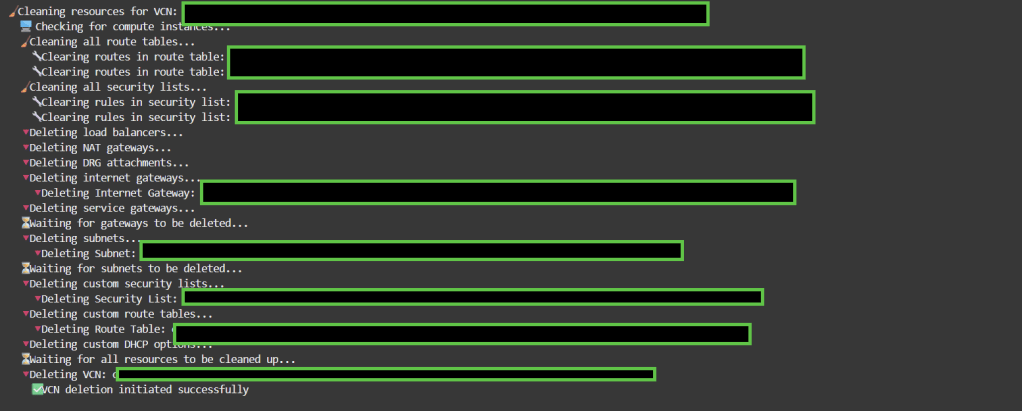
DELETE All the VCNs in THE OCI Using BASH SCRIPT

The script below will allow you to list all VCNs in OCI and delete all attached resources to the COMPARTMENT_OCID.

Note: I wrote the scripts to perform the tasks mentioned below, which can be updated and expanded based on the needs. Feel free to do that and say the source

Complete Resource Deletion Chain: The script now handles the proper order of deletion:

  • Compute instances first
  • Clean route tables and security lists
  • Load balancers
  • Gateways (NAT, Internet, Service, DRG attachments)
  • Subnets
  • Custom security lists, route tables, and DHCP options
  • Finally, the VCN itself
#!/bin/bash

# ✅ Set this to the target compartment OCID
COMPARTMENT_OCID="Set Your OCID Here"

# (Optional) Force region
export OCI_CLI_REGION=me-jeddah-1

echo "📍 Region: $OCI_CLI_REGION"
echo "📦 Compartment: $COMPARTMENT_OCID"
echo "⚠️  WARNING: This will delete ALL VCNs and related resources in the compartment!"
echo "Press Ctrl+C within 10 seconds to cancel..."
sleep 10

# Function to wait for resource deletion
wait_for_deletion() {
    local resource_id=$1
    local resource_type=$2
    local max_attempts=30
    local attempt=1
    
    echo "    ⏳ Waiting for $resource_type deletion..."
    while [ $attempt -le $max_attempts ]; do
        if ! oci network $resource_type get --${resource_type//-/}-id "$resource_id" &>/dev/null; then
            echo "    ✅ $resource_type deleted successfully"
            return 0
        fi
        sleep 10
        ((attempt++))
    done
    echo "    ⚠️  Timeout waiting for $resource_type deletion"
    return 1
}

# Function to check if resource is default
is_default_resource() {
    local resource_id=$1
    local resource_type=$2
    
    case $resource_type in
        "security-list")
            result=$(oci network security-list get --security-list-id "$resource_id" --query "data.\"display-name\"" --raw-output 2>/dev/null)
            [[ "$result" == "Default Security List"* ]]
            ;;
        "route-table")
            result=$(oci network route-table get --rt-id "$resource_id" --query "data.\"display-name\"" --raw-output 2>/dev/null)
            [[ "$result" == "Default Route Table"* ]]
            ;;
        "dhcp-options")
            result=$(oci network dhcp-options get --dhcp-id "$resource_id" --query "data.\"display-name\"" --raw-output 2>/dev/null)
            [[ "$result" == "Default DHCP Options"* ]]
            ;;
        *)
            false
            ;;
    esac
}

# Function to clean all route tables in a VCN
clean_all_route_tables() {
    local VCN_ID=$1
    echo "  🧹 Cleaning all route tables..."
    
    local RT_IDS=$(oci network route-table list \
        --compartment-id "$COMPARTMENT_OCID" \
        --vcn-id "$VCN_ID" \
        --query "data[?\"lifecycle-state\" == 'AVAILABLE'].id" \
        --raw-output 2>/dev/null | jq -r '.[]' 2>/dev/null)
    
    for RT_ID in $RT_IDS; do
        if [ -n "$RT_ID" ]; then
            echo "    🔧 Clearing routes in route table: $RT_ID"
            oci network route-table update --rt-id "$RT_ID" --route-rules '[]' --force &>/dev/null || true
        fi
    done
    
    # Wait a bit for route updates to propagate
    sleep 5
}

# Function to clean all security lists in a VCN
clean_all_security_lists() {
    local VCN_ID=$1
    echo "  🧹 Cleaning all security lists..."
    
    local SL_IDS=$(oci network security-list list \
        --compartment-id "$COMPARTMENT_OCID" \
        --vcn-id "$VCN_ID" \
        --query "data[?\"lifecycle-state\" == 'AVAILABLE'].id" \
        --raw-output 2>/dev/null | jq -r '.[]' 2>/dev/null)
    
    for SL_ID in $SL_IDS; do
        if [ -n "$SL_ID" ]; then
            echo "    🔧 Clearing rules in security list: $SL_ID"
            oci network security-list update \
                --security-list-id "$SL_ID" \
                --egress-security-rules '[]' \
                --ingress-security-rules '[]' \
                --force &>/dev/null || true
        fi
    done
    
    # Wait a bit for security list updates to propagate
    sleep 5
}

# Function to delete compute instances in subnets
delete_compute_instances() {
    local VCN_ID=$1
    echo "  🖥️  Checking for compute instances..."
    
    local INSTANCES=$(oci compute instance list \
        --compartment-id "$COMPARTMENT_OCID" \
        --query "data[?\"lifecycle-state\" != 'TERMINATED'].id" \
        --raw-output 2>/dev/null | jq -r '.[]' 2>/dev/null)
    
    for INSTANCE_ID in $INSTANCES; do
        if [ -n "$INSTANCE_ID" ]; then
            # Check if instance is in this VCN
            local INSTANCE_VCN=$(oci compute instance list-vnics \
                --instance-id "$INSTANCE_ID" \
                --query "data[0].\"vcn-id\"" \
                --raw-output 2>/dev/null)
            
            if [[ "$INSTANCE_VCN" == "$VCN_ID" ]]; then
                echo "    🔻 Terminating compute instance: $INSTANCE_ID"
                oci compute instance terminate --instance-id "$INSTANCE_ID" --force &>/dev/null || true
            fi
        fi
    done
}

# Main cleanup function for a single VCN
cleanup_vcn() {
    local VCN_ID=$1
    echo -e "\n🧹 Cleaning resources for VCN: $VCN_ID"
    
    # Step 1: Delete compute instances first
    delete_compute_instances "$VCN_ID"
    
    # Step 2: Clean route tables and security lists
    clean_all_route_tables "$VCN_ID"
    clean_all_security_lists "$VCN_ID"
    
    # Step 3: Delete Load Balancers
    echo "  🔻 Deleting load balancers..."
    local LBS=$(oci lb load-balancer list \
        --compartment-id "$COMPARTMENT_OCID" \
        --query "data[?\"lifecycle-state\" == 'ACTIVE'].id" \
        --raw-output 2>/dev/null | jq -r '.[]' 2>/dev/null)
    
    for LB_ID in $LBS; do
        if [ -n "$LB_ID" ]; then
            echo "    🔻 Deleting Load Balancer: $LB_ID"
            oci lb load-balancer delete --load-balancer-id "$LB_ID" --force &>/dev/null || true
        fi
    done
    
    # Step 4: Delete NAT Gateways
    echo "  🔻 Deleting NAT gateways..."
    local NAT_GWS=$(oci network nat-gateway list \
        --compartment-id "$COMPARTMENT_OCID" \
        --vcn-id "$VCN_ID" \
        --query "data[?\"lifecycle-state\" == 'AVAILABLE'].id" \
        --raw-output 2>/dev/null | jq -r '.[]' 2>/dev/null)
    
    for NAT_ID in $NAT_GWS; do
        if [ -n "$NAT_ID" ]; then
            echo "    🔻 Deleting NAT Gateway: $NAT_ID"
            oci network nat-gateway delete --nat-gateway-id "$NAT_ID" --force &>/dev/null || true
        fi
    done
    
    # Step 5: Delete DRG Attachments
    echo "  🔻 Deleting DRG attachments..."
    local DRG_ATTACHMENTS=$(oci network drg-attachment list \
        --compartment-id "$COMPARTMENT_OCID" \
        --query "data[?\"vcn-id\" == '$VCN_ID' && \"lifecycle-state\" == 'ATTACHED'].id" \
        --raw-output 2>/dev/null | jq -r '.[]' 2>/dev/null)
    
    for DRG_ATTACHMENT_ID in $DRG_ATTACHMENTS; do
        if [ -n "$DRG_ATTACHMENT_ID" ]; then
            echo "    🔻 Deleting DRG Attachment: $DRG_ATTACHMENT_ID"
            oci network drg-attachment delete --drg-attachment-id "$DRG_ATTACHMENT_ID" --force &>/dev/null || true
        fi
    done
    
    # Step 6: Delete Internet Gateways
    echo "  🔻 Deleting internet gateways..."
    local IGWS=$(oci network internet-gateway list \
        --compartment-id "$COMPARTMENT_OCID" \
        --vcn-id "$VCN_ID" \
        --query "data[?\"lifecycle-state\" == 'AVAILABLE'].id" \
        --raw-output 2>/dev/null | jq -r '.[]' 2>/dev/null)
    
    for IGW_ID in $IGWS; do
        if [ -n "$IGW_ID" ]; then
            echo "    🔻 Deleting Internet Gateway: $IGW_ID"
            oci network internet-gateway delete --ig-id "$IGW_ID" --force &>/dev/null || true
        fi
    done
    
    # Step 7: Delete Service Gateways
    echo "  🔻 Deleting service gateways..."
    local SGWS=$(oci network service-gateway list \
        --compartment-id "$COMPARTMENT_OCID" \
        --vcn-id "$VCN_ID" \
        --query "data[?\"lifecycle-state\" == 'AVAILABLE'].id" \
        --raw-output 2>/dev/null | jq -r '.[]' 2>/dev/null)
    
    for SGW_ID in $SGWS; do
        if [ -n "$SGW_ID" ]; then
            echo "    🔻 Deleting Service Gateway: $SGW_ID"
            oci network service-gateway delete --service-gateway-id "$SGW_ID" --force &>/dev/null || true
        fi
    done
    
    # Step 8: Wait for gateways to be deleted
    echo "  ⏳ Waiting for gateways to be deleted..."
    sleep 30
    
    # Step 9: Delete Subnets
    echo "  🔻 Deleting subnets..."
    local SUBNETS=$(oci network subnet list \
        --compartment-id "$COMPARTMENT_OCID" \
        --vcn-id "$VCN_ID" \
        --query "data[?\"lifecycle-state\" == 'AVAILABLE'].id" \
        --raw-output 2>/dev/null | jq -r '.[]' 2>/dev/null)
    
    for SUBNET_ID in $SUBNETS; do
        if [ -n "$SUBNET_ID" ]; then
            echo "    🔻 Deleting Subnet: $SUBNET_ID"
            oci network subnet delete --subnet-id "$SUBNET_ID" --force &>/dev/null || true
        fi
    done
    
    # Step 10: Wait for subnets to be deleted
    echo "  ⏳ Waiting for subnets to be deleted..."
    sleep 30
    
    # Step 11: Delete non-default Security Lists
    echo "  🔻 Deleting custom security lists..."
    local SL_IDS=$(oci network security-list list \
        --compartment-id "$COMPARTMENT_OCID" \
        --vcn-id "$VCN_ID" \
        --query "data[?\"lifecycle-state\" == 'AVAILABLE'].id" \
        --raw-output 2>/dev/null | jq -r '.[]' 2>/dev/null)
    
    for SL_ID in $SL_IDS; do
        if [ -n "$SL_ID" ] && ! is_default_resource "$SL_ID" "security-list"; then
            echo "    🔻 Deleting Security List: $SL_ID"
            oci network security-list delete --security-list-id "$SL_ID" --force &>/dev/null || true
        fi
    done
    
    # Step 12: Delete non-default Route Tables
    echo "  🔻 Deleting custom route tables..."
    local RT_IDS=$(oci network route-table list \
        --compartment-id "$COMPARTMENT_OCID" \
        --vcn-id "$VCN_ID" \
        --query "data[?\"lifecycle-state\" == 'AVAILABLE'].id" \
        --raw-output 2>/dev/null | jq -r '.[]' 2>/dev/null)
    
    for RT_ID in $RT_IDS; do
        if [ -n "$RT_ID" ] && ! is_default_resource "$RT_ID" "route-table"; then
            echo "    🔻 Deleting Route Table: $RT_ID"
            oci network route-table delete --rt-id "$RT_ID" --force &>/dev/null || true
        fi
    done
    
    # Step 13: Delete non-default DHCP Options
    echo "  🔻 Deleting custom DHCP options..."
    local DHCP_IDS=$(oci network dhcp-options list \
        --compartment-id "$COMPARTMENT_OCID" \
        --vcn-id "$VCN_ID" \
        --query "data[?\"lifecycle-state\" == 'AVAILABLE'].id" \
        --raw-output 2>/dev/null | jq -r '.[]' 2>/dev/null)
    
    for DHCP_ID in $DHCP_IDS; do
        if [ -n "$DHCP_ID" ] && ! is_default_resource "$DHCP_ID" "dhcp-options"; then
            echo "    🔻 Deleting DHCP Options: $DHCP_ID"
            oci network dhcp-options delete --dhcp-id "$DHCP_ID" --force &>/dev/null || true
        fi
    done
    
    # Step 14: Wait before attempting VCN deletion
    echo "  ⏳ Waiting for all resources to be cleaned up..."
    sleep 60
    
    # Step 15: Finally, delete the VCN
    echo "  🔻 Deleting VCN: $VCN_ID"
    local max_attempts=5
    local attempt=1
    
    while [ $attempt -le $max_attempts ]; do
        if oci network vcn delete --vcn-id "$VCN_ID" --force &>/dev/null; then
            echo "    ✅ VCN deletion initiated successfully"
            break
        else
            echo "    ⚠️  VCN deletion attempt $attempt failed, retrying in 30 seconds..."
            sleep 30
            ((attempt++))
        fi
    done
    
    if [ $attempt -gt $max_attempts ]; then
        echo "    ❌ Failed to delete VCN after $max_attempts attempts"
        echo "    💡 You may need to manually check for remaining dependencies"
    fi
}

# Main execution
echo -e "\n🚀 Starting VCN cleanup process..."

# Fetch all VCNs in the compartment
VCN_IDS=$(oci network vcn list \
    --compartment-id "$COMPARTMENT_OCID" \
    --query "data[?\"lifecycle-state\" == 'AVAILABLE'].id" \
    --raw-output 2>/dev/null | jq -r '.[]' 2>/dev/null)

if [ -z "$VCN_IDS" ]; then
    echo "📭 No VCNs found in compartment $COMPARTMENT_OCID"
    exit 0
fi

echo "📋 Found VCNs to delete:"
for VCN_ID in $VCN_IDS; do
    VCN_NAME=$(oci network vcn get --vcn-id "$VCN_ID" --query "data.\"display-name\"" --raw-output 2>/dev/null)
    echo "  - $VCN_NAME ($VCN_ID)"
done

# Process each VCN
for VCN_ID in $VCN_IDS; do
    if [ -n "$VCN_ID" ]; then
        cleanup_vcn "$VCN_ID"
    fi
done

echo -e "\n✅ Cleanup complete for compartment: $COMPARTMENT_OCID"
echo "🔍 You may want to verify in the OCI Console that all resources have been deleted."

Output example

Regards

Automating Block Volume Backups in Oracle Cloud Infrastructure (OCI) using CLI and Terraform

Briefly introduce the importance of block volumes in OCI and why automated backups are essential.Mention that this blog will cover two methods: using the OCI CLI and Terraform for automation.

Automating Block Volume Backups using OCI CLI

Prerequisites:

  • Set up OCI CLI on your machine (brief steps with links).
  • Ensure that you have the right permissions to manage block volumes.

Step-by-step guide:

  • Command to create a block volume
oci bv volume create --compartment-id <your_compartment_ocid> --availability-domain <your_ad> --display-name "MyVolume" --size-in-gbs 50

Command to take a backup of the block volume:

oci bv backup create --volume-id <your_volume_ocid> --display-name "MyVolumeBackup"

Scheduling backups using cron jobs for automation.

  • Example cron job configuration
0 2 * * * /usr/local/bin/oci bv backup create --volume-id <your_volume_ocid> --display-name "ScheduledBackup" >> /var/log/oci_backup.log 2>&1

Automating Block Volume Backups using Terraform

Prerequisites

  1. OCI Credentials: Make sure you have the proper API keys and permissions configured in your OCI tenancy.
  2. Terraform Setup: Terraform should be installed and configured to interact with OCI, including the OCI provider setup in your environment.
Step 1: Define the OCI Block Volume Resource

First, define the block volume that you want to automate backups for. Here’s an example of a simple block volume resource in Terraform:

resource "oci_core_volume" "my_block_volume" {
  availability_domain = "your-availability-domain"
  compartment_id      = "ocid1.compartment.oc1..your-compartment-id"
  display_name        = "my_block_volume"
  size_in_gbs         = 50
}
Step 2: Define a Backup Policy

OCI provides predefined backup policies such as gold, silver, and bronze, which define how frequently backups are taken. You can create a custom backup policy as well, but for simplicity, we’ll use one of the predefined policies in this example. The Terraform resource oci_core_volume_backup_policy_assignment will assign a backup policy to the block volume.

Here’s an example to assign the gold backup policy to the block volume:

resource "oci_core_volume_backup_policy_assignment" "backup_assignment" {
  volume_id       = oci_core_volume.my_block_volume.id
  policy_id       = data.oci_core_volume_backup_policy.gold.id
}

data "oci_core_volume_backup_policy" "gold" {
  name = "gold"
}
Step 3: Custom Backup Policy (Optional)

If you need a custom backup policy rather than using the predefined gold, silver, or bronze policies, you can define a custom backup policy using OCI’s native scheduling.

You can create a custom schedule by combining these elements in your oci_core_volume_backup_policy resource.

resource "oci_core_volume_backup_policy" "custom_backup_policy" {
  compartment_id = "ocid1.compartment.oc1..your-compartment-id"
  display_name   = "CustomBackupPolicy"

  schedules {
    backup_type = "INCREMENTAL"
    period      = "ONE_DAY"
    retention_duration = "THIRTY_DAYS"
  }

  schedules {
    backup_type = "FULL"
    period      = "ONE_WEEK"
    retention_duration = "NINETY_DAYS"
  }
}

You can then assign this policy to the block volume using the same method as earlier.

Step 4: Apply the Terraform Configuration

Once your Terraform configuration is ready, apply it using the standard Terraform workflow:

  1. Initialize Terraform:
terraform init

Plan the Terraform deployment:

terraform plan

Apply the Terraform plan:

terraform apply

This process will automatically provision your block volumes and assign the specified backup policy.


Regards
Osama

AWS Data migration tools

AWS offers a wide variety of services and Partner tools to help you migrate your data sets, whether they are files, databases, machine images, block volumes, or even tape backups.

AWS Storage Gateway

AWS Storage Gateway is a service that gives your applications seamless and secure integration between on-premises environments and AWS storage.

It provides you low-latency access to cloud data with a Storage Gateway appliance.

Storage Gateway types

Choose a Storage Gateway type that is the best fit for your workload.

  • Amazon s3 file Gateway
  • Amazon FSx file Gateway
  • Tape Gateway
  • Volume Gateway

The Storage Gateway Appliance supports the following protocols to connect to your local data:

  • NFS or SMB for files
  • iSCSI for volumes
  • iSCSI VTL for tapes

Your storage gateway appliance runs in one of four modes: Amazon S3 File Gateway, Amazon FSx File Gateway, Tape Gateway, or Volume Gateway.

Data moved to AWS using Storage Gateway can be sent to the following destinations through the Storage Gateway managed service:

  • Amazon S3 (Amazon S3 File Gateway, Tape Gateway)
  • Amazon S3 Glacier (Amazon S3 File Gateway, Tape Gateway)
  • Amazon FSx for Windows File Server (Amazon FSx File Gateway)
  • Amazon EBS (Volume Gateway)

AWS Datasync

Manual tasks related to data transfers can slow down migrations and burden IT operations. DataSync facilitates moving large amounts of data between on-premises storage and Amazon S3 and Amazon EFS, or FSx for Windows File Server. By default, data is encrypted in transit using Transport Layer Security (TLS) 1.2. DataSync automatically handles scripting copy jobs, scheduling and monitoring transfers, validating data, and optimizing network usage. 

Reduce on-premises storage infrastructure by shifting SMB-based data stores and content repositories from file servers and NAS arrays to Amazon S3 and Amazon EFS for analytics.

DataSync deploys as a single software agent that can connect to multiple shared file systems and run multiple tasks. The software agent is typically deployed on premises through a virtual machine to handle the transfer of data over the wide area network (WAN) to AWS. On the AWS side, the agent connects to the DataSync service infrastructure. Because DataSync is a service, there is no infrastructure for customers to set up or maintain in the cloud. DataSync configuration is managed directly from the console.

AWS Snow Family service models

The AWS Snow Family helps customers that need to run operations in austere, non-data center environments and in locations where there’s lack of consistent network connectivity. The AWS Snow Family, comprised of AWS Snowcone, AWS Snowball, and AWS Snowmobile, offers several physical devices and capacity points.

You can check my blog post here about the model https://osamaoracle.com/2023/01/28/aws-snow-family-members/

Regards

Osama

AWS CLOUD STORAGE OVERVIEW

There are three types of cloud storage: object, file, and block. Each storage option has a unique combination of performance, durability, cost, and interface.

  • Block storage – Enterprise applications like databases or enterprise resource planning (ERP) systems often require dedicated, low-latency storage for each host. This is similar to direct-attached storage (DAS) or a Storage Area Network (SAN). Block-based cloud storage solutions like Amazon Elastic Block Store (Amazon EBS) are provisioned with each virtual server and offer the ultra-low latency required for high-performance workloads.
  • File storage – Many applications must access shared files and require a file system. This type of storage is often supported with a Network Attached Storage (NAS) server. File storage solutions like Amazon Elastic File System (Amazon EFS) are ideal for use cases such as large content repositories, development environments, media stores, or user home directories.
  • Object storage – Applications developed in the cloud need the vast scalability and metadata of object storage. Object storage solutions like Amazon Simple Storage Service (Amazon S3) are ideal for building modern applications. Amazon S3 provides scale and flexibility. You can use it to import existing data stores for analytics, backup, or archive.

AWS provides you with services for your block, file and object storage needs. Select each hotspot in the image to see what services are available for you to explore to build solutions.

Amazon S3 use cases

  • Backup and restore.
  • Data Lake for analytics.
  • Media storage
  • Static website.
  • Archiving

Buckets and objects

Amazon S3 stores data as objects within buckets. An object is composed of a file and any metadata that describes that file.  The diagram below contains a URL comprised of a bucket and an object key. The object key is the unique identifier of an object in a bucket. The combination of a bucket, key, and version ID uniquely identifies each object. The object is uniquely addressed through the combination of the web service endpoint, bucket name, key, and optionally, a version. 

To store an object in Amazon S3, upload the file into a bucket. When you upload a file, you can set permissions on the object and add metadata. You can have one or more buckets in your account. For each bucket, you control who can create, delete, and list objects in the bucket.

Amazon S3 access control

By default, all Amazon S3 resources—buckets, objects, and related resources (for example, lifecycle configuration and website configuration)—are private. Only the resource owner, an AWS account that created it, can access the resource. The resource owner can grant access permissions to others by writing access policies. 

AWS provides several different tools to help developers configure buckets for a wide variety of workloads. 

  • Most Amazon S3 use cases do not require public access. 
  • Amazon S3 usually stores data from other applications. Public access is not recommended for these types of buckets. 
  • Amazon S3 includes a block public access feature. This acts as an additional layer of protection to prevent accidental exposure of customer data. 

Amazon S3 Event Notifications

Amazon S3 event notifications enable you to receive notifications when certain object events happen in your bucket. Here is an example of an event notification workflow to convert images to thumbnails. To learn more, select each of the three hotspots in the diagram below.

Amazon S3 cost factors and best practices

Cost is an important part of choosing the right Amazon S3 storage solution. Some of the Amazon S3 cost factors to consider include the following:

  • Storage – Per-gigabyte cost to hold your objects. You pay for storing objects in your S3 buckets. The rate you’re charged depends on your objects’ size, how long you stored the objects during the month, and the storage class. There are per-request ingest charges when using PUT, COPY, or lifecycle rules to move data into any S3 storage class.
  • Requests and retrievals – The number of API calls: PUT and GET requests. You pay for requests made against your S3 buckets and objects. S3 request costs are based on the request type, and are charged on the quantity of requests. When you use the Amazon S3 console to browse your storage, you incur charges for GET, LIST, and other requests that are made to facilitate browsing.
  • Data transfer – Usually no transfer fee for data-in from the internet and, depending on the requestor location and medium of data transfer, different charges for data-out. 
  • Management and analytics – You pay for the storage management features and analytics that are enabled on your account’s buckets. These features are not discussed in detail in this course.

S3 Replication and S3 Versioning can have a big impact on your AWS bill. These services both create multiple copies of your objects and you pay for each PUT request in addition to the storage tier charge. S3 Cross-Region Replication also requires data transfer between AWS Regions.

Shared file systems

Using a fully managed cloud shared file system solution removes complexities, reduces costs, and simplifies management. To learn more about shared file systems, select each hotspot in the image below.

Amazon Elastic File System (EFS) 

Amazon EFS provides a scalable, elastic file system for Linux-based workloads for use with AWS Cloud services and on-premises resources. 

You’re able to access your file system across Availability Zones, AWS Regions, and VPCs while sharing files between thousands of EC2 instances and on-premises servers through AWS Direct Connect or AWS VPN. 

You can create a file system, mount the file system on an Amazon EC2 instance, and then read and write data to and from your file system. 

Amazon EFS provides a shared, persistent layer that allows stateful applications to elastically scale up and down. Examples include DevOps, web serving, web content systems, media processing, machine learning, analytics, search index, and stateful microservices applications. Amazon EFS can support a petabyte-scale file system, and the throughput of the file system also scales with the capacity of the file system.

Because Amazon EFS is serverless, you don’t need to provision or manage the infrastructure or capacity. Amazon EFS file systems can be shared with up to tens of thousands of concurrent clients, no matter the type. These could be traditional EC2 instances, containers running in one of your self-managed clusters or in one of the AWS container services, Amazon ECS, Amazon EKS, and Fargate, or in a serverless function running in Lambda.

Use Amazon EFS to lower your total cost of ownership for shared file storage. Choose Amazon EFS One Zone for data that does not require replication across multiple Availability Zones and save on storage costs. Amazon EFS Standard-Infrequent Access (EFS Standard-IA) and Amazon EFS One Zone-Infrequent Access (EFS One Zone-IA) are storage classes that provide price/performance that is cost-optimized for files not accessed every day.

Use Amazon EFS scaling and automation to save on management costs, and pay only for what you use.

Amazon FSx

With Amazon FSx, you can quickly launch and run feature-rich and high-performing file systems. The service provides you with four file systems to choose from. This choice is based on your familiarity with a given file system or by matching the feature sets, performance profiles, and data management capabilities to your needs.

Amazon FSx for Windows File Server

FSx for Windows File Server provides fully managed Microsoft Windows file servers that are backed by a native Windows file system. Built on Windows Server, Amazon FSx delivers a wide range of administrative features such as data deduplication, end-user file restore, and Microsoft Active Directory.

Amazon FSx for Lustre (FSx for Lustre) 

FSx for Lustre is a fully managed service that provides high-performance, cost-effective storage. FSx for Lustre is compatible with the most popular Linux-based AMIs, including Amazon Linux, Amazon Linux 2, Red Hat Enterprise Linux (RHEL), CentOS, SUSE Linux, and Ubuntu.

Amazon FSx for NETapp ONTAP

FSx for NETapp ONTAP provides fully managed shared storage in the AWS Cloud with the popular data access and management capabilities of ONTAP.

Amazon FSx for OpenZFS

Where the road leads, I will go. Along the stark desert, across the wide plains, into the deep forests I will follow the call of the world and embrace its ferocious beauty.

Regards

Osama

Harnessing the Power of AWS ECS Fargate with Terraform: A Comprehensive Guide

Welcome to our deep dive into the world of containerization and cloud orchestration! In this blog post, we’re going to explore the innovative realm of AWS ECS Fargate, a game-changer in the world of container management and deployment. AWS ECS Fargate simplifies the process of running containers by eliminating the need to manage servers or clusters, offering a more streamlined and efficient way to deploy your applications.

But that’s not all. We understand the importance of infrastructure as code (IaC) in today’s fast-paced tech environment. That’s why we’re also providing you with a powerful resource – a GitHub repository containing Terraform code, meticulously crafted to help you deploy AWS ECS Fargate services with ease. Terraform, an open-source infrastructure as code software tool, enables you to define and provision a datacenter infrastructure using a declarative configuration language. This integration with Terraform not only automates your deployments but also ensures consistency and reliability in your infrastructure setup.

Whether you’re new to AWS ECS Fargate or looking to enhance your existing knowledge, this post aims to provide you with actionable insights and practical know-how. From setting up your first Fargate service to scaling and managing it effectively, we’ve got you covered. So, gear up as we embark on this journey to harness the full potential of AWS ECS Fargate, supplemented by the power of Terraform automation.

Stay tuned, and don’t forget to check out our GitHub repository linked at the end of this post for the Terraform code that will be your ally in deploying and managing your Fargate services efficiently.

The GitHub Link Here

Regards

Osama

AWS EDGE Services

AWS edge computing services provide infrastructure and software that move data processing and analysis as close to the endpoint as necessary. This includes deploying AWS managed hardware and software to locations outside AWS data centers, and even onto customer-owned devices. 

You can extend the cloud for a consistent hybrid experience using these AWS edge services related to locations:

  • AWS edge locations – Edge locations are connected to the AWS Regions through the AWS network backbone. Amazon CloudFront, AWS WAF, and AWS Shield are services you use here.
  • AWS Local Zones – Local Zones are an extension of the AWS Cloud located close to large population and industry centers. You learned about Local Zones in Module 1: Architecting Fundamentals.
  • AWS Outposts – With AWS Outposts, you can run some AWS services on premises or at your own data center.
  • AWS Snow Family – The Snow Family of products provides offline storage at the edge, which is used to deliver data back to AWS Regions.

Edge services architecture

Review the edge services architecture. A user sends a request to an application partly hosted on premises. The user’s request interacts with Amazon Route 53, AWS WAF, Amazon CloudFront and AWS Outposts. The AWS services hosted in the cloud are protected with AWS Shield.

Amazon Route 53

Amazon Route 53 provides a DNS, domain name registration, and health-checks. Route 53 was designed to give developers and businesses a reliable and cost-effective way to route end users to internet applications. It translates names like example.com into the numeric IP addresses that computers use to connect to each other. 

Route 53 effectively connects user requests to infrastructure running in AWS—such as EC2 instances, ELB load balancers, or Amazon S3 buckets—and can also be used to route users to infrastructure outside of AWS.

You can configure a Amazon CloudWatch alarm to check on the state of your endpoints. Combine your DNS with Health Check Metrics to monitor and route traffic to healthy endpoints.

Amazon Route 53 public and private DNS

A hosted zone is a container for records. Records contain information about how you want to route traffic for a specific domain, such as example.com, and its subdomains such as dev.example.com or mail.example.com. A hosted zone and the corresponding domain have the same name. 

PUBLIC HOSTED ZONE

Public hosted zones contain records that specify how you want to route traffic on the internet.

  • For internet name resolution
  • Delegation set – for authoritative name servers to be provided to the registrar or parent domain
  • Route to internet-facing resources
  • Resolve from the internet
  • Global routing policies

PRIVATE HOSTED ZONE

Private hosted zones contain records that specify how you want to route traffic in your Amazon VPC.

  • For name resolution inside a VPC
  • Can be associated with multiple VPCs and across accounts
  • Route to VPC resources
  • Resolve from inside the VPC
  • Integrate with on-premises private zones using forwarding rules and endpoints

Routing policies

When you create a record, you choose a routing policy, which determines how Amazon Route 53 responds to queries.

Failover routing

Amazon Route 53 health checks monitor the health and performance of your web applications, web servers, and other resources. 

Each health check that you create can monitor one of the following:

  • The health of a specified resource, such as a web server
  • The status of other health checks
  • The status of an Amazon CloudWatch alarm

After you create a health check, you can get the status of the health check, get notifications when the status changes, and configure DNS failover.

Geolocation routing

Geolocation routing lets you choose the resources that serve your traffic based on the geographic location of your users, meaning the location that DNS queries originate from. For example, you might want all queries from Europe to be routed to an ELB load balancer in the Frankfurt Region.

Geoproximity routing

Geoproximity routing lets Amazon Route 53 route traffic to your resources based on the geographic location of your users and your resources. You can also optionally choose to route more traffic or less to a given resource by specifying a value, known as a bias. A bias expands or shrinks the size of the geographic Region from which traffic is routed to a resource.

Latency-based routing

If your application is hosted in multiple AWS Regions, you can improve performance for your users by serving their requests from the AWS Region that provides the lowest latency.

Data about the latency between users and your resources is based entirely on traffic between users and AWS data centers. If you aren’t using resources in an AWS Region, the actual latency between your users and your resources can vary significantly from AWS latency data. This is true even if your resources are located in the same city as an AWS Region.

Multivalue answer routing

Multivalue answer routing lets you configure Route 53 to return multiple values, such as IP addresses for your web servers, in response to DNS queries. You can specify multiple values for almost any record, but multivalue answer routing also lets you check the health of each resource. Route 53 returns only values for healthy resources.

The ability to return multiple health-checkable IP addresses is a way for you to use DNS to improve availability and load balancing. However, it is not a substitute for a load balancer.

Weighted routing

Weighted routing enables you to assign weights to a resource record set to specify the frequency with which different responses are served.

In this example of a blue/green deployment, a weighted routing policy is used to send a small amount of traffic to a new production environment. If the new environment is operating as intended, the amount of weighted traffic can be increased to confirm it can handle the increased load. If the test is successful, all traffic can be sent to the new environment.

Amazon CloudFront

Content delivery networks 

It’s not always possible to replicate your entire infrastructure across the globe when your web traffic is geo-dispersed. It is also not cost effective. With a content delivery network (CDN), you can use its global network of edge locations to deliver a cached copy of your web content to your customers. 

To reduce response time, the CDN uses the nearest edge location to the customer or the originating request location. Using the nearest edge location dramatically increases throughput because the web assets are delivered from cache. For dynamic data, you can configure many CDNs to retrieve data from the origin servers.

Use Regional edge caches when you have content that is not accessed frequently enough to remain in an edge location. Regional edge caches absorb this content and provide an alternative to having to retrieve that content from the origin server.

Edge caching 

Edge caching helps applications perform dramatically faster and cost significantly less at scale. Review the content below to learn the benefits of edge caching.

WITHOUT EDGE CACHING

As an example, let’s say you are serving an image from a traditional web server, not from Amazon CloudFront. You might serve an image named sunsetphoto.png using the URL:

 http://example.com/sunsetphoto.png

Your users can easily navigate to this URL and see the image. They don’t realize that their request was routed from one network to another (through the complex collection of interconnected networks that comprise the internet) until the image was found.


WITH EDGE CACHING

Amazon CloudFront speeds up the distribution of your content by routing each user request through the AWS backbone network to the edge location that can best serve your content. Typically, this is a CloudFront edge server that provides the fastest delivery to the viewer. 

Using the AWS network can dramatically reduce the number of networks your users’ requests must pass through, which improves performance. Users get lower latency (the time it takes to load the first byte of the file) and higher data transfer rates.

You also get increased reliability and availability because copies of your files (also called objects) are now held (or cached) in multiple edge locations around the world.

Amazon CloudFront

Amazon CloudFront is a global CDN service that accelerates delivery of your websites, APIs, video content, or other web assets. It integrates with other AWS products to give developers and businesses a straightforward way to accelerate content to end users. There are no minimum usage commitments. 

Amazon CloudFront provides extensive flexibility for optimizing cache behavior, coupled with network-layer optimizations for latency and throughput. The CDN offers a multi-tier cache by default, with regional edge caches that improve latency and lower the load on your origin servers when the object is not already cached at the edge.

Amazon CloudFront supports real-time, bidirectional communication over the WebSocket protocol. This persistent connection permits clients and servers to send real-time data to one another without the overhead of repeatedly opening connections. This is especially useful for communications applications such as chat, collaboration, gaming, and financial trading.

Support for WebSockets in Amazon CloudFront makes it possible for customers to manage WebSocket traffic through the same avenues as any other dynamic and static content. With CloudFront, customers can take advantage of distributed denial of service (DDoS) protection using the built-in CloudFront integrations with Shield and AWS WAF.

Amazon CloudFront caching

When a user requests content that you are serving with Amazon CloudFront, the user is routed to the edge location that provides the lowest latency. Content is delivered with the best possible performance. To review the steps for CloudFront caching, select each hotspot in the image below.

Improving CloudFront performance

WHAT AWS DOES

AWS provides features that improve the performance of your content delivery:

  • TCP optimization – CloudFront uses TCP optimization to observe how fast a network is already delivering your traffic and the latency of your current round trips. It then uses that data as input to automatically improve performance.
  • TLS 1.3 support – CloudFront supports TLS 1.3, which provides better performance with a simpler handshake process that requires fewer round trips. It also adds improved security features.
  • Dynamic content placement – Serve dynamic content, such as web applications or APIs from ELB load balancers or Amazon EC2 instances, by using CloudFront. You can improve the performance, availability, and security of your content.

You can also adjust the configuration of your CloudFront distribution to accommodate for better performance:

  • Define your caching strategy – Choosing an appropriate TTL is important. In addition, consider caching based on things like query string parameters, cookies, or request headers.
  • Improve your cache hit ratio – You can view the percentage of viewer requests that are hits, misses, and errors in the CloudFront console. Make changes to your distribution based on statistics collected in the CloudFront cache statistics report.
  • Use Origin Shield – Get an additional layer of caching between the regional edge caches and your origin. It is not always a best fit for your use case, but it can be beneficial for viewers that are spread across geographic regions or on-premises origins with capacity or bandwidth constraints.

DDoS Protection

A DDoS attack is an attack in which multiple compromised systems attempt to flood a target, such as a network or web application, with traffic. A DDoS attack can prevent legitimate users from accessing a service and can cause the system to crash due to the overwhelming traffic volume.

OSI layer attacks

In general, DDoS attacks can be segregated by which layer of the OSI model they attack. They are most common at the Network (layer 3), Transport (Layer 4), Presentation (Layer 6) and Application (Layer 7) Layers.

Infrastructure Layer Attacks – Attacks at Layer 3 and 4, are typically categorized as Infrastructure layer attacks. These are also the most common type of DDoS attack and include vectors like synchronized (SYN) floods and other reflection attacks like User Datagram Packet (UDP) floods. These attacks are usually large in volume and aim to overload the capacity of the network or the application servers. But fortunately, these are also the type of attacks that have clear signatures and are easier to detect.

Application Layer Attacks – An attacker may target the application itself by using a layer 7 or application layer attack. In these attacks, similar to SYN flood infrastructure attacks, the attacker attempts to overload specific functions of an application to make the application unavailable or extremely unresponsive to legitimate users. 

AWS Solutions

AWS Shield Standard, AWS Web Application Firewall (WAF), and AWS Firewall Manager are AWS services that protect architectures against web-based attacks. Review the section below to learn more about each of these AWS services.

AWS Shield

AWS Shield is a managed DDoS protection service that safeguards your applications running on AWS. It provides you with dynamic detection and automatic inline mitigations that minimize application downtime and latency. There are two tiers of AWS Shield: Shield Standard and Shield Advanced.

AWS Shield Standard provides you protection against some of the most common and frequently occurring infrastructure (Layer 3 and 4) attacks. This includes SYN/UDP floods and reflection attacks. Shield Standard improves availability of your applications on AWS. The service applies a combination of traffic signatures, anomaly algorithms, and other analysis techniques. Shield Standard detects malicious traffic and it provides real-time issue mitigation. You are protected by Shield Standard at no additional charge.

If you need even more protection from DDoS attacks on your applications, consider using Shield Advanced. You get additional detection and mitigation against large and sophisticated DDoS attacks, near real-time visibility, and integration with AWS WAF, a web application firewall.

AWS Web Application Firewall (WAF)

AWS WAF is a web application firewall that helps protect your web applications or APIs against common web exploits and bots. AWS WAF gives you control over how traffic reaches your applications. Create security rules that control bot traffic and block common attack patterns, such as SQL injection (SQLi) or cross-site scripting (XSS). You can also monitor HTTP(S) requests that are forwarded to your compatible AWS services.

AWS WAF: Components of access control

Before configuring AWS WAF, you should understand the components used to control access to your AWS resources.

  • Web ACLs – You use a web ACL to protect a set of AWS resources. You create a web ACL and define its protection strategy by adding rules. 
  • Rules – Each rule contains a statement that defines the inspection criteria and an action to take if a web request meets the criteria.
  • Rules groups – You can use rules individually or in reusable rule groups. 
  • Rule statements – This is the part of a rule that tells AWS WAF how to inspect a web request.
  •  IP set – This is a collection of IP addresses and IP address ranges that you want to use together in a rule statement. 
  • Regex pattern set – This is a collection of regular expressions that you want to use together in a rule statement.

AWS Firewall Manager

AWS Firewall Manager simplifies your AWS WAF and Amazon VPC security groups administration and maintenance tasks. Set up your AWS WAF firewall rules, Shield protections, and Amazon VPC security groups once. 

The service automatically applies the rules and protections across your accounts and resources, even as you add new resources. Firewall Manager helps you to:

  • Simplify management of rules across accounts and application.
  • Automatically discover new accounts and remediate noncompliant events.
  • Deploy AWS WAF rules from AWS Marketplace.
  • Enable rapid response to attacks across all accounts.

As new applications are created, Firewall Manager also facilitates bringing new applications and resources into compliance with a common set of security rules from day one. Now you have a single service to build firewall rules, create security policies, and enforce them in a consistent, hierarchical manner across your entire AWS infrastructure.

AWS Outposts solutions

These applications might need to generate near-real-time responses to end-user applications, or they might need to communicate with other on-premises systems or control on-site equipment. Examples include workloads running on factory floors for automated operations in manufacturing, real-time patient diagnosis or medical imaging, and content and media streaming. 

You need a solution to securely store and process customer data that must remain on premises or in countries outside an AWS Region. You need to run data-intensive workloads and process data locally, or when you want closer controls on data analysis, backup, and restore.

With Outposts, you can extend the AWS Cloud to an on-premises data center. Outposts come in different form factors, each with separate requirements. Verify that your site meets the requirements for the form factor that you’re ordering.

The AWS Outposts family is made up of two types of Outposts: Outposts racks and Outposts servers. Choose each tab to learn more about the Outposts family products.

OUTPOSTS RACKS

When you order an Outposts rack, you can choose from a variety of Outposts configurations. Each configuration provides a mix of EC2 instance types and Amazon Elastic Block Store (Amazon EBS) volumes.

The benefits of Outposts racks include the following:

  • Scale up to 96 42U–standard racks.
  • Pool compute and storage capacity between multiple Outposts racks.
  • Get more service options than Outposts servers.

To fulfill the Outposts rack order, AWS will schedule a date and time with you. You will also receive a checklist of items to verify or provide before the installation. The team will roll the rack to the identified position, and your electrician can power the rack. The team will establish network connectivity for the rack over the uplink that you provide, and they will configure the rack’s capacity.

The installation is complete when you confirm that the Amazon EC2 and Amazon EBS capacity for your AWS Outpost is available from your AWS account.

OUTPOSTS SERVERS

With Outposts servers, you can order hardware at a smaller scale while still providing you AWS services on premises. You can choose from Arm-based or Intel-based options. Not all services available in Outposts racks are supported in Outposts servers.

Outposts servers are delivered directly to you and installed by either your own onsite personnel or a third-party vendor. Once connected to your network, AWS will remotely provision compute and storage resources.

Benefits of Outposts servers include the following:

  • Place in your own rack
  • Choose from:
    • 1U Graviton-based processor
    • 2U Intel Xeon Scalable processor

Outposts extend your VPC

A virtual private cloud (VPC) spans all Availability Zones in its AWS Region. You can extend any VPC in the Region to your Outpost by adding an Outpost subnet.

Outposts support multiple subnets. You choose the EC2 instance subnet when you launch the EC2 instance in your Outpost. You cannot choose the underlying hardware where the instance is deployed, because the Outpost is a pool of AWS compute and storage capacity.

Each Outpost can support multiple VPCs that can have one or more Outpost subnets.

You create Outpost subnets from the VPC CIDR range where you created the Outpost. You can use the Outpost address ranges for resources, such as EC2 instances that reside in the Outpost subnet. AWS does not directly advertise the VPC CIDR, or the Outpost subnet range to your on-premises location.

Regards

Osama

AWS database services part 2

Part one https://osamaoracle.com/2023/01/03/aws-database-services/

Amazon RDS

Amazon RDS is a web service that makes it easy to set up, operate, and scale a relational database in the cloud. It provides cost-efficient and resizable capacity while managing time-consuming database administration tasks. This allows you to focus on your applications and business. Amazon RDS gives you access to the full capabilities of a MySQL, Oracle, SQL Server, or Aurora database engines. This means that the code, applications, and tools you already use today with your existing databases can be used with Amazon RDS. 

Amazon RDS automatically patches the database software and backs up your database. It stores the backups for a user-defined retention period and provides point-in-time recovery. You benefit from the flexibility of scaling the compute resources or storage capacity associated with your relational DB instance with a single API call.

Amazon RDS is available on six database engines, which optimize for memory, performance, or I/O. The database engines include:

  • Amazon Aurora
  • PostgreSQL
  • MySQL
  • MariaDB
  • Oracle Database
  • SQL Server

Amazon RDS Multi-AZ deployments

Amazon RDS Multi-AZ deployments provide enhanced availability and durability for DB instances, making them a natural fit for production database workloads. When you provision a Multi-AZ DB instance, Amazon RDS synchronously replicates the data to a standby instance in a different Availability Zone. 

You can modify your environment from Single-AZ to Multi-AZ at any time. Each Availability Zone runs on its own physically distinct, independent infrastructure and is engineered to be highly reliable. Upon failure, the secondary instance picks up the load. Note that this is not used for read-only scenarios.

Read replicas

With Amazon RDS, you can create read replicas of your database. Amazon automatically keeps them in sync with the primary DB instance. Read replicas are available in Amazon RDS for Aurora, MySQL, MariaDB, PostgreSQL, Oracle, and Microsoft SQL Server. Read replicas can help you:

  • Relieve pressure on your primary node with additional read capacity.
  • Bring data close to your applications in different AWS Regions.
  • Promote a read replica to a standalone instance as a disaster recovery (DR) solution if the primary DB instance fails.

You can add read replicas to handle read workloads so your primary database doesn’t become overloaded with read requests. Depending on the database engine, you can also place your read replica in a different Region from your primary database. This gives you the ability to have a read replica closer to a particular locality.

You can configure a source database as Multi-AZ for high availability and create a read replica (in Single-AZ) for read scalability. With RDS for MySQL and MariaDB, you can also set the read replica as Multi-AZ, and as a DR target. When you promote the read replica to be a standalone database, it will be replicated to multiple Availability Zones.

Amazon DynamoDB tables

DynamoDB is a fully managed NoSQL database service. DynamoDB uses primary keys to uniquely identify each item in a table and secondary indexes to provide more querying flexibility. When creating a table, you must specify a table name and a primary key. These are the only two required entities.

There are two types of primary keys supported:

  • Simple primary key: A simple primary key is composed of just one attribute designated as the partition key. If you use only the partition, no two items can have the same value.
  • Composite primary key: A composite primary key is composed of both a partition key and a sort key. In this case the partition key value for multiple items can be the same, but their sort key values must be different.

You work with the core components: tables, items, and attributes. A table is a collection of items, and each item is a collection of attributes. In the example above, the table includes two items, with primary keys Nikki Wolf and John Stiles. The item with the primary key Nikki Wolf includes three attributes: Role, Year, and Genre. The primary key for John Stiles includes a Height attribute, and it does not include the Genre attribute.

Amazon DynamoDB consistency options

When your application writes data to a DynamoDB table and receives an HTTP 200 response (OK), the write has occurred and is durable. The data is eventually consistent across all storage locations, usually within one second or less. DynamoDB supports eventually consistent and strongly consistent reads.

DynamoDB uses eventually consistent reads, unless you specify otherwise. Read operations (such as GetItem, Query, and Scan) provide a ConsistentRead parameter. If you set this parameter to true, DynamoDB uses strongly consistent reads during the operation.

EVENTUALLY CONSISTENT READS

When you read data from a DynamoDB table, the response might not reflect the results of a recently completed write operation. The response might include some stale data. If you repeat your read request after a short time, the response should return the latest data.

STRONGLY CONSISTENT READS

When you request a strongly consistent read, DynamoDB returns a response with the most up-to-date data, reflecting the updates from all prior write operations that were successful. A strongly consistent read might not be available if there is a network delay or outage.

Amazon DynamoDB global tables

global table is a collection of one or more DynamoDB tables, all owned by a single AWS account, identified as replica tables. A replica table (or replica, for short) is a single DynamoDB table that functions as part of a global table. Each replica stores the same set of data items. Any given global table can only have one replica table per Region, and every replica has the same table name and the same primary key schema.

DynamoDB global tables provide a fully managed solution for deploying a multi-Region, multi-active database, without having to build and maintain your own replication solution. When you create a global table, you specify the AWS Regions where you want the table to be available. DynamoDB performs all the necessary tasks to create identical tables in these Regions and propagate ongoing data changes to all of them.

Database Caching

Without caching, EC2 instances read and write directly to the database. With a caching, instances first attempt to read from a cache which uses high performance memory. They use a cache cluster that contains a set of cache nodes distributed between subnets. Resources within those subnets have high-speed access to those nodes.

Common caching strategies

There are multiple strategies for keeping information in the cache in sync with the database. Two common caching strategies include lazy loading and write-through.

Lazy loading

In lazy loading, updates are made to the database without updating the cache. In the case of a cache miss, the information retrieved from the database can be subsequently written to the cache. Lazy loading ensures that the data loaded in the cache is data needed by the application but can result in high cache-miss-to-cache-hit ratios in some use cases.

Write-through

An alternative strategy is to write through to the cache every time the database is accessed. This approach results in fewer cache misses. This improves performance but requires additional storage for data, which may not be needed by the applications.

Managing your cache

As your application writes to the cache, you need to consider cache validity and make sure that the data written to the cache is accurate. You also need to develop a strategy for managing cache memory. When your cache is full, you determine which items should be deleted by setting an eviction policy.

CACHE VALIDITY

Lazy loading allows for stale data but doesn’t fail with empty nodes. Write-through ensures that data is always fresh but can fail with empty nodes and can populate the cache with superfluous data. By adding a time to live (TTL) value to each write to the cache, you can ensure fresh data without cluttering up the cache with extra data. 

TTL is an integer value that specifies the number of seconds or milliseconds, until the key expires. When an application attempts to read an expired key, it is treated as though the data is not found in cache, meaning that the database is queried and the cache is updated. This keeps data from getting too stale and requires that values in the cache are occasionally refreshed from the database.

MANAGING MEMORY

When cache memory is full, the cache engine removes data from memory to make space for new data. It chooses this data based on the eviction policy you set. An eviction policy evaluates the following characteristics of your data:

  • Which were accessed least recently?
  • Which have been accessed least frequently?
  • Which have a TTL set and the TTL value?

Amazon Elasticache

Amazon ElastiCache is a web service that makes it easy to set up, manage, and scale a distributed in-memory data store or cache environment in the cloud. When you’re using a cache for a backend data store, a side-cache is perhaps the most commonly known approach. Redis and Memcached are general-purpose caches that are decoupled from the underlying data store.

Use ElastiCache for Memcached for data-intensive apps. The service works as an in-memory data store and cache to support the most demanding applications requiring sub-millisecond response times. It is fully managed, scalable, and secure—making it an ideal candidate for cases where frequently accessed data must be in memory. The service is a popular choice for web, mobile apps, gaming, ad tech, and e-commerce. 

ElastiCache for Redis is an in-memory data store that provides sub-millisecond latency at internet scale. It can power the most demanding real-time applications in gaming, ad tech, e-commerce, healthcare, financial services, and IoT. 

ElastiCache engines

ElastiCache for MemcachedElastiCache for Redis
Simple cache to offload database burdenYesYes
Ability to scale horizontally for writes and storageYesYes
(if cluster mode is enabled)
Multi-threaded performanceYes
Advanced data typesYes
Sorting and ranking data setsYes
Pub and sub capabilityYes
Multi-AZ with Auto FailoverYes
Backup and restoreYes

Amazon DynamoDB Accelerator

DynamoDB is designed for scale and performance. In most cases, the DynamoDB response times can be measured in single-digit milliseconds. However, there are certain use cases that require response times in microseconds. For those use cases, DynamoDB Accelerator (DAX) delivers fast response times for accessing eventually consistent data.

DAX is an Amazon DynamoDB compatible caching service that provides fast in-memory performance for demanding applications.

AWS Database Migration Service

AWS Database Migration Service (AWS DMS) supports migration between the most widely used databases like Oracle, PostgreSQL, SQL Server, Amazon Redshift, Aurora, MariaDB, and MySQL. AWS DMS supports both homogeneous (same engine) and heterogeneous (different engines) migrations.

  • The service can be used to migrate between databases on Amazon EC2, Amazon RDS, and on-premises. Either the target or the source database must be located in Amazon EC2. It cannot be used to migrate between two on-premises databases.
  • AWS DMS automatically handles formatting of the source data for consumption by the target database. It does not perform schema or code conversion.
  • For homogenous migrations, you can use native tools to perform these conversions. For heterogeneous migrations, you can use the AWS Schema Conversion Tool (AWS SCT).

AWS Schema Conversion Tool

The AWS Schema Conversion Tool (AWS SCT) automatically converts the source database schema and a majority of the database code objects. The conversion includes views, stored procedures, and functions. They are converted to a format that is compatible with the target database. Any objects that cannot be automatically converted are marked so that they can be manually converted to complete the migration.

Source databasesTarget databases on AWS
Oracle database
Oracle data warehouse
Azure SQL
SQL server
Teradata
IBM Netezza
Greenplum
HPE Vertica
MySQL and MariaDB
PostgreSQL
Aurora
IBM DB2 LUW
Apache Cassandra
SAP ASE
AWS SCTMySQL
PostgreSQL
Oracle
AmazonDB
RDS for MySQL
Aurora for MySQL
RDS for PostgreSQL
Aurora PostgreSQL

The AWS SCT can also scan your application source code for embedded SQL statements and convert them as part of a database schema conversion project. During this process, the AWS SCT performs cloud native code optimization by converting legacy Oracle and SQL Server functions to their equivalent AWS service, modernizing the applications at the same time of migration. 

Regards

Osama

AWS Step Functions

It’s common for modern cloud applications to be composed of many services and components. As applications grow, an increasing amount of code needs to be written to coordinate the interaction of all components. With AWS Step Functions, you can focus on defining the component interactions, rather than writing all the software to make the interactions work.

AWS Step Functions integrates with the AWS services listed below. You can directly call API actions from the Amazon States Language in AWS Step Functions and pass parameters to the APIs of these services:

  • Compute services (AWS Lambda, Amazon ECS, Amazon EKS, and AWS Fargate)
  • Database services (Amazon DynamoDB)
  • Messaging services (Amazon SNS and Amazon SQS)
  • Data processing and analytics services (Amazon Athena, AWS Batch, AWS Glue, Amazon EMR, and AWS Glue DataBrew)
  • Machine learning services (Amazon SageMaker)
  • APIs created by API Gateway

You can configure your AWS Step Functions workflow to call other AWS services using AWS Step Functions service tasks. 

Step Functions: State machine

A state machine is an object that has a set number of operating conditions that depend on its previous condition to determine output.

A common example of a state machine is the soda vending machine. The machine starts in the operating state (waiting for a transaction), and then moves to soda selection when money is added. After that, it enters a vending state, where the soda is deployed to the customer. After completion, the state returns back to operating.

Build workflows using state types

States are elements in your state machine. A state is referred to by its name, which can be any string, but must be unique within the scope of the entire state machine.

States can perform a variety of functions in your state machine:

  • Do some work in your state machine (a Task state)
  • Make a choice between different branches to run (a Choice state)
  • Stop with a failure or success (a Fail or Succeed state)
  • Pass its input to its output or inject some fixed data (a Pass state)
  • Provide a delay for a certain amount of time or until a specified time or date (a Wait state)
  • Begin parallel branches (a Parallel state)
  • Dynamically iterate steps (a Map state)

Orchestration of complex distributed workflows

Express Workflows are ideal for high-volume, event-processing workloads such as IoT data ingestion, streaming data processing and transformation, and mobile application backends. They can run for up to 5 minutes. Express Workflows employ an at-least-once model, where there is a possibility that a code might be run more than once. This makes them ideal for orchestrating idempotent actions such as transforming input data and storing using PUT in DynamoDB. Express Workflow executions are billed by the number of executions, the duration of execution, and the memory consumed.

Regards

Osama