What is ORA-00600

The ORA-600 error is the generic internal error number for Oracle program exceptions. It indicates that a process has encountered a low-level, unexpected condition.

ORA 600 “internal error code, arguments: [%s], [%s],[%s], [%s], [%s]”

and you should it’s different Oracle errors , Because when you see this error then it’s indicating for bugs, the above is general description for the error the first characterset / Number is is used with database version to identify the problem by oracle support. and maybe you will find related document on https://support.oracle.com.

When you face this error you should check the below document searching for some Notes/Patch could help you :

 Note 600.1 ORA-600/ORA-7445 Lookup tool

You need to Choose database version ( 4 digit ) and First argument in the error, also for more information how to use this tool :

 Note 1082674.1 : A Video To Demonstrate The Usage Of The ORA-600/ORA-7445 Lookup Tool [Video]

Notice when you check the alert log and see this error, a trace file is generated and an entry is written to the alert.log with details of the trace file location, trace file provide you with more information about the error that could help you to solve it. you can check the below document how to use trace file :

Note 453125.1 11g Diagnosability Frequently Asked Questions
Note 443529.1 11g Quick Steps to Package and Send Critical Error Diagnostic Information to Support[Video]

Most Common Reason for ORA-00600 File-Corruption, Failure in Hardware, I/O , or memory, to solve this error you need to do some steps before Open Services Request :

  1. Check Alert Log .
  2. Don’t forget to look at the Ora-00600 Tools.
  3. If you find any Notes related to your problem  use it and read it carefully.
  4. The last option you could help is contact Oracle Support by open Services Request but provide the full information such as:
      1. alertlog for database.
      2. Traces.
      3. If any change happened lately included with SR.
      4. I post About RDA it’s useful to use it when you open SR.

Thank you
Osama Mustafa
WARNING: failed to read mirror side In alert log

Database Version : 11.2.0.2
Real Application Cluster — > ASM

How error look like in Database Alert log :

WARNING: Read Failed. group:1 disk:4 AU:11852 offset:892928 size:8192
WARNING: failed to read mirror side 1 of virtual extent 1722 logical extent 0 of file 285 in group [1.4277692974] from disk DATA01_0004  allocation unit 11852 reason error; if possible,will try another mirror side
Errors in file /home/app/oracle/diag/rdbms/absnl/ABSNL1/trace/ABSNL1_ora_24108.trc:
WARNING: Read Failed. group:1 disk:4 AU:11852 offset:892928 size:8192
WARNING: failed to read mirror side 1 of virtual extent 1722 logical extent 0 of file 285 in group [1.4277692974] from disk DATA01_0004  allocation unit 11852 reason error; if possible,will try another mirror side

 For the First time when I see this error i thought i had problem in my storage (ASM) But after checking And everything was Ok i start search at Http://Support.oracle.com

Yes it’s Bug , and the Bug Number is 10422126.

you can Check Some Notes related to this issue which You should download Patch and apply it or upgrade to 11.2.0.3

WARNING: Failed To Read Mirror Side 1 continuously reported in the alert log [ID 1289905.1]
WARNING: failed to read mirror side 1 of virtual extent ….. [ID 1274852.1]

Thank you
Osama Mustafa

check the root blocker and kill it

Today On OTN this question has been asked how to check the root killer and kill it, While searching and browsing i found nice article i would love to share written by Moid I would thank him for his sharing and amazing topics

Step #1 : 
Create a view called root_blocker, and Grant read only permission to  public

Create or replace view root_blocker
as
    (select
       to_char(a.logon_time, ‘MM/DD/YY HH:MI:SS’) as Logon_Time,
       a.inst_id,
       b.username||’@’||a.machine as blocker,
       a.sql_id,
       c.sql_text,
       ‘(‘||a.sid||’,’||a.serial#||’)’ as root_blockers_sid_n_serial#,
       ‘ALTER SYSTEM KILL SESSION ”’|||a.sid||’,’||a.serial#||”’ IMMEDIATE;’ as “10g Command to kill session”,
       ‘ALTER SYSTEM KILL SESSION ”’||a.sid||’,’||a.serial#||’@’||a.inst_id||”’ IMMEDIATE;’ as “11g Command to kill session”
    from
       gv$session a,
       dba_users b,
       gv$sqltext c
    where
       b.username=a.username
       and a.sql_id=c.sql_id
       and logon_time=(select
                       max(logon_time)
                   from
                       V$session
                   where blocking_session_status=’VALID’)
    );

 Step #2:
Now, using the help of plan_table, let’s display the values vertically so that it is easier for us to read the output.

set linesize 300
SET SERVEROUTPUT ON FORMAT WRAPPED
exec print_table( ‘select * from sys.root_blocker’ );

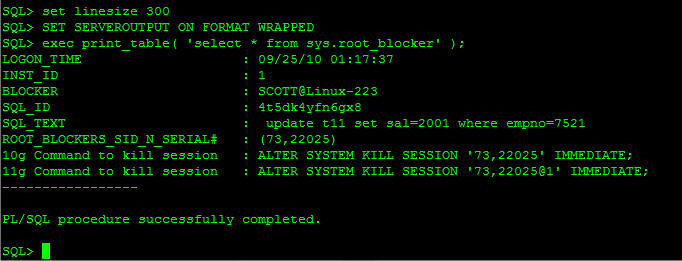
SQL> exec print_table(‘select * from sys.root_blocker’);
LOGON_TIME                    : 09/25/10 01:17:37
INST_ID                       : 1
USERNAME                      : SCOTT
SQL_ID                        : 4t5dk4yfn6gx8
SQL_TEXT                      :  update t11 set sal=2001 where empno=7521
ROOT_BLOCKERS_SID_N_SERIAL#   : (73,22025)

 and you could kill it like the below screen shot :

Step #3:
To check the complete list of locked_session/blockers, use the following query.

select
    to_char(a.logon_time, ‘MM/DD/YY HH:MI:SS’) as Logon_Time,
    a.inst_id,
    b.username||’@’||a.machine as blocker,
    a.sql_id,
    c.sql_text,
    ‘(‘||a.sid||’,’||a.serial#||’)’ as root_blockers_sid_n_serial#,
    ‘ALTER SYSTEM KILL SESSION ‘||a.sid||’,’||a.serial#||”’ IMMEDIATE;’ as “10g Command to kill session”,
    ‘ALTER SYSTEM KILL SESSION ”’||a.sid||’,’||a.serial#||’@’||a.inst_id||”’ IMMEDIATE;’ as “11g Command to kill session”
from
    gv$session a,
    dba_users b,
    gv$sqltext c
where
    b.username=a.username
    and a.sql_id=c.sql_id
    and a.blocking_session_status=’VALID’

order by logon_time desc;

Original Post Here

Thank you

SQL Injection In Oracle

I post earlier about database threats, but today i will go more deeply and start describe these threats.
SQL injection is a type of security exploit in which the attacker injects Structured Query Language (SQL) code through a web form input box, to gain access to resources, or make changes to data,Attackers can execute arbitrary SQL commands through the web application.

It enables an attacker to execute unauthorized SQL commands,For example, when a user logs onto a web page by using auser name and password for validation, a SQL query is used. what do you need ? just web browser.

to start using SQL Injection you need to look for  search page, Login page or even comment ( feedback), also you should be familiar with HTML for example Which Way page POST or GET commands, If POST is used, you cannot see the parameters in the URL check the below :

Some Programming language not take any method, most of them new Language such as ASP, PHP and JSP.

check simple example how attackers try to hack the below website, remember that below website doesn’t exists:

http:// http://www.hackme.com /index.asp?id=1

But the attackers change it to be :

http://www.hackme.com/index.asp?id=blah’ or 1=1–

The above is simple example describe how sql injection works, also another way to know if the website is vulnerable to an SQL injection attack if just insert (‘) and press Enter. you will get error regarding to ODBC Access.

There’s lot of way to use SQL Injection i will not mention them all , just few method to know the basic , the purpose of this article is to learn how secure database and code against database threats.

The Simplest way to generate SQL injection attack is by run one of the below :

• “ or 1=1–
• ‘ or ‘a’=‘a
• “ or “a”=“a
• ‘) or (‘a’=‘a)

For Example:

http://www.hackme.com/index.asp?id=blah’ or 1=1–

SQL Injection can be perform On oracle using the below:

  • Insert,Updates and select.
  • Union 
  • Sub Select.

for complex SQL Injection you can use also OS Command Line using stored procedures like master..xp_cmdshell.

For Example :
Ping a server
• blah‘;exec master..xp_cmdshell ping 10.10.1.2” —

to avoid SQL injection :

  • Minimize the privileges of database connections
  • Disable verbose error messages
  • Protect the system account “System Administrator”
  • Reject known bad input
  • Never trust user input
  • Never use dynamic SQL
  • Do not store secrets in plain text

I just Describe Small Section of this topic to avoid SQL injection, read this topic and understand it will avoid attacker to get into your system and start miss around.

Thank you
Osama Mustafa

DataGuard MOS Notes

Find the below very Useful MOS Notes that could help you In Data Gaurd

Step by Step Guide on Creating Physical Standby Using RMAN DUPLICATE…FROM ACTIVE DATABASE [ID 1075908.1]
Script to Collect Data Guard Physical Standby Diagnostic Information [ID 241438.1]
How to run DBUA in silent mode? [ID 422737.1]
Bug 15927527 : ORA-1555 ON ACTIVE DATA GUARD
Rman-06571: Datafile 1 Does Not Have Recoverable Copy [ID 1336872.1]

Thank you
Osama Mustafa

Stop Standby Database And Work As Standalone

Sometimes you need to disconnect Standby Database, Or even Delete the Configuration And let the primary Is StandAlone Database to do that you have Temporary way or Permanet Way :

 1 – Temporary :

Run the below command in standby Database:

SQL> alter database recover managed standby database cancel;

2- Permant With The Following Steps :

Run the below command in standby Database: 

SQL> alter database recover managed standby database cancel;

 Shutdown Standby Database.
change the parameters LOG_ARCHIVE_DEST_n/LOG_ARCHIVE_CONFIG (if set).
 Remove tnsnames.ora for standby In primary Database.

Thank you
Osama mustafa

Moving Undo/Temporary Tablespace

To Move these tablespace Easily you can create them By Following the below Steps :

sqlplus '/as sysdba'
 
SQL>CREATE TEMPORARY TABLESPACE 
TEMPFILE '/new_location/.dbf' 
SIZE 64M REUSE AUTOEXTEND ON NEXT 28 MAXSIZE unlimited;
 
SQL>ALTER DATABASE DEFAULT TEMPORARY TABLESPACE
 
Drop the Old One By Run the Below Command :
 
SQL>DROP TABLESPACE temp INCLUDING CONTENTS AND DATAFILES;
 
 
For Undo Tablespace Check the below Steps:

 
SQL>create undo tablespace
 datafile '/new_location/.dbf' size 2000m;
 
Make New Tablespace for Database:
 
SQL> alter system set undo_tablespace= undotbs2 ;
 
Drop Old Tablespace
:
 
SQL> drop tablespace undotbs including contents;
 
Thank you 
Osama Mustafa 

ora-27086 unable to lock file / Alertlog

ORA-27086:unable to lock file – already in use
Cause:the file is locked by another process, indicating that it is currently in use by a database instance.
Action:determine which database instance legitimately owns this file.

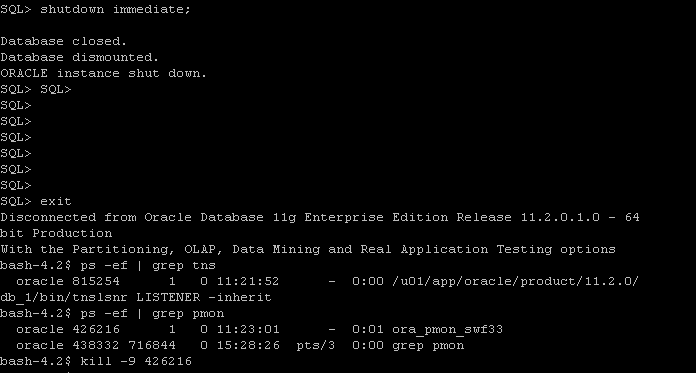
If you check the above Picture you will there’s two Pmon process for the same instance, So what you do is the follwing

export ORACLE_SID=swf33
export ORACLE_HOME=
sqlplus / as sysdba
Shutdown immediate;

 After shutdown database another process still up use kill -9 OS command to kill it and startup database.

Thank you
Osama Mustafa

Applying Critical Patch Updates (CPU).

A Critical Patch Update is a collection of patches for multiple security vulnerabilities. Critical Patch Update patches are usually cumulative but each advisory describes only the security fixes added since the previous Critical Patch Update advisory. Thus, prior Critical Patch Update advisories should be reviewed for information regarding earlier published security fixes.its released on January, April, July &October.

Steps to Apply CPU: 

Pre-Installation:

  1. Shutdown all the instance , and oracle services such as listener. 
  2. ensure $PATH variable.
  3. Download Patchand unzip it.
  4. Use the Opatch like this : opatch napply -skip_subset -skip_duplicate.
  5. Startup databas.

Post-Installation :

  1.  cd $ORACLE_HOME/rdbms/admin
  2. sqlplus / as sysdba
  3. SQL> @catbundle.sql cpu apply


Note : For rac database nothing diffrenece unless you have to shutdown services node by node and patching ( you can patch one node then the other one).

Useful MOS notes :
Introduction To Oracle Database catbundle.sql [ID 605795.1]

 Thank you 
Osama Mustafa

Zombie process

Zombie process is an inactive computer process,according to wikipedia article, “…On Unix operating systems, a zombie process or defunct process is a process that has completed execution but still has an entry in the process table, allowing the process that started it to read its exit status. In the term’s colorful metaphor, the child process has died but has not yet been reaped…”

Find zombie by :

# ps aux | awk '{ print $8 " " $2 }' | grep -w Z

 after that use kill -9  PID

Thank you
osama mustafa