Oracle Mechanism To Store Password

Today I post This Topic About how Oracle Store Password, I choose this topic since i will write on other topics that related to this one, Understand this topic will make you understand the basics how to secure oracle database.

As i mention before there’s are simple steps to secure database before start buying products and use them.
Also Please note that article will not show you how to hack or attacks any algorithms it’s only show the Title of this topic.I used in this topic Database version 10g,11g.

When You Enter Username which is stored in Plain Text ( Clear Text ) in DBA_USERS view on other hand the password stored as hash, when you log in to The Password is concatenated to the end of your username, and when you type the password , it will be compared to Stored hash password if they match then welcome to your schema otherwise you don’t have access to the schema.

I love to keep asking this question since its really good question regarding to password, why Using Hash instead of encrypt it ? The Answer is Simple you can’t reverse the hash while you can do that in encrypted.
still difficult … if you have encrypted file you can decrypt it it will not be easy but POSSIBLE , Otherwise in hash you need other age to extract the password from it.Adding to your information that hashing store any amount of data

for example : hashing could be 16 bytes and its could be different related to hashing algorithms so you cannot retrieve the original data from the hash, so when you enter the password in oracle this password will be hashed and comparing to Stored Hashing password ( in DBA_USERS ) you will log on, actually lot of systems using this way Unix one of them.

and you check all this information username, password and others in Tables called SYS.USER.

SQL> select user#,Name,Password from SYS.USER$;

     USER# NAME                           PASSWORD
———- —————————— ——————————
         0 SYS                            8A8F025737A9097A
         1 PUBLIC
         2 CONNECT
         3 RESOURCE
         4 DBA
         5 SYSTEM                         2D594E86F93B17A1

The algorithm that generates that hash is the same in all versions and platforms and does not include any identifying info from the database, host, instance or other information beyond the username and password.Thus, if your username and password are the same on multiple databases they will all have the same hash value.

I always consider and inform client and customers for grant users privileges that they don’t need to what it’s called “ESCALATE PRIVILEGES”  Check the below example that describe If you don’t know the other user’s password you can temporarily change the password then restore it by saving the hash and then using the “IDENTIFIED BY VALUES” clause of the ALTER USER command to restore the hash value when you are done.

SQL> conn test/test_123;
Connected.

SQL>  select user#,Name,Password from SYS.USER$ where name=’TEST’;

     USER# NAME                           PASSWORD
———- —————————— ——————————
        85 TEST                           BB68AA665B7F31FB

SQL> alter user test identified by test_osama_123 ;

User altered.

SQL> conn test/test_osama_123;
Connected.

 SQL> alter user test identified by Values ‘BB68AA665B7F31FB’;
User altered.

you can controlled this error  by password_reuse_time/password_reuse_time parameter in profile.Change password different than test_123. and if you choose the same password the below error appeared :
ORA-28007: the password cannot be reused

You can check the description for the error :
ORA-28007:the password cannot be reused
Cause: The password cannot be reused for the specified number of days or for the specified number of password changes
Action: Try the password that you have not used for the specified number of days or the specified number of password changes Refer to the password parameters in the CREATE PROFILE statement.

if you don’t modify the profile you can be aware of the below :

  • you should be aware with alter user Privileges.
  • Check who has Access to DBA_USERS.

Notice the above information for Database 10g.

Now I will talk about Database 11g which get enhance for storing Database By adding new column to DBA_USER called PASSWORD_VERSION to understand it if this column contain 10g this the above information can be applied. if no 10g mention in that column you should search for new methods 🙂

Include to this new features 11g Introduce the ability of Store password In CASE_SENSITIVE and password hash no more appeared in DBA_USERS and to check it you should have access to SYS.USER$

Now Let’s Back to PASSWORD_VERSION Column if this column contain 10g then SYS.USER$ Column PASSWORD   will not be reliable  Why ? Because hashing in this case will not support case sensitive so Upper or lower will be the same will be explain with example.
On Other hand if the PASSWORD_VERSION contain only 11g  then you will need to look in the SYS.USER$.SPARE4 column and you will see a much larger hex number.  This is because Oracle has switched to the SHA-1.

Another Interesting Thing that you could see in 11g if you assign the same password to user the hash value in the column will be Totally different but it will be usable in an “IDENTIFIED BY VALUES” amazing algorithm and new way to store oracle password and more secure.

Note : “IDENTIFIED BY VALUES” command  is not supported  which mean maybe will gone in Next Releases.Also SPARE 4 Column is not documented by oracle So Any next Patch or new Version Oracle may change how the password information is exposed.

Let’s work On Examples Now:

SQL> show parameters sec_case;

NAME                                 TYPE        VALUE
———————————— ———– ——————————
sec_case_sensitive_logon             boolean     TRUE

SQL> alter user test identified by test ;
User altered.

SQL> select username,password,password_versions from dba_users where username = ‘TEST’;

USERNAME                       PASSWORD                       PASSWORD_VERSION
—————————— —————————— ——–
TEST                                                                                 10G 11G

SQL> select name,password,spare4 from sys.user$ where name = ‘TEST’;   
NAME                           PASSWORD                       SPARE4
—————————— ——————————
TEST                           7A0F2B316C212D67               S:6129354E59DE31C3554426823BB98CC0CDC3A9F5495076D46305BB73ECD

Now Let’s Test Our Work on this User 🙂

SQL> conn / as sysdba
Connected.

SQL> alter user test identified by TesT ;
User altered.

SQL> conn test/test;
ERROR:
ORA-01017: invalid username/password; logon denied
Warning: You are no longer connected to ORACLE.

SQL> conn test/TesT ;
Connected.

Let’s Check Case_sensitive if it’s enabled :

SQL> conn / as sysdba
Connected.
SQL> alter user test identified by TesT ;

User altered.

SQL> conn test/test;
ERROR:
ORA-01017: invalid username/password; logon denied

Warning: You are no longer connected to ORACLE.
SQL> conn test/TesT ;
Connected.

let’s use Identified By Values and see changes happened to DBA_USERS and SYS.USER$, Please notice that in the below example when i use Hash Value that stored in password The User able to connect using lower/upper Letters even Case_senentive parameter is enabled but when i used Hash that stored in SPARE4 everything is changed

SQL> conn / as sysdba
Connected.

SQL> alter user test identified by values ‘7A0F2B316C212D67’;
User altered.

SQL> select username,password,password_versions from dba_users where username = ‘TEST’;

USERNAME                       PASSWORD                       PASSWORD
—————————— —————————— ——–
TEST                                                          10G

SQL> select name,password,spare4 from sys.user$ where name = ‘TEST’;   

NAME                           PASSWORD                       SPARE4
—————————— ——————————
TEST                           7A0F2B316C212D67

SQL> conn test/test ;
Connected.
SQL> conn test/TesT ;
Connected.

SQL> alter user test identified by values ‘S:6129354E59DE31C3554426823BB98CC0CDC3A9F5495076D426305BB73ECD’;
User altered.

SQL> select username,password,password_versions from dba_users where username = ‘TEST’;

USERNAME                       PASSWORD                       PASSWORD
—————————— —————————— ——–
TEST                                                          11G

SQL> select name,password,spare4 from sys.user$ where name = ‘TEST’;

NAME                           PASSWORD                       SPARE4
—————————— ——————————
TEST                                                          S:6129354E59DE31C3554426823BB98CC0CDC3A9F5495076D426305BB73ECD

SQL> conn test/test ;
ERROR:
ORA-01017: invalid username/password; logon denied
Warning: You are no longer connected to ORACLE.

SQL> conn test/TesT ;
Connected.

Now The Let’s Turn off the Case_sensitive parameter and set it to False what will be happened

SQL> show parameter case ;

NAME                                 TYPE        VALUE
———————————— ———– ——————————
sec_case_sensitive_logon             boolean     TRUE

SQL> alter system set sec_case_sensitive_logon=FALSE scope=both ;

System altered.

SQL> select username,password,password_versions from dba_users where username = ‘TEST’;

USERNAME                       PASSWORD                       PASSWORD
—————————— —————————— ——–
TEST                                                          11G

SQL> select name,password,spare4 from sys.user$ where name = ‘TEST’;

NAME                           PASSWORD
—————————— ——————————
SPARE4
——————————————————————————–
TEST
S:6EC2440ABAAC65F5883FF868BBC50757FB722E260633A417B04A982E1F15

SQL> conn test/test ;
ERROR:
ORA-01017: invalid username/password; logon denied
Warning: You are no longer connected to ORACLE.

Until This moment i am still unable to connect even i turned off the Case_sensitive parameter.

SQL> conn test/TesT ;
ERROR:
ORA-01017: invalid username/password; logon denied
Warning: You are no longer connected to ORACLE.

Also Same Error which indicate you should enable Parameter again or change password again 🙂

I wish it was useful article and full of demonstration if you have question Post it in comment please.

Thank you
Osama Mustafa
check the root blocker and kill it

Today On OTN this question has been asked how to check the root killer and kill it, While searching and browsing i found nice article i would love to share written by Moid I would thank him for his sharing and amazing topics

Step #1 : 
Create a view called root_blocker, and Grant read only permission to  public

Create or replace view root_blocker
as
    (select
       to_char(a.logon_time, ‘MM/DD/YY HH:MI:SS’) as Logon_Time,
       a.inst_id,
       b.username||’@’||a.machine as blocker,
       a.sql_id,
       c.sql_text,
       ‘(‘||a.sid||’,’||a.serial#||’)’ as root_blockers_sid_n_serial#,
       ‘ALTER SYSTEM KILL SESSION ”’|||a.sid||’,’||a.serial#||”’ IMMEDIATE;’ as “10g Command to kill session”,
       ‘ALTER SYSTEM KILL SESSION ”’||a.sid||’,’||a.serial#||’@’||a.inst_id||”’ IMMEDIATE;’ as “11g Command to kill session”
    from
       gv$session a,
       dba_users b,
       gv$sqltext c
    where
       b.username=a.username
       and a.sql_id=c.sql_id
       and logon_time=(select
                       max(logon_time)
                   from
                       V$session
                   where blocking_session_status=’VALID’)
    );

 Step #2:
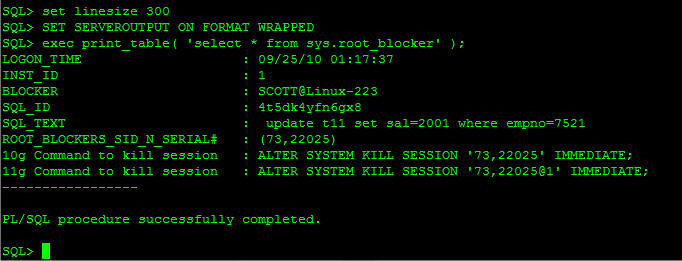
Now, using the help of plan_table, let’s display the values vertically so that it is easier for us to read the output.

set linesize 300
SET SERVEROUTPUT ON FORMAT WRAPPED
exec print_table( ‘select * from sys.root_blocker’ );

SQL> exec print_table(‘select * from sys.root_blocker’);
LOGON_TIME                    : 09/25/10 01:17:37
INST_ID                       : 1
USERNAME                      : SCOTT
SQL_ID                        : 4t5dk4yfn6gx8
SQL_TEXT                      :  update t11 set sal=2001 where empno=7521
ROOT_BLOCKERS_SID_N_SERIAL#   : (73,22025)

 and you could kill it like the below screen shot :

Step #3:
To check the complete list of locked_session/blockers, use the following query.

select
    to_char(a.logon_time, ‘MM/DD/YY HH:MI:SS’) as Logon_Time,
    a.inst_id,
    b.username||’@’||a.machine as blocker,
    a.sql_id,
    c.sql_text,
    ‘(‘||a.sid||’,’||a.serial#||’)’ as root_blockers_sid_n_serial#,
    ‘ALTER SYSTEM KILL SESSION ‘||a.sid||’,’||a.serial#||”’ IMMEDIATE;’ as “10g Command to kill session”,
    ‘ALTER SYSTEM KILL SESSION ”’||a.sid||’,’||a.serial#||’@’||a.inst_id||”’ IMMEDIATE;’ as “11g Command to kill session”
from
    gv$session a,
    dba_users b,
    gv$sqltext c
where
    b.username=a.username
    and a.sql_id=c.sql_id
    and a.blocking_session_status=’VALID’

order by logon_time desc;

Original Post Here

Thank you

Install/Deinstall Oracle Lable Secuirty

Oracle provide you with amazing tools to secure your data, and make sure no one will access to it. One of this amazing tools is Oracle label security (OLS) allows access control down to individual rows based on attached labels. Similar functionality can be reproduced using Fine Grained Access Control (FGAC) but OLS provides an out-of-the-box solution to row-level security. In this article I’ll present a simple example of the configuration of OLS.

To understand OLS you could read oracle documentation about it, OLS has two parts One binary which installed through Oracle Universal Installer (OUI) and to know if you have been install it you can check log in information to sqlplus  banner

Oracle Label Security  ….

All this in the 11g become more easier since you can install all features while you choose enterprise edition and use chopt to enable and disable :

chopt enable lbac
chopt disable lbac

 talking about second part which can be installed via PL/SQL packages,all this can be installed thru catols.sql
and you can use this way in 10g or 11g, and to de-install the OLS you can use the catnools.sql. but just as information oracle recommend that to install OLS you need to use DBCA.

if you decide to goes thru manual way its better to read MOS notes since you need to apply some patches to complete the installation.

Install
sqlplus / as sysdba
SQL> @?/rdbms/admin/catols.sql

 Deinstall
sqlplus / as sysdba
SQL> @?/rdbms/admin/catnools.sql

Just as note : If you install OLS while installation AUD$ table dropped from SYS schema and recreated on SYSTEM to be –> SYSTEM.AUD$

And Once you remove OLS its recreated again on SYS.AUD$

Thank you
Osama Mustafa

The Effect of the Weak Password

Default/weak passwords.

There is no need to discuss this point any more one of the most Security breaches happened because weak password, can you guess most popular passwords, I provide list for the most common password all the time is your one of them ?

1. password.
2, 123456.
3. 12345678.
4. abc123.
5. qwerty.
6. monkey.
7. letmein.
8. Dragon.
9. 111111.
10. baseball.

Simple steps keep you away in the safe side, No need for software or third party products to change your password in Database 10g, 11g Oracle provide to new features. Noted that what work on 10g is working on 11g.

Oracle Database 10g

In database 10g Oracle provide an example for password verifications functions you can write you own code and you can use
ORACLE_HOME/rdbms/admin/utlpwdmg.sql
This function must be created in SYS schema, when you run the script you enable the following:
•    alters the default parameters for Password Management this mean all the users on the system have Password Management
•    sets the default password resource parameters
•    Function makes the minimum complexity checks like minimum length of the password.

Sqlplus / as sysdba
SQL> @utlpwdmg.sql
Function created.
Profile altered.

Create new user after run the utlpwdmg.sql script.

SQL> create user test identified by test;
create user test identified by test
*
ERROR at line 1:
ORA-28003: password verification for the specified password failed
ORA-20001: Password same as or similar to user

SQL> create user test identified by test_oracle123 ;
User created.

At least we insure that no more easy password, as mention before you can create your own code or trigger.

CREATE OR REPLACE FUNCTION paasword_check (
  Username      VARCHAR2,
  Password      VARCHAR2,
    Old_password VARCHAR2)
  RETURN BOOLEAN AS
BEGIN
  IF LENGTH (password) < 10 THEN
    RETURN FALSE;
  ELSE
    RETURN TRUE;
  END IF;
END password_check;
/

After run the above function under SYS schema you should assign it to specific profile. Let me describe step by step.

1-    Create profile

CREATE PROFILE New_profile LIMIT
  FAILED_LOGIN_ATTEMPTS 5
  PASSWORD_LOCK_TIME 3   
  PASSWORD_LIFE_TIME 15
  PASSWORD_GRACE_TIME 3  
  PASSWORD_REUSE_TIME 60
  PASSWORD_REUSE_MAX 3
/

Check if profile created.

SQL> select profile from dba_profiles where profile = ‘NEW_PROFILE’;

PROFILE
——————————
NEW_PROFILE

2-    Assign verify_function to New_profile

SQL> ALTER PROFILE new_profile LIMIT
  PASSWORD_VERIFY_FUNCTION verify_function; 
Profile altered.

3-    Change User profile
SQL> alter user scott profile NEW_profile ;
User altered.

Now you are creating user with verification password and profile to with password conditions, all this to make sure that user will not be able to choose weak password.

You need to generate strong password and nothing came to your mind one of the most amazing website that help you to do that is
http://www.randpass.com/. Just choose length for the password.


Example of Generated password by random password sites:
“eo2toozo”,” gop}geeu”.

Oracle Database 11g

Earlier in 11g Version Oracle Provide new parameter which control case sensitive for Password , I consider this is amazing adding for database , its dose not exists in 10g but you can there’s difference between oracle and ORACLE as Password .

Since this book is concern about oracle security I will post every example I can to prove the best to secure your database.

SQL> show parameter case;

NAME                                 TYPE        VALUE
——————————— ———– ——————————
sec_case_sensitive_logon             boolean     FALSE

By default this parameter is set to TRUE, to ensure securing your password, I include demonstrate to let you understand this parameter as well.

From the above the parameter is set to FALSE

SQL> Create user test identified by test;
User created.

SQL> grant create session to test ;
Grant succeeded.

Let’s try to connect using test user once as “test” and “TEST”

SQL> conn test/test ;
Connected.
SQL> conn test/TEST;
Connected.

There’s no difference Between Sensitivity for the password. But I will set CASE_SENSITIVE Parameter to TRUE and try again After change password for test user.

SQL> alter system set sec_case_sensitive_logon=TRUE scope=memory;
System altered.

SQL> alter user test identified by TEST;
User altered.

Let’s try to connect this time using Test User.

SQL> conn test/test ;
ERROR:
ORA-01017: invalid username/password; logon denied

But Using “TEST”

SQL> conn test/TEST ;
Connected.

This parameter consider as important feature for security, you can create your own complex password to ensure protecting your data, Weak password is one of the most important threats, reduce hacking start with simple basic steps.

Thank you
Osama Mustafa

Oracle ACE

I am writing this topic while i don’t know what should i write, So happy To Join The Most Amazing Community In the World, Oracle ACE world , Today I join this Amazing Community and i would take this opportunity and thanks my family and friends , and how can i forgot the people who motivate me and show me how this world and community is amazing Kamran, Hans,Kai,  Gokhan , Eddie, Aman and lot of others guys.

Oracle is my world, this is what i love i will love it to the end .

Thank you Guys again

Osama Mustafa

SQL Injection In Oracle

I post earlier about database threats, but today i will go more deeply and start describe these threats.
SQL injection is a type of security exploit in which the attacker injects Structured Query Language (SQL) code through a web form input box, to gain access to resources, or make changes to data,Attackers can execute arbitrary SQL commands through the web application.

It enables an attacker to execute unauthorized SQL commands,For example, when a user logs onto a web page by using auser name and password for validation, a SQL query is used. what do you need ? just web browser.

to start using SQL Injection you need to look for  search page, Login page or even comment ( feedback), also you should be familiar with HTML for example Which Way page POST or GET commands, If POST is used, you cannot see the parameters in the URL check the below :

Some Programming language not take any method, most of them new Language such as ASP, PHP and JSP.

check simple example how attackers try to hack the below website, remember that below website doesn’t exists:

http:// http://www.hackme.com /index.asp?id=1

But the attackers change it to be :

http://www.hackme.com/index.asp?id=blah’ or 1=1–

The above is simple example describe how sql injection works, also another way to know if the website is vulnerable to an SQL injection attack if just insert (‘) and press Enter. you will get error regarding to ODBC Access.

There’s lot of way to use SQL Injection i will not mention them all , just few method to know the basic , the purpose of this article is to learn how secure database and code against database threats.

The Simplest way to generate SQL injection attack is by run one of the below :

• “ or 1=1–
• ‘ or ‘a’=‘a
• “ or “a”=“a
• ‘) or (‘a’=‘a)

For Example:

http://www.hackme.com/index.asp?id=blah’ or 1=1–

SQL Injection can be perform On oracle using the below:

  • Insert,Updates and select.
  • Union 
  • Sub Select.

for complex SQL Injection you can use also OS Command Line using stored procedures like master..xp_cmdshell.

For Example :
Ping a server
• blah‘;exec master..xp_cmdshell ping 10.10.1.2” —

to avoid SQL injection :

  • Minimize the privileges of database connections
  • Disable verbose error messages
  • Protect the system account “System Administrator”
  • Reject known bad input
  • Never trust user input
  • Never use dynamic SQL
  • Do not store secrets in plain text

I just Describe Small Section of this topic to avoid SQL injection, read this topic and understand it will avoid attacker to get into your system and start miss around.

Thank you
Osama Mustafa

BarCode Fonts

If you look for bar code fonts to make your reports Look more nicer , I uploaded Fonts and you can download them On the Below Link , Hope its useful

BarCode Fonts Download Here

And For Tadqeet Code That Use for Arabic , Called Tafqeet :

Tarqeet You can Dowload it Here

Thank you
Osama Mustafa

DataGuard MOS Notes

Find the below very Useful MOS Notes that could help you In Data Gaurd

Step by Step Guide on Creating Physical Standby Using RMAN DUPLICATE…FROM ACTIVE DATABASE [ID 1075908.1]
Script to Collect Data Guard Physical Standby Diagnostic Information [ID 241438.1]
How to run DBUA in silent mode? [ID 422737.1]
Bug 15927527 : ORA-1555 ON ACTIVE DATA GUARD
Rman-06571: Datafile 1 Does Not Have Recoverable Copy [ID 1336872.1]

Thank you
Osama Mustafa

Database HealthCheck

Stable Environment without any problem need to be monitored by DBA, Trying To Check Database With Specific Period or even everyday it’s called HealthCheck All that to avoid any Problem That could occur in the future which will prevent users and customer doing their work.

Therefore any DBA should perform Healthcheck for the database By Check the below :

1- Check Alert Log.

Check alert log is very important step, which its Indicate for any Error occurs in Database level, So the Data is always append, don’t forget to rotate alert log or purge if you are using 11g you can use ADRCI tools.
you can find alert log location :

in 10g

SQL> show parameter background_dump_dest;

NAME                                 TYPE        VALUE
———————————— ———– ——————————
background_dump_dest                 string      /u01/app/oracle/admin/orcl/bdump

in 11g

SQL> show parameter diagnostic_dest

NAME                                 TYPE        VALUE
———————————— ———– ——————————
diagnostic_dest                      string      /u01/app/oracle

2.Check Dump_File_szie

As we know Oracle Generate Trace file On OS level, But how Oracle manage their size, all this happened By Parameter Called “Max_dump_File_size” This Parameter define Max Size for OS Disk Space.

SQL> show parameter max_dump_file_size

NAME                                 TYPE        VALUE
———————————— ———– ——————————
max_dump_file_size                   string      UNLIMITED

3.Audit Files

If you are enable Audit Parameter, Or SYSDBA Operation is Enable Oracle Will Start generate audit files which is take significant amount of space. and if you didn’t monitor this space it will prevent you access to oracle database until you remove them.

4.Check TableSpace (System, SysAux , Temp … )

You should monitor tablespace and check the free space and status for these table space and all the tablespace should be monitored to avoid any problem that could occur in the future since it will prevent users continuous their works, the below script check Size for each table space and Free space

SELECT /* + RULE */  df.tablespace_name "Tablespace",
df.bytes / (1024 * 1024) "Size (MB)",
SUM(fs.bytes) / (1024 * 1024) "Free (MB)",
Nvl(Round(SUM(fs.bytes) * 100 / df.bytes),1) "% Free",
Round((df.bytes - SUM(fs.bytes)) * 100 / df.bytes) "% Used"
FROM dba_free_space fs,
(SELECT tablespace_name,SUM(bytes) bytes
FROM dba_data_files
GROUP BY tablespace_name) df
WHERE fs.tablespace_name (+) = df.tablespace_name
GROUP BY df.tablespace_name,df.bytes
UNION ALL
SELECT /* + RULE */ df.tablespace_name tspace,
fs.bytes / (1024 * 1024),
SUM(df.bytes_free) / (1024 * 1024),
Nvl(Round((SUM(fs.bytes) - df.bytes_used) * 100 / fs.bytes), 1),
Round((SUM(fs.bytes) - df.bytes_free) * 100 / fs.bytes)
FROM dba_temp_files fs,
(SELECT tablespace_name,bytes_free,bytes_used
FROM v$temp_space_header
GROUP BY tablespace_name,bytes_free,bytes_used) df
WHERE fs.tablespace_name (+) = df.tablespace_name
GROUP BY df.tablespace_name,fs.bytes,df.bytes_free,df.bytes_used
ORDER BY 4 DESC;

OR

SELECT d.STATUS "Status",
d.tablespace_name "Name",
d.contents "Type",
d.extent_management "Extent Management",
d.initial_extent "Initial Extent",
TO_CHAR(NVL(a.bytes / 1024 / 1024, 0),'99,999,990.900') "Size (M)",
TO_CHAR(NVL(a.bytes - NVL(f.bytes, 0), 0)/1024/1024,'99,999,999.999') "Used (M)",
TO_CHAR(NVL((a.bytes - NVL(f.bytes, 0)) / a.bytes * 100, 0), '990.00') "Used %",
TO_CHAR(NVL(a.maxbytes / 1024 / 1024, 0),'99,999,990.900') "MaxSize (M)",
TO_CHAR(NVL((a.bytes - NVL(f.bytes, 0)) / a.maxbytes * 100, 0), '990.00') "Used % of Max"
FROM sys.dba_tablespaces d,
(SELECT tablespace_name,
SUM(bytes) bytes,
SUM(decode(autoextensible,'NO',bytes,'YES',maxbytes))
maxbytes FROM dba_data_files GROUP BY tablespace_name) a,
(SELECT tablespace_name, SUM(bytes) bytes FROM dba_free_space
GROUP BY tablespace_name) f
WHERE d.tablespace_name = a.tablespace_name(+)
AND d.tablespace_name = f.tablespace_name(+)
ORDER BY 10 DESC;

5. Data Files Locations

you should check the location for datafiles to make sure there’s no misunderstanding and check autoextened

SQL> select * from v$dbfile;

to Check if the auto extend is on

SQL> select file_id, tablespace_name, bytes, maxbytes, maxblocks, increment_by, file_name
from dba_data_files where autoextensible = ‘YES’;

6. Redo Log

Redo log is very important components in database since its minimize loss of data in the database Redo log files are used in a situation such as instance failure to recover commited data that has not yet been written to the data file.

SQL> select * from v$logfile;

7. Parameter files

Check Spfile, Or pfile in database to Ensure startup and database parameters

SQL> show parameter pfile ;

NAME                                 TYPE        VALUE
———————————— ———– ——————————
spfile                               string      /u01/app/oracle/product/10.2.0/db_1/dbs/spfileorcl.ora

 8. Backup

You have to Check if the backup Script Run successfully without any problems

RMAN > list backup summary

This is how health check database there’s others things you can do such as indexes,and memory

Thank you
Osama Mustafa