Replicating data via materialized views

Sometimes We Need The Same Data For specific Tables On Other Database , What Should I Do ?

As We Know There’s Oracle Solution For this issue :
1- Oracle Stream.
2- Golden Gate.
3-Standby Database.

The Above Solution Depends On what you need . What If I need One Table Or Two Or Three Table on another Database Some will say export/import , Sql Loader .

But why we don’t Use Materialized Views ,The below Steps Shows how to Replicating data via materialized views

The main difference between regular and materialized view is that the latter does not query the original tables for every user request. The materialized view holds a copy of their data instead.

Source Database : Source
Target Database: Target
 

1-create the USERS table and add some sample records inside.


SQL> CONNECT SYSTEM/*********@Source
Connected.
SQL> CREATE USER APP1 IDENTIFIED BY APP1;

User created.

SQL> GRANT CONNECT,RESOURCE TO APP1;

Grant succeeded.

SQL> CONNECT APP1/APP1@Source
Connected.
 
SQL> CREATE TABLE USERS (USER_ID INTEGER PRIMARY KEY,
FIRST_NAME VARCHAR2(30), LAST_NAME VARCHAR2(30), PASSWORD VARCHAR2(20));


Table created.

SQL> INSERT INTO USERS VALUES (1, 'BRIAN', 'ALDISS', 'PASS1')

1 row created.

SQL> INSERT INTO USERS VALUES (2, 'POUL', 'ANDERSON', 'PASS2')

1 row created.

SQL> INSERT INTO USERS VALUES (3, 'NEAL', 'ASHER', 'PASS3')

1 row created.

SQL> COMMIT

Commit complete.

2-After That We need Move to The Target Database , We need to Create Database Link to make connection between the two databases , editing the TNSNAMES.ORA file and adding a record for Source there

Source =
(DESCRIPTION =
(ADDRESS_LIST =
(ADDRESS = (PROTOCOL = TCP)(HOST = 172.11.11.10)
(PORT = 1522))
)
(CONNECT_DATA =
(SERVICE_NAME = orcl)
)
)

 We need to test it by “tnsping Source” .

3-connect to the local database (Target) and create the user account for the APP2 application.

SQL> CREATE USER APP2 IDENTIFIED BY APP2

User created.

SQL> GRANT CONNECT, RESOURCE, CREATE MATERIALIZED VIEW, CREATE DATABASE LINK TO APP2

Grant succeeded.

4-Connect To APP2 (User that we create it On target Database ).

SQL> CONNECT APP2@Target
Enter password:
Connected.

SQL> CREATE DATABASE LINK Source CONNECT TO APP1 IDENTIFIED BY APP1 USING 'Source';

Database link created.

 Now You must be able to Select any table from user APP1 On Source Database .
For Example :

Select * from User@source .

5-After we did the above steps we will create materialized view On target Database : 


SQL> CREATE MATERIALIZED VIEW V_USERS REFRESH NEXT
SYSDATE+INTERVAL '10' MINUTE WITH ROWID AS SELECT * FROM USERS@Source;

“REFRESH NEXT SYSDATE + INTERVAL ’10’ MINUTE asks the database to refresh the materialized view every 10 minutes”

Notices : There’s Lot Of Attribute for  materialized view You don’t have to use the same Sentence its depend on what you need and how you will use it.

6- To Test It 

On APP2@Target  Users

SQL > SELECT COUNT(*) FROM V_USERS

It Must Give you same Number Of Row In APP1@Source , If you want to test synchronization All you have to do is

On Source Database :

APP1@source

INSERT INTO USERS VALUES (4, 'ROBERT', 'ASPRIN', 'PASS4')

Wait For Sync .

Hope its Simple and Easy 
Osama Mustafa 

FRM-92102 : A network error has occured

FRM-92102 is Gerneric Error maybe occur for more than one reasons :

1-Network 
2-Proxy
3-http
4-Session Time 


But today i will discuss the problem On oracle Application server 10g .
Description for the problem like the following when you try to connect on your deploy application On OAS 10g it’s gives the above error from 1-5 minutes.

I will give you more than one solution maybe it will be related to the above problem and you try them separately to see which one will be valid for you : 

1-Netowrk Parameters :

You will find it $ORACLE_HOME/forms/server/default.env
Just increase the value .

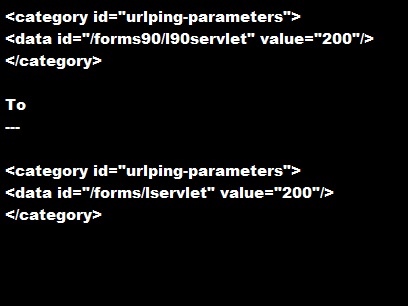
2-do the following change in opmn.xml (under $ORACLE_HOME/opmn/conf/):


3-SET Inbound_connection_timeout In sqlnet.ora to ZERO .

Sqlnet.Inbound_connection_timeout = 0

Note : if your can’t find this parameter in the SQLNET.ORA you cant add it .

5- Change the following $ORACLE_HOME/opmn/conf/opmn.xml


Hope this will work 

Thank you 
Osama mustafa 

ORA-12528 tns listener all appropriate instances are blocking new connections

SQL> set ORACLE_SID=ORCL
SQL> startup nomount
ORACLE instance started.

Total System Global Area 263639040 bytes
Fixed Size 1332552 bytes
Variable Size 222300856 bytes
Database Buffers 33554432 bytes
Redo Buffers 6451200 bytes

C:\>lsnrctl services

LSNRCTL for 32-bit Windows: Version 11.1.0.6.0 - Production

Service "ORCL" has 2 instance(s).
Instance "ORCL", status UNKNOWN, has 1 handler(s) for this service...
Handler(s):
"DEDICATED" established:0 refused:59
LOCAL SERVER
Instance "ORCL", status BLOCKED, has 1 handler(s) for this service...
Handler(s):
"DEDICATED" established:0 refused:0 state:ready
LOCAL SERVER
Service "ORCL_XPT" has 1 instance(s).
Instance "ORCL", status BLOCKED, has 1 handler(s) for this service...
Handler(s):
"DEDICATED" established:0 refused:0 state:ready
LOCAL SERVER
 
 
Want Solution Do the following : 
 
you can add the new TNS connect string (UR = A) to the tnsnames entry.
 
ORCL =
(DESCRIPTION =
(ADDRESS_LIST =
(ADDRESS = (PROTOCOL = TCP)(HOST = localhost)(PORT = 1521))
)
(CONNECT_DATA =
(SERVICE_NAME = ORCL)
(UR = A)
)
 
if the above Solution not working Make sure your listener look like :
 
SID_LIST_LISTENER =
(SID_LIST =
(SID_DESC =
(SID_NAME = CLRExtProc)
(ORACLE_HOME = D:\app\oraserver\product\11.2.0\dbhome_1)
(PROGRAM = extproc)
(ENVS = "EXTPROC_DLLS=ONLY:D:\app\oraserver\product\11.2.0\dbhome_1\bin\oraclr11.dll")
)
(SID_DESC =
(SID_NAME=orcl)
(ORACLE_HOME=D:\app\oraserver\product\11.2.0\dbhome_1)
)
)

LISTENER =
(DESCRIPTION_LIST =
(DESCRIPTION =
(ADDRESS = (PROTOCOL = IPC)(KEY = EXTPROC1521))
(ADDRESS = (PROTOCOL = TCP)(HOST = localhost)(PORT = 1521))
)
)


Thank you 
Osama Mustafa

RAC TO SINGLE NODE STEPS

Take RMAN backup of the production RAC database

1-
RMAN> run{
allocate channel c1 type disk format ‘/tmp/%U’;
backup database;
backup archivelog all;

backup controlfile ;
}

2-Create Pfile from RAC for single Node Using SQLPLUS :
 SQL>create pfile ” from spfile ;

3-Open pfile that you create it and modify the following parameters manually:
%dest, control_files
log_archive_dest_1
cluster_database_instances

4-Use the pfile created above to STARTUP NOMOUNT the database on the new host
$ sqlplus / as sysdba
SQL> startup nomount;

5-rman target /
A-restore controlfile from ‘/tmp/’;
OR
  restore controlfile from ‘/media/moh_1509/MEPSLIVE_20110919_762231895_3885.ctl’


B-ALTER DATABASE MOUNT ;
C.catalog backuppiece  ‘.bkp’ repeat it for all of backupset .
D.catalog backuppiece  ‘.arch’ repeat it for all of ARCHIVELOG.

E.
run
{
set newname for datafile 1 to ”;
set newname for datafile 2 to  ”;
set newname for datafile 3 to ”;
set newname for datafile 4 to  ”;
set newname for datafile 5 to  ”;
set newname for datafile 6 to  ”;
     restore database;
     switch datafile all;
}

NOTE : datafile number must be taken from the production system .

F.
sqlplus / as sysdba

alter database rename file ” to ”;

G.
alter database clear logfile group 1;
alter database clear logfile group 2;
alter database clear logfile group 3;

Then Delete unnecessary Redolog .

6.RMAN TARGET /
RMAN>RECOVER DATABASE ;

7.SQL> alter database open resetlogs;

If open database fail with error ORA-38856
then, Set the following parameter in the init.ora file:

_no_recovery_through_resetlogs=TRUE

8. 
SQL> select THREAD#, STATUS, ENABLED 2 from v$thread;

SQL> select group# from v$log where THREAD#=2;
SQL> alter database disable thread 2;

9.DROP REDO LOG FROM NEW SINGLE NODE BY :
 SQL> alter database clear unarchived logfile group ;  
SQL>alter database drop logfile group ;

After doing this you can remove undo tablespace for other instance 

10.To Remove it :
 SQL> show parameter undo;
SQL> select tablespace_name from dba_tablespaces where contents=’UNDO’;
SQL> drop tablespace UNDOTBS2 including contents and datafiles; 

Now you have single node instance 🙂

Thank you
Osama Mustafa

Change Listener Port For Oracle RAC

I think its useful to document this since maybe i will need it too 🙂

Environment

2 Node , Linux  …..

RAC database name: ORCL
Node 1 vip: myhost1-vip
Node 2 vip: myhost2-vip
Instance 1: ORCL1
Instance 2: ORCL2
Version: 11.1.0.7
New port: 1522

STEPS :

1) First, use netca to adjust the the listener port from 1521 to 1522. It’s a good idea to use netca to do this cluster-wide and keep the OCR in check.  
NOTE: This will shutdown the listeners across both nodes.

2)

2) In the tnsnames.ora for ASM and RDBMS, ensure the following entry exists (they’ll probably be there but with the 1521 port, so adjust accordingly):

LISTENERS_ORCL=
(ADDRESS_LIST =
(ADDRESS = (PROTOCOL = TCP)(HOST = myhost1-vip)(PORT = 1522))
(ADDRESS = (PROTOCOL = TCP)(HOST = myhost2-vip)(PORT = 1522))
)

LISTENER_ORCL2=
(ADDRESS = (PROTOCOL = TCP)(HOST = myhost2-vip)(PORT = 1522))

LISTENER_ORCL1=
(ADDRESS = (PROTOCOL = TCP)(HOST = myhost1-vip)(PORT = 1522))

3)
Connect to each instance and set the local_listener to parameter to either LISTENER_MYRACDB1 or 2 depending on the instance you connect to. Ensure you do this so it applies to the instance you are connected to only, and does not apply globally.

e.g. if connected to ORCL1

alter system set local_listener=’LISTENER_ORCL1′ sid=’ORCL1′;

4) Set the remote_listener parameter to LISTENERS_MYRACDB across all instances

e.g. alter system set remote_listener=’LISTENERS_ORCL’;

5) Repeat the above for both ASM instances

6) You should be able to start the listener on each node now.

e.g. srvctl start listener -n myhost1 

Thank you

Note :

On Single node instance all you need to do is
1-stop the listener
lsnrctl stop

2-Go to $ORACLE_HOME/network/admin/listener.ora
modified the port for new one .

3-start the listener
lsnrctl start

DONE

Osama mustafa
Oracle Database consultant

Resize Redolog On RAC Instance

Before I Posted “How To Resize redo log ” This was on Single Instance But Now I show you how to do it on Oracle Real Application Cluster


1.First Run this Query To check size, redo On your RAC :

select l.group#, l.thread#, f.member, l.archived, l.status, (bytes/1024/1024) fsize
from v$log l, v$logfile f
where f.group# = l.group#
order by 1,2


2. Now our purpose is increase redosize from 100Mb to 300 Mb

3. We are going to add our new redo file by below command:

4.
alter database add logfile group 5 ‘+ORADATA’ size 300M;    <<   node 2
alter database add logfile group 6 ‘+ORADATA’ size 300M;    <<   node 2
alter database add logfile group 7 ‘+ORADATA’ size 300M;    <<   node 1
alter database add logfile group 8 ‘+ORADATA’ size 300M;    <<   node 1

5. Switch until we are into log group 5,6,7,8 so we can drop log groups 1, 2,3 and 4 Until you see the new redo log used .

Thank you
Osama mustafa

Resize Redo Log

Here is a newly created database redo log information:

SQL> select * from v$log;

GROUP# THREAD# SEQUENCE# BYTES MEMBERS ARC STATUS FIRST_CHANGE# FIRST_TIME
———- ———- ———- ———- ———- — —————- ————- ——————-
1 1 17 52428800 1 NO INACTIVE 996238 06/09/2007 22:01:59
2 1 18 52428800 1 NO INACTIVE 1006432 06/09/2007 22:13:32
3 1 19 52428800 1 NO CURRENT 1036439 07/09/2007 09:56:44

SQL> select * from v$logfile;

GROUP# STATUS TYPE MEMBER
———- ——- ——- ————————————————-
3 ONLINE /database/data/redo03.log
2 ONLINE /database/data/redo02.log
1 ONLINE /database/data/redo01.log


Here is how i changed this to five 200M redo logs:

SQL> alter database add logfile group 4 (‘/database/data/redo04.log’) size 200M;
SQL> alter database add logfile group 5 (‘/database/data/redo05.log’) size 200M;

while running following sql commands, if you hit an error like this:

ORA-01623: log 3 is current log for instance RPTDB (thread 1) – cannot drop
ORA-00312: online log 3 thread 1: ‘/database/data/redo03.log’

you should run ” alter system switch logfile;” until current log is 4 or 5. Then execute “alter system checkpoint;”

SQL> alter database drop logfile group 1;
SQL> alter database drop logfile group 2;
SQL> alter database drop logfile group 3;

then move (or maybe drop) old redo logs

mv /database/data/redo01.log /database/data/redo01_old.log
mv /database/data/redo02.log /database/data/redo02_old.log
mv /database/data/redo03.log /database/data/redo03_old.log

finally

SQL> alter database add logfile group 1 (‘/database/data/redo01.log’) size 200M;
SQL> alter database add logfile group 2 (‘/database/data/redo02.log’) size 200M;
SQL> alter database add logfile group 3 (‘/database/data/redo03.log’) size 200M;

Linux Command On Windows :)

Install Cygwin

Cygwin comes with a normal setup.exe to install in Windows, but there are a couple steps you will need to pay attention to, so we will walk you through the installation.

To keep the installation small while saving bandwidth for you and Cygwin, the default installer will download only the files you need from the internet.

The default install path is C:\Cygwin

Click next until you come to a download mirror selection. Unfortunately, the installer does not say where the mirrors are located so in most cases you might as well just guess which mirror works best.

After you have selected a mirror, the installer will download a list of available packages for you to install. Here is where things get a bit more intimidating.
There will be hundreds of packages available separated by multiple different categories. If you don’t know what the package is you can leave the default selection and install additional packages later by running the installer again.


If you know what package you need, you can search for it and the results will be automatically filtered.

Once you click next, it will take a little while to download all the selected tools and then finish the installation.

Add Cygwin Path to Windows Environment Variable

In the left column click on advanced system settings to open the system properties window we are looking for


From the advanced tab, click on environment variables at the bottom.

Then in the system variables, locate the path variable and click edit.

At the end of the variable value option, add the Cygwin bin location like so.
;C:\Cygwin\bin
Note: Make sure you add a semicolon to separate it from the other values.


Click OK to close out of the window and then open a command prompt to test out a few Linux commands.

Enjoy

Osama Mustafa

Threats to Database Security Part 1

Today, all company needs to save data and information, these kinds of data different from company to other such as (pictures, employee and Customer data); it’s so rarely to find companies used papers to save important data.We don’t disagree on database type, Sure Oracle is the best but there’s another product in the market today such as Oracle, Microsoft and k2 but all these products have common thing Called Threats .

Before this, we need to know what we mean with database Security since it’s my article subject
Database Security: can be defined as a system or process by which the “Confidentiality, Integrity, and Availability (CIA) of the database can be protectedUnauthorized entry or access to a database server signifies a loss of confidentiality; unauthorized alteration to the available data signifies loss of integrity; and lack of access to database services signifies loss of availability. Loss of one or more of these basic facets will have a significant impact on the security of the database.
This is the common defined for database security.For an illustration of this concept, imagine that the website of a company contains information like who they are, what they do, and what prospective customers have to do to contact them for their queries. In this case, the availability of the database services is more important when compared with other factors like the confidentiality or integrity of the database security.
Threats and risks to databases have increased and therefore, the need for securing databases has also increased. When it comes to securing a database, lots of things have to take care of , if you was focused On pervious talking you will know that I am talking about:
1- Confidentiality
2- Integrity
3- Availability

Confidentiality

What I mean in this word is so simple by encrypting the data stored in the database,two type of encryption in database :
1-Data-in-transit:
This refers to data that is moving within the network. Sensitive data, for example, that is sent through network layers or through the Internet. A hacker can gain access to this sensitive data by eavesdropping. When this happens, the confidentiality of the data is compromised. Encrypting datain-transit avoids such compromises.

2- Data-at-rest:
It is possible for a hacker to hack the data that is stored in the database. Encrypting data-at-rest prevents such data leakages.

Integrity
 
I am not going to say it’s too simple to, because I don’t want from Listeners to kick me; but guys for me It’s simple sorry, Integrity talking about which users have to be given what permissions in the database For example, data related to employee information is stored in a database. An employee may have permission for viewing the records and altering only part of information like his contact details, whereas a person in the human resources department will have more privileges.

To make sure everything is going to be ok just following these steps:

  • Change the password, once the database is installed.
  • Policies to set strong passwords have to be enforced. A good idea is to have a policy of changing the passwords once per a month.
  • Does your company have multiple database administrators? If yes, segregate the duties
    among these database administrators. 

Simple steps (again simple) save you and your company. 

Now last but I am not finished yet


Availability

Databases must not have unplanned downtime, to ensure this, following steps have to be taken:

  • To ensure high availability, usage of database clusters is recommended. 
  • Databases should be secured against security vulnerabilities.
  • Backup the data at periodic intervals to ensure data recovery in case of application issues.

As we all know there’s nothing perfect so when we talk about Security, that mean we talk about Threats and attackers. With the increase in usage of databases, the frequency of attacks against those databases has also increased; Database attacks are an increasing trend these days. What is the reason behind database attacks? One reason is the increase in access to data stored in databases. When the data is been accessed by many people, the chances of data theft increases. In the past, database attacks were prevalent, but were less in number as hackers hacked the network more to show it was possible to hack and not to sell proprietary information. Another reason for database attacks is to gain money selling sensitive information, which includes credit card numbers, Social Security Numbers, etc. We previously defined database security and talked about common database security concepts. Now let’s look at the various types of threats that affect database security.


Thank You 
Written By : Osama Mustafa 
Consider this as part one since i will post another one related to this .
Twitter