BLOG

SQL Injection In Oracle

I post earlier about database threats, but today i will go more deeply and start describe these threats.
SQL injection is a type of security exploit in which the attacker injects Structured Query Language (SQL) code through a web form input box, to gain access to resources, or make changes to data,Attackers can execute arbitrary SQL commands through the web application.

It enables an attacker to execute unauthorized SQL commands,For example, when a user logs onto a web page by using auser name and password for validation, a SQL query is used. what do you need ? just web browser.

to start using SQL Injection you need to look for  search page, Login page or even comment ( feedback), also you should be familiar with HTML for example Which Way page POST or GET commands, If POST is used, you cannot see the parameters in the URL check the below :

Some Programming language not take any method, most of them new Language such as ASP, PHP and JSP.

check simple example how attackers try to hack the below website, remember that below website doesn’t exists:

http:// http://www.hackme.com /index.asp?id=1

But the attackers change it to be :

http://www.hackme.com/index.asp?id=blah’ or 1=1–

The above is simple example describe how sql injection works, also another way to know if the website is vulnerable to an SQL injection attack if just insert (‘) and press Enter. you will get error regarding to ODBC Access.

There’s lot of way to use SQL Injection i will not mention them all , just few method to know the basic , the purpose of this article is to learn how secure database and code against database threats.

The Simplest way to generate SQL injection attack is by run one of the below :

• “ or 1=1–
• ‘ or ‘a’=‘a
• “ or “a”=“a
• ‘) or (‘a’=‘a)

For Example:

http://www.hackme.com/index.asp?id=blah’ or 1=1–

SQL Injection can be perform On oracle using the below:

  • Insert,Updates and select.
  • Union 
  • Sub Select.

for complex SQL Injection you can use also OS Command Line using stored procedures like master..xp_cmdshell.

For Example :
Ping a server
• blah‘;exec master..xp_cmdshell ping 10.10.1.2” —

to avoid SQL injection :

  • Minimize the privileges of database connections
  • Disable verbose error messages
  • Protect the system account “System Administrator”
  • Reject known bad input
  • Never trust user input
  • Never use dynamic SQL
  • Do not store secrets in plain text

I just Describe Small Section of this topic to avoid SQL injection, read this topic and understand it will avoid attacker to get into your system and start miss around.

Thank you
Osama Mustafa

BarCode Fonts

If you look for bar code fonts to make your reports Look more nicer , I uploaded Fonts and you can download them On the Below Link , Hope its useful

BarCode Fonts Download Here

And For Tadqeet Code That Use for Arabic , Called Tafqeet :

Tarqeet You can Dowload it Here

Thank you
Osama Mustafa

DataGuard MOS Notes

Find the below very Useful MOS Notes that could help you In Data Gaurd

Step by Step Guide on Creating Physical Standby Using RMAN DUPLICATE…FROM ACTIVE DATABASE [ID 1075908.1]
Script to Collect Data Guard Physical Standby Diagnostic Information [ID 241438.1]
How to run DBUA in silent mode? [ID 422737.1]
Bug 15927527 : ORA-1555 ON ACTIVE DATA GUARD
Rman-06571: Datafile 1 Does Not Have Recoverable Copy [ID 1336872.1]

Thank you
Osama Mustafa

Database HealthCheck

Stable Environment without any problem need to be monitored by DBA, Trying To Check Database With Specific Period or even everyday it’s called HealthCheck All that to avoid any Problem That could occur in the future which will prevent users and customer doing their work.

Therefore any DBA should perform Healthcheck for the database By Check the below :

1- Check Alert Log.

Check alert log is very important step, which its Indicate for any Error occurs in Database level, So the Data is always append, don’t forget to rotate alert log or purge if you are using 11g you can use ADRCI tools.
you can find alert log location :

in 10g

SQL> show parameter background_dump_dest;

NAME                                 TYPE        VALUE
———————————— ———– ——————————
background_dump_dest                 string      /u01/app/oracle/admin/orcl/bdump

in 11g

SQL> show parameter diagnostic_dest

NAME                                 TYPE        VALUE
———————————— ———– ——————————
diagnostic_dest                      string      /u01/app/oracle

2.Check Dump_File_szie

As we know Oracle Generate Trace file On OS level, But how Oracle manage their size, all this happened By Parameter Called “Max_dump_File_size” This Parameter define Max Size for OS Disk Space.

SQL> show parameter max_dump_file_size

NAME                                 TYPE        VALUE
———————————— ———– ——————————
max_dump_file_size                   string      UNLIMITED

3.Audit Files

If you are enable Audit Parameter, Or SYSDBA Operation is Enable Oracle Will Start generate audit files which is take significant amount of space. and if you didn’t monitor this space it will prevent you access to oracle database until you remove them.

4.Check TableSpace (System, SysAux , Temp … )

You should monitor tablespace and check the free space and status for these table space and all the tablespace should be monitored to avoid any problem that could occur in the future since it will prevent users continuous their works, the below script check Size for each table space and Free space

SELECT /* + RULE */  df.tablespace_name "Tablespace",
df.bytes / (1024 * 1024) "Size (MB)",
SUM(fs.bytes) / (1024 * 1024) "Free (MB)",
Nvl(Round(SUM(fs.bytes) * 100 / df.bytes),1) "% Free",
Round((df.bytes - SUM(fs.bytes)) * 100 / df.bytes) "% Used"
FROM dba_free_space fs,
(SELECT tablespace_name,SUM(bytes) bytes
FROM dba_data_files
GROUP BY tablespace_name) df
WHERE fs.tablespace_name (+) = df.tablespace_name
GROUP BY df.tablespace_name,df.bytes
UNION ALL
SELECT /* + RULE */ df.tablespace_name tspace,
fs.bytes / (1024 * 1024),
SUM(df.bytes_free) / (1024 * 1024),
Nvl(Round((SUM(fs.bytes) - df.bytes_used) * 100 / fs.bytes), 1),
Round((SUM(fs.bytes) - df.bytes_free) * 100 / fs.bytes)
FROM dba_temp_files fs,
(SELECT tablespace_name,bytes_free,bytes_used
FROM v$temp_space_header
GROUP BY tablespace_name,bytes_free,bytes_used) df
WHERE fs.tablespace_name (+) = df.tablespace_name
GROUP BY df.tablespace_name,fs.bytes,df.bytes_free,df.bytes_used
ORDER BY 4 DESC;

OR

SELECT d.STATUS "Status",
d.tablespace_name "Name",
d.contents "Type",
d.extent_management "Extent Management",
d.initial_extent "Initial Extent",
TO_CHAR(NVL(a.bytes / 1024 / 1024, 0),'99,999,990.900') "Size (M)",
TO_CHAR(NVL(a.bytes - NVL(f.bytes, 0), 0)/1024/1024,'99,999,999.999') "Used (M)",
TO_CHAR(NVL((a.bytes - NVL(f.bytes, 0)) / a.bytes * 100, 0), '990.00') "Used %",
TO_CHAR(NVL(a.maxbytes / 1024 / 1024, 0),'99,999,990.900') "MaxSize (M)",
TO_CHAR(NVL((a.bytes - NVL(f.bytes, 0)) / a.maxbytes * 100, 0), '990.00') "Used % of Max"
FROM sys.dba_tablespaces d,
(SELECT tablespace_name,
SUM(bytes) bytes,
SUM(decode(autoextensible,'NO',bytes,'YES',maxbytes))
maxbytes FROM dba_data_files GROUP BY tablespace_name) a,
(SELECT tablespace_name, SUM(bytes) bytes FROM dba_free_space
GROUP BY tablespace_name) f
WHERE d.tablespace_name = a.tablespace_name(+)
AND d.tablespace_name = f.tablespace_name(+)
ORDER BY 10 DESC;

5. Data Files Locations

you should check the location for datafiles to make sure there’s no misunderstanding and check autoextened

SQL> select * from v$dbfile;

to Check if the auto extend is on

SQL> select file_id, tablespace_name, bytes, maxbytes, maxblocks, increment_by, file_name
from dba_data_files where autoextensible = ‘YES’;

6. Redo Log

Redo log is very important components in database since its minimize loss of data in the database Redo log files are used in a situation such as instance failure to recover commited data that has not yet been written to the data file.

SQL> select * from v$logfile;

7. Parameter files

Check Spfile, Or pfile in database to Ensure startup and database parameters

SQL> show parameter pfile ;

NAME                                 TYPE        VALUE
———————————— ———– ——————————
spfile                               string      /u01/app/oracle/product/10.2.0/db_1/dbs/spfileorcl.ora

 8. Backup

You have to Check if the backup Script Run successfully without any problems

RMAN > list backup summary

This is how health check database there’s others things you can do such as indexes,and memory

Thank you
Osama Mustafa

Check TimeZone Before Upgrades

Lot of question Regarding to TimeZone While Upgrade Oracle Database, You have to Check TimeZone When you have Data Or Schedule Job With Timezone info.

There are three Cases I will Describe them later In this article , but First You need to check Timezone

SQL> select version from v$timezone_file;

After Doing That you will Have Number As Output , This Number Should Compare to 4 ( value ) with Three below Cases :
1- Output =  4

You could Contuine with Upgrade without Do anything

2- Output >  4
Actions for the DSTv4 update in the 10.2.0.4 patchset [ID 553812.1]
Updated DST transitions and new Time Zones in Oracle Time Zone File patches [ID 412160.1]

3 – Output < 4 
You have to download utltzpv4.sqlfrom MOS (https://support.oracle.com)
With This Script also you have two case
if script returns no rows, there is nothing that needs to be done. Just proceed with the upgrade.

If script retunrs the detail of columns that contain TZ data which may be affected by the upgrade, then follow document Actions for the DSTv4 update in the 10.2.0.4 patchset [ID 553812.1]

Thank you
Osama Mustafa

Stop Standby Database And Work As Standalone

Sometimes you need to disconnect Standby Database, Or even Delete the Configuration And let the primary Is StandAlone Database to do that you have Temporary way or Permanet Way :

 1 – Temporary :

Run the below command in standby Database:

SQL> alter database recover managed standby database cancel;

2- Permant With The Following Steps :

Run the below command in standby Database: 

SQL> alter database recover managed standby database cancel;

 Shutdown Standby Database.
change the parameters LOG_ARCHIVE_DEST_n/LOG_ARCHIVE_CONFIG (if set).
 Remove tnsnames.ora for standby In primary Database.

Thank you
Osama mustafa

Compare Two AWR/ Different Period

Very and Useful Article To learn how to compare between AWR With Different Period

Press the Link Here.

Or

1-Use  DBMS_WORKLOAD_REPOSITORY.CREATE_BASLELINE_TEMPLATE to instruct Oracle to keep the snapshots for (for example) every Sunday.
2- generate comparison reports with the awrddrpt.sql Comparing any Sunday.

Thank you
Osama Mustafa

Moving Undo/Temporary Tablespace

To Move these tablespace Easily you can create them By Following the below Steps :

sqlplus '/as sysdba'
 
SQL>CREATE TEMPORARY TABLESPACE 
TEMPFILE '/new_location/.dbf' 
SIZE 64M REUSE AUTOEXTEND ON NEXT 28 MAXSIZE unlimited;
 
SQL>ALTER DATABASE DEFAULT TEMPORARY TABLESPACE
 
Drop the Old One By Run the Below Command :
 
SQL>DROP TABLESPACE temp INCLUDING CONTENTS AND DATAFILES;
 
 
For Undo Tablespace Check the below Steps:

 
SQL>create undo tablespace
 datafile '/new_location/.dbf' size 2000m;
 
Make New Tablespace for Database:
 
SQL> alter system set undo_tablespace= undotbs2 ;
 
Drop Old Tablespace
:
 
SQL> drop tablespace undotbs including contents;
 
Thank you 
Osama Mustafa 

ora-27086 unable to lock file / Alertlog

ORA-27086:unable to lock file – already in use
Cause:the file is locked by another process, indicating that it is currently in use by a database instance.
Action:determine which database instance legitimately owns this file.

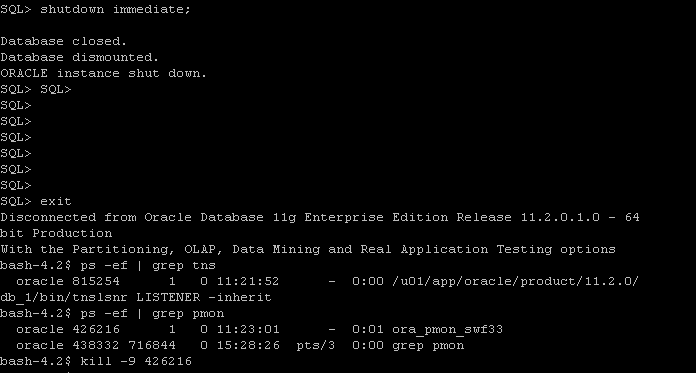
If you check the above Picture you will there’s two Pmon process for the same instance, So what you do is the follwing

export ORACLE_SID=swf33
export ORACLE_HOME=
sqlplus / as sysdba
Shutdown immediate;

 After shutdown database another process still up use kill -9 OS command to kill it and startup database.

Thank you
Osama Mustafa