emagent : Memory 0x0 encountered

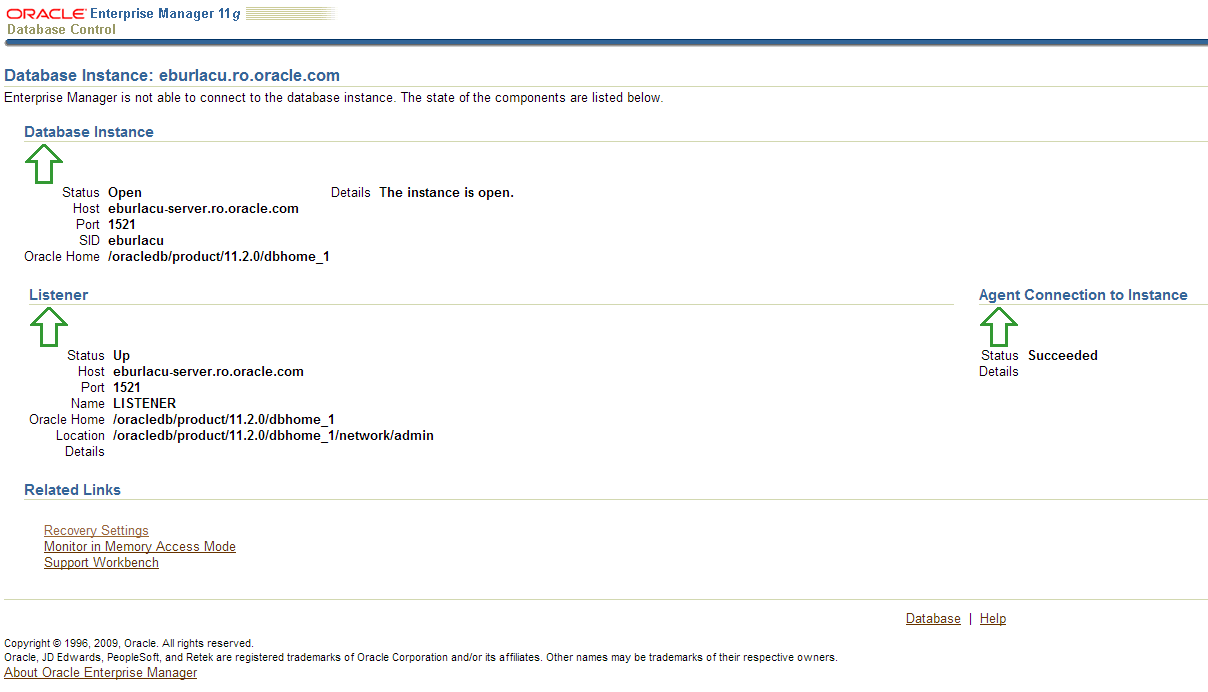
When you try to login to EM the following screen appear :

-bash-3.00$ emctl stop dbconsole
Oracle Enterprise Manager 11g Database Control Release 11.1.0.7.0
Copyright (c) 1996, 2008 Oracle Corporation. All rights reserved.

https://rgpdb1.rg.com:1158/em/console/aboutApplication

Stopping Oracle Enterprise Manager 11g Database Control ...
... Stopped.
-bash-3.00$
-bash-3.00$
-bash-3.00$
-bash-3.00$ emctl start dbconsole
Oracle Enterprise Manager 11g Database Control Release 11.1.0.7.0
Copyright (c) 1996, 2008 Oracle Corporation. All rights reserved.

https://rgpdb1.rg.com:1158/em/console/aboutApplication

Starting Oracle Enterprise Manager 11g Database Control ............................................................................................. failed.
------------------------------------------------------------------
Logs are generated in directory /pdb01/oraprod/db/tech_st/11.1.0/rgpdb1_rgprd1/sysman/log
 
 
Solution:

Check the following processes and kill them :

ps -ef | grep emagent
ps -ef | grep DEMS

-bash-3.00$ kill -9 PID

 Then

-bash-3.00$ emctl stop dbconsole
-bash-3.00$ emctl start dbconsole 

 
 Thank you 
Osama Mustafa 


Speeding up Oracle Applications/Payroll processing

% sqlplus apps/apps

To retrieve the current value of ‘THREADS’ parameter:

SQL> select parameter_value
from pay_action_parameters
where parameter_name = 'THREADS';
To set the value for the number of payroll threads:

SQL> update pay_action_parameters
set parameter_value = <number_of_threads>
where parameter_name = ‘THREADS’;

SQL> commit;

 
if you don't have thread value use the below sql :
 
SQL> insert into PAY_ACTION_PARAMETERS values ('THREADS', 'XXXX');
SQL>commit;


thank you
Osama mustafa 

Conncurrent manger Problems

I Post this after suffering with Concurrent manager  in customer side

Summary of Possible Reasons and Solutions for the Problem Where All Concurrent Requests Stuck in Pending Phase

Below are several different possible solutions to the problem where concurrent
requests are stuck in pending status:

1. When shutting down the concurrent manager are there any FNDLIBR processes still running at the OS level? If so, do a kill -9 on them. Then restart the concurrent manager.

2. Try Relinking $FND_TOP.
3. Rebuild the concurrent manager views. As applmgr run the following from
the OS:

This is non-destructive. Concurrent Manager views can be rebuild by running the following command at the command line:

Ensure that concurrent manager is shutdown.

FNDLIBR FND FNDCPBWV apps/apps SYSADMIN ‘System Administrator’ SYSADMIN

restart the concurrent mgr.

4. Another possibility is that the Profile Option “Concurrent: OPS Request Partitioning” is set to OFF (by default). Unless Concurrent OPS is being used, the setting for this profile option should be NULL.


5. Yet another possibility is that System Profile Option: Concurrent Active
Requests is set to 0.

1. Log into Oracle Applications as SYSADMIN.
2. Select System Administrator responsibility.
3. Navigate to PROFILE –> SYSTEM.
4. Query for %CONC%ACTIVE%.
5. Change the profile option for Concurrent: Active Request Limit to Null (blank).
6. Exit Oracle Applications and log in again for the change to take affect.
7. Run a new concurrent request.

6. Another possibility is that Concurrent managers were brought down, while an
outstanding request was still running in the background. In which case, Update
the FND_CONCURRENT_REQUESTS table as follows:

.
sql> update fnd_concurrent_requests
set status_code=’X’, phase_code=’C’
where status_code=’T’;
sql> commit;

7. The control_code for concurrent_queue_name = ‘FNDCRM’ is ‘N’ in the FND_CONCURRENT_QUEUES table, which means ‘Target node/queue unavailable’. This value should be NULL (CRM is running; target and actual process amount are the same), or ‘A’ (‘Activate concurrent manager’ control status).

Set the control_code to ‘A’ in fnd_concurrent_queues for the Conflict Resolution Manager:

1. Logon to Oracle Applications database server as ‘applmgr’.
2. Verify the Applications environment is setup correctly ($ORACLE_HOME and $ORACLE_SID).

3. Logon to SQL*Plus as ‘APPS’ and run the following SQL statement:

update fnd_concurrent_queues
set control_code = ‘A’
where concurrent_queue_name = ‘FNDCRM’;

commit;

4. Verify the status of the concurrent managers through the
Concurrent -> Manager -> Administer form.

If the CRM is still not active, bounce (deactivate, activate) the Internal Concurrent Manager. This is done through the Concurrent -> Manager ->

Administer form from the ‘System Administrator’ responsibility. It can also be done through the CONCSUB command at the command level.

Setting the control_code to ‘A’ in the fnd_concurrent_queues table for the Conflict Resolution Manager indicates that this concurrent manager is to be activated with the parameter values specified through this table for this manager (MAX_PROCESSES, CACHE_SIZE, etc).

8. What is the cache size? Try increasing it then bounce the concurrent manager.

If concurrent requests are rarely prioritized and there are managers that service short-running requests, consider setting the cache size to equal at least twice the number of target processes. This increases the throughput of the concurrent manaagers by attempting to avoid any sleep time. For example, if more than one manager or worker processes the same type of requests with only a small cache size, it may be unable to process any jobs in a single processing cycle, because other processes have already run the cached requests. When this happens, it is important to note that the manager will sleep before refreshign its cache. To increase manager throughput where there are sufficient requests of the required type in the queue, increase the cache size to improve the chance of the manager finding work to process and thus avoid having to enter a sleep phase.

TIP: Ensure that the system is not resource-constrained before attempting to increase the rate of concurrent processing in this way; otherwise, these changes may actually reduce concurrent processing throughput because jobs take longer to run..

Enter the number of requests your manager remembers each time it reads which requests to run. For example, if a manager’s workshift has 1 target process and a cache value of 3, it will read three requests,, and will wait until these three requests have been run before reading new requests.

In reading requests, the manager will only put requests it is allowed to run into its cache. For example, if you have defined your manager to run only Order Entry reports then the manager will put only Order Entry requests into its cache.

If you enter 1, the concurrent manager must look at its requests list each time it is ready to process another request. By setting the cache size at a higher number, the concurrent manager does not have to read its requests list each time it runs a request. However, the manager does not recognizea nay priority changes you make for a particular request if it has already read that request into its cache. Further, even if you give a higher priority to a new request, that new request must wait until the buffer isempty and the manager returns to look at the requests list. That request may have to wait a long time if you set the buffer size to a high number.

You should use cache size to tune your concurrent managers to work most efficiently for you site’s needs. If your organization tends to reprioritize jobs going to a certain manager, that manager should have its buffer size set fairly low.

*Suggestion: *Enter a value of 1 when defining a manager that runs long, time-consuming jobs, and a value of 3 or 4 for managers that run small, quick jobs.

9. Please check the sleep seconds set for the concurrent manager which runs the report that is taking long time for completion. Reducing the sleep time will improve performance.

1. Check for the value set for the sleep seconds for the concurrent manager using the following path: System Administrator Responsibilty -> Concurrent -> Manager -> Define.

2. Check the processes running for the concurent manager using the following command:

ps -ef | grep ‘INVLIBR’

As all concurrent programs are dealt by INVLIBR, the number of processes returned here must tally with the value specified for the processes defined for the concurrent manager.

3. Also, check for the duration for which the processes are sleeping. Reducing the value assigned for it would improve performance.
Clean Concurrent Manager Tables

The Below Script "CMCLEAN.SQL For Cleaning ConCurrent Manager In Oracle EBS VERSION :  -10.7
-11.0
-11.5
-12.1.3
REM
REM FILENAME
REM cmclean.sql
REM DESCRIPTION
REM Clean out the concurrent manager tables
REM NOTES
REM Usage: sqlplus @cmclean
REM
REM
REM $Id: cmclean.sql,v 1.4 2001/04/07 15:55:07 pferguso Exp $
REM
REM
REM +======================================================================+

set verify off;
set head off;
set timing off
set pagesize 1000

column manager format a20 heading 'Manager short name'
column pid heading 'Process id'
column pscode format a12 heading 'Status code'
column ccode format a12 heading 'Control code'
column request heading 'Request ID'
column pcode format a6 heading 'Phase'
column scode format a6 heading 'Status'

WHENEVER SQLERROR EXIT ROLLBACK;

DOCUMENT

WARNING : Do not run this script without explicit instructions
from Oracle Support

*** Make sure that the managers are shut down ***
*** before running this script ***

*** If the concurrent managers are NOT shut down, ***
*** exit this script now !! ***

#

accept answer prompt 'If you wish to continue type the word ''dual'': '

set feed off
select null from &answer;
set feed on

REM Update process status codes to TERMINATED

prompt
prompt ------------------------------------------------------------------------

prompt -- Updating invalid process status codes in FND_CONCURRENT_PROCESSES
set feedback off
set head on
break on manager

SELECT concurrent_queue_name manager,
concurrent_process_id pid,
process_status_code pscode
FROM fnd_concurrent_queues fcq, fnd_concurrent_processes fcp
WHERE process_status_code not in ('K', 'S')
AND fcq.concurrent_queue_id = fcp.concurrent_queue_id
AND fcq.application_id = fcp.queue_application_id;

set head off
set feedback on
UPDATE fnd_concurrent_processes
SET process_status_code = 'K'
WHERE process_status_code not in ('K', 'S');

REM Set all managers to 0 processes

prompt
prompt ------------------------------------------------------------------------

prompt -- Updating running processes in FND_CONCURRENT_QUEUES
prompt -- Setting running_processes = 0 and max_processes = 0 for all managers

UPDATE fnd_concurrent_queues
SET running_processes = 0, max_processes = 0;

REM Reset control codes

prompt
prompt ------------------------------------------------------------------------

prompt -- Updating invalid control_codes in FND_CONCURRENT_QUEUES
set feedback off
set head on
SELECT concurrent_queue_name manager,
control_code ccode
FROM fnd_concurrent_queues
WHERE control_code not in ('E', 'R', 'X')
AND control_code IS NOT NULL;

set feedback on
set head off
UPDATE fnd_concurrent_queues
SET control_code = NULL
WHERE control_code not in ('E', 'R', 'X')
AND control_code IS NOT NULL;

REM Also null out target_node for all managers
UPDATE fnd_concurrent_queues
SET target_node = null;

REM Set all 'Terminating' requests to Completed/Error
REM Also set Running requests to completed, since the managers are down

prompt
prompt ------------------------------------------------------------------------

prompt -- Updating any Running or Terminating requests to Completed/Error
set feedback off
set head on
SELECT request_id request,
phase_code pcode,
status_code scode
FROM fnd_concurrent_requests
WHERE status_code = 'T' OR phase_code = 'R'
ORDER BY request_id;

set feedback on
set head off
UPDATE fnd_concurrent_requests
SET phase_code = 'C', status_code = 'E'
WHERE status_code ='T' OR phase_code = 'R';

REM Set all Runalone flags to 'N'
REM This has to be done differently for Release 10

prompt
prompt ------------------------------------------------------------------------

prompt -- Updating any Runalone flags to 'N'
prompt
set serveroutput on
set feedback off
declare
c pls_integer := dbms_sql.open_cursor;
upd_rows pls_integer;
vers varchar2(50);
tbl varchar2(50);
col varchar2(50);
statement varchar2(255);
begin

select substr(release_name, 1, 2)
into vers
from fnd_product_groups;

if vers >= 11 then
tbl := 'fnd_conflicts_domain';
col := 'runalone_flag';
else
tbl := 'fnd_concurrent_conflict_sets';
col := 'run_alone_flag';
end if;

statement := 'update ' || tbl || ' set ' || col || '=''N'' where ' || col || ' = ''Y''';
dbms_sql.parse(c, statement, dbms_sql.native);
upd_rows := dbms_sql.execute(c);
dbms_sql.close_cursor(c);
dbms_output.put_line('Updated ' || upd_rows || ' rows of ' || col || ' in ' || tbl || ' to ''N''');
end;
/

prompt

prompt ------------------------------------------------------------------------

prompt Updates complete.
prompt Type commit now to commit these updates, or rollback to cancel.
prompt ------------------------------------------------------------------------

prompt

set feedback on

REM <= Last REM statment -----------------------------------------------------

Disclaimer
EXCEPT WHERE EXPRESSLY PROVIDED OTHERWISE, THE INFORMATION, SOFTWARE,
PROVIDED ON AN "AS IS" AND "AS AVAILABLE" BASIS. ORACLE EXPRESSLY DISCLAIMS
ALL WARRANTIES OF ANY KIND, WHETHER EXPRESS OR IMPLIED, INCLUDING, BUT NOT
LIMITED TO, THE IMPLIED WARRANTIES OF MERCHANTABILITY, FITNESS FOR A PARTICULAR
PURPOSE AND NON-INFRINGEMENT. ORACLE MAKES NO WARRANTY THAT: (A) THE RESULTS
THAT MAY BE OBTAINED FROM THE USE OF THE SOFTWARE WILL BE ACCURATE OR
RELIABLE; OR (B) THE INFORMATION, OR OTHER MATERIAL OBTAINED WILL MEET YOUR
EXPECTATIONS. ANY CONTENT, MATERIALS, INFORMATION OR SOFTWARE DOWNLOADED OR
OTHERWISE OBTAINED IS DONE AT YOUR OWN DISCRETION AND RISK. ORACLE SHALL HAVE
NO RESPONSIBILITY FOR ANY DAMAGE TO YOUR COMPUTER SYSTEM OR LOSS OF DATA THAT
RESULTS FROM THE DOWNLOAD OF ANY CONTENT, MATERIALS, INFORMATION OR SOFTWARE.

ORACLE RESERVES THE RIGHT TO MAKE CHANGES OR UPDATES TO THE SOFTWARE AT ANY
TIME WITHOUT NOTICE.
Limitation of Liability
IN NO EVENT SHALL ORACLE BE LIABLE FOR ANY DIRECT, INDIRECT, INCIDENTAL,
SPECIAL OR CONSEQUENTIAL DAMAGES, OR DAMAGES FOR LOSS OF PROFITS, REVENUE,
DATA OR USE, INCURRED BY YOU OR ANY THIRD PARTY, WHETHER IN AN ACTION IN
CONTRACT OR TORT, ARISING FROM YOUR ACCESS TO, OR USE OF, THE SOFTWARE.

SOME JURISDICTIONS DO NOT ALLOW THE LIMITATION OR EXCLUSION OF LIABILITY.
ACCORDINGLY, SOME OF THE ABOVE LIMITATIONS MAY NOT APPLY TO YOU.

Oracle Document ID : [ID 134007.1]
Thank you
Osama Mustafa

Steps To Clone Oracle EBS R12

There’s Two major Parts In This Topics :
1- Pre Clone Steps .
2 – Post Clone Steps.

LETS START :

1- Pre Clone Steps : 

On Application Tier : 

1-    Execute Apps environment file
2-    cd $ADMIN_SCRIPTS_HOME
3-    ./adautocfg.sh
4-    Perl adpreclone.pl appsTier

Database Tier : 

1-    Execute Database environment ( under ORACLE_HOME)
2-    cd $ORACLE_HOME/appsutil/scripts/(CONTEXT_NAME)
3-    ./adautocfg.sh
4-    perl adpreclone.pl dbTier

shutdown application and database Copy your virtual nodes on new servers .

Post clone Steps:

Database Server

1-    cd $ORACLE_HOME/appsutil/clone/bin
2-    perl adcfgclone.pl dbTier

Application Server:

1-    cd $COMMON_TOP/clone/bin
2-    perl adcfgclone.pl appsTier

Notes:
$COMMON_TOP: APPLICATION_BASE/apps/apps_st/comn
CONTEXT_NAME: SERVICE_NAME_HOSTNAME

Thank you
Osama mustafa

FRM-92100 : your connection to the server was interrupted

Cause

NLS_LANG has been set to an invalid value in the environment of the user starting Oracle Forms Services.

Solution

Set NLS_LANG to a valid value like AMERICAN_AMERICA.AR8MSWIN1256 in the default.env file or any custom environment file which is being used.

You can go to regedit and also set the NLS_LANG value to the one mentioned above and check if this resolves the issue. 

 If the Above Solution Doesn’t Work For you Try The Below One :

1) FRM-92100 occurs when invoking a new forms session from existing form session, or another URL is invoked from the parent browser window of the forms applet?

To work-around use the applet parameter separateFrame=”True”. This parameter is set in the static html file or formsweb.cfg

2) If using Oracle Jinitiator, try clearing the Jinitiator JAR or jcache:

For versions 1.3.x.x.x : Control Panel – Jinitiator Control Panel – Cache Tab Page – Clear JAR Cache button

3) If using MS Internet Explorer check that permissions / security options are set correctly

Launch Microsoft Internet Explorer.
Select the Tools -> Internet Options from the top level menu.
Click the SECURITY Tab:
Choose Local Intranet Zone from the list.
Click Custom Level.
Select Java Permissions – Custom from the list.
Click Java Custom Settings.
Select the Edit Permissions tab.
Choose Enable for Run Unsigned Content.
Choose Enable for Run Signed Content.
Select the ADVANCED tab.
Scroll down to Java VM.
Check the Java console enabled option.
Select the CONNECTIONS tab.
Click the LAN Settings button.
If IE is using a proxy server : Check the Bypass proxy server for local addresses check box. Click the Advanced button, and enter the local domain in the Exceptions box. Use the form *.domain.com, where domain.com maps to your local domain.
Click OK to exit the dialog.
Click OK to save the changes and exit IE.
Restart the computer.

Thank you
This Work aroud Is Working For Me , Hope it will be useful For you

Osama Mustafa 

All About Oracle WorkFlow Mailer

In this Topic We will discuss the Workflow mailer In Oracle Apps ad how to check it Let Start :

Workflow: version

  $FND_TOP/sql/wfver.sql

check workflow status.

set linesize 120
set pagesize 50
column COMPONENT_NAME format a45
column STARTUP_MODE format a15
column COMPONENT_STATUS format a15

select fsc.COMPONENT_NAME,fsc.STARTUP_MODE,fsc.COMPONENT_STATUS,fcq.last_update_date
from APPS.FND_CONCURRENT_QUEUES_VL fcq, fnd_svc_components fsc
where fsc.concurrent_queue_id = fcq.concurrent_queue_id(+)
order by COMPONENT_STATUS , STARTUP_MODE , COMPONENT_NAME;

check if workflow is used by only one instance
col value format a20
select p.parameter_id,
p.parameter_name,
v.parameter_value value
from apps.fnd_svc_comp_param_vals_v v,
apps.fnd_svc_comp_params_b p,
apps.fnd_svc_components c
where c.component_type = ‘WF_MAILER’
and v.component_id = c.component_id
and v.parameter_id = p.parameter_id
and p.parameter_name in ( ‘INBOUND_SERVER’,’ACCOUNT’, ‘REPLYTO’)

order by p.parameter_name;

check for bad e-mail address

set linesize 170
col name format a40
col email_address format a80
select name, email_address from apps.wf_local_roles where email_address like ‘% %’;

select name, email_address from apps.wf_local_roles where email_address like ‘%%’;

 “If this retuning Row The there’s bad Email”

How to know mail sent to a user with details:

select name, display_name, notification_preference, email_address
 from wf_local_roles where name = ”;

To see failed, open notifications

SELECT message_type, COUNT(1)
FROM apps.wf_notifications
WHERE 1 = 1 AND mail_status = ‘FAILED’ AND status = ‘OPEN’
GROUP BY message_type;

To check if email address, notification preference, display_name

select DISPLAY_NAME, NOTIFICATION_PREFERENCE from wf_users where EMAIL_ADDRESS = ‘HR@domainname.com‘ and STATUS = ‘ACTIVE’ and DISPLAY_NAME = ‘xxxxx’;
select DISPLAY_NAME, NOTIFICATION_PREFERENCE, EMAIL_ADDRESS from wf_users where NOTIFICATION_PREFERENCE=’MAILTEXT’ and STATUS = ‘ACTIVE’;
select distinct(count(*)) from wf_users where NOTIFICATION_PREFERENCE=’MAILTEXT’ and STATUS = ‘ACTIVE’ and EMAIL_ADDRESS = ‘HR@Domainname.com‘;

Thank you
Osama mustafa

What Is $ADMIN_SCRIPT_HOME ???

As We All Know if you need to start/shutdown Oracle Apps you need go $ADMIN_SCRIPT_HOME In R12 Or $CONTEXT_HOME in R11

This Article Explain What These Scripts Do : 

adstrtal.sh

Master script to start all components/services of middle tier or application tier. This script will use Service Control API to start all services which are enabled after checking them in context file (SID_HOSTNAME.xml or CONTEXT_NAME.xml)

adstpall.sh

Master script to stop all components/services of middle tier or application tier


adalnctl.sh

Script to start / stop apps listener (FNDFS and FNDFS). This listener will file will be in 10.1.2 ORACLE_HOME (i.e. Forms & Reports Home)
listener.ora file will be in $INST_TOP/apps/$CONTEXT_NAME/ora/10.1.2/network/admin directory
(Mostly similar to one in 11i with only change in ORACLE_HOME i.e. from 8.0.6 to 10.1.2 )

adapcctl.sh

Script to start/stop Web Server or Oracle HTTP Server. This script uses opmn (Oracle Process Manager and Notification Server) with syntax similar to opmnctl [startstop]proc ohslike opmnctl stopproc ohs .

adcmctl.sh

Script to start / stop concurrent manager,

adformsctl.sh

Script to start / stop Forms OC4J from 10.1.3 Oracle_Home. This script will also use opmnctl to start/stop Forms OC4J like
opmnctl stopproc type=oc4j instancename=forms

adformsrvctl.sh

This script is used only if you wish to start forms in socket mode. Default forms connect method in R12 is servlet.
If started this will start frmsrv executable from 10.1.2 Oracle_Home in Apps R12

adoacorectl.sh

This script will start/stop oacore OC4J in 10.1.3 Oracle_Home. This scripts will also use opmnctl (similar to adapcctl & adformsctl) to start oacore instance of OC4J like
opmnctl startproc type=oc4j instancename=oacore

adoafmctl.sh

 This script will start/stop oafm OC4J in 10.1.3 Oracle_Home. This scripts will also use opmnctl (similar to above) to start oacore instance of OC4J like
opmnctl startproc type=oc4j instancename=oafm

adopmnctl.sh

This script will start/stop opmn service in 10.1.3 Oracle_Home. opmn will control all services in 10.1.3 Oracle_Home like web server or various oc4j instances. If any services are stopped abnormally opmn will/should start them automatically.

Thank You 
Osama Mustafa 
     

RW-50015 : Installation Error On Oracle EBS R12

RW-50015: Error: – HTTP Listener is not responding. The service might not have started on the port yet. Please check the service and use the retry button.

the Rapid Install window will show many errors for HTTP.

Checking status of OPMN managed Oracle HTTP Server (OHS) instance …

Processes in Instance: PROD_ebs.ebs.sandiego.com

——————-+——————–+———+———
ias-component | process-type | pid | status
——————-+——————–+———+———
OC4J | oafm | 21168 | Alive
OC4J | forms | 21078 | Alive
OC4J | oacore | 20943 | Alive
HTTP_Server | HTTP_Server | N/A | Down

Download and apply the patch 6078836 from OracleMetaLink to fix an issue with the Oracle HTTP Server bundled with the E-Business Suite technology stack. We unzip the patch:

[oracle@ebs oracle]$ unzip p6078836_101330_LINUX.zip
Archive: p6078836_101330_LINUX.zip
creating: 6078836/
inflating: 6078836/libdb.so.2
inflating: 6078836/README.txt

[oracle@ebs oracle]$ cd 6078836/
[oracle@ebs 6078836]$ ls
libdb.so.2 README.txt

Then we copy to /usr/lib.

[root@ebs 6078836] $ cp libdb.so.2 /usr/lib

[root@ebs lib]# cd /usr/lib

[root@ebs lib]# pwd
/usr/lib

[root@ebs lib]# ls libdb.so*
libdb.so libdb.so.2
 

Processes in Instance: PROD_ebs.ebs.sandiego.com

——————-+——————–+———+———
ias-component | process-type | pid | status
——————-+——————–+———+———
OC4J | oafm | 21168 | Alive
OC4J | forms | 21078 | Alive
OC4J | oacore | 20943 | Alive
HTTP_Server | HTTP_Server | 28519 | Alive 


Thank You
 Osama mustafa