Configuring Your Lambda Functions

When building and testing a function, you must specify three primary configuration settings: memory, timeout, and concurrency. These settings are important in defining how each function performs. Deciding how to configure memory, timeout, and concurrency comes down to testing your function in real-world scenarios and against peak volume. As you monitor your functions, you must adjust the settings to optimize costs and ensure the desired customer experience with your application.

Memory

You can allocate up to 10 GB of memory to a Lambda function. Lambda allocates CPU and other resources linearly in proportion to the amount of memory configured. Any increase in memory size triggers an equivalent increase in CPU available to your function. To find the right memory configuration for your functions, use the AWS Lambda Power Tuning tool.

Timeout

The AWS Lambda timeout value dictates how long a function can run before Lambda terminates the Lambda function. At the time of this publication, the maximum timeout for a Lambda function is 900 seconds. This limit means that a single invocation of a Lambda function cannot run longer than 900 seconds (which is 15 minutes). 

It is important to analyze how long your function runs. When you analyze the duration, you can better determine any problems that might increase the invocation of the function beyond your expected length. Load testing your Lambda function is the best way to determine the optimum timeout value.

Lambda billing costs

With AWS Lambda, you pay only for what you use. You are charged based on the number of requests for your functions and the duration, the time it takes for your code to run. Lambda counts a request each time it starts running in response to an event notification or an invoke call, including test invokes from the console.

Duration is calculated from the time your code begins running until it returns or otherwise terminates, rounded up to the nearest 1 ms. Price depends on the amount of memory you allocate to your function, not the amount of memory your function uses. If you allocate 10 GB to a function and the function only uses 2 GB, you are charged for the 10 GB. This is another reason to test your functions using different memory allocations to determine which is the most beneficial for the function and your budget. 

In the AWS Lambda resource model, you can choose the amount of memory you want for your function and are allocated proportional CPU power and other resources. An increase in memory triggers an equivalent increase in CPU available to your function. The AWS Lambda Free Tier includes 1 million free requests per month and 400,000 GB-seconds of compute time per month.

The balance between power and duration

Depending on the function, you might find that the higher memory level might actually cost less because the function can complete much more quickly than at a lower memory configuration.

You can use an open-source tool called Lambda Power Tuning to find the best configuration for a function. The tool helps you to visualize and fine-tune the memory and power configurations of Lambda functions. The tool runs in your own AWS account—powered by AWS Step Functions—and supports three optimization strategies: cost, speed, and balanced. It’s language-agnostic so that you can optimize any Lambda functions in any of your languages. 

Concurrency and scaling

Concurrency is the third major configuration that affects your function’s performance and its ability to scale on demand. Concurrency is the number of invocations your function runs at any given moment. When your function is invoked, Lambda launches an instance of the function to process the event. When the function code finishes running, it can handle another request. If the function is invoked again while the first request is still being processed, another instance is allocated. Having more than one invocation running at the same time is the function’s concurrency.

Concurrent invocations

As an analogy, you can think of concurrency as the total capacity of a restaurant for serving a certain number of diners at one time. If you have seats in the restaurant for 100 diners, only 100 people can sit at the same time. Anyone who comes while the restaurant is full must wait for a current diner to leave before a seat is available. If you use a reservation system, and a dinner party has called to reserve 20 seats, only 80 of those 100 seats are available for people without a reservation. Lambda functions also have a concurrency limit and a reservation system that can be used to set aside runtime for specific instances.

Concurrency types

Unreserved concurrency

The amount of concurrency that is not allocated to any specific set of functions. The minimum is 100 unreserved concurrency. This allows functions that do not have any provisioned concurrency to still be able to run. If you provision all your concurrency to one or two functions, no concurrency is left for any other function. Having at least 100 available allows all your functions to run when they are invoked.

Reserved concurrency

Guarantees the maximum number of concurrent instances for the function. When a function has reserved concurrency, no other function can use that concurrency. No charge is incurred for configuring reserved concurrency for a function.

Provisioned concurrency

Initializes a requested number of runtime environments so that they are prepared to respond immediately to your function’s invocations. This option is used when you need high performance and low latency. 

You pay for the amount of provisioned concurrency that you configure and for the period of time that you have it configured. 

For example, you might want to increase provisioned concurrency when you are expecting a significant increase in traffic. To avoid paying for unnecessary warm environments, you scale back down when the event is over.

Reasons for setting concurrency limits

Limit a function’s concurrency to achieve the following:

  • Limit costs
  • Regulate how long it takes you to process a batch of events
  • Match it with a downstream resource that cannot scale as quickly as Lambda

Reserve function concurrency to achieve the following: 

  • Ensure that you can handle peak expected volume for a critical function 
  • Address invocation errors

CloudWatch metrics for concurrency

When your function finishes processing an event, Lambda sends metrics about the invocation to Amazon CloudWatch. You can build graphs and dashboards with these metrics in the CloudWatch console. You can also set alarms to respond to changes in use, performance, or error rates.

CloudWatch includes two built-in metrics that help determine concurrency: ConcurrentExecutions and UnreservedConcurrentExecutions.

ConcurrentExecutions

Shows the sum of concurrent invocations for a given function at a given point in time. Provides historical data on how functions are performing. 

You can view all functions in the account or only the functions that have a custom concurrency limit specified.

UnreservedConcurrentExecutions

Shows the sum of the concurrency for the functions that do not have a custom concurrency limit specified.

Enjoy the Cloud

Osama

Cheers

Introduction to Serverless

One of the major benefits of cloud computing is its ability to abstract (hide) the infrastructure layer. This ability eliminates the need to manually manage the underlying physical hardware. In a serverless environment, this abstraction allows you to focus on the code for your applications without spending time building and maintaining the underlying infrastructure. With serverless applications, there are never instances, operating systems, or servers to manage. AWS handles everything required to run and scale your application. By building serverless applications, your developers can focus on the code that makes your business unique. 

Serverless operational tasks

Deployment and Operational tasksTraditional EnvironmentServerless 
Configure an instanceYES
Update operating system (OS)YES
Install application platformYES
Build and deploy appsYESYES
Configure automatic scaling and load balancingYES
Continuously secure and monitor instancesYES
Monitor and maintain appsYESYES

AWS serverless platform

The AWS serverless platform includes a number of fully managed services that are tightly integrated with AWS Lambda and well-suited for serverless applications. Developer tools, including the AWS Serverless Application Model (AWS SAM), help simplify deployment of your Lambda functions and serverless applications.

What is AWS Lambda?

AWS Lambda is a compute service. You can use it to run code without provisioning or managing servers. Lambda runs your code on a high-availability compute infrastructure. It operates and maintains all of the compute resources, including server and operating system maintenance, capacity provisioning and automatic scaling, code monitoring, and logging. With Lambda, you can run code for almost any type of application or backend service. 

Some benefits of using Lambda include the following:

  • You can run code without provisioning or maintaining servers.
  • It initiates functions for you in response to events.
  • It scales automatically.
  • It provides built-in code monitoring and logging via Amazon CloudWatch

AWS Lambda features

Event-driven architectures

An event-driven architecture uses events to initiate actions and communication between decoupled services. An event is a change in state, a user request, or an update, like an item being placed in a shopping cart in an e-commerce website. When an event occurs, the information is published for other services to consume it. In event-driven architectures, events are the primary mechanism for sharing information across services. These events are observable, such as a new message in a log file, rather than directed, such as a command to specifically do something. 

Producers, routers, consumers

AWS Lambda is an example of an event-driven architecture. Most AWS services generate events and act as an event source for Lambda. Lambda runs custom code (functions) in response to events. Lambda functions are designed to process these events and, once invoked, may initiate other actions or subsequent events.

What is a Lambda function?

The code you run on AWS Lambda is called a Lambda function. Think of a function as a small, self-contained application. After you create your Lambda function, it is ready to run as soon as it is initiated. Each function includes your code as well as some associated configuration information, including the function name and resource requirements. Lambda functions are stateless, with no affinity to the underlying infrastructure. Lambda can rapidly launch as many copies of the function as needed to scale to the rate of incoming events.

After you upload your code to AWS Lambda, you can configure an event source, such as an Amazon Simple Storage Service (Amazon S3) event, Amazon DynamoDB stream, Amazon Kinesis stream, or Amazon Simple Notification Service (Amazon SNS) notification. When the resource changes and an event is initiated, Lambda will run your function and manage the compute resources as needed to keep up with incoming requests.

How AWS Lambda Works

Invocation models for running Lambda functions

Event sources can invoke a Lambda function in three general patterns. These patterns are called invocation models. Each invocation model is unique and addresses a different application and developer needs. The invocation model you use for your Lambda function often depends on the event source you are using. It’s important to understand how each invocation model initializes functions and handles errors and retries.

Synchronous invocation

When you invoke a function synchronously, Lambda runs the function and waits for a response. When the function completes, Lambda returns the response from the function’s code with additional data, such as the version of the function that was invoked. Synchronous events expect an immediate response from the function invocation. 

With this model, there are no built-in retries. You must manage your retry strategy within your application code.

The following AWS services invoke Lambda synchronously:

  • Amazon API Gateway
  • Amazon Cognito
  • AWS CloudFormation
  • Amazon Alexa
  • Amazon Lex
  • Amazon CloudFront
Asynchronous invocation

When you invoke a function asynchronously, events are queued and the requestor doesn’t wait for the function to complete. This model is appropriate when the client doesn’t need an immediate response. 

With the asynchronous model, you can make use of destinations. Use destinations to send records of asynchronous invocations to other services.

The following AWS services invoke Lambda asynchronously: 

  • Amazon SNS 
  • Amazon S3
  • Amazon EventBridge 

Note :-

A destination can send records of asynchronous invocations to other services. You can configure separate destinations for events that fail processing and for events that process successfully. You can configure destinations on a function, a version, or an alias, similarly to how you can configure error handling settings. With destinations, you can address errors and successes without needing to write more code. 

Polling invocation

This invocation model is designed to integrate with AWS streaming and queuing based services with no code or server management. Lambda will poll (or watch) these services, retrieve any matching events, and invoke your functions. This invocation model supports the following services:

  • Amazon Kinesis
  • Amazon SQS
  • Amazon DynamoDB Streams
  • Amazon MQ
  • Amazon Managed Streaming for Apache Kafka (MSK)
  • self-managed Apache Kafka

With this type of integration, AWS will manage the poller on your behalf and perform synchronous invocations of your function. 

Invocation model error behavior

Invocation modelError behavior
SynchronousNo retries
AsynchronousBuilt in – retries twice
PollingDepends on event source

Lambda execution environment

Lambda invokes your function in an execution environment, which is a secure and isolated environment. The execution environment manages the resources required to run your function. The execution environment also provides lifecycle support for the function’s runtime and any external extensions associated with your function. 

Performance optimization

erverless applications can be extremely performant, thanks to the ease of parallelization and concurrency. While the Lambda service manages scaling automatically, you can optimize the individual Lambda functions used in your application to reduce latency and increase throughput. 

Cold and warm starts

A cold start occurs when a new execution environment is required to run a Lambda function. When the Lambda service receives a request to run a function, the service first prepares an execution environment. During this step, the service downloads the code for the function, then creates the execution environment with the specified memory, runtime, and configuration. Once complete, Lambda runs any initialization code outside of the event handler before finally running the handler code. 

In a warm start, the Lambda service retains the environment instead of destroying it immediately. This allows the function to run again within the same execution environment. This saves time by not needing to initialize the environment.  

Best practice: Minimize cold start times

When you invoke a Lambda function, the invocation is routed to an execution environment to process the request. If the environment is not already initialized, the start-up time of the environment adds to latency. If a function has not been used for some time, if more concurrent invocations are required, or if you update a function, new environments are created.  Creation of these environments can introduce latency for the invocations that are routed to a new environment. This latency is implied when using the term cold start. For most applications, this additional latency is not a problem. However, for some synchronous models, this latency can inhibit optimal performance. It is critical to understand latency requirements and try to optimize your function for peak performance. 

After optimizing your function, another way to minimize cold starts is to use provisioned concurrency. Provisioned concurrency is a Lambda feature that prepares concurrent execution environments before invocations.

Best practice: Write functions to take advantage of warm starts
  • Store and reference dependencies locally.
  • Limit re-initialization of variables.
  • Add code to check for and reuse existing connections.
  • Use tmp space as transient cache.
  • Check that background processes have completed.

Design best practices

  • Separate business logic
  • Write modular functions
  • Treat functions as stateless
  • Only include what you need

Best practices for writing code

  • Include logging statements
  • Use return coding
  • Provide environment variables
  • Add secret and reference data
  • Avoid recursive code
  • Gather metrics with Amazon CloudWatch
  • Reuse execution context

Reference

AWS Lambda execution environment

Cheers

Osama

AWS IAM Policy Basics

IAM request context

In order to talk about IAM policies, you first need to cover the three main pieces of logic that define what is in the policy and how the policy actually works. These pieces make up the request context that is authenticated by IAM and authorized accordingly. You can think of the principal, action, and resource as the subject, verb, and object of a sentence, respectively.

PrincipalActionResource
User, role, external user, or application that sent the request and the policies associated with that principal
What the principal is attempting to do
AWS resource object upon which the actions or operations are performed

Access through identity-based policies

You manage access in AWS by creating policies and attaching them to IAM identities or AWS resources. An identity-based policy is an object in AWS that, when associated with an IAM identity, defines their permissions. AWS evaluates these policies when a principal entity (IAM user or role) makes a request. Permissions in the policies determine whether the request is allowed or denied. Most policies are stored in AWS as JSON documents.

There are three types of identity-based policies. Choose each flashcard below for more information.

AWS managed

AWS manages and creates these types of policies. They can be attached to multiple users, groups, and roles. If you are new to using policies, AWS recommends that you start by using AWS managed policies. 

Customer managed

These are policies that you create and manage in your AWS account. This type of policy provides more precise control than AWS managed policies and can also be attached to multiple users, groups, and roles. 

Inline

Inline policies are embedded directly into a single user, group, or role. In most cases, AWS doesn’t recommend using inline policies. This type of policy is useful if you want to maintain a strict one-to-one relationship between a policy and the principal entity that it’s applied to. For example, use this type of policy if you want to be sure that the permissions in a policy are not inadvertently assigned to a principal entity other than the one they’re intended for. 

How this

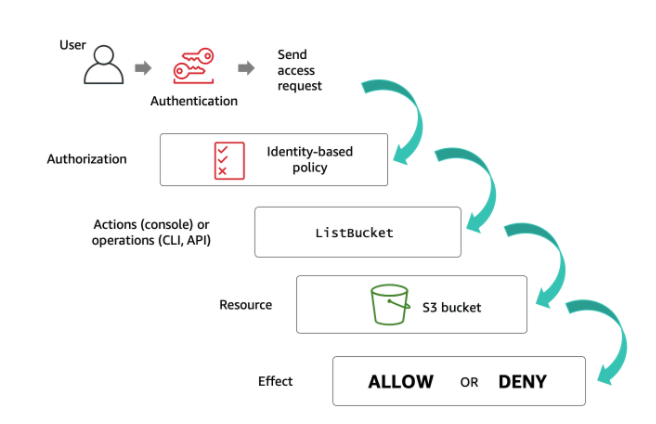
  • First, IAM checks that the user (the principal) is authenticated (signed in) to perform the specified action on the specified resource. 
  • Then, IAM confirms that the user is authorized (has the proper permissions) by checking all the policies attached to your user. 
  • During authorization, IAM verifies that the requested actions are allowed by the policies.
  • IAM also checks any policies attached to the resource that the user is trying to access. These policies are known as resource-based policies. If the identity-based policy allows a certain action but the resource-based policy does not, the result will be a deny.
  • AWS authorizes the request only if each part of your request is allowed by the policies. By default, all requests are denied. An explicit allow overrides this default, and an explicit deny overrides any allows. After your request has been authenticated and authorized, AWS approves the actions in your request. Then, those actions can be performed on the related resources within your account. 

IAM allows you to add conditions to your policy statements. The Condition element is optional and lets you specify conditions for when a policy is in effect. In the condition element, you build expressions in which you use condition operators (equal, less than, etc.) to match the condition keys and values in the policy against keys and values in the request.

"Condition" : { "{condition-operator}" : { "{condition-key}" : "{condition-value}" }}

For example, the following condition can be added to an Amazon S3 bucket policy to further restrict access to the bucket. In this case, the condition includes the StringEquals operator to ensure that only requests made by JohnDoe will be allowed.

"Condition" : { "StringEquals" : { "aws:username" : "JohnDoe" }}

Here’s another example. This example uses the IpAddress condition operator and the aws:SourceIP condition key. In this scenario, the request must come from the IP range 203.0.113.0 to 203.0.113.255 in order for the desired action to be allowed.

"Condition": {"IpAddress": {"aws:SourceIp": "203.0.113.0/24"}}

Reference for the condition from here.

Policy types

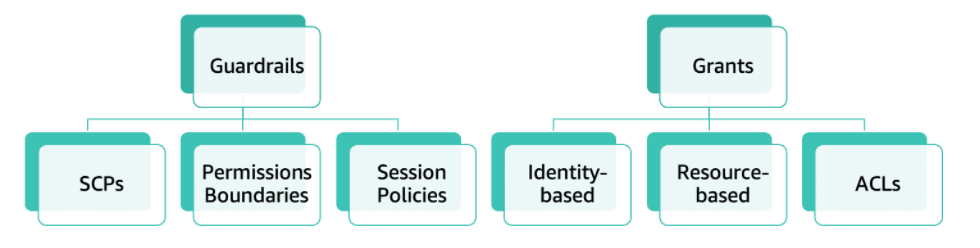
AWS supports six types of policies: identity-based policies, resource-based policies, IAM permissions boundaries, AWS Organizations service control policies (SCPs), access control lists (ACLs), and session policies. All of these polices are evaluated before a request is either allowed or denied. 

  • Identity-based

Also known as IAM policies, identity-based policies are managed and inline policies attached to IAM identities (users, groups to which users belong, or roles).

Impacts IAM principal permissions

  • Resource-based

These are inline policies that are attached to AWS resources. The most common examples of resource-based policies are Amazon S3 bucket policies and IAM role trust policies. Resource-based policies grant permissions to the principal that is specified in the policy; hence, the principal policy element is required. 

Grants permission to principals or accounts (same or different accounts)

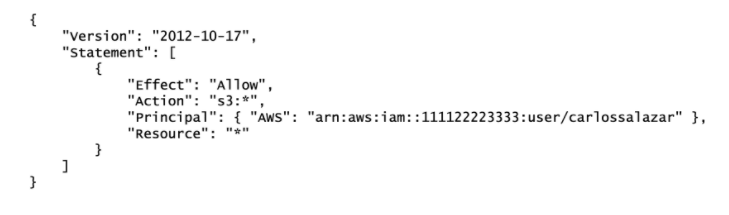
The resource-based policy below is attached to an Amazon S3 bucket. According to the policy, only the IAM user carlossalzar can access this bucket.

  • Permissions boundaries

A permissions boundary sets the maximum permissions that an identity-based policy can grant to an IAM entity. The entity can perform only the actions that are allowed by both its identity-based policies and its permissions boundaries. Resource-based policies that specify the user or role as the principal are not limited by the permissions boundary.

Restricts permissions for the IAM entity attached to it

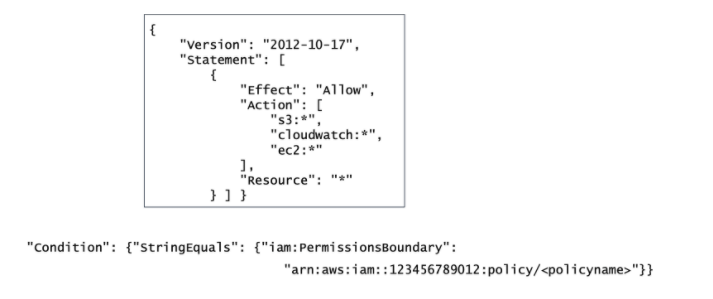
For example, assume that one of your IAM users should be allowed to manage only Amazon S3, Amazon CloudWatch, and Amazon EC2. To enforce this rule, you can use the customer-managed policy enclosed in the square to set the permissions boundary for the user. Then, add the condition block below to the IAM user’s policy. The user can never perform operations in any other service, including IAM, even if it has a permissions policy that allows it.

  • AWS Organizations

AWS Organizations is a service for grouping and centrally managing AWS accounts. If you enable all features in an organization, then you can apply SCPs to any or all of your accounts. SCPs specify the maximum permissions for an account, or a group of accounts, called an organizational unit (OU). 

Restricts permissions for entities in an AWS account, including AWS account root users

  • ACLs

Use ACLs to control which principals in other accounts can access the resource to which the ACL is attached. ACLs are supported by Amazon S3 buckets and objects. They are similar to resource-based policies although they are the only policy type that does not use the JSON policy document structure. ACLs are cross-account permissions policies that grant permissions to the specified principal. ACLs cannot grant permissions to entities within the same account.

  • Session policies

A session policy is an inline permissions policy that users pass in the session when they assume the role. The permissions for a session are the intersection of the identity-based policies for the IAM entity (user or role) used to create the session and the session policies. Permissions can also come from a resource-based policy. Session policies limit the permissions that the role or user’s identity-based policies grant to the session. 

Guardrails vs. grants

some policies are used to restrict permissions while others are used to grant access. Using a combination of different policy types not only improves your overall security posture but also minimizes your blast radius in case an incident occurs.

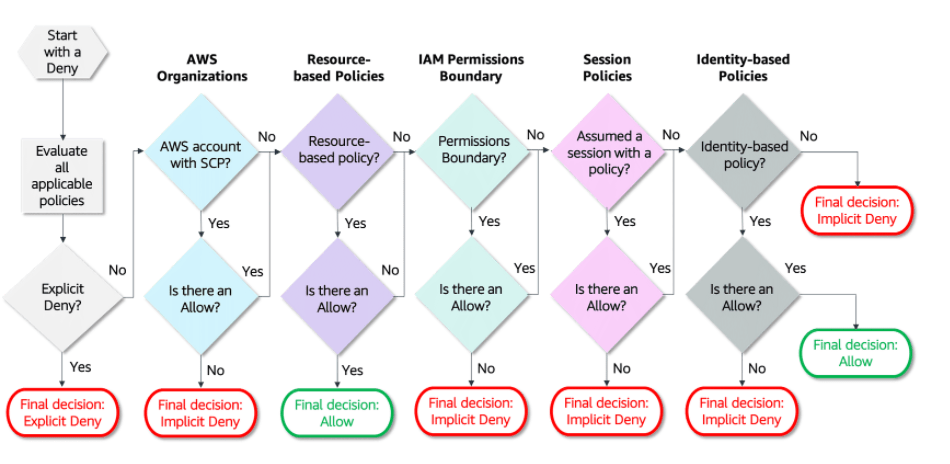
how the decision is made as AWS authenticates the principal that makes the request

Note

  • that within an account, you need a service control policy AND an IAM policy OR a resource-based policy. Across accounts, you need a service control policy AND an IAM policy AND a resource-based policy.
  • By default, all requests are implicitly denied (the AWS account root user has full access by default).
  • An explicit allow in an identity-based or resource-based policy overrides the default.
  • If a permissions boundary, AWS Organizations SCP, or session policy is present, it might override the allow with an implicit deny.
  • An explicit deny in any policy overrides any allows.
  • If the requested resource has a resource-based policy that allows the requested action, then AWS returns a final decision of allow. If there is no resource-based policy or if the policy does not include an Allow statement, then the evaluation continues.
  • If there is a session policy present and it does not allow the requested action, then the request is implicitly denied.

Cheers

Osama

AWS security levels

Infrastructure Protection

Infrastructure protection ensures that systems and resources within your workloads are protected against unintended and unauthorized access, and other potential vulnerabilities. Amazon Virtual Private Cloud (Amazon VPC) allows you to isolate your AWS resources in the cloud. A VPC enables you to launch resources into a virtual network that you’ve defined and that closely resembles a traditional network that you’d operate in your own data center. 

Services :-

  • AWS Firewall Manager is a security management service that allows you to centrally configure and manage AWS WAF rules across your accounts and applications. Firewall Manager is able to bring new applications and resources into compliance with a common set of security rules from the start.
  • AWS Direct Connect is a cloud service solution that is used to establish a dedicated and secure network connection from your premises to AWS. Using AWS Direct Connect, you can establish private connectivity between AWS and your data center, office, or colocation environment. In many cases, this can reduce your network costs, increase bandwidth throughput, and provide a more consistent network experience than internet-based connections.
  • AWS CloudFormation automates and simplifies the task of repeatedly creating and deploying AWS resources in a consistent manner.  With AWS CloudFormation, you can ensure that all of your security and compliance controls are deployed along with your new environment.
  • Amazon Inspector is an automated security assessment service that helps improve the security and compliance of applications deployed on AWS. It assesses applications for vulnerabilities or deviations from best practices. After performing an assessment, Amazon Inspector produces a detailed list of security findings prioritized by level of severity.

Data Protection

Protecting data at rest has to do with encrypting data while using one of our storage services, including our database services. When it comes to Amazon S3, for example, there are two types of encryption options available:  

  • Client side : you can do it by youself
  • Server Side : AWS will do it for you.

Any data that gets transmitted from one system to another is considered data in transit. AWS recommends the following solutions and best practices to help you provide the appropriate level of protection for your data in transit, including the confidentiality and integrity of your application’s data.

Additional AWS Services for Data Protection

  • AWS CloudHSM provides hardware security modules (HSM) in the AWS Cloud. An HSM is a computing device that processes cryptographic operations and provides secure storage for cryptographic keys. CloudHSM allows you to generate, store, import, export, and manage cryptographic keys, including symmetric keys and asymmetric key pairs.
  • Amazon S3 Glacier is a storage service optimized for infrequently used data, also called cold data. This service provides durable and extremely low-cost storage with security features for data archiving and backup. Amazon S3 Glacier stores data as archives within vaults.  You can enforce compliance controls for individual Amazon S3 Glacier vaults with a vault lock policy. 
  • AWS Certificate Manager (ACM) handles the complexity of creating and managing public SSL/TLS certificates for your AWS based websites and applications. ACM can also be used to issue private SSL/TLS X.509 certificates that identify users, computers, applications, services, servers, and other devices internally. 
  • Amazon Macie uses machine learning to automatically discover, classify, and protect sensitive data in AWS. Macie recognizes sensitive data such as personally identifiable information (PII) or intellectual property. It provides you with dashboards and alerts that give visibility into how this data is being accessed or moved.
  • AWS Key Management Service (AWS KMS) is a managed service that allows you to create and control the keys used in data encryption. If you want a managed service for creating and controlling encryption keys, but do not want or need to operate your own hardware security module (HSM), consider using AWS KMS. You can use the key management and cryptographic features directly in your applications or through AWS services that are integrated with AWS KMS, including AWS CloudTrail, which helps meet your auditing, regulatory, and compliance needs.

DDoS Mitigation

  • Edge locations are physical data centers located in key cities, that are different from Availability Zones. As access to certain data increases with time, this data is copied to an edge location near your customer base for better performance and latency. Threats can then be taken care of at these edge locations, away from your web applications, AWS resources, and the original data.
  • Amazon Route 53 is a highly available and scalable DNS service that can be used to direct traffic to your web application. It includes many advanced features like traffic flow, latency-based routing, weighted round-robin, Geo DNS, health checks, and monitoring. You can use these features to improve the performance of your web application and to avoid site outages. Route 53 is hosted at numerous AWS edge locations, creating a global surface area capable of absorbing large amounts of DDoS traffic.
  • Amazon CloudFront is a content delivery network (CDN) service that can be used to deliver data, including your entire website, to end users. CloudFront only accepts HTTPS and HTTP well-formed connections to prevent many common DDoS attacks. These capabilities can greatly improve your ability to continue serving traffic to end users during larger DDoS attacks. 
  • AWS Shield is a managed DDoS protection service that safeguards web applications that run on AWS. AWS Shield provides always-on detection and automatic inline mitigations that minimize application downtime and latency.
  • AWS Web Application Firewall (WAF) helps protect your web applications from common web exploits that could affect application availability, compromise security, or consume excessive resources. AWS WAF gives you control over which traffic to allow or block by defining customizable web security rules.

Reference

Overview of AWS Security – Network Security

Tips for Securing Your EC2 Instance

Amazon Inspector rules packages and rules

Data protection in Amazon S3

AWS Key Management Service Cryptographic Details

VPN Connections Overview

AWS Best Practices for DDoS Resiliency

AWS Edge Locations

Regards

Osama

Types of AWS Credentials

In this post, I will talk about AWS IAM Users and Groups and AWS credentials.

The careful management of access credentials is the foundation of how you will secure your resources in the cloud. As we saw in the previous video, every interaction you make with AWS is authenticated. When you open an AWS account, the identity you begin with has access to all AWS services and resources in that account. You use this identity to establish less-privileged users and role-based access in IAM. IAM is a centralized mechanism for creating and managing individual users and their permissions with your AWS account.

An IAM group is a collection of users. Groups allow you to specify permissions for similar types of users. For example, if you have a group named “Developers,” you can give that group the types of permissions that developers typically need. This can be considered a form of role-based access control. Create groups that reflect organization roles, not technical commonality.

AWS Credentials

  • Username/Password
    • password policy is a set of rules that define the type of password an IAM user can set. You should define a password policy for all of your IAM users to enforce strong passwords and regular changing of passwords. Password requirements are similar to those found in most secure online environments. 
  • Multi-factor authentication
    • Multi-factor authentication (MFA) is an additional layer of security for accessing AWS services. With this authentication method, more than one authentication factor is checked before access is granted, which consists of a user name and password, and the single-use code from the MFA device. AWS CLI also supports MFA. Please click here for a list of supported MFA devices.
  • User Access Key
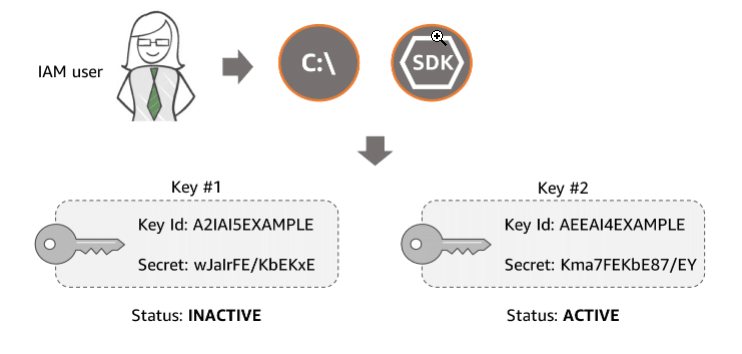
    • Users need their own access keys to make programmatic calls to AWS using the AWS CLI, the AWS SDKs, or direct HTTPS calls using the APIs for individual AWS services. Access keys are used to digitally sign API calls made to AWS services. Each access key credential is comprised of an access key ID and a secret key. Each user can have two active access keys, which is useful when you need to rotate the user’s access keys or revoke permissions.
  • Amazon EC2 key Pair

To enable SSH or RDP connections to an Amazon Elastic Cloud Compute (EC2) instance, AWS uses a public–key infrastructure to sign the login request. The public and private keys are known as a key pair. To log in to your instance, you must create a key pair, or use an existing key pair, and provide the private key when you connect to the instance. You can choose to have the EC2 key pairs generated by AWS or import your own set of keys. 

EC2 key pairs do not provide accountability (as in who is using the keys); therefore, they are not recommended for routine usage. If you require daily access to the instance, AWS recommends that EC2 instances be part of a directory domain (Active Directory or LDAP) in order to enable federated access and provide accountability by tracking which user is logging into which instance.

Additional AWS Services for Identity and Access Management

  • AWS Secrets Manager is designed to centrally manage secrets used to access resources on AWS, on-premises, and third-party services. Secrets can be database credentials, passwords, third-party API keys, and even arbitrary text. Secrets Manager enables you to replace hardcoded credentials in your code with an API call to Secrets Manager to retrieve the secret programmatically. Also, you can configure Secrets Manager to automatically rotate the secret for you according to a schedule that you specify.
  • AWS Single Sign-On (SSO) is a cloud SSO service that allows for the central management of SSO access to multiple AWS accounts and business applications. It enables users to sign in to a user portal with their existing corporate credentials and access all of their assigned accounts and applications from one place. AWS SSO includes built-in SAML integrations to many business applications. AWS SSO may be integrated with Microsoft Active Directory, which means your employees can sign in to your AWS SSO user portal using their corporate Active Directory credentials. 
  • The AWS Security Token Service (STS) is a web service that enables you to request temporary, limited-privilege credentials for IAM users who are taking on a different role or for users who are being federated. A scenario in which someone, or something, needs access to your account to perform a specific task that is not done on a daily basis would be a great candidate for temporary credentials.
  • AWS Directory Service for Microsoft Active Directory, also known as AWS Managed Microsoft AD, enables your domain workloads and AWS resources to use managed Active Directory in the AWS Cloud. AWS Managed Microsoft AD is built on actual Microsoft Active Directory and does not require you to synchronize or replicate data from your existing Active Directory to the cloud.
  • AWS Organizations lets you centrally manage and enforce policies for multiple AWS accounts. This service allows grouping accounts into organizational units and use service control policies to centrally control AWS services across multiple AWS accounts. With Organizations, you can also automate the creation of new accounts through APIs and simplify billing by allowing you to set up a single payment method for all the accounts in your organization through consolidated billing. Organizations is available to all AWS customers at no additional charge.
  • Amazon Cognito lets you add user sign-up, sign-in, and access controls to your web and mobile apps. You can define roles and map users to different roles so your app can access only the resources that are authorized for each user. User sign in can be done either by a third-party identity provider, or directly via Amazon Cognito.

An Amazon Cognito user pool is a user directory that manages the overhead of handling the tokens that are returned from social sign-in providers, such as Facebook, Google, and Amazon, and enterprise identity providers via SAML 2.0. After a successful user pool sign-in, your web or mobile app will receive user pool tokens from Amazon Cognito. These tokens can then be used to retrieve AWS credentials via Amazon Cognito identity pools. These credentials allow your app to access other AWS services and you don’t have to embed long-term AWS credentials in your app.

Reference :-

Regards

Osama

AUSOUG Virtual Connect 2020

I posted about this earlier , since AUSOUG had Virtual conference with different topics covering Cloud and databases.

my presentation was on Thursday about Oracle on azure. it was great pleasure to present again, the virtual connect had very big names in Oracle commuinty and had pleasure to present with them.

The Link for recorded session HERE

I recorded the session and it’s avaliable on my youtube channel HERE.

Enjoy learning

Osama

Setting up a Jenkins-Based Continuous Delivery Pipeline with Docker

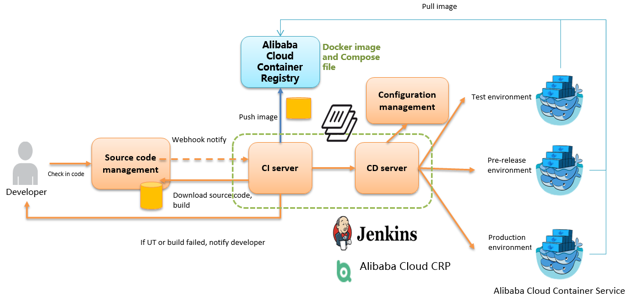
As an important step in agile development, continuous integration is designed to maintain high quality while accelerating product iteration. Every time when the codes are updated, an automatic test is performed to test the codes and function validity. The codes can only be delivered and deployed after they pass the automatic test, This post describes how to combine Jenkins, one of the most popular integration tools, with Alibaba Cloud Container Service to realize automatic test and image building pushing.

1

Deploying Jenkins Applications and the Slave Nodes

1. Create a Jenkins orchestration template.

Create a new template and create the orchestration based on the following content.

jenkins:  image: 'registry.aliyuncs.com/acs-sample/jenkins:latest'  ports:      - '8080:8080'      - '50000:50000'  volumes:      - /var/lib/docker/jenkins:/var/jenkins_home  privileged: true  restart: always   labels:      aliyun.scale: '1'      aliyun.probe.url: 'tcp://container:8080'      aliyun.probe.initial_delay_seconds: '10'      aliyun.routing.port_8080: jenkins  links:      - slave-nodejs slave-nodejs:  image: 'registry.aliyuncs.com/acs-sample/jenkins-slave-dind-nodejs'  restart: always   volumes:      - /var/run/docker.sock:/var/run/docker.sock  labels:      aliyun.scale: '1' 

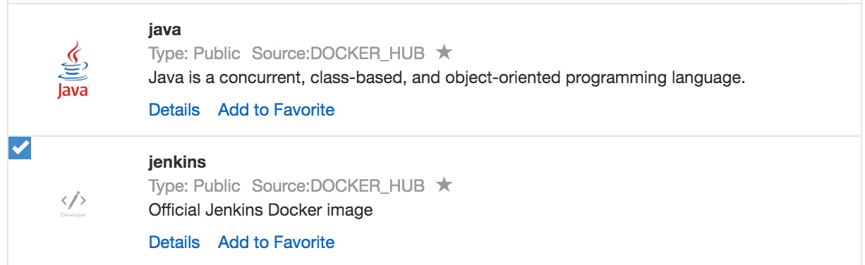
2. Use the template to create Jenkins applications and slave nodes.

You can also directly use a Jenkins sample template provided by Alibaba Cloud Container Service to create Jenkins applications and slave nodes.

2

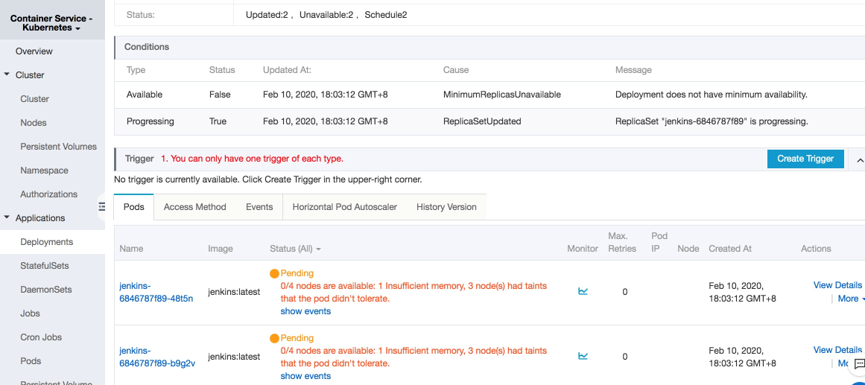
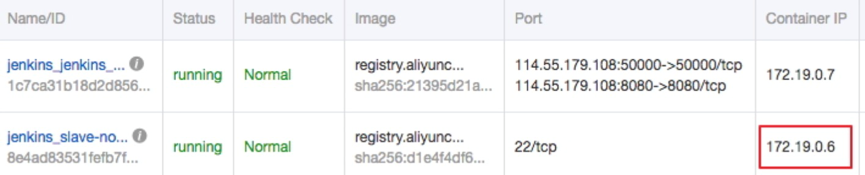
3. After the successful creation, Jenkins applications and slave nodes will be displayed in the service list.

3

4. After opening the access endpoint provided by the Container Service, you can use the Jenkins application deployed just now.

4

Realizing Automatic Test and Automatic Build and Push of Image

Configure the slave container as the slave node of the Jenkins application.

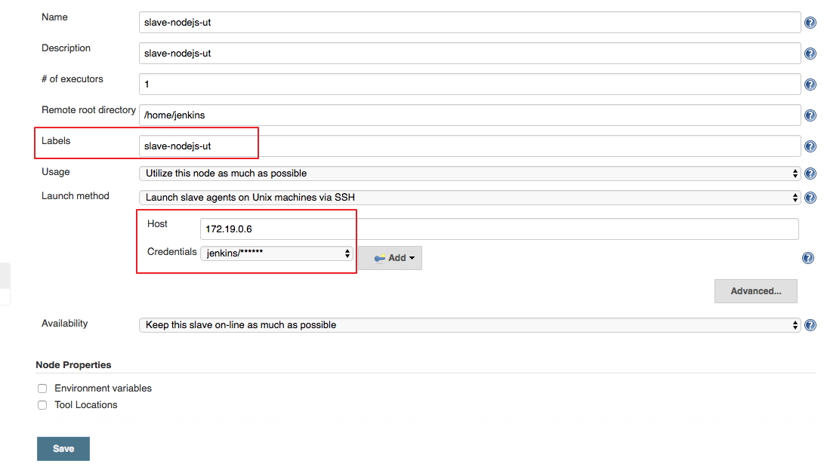
Open the Jenkins application and enter the System Settings interface. Select Manage Node > Create Node, and configure corresponding parameters. See the figure below.

5

Note: Label is the only identifier of the slave. The slave container and Jenkins container run on the Alibaba Cloud platform at the same time. Therefore, you can fill in a container node IP address that is inaccessible to the Internet to isolate the test environment.

6

Use the jenkins account and password (the initial password is jenkins) in Dockerfile for the creation of the slave-nodejs image when adding Credential. Image Dockerfile address HERE

1. Create a project to implement the automatic test.

  1. Create an item and choose to build a software project of free style.
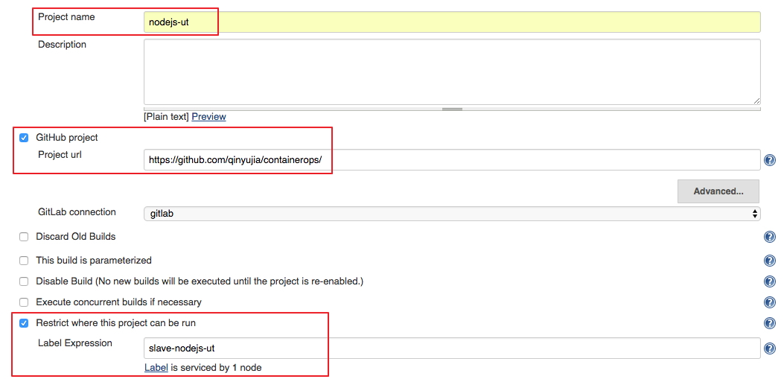
  2. Enter the project name and select a node for running the project. In this example, enter the slave-nodejs-ut node created above.
7

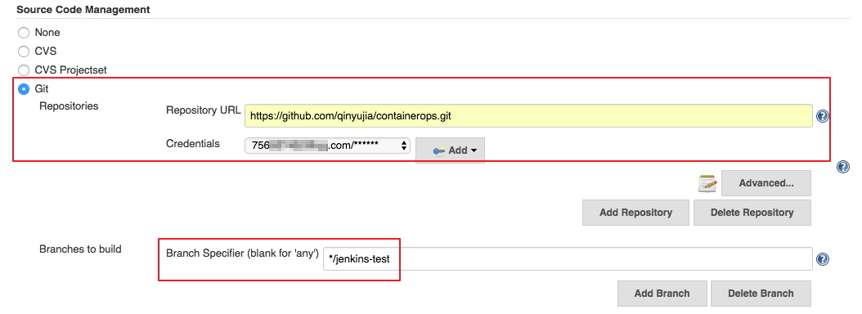
Configure the source code management and code branch. In this example, use GitHub to manage source codes.

8

Configure the trigger for building. In this example, automatically trigger project execution by combining GitHub Webhooks and services.

9

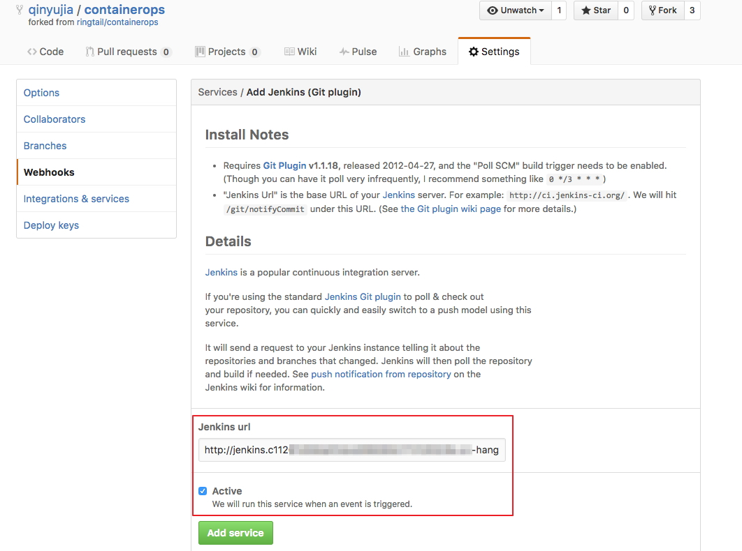
Add the Jenkins service hook to GitHub to implement automatic triggering.

Click the Settings tab on the Github project homepage, and click Webhooks & services > Add service and select Jenkins (Git plugin). Enter ${Jenkins IP}/github-webhook/ in the Jenkins hook URL dialog box.

1. http://jenkins.cd****************.cn-beijing.alicontainer.com/github-webhook/
10

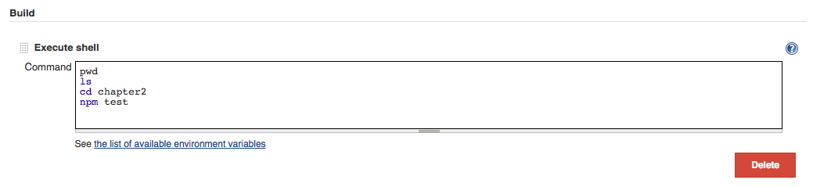
Add a build step of Executes shell type and write shell scripts to execute the test.

11

The command in this example is as follows.

1. pwd
2. ls
3. cd chapter2
4. npm test

Create a project to automatically build and push images.

  1. Create an item and choose to build a software project of free style.
  2. Enter the project name and select a node for running the project. In this example, enter the slave-nodejs-ut node created above.
  3. Configure the source code management and code branch. In this example, use GitHub to manage source codes.
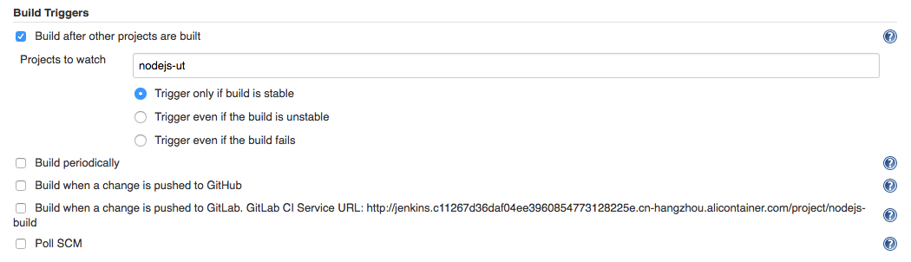
  4. Add the following trigger and set it to implement automatic image building only after success of the unit test.
12

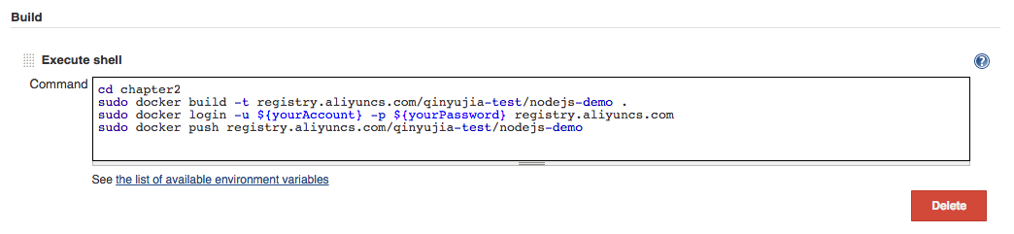
Write shell scripts for building and pushing images.

13

The command in this example is as follows.

a.cd chapter2 b.docker build -t registry.aliyuncs.com/qinyujia-test/nodejs-demo . c.docker login -u ${yourAccount} -p ${yourPassword} registry.aliyuncs.com d.docker push registry.aliyuncs.com/qinyujia-test/nodejs-demo 

Automatically Redeploy the Application

Deploy the application for the first time

Use the orchestration template to deploy the image created above to the Container Service and create the nodejs-demo application.

Example

1. 
2. express:
3. image: 'registry.aliyuncs.com/qinyujia-test/nodejs-demo'
4. expose:
5. - '22'
6. - '3000'
7. restart: always
8. labels:
9. aliyun.routing.port_3000: express
10. 

1. Select the application nodejs-demo just created, and create the trigger.

14

 Add a line to the shell scripts you wrote in Realize automatic test and automatic build and push of image. The address is the trigger link given by the trigger created above.

i.curl 'https://cs.console.aliyun.com/hook/trigger?triggerUrl=***==&secret=***' 

Change the Command in the example from Realize automatic test and automatic build and push of image as follows.

i. cd chapter2
ii. docker build -t registry.aliyuncs.com/qinyujia-test/nodejs-demo .
iii. docker login -u ${yourAccount} -p ${yourPassword} registry.aliyuncs.com iv.docker push registry.aliyuncs.com/qinyujia-test/nodejs-demo
v. curl 'https://cs.console.aliyun.com/hook/trigger?triggerUrl=***==&secret=***'

After pushing the image, Jenkins automatically triggers redeployment of the nodejs-demo application.

Configure The Email Notification for the Results

If you want to send the unit test or image configuration results to relevant developers or project execution initiators through email, perform the following configurations.

On the Jenkins homepage, click System Management > System Settings, and configure a Jenkins system administrator email.

15

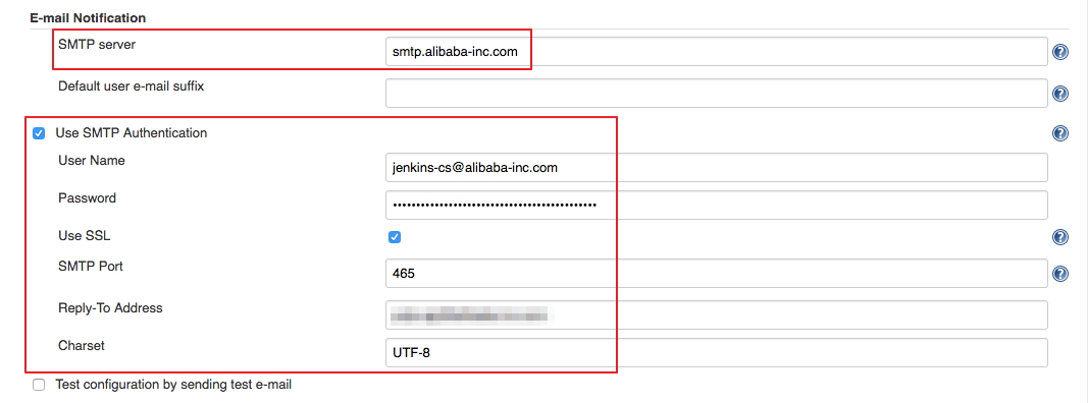
Install the Extended Email Notification plugin, configure SMTP server and other relevant information, and set the default recipient list. See the figure below.

16

The above example shows the parameter settings of the Jenkins application system. The following example shows the relevant configurations for Jenkins projects whose results are to be pushed through email.

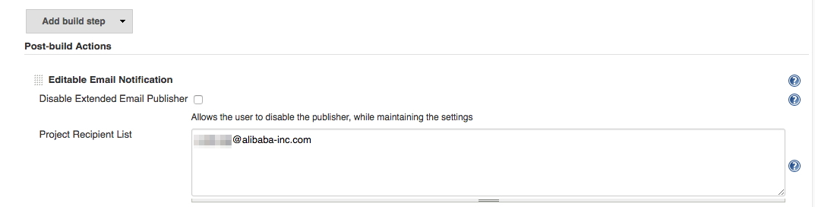
1. Add post-building operation steps in the Jenkins project, select Editable Email Notification, and enter a recipient list.

17

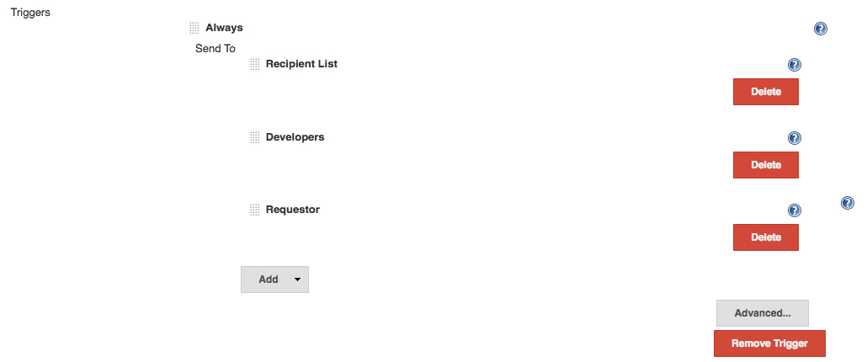
2. Add a mailing trigger.

18

Cheers

Osama
Set Up Your First Server on Alibaba Cloud

I posted before about AWS, Azure and OCI but this time i am trying to cover Alibaba , in this post i will show you how to setup your first Compute instance whatever OS you want CentOS or Ubuntu depeds on what you want

What you need ?

  • A valid Alibaba Cloud account., create free one with 300$ credit
  • An ECS instance running CentOS 7 or whatever OS you want.
  • A root password for your server.

Connect to your Alibaba Cloud

Locate the Internet IP address (Public IP address) associated with your Alibaba Cloud ECS Instance.

If you are running Linux or Mac, use a terminal application to connect to the instance via SSH. If you are on Windows, you can use PuTTy.

Change the Hostname

The hostname is a default identifier when you communicate to a Linux server. It is like a computer name that is associated with your home PC or laptop. Naming your CentOS 7 server with a descriptive hostname helps you to differentiate your machines especially if you are running a bunch of them.

check the update

$ sudo yum update

check your hostname

$ hostname

change your hostname, we need to install nano text editor using the command below:

$ sudo yum install nano

Then, edit the /etc/cloud/cloud.cfg file and find the entry preserve_hostname. Change its value from false to true.

$ sudo nano /etc/cloud/cloud.cfg
preserve_hostname true

Then, edit the /etc/hostname file using a nano editor by typing the command below:

$ sudo nano /etc/hostname

You will need to add two entries on this file just below the 127.0.0.1 localhost entry. The first entry you are adding uses the loopback interface address 127.0.1.1. Please note that this is different from the address 127.0.0.1 which have a ‘localhost’ value in the same file.

Reboot your Alibaba Cloud ECS instance for the changes to take effect by typing the command below:

$ sudo reboot

Also you can create non root user by

$ sudo adduser

For instance, to add a user identified as osama on your server, use the command below:

$ sudo adduser osama

Next, we assign a password to the user we have created above:

$ sudo passwd osama

now assign the administrative task to this user

$ sudo gpasswd -a osama wheel

Cheers

Osama