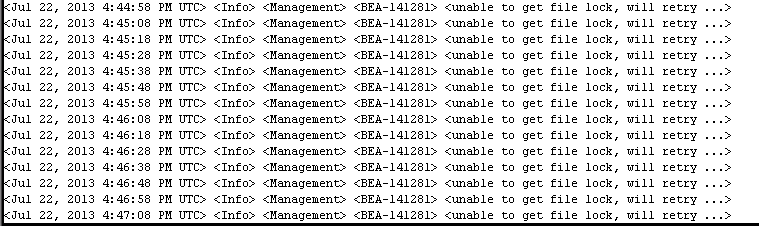
Failed to create secure socket for OPMN at LocalHost:9501

The Below Error Appear when you enter to the following URL :  http://LocalHost:9704/analytics

oracle.as.management.opmn.optic.OpticBadConnectException: Failed to create secure socket for OPMN

Change Directory to the to BI instance/Bin Folder and :

[oracle@exalytic bin]$ ./opmnctl stopall
opmnctl stopall: opmn is not running.

[oracle@exalytic bin]$ ./opmnctl startall
opmnctl startall: starting opmn and all managed processes…

[oracle@exalytic bin]$ ./opmnctl status
Processes in Instance: obiee1
———————————+——————–+———+———
ias-component                    | process-type       |     pid | status
———————————+——————–+———+———
coreapplication_obiccs1          | OracleBIClusterCo~ |   19837 | Alive  
coreapplication_obisch1          | OracleBIScheduler~ |       0 | NONE  
coreapplication_obijh1           | OracleBIJavaHostC~ |   19836 | Alive  
coreapplication_obips1           | OracleBIPresentat~ |   19840 | Alive  
coreapplication_obis1            | OracleBIServerCom~ |   19838 | Alive  

Thank you
Osama Mustafa 
unpack.sh Error -name=Value

The pack command creates a template archive (.jar) file that contains a snapshot of either an entire domain or a subset of a domain. You can use a template that contains a subset of a domain to create a Managed Server domain directory hierarchy on a remote machine.

The unpack command Creates a full domain or a subset of a domain used for a Managed Server domain directory on a remote machine. You may use unpack only with a template compatible with your current installation. The template can be any of the following:

  •  A domain template provided by BEA and packaged with your current installation
  •  A domain template created using the Domain Template Builder or WLST Offline
  •  A domain template created using the pack command
  •  A Managed Server template created using the pack command. A Managed Server template, by default, contains only the files necessary for creating a Managed Server domain directory.
You Can Check Oracle Documentation here for more information about the above commands.
When Trying to use unpack command with the below command:

./unpack.sh -domain=/u01/app/oracle/domains/IDMDomains -template=/u01/shared/IDMdomains.jar

The below error appear :

ERROR !!! ./unpack.sh -name=Value Missing

The Solution is simple :

-template attribute should come first. 

./unpack.sh  -template=/u01/shared/IDMdomains.jar -domain=/u01/app/oracle/domains/IDMDomains

Thank you
Osama Mustafa

Start Managed Server Failed With "Access not allowed for subject: principals=[]"

When Trying to Start Managed Server From Admin Console it’s Failed with

weblogic.management.NoAccessRuntimeException: Access not allowed for subject: principals=[], on ResourceType: Application Action: write, Target: Deployed”

After Check Everything and Configuration i found the following :

  • My Admin Server Already have More than one managed Server : SOA, ODI , BAM.
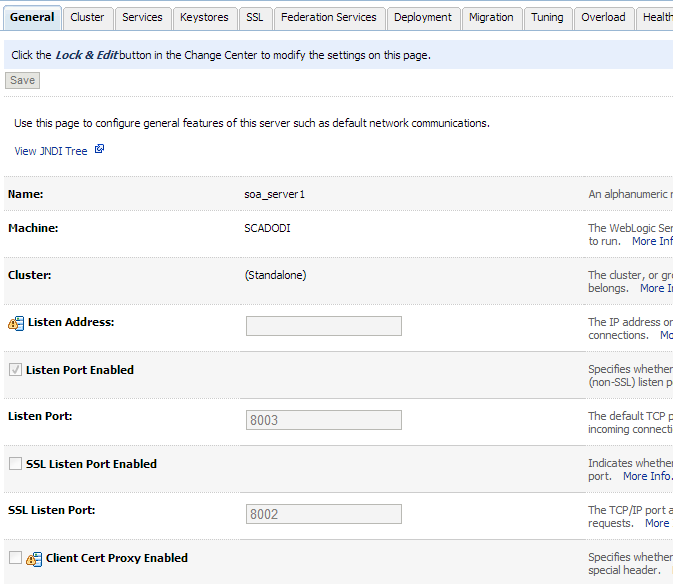
  • SOA and ODI Using the Same Port which is 8001 Which caused Conflict.

I Changed SOA Port to Work On 8003 From Admin Server Console. Like the Below

Managed Server BI_Server Unable To Start After Create Node manager Service

Problem Description :

After Install Weblogic and BI On Windows, And Create Admin Server as Services BI_server unable to start, Node manager Created Service Created Without Any Error.

Cause & Solution : 

After Investigation I found Class Path is too Long So what i did like the following, Edit installSVC.cmd To set Classpath  to be Short

you will find the below line in the InstallSvc.cmd all you have to do is change it to be like Line in Red Color :

@echo off

echo %CLASSPATH% > %USERDOMAIN_HOME%\cp.properties

if “%ADMIN_URL%” == “” goto runAdmin
@echo on
set CMDLINE=”%JAVA_VM% %MEM_ARGS% %JAVA_OPTIONS%
-classpath @%USERDOMAIN_HOME%\cp.properties 
-Dweblogic.Name=%SERVER_NAME% -Dweblogic.management.username=%WLS_USER%
-Dweblogic.management.server=\”%ADMIN_URL%\”
-Dweblogic.ProductionModeEnabled=%PRODUCTION_MODE%
-Djava.security.policy=\”%WL_HOME%\server\lib\weblogic.policy\” weblogic.Server”

goto finish

Thank you
Osama Mustafa

Oracle SOA Installation on Solaris 11.1

Another Post Describe how to install Oracle SOA, Steo by Step To Install Oracle SOA and Extend Admin Server.

As Usual you can download this document From SlideShare.

Download Document Here.

Thank you
Osama Mustafa

Oracle Business Intelligence Installation

Before start describes steps, I would like to share some notes:
  •     Extend Weblogic Server will not work (config.sh).
  •    BI server should be added first before any managed server otherwise AdminServer will corrupted.
  •   If you already have AdminServer configured you can created new BI Domain, Or backup your AdminServer  domain and Reconfigure again.

The above notes are useful and must be considered before installing Oracle BI.
You can download the document from Here
Thank you

Osama Mustafa

Step by Step Configure SSO Using Oracle Fusion Middle-ware

I would like to share this document , which is describe step by step dealing with :

  • WebLogic
  • Oracle Internet Directory
  • Oracle Content Server
  • Oracle Access manager 
Every thing mentioned with Installation &  Configuration Steps.
I tried To make it simple as i can, Included with Screen Shots ,Step By Step how to install The above Oracle Products and how to configure them to prepare your application for Single-Sing-On 
Please if you would like to share this document ask me before.

You can View and Download the Document from Here
Thank you 
Osama mustafa